Individual PDF Download Activity

Versions
Current version
v1.1 (2025091500)
v1.1
Plugin type: Activities
Frankenstyle component name: mod_autopdfform
Version build number: 2025091500
Version release name: v1.1
Maturity: Stable
Supported Moodle versions: 4.0, 4.1, 4.2, 4.3, 4.4, 4.5, 5.0
Repository URL (Git): https://github.com/TangatBaktybergen/moodle-activity_autopdfform
Repository branch:
Repository tag:
Issue/bug tracker URL: https://github.com/TangatBaktybergen/moodle-activity_autopdfform/issues
Auto-Filled PDF Form (mod_autopdfform)
This Moodle activity plugin allows teachers to upload a PDF template (with interactive form fields – AcroForm). When a student accesses the activity, a personalized version of the PDF is automatically generated and downloaded, filled with their own name, ID, email, and the current date.
Key Features
- Personalized PDF Generation: Automatically fills out a PDF form for each student using their Moodle profile data (name, ID, email, date).
- PDF-Based: Teachers upload a final PDF document with form fields containing placeholder texts. The plugin fills those placeholders with student data.
- Instant Downloads: Students click the activity and instantly receive their customized document — no loading or manual edits required.
- Smart File Naming: Generated PDFs are named using the student's personal data to help with record-keeping.
- No Extra Tools: No coding, scripts, or external software needed — everything runs inside Moodle.
Auto-Filled Fields
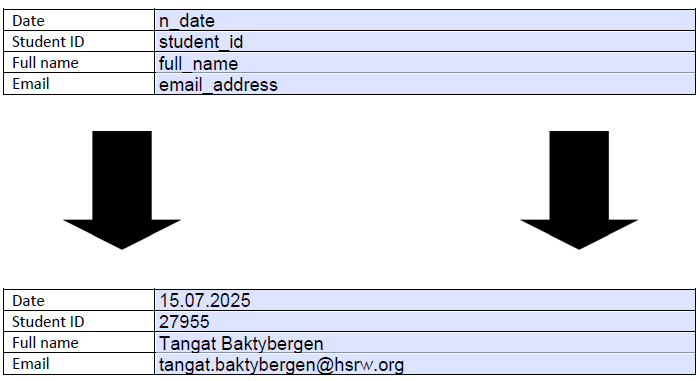
The plugin automatically replaces the following placeholder texts inside the PDF form:
| Placeholder Field | Filled With |
|----------------------|--------------------------------------|
| full_name | Student’s full name (from profile) |
| student_id | Moodle username or extracted ID |
| email_address | Student’s Moodle email |
| n_date | Current server date |
Note: For student_id, the plugin uses the part before @ in the Moodle username (e.g., 12345@students) or the full username if there is no @.
Example Use Cases
- Lab reports or assignment coversheets
- Participation certificates
- Personalized instruction sheets
- Fieldwork forms or feedback templates
Installation
- Place the folder
mod_autopdfforminmoodle/mod/ - Run Moodle upgrade via web or CLI
Teacher Workflow
- Turn editing on in your Moodle course
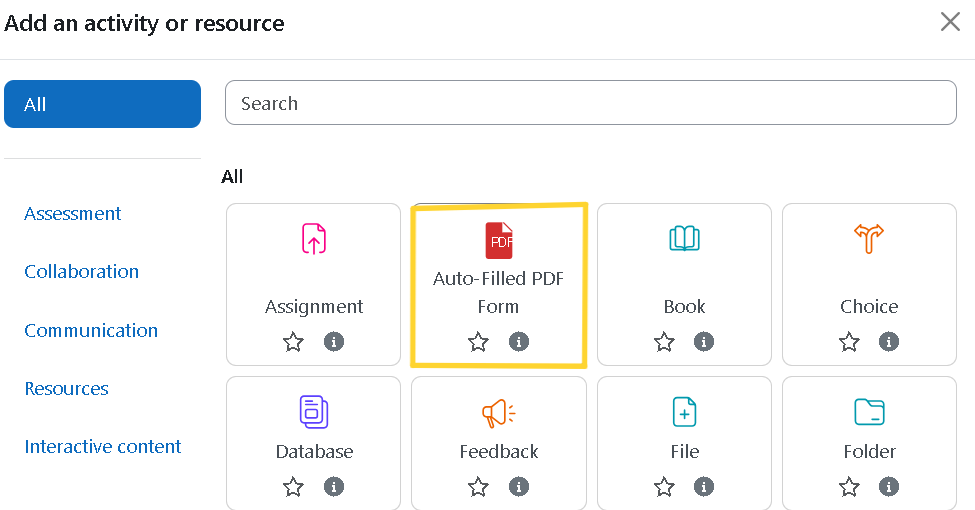
- Add activity ' Auto-Filled PDF Form
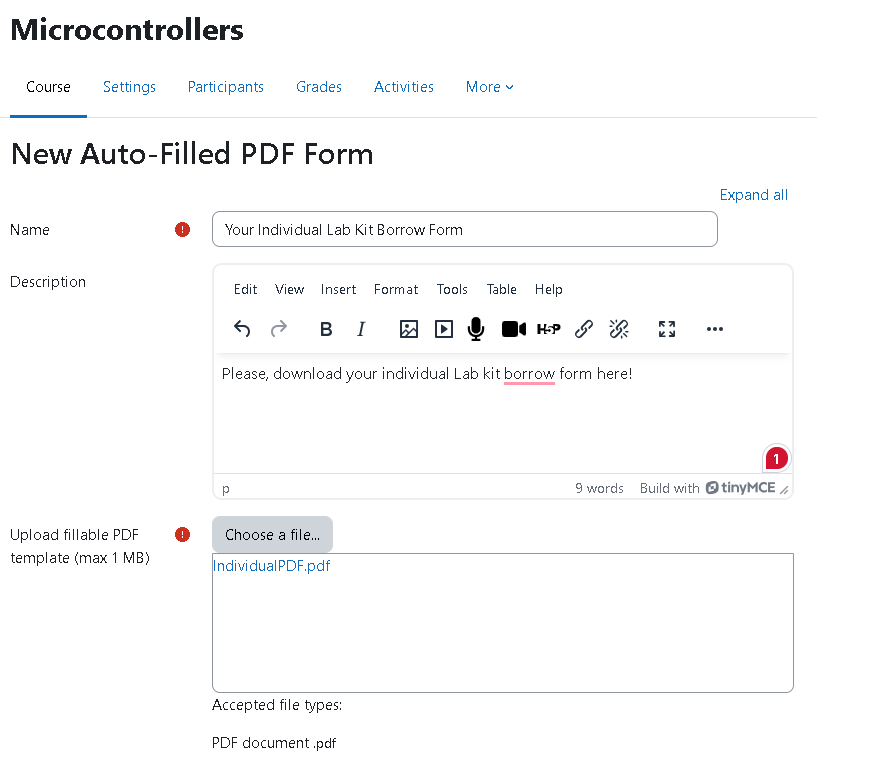
- Fill in the activity name and description
- Upload a valid AcroForm PDF file with field names set to
full_name,student_id,email_address, andn_date - Save and return to course
Important: Use Adobe Acrobat Pro to prepare the AcroForm file and apply "Reader Extensions" if needed to enable editing/viewing of form fields in PDF viewers.
Student Experience
- See the activity with a PDF icon
- Click the activity
- A personalized PDF file downloads automatically
- The form fields are pre-filled with the student's personal information
Known Limitations
- In rare cases, field values may not display properly (e.g., if the student’s last name matches the registered Adobe Suite user).
- Only AcroForm-compatible PDFs are supported (not XFA).
How Data Is Used
The plugin retrieves the following information from the logged-in student's Moodle account:
- Full Name from the Moodle user profile
- Email Address from the Moodle account
- Student ID from the Moodle username (see rules above)
- Current Date from the Moodle server timestamp
This ensures each student receives a clean and customized PDF — reducing paperwork errors and simplifying distribution.
License
GNU GPL v3 or later
Developed at Rhine-Waal University of Applied Sciences (HSRW), Kleve, Germany.
Authors
- Ivan Volosyak
- Tangat Baktybergen
v1.1 (2025082901)
v1.1
Plugin type: Activities
Frankenstyle component name: mod_autopdfform
Version build number: 2025082901
Version release name: v1.1
Maturity: Stable
Supported Moodle versions: 4.0, 4.1, 4.2, 4.3, 4.4, 4.5, 5.0
Repository URL (Git): https://github.com/TangatBaktybergen/moodle-activity_autopdfform
Repository branch:
Repository tag:
Issue/bug tracker URL: https://github.com/TangatBaktybergen/moodle-activity_autopdfform/issues
Auto-Filled PDF Form (mod_autopdfform)
This Moodle activity plugin allows teachers to upload a PDF template (with interactive form fields – AcroForm). When a student accesses the activity, a personalized version of the PDF is automatically generated and downloaded, filled with their own name, ID, email, and the current date.
Key Features
- Personalized PDF Generation: Automatically fills out a PDF form for each student using their Moodle profile data (name, ID, email, date).
- PDF-Based: Teachers upload a final PDF document with form fields containing placeholder texts. The plugin fills those placeholders with student data.
- Instant Downloads: Students click the activity and instantly receive their customized document — no loading or manual edits required.
- Smart File Naming: Generated PDFs are named using the student's personal data to help with record-keeping.
- No Extra Tools: No coding, scripts, or external software needed — everything runs inside Moodle.
Auto-Filled Fields
The plugin automatically replaces the following placeholder texts inside the PDF form:
| Placeholder Field | Filled With |
|----------------------|--------------------------------------|
| full_name | Student’s full name (from profile) |
| first_name | Student’s first name (from profile) |
| last_name | Student’s last name (from profile) |
| student_id | Moodle username or extracted ID |
| email_address | Student’s Moodle email |
| n_date | Current server date |
Note: For student_id, the plugin uses the part before @ in the Moodle username (e.g., 12345@students) or the full username if there is no @.
Example Use Cases
- Lab reports or assignment coversheets
- Participation certificates
- Personalized instruction sheets
- Fieldwork forms or feedback templates
Installation
- Place the folder
mod_autopdfforminmoodle/mod/ - Run Moodle upgrade via web or CLI
Teacher Workflow
- Turn editing on in your Moodle course
- Add activity ' Auto-Filled PDF Form
- Fill in the activity name and description
- Upload a valid AcroForm PDF file with field names set to
full_name,first_name,last_name,student_id,email_address, andn_date - Save and return to course
Important: Use Adobe Acrobat Pro to prepare the AcroForm file and apply "Reader Extensions" if needed to enable editing/viewing of form fields in PDF viewers.
Student Experience
- See the activity with a PDF icon
- Click the activity
- A personalized PDF file downloads automatically
- The form fields are pre-filled with the student's personal information
Known Limitations
- In rare cases, field values may not display properly (e.g., if the student’s last name matches the registered Adobe Suite user).
- Only AcroForm-compatible PDFs are supported (not XFA).
How Data Is Used
The plugin retrieves the following information from the logged-in student's Moodle account:
- Full Name from the Moodle user profile
- Email Address from the Moodle account
- Student ID from the Moodle username (see rules above)
- Current Date from the Moodle server timestamp
This ensures each student receives a clean and customized PDF — reducing paperwork errors and simplifying distribution.
License
GNU GPL v3 or later
Developed at Rhine-Waal University of Applied Sciences (HSRW), Kleve, Germany.
Authors
- Ivan Volosyak
- Tangat Baktybergen
v1.1 (2025082900)
v1.1
Plugin type: Activities
Frankenstyle component name: mod_autopdfform
Version build number: 2025082900
Version release name: v1.1
Maturity: Stable
Supported Moodle versions: 4.0, 4.1, 4.2, 4.3, 4.4, 4.5, 5.0
Repository URL (Git): https://github.com/TangatBaktybergen/moodle-activity_autopdfform
Repository branch:
Repository tag:
Issue/bug tracker URL: https://github.com/TangatBaktybergen/moodle-activity_autopdfform/issues
Auto-Filled PDF Form (mod_autopdfform)
This Moodle activity plugin allows teachers to upload a PDF template (with interactive form fields – AcroForm). When a student accesses the activity, a personalized version of the PDF is automatically generated and downloaded, filled with their own name, ID, email, and the current date.
Key Features
- Personalized PDF Generation: Automatically fills out a PDF form for each student using their Moodle profile data (name, ID, email, date).
- PDF-Based: Teachers upload a final PDF document with form fields containing placeholder texts. The plugin fills those placeholders with student data.
- Instant Downloads: Students click the activity and instantly receive their customized document — no loading or manual edits required.
- Smart File Naming: Generated PDFs are named using the student's personal data to help with record-keeping.
- No Extra Tools: No coding, scripts, or external software needed — everything runs inside Moodle.
Auto-Filled Fields
The plugin automatically replaces the following placeholder texts inside the PDF form:
| Placeholder Field | Filled With |
|----------------------|--------------------------------------|
| full_name | Student’s full name (from profile) |
| student_id | Moodle username or extracted ID |
| email_address | Student’s Moodle email |
| n_date | Current server date |
Note: For student_id, the plugin uses the part before @ in the Moodle username (e.g., 12345@students) or the full username if there is no @.
Example Use Cases
- Lab reports or assignment coversheets
- Participation certificates
- Personalized instruction sheets
- Fieldwork forms or feedback templates
Installation
- Place the folder
mod_autopdfforminmoodle/mod/ - Run Moodle upgrade via web or CLI
Teacher Workflow
- Turn editing on in your Moodle course
- Add activity ' Auto-Filled PDF Form
- Fill in the activity name and description
- Upload a valid AcroForm PDF file with field names set to
full_name,student_id,email_address, andn_date - Save and return to course
Important: Use Adobe Acrobat Pro to prepare the AcroForm file and apply "Reader Extensions" if needed to enable editing/viewing of form fields in PDF viewers.
Student Experience
- See the activity with a PDF icon
- Click the activity
- A personalized PDF file downloads automatically
- The form fields are pre-filled with the student's personal information
Known Limitations
- In rare cases, field values may not display properly (e.g., if the student’s last name matches the registered Adobe Suite user).
- Only AcroForm-compatible PDFs are supported (not XFA).
How Data Is Used
The plugin retrieves the following information from the logged-in student's Moodle account:
- Full Name from the Moodle user profile
- Email Address from the Moodle account
- Student ID from the Moodle username (see rules above)
- Current Date from the Moodle server timestamp
This ensures each student receives a clean and customized PDF — reducing paperwork errors and simplifying distribution.
License
GNU GPL v3 or later
Developed at Rhine-Waal University of Applied Sciences (HSRW), Kleve, Germany.
Authors
- Ivan Volosyak
- Tangat Baktybergen
v1.1 (2025082503)
v1.1
Plugin type: Activities
Frankenstyle component name: mod_autopdfform
Version build number: 2025082503
Version release name: v1.1
Maturity: Stable
Supported Moodle versions: 4.0, 4.1, 4.2, 4.3, 4.4, 4.5, 5.0
Repository URL (Git): https://github.com/TangatBaktybergen/moodle-activity_autopdfform
Repository branch:
Repository tag:
Issue/bug tracker URL: https://github.com/TangatBaktybergen/moodle-activity_autopdfform/issues
Auto-Filled PDF Form (mod_autopdfform)
This Moodle activity plugin allows teachers to upload a PDF template (with interactive form fields – AcroForm). When a student accesses the activity, a personalized version of the PDF is automatically generated and downloaded, filled with their own name, ID, email, and the current date.
Key Features
- Personalized PDF Generation: Automatically fills out a PDF form for each student using their Moodle profile data (name, ID, email, date).
- PDF-Based: Teachers upload a final PDF document with form fields containing placeholder texts. The plugin fills those placeholders with student data.
- Instant Downloads: Students click the activity and instantly receive their customized document — no loading or manual edits required.
- Smart File Naming: Generated PDFs are named using the student's personal data to help with record-keeping.
- No Extra Tools: No coding, scripts, or external software needed — everything runs inside Moodle.
Auto-Filled Fields
The plugin automatically replaces the following placeholder texts inside the PDF form:
| Placeholder Field | Filled With |
|----------------------|--------------------------------------|
| full_name | Student’s full name (from profile) |
| student_id | Moodle username or extracted ID |
| email_address | Student’s Moodle email |
| n_date | Current server date |
Note: For student_id, the plugin uses the part before @ in the Moodle username (e.g., 12345@students) or the full username if there is no @.
Example Use Cases
- Lab reports or assignment coversheets
- Participation certificates
- Personalized instruction sheets
- Fieldwork forms or feedback templates
Installation
- Place the folder
mod_autopdfforminmoodle/mod/ - Run Moodle upgrade via web or CLI
Teacher Workflow
- Turn editing on in your Moodle course
- Add activity ' Auto-Filled PDF Form
- Fill in the activity name and description
- Upload a valid AcroForm PDF file with field names set to
full_name,student_id,email_address, andn_date - Save and return to course
Important: Use Adobe Acrobat Pro to prepare the AcroForm file and apply "Reader Extensions" if needed to enable editing/viewing of form fields in PDF viewers.
Student Experience
- See the activity with a PDF icon
- Click the activity
- A personalized PDF file downloads automatically
- The form fields are pre-filled with the student's personal information
Known Limitations
- In rare cases, field values may not display properly (e.g., if the student’s last name matches the registered Adobe Suite user).
- Only AcroForm-compatible PDFs are supported (not XFA).
How Data Is Used
The plugin retrieves the following information from the logged-in student's Moodle account:
- Full Name from the Moodle user profile
- Email Address from the Moodle account
- Student ID from the Moodle username (see rules above)
- Current Date from the Moodle server timestamp
This ensures each student receives a clean and customized PDF — reducing paperwork errors and simplifying distribution.
License
GNU GPL v3 or later
Developed at Rhine-Waal University of Applied Sciences (HSRW), Kleve, Germany.
Authors
- Ivan Volosyak
- Tangat Baktybergen
v1.1 (2025082502)
v1.1
Plugin type: Activities
Frankenstyle component name: mod_autopdfform
Version build number: 2025082502
Version release name: v1.1
Maturity: Stable
Supported Moodle versions: 4.0, 4.1, 4.2, 4.3, 4.4, 4.5, 5.0
Repository URL (Git): https://github.com/TangatBaktybergen/moodle-activity_autopdfform
Repository branch:
Repository tag:
Issue/bug tracker URL: https://github.com/TangatBaktybergen/moodle-activity_autopdfform/issues
Auto-Filled PDF Form (mod_autopdfform)
This Moodle activity plugin allows teachers to upload a PDF template (with interactive form fields – AcroForm). When a student accesses the activity, a personalized version of the PDF is automatically generated and downloaded, filled with their own name, ID, email, and the current date.
Key Features
- Personalized PDF Generation: Automatically fills out a PDF form for each student using their Moodle profile data (name, ID, email, date).
- PDF-Based: Teachers upload a final PDF document with form fields containing placeholder texts. The plugin fills those placeholders with student data.
- Instant Downloads: Students click the activity and instantly receive their customized document — no loading or manual edits required.
- Smart File Naming: Generated PDFs are named using the student's personal data to help with record-keeping.
- No Extra Tools: No coding, scripts, or external software needed — everything runs inside Moodle.
Auto-Filled Fields
The plugin automatically replaces the following placeholder texts inside the PDF form:
| Placeholder Field | Filled With |
|----------------------|--------------------------------------|
| full_name | Student’s full name (from profile) |
| student_id | Moodle username or extracted ID |
| email_address | Student’s Moodle email |
| n_date | Current server date |
Note: For student_id, the plugin uses the part before @ in the Moodle username (e.g., 12345@students) or the full username if there is no @.
Example Use Cases
- Lab reports or assignment coversheets
- Participation certificates
- Personalized instruction sheets
- Fieldwork forms or feedback templates
Installation
- Place the folder
mod_autopdfforminmoodle/mod/ - Run Moodle upgrade via web or CLI
Teacher Workflow
- Turn editing on in your Moodle course
- Add activity ' Auto-Filled PDF Form
- Fill in the activity name and description
- Upload a valid AcroForm PDF file with field names set to
full_name,student_id,email_address, andn_date - Save and return to course
Important: Use Adobe Acrobat Pro to prepare the AcroForm file and apply "Reader Extensions" if needed to enable editing/viewing of form fields in PDF viewers.
Student Experience
- See the activity with a PDF icon
- Click the activity
- A personalized PDF file downloads automatically
- The form fields are pre-filled with the student's personal information
Known Limitations
- In rare cases, field values may not display properly (e.g., if the student’s last name matches the registered Adobe Suite user).
- Only AcroForm-compatible PDFs are supported (not XFA).
How Data Is Used
The plugin retrieves the following information from the logged-in student's Moodle account:
- Full Name from the Moodle user profile
- Email Address from the Moodle account
- Student ID from the Moodle username (see rules above)
- Current Date from the Moodle server timestamp
This ensures each student receives a clean and customized PDF — reducing paperwork errors and simplifying distribution.
License
GNU GPL v3 or later
Developed at Rhine-Waal University of Applied Sciences (HSRW), Kleve, Germany.
Authors
- Ivan Volosyak
- Tangat Baktybergen
v1.1 (2025082501)
v1.1
Plugin type: Activities
Frankenstyle component name: mod_autopdfform
Version build number: 2025082501
Version release name: v1.1
Maturity: Stable
Supported Moodle versions: 4.0, 4.1, 4.2, 4.3, 4.4, 4.5, 5.0
Repository URL (Git): https://github.com/TangatBaktybergen/moodle-activity_autopdfform
Repository branch:
Repository tag:
Issue/bug tracker URL: https://github.com/TangatBaktybergen/moodle-activity_autopdfform/issues
Auto-Filled PDF Form (mod_autopdfform)
This Moodle activity plugin allows teachers to upload a PDF template (with interactive form fields – AcroForm). When a student accesses the activity, a personalized version of the PDF is automatically generated and downloaded, filled with their own name, ID, email, and the current date.
Key Features
- Personalized PDF Generation: Automatically fills out a PDF form for each student using their Moodle profile data (name, ID, email, date).
- PDF-Based: Teachers upload a final PDF document with form fields containing placeholder texts. The plugin fills those placeholders with student data.
- Instant Downloads: Students click the activity and instantly receive their customized document — no loading or manual edits required.
- Smart File Naming: Generated PDFs are named using the student's personal data to help with record-keeping.
- No Extra Tools: No coding, scripts, or external software needed — everything runs inside Moodle.
Auto-Filled Fields
The plugin automatically replaces the following placeholder texts inside the PDF form:
| Placeholder Field | Filled With |
|----------------------|--------------------------------------|
| full_name | Student’s full name (from profile) |
| firstname | Student’s firstname (from profile) |
| lastname | Student’s lastname (from profile) |
| student_id | Moodle username or extracted ID |
| email_address | Student’s Moodle email |
| n_date | Current server date |
Note: For student_id, the plugin uses the part before @ in the Moodle username (e.g., 12345@students) or the full username if there is no @.
Example Use Cases
- Lab reports or assignment coversheets
- Participation certificates
- Personalized instruction sheets
- Fieldwork forms or feedback templates
Installation
- Place the folder
mod_autopdfforminmoodle/mod/ - Run Moodle upgrade via web or CLI
Teacher Workflow
- Turn editing on in your Moodle course
- Add activity ' Auto-Filled PDF Form
- Fill in the activity name and description
- Upload a valid AcroForm PDF file with field names set to
full_name,student_id,email_address, andn_date - Save and return to course
Important: Use Adobe Acrobat Pro to prepare the AcroForm file and apply "Reader Extensions" if needed to enable editing/viewing of form fields in PDF viewers.
Student Experience
- See the activity with a PDF icon
- Click the activity
- A personalized PDF file downloads automatically
- The form fields are pre-filled with the student's personal information
Known Limitations
- In rare cases, field values may not display properly (e.g., if the student’s last name matches the registered Adobe Suite user).
- Only AcroForm-compatible PDFs are supported (not XFA).
How Data Is Used
The plugin retrieves the following information from the logged-in student's Moodle account:
- Full Name from the Moodle user profile
- Email Address from the Moodle account
- Student ID from the Moodle username (see rules above)
- Current Date from the Moodle server timestamp
This ensures each student receives a clean and customized PDF — reducing paperwork errors and simplifying distribution.
License
GNU GPL v3 or later
Developed at Rhine-Waal University of Applied Sciences (HSRW), Kleve, Germany.
Authors
- Ivan Volosyak
- Tangat Baktybergen
v1.1 (2025082500)
v1.1
Plugin type: Activities
Frankenstyle component name: mod_autopdfform
Version build number: 2025082500
Version release name: v1.1
Maturity: Stable
Supported Moodle versions: 4.0, 4.1, 4.2, 4.3, 4.4, 4.5, 5.0
Repository URL (Git): https://github.com/TangatBaktybergen/moodle-activity_autopdfform
Repository branch:
Repository tag:
Issue/bug tracker URL: https://github.com/TangatBaktybergen/moodle-activity_autopdfform/issues
Auto-Filled PDF Form (mod_autopdfform)
This Moodle activity plugin allows teachers to upload a PDF template (with interactive form fields – AcroForm). When a student accesses the activity, a personalized version of the PDF is automatically generated and downloaded, filled with their own name, ID, email, and the current date.
Key Features
- Personalized PDF Generation: Automatically fills out a PDF form for each student using their Moodle profile data (name, ID, email, date).
- PDF-Based: Teachers upload a final PDF document with form fields containing placeholder texts. The plugin fills those placeholders with student data.
- Instant Downloads: Students click the activity and instantly receive their customized document — no loading or manual edits required.
- Smart File Naming: Generated PDFs are named using the student's personal data to help with record-keeping.
- No Extra Tools: No coding, scripts, or external software needed — everything runs inside Moodle.
Auto-Filled Fields
The plugin automatically replaces the following placeholder texts inside the PDF form:
| Placeholder Field | Filled With |
|----------------------|--------------------------------------|
| full_name | Student’s full name (from profile) |
| student_id | Moodle username or extracted ID |
| email_address | Student’s Moodle email |
| n_date | Current server date |
Note: For student_id, the plugin uses the part before @ in the Moodle username (e.g., 12345@students) or the full username if there is no @.
Example Use Cases
- Lab reports or assignment coversheets
- Participation certificates
- Personalized instruction sheets
- Fieldwork forms or feedback templates
Installation
- Place the folder
mod_autopdfforminmoodle/mod/ - Run Moodle upgrade via web or CLI
Teacher Workflow
- Turn editing on in your Moodle course
- Add activity ' Auto-Filled PDF Form
- Fill in the activity name and description
- Upload a valid AcroForm PDF file with field names set to
full_name,student_id,email_address, andn_date - Save and return to course
Important: Use Adobe Acrobat Pro to prepare the AcroForm file and apply "Reader Extensions" if needed to enable editing/viewing of form fields in PDF viewers.
Student Experience
- See the activity with a PDF icon
- Click the activity
- A personalized PDF file downloads automatically
- The form fields are pre-filled with the student's personal information
Known Limitations
- In rare cases, field values may not display properly (e.g., if the student’s last name matches the registered Adobe Suite user).
- Only AcroForm-compatible PDFs are supported (not XFA).
How Data Is Used
The plugin retrieves the following information from the logged-in student's Moodle account:
- Full Name from the Moodle user profile
- Email Address from the Moodle account
- Student ID from the Moodle username (see rules above)
- Current Date from the Moodle server timestamp
This ensures each student receives a clean and customized PDF — reducing paperwork errors and simplifying distribution.
License
GNU GPL v3 or later
Developed at Rhine-Waal University of Applied Sciences (HSRW), Kleve, Germany.
Authors
- Ivan Volosyak
- Tangat Baktybergen
v1.0 (2025072707)
v1.0
Plugin type: Activities
Frankenstyle component name: mod_autopdfform
Version build number: 2025072707
Version release name: v1.0
Maturity: Stable
Supported Moodle versions: 4.0, 4.1, 4.2, 4.3, 4.4, 4.5, 5.0
Repository URL (Git): https://github.com/TangatBaktybergen/moodle-activity_autopdfform
Repository branch:
Repository tag:
Issue/bug tracker URL: https://github.com/TangatBaktybergen/moodle-activity_autopdfform/issues
Auto-Filled PDF Form (mod_autopdfform)
This Moodle activity plugin allows teachers to upload a PDF template (with interactive form fields – AcroForm). When a student accesses the activity, a personalized version of the PDF is automatically generated and downloaded, filled with their own name, ID, email, and the current date.
Key Features
- Personalized PDF Generation: Automatically fills out a PDF form for each student using their Moodle profile data (name, ID, email, date).
- PDF-Based: Teachers upload a final PDF document with form fields containing placeholder texts. The plugin fills those placeholders with student data.
- Instant Downloads: Students click the activity and instantly receive their customized document — no loading or manual edits required.
- Smart File Naming: Generated PDFs are named using the student's personal data to help with record-keeping.
- No Extra Tools: No coding, scripts, or external software needed — everything runs inside Moodle.
Auto-Filled Fields
The plugin automatically replaces the following placeholder texts inside the PDF form:
| Placeholder Field | Filled With |
|----------------------|--------------------------------------|
| full_name | Student’s full name (from profile) |
| student_id | Moodle username or extracted ID |
| email_address | Student’s Moodle email |
| n_date | Current server date |
Note: For student_id, the plugin uses the part before @ in the Moodle username (e.g., 12345@students) or the full username if there is no @.
Example Use Cases
- Lab reports or assignment coversheets
- Participation certificates
- Personalized instruction sheets
- Fieldwork forms or feedback templates
Installation
- Place the folder
mod_autopdfforminmoodle/mod/ - Run Moodle upgrade via web or CLI
Teacher Workflow
- Turn editing on in your Moodle course
- Add activity ' Auto-Filled PDF Form
- Fill in the activity name and description
- Upload a valid AcroForm PDF file with field names set to
full_name,student_id,email_address, andn_date - Save and return to course
Important: Use Adobe Acrobat Pro to prepare the AcroForm file and apply "Reader Extensions" if needed to enable editing/viewing of form fields in PDF viewers.
Student Experience
- See the activity with a PDF icon
- Click the activity
- A personalized PDF file downloads automatically
- The form fields are pre-filled with the student's personal information
Known Limitations
- In rare cases, field values may not display properly (e.g., if the student’s last name matches the registered Adobe Suite user).
- Only AcroForm-compatible PDFs are supported (not XFA).
How Data Is Used
The plugin retrieves the following information from the logged-in student's Moodle account:
- Full Name from the Moodle user profile
- Email Address from the Moodle account
- Student ID from the Moodle username (see rules above)
- Current Date from the Moodle server timestamp
This ensures each student receives a clean and customized PDF — reducing paperwork errors and simplifying distribution.
License
GNU GPL v3 or later
Developed at Rhine-Waal University of Applied Sciences (HSRW), Kleve, Germany.
Authors
- Ivan Volosyak
- Tangat Baktybergen
v1.0 (2025072706)
v1.0
Plugin type: Activities
Frankenstyle component name: mod_autopdfform
Version build number: 2025072706
Version release name: v1.0
Maturity: Stable
Supported Moodle versions: 4.0, 4.1, 4.2, 4.3, 4.4, 4.5, 5.0
Repository URL (Git): https://github.com/TangatBaktybergen/moodle-activity_autopdfform
Repository branch:
Repository tag:
Issue/bug tracker URL: https://github.com/TangatBaktybergen/moodle-activity_autopdfform/issues
Auto-Filled PDF Form (mod_autopdfform)
This Moodle activity plugin allows teachers to upload a PDF template (with interactive form fields – AcroForm). When a student accesses the activity, a personalized version of the PDF is automatically generated and downloaded, filled with their own name, ID, email, and the current date.
Key Features
- Personalized PDF Generation: Automatically fills out a PDF form for each student using their Moodle profile data (name, ID, email, date).
- PDF-Based: Teachers upload a final PDF document with form fields containing placeholder texts. The plugin fills those placeholders with student data.
- Instant Downloads: Students click the activity and instantly receive their customized document — no loading or manual edits required.
- Smart File Naming: Generated PDFs are named using the student's personal data to help with record-keeping.
- No Extra Tools: No coding, scripts, or external software needed — everything runs inside Moodle.
Auto-Filled Fields
The plugin automatically replaces the following placeholder texts inside the PDF form:
| Placeholder Field | Filled With |
|----------------------|--------------------------------------|
| full_name | Student’s full name (from profile) |
| student_id | Moodle username or extracted ID |
| email_address | Student’s Moodle email |
| n_date | Current server date |
Note: For student_id, the plugin uses the part before @ in the Moodle username (e.g., 12345@students) or the full username if there is no @.
Example Use Cases
- Lab reports or assignment coversheets
- Participation certificates
- Personalized instruction sheets
- Fieldwork forms or feedback templates
Installation
- Place the folder
mod_autopdfforminmoodle/mod/ - Run Moodle upgrade via web or CLI
Teacher Workflow
- Turn editing on in your Moodle course
- Add activity ' Auto-Filled PDF Form
- Fill in the activity name and description
- Upload a valid AcroForm PDF file with field names set to
full_name,student_id,email_address, andn_date - Save and return to course
Important: Use Adobe Acrobat Pro to prepare the AcroForm file and apply "Reader Extensions" if needed to enable editing/viewing of form fields in PDF viewers.
Student Experience
- See the activity with a PDF icon
- Click the activity
- A personalized PDF file downloads automatically
- The form fields are pre-filled with the student's personal information
Known Limitations
- In rare cases, field values may not display properly (e.g., if the student’s last name matches the registered Adobe Suite user).
- Only AcroForm-compatible PDFs are supported (not XFA).
How Data Is Used
The plugin retrieves the following information from the logged-in student's Moodle account:
- Full Name from the Moodle user profile
- Email Address from the Moodle account
- Student ID from the Moodle username (see rules above)
- Current Date from the Moodle server timestamp
This ensures each student receives a clean and customized PDF — reducing paperwork errors and simplifying distribution.
License
GNU GPL v3 or later
Developed at Rhine-Waal University of Applied Sciences (HSRW), Kleve, Germany.
Authors
- Ivan Volosyak
- Tangat Baktybergen
v1.0 (2025072705)
v1.0
Plugin type: Activities
Frankenstyle component name: mod_autopdfform
Version build number: 2025072705
Version release name: v1.0
Maturity: Stable
Supported Moodle versions: 4.0, 4.1, 4.2, 4.3, 4.4, 4.5, 5.0
Repository URL (Git): https://github.com/TangatBaktybergen/moodle-activity_autopdfform
Repository branch:
Repository tag:
Issue/bug tracker URL: https://github.com/TangatBaktybergen/moodle-activity_autopdfform/issues
Auto-Filled PDF Form (mod_autopdfform)
This Moodle activity plugin allows teachers to upload a PDF template (with interactive form fields – AcroForm). When a student accesses the activity, a personalized version of the PDF is automatically generated and downloaded, filled with their own name, ID, email, and the current date.
Key Features
- Personalized PDF Generation: Automatically fills out a PDF form for each student using their Moodle profile data (name, ID, email, date).
- PDF-Based: Teachers upload a final PDF document with form fields containing placeholder texts. The plugin fills those placeholders with student data.
- Instant Downloads: Students click the activity and instantly receive their customized document — no loading or manual edits required.
- Smart File Naming: Generated PDFs are named using the student's personal data to help with record-keeping.
- No Extra Tools: No coding, scripts, or external software needed — everything runs inside Moodle.
Auto-Filled Fields
The plugin automatically replaces the following placeholder texts inside the PDF form:
| Placeholder Field | Filled With |
|----------------------|--------------------------------------|
| full_name | Student’s full name (from profile) |
| student_id | Moodle username or extracted ID |
| email_address | Student’s Moodle email |
| n_date | Current server date |
Note: For student_id, the plugin uses the part before @ in the Moodle username (e.g., 12345@students) or the full username if there is no @.
Example Use Cases
- Lab reports or assignment coversheets
- Participation certificates
- Personalized instruction sheets
- Fieldwork forms or feedback templates
Installation
- Place the folder
mod_autopdfforminmoodle/mod/ - Run Moodle upgrade via web or CLI
Teacher Workflow
- Turn editing on in your Moodle course
- Add activity ' Auto-Filled PDF Form
- Fill in the activity name and description
- Upload a valid AcroForm PDF file with field names set to
full_name,student_id,email_address, andn_date - Save and return to course
Important: Use Adobe Acrobat Pro to prepare the AcroForm file and apply "Reader Extensions" if needed to enable editing/viewing of form fields in PDF viewers.
Student Experience
- See the activity with a PDF icon
- Click the activity
- A personalized PDF file downloads automatically
- The form fields are pre-filled with the student's personal information
Known Limitations
- In rare cases, field values may not display properly (e.g., if the student’s last name matches the registered Adobe Suite user).
- Only AcroForm-compatible PDFs are supported (not XFA).
How Data Is Used
The plugin retrieves the following information from the logged-in student's Moodle account:
- Full Name from the Moodle user profile
- Email Address from the Moodle account
- Student ID from the Moodle username (see rules above)
- Current Date from the Moodle server timestamp
This ensures each student receives a clean and customized PDF — reducing paperwork errors and simplifying distribution.
License
GNU GPL v3 or later
Developed at Rhine-Waal University of Applied Sciences (HSRW), Kleve, Germany.
Authors
- Ivan Volosyak
- Tangat Baktybergen
v1.0 (2025072704)
v1.0
Plugin type: Activities
Frankenstyle component name: mod_autopdfform
Version build number: 2025072704
Version release name: v1.0
Maturity: Stable
Supported Moodle versions: 4.0, 4.1, 4.2, 4.3, 4.4, 4.5, 5.0
Repository URL (Git): https://github.com/TangatBaktybergen/moodle-activity_autopdfform
Repository branch:
Repository tag:
Issue/bug tracker URL: https://github.com/TangatBaktybergen/moodle-activity_autopdfform/issues
Auto-Filled PDF Form (mod_autopdfform)
This Moodle activity plugin allows teachers to upload a PDF template (with interactive form fields – AcroForm). When a student accesses the activity, a personalized version of the PDF is automatically generated and downloaded, filled with their own name, ID, email, and the current date.
Key Features
- Personalized PDF Generation: Automatically fills out a PDF form for each student using their Moodle profile data (name, ID, email, date).
- PDF-Based: Teachers upload a final PDF document with form fields containing placeholder texts. The plugin fills those placeholders with student data.
- Instant Downloads: Students click the activity and instantly receive their customized document — no loading or manual edits required.
- Smart File Naming: Generated PDFs are named using the student's personal data to help with record-keeping.
- No Extra Tools: No coding, scripts, or external software needed — everything runs inside Moodle.
Auto-Filled Fields
The plugin automatically replaces the following placeholder texts inside the PDF form:
| Placeholder Field | Filled With |
|----------------------|--------------------------------------|
| full_name | Student’s full name (from profile) |
| student_id | Moodle username or extracted ID |
| email_address | Student’s Moodle email |
| n_date | Current server date |
Note: For student_id, the plugin uses the part before @ in the Moodle username (e.g., 12345@students) or the full username if there is no @.
Example Use Cases
- Lab reports or assignment coversheets
- Participation certificates
- Personalized instruction sheets
- Fieldwork forms or feedback templates
Installation
- Place the folder
mod_autopdfforminmoodle/mod/ - Run Moodle upgrade via web or CLI
Teacher Workflow
- Turn editing on in your Moodle course
- Add activity ' Auto-Filled PDF Form
- Fill in the activity name and description
- Upload a valid AcroForm PDF file with field names set to
full_name,student_id,email_address, andn_date - Save and return to course
Important: Use Adobe Acrobat Pro to prepare the AcroForm file and apply "Reader Extensions" if needed to enable editing/viewing of form fields in PDF viewers.
Student Experience
- See the activity with a PDF icon
- Click the activity
- A personalized PDF file downloads automatically
- The form fields are pre-filled with the student's personal information
Known Limitations
- In rare cases, field values may not display properly (e.g., if the student’s last name matches the registered Adobe Suite user).
- Only AcroForm-compatible PDFs are supported (not XFA).
How Data Is Used
The plugin retrieves the following information from the logged-in student's Moodle account:
- Full Name from the Moodle user profile
- Email Address from the Moodle account
- Student ID from the Moodle username (see rules above)
- Current Date from the Moodle server timestamp
This ensures each student receives a clean and customized PDF — reducing paperwork errors and simplifying distribution.
License
GNU GPL v3 or later
Developed at Rhine-Waal University of Applied Sciences (HSRW), Kleve, Germany.
Authors
- Ivan Volosyak
- Tangat Baktybergen
v1.0 (2025072703)
v1.0
Plugin type: Activities
Frankenstyle component name: mod_autopdfform
Version build number: 2025072703
Version release name: v1.0
Maturity: Stable
Supported Moodle versions: 4.0, 4.1, 4.2, 4.3, 4.4, 4.5, 5.0
Repository URL (Git): https://github.com/TangatBaktybergen/moodle-activity_autopdfform
Repository branch:
Repository tag:
Issue/bug tracker URL: https://github.com/TangatBaktybergen/moodle-activity_autopdfform/issues
Auto-Filled PDF Form (mod_autopdfform)
This Moodle activity plugin allows teachers to upload a PDF template (with interactive form fields – AcroForm). When a student accesses the activity, a personalized version of the PDF is automatically generated and downloaded, filled with their own name, ID, email, and the current date.
Key Features
- Personalized PDF Generation: Automatically fills out a PDF form for each student using their Moodle profile data (name, ID, email, date).
- PDF-Based: Teachers upload a final PDF document with form fields containing placeholder texts. The plugin fills those placeholders with student data.
- Instant Downloads: Students click the activity and instantly receive their customized document — no loading or manual edits required.
- Smart File Naming: Generated PDFs are named using the student's personal data to help with record-keeping.
- No Extra Tools: No coding, scripts, or external software needed — everything runs inside Moodle.
Auto-Filled Fields
The plugin automatically replaces the following placeholder texts inside the PDF form:
| Placeholder Field | Filled With |
|----------------------|--------------------------------------|
| full_name | Student’s full name (from profile) |
| student_id | Moodle username or extracted ID |
| email_address | Student’s Moodle email |
| n_date | Current server date |
Note: For student_id, the plugin uses the part before @ in the Moodle username (e.g., 12345@students) or the full username if there is no @.
Example Use Cases
- Lab reports or assignment coversheets
- Participation certificates
- Personalized instruction sheets
- Fieldwork forms or feedback templates
Installation
- Place the folder
mod_autopdfforminmoodle/mod/ - Run Moodle upgrade via web or CLI
Teacher Workflow
- Turn editing on in your Moodle course
- Add activity ' Auto-Filled PDF Form
- Fill in the activity name and description
- Upload a valid AcroForm PDF file with field names set to
full_name,student_id,email_address, andn_date - Save and return to course
Important: Use Adobe Acrobat Pro to prepare the AcroForm file and apply "Reader Extensions" if needed to enable editing/viewing of form fields in PDF viewers.
Student Experience
- See the activity with a PDF icon
- Click the activity
- A personalized PDF file downloads automatically
- The form fields are pre-filled with the student's personal information
Known Limitations
- In rare cases, field values may not display properly (e.g., if the student’s last name matches the registered Adobe Suite user).
- Only AcroForm-compatible PDFs are supported (not XFA).
How Data Is Used
The plugin retrieves the following information from the logged-in student's Moodle account:
- Full Name from the Moodle user profile
- Email Address from the Moodle account
- Student ID from the Moodle username (see rules above)
- Current Date from the Moodle server timestamp
This ensures each student receives a clean and customized PDF — reducing paperwork errors and simplifying distribution.
License
GNU GPL v3 or later
Developed at Rhine-Waal University of Applied Sciences (HSRW), Kleve, Germany.
Authors
- Ivan Volosyak
- Tangat Baktybergen
v1.0 (2025072702)
v1.0
Plugin type: Activities
Frankenstyle component name: mod_autopdfform
Version build number: 2025072702
Version release name: v1.0
Maturity: Stable
Supported Moodle versions: 4.0, 4.1, 4.2, 4.3, 4.4, 4.5, 5.0
Repository URL (Git): https://github.com/TangatBaktybergen/moodle-activity_autopdfform
Repository branch:
Repository tag:
Issue/bug tracker URL: https://github.com/TangatBaktybergen/moodle-activity_autopdfform/issues
Auto-Filled PDF Form (mod_autopdfform)
This Moodle activity plugin allows teachers to upload a PDF template (with interactive form fields – AcroForm). When a student accesses the activity, a personalized version of the PDF is automatically generated and downloaded, filled with their own name, ID, email, and the current date.
Key Features
- Personalized PDF Generation: Automatically fills out a PDF form for each student using their Moodle profile data (name, ID, email, date).
- PDF-Based: Teachers upload a final PDF document with form fields containing placeholder texts. The plugin fills those placeholders with student data.
- Instant Downloads: Students click the activity and instantly receive their customized document — no loading or manual edits required.
- Smart File Naming: Generated PDFs are named using the student's personal data to help with record-keeping.
- No Extra Tools: No coding, scripts, or external software needed — everything runs inside Moodle.
Auto-Filled Fields
The plugin automatically replaces the following placeholder texts inside the PDF form:
| Placeholder Field | Filled With |
|----------------------|--------------------------------------|
| full_name | Student’s full name (from profile) |
| student_id | Moodle username or extracted ID |
| email_address | Student’s Moodle email |
| n_date | Current server date |
Note: For student_id, the plugin uses the part before @ in the Moodle username (e.g., 12345@students) or the full username if there is no @.
Example Use Cases
- Lab reports or assignment coversheets
- Participation certificates
- Personalized instruction sheets
- Fieldwork forms or feedback templates
Installation
- Place the folder
mod_autopdfforminmoodle/mod/ - Run Moodle upgrade via web or CLI
Teacher Workflow
- Turn editing on in your Moodle course
- Add activity ' Auto-Filled PDF Form
- Fill in the activity name and description
- Upload a valid AcroForm PDF file with field names set to
full_name,student_id,email_address, andn_date - Save and return to course
Important: Use Adobe Acrobat Pro to prepare the AcroForm file and apply "Reader Extensions" if needed to enable editing/viewing of form fields in PDF viewers.
Student Experience
- See the activity with a PDF icon
- Click the activity
- A personalized PDF file downloads automatically
- The form fields are pre-filled with the student's personal information
Known Limitations
- In rare cases, field values may not display properly (e.g., if the student’s last name matches the registered Adobe Suite user).
- Only AcroForm-compatible PDFs are supported (not XFA).
How Data Is Used
The plugin retrieves the following information from the logged-in student's Moodle account:
- Full Name from the Moodle user profile
- Email Address from the Moodle account
- Student ID from the Moodle username (see rules above)
- Current Date from the Moodle server timestamp
This ensures each student receives a clean and customized PDF — reducing paperwork errors and simplifying distribution.
License
GNU GPL v3 or later
Developed at Rhine-Waal University of Applied Sciences (HSRW), Kleve, Germany.
Authors
- Ivan Volosyak
- Tangat Baktybergen
v1.0 (2025072701)
v1.0
Plugin type: Activities
Frankenstyle component name: mod_autopdfform
Version build number: 2025072701
Version release name: v1.0
Maturity: Stable
Supported Moodle versions: 4.0, 4.1, 4.2, 4.3, 4.4, 4.5, 5.0
Repository URL (Git): https://github.com/TangatBaktybergen/moodle-activity_autopdfform
Repository branch:
Repository tag:
Issue/bug tracker URL: https://github.com/TangatBaktybergen/moodle-activity_autopdfform/issues
Auto-Filled PDF Form (mod_autopdfform)
This Moodle activity plugin allows teachers to upload a PDF template (with interactive form fields – AcroForm). When a student accesses the activity, a personalized version of the PDF is automatically generated and downloaded, filled with their own name, ID, email, and the current date.
Key Features
- Personalized PDF Generation: Automatically fills out a PDF form for each student using their Moodle profile data (name, ID, email, date).
- PDF-Based: Teachers upload a final PDF document with form fields containing placeholder texts. The plugin fills those placeholders with student data.
- Instant Downloads: Students click the activity and instantly receive their customized document — no loading or manual edits required.
- Smart File Naming: Generated PDFs are named using the student's personal data to help with record-keeping.
- No Extra Tools: No coding, scripts, or external software needed — everything runs inside Moodle.
Auto-Filled Fields
The plugin automatically replaces the following placeholder texts inside the PDF form:
| Placeholder Field | Filled With |
|----------------------|--------------------------------------|
| full_name | Student’s full name (from profile) |
| student_id | Moodle username or extracted ID |
| email_address | Student’s Moodle email |
| n_date | Current server date |
Note: For student_id, the plugin uses the part before @ in the Moodle username (e.g., 12345@students) or the full username if there is no @.
Example Use Cases
- Lab reports or assignment coversheets
- Participation certificates
- Personalized instruction sheets
- Fieldwork forms or feedback templates
Installation
- Place the folder
mod_autopdfforminmoodle/mod/ - Run Moodle upgrade via web or CLI
Teacher Workflow
- Turn editing on in your Moodle course
- Add activity ' Auto-Filled PDF Form
- Fill in the activity name and description
- Upload a valid AcroForm PDF file with field names set to
full_name,student_id,email_address, andn_date - Save and return to course
Important: Use Adobe Acrobat Pro to prepare the AcroForm file and apply "Reader Extensions" if needed to enable editing/viewing of form fields in PDF viewers.
Student Experience
- See the activity with a PDF icon
- Click the activity
- A personalized PDF file downloads automatically
- The form fields are pre-filled with the student's personal information
Known Limitations
- In rare cases, field values may not display properly (e.g., if the student’s last name matches the registered Adobe Suite user).
- Only AcroForm-compatible PDFs are supported (not XFA).
How Data Is Used
The plugin retrieves the following information from the logged-in student's Moodle account:
- Full Name from the Moodle user profile
- Email Address from the Moodle account
- Student ID from the Moodle username (see rules above)
- Current Date from the Moodle server timestamp
This ensures each student receives a clean and customized PDF — reducing paperwork errors and simplifying distribution.
License
GNU GPL v3 or later
Developed at Rhine-Waal University of Applied Sciences (HSRW), Kleve, Germany.
Authors
- Ivan Volosyak
- Tangat Baktybergen
v1.0 (2025072700)
v1.0
Plugin type: Activities
Frankenstyle component name: mod_autopdfform
Version build number: 2025072700
Version release name: v1.0
Maturity: Stable
Supported Moodle versions: 4.0, 4.1, 4.2, 4.3, 4.4, 4.5, 5.0
Repository URL (Git): https://github.com/TangatBaktybergen/moodle-activity_autopdfform
Repository branch:
Repository tag:
Issue/bug tracker URL: https://github.com/TangatBaktybergen/moodle-activity_autopdfform/issues
Auto-Filled PDF Form (mod_autopdfform)
This Moodle activity plugin allows teachers to upload a PDF template (with interactive form fields – AcroForm). When a student accesses the activity, a personalized version of the PDF is automatically generated and downloaded, filled with their own name, ID, email, and the current date.
Key Features
- Personalized PDF Generation: Automatically fills out a PDF form for each student using their Moodle profile data (name, ID, email, date).
- PDF-Based: Teachers upload a final PDF document with form fields containing placeholder texts. The plugin fills those placeholders with student data.
- Instant Downloads: Students click the activity and instantly receive their customized document — no loading or manual edits required.
- Smart File Naming: Generated PDFs are named using the student's personal data to help with record-keeping.
- No Extra Tools: No coding, scripts, or external software needed — everything runs inside Moodle.
Auto-Filled Fields
The plugin automatically replaces the following placeholder texts inside the PDF form:
| Placeholder Field | Filled With |
|----------------------|--------------------------------------|
| full_name | Student’s full name (from profile) |
| student_id | Moodle username or extracted ID |
| email_address | Student’s Moodle email |
| n_date | Current server date |
Note: For student_id, the plugin uses the part before @ in the Moodle username (e.g., 12345@students) or the full username if there is no @.
Example Use Cases
- Lab reports or assignment coversheets
- Participation certificates
- Personalized instruction sheets
- Fieldwork forms or feedback templates
Installation
- Place the folder
mod_autopdfforminmoodle/mod/ - Run Moodle upgrade via web or CLI
Teacher Workflow
- Turn editing on in your Moodle course
- Add activity ' Auto-Filled PDF Form
- Fill in the activity name and description
- Upload a valid AcroForm PDF file with field names set to
full_name,student_id,email_address, andn_date - Save and return to course
Important: Use Adobe Acrobat Pro to prepare the AcroForm file and apply "Reader Extensions" if needed to enable editing/viewing of form fields in PDF viewers.
Student Experience
- See the activity with a PDF icon
- Click the activity
- A personalized PDF file downloads automatically
- The form fields are pre-filled with the student's personal information
Known Limitations
- In rare cases, field values may not display properly (e.g., if the student’s last name matches the registered Adobe Suite user).
- Only AcroForm-compatible PDFs are supported (not XFA).
How Data Is Used
The plugin retrieves the following information from the logged-in student's Moodle account:
- Full Name from the Moodle user profile
- Email Address from the Moodle account
- Student ID from the Moodle username (see rules above)
- Current Date from the Moodle server timestamp
This ensures each student receives a clean and customized PDF — reducing paperwork errors and simplifying distribution.
License
GNU GPL v3 or later
Developed at Rhine-Waal University of Applied Sciences (HSRW), Kleve, Germany.
Authors
- Ivan Volosyak
- Tangat Baktybergen
v1.0 (2025070408)
v1.0
Plugin type: Activities
Frankenstyle component name: mod_autopdfform
Version build number: 2025070408
Version release name: v1.0
Maturity: Stable
Supported Moodle versions: 4.0, 4.1, 4.2, 4.3, 4.4, 4.5, 5.0
Repository URL (Git): https://github.com/TangatBaktybergen/moodle-activity_autopdfform
Repository branch:
Repository tag:
Issue/bug tracker URL: https://github.com/TangatBaktybergen/moodle-activity_autopdfform/issues
Auto-Filled PDF Form (mod_autopdfform)
This Moodle activity plugin allows teachers to upload a PDF template (with interactive form fields – AcroForm). When a student accesses the activity, a personalized version of the PDF is automatically generated and downloaded, filled with their own name, ID, email, and the current date.
Key Features
- Personalized PDF Generation: Automatically fills out a PDF form for each student using their Moodle profile data (name, ID, email, date).
- PDF-Based: Teachers upload a final PDF document with form fields containing placeholder texts. The plugin fills those placeholders with student data.
- Instant Downloads: Students click the activity and instantly receive their customized document — no loading or manual edits required.
- Smart File Naming: Generated PDFs are named using the student's personal data to help with record-keeping.
- No Extra Tools: No coding, scripts, or external software needed — everything runs inside Moodle.
Auto-Filled Fields
The plugin automatically replaces the following placeholder texts inside the PDF form:
| Placeholder Field | Filled With |
|----------------------|--------------------------------------|
| full_name | Student’s full name (from profile) |
| student_id | Moodle username or extracted ID |
| email_address | Student’s Moodle email |
| n_date | Current server date |
Note: For student_id, the plugin uses the part before @ in the Moodle username (e.g., 12345@students) or the full username if there is no @.
Example Use Cases
- Lab reports or assignment coversheets
- Participation certificates
- Personalized instruction sheets
- Fieldwork forms or feedback templates
Installation
- Place the folder
mod_autopdfforminmoodle/mod/ - Run Moodle upgrade via web or CLI
Teacher Workflow
- Turn editing on in your Moodle course
- Add activity ' Auto-Filled PDF Form
- Fill in the activity name and description
- Upload a valid AcroForm PDF file with field names set to
full_name,student_id,email_address, andn_date - Save and return to course
Important: Use Adobe Acrobat Pro to prepare the AcroForm file and apply "Reader Extensions" if needed to enable editing/viewing of form fields in PDF viewers.
Student Experience
- See the activity with a PDF icon
- Click the activity
- A personalized PDF file downloads automatically
- The form fields are pre-filled with the student's personal information
Known Limitations
- In rare cases, field values may not display properly (e.g., if the student’s last name matches the registered Adobe Suite user).
- Only AcroForm-compatible PDFs are supported (not XFA).
How Data Is Used
The plugin retrieves the following information from the logged-in student's Moodle account:
- Full Name from the Moodle user profile
- Email Address from the Moodle account
- Student ID from the Moodle username (see rules above)
- Current Date from the Moodle server timestamp
This ensures each student receives a clean and customized PDF — reducing paperwork errors and simplifying distribution.
License
GNU GPL v3 or later
Developed at Rhine-Waal University of Applied Sciences (HSRW), Kleve, Germany.
Authors
- Ivan Volosyak
- Tangat Baktybergen
v1.0 (2025070407)
v1.0
Plugin type: Activities
Frankenstyle component name: mod_autopdfform
Version build number: 2025070407
Version release name: v1.0
Maturity: Stable
Supported Moodle versions: 4.0, 4.1, 4.2, 4.3, 4.4, 4.5, 5.0
Repository URL (Git): https://github.com/TangatBaktybergen/mod-individual-pdf
Repository branch:
Repository tag:
Issue/bug tracker URL: https://github.com/TangatBaktybergen/moodle-activity_autopdfform/issues
Auto-Filled PDF Form (mod_autopdfform)
This Moodle activity plugin allows teachers to upload a PDF template (with interactive form fields – AcroForm). When a student accesses the activity, a personalized version of the PDF is automatically generated and downloaded, filled with their own name, ID, email, and the current date.
Key Features
- Personalized PDF Generation: Automatically fills out a PDF form for each student using their Moodle profile data (name, ID, email, date).
- PDF-Based: Teachers upload a final PDF document with form fields containing placeholder texts. The plugin fills those placeholders with student data.
- Instant Downloads: Students click the activity and instantly receive their customized document — no loading or manual edits required.
- Smart File Naming: Generated PDFs are named using the student's personal data to help with record-keeping.
- No Extra Tools: No coding, scripts, or external software needed — everything runs inside Moodle.
Auto-Filled Fields
The plugin automatically replaces the following placeholder texts inside the PDF form:
| Placeholder Field | Filled With |
|----------------------|--------------------------------------|
| full_name | Student’s full name (from profile) |
| student_id | Moodle username or extracted ID |
| email_address | Student’s Moodle email |
| n_date | Current server date |
Note: For student_id, the plugin uses the part before @ in the Moodle username (e.g., 12345@students) or the full username if there is no @.
Example Use Cases
- Lab reports or assignment coversheets
- Participation certificates
- Personalized instruction sheets
- Fieldwork forms or feedback templates
Installation
- Place the folder
mod_autopdfforminmoodle/mod/ - Run Moodle upgrade via web or CLI
Teacher Workflow
- Turn editing on in your Moodle course
- Add activity ' Auto-Filled PDF Form
- Fill in the activity name and description
- Upload a valid AcroForm PDF file with field names set to
full_name,student_id,email_address, andn_date - Save and return to course
Important: Use Adobe Acrobat Pro to prepare the AcroForm file and apply "Reader Extensions" if needed to enable editing/viewing of form fields in PDF viewers.
Student Experience
- See the activity with a PDF icon
- Click the activity
- A personalized PDF file downloads automatically
- The form fields are pre-filled with the student's personal information
Known Limitations
- In rare cases, field values may not display properly (e.g., if the student’s last name matches the registered Adobe Suite user).
- Only AcroForm-compatible PDFs are supported (not XFA).
How Data Is Used
The plugin retrieves the following information from the logged-in student's Moodle account:
- Full Name from the Moodle user profile
- Email Address from the Moodle account
- Student ID from the Moodle username (see rules above)
- Current Date from the Moodle server timestamp
This ensures each student receives a clean and customized PDF — reducing paperwork errors and simplifying distribution.
License
GNU GPL v3 or later
Developed at Rhine-Waal University of Applied Sciences (HSRW), Kleve, Germany.
Authors
- Ivan Volosyak
- Tangat Baktybergen
v1.0 (2025070406)
v1.0
Plugin type: Activities
Frankenstyle component name: mod_autopdfform
Version build number: 2025070406
Version release name: v1.0
Maturity: Stable
Supported Moodle versions: 4.0, 4.1, 4.2, 4.3, 4.4, 4.5, 5.0
Repository URL (Git): https://github.com/TangatBaktybergen/mod-individual-pdf
Repository branch:
Repository tag:
Issue/bug tracker URL: https://github.com/TangatBaktybergen/moodle-activity_autopdfform/issues
Auto-Filled PDF Form (mod_autopdfform)
This Moodle activity module allows teachers to upload a PDF form and students to download a version that is automatically filled with their personal data.
Features
- Teachers upload a PDF template with form fields (AcroForm)
- Students click the activity and instantly download a personalized PDF
- Automatically fills:
- Full Name
- Student ID (idnumber)
- Date
Installation
- Place the folder
autopdfforminmoodle/mod/ - Run Moodle upgrade via web or CLI
Teacher Workflow
- Turn editing on
- Add activity ' Auto-Filled PDF Form
- Fill in name and description
- Upload PDF template
- Save and return to course
Student Experience
- See activity with PDF icon
- Click ' download begins immediately
- PDF contains auto-filled personal info
Authors
Ivan Volosyak, Tangat Baktybergen
License
GNU GPL v3 or later
Developed for Hochschule Rhein-Waal (HSRW) PDF form automation project.
v1.0 (2025070405)
v1.0
Plugin type: Activities
Frankenstyle component name: mod_autopdfform
Version build number: 2025070405
Version release name: v1.0
Maturity: Stable
Supported Moodle versions: 4.0, 4.1, 4.2, 4.3, 4.4, 4.5, 5.0
Repository URL (Git): https://github.com/TangatBaktybergen/mod-individual-pdf
Repository branch:
Repository tag:
Issue/bug tracker URL: https://github.com/TangatBaktybergen/moodle-activity_autopdfform/issues
Auto-Filled PDF Form (mod_autopdfform)
This Moodle activity module allows teachers to upload a PDF form and students to download a version that is automatically filled with their personal data.
Features
- Teachers upload a PDF template with form fields (AcroForm)
- Students click the activity and instantly download a personalized PDF
- Automatically fills:
- Full Name
- Student ID (idnumber)
- Date
Installation
- Place the folder
autopdfforminmoodle/mod/ - Run Moodle upgrade via web or CLI
Teacher Workflow
- Turn editing on
- Add activity ' Auto-Filled PDF Form
- Fill in name and description
- Upload PDF template
- Save and return to course
Student Experience
- See activity with PDF icon
- Click ' download begins immediately
- PDF contains auto-filled personal info
Authors
Ivan Volosyak, Tangat Baktybergen
License
GNU GPL v3 or later
Developed for Hochschule Rhein-Waal (HSRW) PDF form automation project.
v1.0 (2025070404)
v1.0
Plugin type: Activities
Frankenstyle component name: mod_autopdfform
Version build number: 2025070404
Version release name: v1.0
Maturity: Stable
Supported Moodle versions: 4.0, 4.1, 4.2, 4.3, 4.4, 4.5, 5.0
Repository URL (Git): https://github.com/TangatBaktybergen/mod-individual-pdf
Repository branch:
Repository tag:
Issue/bug tracker URL: https://github.com/TangatBaktybergen/moodle-activity_autopdfform/issues
Auto-Filled PDF Form (mod_autopdfform)
This Moodle activity module allows teachers to upload a PDF form and students to download a version that is automatically filled with their personal data.
Features
- Teachers upload a PDF template with form fields (AcroForm)
- Students click the activity and instantly download a personalized PDF
- Automatically fills:
- Full Name
- Student ID (idnumber)
- Date
Installation
- Place the folder
autopdfforminmoodle/mod/ - Run Moodle upgrade via web or CLI
Teacher Workflow
- Turn editing on
- Add activity ' Auto-Filled PDF Form
- Fill in name and description
- Upload PDF template
- Save and return to course
Student Experience
- See activity with PDF icon
- Click ' download begins immediately
- PDF contains auto-filled personal info
Authors
Ivan Volosyak, Tangat Baktybergen
License
GNU GPL v3 or later
Developed for Hochschule Rhein-Waal (HSRW) PDF form automation project.
v1.0 (2025070403)
v1.0
Plugin type: Activities
Frankenstyle component name: mod_autopdfform
Version build number: 2025070403
Version release name: v1.0
Maturity: Stable
Supported Moodle versions: 4.0, 4.1, 4.2, 4.3, 4.4, 4.5, 5.0
Repository URL (Git): https://github.com/TangatBaktybergen/mod-individual-pdf
Repository branch:
Repository tag:
Issue/bug tracker URL: https://github.com/TangatBaktybergen/moodle-activity_autopdfform/issues
Auto-Filled PDF Form (mod_autopdfform)
This Moodle activity module allows teachers to upload a PDF form and students to download a version that is automatically filled with their personal data.
Features
- Teachers upload a PDF template with form fields (AcroForm)
- Students click the activity and instantly download a personalized PDF
- Automatically fills:
- Full Name
- Student ID (idnumber)
- Date
Installation
- Place the folder
autopdfforminmoodle/mod/ - Run Moodle upgrade via web or CLI
Teacher Workflow
- Turn editing on
- Add activity ' Auto-Filled PDF Form
- Fill in name and description
- Upload PDF template
- Save and return to course
Student Experience
- See activity with PDF icon
- Click ' download begins immediately
- PDF contains auto-filled personal info
Authors
Ivan Volosyak, Tangat Baktybergen
License
GNU GPL v3 or later
Developed for Hochschule Rhein-Waal (HSRW) PDF form automation project.
v1.0 (2025070402)
v1.0
Plugin type: Activities
Frankenstyle component name: mod_autopdfform
Version build number: 2025070402
Version release name: v1.0
Maturity: Stable
Supported Moodle versions: 4.0, 4.1, 4.2, 4.3, 4.4, 4.5, 5.0
Repository URL (Git): https://github.com/TangatBaktybergen/mod-individual-pdf
Repository branch:
Repository tag:
Issue/bug tracker URL: https://github.com/TangatBaktybergen/moodle-activity_autopdfform/issues
Auto-Filled PDF Form (mod_autopdfform)
This Moodle activity module allows teachers to upload a PDF form and students to download a version that is automatically filled with their personal data.
Features
- Teachers upload a PDF template with form fields (AcroForm)
- Students click the activity and instantly download a personalized PDF
- Automatically fills:
- Full Name
- Student ID (idnumber)
- Date
Installation
- Place the folder
autopdfforminmoodle/mod/ - Run Moodle upgrade via web or CLI
Teacher Workflow
- Turn editing on
- Add activity ' Auto-Filled PDF Form
- Fill in name and description
- Upload PDF template
- Save and return to course
Student Experience
- See activity with PDF icon
- Click ' download begins immediately
- PDF contains auto-filled personal info
Authors
Ivan Volosyak, Tangat Baktybergen
License
GNU GPL v3 or later
Developed for Hochschule Rhein-Waal (HSRW) PDF form automation project.
v1.0 (2025070401)
v1.0
Plugin type: Activities
Frankenstyle component name: mod_autopdfform
Version build number: 2025070401
Version release name: v1.0
Maturity: Stable
Supported Moodle versions: 4.0, 4.1, 4.2, 4.3, 4.4, 4.5, 5.0
Repository URL (Git): https://github.com/TangatBaktybergen/mod-individual-pdf
Repository branch:
Repository tag:
Issue/bug tracker URL: https://github.com/TangatBaktybergen/moodle-activity_autopdfform/issues
Auto-Filled PDF Form (mod_autopdfform)
This Moodle activity module allows teachers to upload a PDF form and students to download a version that is automatically filled with their personal data.
Features
- Teachers upload a PDF template with form fields (AcroForm)
- Students click the activity and instantly download a personalized PDF
- Automatically fills:
- Full Name
- Student ID (idnumber)
- Date
Installation
- Place the folder
autopdfforminmoodle/mod/ - Run Moodle upgrade via web or CLI
Teacher Workflow
- Turn editing on
- Add activity ' Auto-Filled PDF Form
- Fill in name and description
- Upload PDF template
- Save and return to course
Student Experience
- See activity with PDF icon
- Click ' download begins immediately
- PDF contains auto-filled personal info
Authors
Ivan Volosyak, Tangat Baktybergen
License
GNU GPL v3 or later
Developed for Hochschule Rhein-Waal (HSRW) PDF form automation project.
v1.0 (2025070400)
v1.0
Plugin type: Activities
Frankenstyle component name: mod_autopdfform
Version build number: 2025070400
Version release name: v1.0
Maturity: Stable
Supported Moodle versions: 4.0, 4.1, 4.2, 4.3, 4.4, 4.5, 5.0
Repository URL (Git):
Repository branch:
Repository tag:
Issue/bug tracker URL: https://github.com/TangatBaktybergen/moodle-activity_autopdfform/issues
Auto-Filled PDF Form (mod_autopdfform)
Moodle plugin that automatically fills PDF files with student name, email, and current date using available data.
This Moodle activity module allows teachers to upload a PDF form file (AcroForm), which students can download with their personal data automatically filled in.
Features
- Unlike other plugins, teachers upload already a final PDF document (PDF template with interactive form fields, AcroForm)
- This moodle plugin handles the placeholders texts by exchanging them with student information
- Students click the activity and instantly download their personalized PDF files
- Plugin automatically fills:
- Full Name (text:
full_name) - Student ID (text:
student_id- first part of the moodle username, it is 12345, if the moodle username in format 12345@students,
or by full moodle username, if the moodle uername contains no character @ in it) - Email (text:
email_address) - Current server date (text:
n_date)
- Full Name (text:
Teacher Workflow
- Turn editing on
- Add activity ' Auto-Filled PDF Form
- Prepare the suitable AcroForm PDF file with interactive fields
(important: Save the PDF with usage rights enabled to allow form field editing in Adobe Acrobat Reader.
This is done by applying Reader Extensions using Adobe Acrobat Pro). - Fill in fields information accordignly (using texts
full_name,student_id,email_address, andn_date) - Upload PDF template
- Save and return to course
Students View
- See activity with PDF icon
- Click ' download begins immediately
- PDF contains auto-filled personal info
Known Limitations
- Sometimes the field data are not shown properly (e.g. if the last name of the student to be inserted is identical
to the last name of the registered user of the Adobe suite, who created this PDF document template,
possibly due to the fact that it may be seen as some kind of manipulation, since last name may work as a digital signature in some cases)
Installation
- Place the folder
mod_autopdfforminmoodle/mod/ - Run Moodle upgrade via web or CLI
Authors
Ivan Volosyak, Tangat Baktybergen
License
GNU GPL v3 or later
Developed at Rhine-Waal University of Applied Sciences (Hochschule Rhein-Waal, HSRW), Kleve, Germany.