Auto-Filled PDF Form (mod_autopdfform)
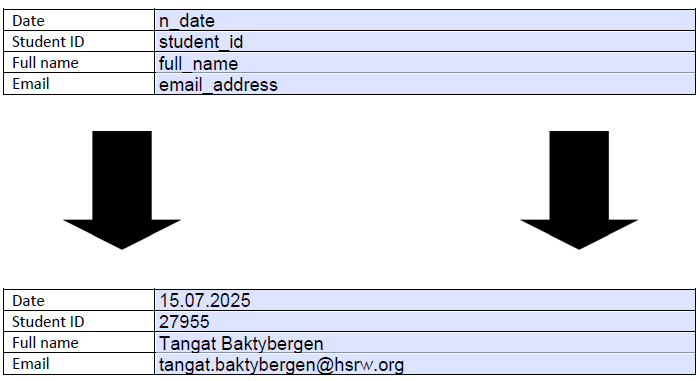
This Moodle activity plugin allows teachers to upload a PDF template (with interactive form fields – AcroForm). When a student accesses the activity, a personalized version of the PDF is automatically generated and downloaded, filled with their own name, ID, email, and the current date.
Key Features
- Personalized PDF Generation: Automatically fills out a PDF form for each student using their Moodle profile data (name, ID, email, date).
- PDF-Based: Teachers upload a final PDF document with form fields containing placeholder texts. The plugin fills those placeholders with student data.
- Instant Downloads: Students click the activity and instantly receive their customized document — no loading or manual edits required.
- Smart File Naming: Generated PDFs are named using the student's personal data to help with record-keeping.
- No Extra Tools: No coding, scripts, or external software needed — everything runs inside Moodle.
Auto-Filled Fields
The plugin automatically replaces the following placeholder texts inside the PDF form:
| Placeholder Field | Filled With |
|----------------------|--------------------------------------|
| full_name | Student’s full name (from profile) |
| student_id | Moodle username or extracted ID |
| email_address | Student’s Moodle email |
| n_date | Current server date |
Note: For student_id, the plugin uses the part before @ in the Moodle username (e.g., 12345@students) or the full username if there is no @.
Example Use Cases
- Lab reports or assignment coversheets
- Participation certificates
- Personalized instruction sheets
- Fieldwork forms or feedback templates
Installation
- Place the folder
mod_autopdfform in moodle/mod/
- Run Moodle upgrade via web or CLI
Teacher Workflow
- Turn editing on in your Moodle course
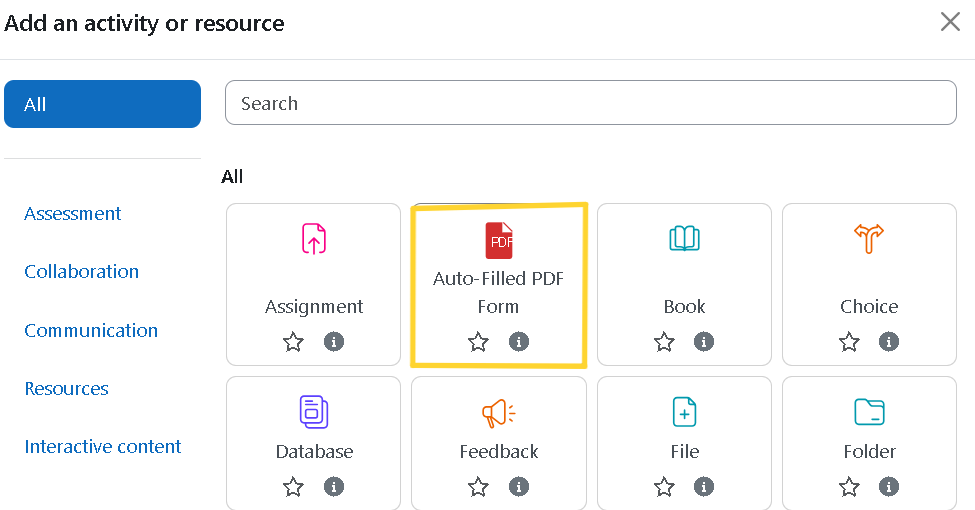
- Add activity ' Auto-Filled PDF Form
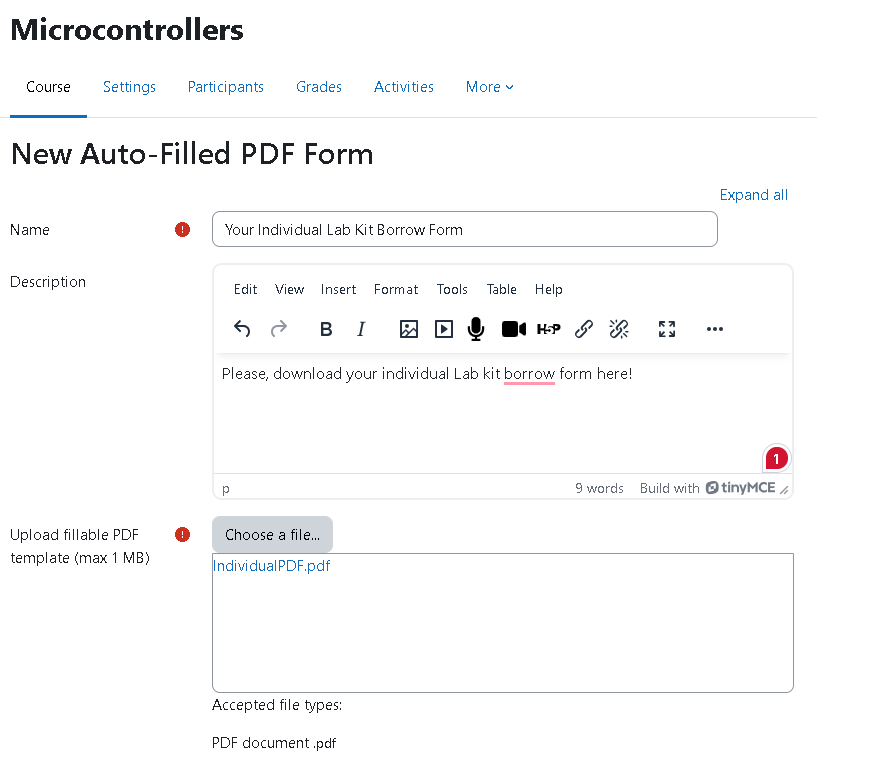
- Fill in the activity name and description
- Upload a valid AcroForm PDF file with field names set to
full_name, student_id, email_address, and n_date
- Save and return to course
Important: Use Adobe Acrobat Pro to prepare the AcroForm file and apply "Reader Extensions" if needed to enable editing/viewing of form fields in PDF viewers.
Student Experience
- See the activity with a PDF icon
- Click the activity
- A personalized PDF file downloads automatically
- The form fields are pre-filled with the student's personal information
Known Limitations
- In rare cases, field values may not display properly (e.g., if the student’s last name matches the registered Adobe Suite user).
- Only AcroForm-compatible PDFs are supported (not XFA).
How Data Is Used
The plugin retrieves the following information from the logged-in student's Moodle account:
- Full Name from the Moodle user profile
- Email Address from the Moodle account
- Student ID from the Moodle username (see rules above)
- Current Date from the Moodle server timestamp
This ensures each student receives a clean and customized PDF — reducing paperwork errors and simplifying distribution.
License
GNU GPL v3 or later
Developed at Rhine-Waal University of Applied Sciences (HSRW), Kleve, Germany.
Authors
- Ivan Volosyak
- Tangat Baktybergen