
GovBR-DS
Versions
Current version
v2.24 (2026052301)
v2.24
Plugin type: Themes
Frankenstyle component name: theme_govbrds
Version build number: 2026052301
Version release name: v2.24
Maturity: Stable
Supported Moodle versions: 4.5
Repository URL (Git): https://github.com/moodlegovbr/moodle-theme_govbrds
Repository branch:
Repository tag: v2.24-stable
Issue/bug tracker URL: https://github.com/moodlegovbr/moodle-theme_govbrds/issues
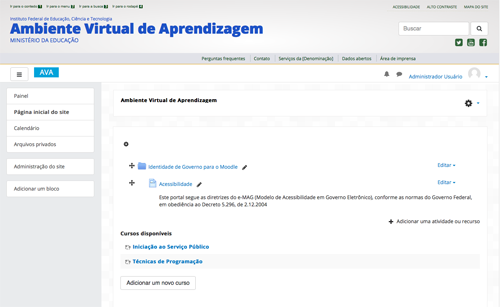
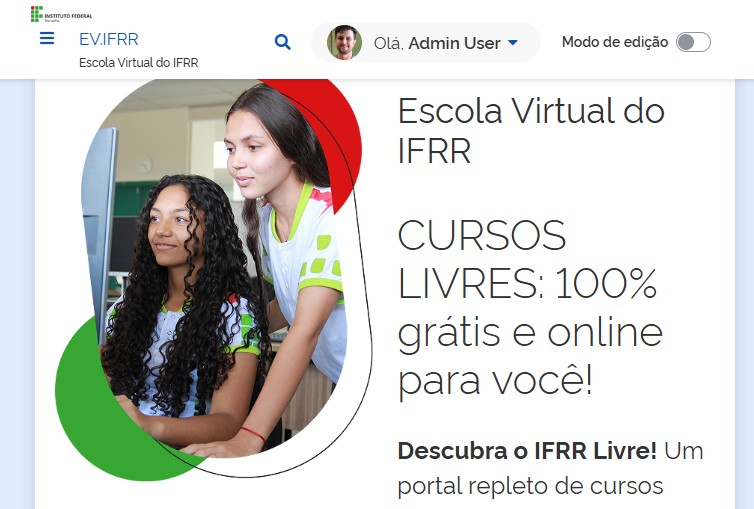
Moodle GovBR-DS Theme
Government Digital Identity for Moodle
These instructions describe how to correctly install the "moodle-govbrds" plugin.
We have the support of the Federal Institute of Education, Science and Technology of Roraima - IFRR, through the following sectors:
Technology and Support Coordination - CTS / DIPEAD / IFRR
Information Technology Directorate - DTI / IFRR
This version of the plugin was developed within the scope of IFRR with funding from Fundape.
It is currently supported by Fábio Santos, Fundape scholarship holder and IFRR employee.
Prerequisites:
============
You will need at least:
- A server running Moodle 4.5+
Installation:
============
These instructions assume that Moodle is already installed on your server (/var/www/moodle).
Unzip the file and copy it to the /var/www/moodle/theme folder;
Log in to your Moodle environment as an administrator user;
Moodle itself will identify the new installation and display the screen to continue the process.
Click the button to install;
Fill out the form to configure the moodle-govbrds theme for your institution;
Click the "Continue" button;
From this point on, you can activate the govbrds theme.
v2.23 (2026051901)
v2.23
Plugin type: Themes
Frankenstyle component name: theme_govbrds
Version build number: 2026051901
Version release name: v2.23
Maturity: Stable
Supported Moodle versions: 4.5
Repository URL (Git): https://github.com/moodlegovbr/moodle-theme_govbrds
Repository branch:
Repository tag: v2.23-stable
Issue/bug tracker URL: https://github.com/moodlegovbr/moodle-theme_govbrds/issues
Moodle GovBR-DS Theme
Government Digital Identity for Moodle
These instructions describe how to correctly install the "moodle-govbrds" plugin.
We have the support of the Federal Institute of Education, Science and Technology of Roraima - IFRR, through the following sectors:
Technology and Support Coordination - CTS / DIPEAD / IFRR
Information Technology Directorate - DTI / IFRR
This version of the plugin was developed within the scope of IFRR with funding from Fundape.
It is currently supported by Fábio Santos, Fundape scholarship holder and IFRR employee.
Prerequisites:
============
You will need at least:
- A server running Moodle 4.5+
Installation:
============
These instructions assume that Moodle is already installed on your server (/var/www/moodle).
Unzip the file and copy it to the /var/www/moodle/theme folder;
Log in to your Moodle environment as an administrator user;
Moodle itself will identify the new installation and display the screen to continue the process.
Click the button to install;
Fill out the form to configure the moodle-govbrds theme for your institution;
Click the "Continue" button;
From this point on, you can activate the govbrds theme.
v2.23 (2026051801)
v2.23
Plugin type: Themes
Frankenstyle component name: theme_govbrds
Version build number: 2026051801
Version release name: v2.23
Maturity: Stable
Supported Moodle versions: 4.5
Repository URL (Git): https://github.com/moodlegovbr/moodle-theme_govbrds
Repository branch:
Repository tag: v2.23-stable
Issue/bug tracker URL: https://github.com/moodlegovbr/moodle-theme_govbrds/issues
Moodle GovBR-DS Theme
Government Digital Identity for Moodle
These instructions describe how to correctly install the "moodle-govbrds" plugin.
We have the support of the Federal Institute of Education, Science and Technology of Roraima - IFRR, through the following sectors:
Technology and Support Coordination - CTS / DIPEAD / IFRR
Information Technology Directorate - DTI / IFRR
This version of the plugin was developed within the scope of IFRR with funding from Fundape.
It is currently supported by Fábio Santos, Fundape scholarship holder and IFRR employee.
Prerequisites:
============
You will need at least:
- A server running Moodle 4.5+
Installation:
============
These instructions assume that Moodle is already installed on your server (/var/www/moodle).
Unzip the file and copy it to the /var/www/moodle/theme folder;
Log in to your Moodle environment as an administrator user;
Moodle itself will identify the new installation and display the screen to continue the process.
Click the button to install;
Fill out the form to configure the moodle-govbrds theme for your institution;
Click the "Continue" button;
From this point on, you can activate the govbrds theme.
v2.22 alpha (2026050701)
v2.22 alpha
Plugin type: Themes
Frankenstyle component name: theme_govbrds
Version build number: 2026050701
Version release name: v2.22 alpha
Maturity: Alpha
Supported Moodle versions: 4.5
Repository URL (Git): https://github.com/moodlegovbr/moodle-theme_govbrds
Repository branch:
Repository tag: v2.22-alpha
Issue/bug tracker URL: https://github.com/moodlegovbr/moodle-theme_govbrds/issues
Moodle GovBR-DS Theme
Government Digital Identity for Moodle
These instructions describe how to correctly install the "moodle-govbrds" plugin.
We have the support of the Federal Institute of Education, Science and Technology of Roraima - IFRR, through the following sectors:
Technology and Support Coordination - CTS / DIPEAD / IFRR
Information Technology Directorate - DTI / IFRR
This version of the plugin was developed within the scope of IFRR with funding from Fundape.
It is currently supported by Fábio Santos, Fundape scholarship holder and IFRR employee.
Prerequisites:
============
You will need at least:
- A server running Moodle 4.5+
Installation:
============
These instructions assume that Moodle is already installed on your server (/var/www/moodle).
Unzip the file and copy it to the /var/www/moodle/theme folder;
Log in to your Moodle environment as an administrator user;
Moodle itself will identify the new installation and display the screen to continue the process.
Click the button to install;
Fill out the form to configure the moodle-govbrds theme for your institution;
Click the "Continue" button;
From this point on, you can activate the govbrds theme.
v2.21 alpha (2026050500)
v2.21 alpha
Plugin type: Themes
Frankenstyle component name: theme_govbrds
Version build number: 2026050500
Version release name: v2.21 alpha
Maturity: Alpha
Supported Moodle versions: 4.5
Repository URL (Git): https://github.com/moodlegovbr/moodle-theme_govbrds
Repository branch:
Repository tag: v2.21-alpha
Issue/bug tracker URL: https://github.com/moodlegovbr/moodle-theme_govbrds/issues
Moodle GovBR-DS Theme
Government Digital Identity for Moodle
These instructions describe how to correctly install the "moodle-govbrds" plugin.
We have the support of the Federal Institute of Education, Science and Technology of Roraima - IFRR, through the following sectors:
Technology and Support Coordination - CTS / DIPEAD / IFRR
Information Technology Directorate - DTI / IFRR
This version of the plugin was developed within the scope of IFRR with funding from Fundape.
It is currently supported by Fábio Santos, Fundape scholarship holder and IFRR employee.
Prerequisites:
============
You will need at least:
- A server running Moodle 4.5+
Installation:
============
These instructions assume that Moodle is already installed on your server (/var/www/moodle).
Unzip the file and copy it to the /var/www/moodle/theme folder;
Log in to your Moodle environment as an administrator user;
Moodle itself will identify the new installation and display the screen to continue the process.
Click the button to install;
Fill out the form to configure the moodle-govbrds theme for your institution;
Click the "Continue" button;
From this point on, you can activate the govbrds theme.
v2.21 alpha (2026021602)
v2.21 alpha
Plugin type: Themes
Frankenstyle component name: theme_govbrds
Version build number: 2026021602
Version release name: v2.21 alpha
Maturity: Alpha
Supported Moodle versions: 4.5
Repository URL (Git): https://github.com/moodlegovbr/moodle-theme_govbrds
Repository branch:
Repository tag: v2.21-alpha
Issue/bug tracker URL: https://github.com/moodlegovbr/moodle-theme_govbrds/issues
Moodle GovBR-DS Theme
Government Digital Identity for Moodle
These instructions describe how to correctly install the "moodle-govbrds" plugin.
We have the support of the Federal Institute of Education, Science and Technology of Roraima - IFRR, through the following sectors:
Technology and Support Coordination - CTS / DIPEAD / IFRR
Information Technology Directorate - DTI / IFRR
This version of the plugin was developed within the scope of IFRR with funding from Fundape.
It is currently supported by Fábio Santos, Fundape scholarship holder and IFRR employee.
Prerequisites:
============
You will need at least:
- A server running Moodle 4.5+
Installation:
============
These instructions assume that Moodle is already installed on your server (/var/www/moodle).
Unzip the file and copy it to the /var/www/moodle/theme folder;
Log in to your Moodle environment as an administrator user;
Moodle itself will identify the new installation and display the screen to continue the process.
Click the button to install;
Fill out the form to configure the moodle-govbrds theme for your institution;
Click the "Continue" button;
From this point on, you can activate the govbrds theme.
v2.20 alpha (2025112500)
v2.20 alpha
Plugin type: Themes
Frankenstyle component name: theme_govbrds
Version build number: 2025112500
Version release name: v2.20 alpha
Maturity: Alpha
Supported Moodle versions: 4.5
Repository URL (Git): https://github.com/moodlegovbr/moodle-theme_govbrds
Repository branch:
Repository tag: v2.20-alpha
Issue/bug tracker URL: https://github.com/moodlegovbr/moodle-theme_govbrds/issues
Moodle Tema GovBR-DS
Identidade Digital de Governo para o Moodle
Estas instruções descrevem como fazer a instalação correta do Plugin "moodle-govbrds".
Contamos com o apoio do Instituto Federal de Educação, Ciência e Tecnologia de Roraima - IFRR, por meio dos seguintes setores:
- Coordenação de Tecnologia e Suporte - CTS / DIPEAD / IFRR
- Diretoria de Tecnologia da Informação - DTI / IFRR
Essa versão do plugin foi desenvolvida no âmbito do IFRR com financiamento da Fundape.
É atualmente suportado por Fábio Santos
Bolsista da Fundape e Servidor do IFRR
Pré-requisitos:
Você irá precisar no mínimo de:
- Um servidor rodando Moodle 4.5+
Instalação:
Estas instruções assumem que o Moodle já esta instalado no seu servidor (/var/www/moodle).
Descompacte o arquivo e copie para a pasta /var/www/moodle/theme;
Faça login no seu ambiente Moodle como usuário administrador;
O próprio Moodle irá identificar a nova instalação e apresentará a tela para a continuação do processo.
Clique no botão para fazer a instalação;
Preencha os formulário para parametrizar o tema moodle-govbrds a sua instituição;
Clique no botão "Continuar";
A partir deste ponto você já poderá adicionar ativar o tema govbrds.
Fim
v2.11 alpha (2025112200)
v2.11 alpha
Plugin type: Themes
Frankenstyle component name: theme_govbrds
Version build number: 2025112200
Version release name: v2.11 alpha
Maturity: Alpha
Supported Moodle versions: 4.5
Repository URL (Git): https://github.com/moodlegovbr/moodle-theme_govbrds
Repository branch:
Repository tag: v2.11-alpha
Issue/bug tracker URL: https://github.com/moodlegovbr/moodle-theme_govbrds/issues
Moodle Tema GovBR-DS
Identidade Digital de Governo para o Moodle
Estas instruções descrevem como fazer a instalação correta do Plugin "moodle-govbrds".
Contamos com o apoio do Instituto Federal de Educação, Ciência e Tecnologia de Roraima - IFRR, por meio dos seguintes setores:
- Coordenação de Tecnologia e Suporte - CTS / DIPEAD / IFRR
- Diretoria de Tecnologia da Informação - DTI / IFRR
Essa versão do plugin foi desenvolvida no âmbito do IFRR com financiamento da Fundape.
É atualmente suportado por Fábio Santos
Bolsista da Fundape e Servidor do IFRR
Pré-requisitos:
Você irá precisar no mínimo de:
- Um servidor rodando Moodle 4.5+
Instalação:
Estas instruções assumem que o Moodle já esta instalado no seu servidor (/var/www/moodle).
Descompacte o arquivo e copie para a pasta /var/www/moodle/theme;
Faça login no seu ambiente Moodle como usuário administrador;
O próprio Moodle irá identificar a nova instalação e apresentará a tela para a continuação do processo.
Clique no botão para fazer a instalação;
Preencha os formulário para parametrizar o tema moodle-govbrds a sua instituição;
Clique no botão "Continuar";
A partir deste ponto você já poderá adicionar ativar o tema govbrds.
Fim
v2.10 alpha (2025100401)
v2.10 alpha
Plugin type: Themes
Frankenstyle component name: theme_govbrds
Version build number: 2025100401
Version release name: v2.10 alpha
Maturity: Alpha
Supported Moodle versions: 4.5
Repository URL (Git): https://github.com/moodlegovbr/moodle-theme_govbrds
Repository branch:
Repository tag: v.2.10-alpha
Issue/bug tracker URL: https://github.com/moodlegovbr/moodle-theme_govbrds/issues
Moodle Tema GovBR-DS
Identidade Digital de Governo para o Moodle
Estas instruções descrevem como fazer a instalação correta do Plugin "moodle-govbrds".
Contamos com o apoio do Instituto Federal de Educação, Ciência e Tecnologia de Roraima - IFRR, por meio dos seguintes setores:
- Coordenação de Tecnologia e Suporte - CTS / DIPEAD / IFRR
- Diretoria de Tecnologia da Informação - DTI / IFRR
Essa versão do plugin foi desenvolvida no âmbito do IFRR com financiamento da Fundape.
É atualmente suportado por Fábio Santos
Bolsista da Fundape e Servidor do IFRR
Pré-requisitos:
Você irá precisar no mínimo de:
- Um servidor rodando Moodle 4.5+
Instalação:
Estas instruções assumem que o Moodle já esta instalado no seu servidor (/var/www/moodle).
Descompacte o arquivo e copie para a pasta /var/www/moodle/theme;
Faça login no seu ambiente Moodle como usuário administrador;
O próprio Moodle irá identificar a nova instalação e apresentará a tela para a continuação do processo.
Clique no botão para fazer a instalação;
Preencha os formulário para parametrizar o tema moodle-govbrds a sua instituição;
Clique no botão "Continuar";
A partir deste ponto você já poderá adicionar ativar o tema govbrds.
Fim
v2.03 alpha (2025092300)
v2.03 alpha
Plugin type: Themes
Frankenstyle component name: theme_govbrds
Version build number: 2025092300
Version release name: v2.03 alpha
Maturity: Alpha
Supported Moodle versions: 4.5
Repository URL (Git): https://github.com/moodlegovbr/moodle-theme_govbrds
Repository branch:
Repository tag: v2.03-alpha
Issue/bug tracker URL: https://github.com/moodlegovbr/moodle-theme_govbrds/issues
Moodle Tema GovBR-DS
Identidade Digital de Governo para o Moodle
Estas instruções descrevem como fazer a instalação correta do Plugin "moodle-govbrds".
Contamos com o apoio do Instituto Federal de Educação, Ciência e Tecnologia de Roraima - IFRR, por meio dos seguintes setores:
- Coordenação de Tecnologia e Suporte - CTS / DIPEAD / IFRR
- Diretoria de Tecnologia da Informação - DTI / IFRR
Essa versão do plugin foi desenvolvida no âmbito do IFRR com financiamento da Fundape.
É atualmente suportado por Fábio Santos
Bolsista da Fundape e Servidor do IFRR
Pré-requisitos:
Você irá precisar no mínimo de:
- Um servidor rodando Moodle 4.5+
Instalação:
Estas instruções assumem que o Moodle já esta instalado no seu servidor (/var/www/moodle).
Descompacte o arquivo e copie para a pasta /var/www/moodle/theme;
Faça login no seu ambiente Moodle como usuário administrador;
O próprio Moodle irá identificar a nova instalação e apresentará a tela para a continuação do processo.
Clique no botão para fazer a instalação;
Preencha os formulário para parametrizar o tema moodle-govbrds a sua instituição;
Clique no botão "Continuar";
A partir deste ponto você já poderá adicionar ativar o tema govbrds.
Fim
v2.02 alpha (2025092002)
v2.02 alpha
Plugin type: Themes
Frankenstyle component name: theme_govbrds
Version build number: 2025092002
Version release name: v2.02 alpha
Maturity: Alpha
Supported Moodle versions: 4.5
Repository URL (Git): https://github.com/moodlegovbr/moodle-theme_govbrds
Repository branch:
Repository tag: v2.02-alpha
Issue/bug tracker URL: https://github.com/moodlegovbr/moodle-theme_govbrds/issues
Moodle Tema GovBR-DS
Identidade Digital de Governo para o Moodle
Estas instruções descrevem como fazer a instalação correta do Plugin "moodle-govbrds".
Contamos com o apoio do Instituto Federal de Educação, Ciência e Tecnologia de Roraima - IFRR, por meio dos seguintes setores:
- Coordenação de Tecnologia e Suporte - CTS / DIPEAD / IFRR
- Diretoria de Tecnologia da Informação - DTI / IFRR
Essa versão do plugin foi desenvolvida no âmbito do IFRR com financiamento da Fundape.
É atualmente suportado por Fábio Santos
Bolsista da Fundape e Servidor do IFRR
Pré-requisitos:
Você irá precisar no mínimo de:
- Um servidor rodando Moodle 4.5+
Instalação:
Estas instruções assumem que o Moodle já esta instalado no seu servidor (/var/www/moodle).
Descompacte o arquivo e copie para a pasta /var/www/moodle/theme;
Faça login no seu ambiente Moodle como usuário administrador;
O próprio Moodle irá identificar a nova instalação e apresentará a tela para a continuação do processo.
Clique no botão para fazer a instalação;
Preencha os formulário para parametrizar o tema moodle-govbrds a sua instituição;
Clique no botão "Continuar";
A partir deste ponto você já poderá adicionar ativar o tema govbrds.
Fim
v2.0 alpha (2025091312)
v2.0 alpha
Plugin type: Themes
Frankenstyle component name: theme_govbrds
Version build number: 2025091312
Version release name: v2.0 alpha
Maturity: Alpha
Supported Moodle versions: 4.5
Repository URL (Git): https://github.com/moodlegovbr/moodle-theme_govbrds
Repository branch:
Repository tag: v2.0-alpha
Issue/bug tracker URL: https://github.com/moodlegovbr/moodle-theme_govbrds/issues
Moodle Tema GovBR-DS
Identidade Digital de Governo para o Moodle
Estas instruções descrevem como fazer a instalação correta do Plugin "moodle-govbrds".
Contamos com o apoio do Instituto Federal de Educação, Ciência e Tecnologia de Roraima - IFRR, por meio dos seguintes setores:
- Coordenação de Tecnologia e Suporte - CTS / DIPEAD / IFRR
- Diretoria de Tecnologia da Informação - DTI / IFRR
Essa versão do plugin foi desenvolvida no âmbito do IFRR com financiamento da Fundape.
É atualmente suportado por Fábio Santos
Bolsista da Fundape e Servidor do IFRR
Pré-requisitos:
Você irá precisar no mínimo de:
- Um servidor rodando Moodle 4.5+
Instalação:
Estas instruções assumem que o Moodle já esta instalado no seu servidor (/var/www/moodle).
Descompacte o arquivo e copie para a pasta /var/www/moodle/theme;
Faça login no seu ambiente Moodle como usuário administrador;
O próprio Moodle irá identificar a nova instalação e apresentará a tela para a continuação do processo.
Clique no botão para fazer a instalação;
Preencha os formulário para parametrizar o tema moodle-govbrds a sua instituição;
Clique no botão "Continuar";
A partir deste ponto você já poderá adicionar ativar o tema govbrds.
Fim
v1.04 alpha (2025090300)
v1.04 alpha
Plugin type: Themes
Frankenstyle component name: theme_govbrds
Version build number: 2025090300
Version release name: v1.04 alpha
Maturity: Alpha
Supported Moodle versions: 3.5
Repository URL (Git): https://github.com/moodlegovbr/moodle-theme_govbrds
Repository branch: MOODLE_35_STABLE
Repository tag: v1.04-alpha
Issue/bug tracker URL: https://github.com/moodlegovbr/moodle-theme_govbrds/issues
Moodle Tema GovBR-DS
Identidade Digital de Governo para o Moodle
Estas instruções descrevem como fazer a instalação correta do Plugin "moodle-govbrds".
Esse plugin é desenvolvido e suportado por Fábio Santos
Com apoio do Instituto Federal de Educação, Ciência e Tecnologia de Roraima - IFRR, por meio dos seguintes setores:
- Coordenação de Tecnologia e Suporte - CTS / DIPEAD / IFRR
- Diretoria de Tecnologia da Informação - DTI / IFRR
Pré-requisitos:
Você irá precisar no mínimo de:
- Um servidor rodando Moodle 3.5+;
Instalação:
Estas instruções assumem que o Moodle já esta instalado no seu servidor (/var/www/moodle).
Descompacte o arquivo e copie para a pasta /var/www/moodle/theme;
Faça login no seu ambiente Moodle como usuário administrador;
O próprio Moodle irá identificar a nova instalação e apresentará a tela para a continuação do processo.
Clique no botão para fazer a instalação;
Preencha os formulário para parametrizar o tema moodle-govbrds a sua instituição;
Clique no botão "Continuar";
A partir deste ponto você já poderá adicionar ativar o tema govbrds.
Fim
v1.03 (2018091800)
v1.03
Plugin type: Themes
Frankenstyle component name: theme_govbrds
Version build number: 2018091800
Version release name: v1.03
Maturity: Alpha
Supported Moodle versions: 3.5
Repository URL (Git): https://github.com/moodlegovbr/theme_govbrds/tree/MOODLE_35_STABLE
Repository branch: MOODLE_35_STABLE
Repository tag:
Issue/bug tracker URL: https://github.com/moodlegovbr/moodle-theme_govbrds/issues
moodle-govbrds
Identidade Digital de Governo para o Moodle
Estas instruções descrevem como fazer a instalação correta do Plugin "moodle-govbrds".
Esse plugin é desenvolvido e suportado pela Coordenação de Tecnologia e Suporte - CTS / IPEAD / IFRR e pela Diretoria de Tecnologia da Informação DTI / IFRR
Pré-requisitos:
Você irá precisar no mínimo de:
- Um servidor rodando Moodle 3.0, ou superior;
Instalação:
Estas instruções assumem que o Moodle já esta instalado no seu servidor (/var/www/moodle).
Descompacte o arquivo e copie para a pasta /var/www/moodle/theme;
Faça login no seu ambiente Moodle como usuário administrador;
O próprio Moodle irá identificar a nova instalação e apresentará a tela para a continuação do processo.
Clique no botão para fazer a instalação;
Preencha os formulário para parametrizar o tema moodle-govbrds a sua instituição;
Clique no botão "Continuar";
A partir deste ponto você já poderá adicionar ativar o tema govbrds.