URL user profile field
Custom user profile field which stores and displays a url
There are currently 2 core custom user fields that allow urls.
- Social custom field - but the label is fixed
- Text custom field - allows a url but only if a parameter has been specified
The url custom field allows for a custom label and a url without parameters
Instructions for use
- Go to Site admin > Users > Accounts > User profile fields (Or direct to
/user/profile/index.php)
- Select "Create a new profile field" and choose "URL" from the menu
- Add the details and optionally choose the "link target" for where to open the link
- Save
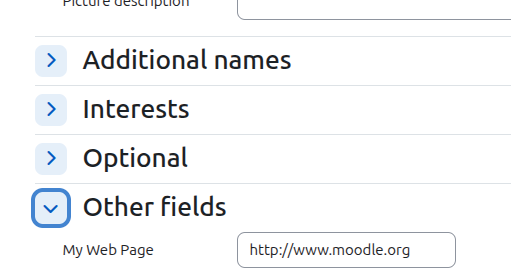
- Edit a user profile
- Scroll down to "Other fields"
- Enter a url - note this must be a valid url eg: http://www.moodle.org
- Save
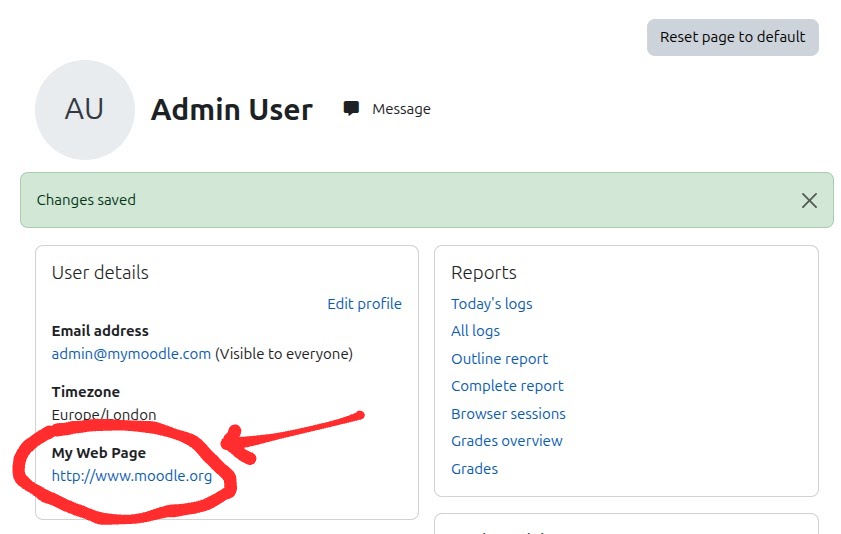
- View the user profile
- The url label and link will be displayed in the "User details" block
Installing via uploaded ZIP file
- Log in to your Moodle site as an admin and go to Site administration >
Plugins > Install plugins.
- Upload the ZIP file with the plugin code. You should only be prompted to add
extra details if your plugin type is not automatically detected.
- Check the plugin validation report and finish the installation.
Installing manually
The plugin can be also installed by putting the contents of this directory to
{your/moodle/dirroot}/user/profile/field/url
Afterwards, log in to your Moodle site as an admin and go to Site administration >
Notifications to complete the installation.
Alternatively, you can run
$ php admin/cli/upgrade.php
to complete the installation from the command line.
License
2025 Russell England http://www.russellengland.com
This program is free software: you can redistribute it and/or modify it under
the terms of the GNU General Public License as published by the Free Software
Foundation, either version 3 of the License, or (at your option) any later
version.
This program is distributed in the hope that it will be useful, but WITHOUT ANY
WARRANTY; without even the implied warranty of MERCHANTABILITY or FITNESS FOR A
PARTICULAR PURPOSE. See the GNU General Public License for more details.
You should have received a copy of the GNU General Public License along with
this program. If not, see https://www.gnu.org/licenses/.