
NLN Learning Object
Versions
Current version
3.0.0 (Build: 20160408) (2016040800)
3.0.0 (Build: 20160408)
Plugin type: Activities
Frankenstyle component name: mod_nln
Version build number: 2016040800
Version release name: 3.0.0 (Build: 20160408)
Maturity: Stable
Supported Moodle versions: 3.0, 3.1, 3.2, 3.3, 3.4, 3.5
Repository URL (Git): https://github.com/tonyjbutler/moodle-mod_nln
Repository branch: MOODLE_30_STABLE
Repository tag: v3.0.0
Issue/bug tracker URL: https://github.com/tonyjbutler/moodle-mod_nln/issues
Readme file for the NLN Materials Moodle Browser (codename: Noodle)
Introduction
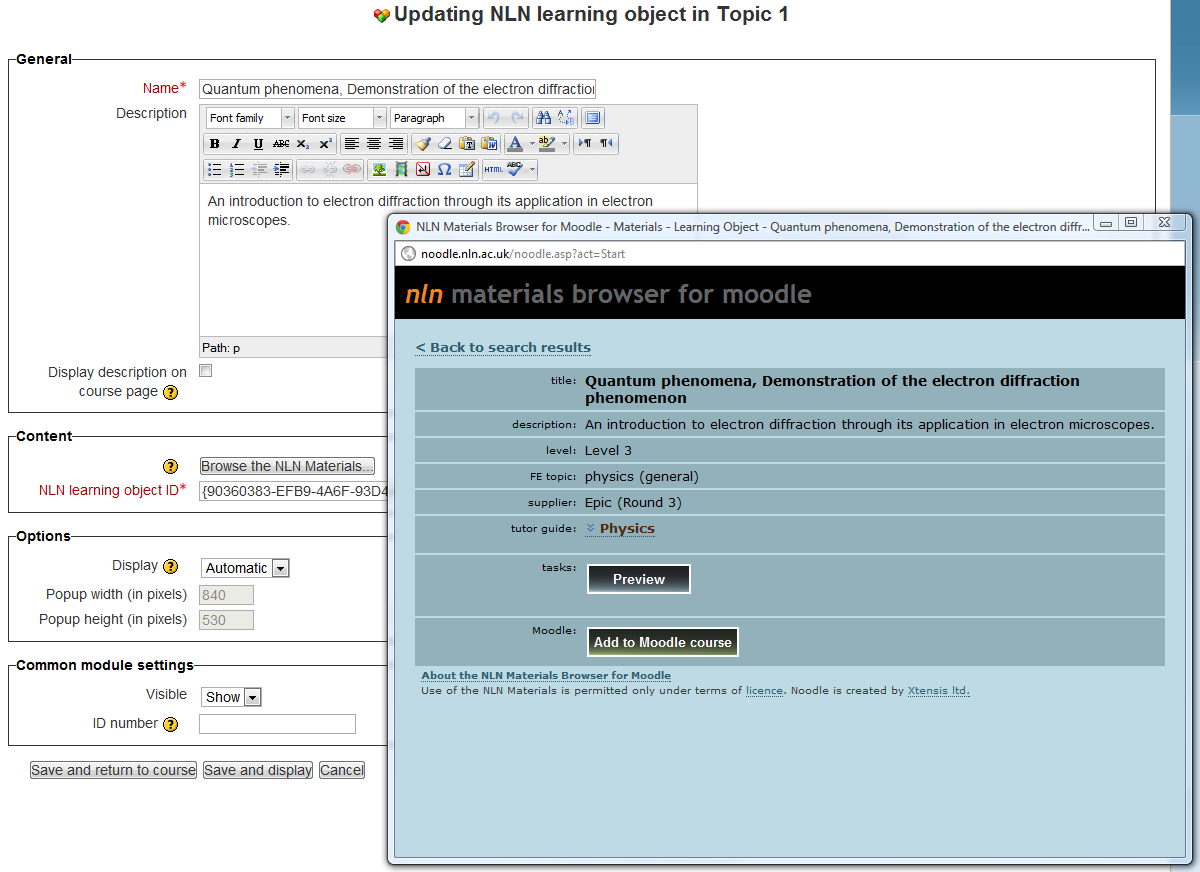
Noodle is a plug-in module for Moodle systems that allows Moodle users to find and use NLN Materials with a minimum of effort. Noodle was developed by Xtensis.co.uk - the developers of the NLN Materials delivery site, as an additional service to our users.
The benefits include:
For administrators:
- no need to create and maintain a repository.
- works alongside but completely independently of local repositories.
- simple installation.
- materials are still hosted on the nln.ac.uk site, so users will see all updates and fixes, and you may save bandwidth
For practitioners:
- no need to log-in separately
- powerful search and browse functionality, specifically tailored for the NLN Materials (e.g. browse by level)
- easy access to supporting information, such as tutor guides, LO-specific FAQ questions etc.
- no need to leave the Moodle interface
- no need to understand SCORM and related technologies
- no need to deal with any downloading/unzipping/uploading/or installing of files
More information about Noodle is available at [http://www.nln.ac.uk/?p=Noodle]. Information about updates and new versions is now available at [http://moodle.org/plugins/view.php?plugin=mod_nln].
This is version 3.0.
Changelog
V0.1 - first release.
V0.2 - fixes compatibility with Moodle 1.8, by a modification in line 74 of resource.class.php, checking that the function build_navigation() exists.
V0.3 - fixes a bug that caused resources not to be added to the database in some environments.
V0.4 - fixes a compatibility problem with PHP4 (line 167 of resource.class.php). This version works with PHP4 and PHP5.
V1.0 - a significant update, with significant updates to this readme, and changes to both browse_start.php and resource.class.php that:
- within the Moodle resource add/edit page, fixes the issue of the name field dragging back focus when the "browse" button is clicked
- fixes a harmless typo in one of language strings given in step 4 of the installation instructions
- adds the ability to launch the browser at a text search result (for integration with other modules, such as MrCute). (See customisation section below.)
- adds the ability to customise the text of the "add to Moodle course" button within Noodle. (See customisation section below.)
- uses a new URL within browse_start.php (noodle.nln.ac.uk rather than www.nln.ac.uk). (Both point to the same location, but the new URL helps us with tracking usage.)
V1.1 - due to changes in the NLN site on July 23rd 2011 (see the FAQ at [http://nln.ac.uk/support/?p=FAQ#i_Transition] for more info). Since the site no longer requires authentication, this has been removed from this version. However, V1.0 will continue to work fine, so there's no need to upgrade from V1.0 to V1.1.
V2.2 - conversion from Moodle 1.x resource type to Moodle 2.x activity module. Tested with Moodle 2.2. - includes a migration script to automatically convert any existing NLN resources in a Moodle 1.9 instance during an upgrade to Moodle 2.
- supports backup/restore functionality, including restoring from a Moodle 1.9 backup.
- incompatible framed and embedded display options removed.
V2.3 - added 'mod/nln:addinstance' capability and 'modulename_help' string for Moodle 2.3.
V2.4 - added help string for Learning Object ID field and replaced icon with higher quality 24px version for Moodle 2.4.
V2.5 - modified update form to add call to setType() for Learning Object ID field and fix broken auto-fill function for description field.
V2.6 - replaced all occurrences of the deprecated get_context_instance() function with context_xxxx::instance().
V2.7 - updated module to use the new activity logging events API in Moodle 2.7.
V2.9 - added LO description auto-fill support for Atto editor and plain textarea.
V3.0 - replaced deprecated get_all_sections() function.
Note that since the bulk of functionality happens on the NLN site, changes in functionality may occur within the Noodle pop-up without requiring a new version of Noodle or a new download. Any significant changes of functionality will be explained on the Noodle page of the NLN website.
License
This program is free software: you can redistribute it and/or modify it under the terms of the GNU General Public License as published by the Free Software Foundation. This program is distributed in the hope that it will be useful, but WITHOUT ANY WARRANTY; without even the implied warranty of MERCHANTABILITY or FITNESS FOR A PARTICULAR PURPOSE. See the GNU General Public License for more details. You should have received a copy of the GNU General Public License along with this program. If not, see [http://www.gnu.org/licenses/].
By installing this software package and using it (or any derivative) to connect to the NLN site, you are also agreeing to the NLN Materials usage license ON BEHALF OF ALL MOODLE USERS WHO WILL BE GIVEN ACCESS TO IT. For more information please see [http://www.nln.ac.uk/?p=Noodle].
The GPL license confers no rights to the www.nln.ac.uk site itself (including the pages from the site exposed by Noodle).
Support
Noodle was developed by Xtensis during their role as developers of the service, and was released free of charge as a (hopefully) useful additional service to the NLN Materials community. As of July 23rd 2011, Xtensis have no ongoing involvement in developing or supporting the NLN service, and as such, there is no ongoing formal support for Noodle. A dedicated thread on the Moodle.org forums has been set up at [http://moodle.org/mod/forum/discuss.php?d=105505].
Installation
Note, if you are upgrading an existing Noodle installation, please see the "Version Info" section above.
Installing from the Git repository (recommended if you installed Moodle from Git):
Follow the instructions at [http://docs.moodle.org/30/en/Git_for_Administrators#Installing_a_contributed_extension_from_its_Git_repository], e.g. for the Moodle 3.0.x code:
$ cd /path/to/your/moodle/
$ cd mod
$ git clone git://github.com/tonyjbutler/moodle-mod_nln.git nln
$ cd nln
$ git checkout -b MOODLE_30_STABLE origin/MOODLE_30_STABLE
$ git branch -d master
$ cd /path/to/your/moodle/
$ echo /mod/nln/ >> .git/info/exclude
Installing from a zip archive downloaded from [http://moodle.org/plugins/pluginversions.php?plugin=mod_nln]:
- Download and unzip the appropriate release for your version of Moodle.
- Place the extracted "nln" folder in your "/mod/" subdirectory.
Whichever of the above methods you use to get the module code in place, the final step is to visit your Site Administration > Notifications page in a browser to invoke the installation script and make the necessary database changes.
Updating Moodle
If you installed Moodle and the NLN module from Git you can run the following commands to update both (see [http://docs.moodle.org/30/en/Git_for_Administrators#Installing_a_contributed_extension_from_its_Git_repository]):
$ cd /path/to/your/moodle/
$ git pull
$ cd mod/nln
$ git pull
If you installed from a zip archive you will need to repeat the installation procedure using the appropriate zip file downloaded from [http://moodle.org/plugins/pluginversions.php?plugin=mod_nln] for your new Moodle version.
Informing Moodle users
After installing, we suggest notifying your Moodle course editors and letting them know what's available. You can find simplified instructions - which presume no prior knowledge of the NLN materials or the main NLN site - at [http://nln.ac.uk/?p=Noodle]. It is suggested that Moodle admins take the concise instructions given there and distribute them, with any relevant modifications, to their users.
2.9.0 (Build: 20150521) (2015052100)
2.9.0 (Build: 20150521)
Plugin type: Activities
Frankenstyle component name: mod_nln
Version build number: 2015052100
Version release name: 2.9.0 (Build: 20150521)
Maturity: Stable
Supported Moodle versions: 2.9
Repository URL (Git): https://github.com/tonyjbutler/moodle-mod_nln
Repository branch: MOODLE_29_STABLE
Repository tag: v2.9.0
Issue/bug tracker URL: https://github.com/tonyjbutler/moodle-mod_nln/issues
Readme file for the NLN Materials Moodle Browser (codename: Noodle)
Introduction
Noodle is a plug-in module for Moodle systems that allows Moodle users to find and use NLN Materials with a minimum of effort. Noodle was developed by Xtensis.co.uk - the developers of the NLN Materials delivery site, as an additional service to our users.
The benefits include:
For administrators:
- no need to create and maintain a repository.
- works alongside but completely independently of local repositories.
- simple installation.
- materials are still hosted on the nln.ac.uk site, so users will see all updates and fixes, and you may save bandwidth
For practitioners:
- no need to log-in separately
- powerful search and browse functionality, specifically tailored for the NLN Materials (e.g. browse by level)
- easy access to supporting information, such as tutor guides, LO-specific FAQ questions etc.
- no need to leave the Moodle interface
- no need to understand SCORM and related technologies
- no need to deal with any downloading/unzipping/uploading/or installing of files
More information about Noodle is available at [http://www.nln.ac.uk/?p=Noodle]. Information about updates and new versions is now available at [http://moodle.org/plugins/view.php?plugin=mod_nln].
This is version 2.9.
Changelog
V0.1 - first release.
V0.2 - fixes compatibility with Moodle 1.8, by a modification in line 74 of resource.class.php, checking that the function build_navigation() exists.
V0.3 - fixes a bug that caused resources not to be added to the database in some environments.
V0.4 - fixes a compatibility problem with PHP4 (line 167 of resource.class.php). This version works with PHP4 and PHP5.
V1.0 - a significant update, with significant updates to this readme, and changes to both browse_start.php and resource.class.php that:
- within the Moodle resource add/edit page, fixes the issue of the name field dragging back focus when the "browse" button is clicked
- fixes a harmless typo in one of language strings given in step 4 of the installation instructions
- adds the ability to launch the browser at a text search result (for integration with other modules, such as MrCute). (See customisation section below.)
- adds the ability to customise the text of the "add to Moodle course" button within Noodle. (See customisation section below.)
- uses a new URL within browse_start.php (noodle.nln.ac.uk rather than www.nln.ac.uk). (Both point to the same location, but the new URL helps us with tracking usage.)
V1.1 - due to changes in the NLN site on July 23rd 2011 (see the FAQ at [http://nln.ac.uk/support/?p=FAQ#i_Transition] for more info). Since the site no longer requires authentication, this has been removed from this version. However, V1.0 will continue to work fine, so there's no need to upgrade from V1.0 to V1.1.
V2.2 - conversion from Moodle 1.x resource type to Moodle 2.x activity module. Tested with Moodle 2.2. - includes a migration script to automatically convert any existing NLN resources in a Moodle 1.9 instance during an upgrade to Moodle 2.
- supports backup/restore functionality, including restoring from a Moodle 1.9 backup.
- incompatible framed and embedded display options removed.
V2.3 - added 'mod/nln:addinstance' capability and 'modulename_help' string for Moodle 2.3.
V2.4 - added help string for Learning Object ID field and replaced icon with higher quality 24px version for Moodle 2.4.
V2.5 - modified update form to add call to setType() for Learning Object ID field and fix broken auto-fill function for description field.
V2.6 - replaced all occurrences of the deprecated get_context_instance() function with context_xxxx::instance().
V2.7 - updated module to use the new activity logging events API in Moodle 2.7.
V2.9 - added LO description auto-fill support for Atto editor and plain textarea.
Note that since the bulk of functionality happens on the NLN site, changes in functionality may occur within the Noodle pop-up without requiring a new version of Noodle or a new download. Any significant changes of functionality will be explained on the Noodle page of the NLN website.
License
This program is free software: you can redistribute it and/or modify it under the terms of the GNU General Public License as published by the Free Software Foundation. This program is distributed in the hope that it will be useful, but WITHOUT ANY WARRANTY; without even the implied warranty of MERCHANTABILITY or FITNESS FOR A PARTICULAR PURPOSE. See the GNU General Public License for more details. You should have received a copy of the GNU General Public License along with this program. If not, see [http://www.gnu.org/licenses/].
By installing this software package and using it (or any derivative) to connect to the NLN site, you are also agreeing to the NLN Materials usage license ON BEHALF OF ALL MOODLE USERS WHO WILL BE GIVEN ACCESS TO IT. For more information please see [http://www.nln.ac.uk/?p=Noodle].
The GPL license confers no rights to the www.nln.ac.uk site itself (including the pages from the site exposed by Noodle).
Support
Noodle was developed by Xtensis during their role as developers of the service, and was released free of charge as a (hopefully) useful additional service to the NLN Materials community. As of July 23rd 2011, Xtensis have no ongoing involvement in developing or supporting the NLN service, and as such, there is no ongoing formal support for Noodle. A dedicated thread on the Moodle.org forums has been set up at [http://moodle.org/mod/forum/discuss.php?d=105505].
Installation
Note, if you are upgrading an existing Noodle installation, please see the "Version Info" section above.
Installing from the Git repository (recommended if you installed Moodle from Git):
Follow the instructions at [http://docs.moodle.org/29/en/Git_for_Administrators#Installing_a_contributed_extension_from_its_Git_repository], e.g. for the Moodle 2.9.x code:
$ cd /path/to/your/moodle/
$ cd mod
$ git clone git://github.com/tonyjbutler/moodle-mod_nln.git nln
$ cd nln
$ git checkout -b MOODLE_29_STABLE origin/MOODLE_29_STABLE
$ git branch -d master
$ cd /path/to/your/moodle/
$ echo /mod/nln/ >> .git/info/exclude
Installing from a zip archive downloaded from [http://moodle.org/plugins/pluginversions.php?plugin=mod_nln]:
- Download and unzip the appropriate release for your version of Moodle.
- Place the extracted "nln" folder in your "/mod/" subdirectory.
Whichever of the above methods you use to get the module code in place, the final step is to visit your Site Administration > Notifications page in a browser to invoke the installation script and make the necessary database changes.
Updating Moodle
If you installed Moodle and the NLN module from Git you can run the following commands to update both (see [http://docs.moodle.org/29/en/Git_for_Administrators#Installing_a_contributed_extension_from_its_Git_repository]):
$ cd /path/to/your/moodle/
$ git pull
$ cd mod/nln
$ git pull
If you installed from a zip archive you will need to repeat the installation procedure using the appropriate zip file downloaded from [http://moodle.org/plugins/pluginversions.php?plugin=mod_nln] for your new Moodle version.
Informing Moodle users
After installing, we suggest notifying your Moodle course editors and letting them know what's available. You can find simplified instructions - which presume no prior knowledge of the NLN materials or the main NLN site - at [http://nln.ac.uk/?p=Noodle]. It is suggested that Moodle admins take the concise instructions given there and distribute them, with any relevant modifications, to their users.
2.7.0 (2014061201)
2.7.0
Plugin type: Activities
Frankenstyle component name: mod_nln
Version build number: 2014061201
Version release name: 2.7.0
Maturity: Stable
Supported Moodle versions: 2.7, 2.8
Repository URL (Git): https://github.com/tonyjbutler/moodle-mod_nln
Repository branch: MOODLE_27_STABLE
Repository tag:
Issue/bug tracker URL: https://github.com/tonyjbutler/moodle-mod_nln/issues
Readme file for the NLN Materials Moodle Browser (codename: Noodle)
Introduction
Noodle is a plug-in module for Moodle systems that allows Moodle users to find and use NLN Materials with a minimum of effort. Noodle was developed by Xtensis.co.uk - the developers of the NLN Materials delivery site, as an additional service to our users.
The benefits include:
For administrators:
- no need to create and maintain a repository.
- works alongside but completely independently of local repositories.
- simple installation.
- materials are still hosted on the nln.ac.uk site, so users will see all updates and fixes, and you may save bandwidth
For practitioners:
- no need to log-in separately
- powerful search and browse functionality, specifically tailored for the NLN Materials (e.g. browse by level)
- easy access to supporting information, such as tutor guides, LO-specific FAQ questions etc.
- no need to leave the Moodle interface
- no need to understand SCORM and related technologies
- no need to deal with any downloading/unzipping/uploading/or installing of files
More information about Noodle is available at [http://www.nln.ac.uk/?p=Noodle]. Information about updates and new versions is now available at [http://moodle.org/plugins/view.php?plugin=mod_nln].
This is version 2.7.
Version Info
V0.1 - first release.
V0.2 - fixes compatibility with Moodle 1.8, by a modification in line 74 of resource.class.php, checking that the function build_navigation() exists.
V0.3 - fixes a bug that caused resources not to be added to the database in some environments.
V0.4 - fixes a compatibility problem with PHP4 (line 167 of resource.class.php). This version works with PHP4 and PHP5.
V1.0 - a significant update, with significant updates to this readme, and changes to both browse_start.php and resource.class.php that:
- within the Moodle resource add/edit page, fixes the issue of the name field dragging back focus when the "browse" button is clicked
- fixes a harmless typo in one of language strings given in step 4 of the installation instructions
- adds the ability to launch the browser at a text search result (for integration with other modules, such as MrCute). (See customisation section below.)
- adds the ability to customise the text of the "add to Moodle course" button within Noodle. (See customisation section below.)
- uses a new URL within browse_start.php (noodle.nln.ac.uk rather than www.nln.ac.uk). (Both point to the same location, but the new URL helps us with tracking usage.)
V1.1 - due to changes in the NLN site on July 23rd 2011 (see the FAQ at [http://nln.ac.uk/support/?p=FAQ#i_Transition] for more info). Since the site no longer requires authentication, this has been removed from this version. However, V1.0 will continue to work fine, so there's no need to upgrade from V1.0 to V1.1.
V2.2 - conversion from Moodle 1.x resource type to Moodle 2.x activity module. Tested with Moodle 2.2. - includes a migration script to automatically convert any existing NLN resources in a Moodle 1.9 instance during an upgrade to Moodle 2.
- supports backup/restore functionality, including restoring from a Moodle 1.9 backup (see "Installation" section below).
- incompatible framed and embedded display options removed.
V2.3 - added 'mod/nln:addinstance' capability and 'modulename_help' string for Moodle 2.3.
V2.4 - added help string for Learning Object ID field and replaced icon with higher quality 24px version for Moodle 2.4.
V2.5 - modified update form to add call to setType() for Learning Object ID field and fix broken auto-fill function for description field.
V2.6 - replaced all occurrences of the deprecated get_context_instance() function with context_xxxx::instance().
V2.7 - updated module to use the new activity logging events API in Moodle 2.7.
Note that since the bulk of functionality happens on the NLN site, changes in functionality may occur within the Noodle pop-up without requiring a new version of Noodle or a new download. Any significant changes of functionality will be explained on the Noodle page of the NLN website.
License
This program is free software: you can redistribute it and/or modify it under the terms of the GNU General Public License as published by the Free Software Foundation. This program is distributed in the hope that it will be useful, but WITHOUT ANY WARRANTY; without even the implied warranty of MERCHANTABILITY or FITNESS FOR A PARTICULAR PURPOSE. See the GNU General Public License for more details. You should have received a copy of the GNU General Public License along with this program. If not, see [http://www.gnu.org/licenses/].
By installing this software package and using it (or any derivative) to connect to the NLN site, you are also agreeing to the NLN Materials usage license ON BEHALF OF ALL MOODLE USERS WHO WILL BE GIVEN ACCESS TO IT. For more information please see [http://www.nln.ac.uk/?p=Noodle].
The GPL license confers no rights to the www.nln.ac.uk site itself (including the pages from the site exposed by Noodle).
Support
Noodle was developed by Xtensis during their role as developers of the service, and was released free of charge as a (hopefully) useful additional service to the NLN Materials community. As of July 23rd 2011, Xtensis have no ongoing involvement in developing or supporting the NLN service, and as such, there is no ongoing formal support for Noodle. A dedicated thread on the Moodle.org forums has been set up at [http://moodle.org/mod/forum/discuss.php?d=105505].
Installation
Note, if you are upgrading an existing Noodle installation, please see the "Version Info" section above.
Installing from the Git repository (recommended if you installed Moodle from Git):
Follow the instructions at [http://docs.moodle.org/27/en/Git_for_Administrators#Installing_a_contributed_extension_from_its_Git_repository], e.g. for the Moodle 2.7.x code:
$ cd /path/to/your/moodle/
$ cd mod
$ git clone git://github.com/tonyjbutler/moodle-mod_nln.git nln
$ cd nln
$ git checkout -b MOODLE_27_STABLE origin/MOODLE_27_STABLE
$ git branch -d master
$ cd /path/to/your/moodle/
$ echo /mod/nln/ >> .git/info/exclude
Installing from a zip archive downloaded from [http://moodle.org/plugins/pluginversions.php?plugin=mod_nln]:
- Download and unzip the appropriate release for your version of Moodle.
- Place the extracted "nln" folder in your "/mod/" subdirectory.
Whichever of the above methods you use to get the module code in place, the final step is to visit your Site Administration > Notifications page in a browser to invoke the installation script and make the necessary database changes.
Note: if you wish to restore NLN resources from course backups created with Moodle 1.9.x, you will also need to make a slight modification to your /mod/resource/backup/moodle1/lib.php file.
A diff patch named moodle1_restore.patch is supplied in the root directory of the NLN module to facilitate this modification. Please see the instructions at [http://docs.moodle.org/dev/How_to_apply_a_patch] if you need help applying the patch.
Updating Moodle
If you installed Moodle and the NLN module from Git you can run the following commands to update both (see [http://docs.moodle.org/27/en/Git_for_Administrators#Installing_a_contributed_extension_from_its_Git_repository]):
$ cd /path/to/your/moodle/
$ git pull
$ cd mod/nln
$ git pull
In this case it will not be necessary to apply the diff patch again.
If you installed from a zip archive you will need to repeat the installation procedure using the appropriate zip file downloaded from [http://moodle.org/plugins/pluginversions.php?plugin=mod_nln] for your new Moodle version.
In this case you will also need to re-apply the patch as above, if you still need the functionality to restore from Moodle 1.9 backups.
Informing Moodle users
After installing, we suggest notifying your Moodle course editors and letting them know what's available. You can find simplified instructions - which presume no prior knowledge of the NLN materials or the main NLN site - at [http://nln.ac.uk/?p=Noodle]. It is suggested that Moodle admins take the concise instructions given there and distribute them, with any relevant modifications, to their users.
2.6.0 (2014061200)
2.6.0
Plugin type: Activities
Frankenstyle component name: mod_nln
Version build number: 2014061200
Version release name: 2.6.0
Maturity: Stable
Supported Moodle versions: 2.6
Repository URL (Git): https://github.com/tonyjbutler/moodle-mod_nln
Repository branch: MOODLE_26_STABLE
Repository tag:
Issue/bug tracker URL: https://github.com/tonyjbutler/moodle-mod_nln/issues
Readme file for the NLN Materials Moodle Browser (codename: Noodle)
Introduction
Noodle is a plug-in module for Moodle systems that allows Moodle users to find and use NLN Materials with a minimum of effort. Noodle was developed by Xtensis.co.uk - the developers of the NLN Materials delivery site, as an additional service to our users.
The benefits include:
For administrators:
- no need to create and maintain a repository.
- works alongside but completely independently of local repositories.
- simple installation.
- materials are still hosted on the nln.ac.uk site, so users will see all updates and fixes, and you may save bandwidth
For practitioners:
- no need to log-in separately
- powerful search and browse functionality, specifically tailored for the NLN Materials (e.g. browse by level)
- easy access to supporting information, such as tutor guides, LO-specific FAQ questions etc.
- no need to leave the Moodle interface
- no need to understand SCORM and related technologies
- no need to deal with any downloading/unzipping/uploading/or installing of files
More information about Noodle is available at [http://www.nln.ac.uk/?p=Noodle]. Information about updates and new versions is now available at [http://moodle.org/plugins/view.php?plugin=mod_nln].
This is version 2.6.
Version Info
V0.1 - first release.
V0.2 - fixes compatibility with Moodle 1.8, by a modification in line 74 of resource.class.php, checking that the function build_navigation() exists.
V0.3 - fixes a bug that caused resources not to be added to the database in some environments.
V0.4 - fixes a compatibility problem with PHP4 (line 167 of resource.class.php). This version works with PHP4 and PHP5.
V1.0 - a significant update, with significant updates to this readme, and changes to both browse_start.php and resource.class.php that:
- within the Moodle resource add/edit page, fixes the issue of the name field dragging back focus when the "browse" button is clicked
- fixes a harmless typo in one of language strings given in step 4 of the installation instructions
- adds the ability to launch the browser at a text search result (for integration with other modules, such as MrCute). (See customisation section below.)
- adds the ability to customise the text of the "add to Moodle course" button within Noodle. (See customisation section below.)
- uses a new URL within browse_start.php (noodle.nln.ac.uk rather than www.nln.ac.uk). (Both point to the same location, but the new URL helps us with tracking usage.)
V1.1 - due to changes in the NLN site on July 23rd 2011 (see the FAQ at [http://nln.ac.uk/support/?p=FAQ#i_Transition] for more info). Since the site no longer requires authentication, this has been removed from this version. However, V1.0 will continue to work fine, so there's no need to upgrade from V1.0 to V1.1.
V2.2 - conversion from Moodle 1.x resource type to Moodle 2.x activity module. Tested with Moodle 2.2. - includes a migration script to automatically convert any existing NLN resources in a Moodle 1.9 instance during an upgrade to Moodle 2.
- supports backup/restore functionality, including restoring from a Moodle 1.9 backup (see "Installation" section below).
- incompatible framed and embedded display options removed.
V2.3 - added 'mod/nln:addinstance' capability and 'modulename_help' string for Moodle 2.3.
V2.4 - added help string for Learning Object ID field and replaced icon with higher quality 24px version for Moodle 2.4.
V2.5 - modified update form to add call to setType() for Learning Object ID field and fix broken auto-fill function for description field.
V2.6 - replaced all occurrences of the deprecated get_context_instance() function with context_xxxx::instance().
Note that since the bulk of functionality happens on the NLN site, changes in functionality may occur within the Noodle pop-up without requiring a new version of Noodle or a new download. Any significant changes of functionality will be explained on the Noodle page of the NLN website.
License
This program is free software: you can redistribute it and/or modify it under the terms of the GNU General Public License as published by the Free Software Foundation. This program is distributed in the hope that it will be useful, but WITHOUT ANY WARRANTY; without even the implied warranty of MERCHANTABILITY or FITNESS FOR A PARTICULAR PURPOSE. See the GNU General Public License for more details. You should have received a copy of the GNU General Public License along with this program. If not, see [http://www.gnu.org/licenses/].
By installing this software package and using it (or any derivative) to connect to the NLN site, you are also agreeing to the NLN Materials usage license ON BEHALF OF ALL MOODLE USERS WHO WILL BE GIVEN ACCESS TO IT. For more information please see [http://www.nln.ac.uk/?p=Noodle].
The GPL license confers no rights to the www.nln.ac.uk site itself (including the pages from the site exposed by Noodle).
Support
Noodle was developed by Xtensis during their role as developers of the service, and was released free of charge as a (hopefully) useful additional service to the NLN Materials community. As of July 23rd 2011, Xtensis have no ongoing involvement in developing or supporting the NLN service, and as such, there is no ongoing formal support for Noodle. A dedicated thread on the Moodle.org forums has been set up at [http://moodle.org/mod/forum/discuss.php?d=105505].
Installation
Note, if you are upgrading an existing Noodle installation, please see the "Version Info" section above.
Installing from the Git repository (recommended if you installed Moodle from Git):
Follow the instructions at [http://docs.moodle.org/26/en/Git_for_Administrators#Installing_a_contributed_extension_from_its_Git_repository], e.g. for the Moodle 2.6.x code:
$ cd /path/to/your/moodle/
$ cd mod
$ git clone git://github.com/tonyjbutler/moodle-mod_nln.git nln
$ cd nln
$ git checkout -b MOODLE_26_STABLE origin/MOODLE_26_STABLE
$ git branch -d master
$ cd /path/to/your/moodle/
$ echo /mod/nln/ >> .git/info/exclude
Installing from a zip archive downloaded from [http://moodle.org/plugins/pluginversions.php?plugin=mod_nln]:
- Download and unzip the appropriate release for your version of Moodle.
- Place the extracted "nln" folder in your "/mod/" subdirectory.
Whichever of the above methods you use to get the module code in place, the final step is to visit your Site Administration > Notifications page in a browser to invoke the installation script and make the necessary database changes.
Note: if you wish to restore NLN resources from course backups created with Moodle 1.9.x, you will also need to make a slight modification to your /mod/resource/backup/moodle1/lib.php file.
A diff patch named moodle1_restore.patch is supplied in the root directory of the NLN module to facilitate this modification. Please see the instructions at [http://docs.moodle.org/dev/How_to_apply_a_patch] if you need help applying the patch.
Updating Moodle
If you installed Moodle and the NLN module from Git you can run the following commands to update both (see [http://docs.moodle.org/26/en/Git_for_Administrators#Installing_a_contributed_extension_from_its_Git_repository]):
$ cd /path/to/your/moodle/
$ git pull
$ cd mod/nln
$ git pull
In this case it will not be necessary to apply the diff patch again.
If you installed from a zip archive you will need to repeat the installation procedure using the appropriate zip file downloaded from [http://moodle.org/plugins/pluginversions.php?plugin=mod_nln] for your new Moodle version.
In this case you will also need to re-apply the patch as above, if you still need the functionality to restore from Moodle 1.9 backups.
Informing Moodle users
After installing, we suggest notifying your Moodle course editors and letting them know what's available. You can find simplified instructions - which presume no prior knowledge of the NLN materials or the main NLN site - at [http://nln.ac.uk/?p=Noodle]. It is suggested that Moodle admins take the concise instructions given there and distribute them, with any relevant modifications, to their users.
2.5.1 (2013070900)
2.5.1
Plugin type: Activities
Frankenstyle component name: mod_nln
Version build number: 2013070900
Version release name: 2.5.1
Maturity: Stable
Supported Moodle versions: 2.5
Repository URL (Git): https://github.com/tonyjbutler/moodle-mod_nln
Repository branch: MOODLE_25_STABLE
Repository tag:
Issue/bug tracker URL: https://github.com/tonyjbutler/moodle-mod_nln/issues
Readme file for the NLN Materials Moodle Browser (codename: Noodle)
Introduction
Noodle is a plug-in module for Moodle systems that allows Moodle users to find and use NLN Materials with a minimum of effort. Noodle was developed by Xtensis.co.uk - the developers of the NLN Materials delivery site, as an additional service to our users.
The benefits include:
For administrators:
- no need to create and maintain a repository.
- works alongside but completely independently of local repositories.
- simple installation.
- materials are still hosted on the nln.ac.uk site, so users will see all updates and fixes, and you may save bandwidth
For practitioners:
- no need to log-in separately
- powerful search and browse functionality, specifically tailored for the NLN Materials (e.g. browse by level)
- easy access to supporting information, such as tutor guides, LO-specific FAQ questions etc.
- no need to leave the Moodle interface
- no need to understand SCORM and related technologies
- no need to deal with any downloading/unzipping/uploading/or installing of files
More information about Noodle is available at [http://www.nln.ac.uk/?p=Noodle]. Information about updates and new versions is now available at [http://moodle.org/plugins/view.php?plugin=mod_nln].
This is version 2.5.
Version Info
V0.1 - first release.
V0.2 - fixes compatibility with Moodle 1.8, by a modification in line 74 of resource.class.php, checking that the function build_navigation() exists.
V0.3 - fixes a bug that caused resources not to be added to the database in some environments.
V0.4 - fixes a compatibility problem with PHP4 (line 167 of resource.class.php). This version works with PHP4 and PHP5.
V1.0 - a significant update, with significant updates to this readme, and changes to both browse_start.php and resource.class.php that:
- within the Moodle resource add/edit page, fixes the issue of the name field dragging back focus when the "browse" button is clicked
- fixes a harmless typo in one of language strings given in step 4 of the installation instructions
- adds the ability to launch the browser at a text search result (for integration with other modules, such as MrCute). (See customisation section below.)
- adds the ability to customise the text of the "add to Moodle course" button within Noodle. (See customisation section below.)
- uses a new URL within browse_start.php (noodle.nln.ac.uk rather than www.nln.ac.uk). (Both point to the same location, but the new URL helps us with tracking usage.)
V1.1 - due to changes in the NLN site on July 23rd 2011 (see the FAQ at [http://nln.ac.uk/support/?p=FAQ#i_Transition] for more info). Since the site no longer requires authentication, this has been removed from this version. However, V1.0 will continue to work fine, so there's no need to upgrade from V1.0 to V1.1.
V2.2 - conversion from Moodle 1.x resource type to Moodle 2.x activity module. Tested with Moodle 2.2. - includes a migration script to automatically convert any existing NLN resources in a Moodle 1.9 instance during an upgrade to Moodle 2.
- supports backup/restore functionality, including restoring from a Moodle 1.9 backup (see "Installation" section below).
- incompatible framed and embedded display options removed.
V2.3 - added 'mod/nln:addinstance' capability and 'modulename_help' string for Moodle 2.3.
V2.4 - added help string for Learning Object ID field and replaced icon with higher quality 24px version for Moodle 2.4.
V2.5 - modified update form to add call to setType() for Learning Object ID field and fix broken auto-fill function for description field.
Note that since the bulk of functionality happens on the NLN site, changes in functionality may occur within the Noodle pop-up without requiring a new version of Noodle or a new download. Any significant changes of functionality will be explained on the Noodle page of the NLN website.
License
This program is free software: you can redistribute it and/or modify it under the terms of the GNU General Public License as published by the Free Software Foundation. This program is distributed in the hope that it will be useful, but WITHOUT ANY WARRANTY; without even the implied warranty of MERCHANTABILITY or FITNESS FOR A PARTICULAR PURPOSE. See the GNU General Public License for more details. You should have received a copy of the GNU General Public License along with this program. If not, see [http://www.gnu.org/licenses/].
By installing this software package and using it (or any derivative) to connect to the NLN site, you are also agreeing to the NLN Materials usage license ON BEHALF OF ALL MOODLE USERS WHO WILL BE GIVEN ACCESS TO IT. For more information please see [http://www.nln.ac.uk/?p=Noodle].
The GPL license confers no rights to the www.nln.ac.uk site itself (including the pages from the site exposed by Noodle).
Support
Noodle was developed by Xtensis during their role as developers of the service, and was released free of charge as a (hopefully) useful additional service to the NLN Materials community. As of July 23rd 2011, Xtensis have no ongoing involvement in developing or supporting the NLN service, and as such, there is no ongoing formal support for Noodle. A dedicated thread on the Moodle.org forums has been set up at [http://moodle.org/mod/forum/discuss.php?d=105505].
Installation
Note, if you are upgrading an existing Noodle installation, please see the "Version Info" section above.
Installing from the Git repository (recommended if you installed Moodle from Git):
Follow the instructions at [http://docs.moodle.org/25/en/Git_for_Administrators#Installing_a_contributed_extension_from_its_Git_repository], e.g. for the Moodle 2.5.x code:
$ cd /path/to/your/moodle/
$ cd mod
$ git clone git://github.com/tonyjbutler/moodle-mod_nln.git nln
$ cd nln
$ git checkout -b MOODLE_25_STABLE origin/MOODLE_25_STABLE
$ git branch -d master
$ cd /path/to/your/moodle/
$ echo /mod/nln/ >> .git/info/exclude
Installing from a zip archive downloaded from [http://moodle.org/plugins/pluginversions.php?plugin=mod_nln]:
- Download and unzip the appropriate release for your version of Moodle.
- Place the extracted "nln" folder in your "/mod/" subdirectory.
Whichever of the above methods you use to get the module code in place, the final step is to visit your Site Administration > Notifications page in a browser to invoke the installation script and make the necessary database changes.
Note: if you wish to restore NLN resources from course backups created with Moodle 1.9.x, you will also need to make a slight modification to your /mod/resource/backup/moodle1/lib.php file.
A diff patch named moodle1_restore.patch is supplied in the root directory of the NLN module to facilitate this modification. Please see the instructions at [http://docs.moodle.org/dev/How_to_apply_a_patch] if you need help applying the patch.
Updating Moodle
If you installed Moodle and the NLN module from Git you can run the following commands to update both (see [http://docs.moodle.org/25/en/Git_for_Administrators#Installing_a_contributed_extension_from_its_Git_repository]):
$ cd /path/to/your/moodle/
$ git pull
$ cd mod/nln
$ git pull
In this case it will not be necessary to apply the diff patch again.
If you installed from a zip archive you will need to repeat the installation procedure using the appropriate zip file downloaded from [http://moodle.org/plugins/pluginversions.php?plugin=mod_nln] for your new Moodle version.
In this case you will also need to re-apply the patch as above, if you still need the functionality to restore from Moodle 1.9 backups.
Informing Moodle users
After installing, we suggest notifying your Moodle course editors and letting them know what's available. You can find simplified instructions - which presume no prior knowledge of the NLN materials or the main NLN site - at [http://nln.ac.uk/?p=Noodle]. It is suggested that Moodle admins take the concise instructions given there and distribute them, with any relevant modifications, to their users.
2.4 (2013052800)
2.4
Plugin type: Activities
Frankenstyle component name: mod_nln
Version build number: 2013052800
Version release name: 2.4
Maturity: Stable
Supported Moodle versions: 2.4
Repository URL (Git): https://github.com/tonyjbutler/moodle-mod_nln
Repository branch: MOODLE_24_STABLE
Repository tag:
Issue/bug tracker URL: https://github.com/tonyjbutler/moodle-mod_nln/issues
Readme file for the NLN Materials Moodle Browser (codename: Noodle)
===================================================================
Introduction
------------
Noodle is a plug-in module for Moodle systems that allows Moodle users to find and use NLN Materials with a minimum of effort. Noodle was developed by Xtensis.co.uk - the developers of the NLN Materials delivery site, as an additional service to our users.
The benefits include:
For administrators:
- no need to create and maintain a repository.
- works alongside but completely independently of local repositories.
- simple installation.
- materials are still hosted on the nln.ac.uk site, so users will see all updates and fixes, and you may save bandwidth
For practitioners:
- no need to log-in separately
- powerful search and browse functionality, specifically tailored for the NLN Materials (e.g. browse by level)
- easy access to supporting information, such as tutor guides, LO-specific FAQ questions etc.
- no need to leave the Moodle interface
- no need to understand SCORM and related technologies
- no need to deal with any downloading/unzipping/uploading/or installing of files
More information about Noodle is available at [http://www.nln.ac.uk/?p=Noodle]. Information about updates and new versions is now available at [http://moodle.org/plugins/view.php?plugin=mod_nln].
This is version 2.4.
Version Info
------------
V0.1 - first release.
V0.2 - fixes compatibility with Moodle 1.8, by a modification in line 74 of resource.class.php, checking that the function build_navigation() exists.
V0.3 - fixes a bug that caused resources not to be added to the database in some environments.
V0.4 - fixes a compatibility problem with PHP4 (line 167 of resource.class.php). This version works with PHP4 and PHP5.
V1.0 - a significant update, with significant updates to this readme, and changes to both browse_start.php and resource.class.php that:
- within the Moodle resource add/edit page, fixes the issue of the name field dragging back focus when the "browse" button is clicked
- fixes a harmless typo in one of language strings given in step 4 of the installation instructions
- adds the ability to launch the browser at a text search result (for integration with other modules, such as MrCute). (See customisation section below.)
- adds the ability to customise the text of the "add to Moodle course" button within Noodle. (See customisation section below.)
- uses a new URL within browse_start.php (noodle.nln.ac.uk rather than www.nln.ac.uk). (Both point to the same location, but the new URL helps us with tracking usage.)
V1.1 - due to changes in the NLN site on July 23rd 2011 (see the FAQ at [http://nln.ac.uk/support/?p=FAQ#i_Transition] for more info). Since the site no longer requires authentication, this has been removed from this version. However, V1.0 will continue to work fine, so there's no need to upgrade from V1.0 to V1.1.
V2.2 - conversion from Moodle 1.x resource type to Moodle 2.x activity module. Tested with Moodle 2.2.
- includes a migration script to automatically convert any existing NLN resources in a Moodle 1.9 instance during an upgrade to Moodle 2.
- supports backup/restore functionality, including restoring from a Moodle 1.9 backup (see "Installation" section below).
- incompatible framed and embedded display options removed.
V2.3 - added 'mod/nln:addinstance' capability and 'modulename_help' string for Moodle 2.3.
V2.4 - added help string for Learning Object ID field and replaced icon with higher quality 24px version for Moodle 2.4.
Note that since the bulk of functionality happens on the NLN site, changes in functionality may occur within the Noodle pop-up without requiring a new version of Noodle or a new download. Any significant changes of functionality will be explained on the Noodle page of the NLN website.
License
-------
This program is free software: you can redistribute it and/or modify it under the terms of the GNU General Public License as published by the Free Software Foundation. This program is distributed in the hope that it will be useful, but WITHOUT ANY WARRANTY; without even the implied warranty of MERCHANTABILITY or FITNESS FOR A PARTICULAR PURPOSE. See the GNU General Public License for more details. You should have received a copy of the GNU General Public License along with this program. If not, see [http://www.gnu.org/licenses/].
By installing this software package and using it (or any derivative) to connect to the NLN site, you are also agreeing to the NLN Materials usage license ON BEHALF OF ALL MOODLE USERS WHO WILL BE GIVEN ACCESS TO IT. For more information please see [http://www.nln.ac.uk/?p=Noodle].
The GPL license confers no rights to the www.nln.ac.uk site itself (including the pages from the site exposed by Noodle).
Support
-------
Noodle was developed by Xtensis during their role as developers of the service, and was released free of charge as a (hopefully) useful additional service to the NLN Materials community. As of July 23rd 2011, Xtensis have no ongoing involvement in developing or supporting the NLN service, and as such, there is no ongoing formal support for Noodle. A dedicated thread on the Moodle.org forums has been set up at [http://moodle.org/mod/forum/discuss.php?d=105505].
Installation
------------
Note, if you are upgrading an existing Noodle installation, please see the "Version Info" section above.
Installing from the Git repository (recommended if you installed Moodle from Git):
Follow the instructions at [http://docs.moodle.org/24/en/Git_for_Administrators#Installing_a_contributed_extension_from_its_Git_repository], e.g. for the Moodle 2.4.x code:
$ cd /path/to/your/moodle/
$ cd mod
$ git clone git://github.com/tonyjbutler/moodle-mod_nln.git nln
$ cd nln
$ git checkout -b MOODLE_24_STABLE origin/MOODLE_24_STABLE
$ git branch -d master
$ cd /path/to/your/moodle/
$ echo /mod/nln/ >> .git/info/exclude
Installing from a zip archive downloaded from [http://moodle.org/plugins/pluginversions.php?plugin=mod_nln]:
1. Download and unzip the appropriate release for your version of Moodle.
2. Place the extracted "nln" folder in your "/mod/" subdirectory.
Whichever of the above methods you use to get the module code in place, the final step is to visit your Site Administration > Notifications page in a browser to invoke the installation script and make the necessary database changes.
Note: if you wish to restore NLN resources from course backups created with Moodle 1.9.x, you will also need to make a slight modification to your /mod/resource/backup/moodle1/lib.php file.
A diff patch named moodle1_restore.patch is supplied in the root directory of the NLN module to facilitate this modification. Please see the instructions at [http://docs.moodle.org/dev/How_to_apply_a_patch] if you need help applying the patch.
Updating Moodle
---------------
If you installed Moodle and the NLN module from Git you can run the following commands to update both (see [http://docs.moodle.org/24/en/Git_for_Administrators#Installing_a_contributed_extension_from_its_Git_repository]):
$ cd /path/to/your/moodle/
$ git pull
$ cd mod/nln
$ git pull
In this case it will not be necessary to apply the diff patch again.
If you installed from a zip archive you will need to repeat the installation procedure using the appropriate zip file downloaded from [http://moodle.org/plugins/pluginversions.php?plugin=mod_nln] for your new Moodle version.
In this case you will also need to re-apply the patch as above, if you still need the functionality to restore from Moodle 1.9 backups.
Informing Moodle users
----------------------
After installing, we suggest notifying your Moodle course editors and letting them know what's available. You can find simplified instructions - which presume no prior knowledge of the NLN materials or the main NLN site - at [http://nln.ac.uk/?p=Noodle]. It is suggested that Moodle admins take the concise instructions given there and distribute them, with any relevant modifications, to their users.
2.3 (2012111900)
2.3
Plugin type: Activities
Frankenstyle component name: mod_nln
Version build number: 2012111900
Version release name: 2.3
Maturity: Stable
Supported Moodle versions: 2.3
Repository URL (Git): https://github.com/tonyjbutler/moodle-mod_nln
Repository branch: MOODLE_23_STABLE
Repository tag:
Issue/bug tracker URL: https://github.com/tonyjbutler/moodle-mod_nln/issues
Readme file for the NLN Materials Moodle Browser (codename: Noodle)
Introduction
Noodle is a plug-in module for Moodle systems that allows Moodle users to find and use NLN Materials with a minimum of effort. Noodle was developed by Xtensis.co.uk - the developers of the NLN Materials delivery site, as an additional service to our users.
The benefits include:
For administrators:
- no need to create and maintain a repository.
- works alongside but completely independently of local repositories.
- simple installation.
- materials are still hosted on the nln.ac.uk site, so users will see all updates and fixes, and you may save bandwidth
For practitioners:
- no need to log-in separately
- powerful search and browse functionality, specifically tailored for the NLN Materials (e.g. browse by level)
- easy access to supporting information, such as tutor guides, LO-specific FAQ questions etc.
- no need to leave the Moodle interface
- no need to understand SCORM and related technologies
- no need to deal with any downloading/unzipping/uploading/or installing of files
More information about Noodle is available at [http://www.nln.ac.uk/?p=Noodle]. Information about updates and new versions is now available at [http://moodle.org/plugins/view.php?plugin=mod_nln].
This is version 2.3.
Version Info
V0.1 - first release.
V0.2 - fixes compatibility with Moodle 1.8, by a modification in line 74 of resource.class.php, checking that the function build_navigation() exists.
V0.3 - fixes a bug that caused resources not to be added to the database in some environments.
V0.4 - fixes a compatibility problem with PHP4 (line 167 of resource.class.php). This version works with PHP4 and PHP5.
V1.0 - a significant update, with significant updates to this readme, and changes to both browse_start.php and resource.class.php that:
- within the Moodle resource add/edit page, fixes the issue of the name field dragging back focus when the "browse" button is clicked
- fixes a harmless typo in one of language strings given in step 4 of the installation instructions
- adds the ability to launch the browser at a text search result (for integration with other modules, such as MrCute). (See customisation section below.)
- adds the ability to customise the text of the "add to Moodle course" button within Noodle. (See customisation section below.)
- uses a new URL within browse_start.php (noodle.nln.ac.uk rather than www.nln.ac.uk). (Both point to the same location, but the new URL helps us with tracking usage.)
V1.1 - due to changes in the NLN site on July 23rd 2011 (see the FAQ at [http://nln.ac.uk/support/?p=FAQ#i_Transition] for more info). Since the site no longer requires authentication, this has been removed from this version. However, V1.0 will continue to work fine, so there's no need to upgrade from V1.0 to V1.1.
V2.2 - conversion from Moodle 1.x resource type to Moodle 2.x activity module. Tested with Moodle 2.2. - includes a migration script to automatically convert any existing NLN resources in a Moodle 1.9 instance during an upgrade to Moodle 2.
- supports backup/restore functionality, including restoring from a Moodle 1.9 backup (see "Installation" section below).
- incompatible framed and embedded display options removed.
V2.3 - added 'mod/nln:addinstance' capability and 'modulename_help' string for Moodle 2.3.
Note that since the bulk of functionality happens on the NLN site, changes in functionality may occur within the Noodle pop-up without requiring a new version of Noodle or a new download. Any significant changes of functionality will be explained on the Noodle page of the NLN website.
License
This program is free software: you can redistribute it and/or modify it under the terms of the GNU General Public License as published by the Free Software Foundation. This program is distributed in the hope that it will be useful, but WITHOUT ANY WARRANTY; without even the implied warranty of MERCHANTABILITY or FITNESS FOR A PARTICULAR PURPOSE. See the GNU General Public License for more details. You should have received a copy of the GNU General Public License along with this program. If not, see [http://www.gnu.org/licenses/].
By installing this software package and using it (or any derivative) to connect to the NLN site, you are also agreeing to the NLN Materials usage license ON BEHALF OF ALL MOODLE USERS WHO WILL BE GIVEN ACCESS TO IT. For more information please see [http://www.nln.ac.uk/?p=Noodle].
The GPL license confers no rights to the www.nln.ac.uk site itself (including the pages from the site exposed by Noodle).
Support
Noodle was developed by Xtensis during their role as developers of the service, and was released free of charge as a (hopefully) useful additional service to the NLN Materials community. As of July 23rd 2011, Xtensis have no ongoing involvement in developing or supporting the NLN service, and as such, there is no ongoing formal support for Noodle. A dedicated thread on the Moodle.org forums has been set up at [http://moodle.org/mod/forum/discuss.php?d=105505].
Installation
Note, if you are upgrading an existing Noodle installation, please see the "Version Info" section above.
Installing from the Git repository (recommended if you installed Moodle from Git):
Follow the instructions at [http://docs.moodle.org/23/en/Git_for_Administrators#Installing_a_contributed_extension_from_its_Git_repository], e.g. for the Moodle 2.2.x code:
$ cd /path/to/your/moodle/
$ cd mod
$ git clone git://github.com/tonyjbutler/moodle-mod_nln.git nln
$ cd nln
$ git checkout -b MOODLE_23_STABLE origin/MOODLE_23_STABLE
$ git branch -d master
$ cd /path/to/your/moodle/
$ echo /mod/nln/ >> .git/info/exclude
Installing from a zip archive downloaded from [http://moodle.org/plugins/pluginversions.php?plugin=mod_nln]:
- Download and unzip the appropriate release for your version of Moodle.
- Place the extracted "nln" folder in your "/mod/" subdirectory.
Whichever of the above methods you use to get the module code in place, the final step is to visit your Site Administration > Notifications page in a browser to invoke the installation script and make the necessary database changes.
Note: if you wish to restore NLN resources from course backups created with Moodle 1.9.x, you will also need to make a slight modification to your /mod/resource/backup/moodle1/lib.php file.
A diff patch named moodle1_restore.patch is supplied in the root directory of the NLN module to facilitate this modification. Please see the instructions at [http://docs.moodle.org/dev/How_to_apply_a_patch] if you need help applying the patch.
Updating Moodle
If you installed Moodle and the NLN module from Git you can run the following commands to update both (see [http://docs.moodle.org/23/en/Git_for_Administrators#Installing_a_contributed_extension_from_its_Git_repository]):
$ cd /path/to/your/moodle/
$ git pull
$ cd mod/nln
$ git pull
In this case it will not be necessary to apply the diff patch again.
If you installed from a zip archive you will need to repeat the installation procedure using the appropriate zip file downloaded from [http://moodle.org/plugins/pluginversions.php?plugin=mod_nln] for your new Moodle version.
In this case you will also need to re-apply the patch as above, if you still need the functionality to restore from Moodle 1.9 backups.
Informing Moodle users
After installing, we suggest notifying your Moodle course editors and letting them know what's available. You can find simplified instructions - which presume no prior knowledge of the NLN materials or the main NLN site - at [http://nln.ac.uk/?p=Noodle]. It is suggested that Moodle admins take the concise instructions given there and distribute them, with any relevant modifications, to their users.
2.2.3 (2012042500)
2.2.3
Plugin type: Activities
Frankenstyle component name: mod_nln
Version build number: 2012042500
Version release name: 2.2.3
Maturity: Stable
Supported Moodle versions: 2.2
Repository URL (Git): https://github.com/tonyjbutler/moodle-mod_nln
Repository branch: MOODLE_22_STABLE
Repository tag:
Issue/bug tracker URL: https://github.com/tonyjbutler/moodle-mod_nln/issues
Readme file for the NLN Materials Moodle Browser (codename: Noodle)
Introduction
Noodle is a plug-in module for Moodle systems that allows Moodle users to find and use NLN Materials with a minimum of effort. Noodle was developed by Xtensis.co.uk - the developers of the NLN Materials delivery site, as an additional service to our users.
The benefits include:
For administrators:
- no need to create and maintain a repository.
- works alongside but completely independently of local repositories.
- simple installation.
- materials are still hosted on the nln.ac.uk site, so users will see all updates and fixes, and you may save bandwidth
For practitioners:
- no need to log-in separately
- powerful search and browse functionality, specifically tailored for the NLN Materials (e.g. browse by level)
- easy access to supporting information, such as tutor guides, LO-specific FAQ questions etc.
- no need to leave the Moodle interface
- no need to understand SCORM and related technologies
- no need to deal with any downloading/unzipping/uploading/or installing of files
More information about Noodle is available at [http://www.nln.ac.uk/?p=Noodle]. Information about updates and new versions is now available at [http://moodle.org/plugins/view.php?plugin=mod_nln].
This is version 2.2.3.
Version Info
V0.1 - first release.
V0.2 - fixes compatibility with Moodle 1.8, by a modification in line 74 of resource.class.php, checking that the function build_navigation() exists.
V0.3 - fixes a bug that caused resources not to be added to the database in some environments.
V0.4 - fixes a compatibility problem with PHP4 (line 167 of resource.class.php). This version works with PHP4 and PHP5.
V1.0 - a significant update, with significant updates to this readme, and changes to both browse_start.php and resource.class.php that:
- within the Moodle resource add/edit page, fixes the issue of the name field dragging back focus when the "browse" button is clicked
- fixes a harmless typo in one of language strings given in step 4 of the installation instructions
- adds the ability to launch the browser at a text search result (for integration with other modules, such as MrCute). (See customisation section below.)
- adds the ability to customise the text of the "add to Moodle course" button within Noodle. (See customisation section below.)
- uses a new URL within browse_start.php (noodle.nln.ac.uk rather than www.nln.ac.uk). (Both point to the same location, but the new URL helps us with tracking usage.)
V1.1 - due to changes in the NLN site on July 23rd 2011 (see the FAQ at [http://nln.ac.uk/support/?p=FAQ#i_Transition] for more info). Since the site no longer requires authentication, this has been removed from this version. However, V1.0 will continue to work fine, so there's no need to upgrade from V1.0 to V1.1.
V2.2 - conversion from Moodle 1.x resource type to Moodle 2.x activity module. Tested with Moodle 2.2. - includes a migration script to automatically convert any existing NLN resources in a Moodle 1.9 instance during an upgrade to Moodle 2.
- supports backup/restore functionality, including restoring from a Moodle 1.9 backup (see "Installation" section below).
- incompatible framed and embedded display options removed.
Note that since the bulk of functionality happens on the NLN site, changes in functionality may occur within the Noodle pop-up without requiring a new version of Noodle or a new download. Any significant changes of functionality will be explained on the Noodle page of the NLN website.
License
This program is free software: you can redistribute it and/or modify it under the terms of the GNU General Public License as published by the Free Software Foundation. This program is distributed in the hope that it will be useful, but WITHOUT ANY WARRANTY; without even the implied warranty of MERCHANTABILITY or FITNESS FOR A PARTICULAR PURPOSE. See the GNU General Public License for more details. You should have received a copy of the GNU General Public License along with this program. If not, see [http://www.gnu.org/licenses/].
By installing this software package and using it (or any derivative) to connect to the NLN site, you are also agreeing to the NLN Materials usage license ON BEHALF OF ALL MOODLE USERS WHO WILL BE GIVEN ACCESS TO IT. For more information please see [http://www.nln.ac.uk/?p=Noodle].
The GPL license confers no rights to the www.nln.ac.uk site itself (including the pages from the site exposed by Noodle).
Support
Noodle was developed by Xtensis during their role as developers of the service, and was released free of charge as a (hopefully) useful additional service to the NLN Materials community. As of July 23rd 2011, Xtensis have no ongoing involvement in developing or supporting the NLN service, and as such, there is no ongoing formal support for Noodle. A dedicated thread on the Moodle.org forums has been set up at [http://moodle.org/mod/forum/discuss.php?d=105505].
Installation
Note, if you are upgrading an existing Noodle installation, please see the "Version Info" section above.
Installing from the Git repository (recommended if you installed Moodle from Git):
Follow the instructions at [http://docs.moodle.org/22/en/Git_for_Administrators#Installing_a_contributed_extension_from_its_Git_repository], e.g. for the Moodle 2.2.x code:
$ cd /path/to/your/moodle/
$ cd mod
$ git clone git://github.com/tonyjbutler/moodle-mod_nln.git nln
$ cd nln
$ git checkout -b MOODLE_22_STABLE origin/MOODLE_22_STABLE
$ git branch -d master
$ cd /path/to/your/moodle/
$ echo /mod/nln/ >> .git/info/exclude
Installing from a zip archive downloaded from [http://moodle.org/plugins/pluginversions.php?plugin=mod_nln]:
- Download and unzip the appropriate release for your version of Moodle.
- Place the extracted "nln" folder in your "/mod/" subdirectory.
Whichever of the above methods you use to get the module code in place, the final step is to visit your Site Administration > Notifications page in a browser to invoke the installation script and make the necessary database changes.
Note: if you wish to restore NLN resources from course backups created with Moodle 1.9.x, you will also need to make a slight modification to your /mod/resource/backup/moodle1/lib.php file.
A diff patch named moodle1_restore.patch is supplied in the root directory of the NLN module to facilitate this modification. Please see the instructions at [http://docs.moodle.org/dev/How_to_apply_a_patch] if you need help applying the patch.
Updating Moodle
If you installed Moodle and the NLN module from Git you can run the following commands to update both (see [http://docs.moodle.org/22/en/Git_for_Administrators#Installing_a_contributed_extension_from_its_Git_repository]):
$ cd /path/to/your/moodle/
$ git pull
$ cd mod/nln
$ git pull
In this case it will not be necessary to apply the diff patch again.
If you installed from a zip archive you will need to repeat the installation procedure using the appropriate zip file downloaded from [http://moodle.org/plugins/pluginversions.php?plugin=mod_nln] for your new Moodle version.
In this case you will also need to re-apply the patch as above, if you still need the functionality to restore from Moodle 1.9 backups.
Informing Moodle users
After installing, we suggest notifying your Moodle course editors and letting them know what's available. You can find simplified instructions - which presume no prior knowledge of the NLN materials or the main NLN site - at [http://nln.ac.uk/?p=Noodle]. It is suggested that Moodle admins take the concise instructions given there and distribute them, with any relevant modifications, to their users.