
cover
Maintained by
John St
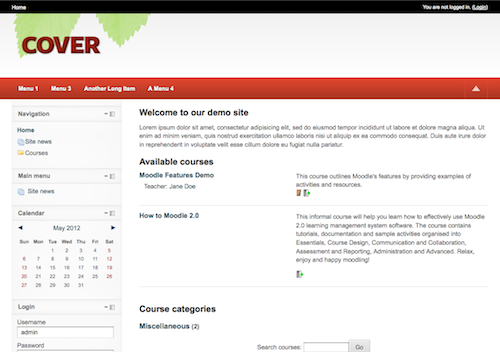
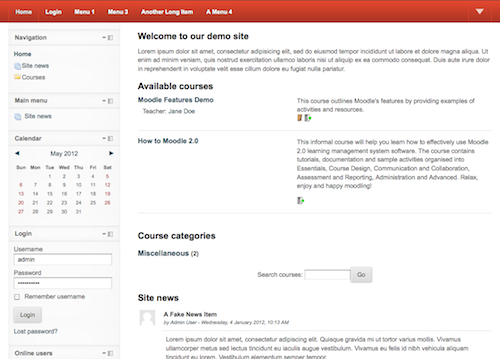
A two column theme with a header that can be minimized and is sticky. From Newschool Learning.
Comments
Comments are no longer open for new posts. Existing comments remain available to read.
I have the same problem of "Aaricia Thorgalson (aka Mari Cruz Garcia)" to messages, does anyone have the solution please?
The problem described by "Aaricia Thorgalson (aka Mari Cruz Garcia)"
--------
I have noticed a small pitfall about your theme when you use Firefox 16.0.1:
When a user sends you a message and you receive the notification (There is a message from user...), if you try to click on 'Go to messages', the link disappear before you can actually can click on it, so there is no way that you can be redirected to your messages unless you go to the habitual route:
Profile->Messages, etc.
----
Help please.
I like your cover theme
One small improvement: Can you please change the string in [pluginname,theme_cover] "cover" to "Cover", as all the other Moodle theme names begin with a CAPITAL letter.
Thanks in advance
I just let you know that I have converted the theme into thee column layout for courses only, because that is what it suits us. It is easy to activate the three column layout for frontpage and general pages after that.
I am happy to share my css files with whoever needs them.
Regards
You can change the size of the menu bar, appreciate your help.
Greetings.
I have noticed a small pitfall about your theme when you use Firefox 16.0.1:
When a user sends you a message and you receive the notification (There is a message from user...), if you try to click on 'Go to messages', the link disappear before you can actually can click on it, so there is no way that you can be redirected to your messages unless you go to the habitual route:
Profile->Messages, etc.
I have tried in Ghromme and IE and it seems to work.
I wonder if somebody else has noticed this or it is only me
I have noticed a small pitfall about your theme when you use Firefox 16.0.1:
When a user sends you a message and you receive the notification (There is a message from user...), if you try to click on 'Go to messages', the link disappear before you can actually can click on it, so there is no way that you can be redirected to your messages unless you go to the habitual route:
Profile->Messages, etc.
I have tried in Ghromme and IE and it seems to work.
I wonder if somebody else has noticed this or it is only me
I have noticed a small pitfall about your theme when you use Firefox 16.0.1:
When a user sends you a message and you receive the notification (There is a message from user...), if you try to click on 'Go to messages', the link disappear before you can actually can click on it, so there is no way that you can be redirected to your messages unless you go to the habitual route:
Profile->Messages, etc.
I have tried in Ghromme and IE and it seems to work.
I wonder if somebody else has noticed this or it is only me
First, edit config.php and change all references of side-pre to side-post.
Then edit pagelayout.css and add
.side-post-only #page-content #region-post {
width: 250px;
}
.side-post-only #page-content #region-post-box {
margin-left: -250px;
}
.side-post-only #page-content #region-main {
margin-left: 250px;
}
.blocks-moving.side-post-only #page-content #region-main-box {left: 0;}
.blocks-moving.side-post-only #page-content #region-post-box {margin-left: -250px;}
.blocks-moving.side-post-only #page-content #region-main {margin-left: 250px;}
.blocks-moving.side-post-only #page-content #region-post {width: 250px;}
Then in core.css find:
#page-content-wrapper {
width: 90%;
margin: 0 auto;
min-width: 960px;
background: url([[pix:theme|leftcol]]) repeat-y top left;
}
and change it to:
#page-content-wrapper {
width: 90%;
margin: 0 auto;
min-width: 960px;
background: url([[pix:theme|leftcol]]) repeat-y top right;
}
That should be it! Clear the moodle cache!!!
Thank you very much for sharing with us this wonderful theme.
I have customised the theme with our branding:
http://testlz.health.org.kw:4949/
but because our students come from arabic countries, I would like to move the block column from left to right, as this is the normal way that they read information.
Is there an easy way to move the blocks column?
Thank you in advance for your advise.
Regards
Je ne trouve pas l'endroit pour modifier le menu. Pouvez vous m'aider ?
Hello,
I can not find the place to change the menu. Can you help me?
thank's