LTI Usage Plugin for Moodle
Overview
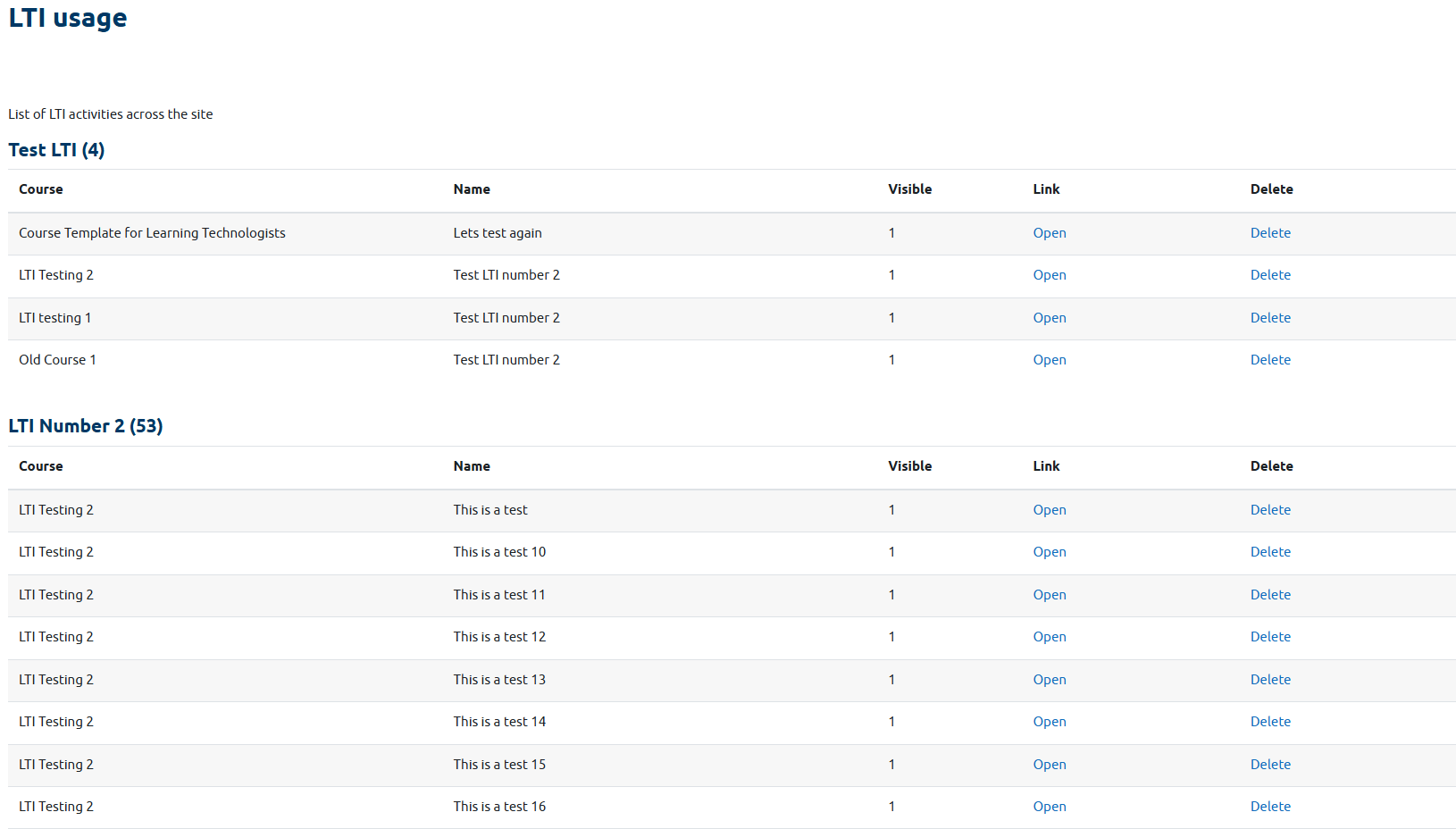
The LTI Usage plugin is a Moodle local plugin that provides administrators and managers with a comprehensive report on Learning Tools Interoperability (LTI) activities across the entire site. This plugin helps institutions track and manage their LTI tool usage effectively.
Features
LTI Activity Reporting
- Comprehensive Scanning: Scans all courses on the site to identify LTI activities
- Tool Type Organization: Groups LTI activities by tool type (pre-configured tools vs. manual/custom LTIs)
- Detailed Information: Displays course name, activity name, visibility status, and direct links to activities
- Real-time Data: Always shows current LTI usage across the site
Administrative Controls
- Delete Functionality: Site administrators can delete LTI activities directly from the report
- Access Control: Delete links are only visible to site administrators
- Confirmation Dialogs: Safe deletion with confirmation prompts
Installation
- Download the plugin files
- Extract to
local directory in your Moodle installation
- Visit Site Administration ' Notifications to complete installation
- Configure capabilities as needed
Configuration
Capabilities
local/ltiusage:viewltiusage - View the LTI usage report (assigned to managers by default)
local/ltiusage:manage - Manage plugin settings (assigned to managers by default)
Usage
Viewing LTI Usage
- Access the plugin through:
- Site Administration ' Plugins ' Local ' LTI Usage
- View organized tables of LTI activities by tool type
- Use pagination controls to navigate through large datasets
Managing LTI Activities
- For Administrators: Delete links appear in the table for direct LTI activity removal
- For Managers: View-only access to monitor LTI usage across courses
Technical Details
Requirements
- Moodle 4.5 or later
- PHP 8.0 or higher
- Database access for LTI tables
Database Tables Accessed
lti - LTI activity instances
lti_types - Pre-configured LTI tool types
course_modules - Course module information
course - Course information
AJAX Implementation
The plugin uses Moodle's AMD (Asynchronous Module Definition) system for smooth pagination:
- Prevents page refreshes during navigation
- Maintains scroll position at table top
- Handles multiple paginated tables independently
- Provides loading feedback during AJAX requests
Security Considerations
- Capability Checks: All access is controlled through Moodle capabilities
- Context Validation: Operations require appropriate system context
- Input Sanitization: All user inputs are properly sanitized
- Admin-only Actions: Delete functionality restricted to site administrators
Troubleshooting
Common Issues
Pagination Not Working
- Check browser console for JavaScript errors
- Ensure AMD modules are properly built
- Verify AJAX requests are not blocked
Delete Links Not Showing
- Confirm user is a site administrator
- Check capability assignments
- Verify Moodle version compatibility
Plugin Not Appearing in Navigation
- Clear Moodle caches
- Check navigation settings
- Verify plugin installation completed successfully
License
This plugin is licensed under the GNU GPL v3 or later.
Author
Michael Clark
michael.d.clark@glasgow.ac.uk
Version History
- 0.1 (2025-09-23): Initial alpha release
- Basic LTI usage reporting
- Pagination support
- Administrative controls
- Navigation integration