WhatsApp Messenger Block for Moodle
A Moodle block plugin that enables teachers to send WhatsApp messages to students enrolled in their courses using the WhatsApp Business API.
Features
- Send WhatsApp messages to individual students or all enrolled students
- Plugin-level configuration for WhatsApp Business API credentials
- Support for WhatsApp templates with dynamic placeholders
- Message logging for tracking sent messages
- AJAX-based interface with real-time status updates
- Uses students' phone numbers from their Moodle profile
- Multi-language support (English and Hebrew)
Requirements
- Moodle 3.9 or higher
- WhatsApp Business API account
- Access token and Phone Number ID from WhatsApp Business
Installation
- Copy the plugin folder to your Moodle installation:
{moodle}/blocks/whatsapp_messenger/
- Log in as administrator and visit the notifications page to install
- Configure the plugin settings with your WhatsApp Business API credentials
Configuration
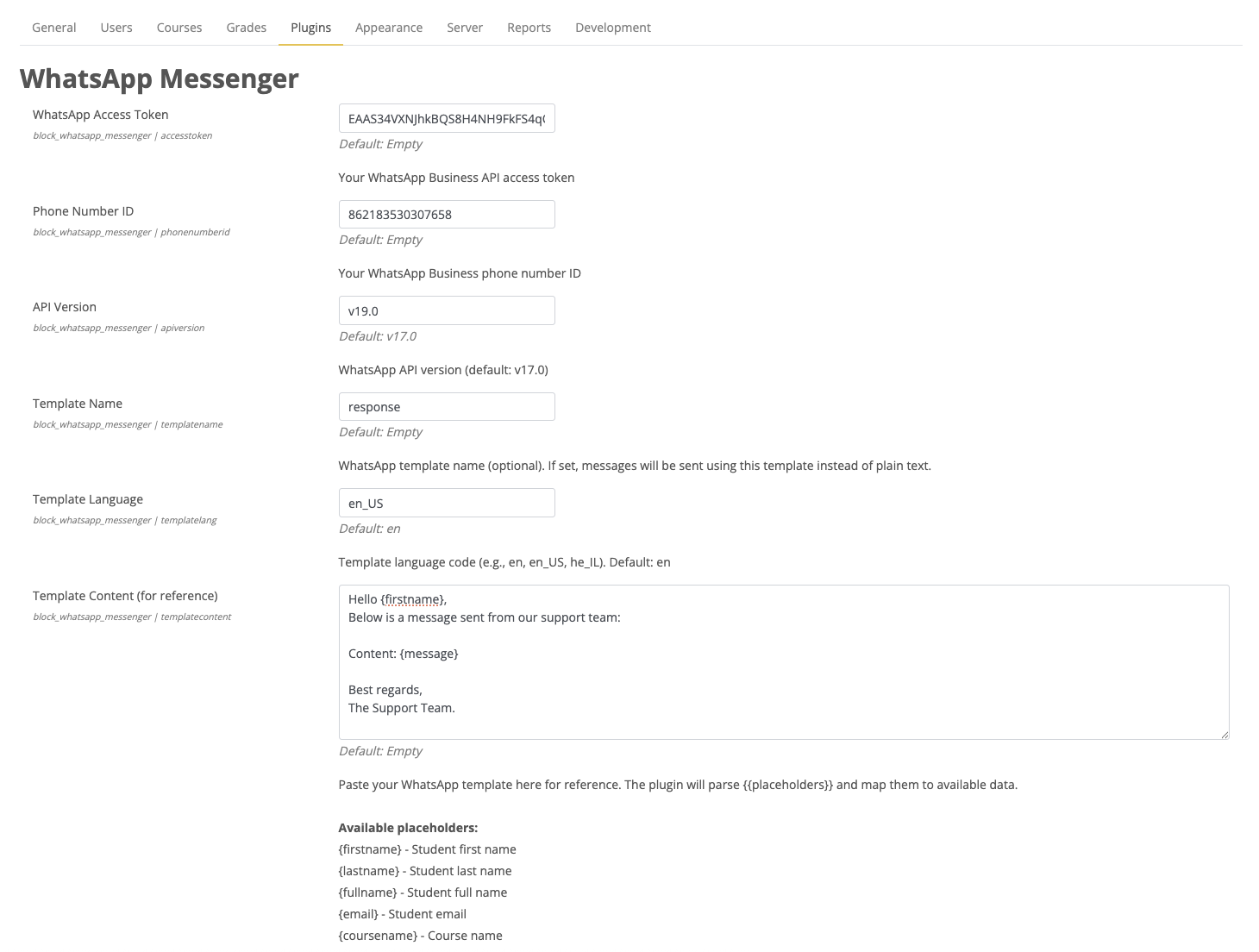
Go to Site administration > Plugins > Blocks > WhatsApp Messenger and configure:
- Access Token: Your WhatsApp Business API access token
- Phone Number ID: Your WhatsApp Business phone number ID
- API Version: WhatsApp API version (default: v17.0)
- Template Name: WhatsApp template name (optional)
- Template Language: Template language code (e.g., en_US, he_IL)
- Template Content: Paste your template for reference with available placeholders
- Debug Mode: Enable detailed logging for troubleshooting
Template Placeholders
Available placeholders for templates:
{firstname} - Student first name
{lastname} - Student last name
{fullname} - Student full name
{email} - Student email
{coursename} - Course name
{courseid} - Course ID
{courseshortname} - Course short name
{message} - The actual message content entered by the teacher
{teachername} - Teacher full name
{sitename} - Site name
{date} - Current date (short format)
{datetime} - Current date and time
{time} - Current time
Usage
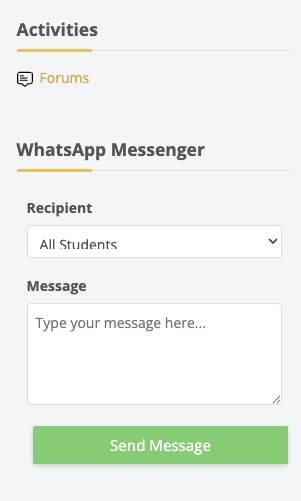
- Add the block to a course page
- Select a recipient (individual student or all students)
- Type your message
- Click "Send Message"
The plugin will send messages to students who have phone numbers in their profile (phone1 or phone2 field).
Permissions
block/whatsapp_messenger:addinstance - Add the block to a course
block/whatsapp_messenger:sendmessage - Send WhatsApp messages
Database
The plugin creates a log table block_whatsapp_messenger_log to track all sent messages.
Copyright
Copyright © 2025 CentricApp LTD
This plugin was developed by CentricApp LTD, a leading provider of educational technology solutions.
License
This program is free software: you can redistribute it and/or modify it under the terms of the GNU General Public License as published by the Free Software Foundation, either version 3 of the License, or (at your option) any later version.
This program is distributed in the hope that it will be useful, but WITHOUT ANY WARRANTY; without even the implied warranty of MERCHANTABILITY or FITNESS FOR A PARTICULAR PURPOSE. See the GNU General Public License for more details.
Support
For support and inquiries, please visit centricapp.co.il
WhatsApp Business Phone Setup / התקנת מספר ט"פון ייעודי
ע'רית:
א" את" מעונייני" "התקין מספר ט"פון ייעודי "ש"י-ת הודעות WhatsApp, אנו יכו"י" "סייע "כ" 'רכישה, קונפי'ורציה והתקנה ש" המערכת. ניתן "פנות א"ינו 'מיי":
📧 support@centricapp.co.il
English:
If you would like to set up a dedicated phone number for sending WhatsApp messages, we can assist you with purchasing, configuration, and installation of the system. Please contact us at:
📧 support@centricapp.co.il