
Reservation
Maintained by
Roberto Pinna
This activity module permits to schedule an event with a defined reservation time.
Comments
Product ratings and reviews are coming to Moodle Marketplace. Until then, existing comments remain available to read, but new posts have been disabled.
Understood you perfectly and also understood the concept. Actually after reviewing the logic I am using, reservation completion will not make sense. I have to you the attendance plugin in fact (realised this before your messege, LOL). I use your plugin and the attendance like Panini con il prosciutto crudo.
Regards
Aaron
I'm sorry but you can't do it with Reservation.
In Moodle completion is intended as a way to define when an activity should be considered completed.
In Reservation plugin the rule "Student must receive a grade to complete this activity" set reservation status to completed for a student when a teacher give a grade to that student in that reservation.
I think you can try to use Attendance plugin (https://moodle.org/plugins/mod_attendance) to achieve your goal.
HTH,
Roberto
I need that whenever someone makes a reservation, the student triggers a grade, let us say, gives him one point. This will then trigger a restriction access to something else. I have ticked both "Student must receive a grade to complete this activity" and "Student must reserve to complete this activity" but when I go and check the gradebook there is no grade. What am I doing wrong?
I shall have a course duration over 10 weeks. Each week will have one booking day per day, so that is 5 days a week (each day of that week is linked - Connect this reservation with - ). I want that once you book a day for week 1, this will then show a notification and next week booking.
Any suggestion or ideas welcome
I'm sorry but you can not add multiple reservations in a single Reservation activity.
Maybe in a future release but, at this time, that feature is not in the develop roadmap.
Regards,
Roberto
Regards,
Mike
sure, you can do it.
Admins could choose which type of events Reservation plugin should create.
This could be done under Other settings section in Site administration -> Plugins -> Activity modules -> Reservation.
HTH,
Roberto
I was wondering if it is possible to modify the plugin so that the reservation does not show up in the calendar? We have the problem that we post events that students can sign up for weeks in advance. We would only want the event time to show up on the day of the activity but not have the reservation show up in the calendar every day.
Is that possible?
Kind regards
reservation plugin get the list of managers based on course capability and display them as options in Teacher field.
You can select who needs to be notified in that field.
If no one is selected all listed users will be notified.
I can also add a plugin capability in order to list less users in that field in a future release.
HTH,
Roberto
Thanks for your contribution, this plugin is very usefull for us.
Category level managers receive notifications from this plugin. Only teachers and non-editor teachers of the course should receive notifications. My suggestion would be to add specific permissions to plugin notifications so that we can easily adjust roles later on as needed.
Let me know if that makes sense!
Tanks in advance for your answer.
Sebastien Ross,
Moodle educational consultant in Montreal, Quebec (Canada)
you can define a percentage of overbooking.
It's not a real waiting list because no messages will be sent when a reservation move from overbooking to real reservation.
HTH,
Roberto
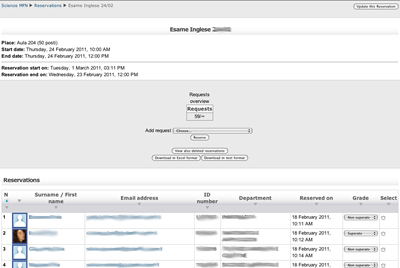
if you set the grading in reservatio settings, as for other plugins, the grading column will be shown after the event date.
No other settings are needed.
HTH,
Roberto
I have to be doing something wrong. We installed this plugin on our 3.11 system. Almost everything is working as expected. I am have an issue with the grades. I cannot figure out how to add a grade to the learner. Looking at the screenshot there is a column for the grade. I don't have that one on my system. Is there any documentation on how to configure the plugin for the grades? Thanks