CSV to Course (tool_csvtocourse)
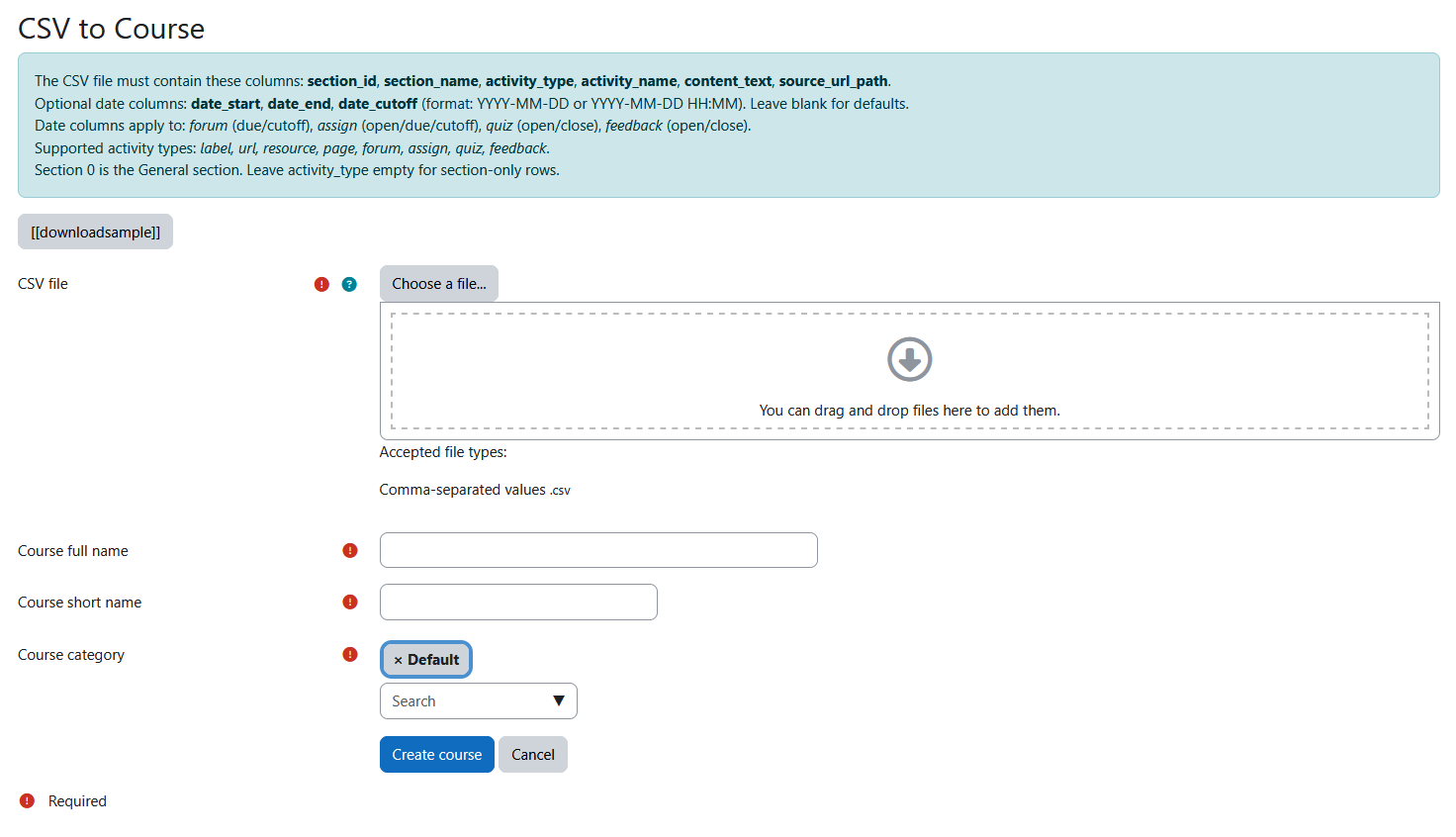
An admin tool plugin for Moodle that allows you to create fully structured courses by uploading a single CSV file. Define sections, activities, content, and dates — the plugin generates an MBZ backup internally and restores it as a new course in one step.
Features
- 8 activity types supported: label, page, url, resource, forum, assign, quiz, feedback
- Optional date columns for assignments, quizzes, forums, and feedback activities
- Topics course format with automatic section and activity ordering
- Sample CSV included — downloadable directly from the plugin page
- Multilingual — English and Spanish translations included
- Secure — requires the
tool/csvtocourse:use capability (granted to Manager role by default)
Requirements
- Moodle 4.1 or later (version 2022112800+)
- PHP 7.4 or later
- User must have the Manager role or the
tool/csvtocourse:use capability
Installation
From a ZIP file
- Download or clone this repository as a ZIP file.
- In Moodle, go to Site administration ' Plugins ' Install plugins.
- Upload the ZIP file and follow the on-screen instructions.
- Complete the upgrade process.
Manual installation
- Copy the
csvtocourse folder into your Moodle installation at:
/path/to/moodle/admin/tool/csvtocourse
- Log in as admin and go to Site administration ' Notifications to trigger the upgrade.
Usage
- Navigate to Site administration ' Courses ' CSV to Course.
- (Optional) Click Download sample CSV to get a template file you can use as a guide.
- Fill in the form:
- CSV file — Upload your CSV file.
- Course full name — The display name for the course.
- Course short name — A unique short identifier (must not already exist).
- Course category — Select where the course will be created.
- Click Create course.
- You will be redirected to the newly created course.
CSV Format
The CSV file must be UTF-8 encoded (with or without BOM) and use commas as delimiters.
Required columns
| Column | Description |
|---|---|
| section_id | Section number (integer). 0 = General section. |
| section_name | Display name for the section (e.g., "Week 1 - Introduction"). |
| activity_type | One of: label, url, resource, page, forum, assign, quiz, feedback. Leave empty for section-only rows. |
| activity_name | Display name for the activity. |
Optional columns
| Column | Description |
|---|---|
| content_text | HTML or plain text content for the activity (description, intro, page body, etc.). |
| source_url_path | URL for url activities, or file path for resource activities. |
| date_start | Start/open date. Format: YYYY-MM-DD or YYYY-MM-DD HH:MM. |
| date_end | End/due/close date. Format: YYYY-MM-DD or YYYY-MM-DD HH:MM. |
| date_cutoff | Cut-off date (assign/forum only). Format: YYYY-MM-DD or YYYY-MM-DD HH:MM. |
How dates apply to each activity type
| Activity | date_start | date_end | date_cutoff |
|---|---|---|---|
| assign | Allow submissions from | Due date | Cut-off date (falls back to date_end if blank) |
| forum | — | Due date | Cut-off date (falls back to date_end if blank) |
| quiz | Time open | Time close | — |
| feedback | Time open | Time close | — |
Leave date columns blank (or omit them entirely) to use Moodle defaults.
Section-only rows
To define a section without any activity, leave activity_type and activity_name empty:
1,Week 1 - Introduction,,,,,,,,
This is useful when you want a section to appear even if its first activity is defined in a later row.
Example
section_id,section_name,activity_type,activity_name,content_text,source_url_path,date_start,date_end,date_cutoff

0,General,label,Welcome,"<h2>Welcome to the course!</h2>",,,,

0,General,forum,General Discussion,"Ask your questions here.",,,,

1,Week 1 - HTML,,,,,,,,

1,Week 1 - HTML,page,HTML Basics,"<p>Introduction to HTML5.</p>",,,,

1,Week 1 - HTML,assign,HTML Exercise,"Create a basic HTML page.",,2026-03-02,2026-03-08 23:59,2026-03-10

1,Week 1 - HTML,quiz,HTML Quiz,"Test your HTML knowledge.",,2026-03-02,2026-03-08,

2,Week 2 - CSS,,,,,,,,

2,Week 2 - CSS,assign,CSS Exercise,"Style a web page.",,2026-03-09,2026-03-15 23:59,2026-03-17

2,Week 2 - CSS,feedback,Course Survey,"Share your feedback.",,2026-03-09,2026-03-22,
Supported activity types
| Type | Description |
|---|---|
| label | Text/HTML label displayed directly on the course page. |
| page | A single page of HTML content. |
| url | A link to an external URL. |
| resource | A file resource (placeholder — the file itself is not uploaded via CSV). |
| forum | A standard discussion forum. |
| assign | An assignment with submission settings (online text + file upload enabled). |
| quiz | A quiz shell (questions must be added manually after course creation). |
| feedback | A feedback/survey activity. |
File structure
csvtocourse/

"── classes/

│   "── form/

│   │   └── upload_form.php        # Upload form definition

│   └── mbz_generator.php         # Core MBZ generation logic

"── db/

│   └── access.php                # Capability definitions

"── lang/

│   "── en/

│   │   └── tool_csvtocourse.php  # English strings

│   └── es/

│       └── tool_csvtocourse.php  # Spanish strings

"── sample/

│   └── sample_course.csv         # Downloadable sample CSV

"── download_sample.php           # Sample CSV download handler

"── index.php                     # Main page (form + processing)

"── settings.php                  # Admin menu registration

"── version.php                   # Plugin version info

└── README.md
License
This plugin is licensed under the GNU GPL v3 or later.
Author
Román Huerta Manrique