CSV User Sync icon

CSV User Sync

Maintained by Salvatore Salvatore
Moodle local plugin that synchronizes users and manual course enrolments from a CSV source. It supports user creation and updates, enrolment creation/update/removal, dry-run mode, detailed logging, and a secure onboarding email flow for new users.
Price option: Free

Supports Moodle 4.4-5.1 See all versions
Latest release: 4 months ago
Installations: 2
Downloads (last 90 days): 92

Frankenstyle name: local_csv_user_sync
Local plugins

Description

CSV User Sync (local_csv_user_sync)

local_csv_user_sync is a Moodle local plugin that synchronizes users and manual course enrolments from a CSV source.

It supports user creation and updates, enrolment creation/update/removal, dry-run mode, detailed logging, and a secure onboarding email flow for new users.

Features

  • Imports users from CSV into Moodle.
  • Updates existing users (optionally only when values changed).
  • Synchronizes manual enrolments by course shortname and role shortname.
  • Supports enrolment suspension and deletion flags.
  • Can auto-create missing manual enrolment instances for courses.
  • Supports CSV source from:
    • absolute file path, or
    • uploaded file in plugin settings.
  • Supports configurable delimiter and encoding (UTF-8, ISO-8859-1, Windows-1252, auto).
  • Validates CSV structure and required headers before processing.
  • Supports Moodle custom profile fields from CSV.
  • Provides downloadable CSV template (including custom profile fields).
  • Includes dry-run mode (simulate actions without writing data).
  • Uses task-level locking to prevent concurrent sync runs.
  • Logs to both mtrace and plugin DB table (local_cus_log).
  • Includes GDPR privacy provider for exported/deleted user-related log data.

Requirements

  • Moodle 4.5 branch or newer ($plugin->requires = 2024100700).
  • Plugin component: local_csv_user_sync.

Installation

  1. Copy the plugin into:
    • local/csv_user_sync
  2. Visit:
    • Site administration -> Notifications
  3. Complete database upgrade if prompted.

Configuration

Path:

  • Site administration -> Plugins -> Local plugins -> CSV User Sync

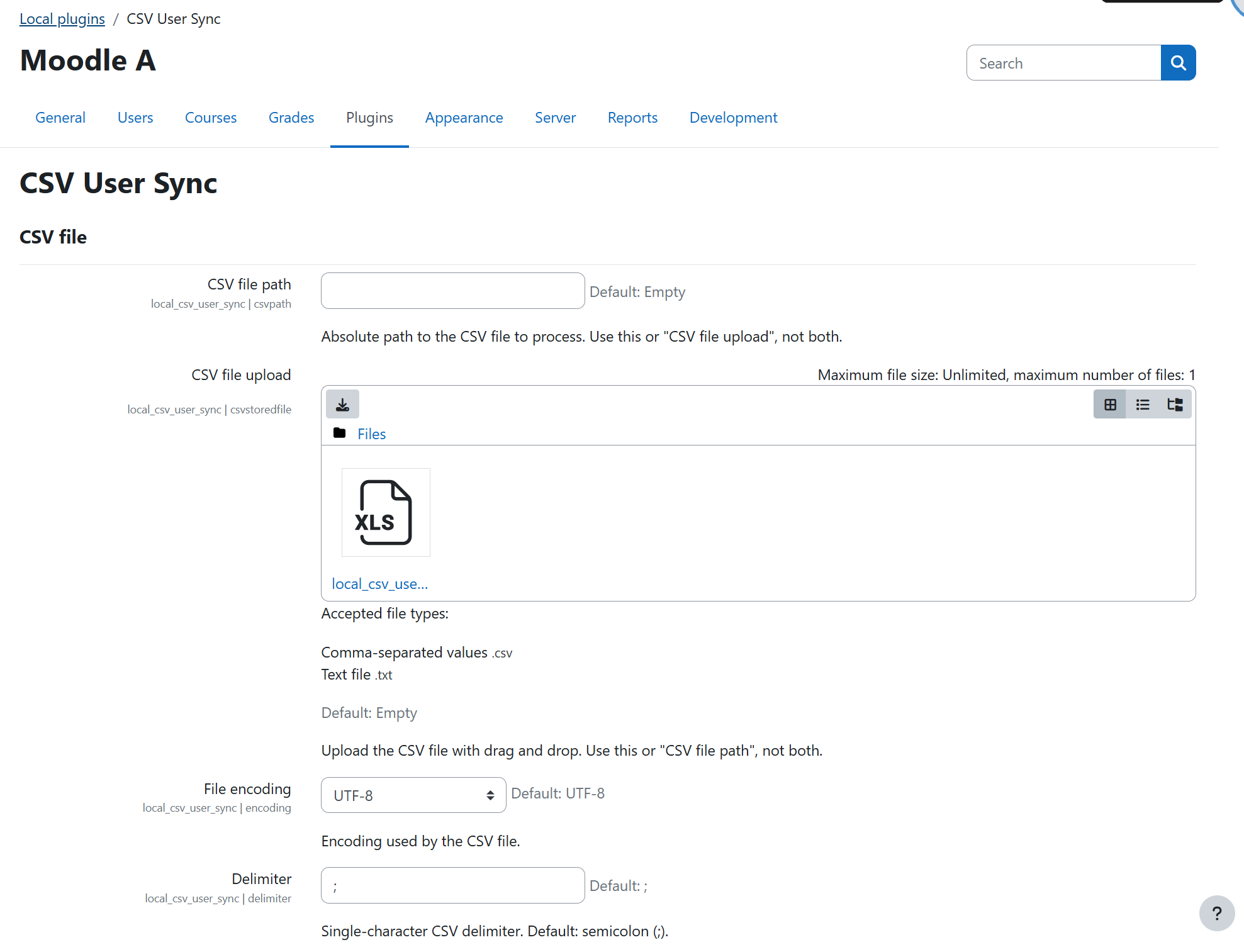
1) CSV Source (exactly one)

Configure only one source:

  • CSV file path (absolute path), or
  • CSV file upload (stored file area csvsource)

If both or neither are set, the task stops with a configuration error.

2) Parser Options

  • File encoding: UTF-8, ISO-8859-1, Windows-1252, auto
  • Delimiter: single character (default ;)

3) Authentication and New User Email

  • Default authentication method: used when CSV auth is empty or invalid.
  • Send credentials email: for newly created users.
  • Email template: supports placeholders:
    • {{firstname}}
    • {{lastname}}
    • {{username}}
    • {{setpasswordurl}}
    • {{sitename}}
    • {{loginurl}}
  • Legacy compatibility:
    • {{password}} is still accepted as an alias for {{setpasswordurl}}.

4) Sync Behavior

  • Update only changed data
  • Detailed logging
  • Dry-run mode

CSV Format

Header normalization

Headers are normalized before matching:

  • lowercase
  • spaces/hyphens converted to _
  • non [a-z0-9_] characters removed
  • UTF-8 BOM removed from first header

Example:

  • Course Shortname -> course_shortname

Required headers

These headers must exist:

  • username
  • firstname
  • lastname
  • email

Enrolment headers must be paired:

  • course_shortname and role_shortname must both be present if either is present.

Supported user headers

  • username
  • firstname
  • lastname
  • email
  • auth
  • city
  • country
  • lang
  • idnumber
  • institution
  • department
  • phone1
  • phone2
  • address

Supported enrolment headers

  • course_shortname
  • role_shortname
  • enrol_start_date (alias: start_date)
  • enrol_end_date (alias: end_date)
  • suspended (0 or 1, empty treated as 0)
  • deleted (0 or 1, empty treated as 0)

Custom profile fields

Two ways are accepted:

  • profile_field_<shortname>
  • <shortname> (if it is not a reserved/system header and matches an existing profile field)

Accepted date formats

  • Y-m-d (example 2026-02-18)
  • d.m.Y (example 18.02.2026)
  • d/m/Y (example 18/02/2026)
  • YYYYMMDD (example 20260218)
  • Unix timestamp (seconds, 10 digits)
  • Unix timestamp (milliseconds, 13 digits)
  • Empty value means 0 (no date)

Runtime Behavior

For each row:

  1. Validate mandatory user values.
  2. Create or update user.
  3. If course shortname is present, process enrolment.

Enrolment logic highlights:

  • If deleted = 1: remove existing manual enrolment.
  • If suspended = 1: set enrolment to suspended.
  • If enrolment exists and start/end dates are empty: preserve existing dates.
  • If role changes, plugin enforces exactly one manual role assignment for that instance.

If a manual enrolment instance is missing on a target course, the plugin creates one (unless dry-run).

Security Notes

  • Template download endpoint requires:
    • authenticated session
    • valid sesskey
    • moodle/site:config capability
  • Plugin file serving is restricted to system context and moodle/site:config.
  • User data from CSV is sanitized before writes.
  • New user:
    • It sends a one-time password setup/reset URL ({{setpasswordurl}}) when supported by user auth.
    • Falls back to login URL when reset links are not available.
  • Exception messages are sanitized before persistent logging to reduce sensitive path leakage.

Logging and Privacy

Logs are written to:

  • mtrace output
  • local_cus_log table (runid, level, rownum, userid, username, message, timecreated)

Privacy support:

  • Plugin declares metadata and supports export/deletion for user-related records in local_cus_log.

Scheduled Task

Task class:

  • \local_csv_user_sync\task\sync_task

Default schedule:

  • random minute / random hour, daily (R R * * *)

Manual execution example:

php admin/cli/scheduled_task.php --execute="\\local_csv_user_sync\\task\\sync_task"
 

Dry-run Mode

When enabled:

  • no DB writes for users/enrolments
  • actions are simulated and logged
  • enrolment for newly "created" dry-run users is skipped because no real user ID exists

Troubleshooting

Common checks:

  • Ensure exactly one CSV source is configured.
  • Ensure delimiter is exactly one character.
  • Ensure required headers exist.
  • Ensure course_shortname and role_shortname are both present for enrolment imports.
  • Ensure role shortnames and course shortnames exist in Moodle.
  • Ensure uploaded file still exists in plugin file storage.

Contributors

Awards

Privacy friendly