
Anoop Kakkur Rich Text Editor
Versions
Current version
3.1.7 (2026032409)
3.1.7
Plugin type: Text editors
Frankenstyle component name: editor_customeditor
Version build number: 2026032409
Version release name: 3.1.7
Maturity: Stable
Supported Moodle versions: 4.1, 4.2, 4.3, 4.4, 4.5, 5.0, 5.1, 5.2
Repository URL (Git): https://github.com/ianoop007/moodle-editor_customeditor.git
Repository branch:
Repository tag:
Issue/bug tracker URL: https://github.com/ianoop007/moodle-editor_customeditor/issues/1
3.1.6 (2026032408)
3.1.6
Plugin type: Text editors
Frankenstyle component name: editor_customeditor
Version build number: 2026032408
Version release name: 3.1.6
Maturity: Stable
Supported Moodle versions: 4.1, 4.2, 4.3, 4.4, 4.5, 5.0, 5.1, 5.2
Repository URL (Git): https://github.com/ianoop007/moodle-editor_customeditor.git
Repository branch:
Repository tag:
Issue/bug tracker URL: https://github.com/ianoop007/moodle-editor_customeditor/issues/1
Changelog
v3.1.6 (2026-07-12)
Plugin version: 2026032408
Fixed
- File Picker "none of your repositories" error — the file picker opened but showed
no repositories becauselib.phpwas ignoring the$fpoptionsparameter passed by
Moodle. The file picker now receives the full repository configuration (Private Files,
Course Files, Recent Files, Wikimedia Commons, and all admin-configured repositories). lib.phpnow passes$fpoptionsto JavaScript viawindow.customeditorFpOptionsamd/src/editor.jsreads Moodle's image file picker config with correctrepositories,
context, anditemidinstead of guessing- Changed
accepted_typesfrom array of extensions to'image'string (Moodle's expected format) - Falls back to borrowing config from existing file pickers on the page, then to minimal config
Changed
amd/src/editor.js— file picker initialization rewritten. Requires AMD rebuild (Grunt).- Version:
2026032407'2026032408, release:3.1.5'3.1.6
v3.1.5 (2026-07-05)
Plugin version: 2026032407
Added
- Browse Moodle Files — new "📁 Browse Moodle" button in the image insertion modal.
Opens Moodle's built-in file picker (M.core_filepicker) so users can browse
Private Files, Course Files, Recent Files, and all configured repositories
without leaving the editor. Selected file URL is automatically filled into
the Image URL field with preview. - Clickable images (Link URL) — new "Link URL" field in the image insertion
modal. When filled, the inserted image is wrapped in an<a>tag with
target="_blank"andrel="noopener", making it clickable. Works with both
URL and file upload images. - PostMessage bridge between editor iframe and parent Moodle page for file
picker communication (customeditor-filepicker/customeditor-filepicker-response)
Changed
amd/src/editor.js— added M.core_filepicker integration with postMessage listener.
Requires AMD rebuild (Grunt).editor.html— image modal enhanced with Browse button, Link URL field, and
postMessage listener for file picker responses- Version:
2026032406'2026032407, release:3.1.4'3.1.5
v3.1.4 (2026-07-02)
Plugin version: 2026032406
Added
- H5P Content embedding — new Insert ' 🎓 H5P Content menu item with modal dialog.
Supports Moodle Content Bank URLs, H5P.org embed/share URLs, and H5P activity URLs.
H5P iframes are marked withdata-h5panddata-editor-embedattributes so the
sanitiser preserves them. Admin-configurable viaenable_h5psetting. enable_h5padmin setting with language strings in settings.php and lib.php- H5P modal with usage instructions for Content Bank, H5P.org, and activity URLs
Fixed
- Autosave stale draft restore — draft restore now checks both the editor content
and the parent Moodle textarea before restoring. If Moodle pre-fills the editor with
existing content, the old draft is cleared instead of overwriting it. Fixes the issue
where editing an existing Forum post, Diary entry, or HotQuestion would load stale
content from a previous session. - Iframe/embed insertion — editor-inserted iframes are now marked with
data-editor-embed="1"attribute and always preserved by the HTML sanitiser.
Previously, iframes inserted via Insert ' Iframe were stripped on source-mode toggle
or paste operations. - Expanded iframe domain allowlist — 25+ educational platform domains added:
H5P.org, CodePen, JSFiddle, CodeSandbox, StackBlitz, Padlet, Canva, Genially, Prezi,
SlideShare, Google Maps, Spotify, Anchor.fm, SoundCloud, TED, EdPuzzle, Nearpod,
Quizlet, Kahoot, Mentimeter, Slido. - Same-origin iframes — iframes pointing to the same Moodle domain (e.g. Moodle's
own H5P embed endpoint/h5p/embed.php) are now always allowed by the sanitiser. - CSP frame-src — Content Security Policy updated from a strict domain allowlist
to'self' https: http:to support external educational embeds. Security is maintained
via thesandboxattribute on all non-H5P iframes. - H5P iframe sandbox removed — H5P iframes no longer have the restrictive
sandbox
attribute, which was preventing media playback, form submission (quizzes), and
fullscreen. Addedallow="autoplay; fullscreen; microphone"instead.
Security
- Unknown-domain iframes now receive a
sandbox="allow-scripts allow-same-origin allow-popups"attribute instead of being removed entirely. This allows content to
render while restricting dangerous capabilities.
Changed
- Version:
2026032402'2026032406, release:3.1.0'3.1.4 - Video embed domain list expanded to include H5P.org, CodePen, JSFiddle
- Insert menu: H5P Content item added after Video Embed in Content section
v3.1.0 (2026-03-25) — Phonetic Keyboard (jQuery.IME)
Plugin version: 2026032402
Added
Phonetic keyboard — new toolbar control group for typing Indian and
international scripts using a standard keyboard. Powered by jQuery.IME
(Wikimedia Foundation, MIT/GPL v2+, bundled inlib/ime/).
Toolbar UX — the IME group uses clear labels so users never confuse
it with Font Family, Font Size, or Voice Language controls:
- [ ⌨ Phonetic ] button — shows "Phonetic - On" when active (highlighted blue)
- Script Language: label + dropdown — shows only admin-enabled languages
- Input Method: label + dropdown — shows all methods for chosen language;
hidden when language has only one method
19 admin-configurable languages (Site Admin ' Plugins ' Text Editors):
- Malayalam
ml— on by default (Transliteration, InScript, InScript 2) - Tamil
ta— on by default (Transliteration, Tamil99, InScript, Bamini, InScript 2) - Hindi
hi— on by default (Transliteration, InScript, Bolnagri, Phonetic, InScript 2) - Telugu
te— on by default (Transliteration, InScript, InScript 2, Apple, Modular) - Kannada
kn— on by default (Transliteration, InScript, KGP, InScript 2) - Bengali, Gujarati, Punjabi, Urdu, Assamese, Odia, Marathi, Sanskrit — off by default
- Arabic, Persian, Russian, Greek, Chinese Simplified, German — off by default
- Malayalam
localStorage persistence — last used language and method remembered
per language independently across sessions
Mutual exclusion — activating IME stops voice typing; activating voice
typing stops IME
Ctrl+M shortcut to toggle IME (built into jQuery.IME)
db/upgrade.phpv3.1.0 block — unconditional defaults, no false guard
thirdpartylibs.xml— jQuery.IME entry (MIT licence)
.eslintignore/.stylelintignore— excludelib/ime/from CI linting
Changed
- version:
2026032401'2026032402, release:3.0.0'3.1.0
v3.0.0 (2026-03-24) — Voice Typing
Plugin version: 2026032401
Added
- Voice typing — microphone button in the editor toolbar for speech-to-text dictation.
Uses the browser built-in Web Speech API. No API key, no third-party service, no cost. - 19 admin-configurable languages under
Site Administration ' Plugins ' Text Editors ' Anoop Kakkur Rich Text Editor:
- English India
en-IN, English USen-US, English UKen-GB— on by default - Malayalam
ml-IN(മലയാളം), Tamilta-IN(தமிழ்), Hindihi-IN(हिंदी) — on by default - Telugu
te-IN, Kannadakn-IN, Bengalibn-IN, Urduur-PK— off by default - Arabic
ar-SA, Frenchfr-FR, Spanishes-ES, Germande-DE— off by default - Japanese
ja-JP, Chinesezh-CN, Portuguesept-BR, Russianru-RU, Koreanko-KR— off by default
- English India
- Language labels shown in native script in the dropdown.
- Voice status bar — amber bar with pulsing red dot, Listening text, live interim transcript, and Stop button.
- Auto-restart on Android Chrome (browser stops recognition after each utterance).
- Graceful degradation — mic button greyed with tooltip on unsupported browsers.
- Descriptive error messages for permission denied, no microphone, network error.
db/upgrade.php— new file; force-sets all voice defaults on upgrade from v2.0.5.
Fixed
- PHP 8.1+ fatal crash on install —
lib.phpuse_editor()hadarray $options = null
(non-nullable typed hint). PHP 8.1+ treats this as a fatal inheritance violation under the
stricter class-loading triggered by the upgrade cycle. Fixed by removing the type hint
entirely:$options = null. Compatible with PHP 8.0–8.4 and Moodle 4.1–5.2.
Technical — Web Speech API
- No API key or registration required.
- Browser support: Chrome 25+, Edge 79+, Safari 14.1+.
Firefox: enablemedia.webspeech.recognition.enableinabout:config. - HTTPS required (all production Moodle installations already use HTTPS).
- Microphone permission: browser prompts on first use, one-time grant.
- Audio streamed by browser directly to Google speech servers (Chrome/Edge).
No audio passes through Moodle or this plugin.
Install checklist
- Upload zip —
Site Administration ' Install plugin Site Administration ' Notifications(runs upgrade.php, writes language defaults to DB)Site Administration ' Development ' Purge all caches- Browser hard reload:
Ctrl+Shift+R
Changed
- Version
2026032400'2026032401(release2.0.5'3.0.0) lib.php:use_editor()type hint removed; voice keys added to settings URL paramssettings.php: Voice Typing section with master toggle + 19 language checkboxeslang/en/editor_customeditor.php: 42 new strings, alphabetically sortedstyles.css: voice mic button, status bar, pulse animation, dark mode (1331 lines)editor.html: Permissions-Policy meta, voice toolbar group, status bar, init IIFE,
SpeechRecognition engineamd/src/editor.js:allow="microphone"on iframe element (requires Grunt rebuild)db/upgrade.php: new file
v2.0.5 (2026-03-24) — Bug Fixes & CI Improvements
Fixed
- Debug mode deprecation notice: Migrated
before_footercallback to Moodle 4.4+
Hooks API (db/hooks.php+classes/hook_callbacks.php). Legacy callback inlib.php
retained for backward compatibility with Moodle 4.1–4.3. Editor no longer triggers
E_USER_NOTICEwhen debugging is set to Developer. - Editor not loading on Moodle pages: Fixed race condition where
js_amd_inline()
was not guaranteed to execute before the AMDinit()module. Replaced with
js_init_code()which runs synchronously before AMD modules, using a
window.customeditorUrlsglobal object to pass the editor URL. - js_call_amd argument exceeding 1024 characters: Moved the long settings URL out
ofjs_call_amdarguments. Settings are now passed viajs_init_code()and only the
element ID is sent tojs_call_amd. - Editor window not resizable: The iframe wrapper now uses
resize: verticalwith
overflow: hiddenandmin-height: 200px. The border is on the wrapper so the native
browser resize grip is visible. - PHP Lint errors:
namespacedeclarations must precededefined('MOODLE_INTERNAL')
in namespaced files. Fixed ineditor_test.phpandprivacy/provider.php. - PHPUnit class-not-found errors: Added
setUpBeforeClass()with
require_once(lib.php)and fixed\editor_customeditor_before_footer()call with
global namespace prefix. - CodeSniffer violations: Added space after
functionkeyword ininstall.php
anonymous function. Removed unnecessaryMOODLE_INTERNALfrom namespaced class files.
Fixed blank line after opening brace ineditor_test.php. - Behat test failure: Changed assertion from checking text inside the editor iframe
(not visible to Behat) to verifying the editor iframe element exists on the page. - CI PostgreSQL version: Upgraded from
postgres:13topostgres:14to satisfy
Moodle 5.0+ requirement (minimum PostgreSQL 14).
Added
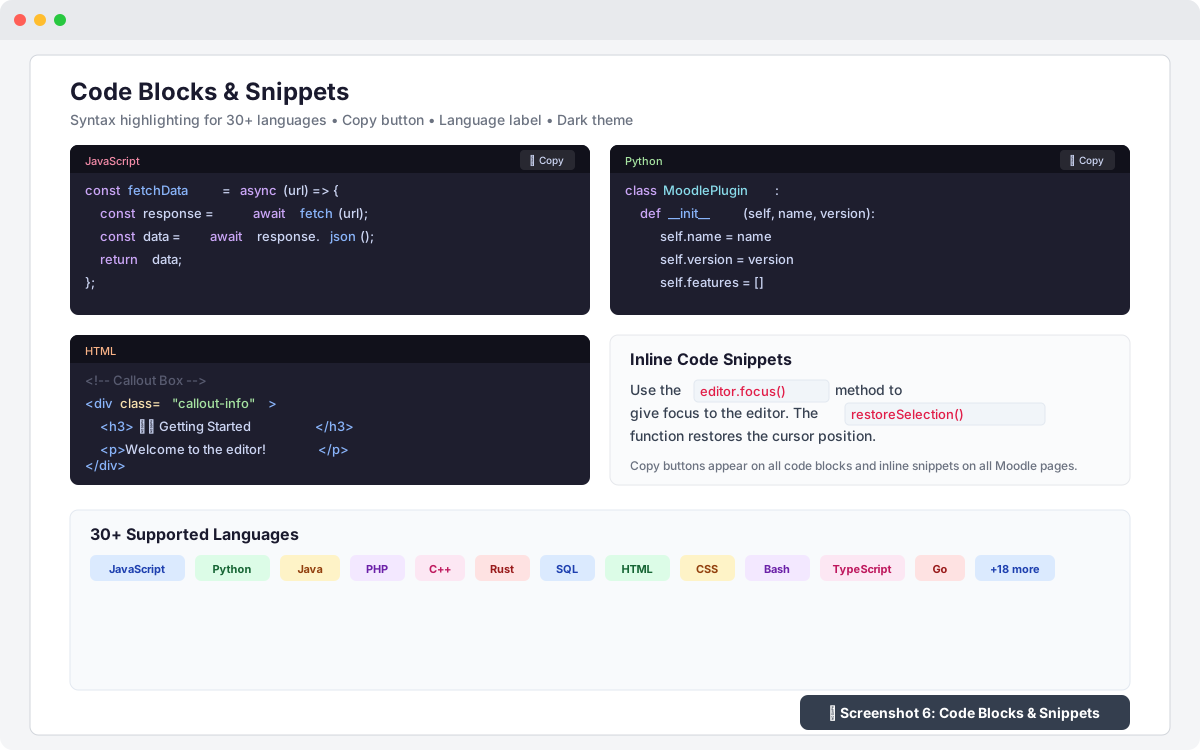
- Code option in block Format dropdown (
<pre><code>styled block with monospace font,
background shading, and border) db/hooks.php— hook callback registration for Moodle 4.4+ Hooks APIclasses/hook_callbacks.php— new-style hook callback class- AMD build sourcemap files (
.map) foreditor.min.jsandcopybuttons.min.js - Behat faildump upload step in CI workflow (screenshots retained 7 days)
- Cancelled job failure step in CI workflow
Changed
- Version bumped to 2.0.5 (plugin version: 2026032400)
- CI workflow updated to official
moodlehq/moodle-plugin-cigha.dist.ymltemplate - CI uses
if: ${{ !cancelled() }}instead ofif: ${{ always() }} - CI uses
--max-warnings 0onphpcsandphpdocsteps (strict mode) - CI PostgreSQL image upgraded from 13 to 14
editor.jsAMD module reads editor URL fromwindow.customeditorUrlsglobal
(set byjs_init_code) instead ofjs_call_amdargument
v2.0.0 (2026-03-20) — Major Feature Release
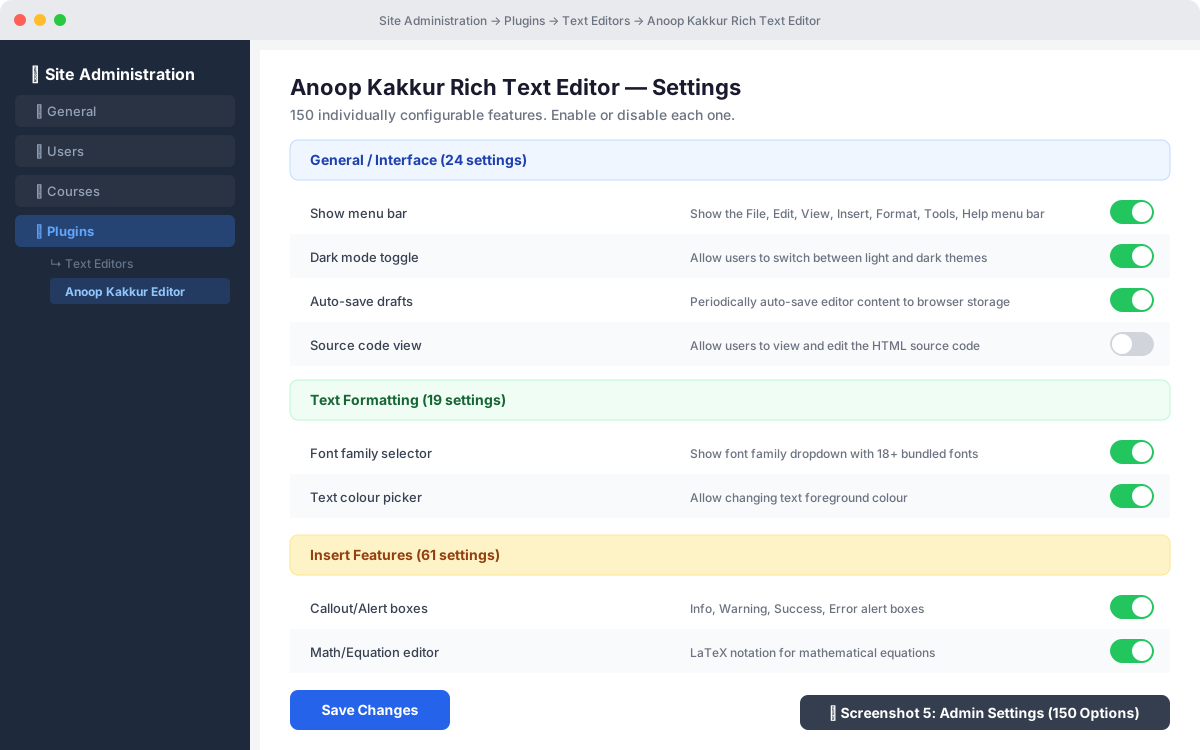
120 New Features Added (all with admin settings toggles)
General / Interface (16 new)
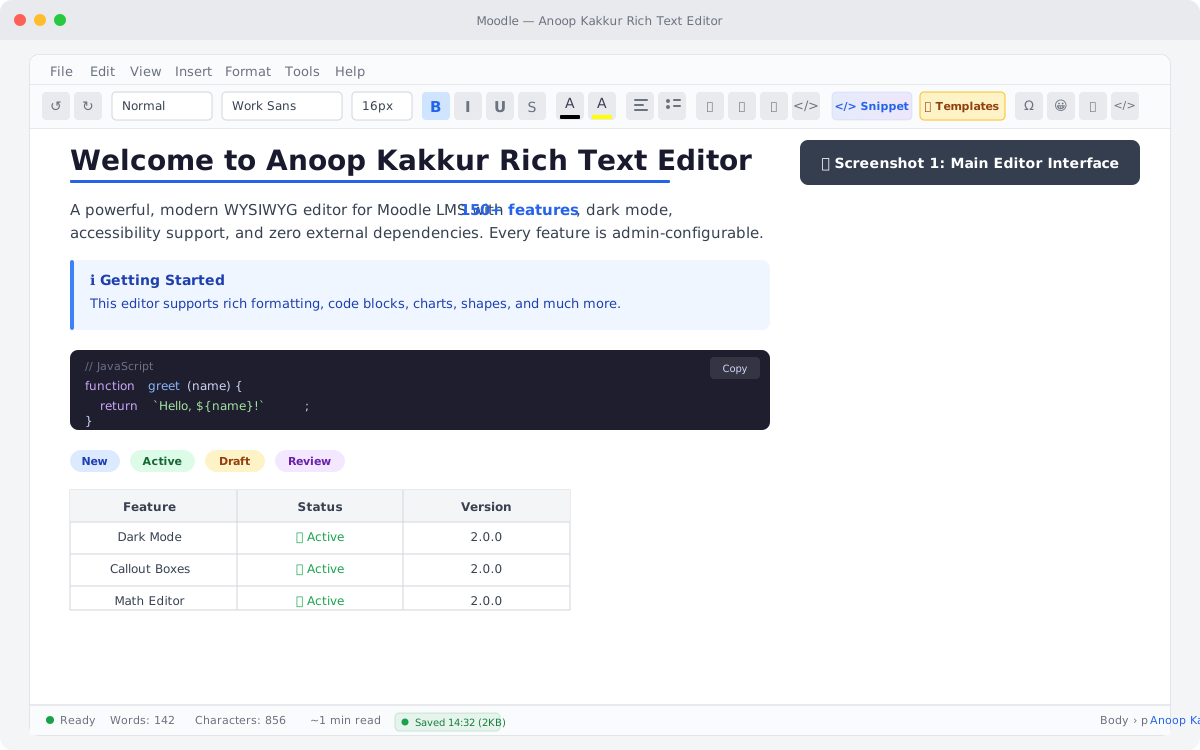
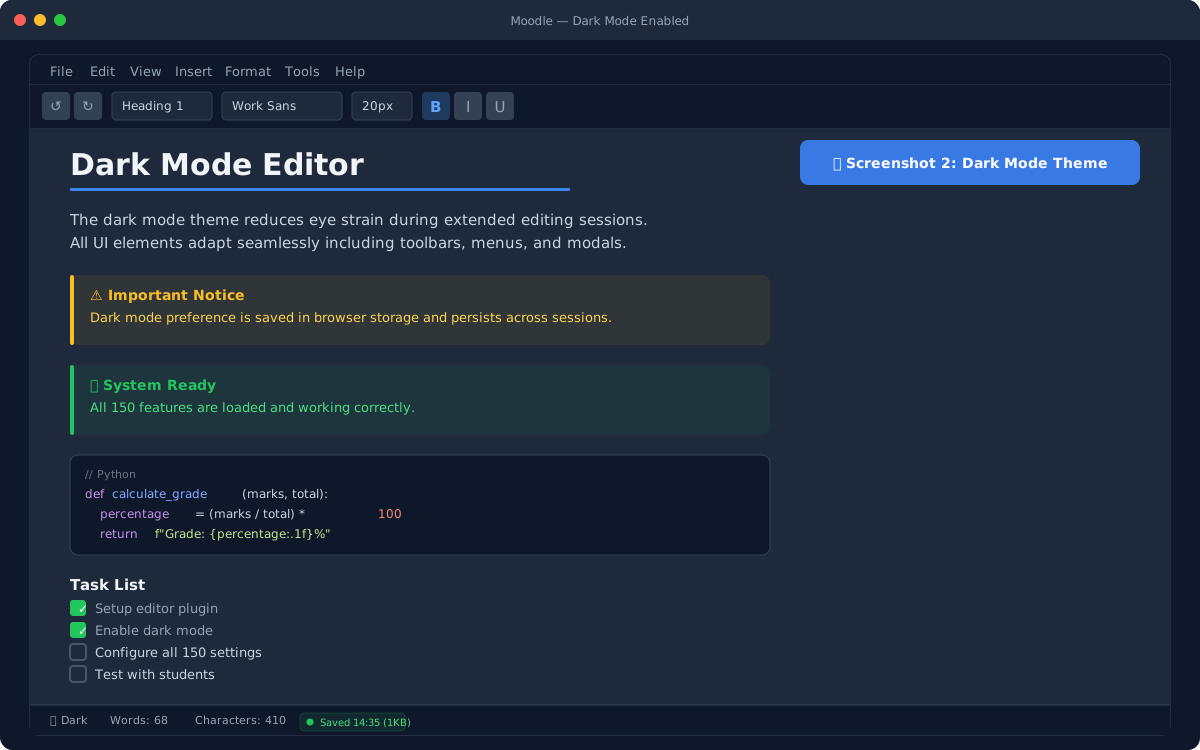
- Dark mode / theme toggle with localStorage persistence
- Spell check toggle (on/off)
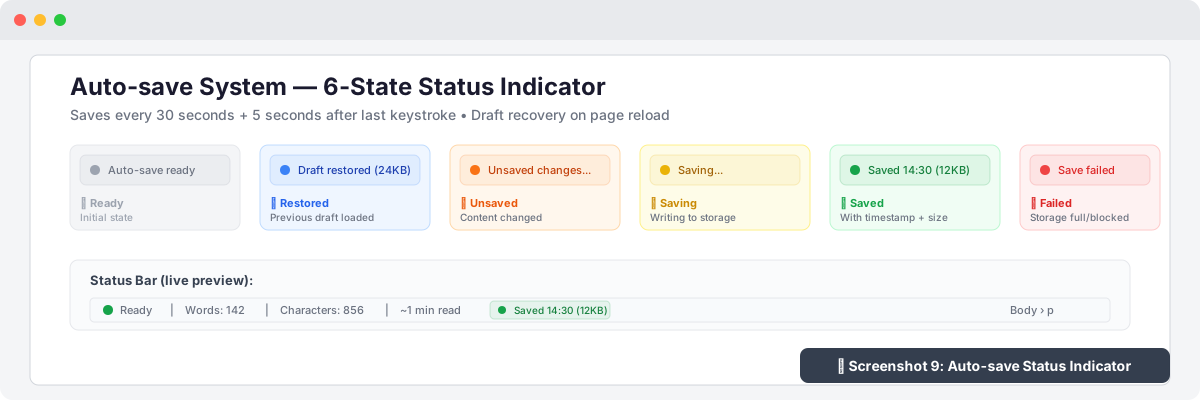
- Auto-save drafts every 30s with draft recovery
- Reading time estimate in status bar
- Keyboard accessibility mode (ARIA roles, labels, tabindex)
- Focus / Typewriter mode (dims all but current paragraph)
- Line numbers toggle
- Zoom controls (50%–200%)
- Reading progress bar
- Paste as plain text global toggle
- Auto-correct / Auto-replace common symbols
- Floating toolbar near selected text
- Clickable element breadcrumb in status bar
- Mini map / Document overview
- Split view (source + preview)
- Distraction-free writing mode
Text Formatting (12 new)
- Text case transform (UPPERCASE, lowercase, Title Case, Sentence case)
- Text direction RTL/LTR toggle
- Drop cap (large first letter)
- Small caps text styling
- Letter and word spacing controls
- Text shadow effects
- Paragraph spacing (before/after)
- Editor background colour
- Custom CSS class application
- Gradient text colouring
- Per-block text direction
- Transliteration helper (English ' Malayalam/Hindi)
- Quick format painter
Insert Features (38 new)
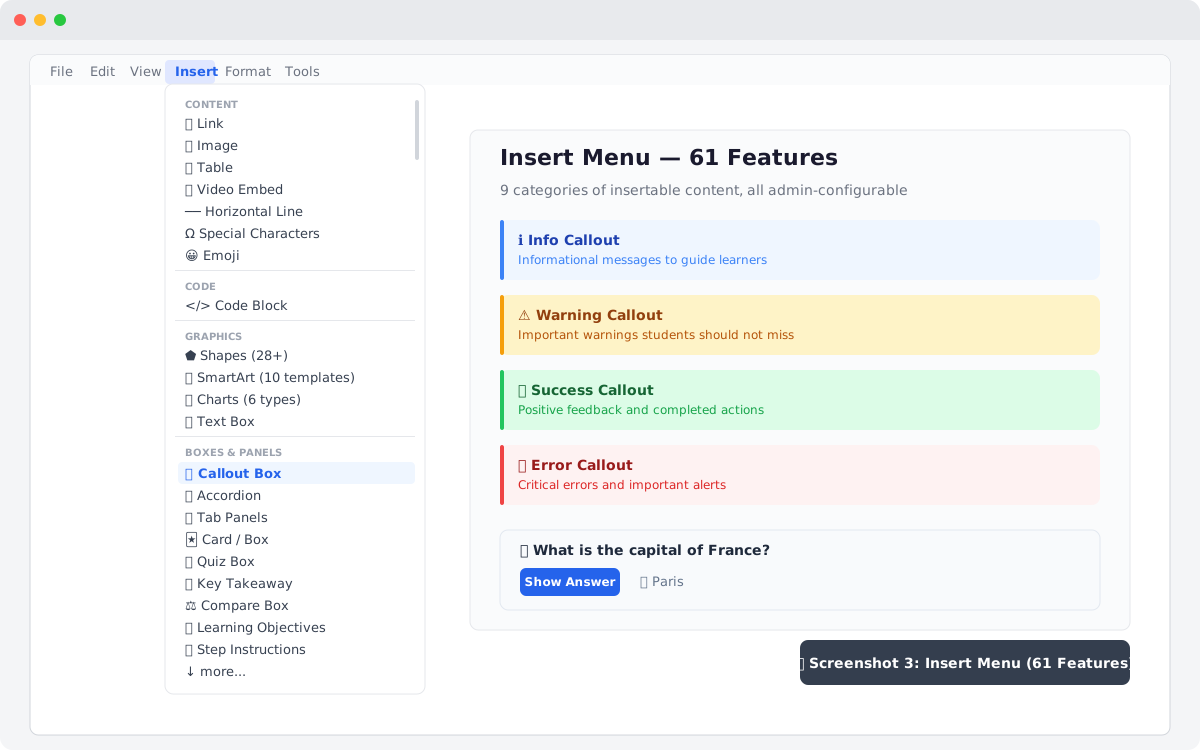
- Callout / Alert boxes (Info, Warning, Success, Error)
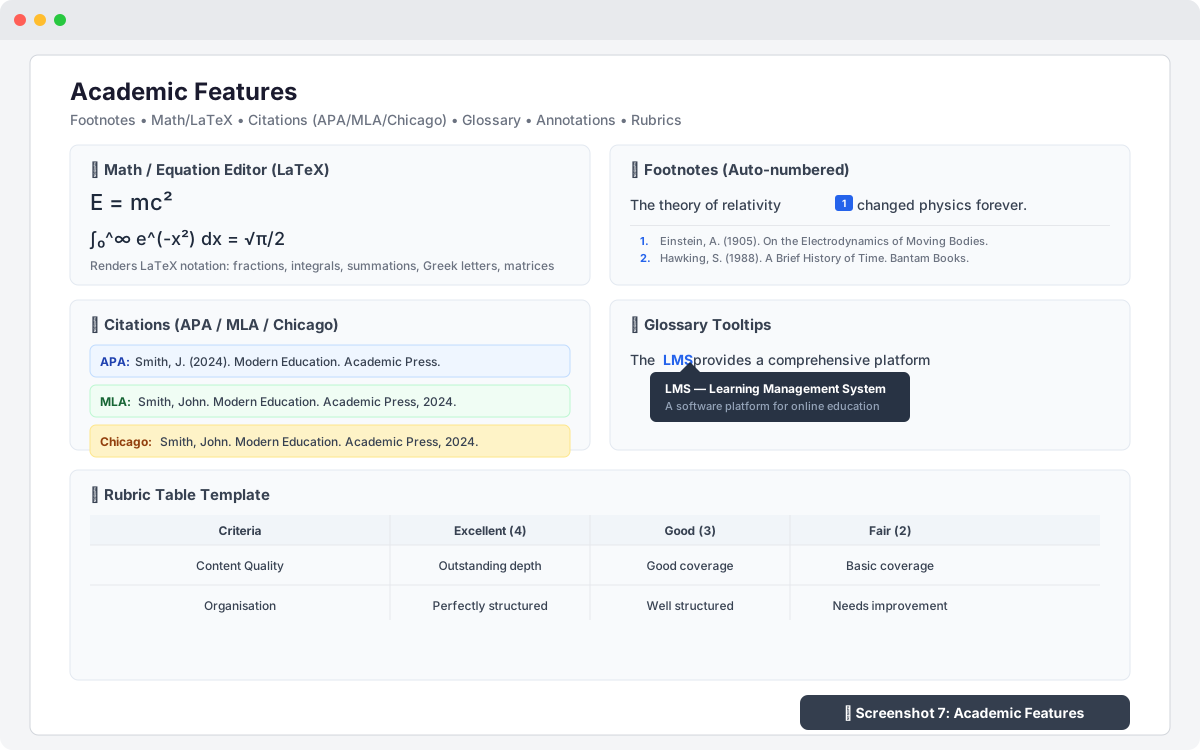
- Footnotes with auto-numbering
- Definition lists (term/description pairs)
- Accordion / Collapsible sections
- Badges / Tags (6 colours)
- Math / Equation editor (LaTeX notation)
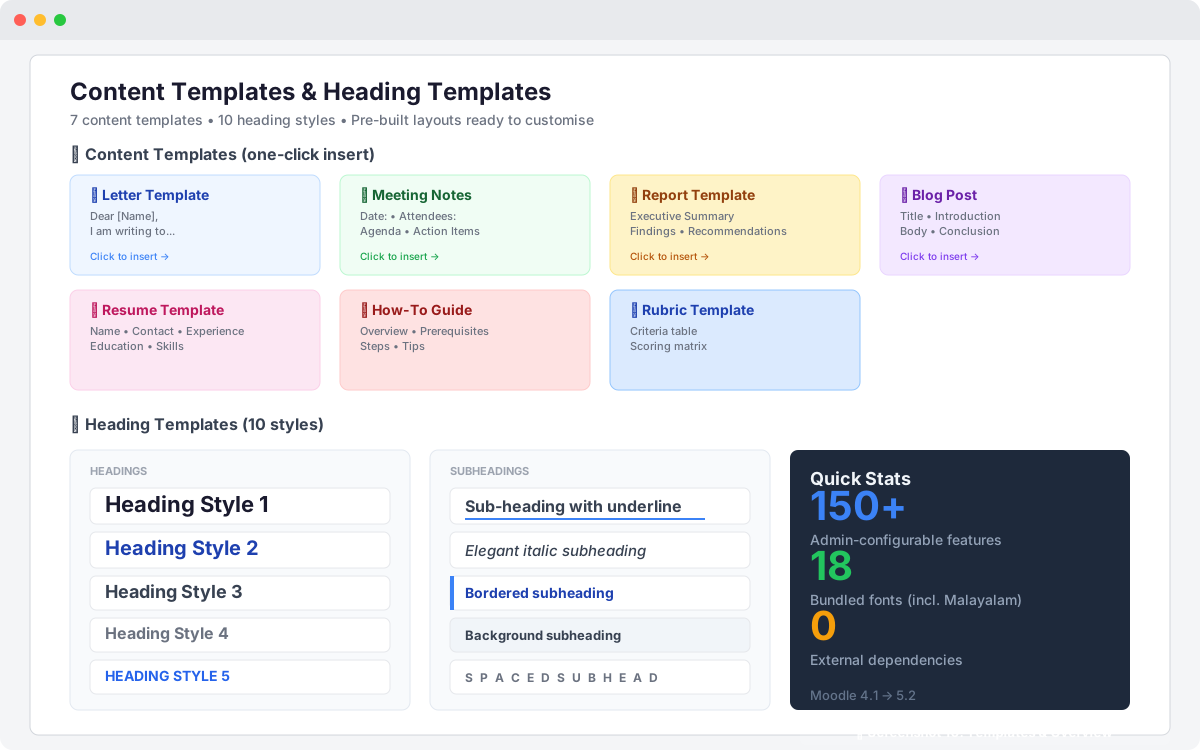
- Content templates (Letter, Meeting, Report, Resume, Blog, How-To, Rubric)
- Highlight annotations with hover tooltips
- Image captions
- Image gallery / Grid layouts
- Audio embed (HTML5 player)
- File attachment styled links
- Blockquote with citation attribution
- Figure with figcaption (HTML5)
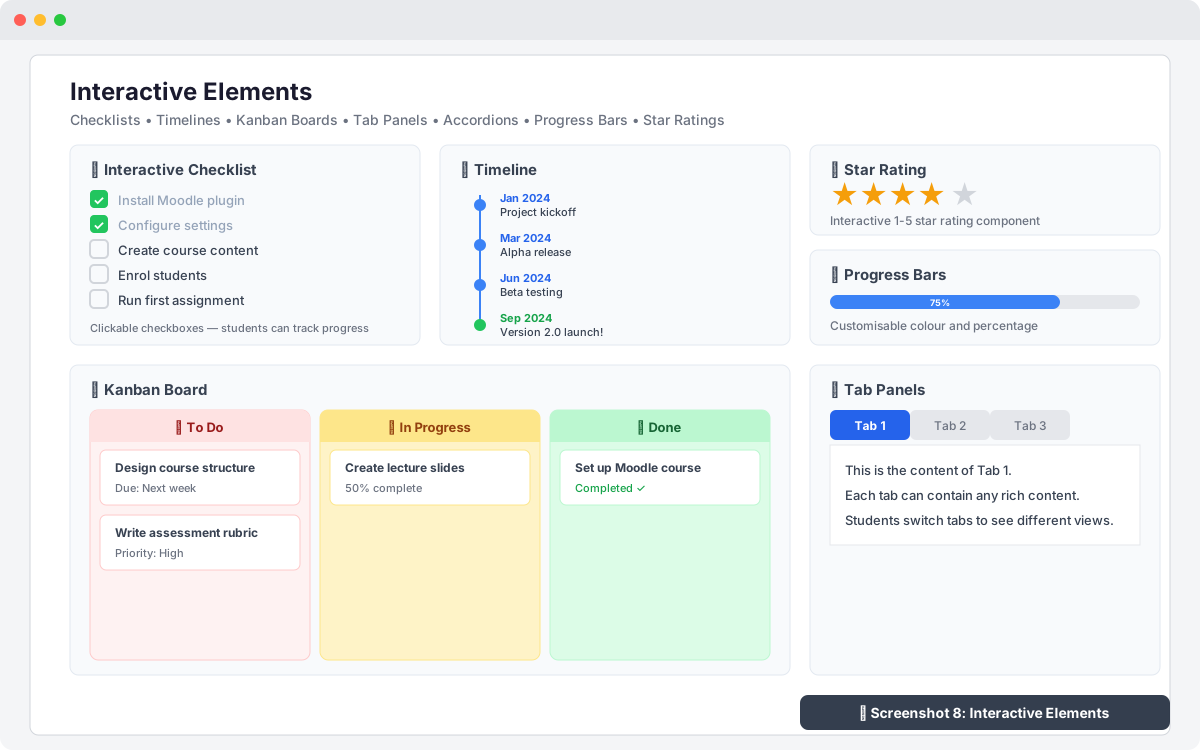
- Progress bars (percentage display)
- Timeline (vertical event timeline)
- Tab panels (tabbed content)
- Checklist / Task lists (interactive checkboxes)
- Content divider with label
- Placeholder / Merge fields ({{name}}, {{date}})
- Date/Time quick-insert
- Lorem ipsum generator (1-5 paragraphs)
- Card / Box component
- Kanban board (To Do, In Progress, Done)
- Star rating display (1-5 stars)
- Glossary tooltip terms
- Citation / Reference insert (APA, MLA, Chicago)
- QR code generator from URL/text
- Quiz / Question reveal boxes
- Step-by-step instruction boxes
- Key takeaway / Summary boxes
- Compare / Versus side-by-side boxes
- Rubric table templates
- Learning objective boxes
- Table cell merge/split
- Table sorting (alphabetical/numerical)
- Table styling presets
- Non-breaking space insert
- Anchor links / Bookmarks
- Endnote section (separate from footnotes)
- Index / Keyword tagging
- JSON/XML syntax viewer
- Mermaid diagram support
- ASCII art boxes
- Colour palette swatches
- Social media embeds
- Google Maps embeds
- oEmbed auto-detection
- Moodle activity linker
- Divider patterns (extended decorative)
Document Features (8 new)
- Heading auto-numbering (1.0, 1.1, 1.2...)
- Document properties (title, author, metadata)
- Multi-page / Section navigator
- Running header/footer (per-section)
- Page numb
3.1.5 (2026032407)
3.1.5
Plugin type: Text editors
Frankenstyle component name: editor_customeditor
Version build number: 2026032407
Version release name: 3.1.5
Maturity: Stable
Supported Moodle versions: 4.1, 4.2, 4.3, 4.4, 4.5, 5.0, 5.1, 5.2
Repository URL (Git): https://github.com/ianoop007/moodle-editor_customeditor.git
Repository branch:
Repository tag:
Issue/bug tracker URL: https://github.com/ianoop007/moodle-editor_customeditor/issues/1
Changelog
v3.1.5 (2026-07-05)
Plugin version: 2026032407
Added
- Browse Moodle Files — new "📁 Browse Moodle" button in the image insertion modal.
Opens Moodle's built-in file picker (M.core_filepicker) so users can browse
Private Files, Course Files, Recent Files, and all configured repositories
without leaving the editor. Selected file URL is automatically filled into
the Image URL field with preview. - Clickable images (Link URL) — new "Link URL" field in the image insertion
modal. When filled, the inserted image is wrapped in an<a>tag with
target="_blank"andrel="noopener", making it clickable. Works with both
URL and file upload images. - PostMessage bridge between editor iframe and parent Moodle page for file
picker communication (customeditor-filepicker/customeditor-filepicker-response)
Changed
amd/src/editor.js— added M.core_filepicker integration with postMessage listener.
Requires AMD rebuild (Grunt).editor.html— image modal enhanced with Browse button, Link URL field, and
postMessage listener for file picker responses- Version:
2026032406'2026032407, release:3.1.4'3.1.5
v3.1.4 (2026-07-02)
Plugin version: 2026032406
Added
- H5P Content embedding — new Insert ' 🎓 H5P Content menu item with modal dialog.
Supports Moodle Content Bank URLs, H5P.org embed/share URLs, and H5P activity URLs.
H5P iframes are marked withdata-h5panddata-editor-embedattributes so the
sanitiser preserves them. Admin-configurable viaenable_h5psetting. enable_h5padmin setting with language strings in settings.php and lib.php- H5P modal with usage instructions for Content Bank, H5P.org, and activity URLs
Fixed
- Autosave stale draft restore — draft restore now checks both the editor content
and the parent Moodle textarea before restoring. If Moodle pre-fills the editor with
existing content, the old draft is cleared instead of overwriting it. Fixes the issue
where editing an existing Forum post, Diary entry, or HotQuestion would load stale
content from a previous session. - Iframe/embed insertion — editor-inserted iframes are now marked with
data-editor-embed="1"attribute and always preserved by the HTML sanitiser.
Previously, iframes inserted via Insert ' Iframe were stripped on source-mode toggle
or paste operations. - Expanded iframe domain allowlist — 25+ educational platform domains added:
H5P.org, CodePen, JSFiddle, CodeSandbox, StackBlitz, Padlet, Canva, Genially, Prezi,
SlideShare, Google Maps, Spotify, Anchor.fm, SoundCloud, TED, EdPuzzle, Nearpod,
Quizlet, Kahoot, Mentimeter, Slido. - Same-origin iframes — iframes pointing to the same Moodle domain (e.g. Moodle's
own H5P embed endpoint/h5p/embed.php) are now always allowed by the sanitiser. - CSP frame-src — Content Security Policy updated from a strict domain allowlist
to'self' https: http:to support external educational embeds. Security is maintained
via thesandboxattribute on all non-H5P iframes. - H5P iframe sandbox removed — H5P iframes no longer have the restrictive
sandbox
attribute, which was preventing media playback, form submission (quizzes), and
fullscreen. Addedallow="autoplay; fullscreen; microphone"instead.
Security
- Unknown-domain iframes now receive a
sandbox="allow-scripts allow-same-origin allow-popups"attribute instead of being removed entirely. This allows content to
render while restricting dangerous capabilities.
Changed
- Version:
2026032402'2026032406, release:3.1.0'3.1.4 - Video embed domain list expanded to include H5P.org, CodePen, JSFiddle
- Insert menu: H5P Content item added after Video Embed in Content section
v3.1.0 (2026-03-25) — Phonetic Keyboard (jQuery.IME)
Plugin version: 2026032402
Added
Phonetic keyboard — new toolbar control group for typing Indian and
international scripts using a standard keyboard. Powered by jQuery.IME
(Wikimedia Foundation, MIT/GPL v2+, bundled inlib/ime/).
Toolbar UX — the IME group uses clear labels so users never confuse
it with Font Family, Font Size, or Voice Language controls:
- [ ⌨ Phonetic ] button — shows "Phonetic - On" when active (highlighted blue)
- Script Language: label + dropdown — shows only admin-enabled languages
- Input Method: label + dropdown — shows all methods for chosen language;
hidden when language has only one method
19 admin-configurable languages (Site Admin ' Plugins ' Text Editors):
- Malayalam
ml— on by default (Transliteration, InScript, InScript 2) - Tamil
ta— on by default (Transliteration, Tamil99, InScript, Bamini, InScript 2) - Hindi
hi— on by default (Transliteration, InScript, Bolnagri, Phonetic, InScript 2) - Telugu
te— on by default (Transliteration, InScript, InScript 2, Apple, Modular) - Kannada
kn— on by default (Transliteration, InScript, KGP, InScript 2) - Bengali, Gujarati, Punjabi, Urdu, Assamese, Odia, Marathi, Sanskrit — off by default
- Arabic, Persian, Russian, Greek, Chinese Simplified, German — off by default
- Malayalam
localStorage persistence — last used language and method remembered
per language independently across sessions
Mutual exclusion — activating IME stops voice typing; activating voice
typing stops IME
Ctrl+M shortcut to toggle IME (built into jQuery.IME)
db/upgrade.phpv3.1.0 block — unconditional defaults, no false guard
thirdpartylibs.xml— jQuery.IME entry (MIT licence)
.eslintignore/.stylelintignore— excludelib/ime/from CI linting
Changed
- version:
2026032401'2026032402, release:3.0.0'3.1.0
v3.0.0 (2026-03-24) — Voice Typing
Plugin version: 2026032401
Added
- Voice typing — microphone button in the editor toolbar for speech-to-text dictation.
Uses the browser built-in Web Speech API. No API key, no third-party service, no cost. - 19 admin-configurable languages under
Site Administration ' Plugins ' Text Editors ' Anoop Kakkur Rich Text Editor:
- English India
en-IN, English USen-US, English UKen-GB— on by default - Malayalam
ml-IN(മലയാളം), Tamilta-IN(தமிழ்), Hindihi-IN(हिंदी) — on by default - Telugu
te-IN, Kannadakn-IN, Bengalibn-IN, Urduur-PK— off by default - Arabic
ar-SA, Frenchfr-FR, Spanishes-ES, Germande-DE— off by default - Japanese
ja-JP, Chinesezh-CN, Portuguesept-BR, Russianru-RU, Koreanko-KR— off by default
- English India
- Language labels shown in native script in the dropdown.
- Voice status bar — amber bar with pulsing red dot, Listening text, live interim transcript, and Stop button.
- Auto-restart on Android Chrome (browser stops recognition after each utterance).
- Graceful degradation — mic button greyed with tooltip on unsupported browsers.
- Descriptive error messages for permission denied, no microphone, network error.
db/upgrade.php— new file; force-sets all voice defaults on upgrade from v2.0.5.
Fixed
- PHP 8.1+ fatal crash on install —
lib.phpuse_editor()hadarray $options = null
(non-nullable typed hint). PHP 8.1+ treats this as a fatal inheritance violation under the
stricter class-loading triggered by the upgrade cycle. Fixed by removing the type hint
entirely:$options = null. Compatible with PHP 8.0–8.4 and Moodle 4.1–5.2.
Technical — Web Speech API
- No API key or registration required.
- Browser support: Chrome 25+, Edge 79+, Safari 14.1+.
Firefox: enablemedia.webspeech.recognition.enableinabout:config. - HTTPS required (all production Moodle installations already use HTTPS).
- Microphone permission: browser prompts on first use, one-time grant.
- Audio streamed by browser directly to Google speech servers (Chrome/Edge).
No audio passes through Moodle or this plugin.
Install checklist
- Upload zip —
Site Administration ' Install plugin Site Administration ' Notifications(runs upgrade.php, writes language defaults to DB)Site Administration ' Development ' Purge all caches- Browser hard reload:
Ctrl+Shift+R
Changed
- Version
2026032400'2026032401(release2.0.5'3.0.0) lib.php:use_editor()type hint removed; voice keys added to settings URL paramssettings.php: Voice Typing section with master toggle + 19 language checkboxeslang/en/editor_customeditor.php: 42 new strings, alphabetically sortedstyles.css: voice mic button, status bar, pulse animation, dark mode (1331 lines)editor.html: Permissions-Policy meta, voice toolbar group, status bar, init IIFE,
SpeechRecognition engineamd/src/editor.js:allow="microphone"on iframe element (requires Grunt rebuild)db/upgrade.php: new file
v2.0.5 (2026-03-24) — Bug Fixes & CI Improvements
Fixed
- Debug mode deprecation notice: Migrated
before_footercallback to Moodle 4.4+
Hooks API (db/hooks.php+classes/hook_callbacks.php). Legacy callback inlib.php
retained for backward compatibility with Moodle 4.1–4.3. Editor no longer triggers
E_USER_NOTICEwhen debugging is set to Developer. - Editor not loading on Moodle pages: Fixed race condition where
js_amd_inline()
was not guaranteed to execute before the AMDinit()module. Replaced with
js_init_code()which runs synchronously before AMD modules, using a
window.customeditorUrlsglobal object to pass the editor URL. - js_call_amd argument exceeding 1024 characters: Moved the long settings URL out
ofjs_call_amdarguments. Settings are now passed viajs_init_code()and only the
element ID is sent tojs_call_amd. - Editor window not resizable: The iframe wrapper now uses
resize: verticalwith
overflow: hiddenandmin-height: 200px. The border is on the wrapper so the native
browser resize grip is visible. - PHP Lint errors:
namespacedeclarations must precededefined('MOODLE_INTERNAL')
in namespaced files. Fixed ineditor_test.phpandprivacy/provider.php. - PHPUnit class-not-found errors: Added
setUpBeforeClass()with
require_once(lib.php)and fixed\editor_customeditor_before_footer()call with
global namespace prefix. - CodeSniffer violations: Added space after
functionkeyword ininstall.php
anonymous function. Removed unnecessaryMOODLE_INTERNALfrom namespaced class files.
Fixed blank line after opening brace ineditor_test.php. - Behat test failure: Changed assertion from checking text inside the editor iframe
(not visible to Behat) to verifying the editor iframe element exists on the page. - CI PostgreSQL version: Upgraded from
postgres:13topostgres:14to satisfy
Moodle 5.0+ requirement (minimum PostgreSQL 14).
Added
- Code option in block Format dropdown (
<pre><code>styled block with monospace font,
background shading, and border) db/hooks.php— hook callback registration for Moodle 4.4+ Hooks APIclasses/hook_callbacks.php— new-style hook callback class- AMD build sourcemap files (
.map) foreditor.min.jsandcopybuttons.min.js - Behat faildump upload step in CI workflow (screenshots retained 7 days)
- Cancelled job failure step in CI workflow
Changed
- Version bumped to 2.0.5 (plugin version: 2026032400)
- CI workflow updated to official
moodlehq/moodle-plugin-cigha.dist.ymltemplate - CI uses
if: ${{ !cancelled() }}instead ofif: ${{ always() }} - CI uses
--max-warnings 0onphpcsandphpdocsteps (strict mode) - CI PostgreSQL image upgraded from 13 to 14
editor.jsAMD module reads editor URL fromwindow.customeditorUrlsglobal
(set byjs_init_code) instead ofjs_call_amdargument
v2.0.0 (2026-03-20) — Major Feature Release
120 New Features Added (all with admin settings toggles)
General / Interface (16 new)
- Dark mode / theme toggle with localStorage persistence
- Spell check toggle (on/off)
- Auto-save drafts every 30s with draft recovery
- Reading time estimate in status bar
- Keyboard accessibility mode (ARIA roles, labels, tabindex)
- Focus / Typewriter mode (dims all but current paragraph)
- Line numbers toggle
- Zoom controls (50%–200%)
- Reading progress bar
- Paste as plain text global toggle
- Auto-correct / Auto-replace common symbols
- Floating toolbar near selected text
- Clickable element breadcrumb in status bar
- Mini map / Document overview
- Split view (source + preview)
- Distraction-free writing mode
Text Formatting (12 new)
- Text case transform (UPPERCASE, lowercase, Title Case, Sentence case)
- Text direction RTL/LTR toggle
- Drop cap (large first letter)
- Small caps text styling
- Letter and word spacing controls
- Text shadow effects
- Paragraph spacing (before/after)
- Editor background colour
- Custom CSS class application
- Gradient text colouring
- Per-block text direction
- Transliteration helper (English ' Malayalam/Hindi)
- Quick format painter
Insert Features (38 new)
- Callout / Alert boxes (Info, Warning, Success, Error)
- Footnotes with auto-numbering
- Definition lists (term/description pairs)
- Accordion / Collapsible sections
- Badges / Tags (6 colours)
- Math / Equation editor (LaTeX notation)
- Content templates (Letter, Meeting, Report, Resume, Blog, How-To, Rubric)
- Highlight annotations with hover tooltips
- Image captions
- Image gallery / Grid layouts
- Audio embed (HTML5 player)
- File attachment styled links
- Blockquote with citation attribution
- Figure with figcaption (HTML5)
- Progress bars (percentage display)
- Timeline (vertical event timeline)
- Tab panels (tabbed content)
- Checklist / Task lists (interactive checkboxes)
- Content divider with label
- Placeholder / Merge fields ({{name}}, {{date}})
- Date/Time quick-insert
- Lorem ipsum generator (1-5 paragraphs)
- Card / Box component
- Kanban board (To Do, In Progress, Done)
- Star rating display (1-5 stars)
- Glossary tooltip terms
- Citation / Reference insert (APA, MLA, Chicago)
- QR code generator from URL/text
- Quiz / Question reveal boxes
- Step-by-step instruction boxes
- Key takeaway / Summary boxes
- Compare / Versus side-by-side boxes
- Rubric table templates
- Learning objective boxes
- Table cell merge/split
- Table sorting (alphabetical/numerical)
- Table styling presets
- Non-breaking space insert
- Anchor links / Bookmarks
- Endnote section (separate from footnotes)
- Index / Keyword tagging
- JSON/XML syntax viewer
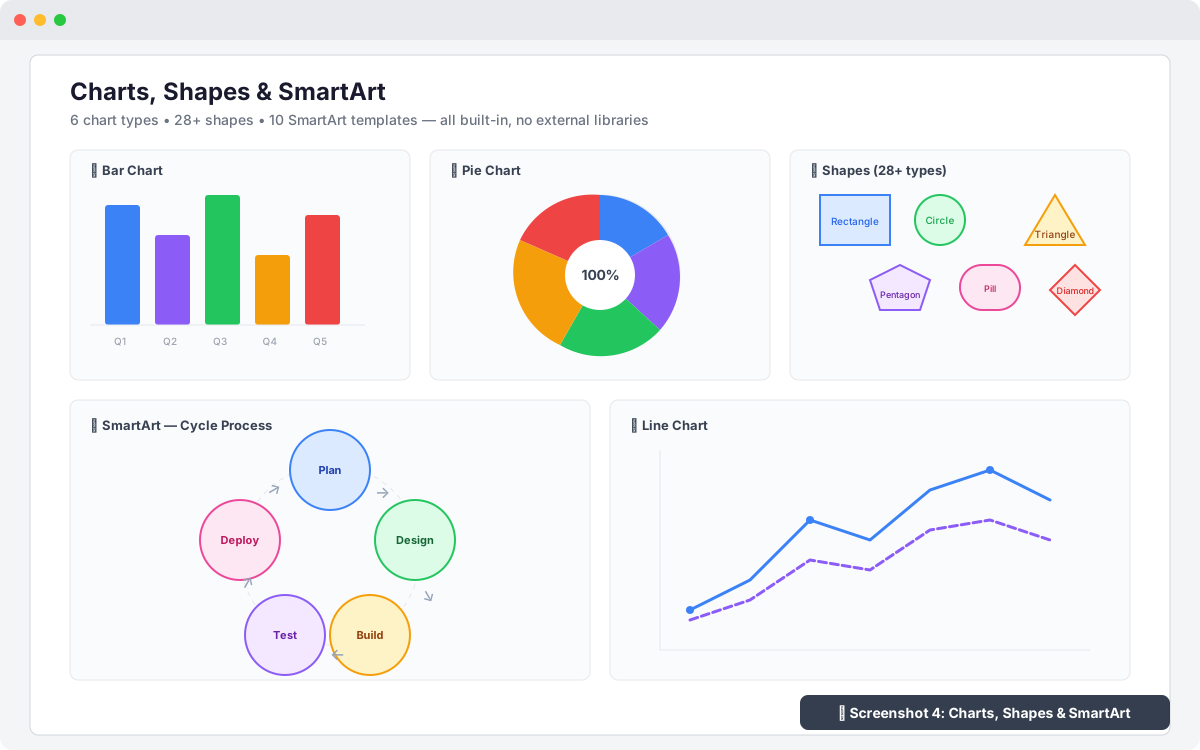
- Mermaid diagram support
- ASCII art boxes
- Colour palette swatches
- Social media embeds
- Google Maps embeds
- oEmbed auto-detection
- Moodle activity linker
- Divider patterns (extended decorative)
Document Features (8 new)
- Heading auto-numbering (1.0, 1.1, 1.2...)
- Document properties (title, author, metadata)
- Multi-page / Section navigator
- Running header/footer (per-section)
- Page number insert (Page X of Y)
- Cross-reference auto-links (See Figure 3)
Export & Import (4 new)
- Markdown import/export (full HTML ↔ MD conversion)
- Print preview with styled popup
- Export to ePub eBook format
- Export Markdown with YAML frontmatter
Advanced Tools (12 new)
- Word/Character limit warning
- Text statistics (sentences, paragraphs, readability score)
- Clipboard history (last 5 items)
- Content lock / Read-only sections
- Undo history panel
- Unicode character inspector
- Word count per language/script
- Broken link checker
- Duplicate content detector
- Word frequency analyser
- Passive voice detector
- Sentence length warning (>40 words)
- Jargon / Complexity highlighter
- Consistency checker (spelling patterns)
- Version compare / Diff view
- Toolbar customiser (drag-and-drop)
- Side panel / Inspector
Accessibility & Validation (5 new)
- Image alt text editor
- Heading level checker (hierarchy validation)
- Colour contrast checker (WCAG AA)
- Reading level indicator (Flesch-Kincaid)
- L
3.1.4 (2026032406)
3.1.4
Plugin type: Text editors
Frankenstyle component name: editor_customeditor
Version build number: 2026032406
Version release name: 3.1.4
Maturity: Stable
Supported Moodle versions: 4.1, 4.2, 4.3, 4.4, 4.5, 5.0, 5.1, 5.2
Repository URL (Git): https://github.com/ianoop007/moodle-editor_customeditor.git
Repository branch:
Repository tag:
Issue/bug tracker URL: https://github.com/ianoop007/moodle-editor_customeditor/issues/1
Changelog
v3.1.4 (2026-07-02)
Plugin version: 2026032406
Added
- H5P Content embedding — new Insert ' 🎓 H5P Content menu item with modal dialog.
Supports Moodle Content Bank URLs, H5P.org embed/share URLs, and H5P activity URLs.
H5P iframes are marked withdata-h5panddata-editor-embedattributes so the
sanitiser preserves them. Admin-configurable viaenable_h5psetting. enable_h5padmin setting with language strings in settings.php and lib.php- H5P modal with usage instructions for Content Bank, H5P.org, and activity URLs
Fixed
- Autosave stale draft restore — draft restore now checks both the editor content
and the parent Moodle textarea before restoring. If Moodle pre-fills the editor with
existing content, the old draft is cleared instead of overwriting it. Fixes the issue
where editing an existing Forum post, Diary entry, or HotQuestion would load stale
content from a previous session. - Iframe/embed insertion — editor-inserted iframes are now marked with
data-editor-embed="1"attribute and always preserved by the HTML sanitiser.
Previously, iframes inserted via Insert ' Iframe were stripped on source-mode toggle
or paste operations. - Expanded iframe domain allowlist — 25+ educational platform domains added:
H5P.org, CodePen, JSFiddle, CodeSandbox, StackBlitz, Padlet, Canva, Genially, Prezi,
SlideShare, Google Maps, Spotify, Anchor.fm, SoundCloud, TED, EdPuzzle, Nearpod,
Quizlet, Kahoot, Mentimeter, Slido. - Same-origin iframes — iframes pointing to the same Moodle domain (e.g. Moodle's
own H5P embed endpoint/h5p/embed.php) are now always allowed by the sanitiser. - CSP frame-src — Content Security Policy updated from a strict domain allowlist
to'self' https: http:to support external educational embeds. Security is maintained
via thesandboxattribute on all non-H5P iframes. - H5P iframe sandbox removed — H5P iframes no longer have the restrictive
sandbox
attribute, which was preventing media playback, form submission (quizzes), and
fullscreen. Addedallow="autoplay; fullscreen; microphone"instead.
Security
- Unknown-domain iframes now receive a
sandbox="allow-scripts allow-same-origin allow-popups"attribute instead of being removed entirely. This allows content to
render while restricting dangerous capabilities.
Changed
- Version:
2026032402'2026032406, release:3.1.0'3.1.4 - Video embed domain list expanded to include H5P.org, CodePen, JSFiddle
- Insert menu: H5P Content item added after Video Embed in Content section
v3.1.0 (2026-03-25) — Phonetic Keyboard (jQuery.IME)
Plugin version: 2026032402
Added
Phonetic keyboard — new toolbar control group for typing Indian and
international scripts using a standard keyboard. Powered by jQuery.IME
(Wikimedia Foundation, MIT/GPL v2+, bundled inlib/ime/).
Toolbar UX — the IME group uses clear labels so users never confuse
it with Font Family, Font Size, or Voice Language controls:
- [ ⌨ Phonetic ] button — shows "Phonetic - On" when active (highlighted blue)
- Script Language: label + dropdown — shows only admin-enabled languages
- Input Method: label + dropdown — shows all methods for chosen language;
hidden when language has only one method
19 admin-configurable languages (Site Admin ' Plugins ' Text Editors):
- Malayalam
ml— on by default (Transliteration, InScript, InScript 2) - Tamil
ta— on by default (Transliteration, Tamil99, InScript, Bamini, InScript 2) - Hindi
hi— on by default (Transliteration, InScript, Bolnagri, Phonetic, InScript 2) - Telugu
te— on by default (Transliteration, InScript, InScript 2, Apple, Modular) - Kannada
kn— on by default (Transliteration, InScript, KGP, InScript 2) - Bengali, Gujarati, Punjabi, Urdu, Assamese, Odia, Marathi, Sanskrit — off by default
- Arabic, Persian, Russian, Greek, Chinese Simplified, German — off by default
- Malayalam
localStorage persistence — last used language and method remembered
per language independently across sessions
Mutual exclusion — activating IME stops voice typing; activating voice
typing stops IME
Ctrl+M shortcut to toggle IME (built into jQuery.IME)
db/upgrade.phpv3.1.0 block — unconditional defaults, no false guard
thirdpartylibs.xml— jQuery.IME entry (MIT licence)
.eslintignore/.stylelintignore— excludelib/ime/from CI linting
Changed
- version:
2026032401'2026032402, release:3.0.0'3.1.0
v3.0.0 (2026-03-24) — Voice Typing
Plugin version: 2026032401
Added
- Voice typing — microphone button in the editor toolbar for speech-to-text dictation.
Uses the browser built-in Web Speech API. No API key, no third-party service, no cost. - 19 admin-configurable languages under
Site Administration ' Plugins ' Text Editors ' Anoop Kakkur Rich Text Editor:
- English India
en-IN, English USen-US, English UKen-GB— on by default - Malayalam
ml-IN(മലയാളം), Tamilta-IN(தமிழ்), Hindihi-IN(हिंदी) — on by default - Telugu
te-IN, Kannadakn-IN, Bengalibn-IN, Urduur-PK— off by default - Arabic
ar-SA, Frenchfr-FR, Spanishes-ES, Germande-DE— off by default - Japanese
ja-JP, Chinesezh-CN, Portuguesept-BR, Russianru-RU, Koreanko-KR— off by default
- English India
- Language labels shown in native script in the dropdown.
- Voice status bar — amber bar with pulsing red dot, Listening text, live interim transcript, and Stop button.
- Auto-restart on Android Chrome (browser stops recognition after each utterance).
- Graceful degradation — mic button greyed with tooltip on unsupported browsers.
- Descriptive error messages for permission denied, no microphone, network error.
db/upgrade.php— new file; force-sets all voice defaults on upgrade from v2.0.5.
Fixed
- PHP 8.1+ fatal crash on install —
lib.phpuse_editor()hadarray $options = null
(non-nullable typed hint). PHP 8.1+ treats this as a fatal inheritance violation under the
stricter class-loading triggered by the upgrade cycle. Fixed by removing the type hint
entirely:$options = null. Compatible with PHP 8.0–8.4 and Moodle 4.1–5.2.
Technical — Web Speech API
- No API key or registration required.
- Browser support: Chrome 25+, Edge 79+, Safari 14.1+.
Firefox: enablemedia.webspeech.recognition.enableinabout:config. - HTTPS required (all production Moodle installations already use HTTPS).
- Microphone permission: browser prompts on first use, one-time grant.
- Audio streamed by browser directly to Google speech servers (Chrome/Edge).
No audio passes through Moodle or this plugin.
Install checklist
- Upload zip —
Site Administration ' Install plugin Site Administration ' Notifications(runs upgrade.php, writes language defaults to DB)Site Administration ' Development ' Purge all caches- Browser hard reload:
Ctrl+Shift+R
Changed
- Version
2026032400'2026032401(release2.0.5'3.0.0) lib.php:use_editor()type hint removed; voice keys added to settings URL paramssettings.php: Voice Typing section with master toggle + 19 language checkboxeslang/en/editor_customeditor.php: 42 new strings, alphabetically sortedstyles.css: voice mic button, status bar, pulse animation, dark mode (1331 lines)editor.html: Permissions-Policy meta, voice toolbar group, status bar, init IIFE,
SpeechRecognition engineamd/src/editor.js:allow="microphone"on iframe element (requires Grunt rebuild)db/upgrade.php: new file
v2.0.5 (2026-03-24) — Bug Fixes & CI Improvements
Fixed
- Debug mode deprecation notice: Migrated
before_footercallback to Moodle 4.4+
Hooks API (db/hooks.php+classes/hook_callbacks.php). Legacy callback inlib.php
retained for backward compatibility with Moodle 4.1–4.3. Editor no longer triggers
E_USER_NOTICEwhen debugging is set to Developer. - Editor not loading on Moodle pages: Fixed race condition where
js_amd_inline()
was not guaranteed to execute before the AMDinit()module. Replaced with
js_init_code()which runs synchronously before AMD modules, using a
window.customeditorUrlsglobal object to pass the editor URL. - js_call_amd argument exceeding 1024 characters: Moved the long settings URL out
ofjs_call_amdarguments. Settings are now passed viajs_init_code()and only the
element ID is sent tojs_call_amd. - Editor window not resizable: The iframe wrapper now uses
resize: verticalwith
overflow: hiddenandmin-height: 200px. The border is on the wrapper so the native
browser resize grip is visible. - PHP Lint errors:
namespacedeclarations must precededefined('MOODLE_INTERNAL')
in namespaced files. Fixed ineditor_test.phpandprivacy/provider.php. - PHPUnit class-not-found errors: Added
setUpBeforeClass()with
require_once(lib.php)and fixed\editor_customeditor_before_footer()call with
global namespace prefix. - CodeSniffer violations: Added space after
functionkeyword ininstall.php
anonymous function. Removed unnecessaryMOODLE_INTERNALfrom namespaced class files.
Fixed blank line after opening brace ineditor_test.php. - Behat test failure: Changed assertion from checking text inside the editor iframe
(not visible to Behat) to verifying the editor iframe element exists on the page. - CI PostgreSQL version: Upgraded from
postgres:13topostgres:14to satisfy
Moodle 5.0+ requirement (minimum PostgreSQL 14).
Added
- Code option in block Format dropdown (
<pre><code>styled block with monospace font,
background shading, and border) db/hooks.php— hook callback registration for Moodle 4.4+ Hooks APIclasses/hook_callbacks.php— new-style hook callback class- AMD build sourcemap files (
.map) foreditor.min.jsandcopybuttons.min.js - Behat faildump upload step in CI workflow (screenshots retained 7 days)
- Cancelled job failure step in CI workflow
Changed
- Version bumped to 2.0.5 (plugin version: 2026032400)
- CI workflow updated to official
moodlehq/moodle-plugin-cigha.dist.ymltemplate - CI uses
if: ${{ !cancelled() }}instead ofif: ${{ always() }} - CI uses
--max-warnings 0onphpcsandphpdocsteps (strict mode) - CI PostgreSQL image upgraded from 13 to 14
editor.jsAMD module reads editor URL fromwindow.customeditorUrlsglobal
(set byjs_init_code) instead ofjs_call_amdargument
v2.0.0 (2026-03-20) — Major Feature Release
120 New Features Added (all with admin settings toggles)
General / Interface (16 new)
- Dark mode / theme toggle with localStorage persistence
- Spell check toggle (on/off)
- Auto-save drafts every 30s with draft recovery
- Reading time estimate in status bar
- Keyboard accessibility mode (ARIA roles, labels, tabindex)
- Focus / Typewriter mode (dims all but current paragraph)
- Line numbers toggle
- Zoom controls (50%–200%)
- Reading progress bar
- Paste as plain text global toggle
- Auto-correct / Auto-replace common symbols
- Floating toolbar near selected text
- Clickable element breadcrumb in status bar
- Mini map / Document overview
- Split view (source + preview)
- Distraction-free writing mode
Text Formatting (12 new)
- Text case transform (UPPERCASE, lowercase, Title Case, Sentence case)
- Text direction RTL/LTR toggle
- Drop cap (large first letter)
- Small caps text styling
- Letter and word spacing controls
- Text shadow effects
- Paragraph spacing (before/after)
- Editor background colour
- Custom CSS class application
- Gradient text colouring
- Per-block text direction
- Transliteration helper (English ' Malayalam/Hindi)
- Quick format painter
Insert Features (38 new)
- Callout / Alert boxes (Info, Warning, Success, Error)
- Footnotes with auto-numbering
- Definition lists (term/description pairs)
- Accordion / Collapsible sections
- Badges / Tags (6 colours)
- Math / Equation editor (LaTeX notation)
- Content templates (Letter, Meeting, Report, Resume, Blog, How-To, Rubric)
- Highlight annotations with hover tooltips
- Image captions
- Image gallery / Grid layouts
- Audio embed (HTML5 player)
- File attachment styled links
- Blockquote with citation attribution
- Figure with figcaption (HTML5)
- Progress bars (percentage display)
- Timeline (vertical event timeline)
- Tab panels (tabbed content)
- Checklist / Task lists (interactive checkboxes)
- Content divider with label
- Placeholder / Merge fields ({{name}}, {{date}})
- Date/Time quick-insert
- Lorem ipsum generator (1-5 paragraphs)
- Card / Box component
- Kanban board (To Do, In Progress, Done)
- Star rating display (1-5 stars)
- Glossary tooltip terms
- Citation / Reference insert (APA, MLA, Chicago)
- QR code generator from URL/text
- Quiz / Question reveal boxes
- Step-by-step instruction boxes
- Key takeaway / Summary boxes
- Compare / Versus side-by-side boxes
- Rubric table templates
- Learning objective boxes
- Table cell merge/split
- Table sorting (alphabetical/numerical)
- Table styling presets
- Non-breaking space insert
- Anchor links / Bookmarks
- Endnote section (separate from footnotes)
- Index / Keyword tagging
- JSON/XML syntax viewer
- Mermaid diagram support
- ASCII art boxes
- Colour palette swatches
- Social media embeds
- Google Maps embeds
- oEmbed auto-detection
- Moodle activity linker
- Divider patterns (extended decorative)
Document Features (8 new)
- Heading auto-numbering (1.0, 1.1, 1.2...)
- Document properties (title, author, metadata)
- Multi-page / Section navigator
- Running header/footer (per-section)
- Page number insert (Page X of Y)
- Cross-reference auto-links (See Figure 3)
Export & Import (4 new)
- Markdown import/export (full HTML ↔ MD conversion)
- Print preview with styled popup
- Export to ePub eBook format
- Export Markdown with YAML frontmatter
Advanced Tools (12 new)
- Word/Character limit warning
- Text statistics (sentences, paragraphs, readability score)
- Clipboard history (last 5 items)
- Content lock / Read-only sections
- Undo history panel
- Unicode character inspector
- Word count per language/script
- Broken link checker
- Duplicate content detector
- Word frequency analyser
- Passive voice detector
- Sentence length warning (>40 words)
- Jargon / Complexity highlighter
- Consistency checker (spelling patterns)
- Version compare / Diff view
- Toolbar customiser (drag-and-drop)
- Side panel / Inspector
Accessibility & Validation (5 new)
- Image alt text editor
- Heading level checker (hierarchy validation)
- Colour contrast checker (WCAG AA)
- Reading level indicator (Flesch-Kincaid)
- Language attribute per-selection
Security & Privacy (4 new)
- Content encryption (passphrase-based)
- Redaction tool (content removal)
- Invisible watermark (digital fingerprint)
- Export sanitiser (strip metadata)
Changed
- Version bumped to 2.0.0 (plugin version: 2026032000)
- Moodle compatibility extended to 4.1–5.2 (from 4.5–5.1)
- Settings page expanded to 150 admin toggle checkboxes + 2 text fields
- Language file expanded to 349 lines with all new strings
- lib.php settings keys array expanded to pass all 152 settings to editor iframe
- About modal updated with v2.0.0 branding and feature count
- Status bar enhanced with reading time, autosave indicator, and zoom controls
- All menus expanded (File, Edit, View, Insert, Format, Tools) with new features
- 120+ new CSS rules including full dark mode theme
Technical Details
- Dark mode uses CSS custom properties override on
body.dark-mode - All features respect admin toggle settings via
_isEnabled()check - New features use the same sanitization pipeline as existing features
- editor.html: ~5,300 lines (up from 4,784)
- settings.php: ~1,800 lines (up from 389)
- Total admin settings: 152 (150 checkboxes + 2 text fields)
v1.0.4 (2026-03-
3.1.0 (2026032402)
3.1.0
Plugin type: Text editors
Frankenstyle component name: editor_customeditor
Version build number: 2026032402
Version release name: 3.1.0
Maturity: Stable
Supported Moodle versions: 4.1, 4.2, 4.3, 4.4, 4.5, 5.0, 5.1
Repository URL (Git): https://github.com/ianoop007/moodle-editor_customeditor.git
Repository branch:
Repository tag:
Issue/bug tracker URL: https://github.com/ianoop007/moodle-editor_customeditor/issues/1
Changelog
v3.1.0 (2026-03-25) — Phonetic Keyboard (jQuery.IME)
Plugin version: 2026032402
Added
Phonetic keyboard — new toolbar control group for typing Indian and
international scripts using a standard keyboard. Powered by jQuery.IME
(Wikimedia Foundation, MIT/GPL v2+, bundled inlib/ime/).
Toolbar UX — the IME group uses clear labels so users never confuse
it with Font Family, Font Size, or Voice Language controls:
- [ ⌨ Phonetic ] button — shows "Phonetic - On" when active (highlighted blue)
- Script Language: label + dropdown — shows only admin-enabled languages
- Input Method: label + dropdown — shows all methods for chosen language;
hidden when language has only one method
19 admin-configurable languages (Site Admin ' Plugins ' Text Editors):
- Malayalam
ml— on by default (Transliteration, InScript, InScript 2) - Tamil
ta— on by default (Transliteration, Tamil99, InScript, Bamini, InScript 2) - Hindi
hi— on by default (Transliteration, InScript, Bolnagri, Phonetic, InScript 2) - Telugu
te— on by default (Transliteration, InScript, InScript 2, Apple, Modular) - Kannada
kn— on by default (Transliteration, InScript, KGP, InScript 2) - Bengali, Gujarati, Punjabi, Urdu, Assamese, Odia, Marathi, Sanskrit — off by default
- Arabic, Persian, Russian, Greek, Chinese Simplified, German — off by default
- Malayalam
localStorage persistence — last used language and method remembered
per language independently across sessions
Mutual exclusion — activating IME stops voice typing; activating voice
typing stops IME
Ctrl+M shortcut to toggle IME (built into jQuery.IME)
db/upgrade.phpv3.1.0 block — unconditional defaults, no false guard
thirdpartylibs.xml— jQuery.IME entry (MIT licence)
.eslintignore/.stylelintignore— excludelib/ime/from CI linting
Changed
- version:
2026032401'2026032402, release:3.0.0'3.1.0
v3.0.0 (2026-03-24) — Voice Typing
Plugin version: 2026032401
Added
- Voice typing — microphone button in the editor toolbar for speech-to-text dictation.
Uses the browser built-in Web Speech API. No API key, no third-party service, no cost. - 19 admin-configurable languages under
Site Administration ' Plugins ' Text Editors ' Anoop Kakkur Rich Text Editor:
- English India
en-IN, English USen-US, English UKen-GB— on by default - Malayalam
ml-IN(മലയാളം), Tamilta-IN(தமிழ்), Hindihi-IN(हिंदी) — on by default - Telugu
te-IN, Kannadakn-IN, Bengalibn-IN, Urduur-PK— off by default - Arabic
ar-SA, Frenchfr-FR, Spanishes-ES, Germande-DE— off by default - Japanese
ja-JP, Chinesezh-CN, Portuguesept-BR, Russianru-RU, Koreanko-KR— off by default
- English India
- Language labels shown in native script in the dropdown.
- Voice status bar — amber bar with pulsing red dot, Listening text, live interim transcript, and Stop button.
- Auto-restart on Android Chrome (browser stops recognition after each utterance).
- Graceful degradation — mic button greyed with tooltip on unsupported browsers.
- Descriptive error messages for permission denied, no microphone, network error.
db/upgrade.php— new file; force-sets all voice defaults on upgrade from v2.0.5.
Fixed
- PHP 8.1+ fatal crash on install —
lib.phpuse_editor()hadarray $options = null
(non-nullable typed hint). PHP 8.1+ treats this as a fatal inheritance violation under the
stricter class-loading triggered by the upgrade cycle. Fixed by removing the type hint
entirely:$options = null. Compatible with PHP 8.0–8.4 and Moodle 4.1–5.2.
Technical — Web Speech API
- No API key or registration required.
- Browser support: Chrome 25+, Edge 79+, Safari 14.1+.
Firefox: enablemedia.webspeech.recognition.enableinabout:config. - HTTPS required (all production Moodle installations already use HTTPS).
- Microphone permission: browser prompts on first use, one-time grant.
- Audio streamed by browser directly to Google speech servers (Chrome/Edge).
No audio passes through Moodle or this plugin.
Install checklist
- Upload zip —
Site Administration ' Install plugin Site Administration ' Notifications(runs upgrade.php, writes language defaults to DB)Site Administration ' Development ' Purge all caches- Browser hard reload:
Ctrl+Shift+R
Changed
- Version
2026032400'2026032401(release2.0.5'3.0.0) lib.php:use_editor()type hint removed; voice keys added to settings URL paramssettings.php: Voice Typing section with master toggle + 19 language checkboxeslang/en/editor_customeditor.php: 42 new strings, alphabetically sortedstyles.css: voice mic button, status bar, pulse animation, dark mode (1331 lines)editor.html: Permissions-Policy meta, voice toolbar group, status bar, init IIFE,
SpeechRecognition engineamd/src/editor.js:allow="microphone"on iframe element (requires Grunt rebuild)db/upgrade.php: new file
v2.0.5 (2026-03-24) — Bug Fixes & CI Improvements
Fixed
- Debug mode deprecation notice: Migrated
before_footercallback to Moodle 4.4+
Hooks API (db/hooks.php+classes/hook_callbacks.php). Legacy callback inlib.php
retained for backward compatibility with Moodle 4.1–4.3. Editor no longer triggers
E_USER_NOTICEwhen debugging is set to Developer. - Editor not loading on Moodle pages: Fixed race condition where
js_amd_inline()
was not guaranteed to execute before the AMDinit()module. Replaced with
js_init_code()which runs synchronously before AMD modules, using a
window.customeditorUrlsglobal object to pass the editor URL. - js_call_amd argument exceeding 1024 characters: Moved the long settings URL out
ofjs_call_amdarguments. Settings are now passed viajs_init_code()and only the
element ID is sent tojs_call_amd. - Editor window not resizable: The iframe wrapper now uses
resize: verticalwith
overflow: hiddenandmin-height: 200px. The border is on the wrapper so the native
browser resize grip is visible. - PHP Lint errors:
namespacedeclarations must precededefined('MOODLE_INTERNAL')
in namespaced files. Fixed ineditor_test.phpandprivacy/provider.php. - PHPUnit class-not-found errors: Added
setUpBeforeClass()with
require_once(lib.php)and fixed\editor_customeditor_before_footer()call with
global namespace prefix. - CodeSniffer violations: Added space after
functionkeyword ininstall.php
anonymous function. Removed unnecessaryMOODLE_INTERNALfrom namespaced class files.
Fixed blank line after opening brace ineditor_test.php. - Behat test failure: Changed assertion from checking text inside the editor iframe
(not visible to Behat) to verifying the editor iframe element exists on the page. - CI PostgreSQL version: Upgraded from
postgres:13topostgres:14to satisfy
Moodle 5.0+ requirement (minimum PostgreSQL 14).
Added
- Code option in block Format dropdown (
<pre><code>styled block with monospace font,
background shading, and border) db/hooks.php— hook callback registration for Moodle 4.4+ Hooks APIclasses/hook_callbacks.php— new-style hook callback class- AMD build sourcemap files (
.map) foreditor.min.jsandcopybuttons.min.js - Behat faildump upload step in CI workflow (screenshots retained 7 days)
- Cancelled job failure step in CI workflow
Changed
- Version bumped to 2.0.5 (plugin version: 2026032400)
- CI workflow updated to official
moodlehq/moodle-plugin-cigha.dist.ymltemplate - CI uses
if: ${{ !cancelled() }}instead ofif: ${{ always() }} - CI uses
--max-warnings 0onphpcsandphpdocsteps (strict mode) - CI PostgreSQL image upgraded from 13 to 14
editor.jsAMD module reads editor URL fromwindow.customeditorUrlsglobal
(set byjs_init_code) instead ofjs_call_amdargument
v2.0.0 (2026-03-20) — Major Feature Release
120 New Features Added (all with admin settings toggles)
General / Interface (16 new)
- Dark mode / theme toggle with localStorage persistence
- Spell check toggle (on/off)
- Auto-save drafts every 30s with draft recovery
- Reading time estimate in status bar
- Keyboard accessibility mode (ARIA roles, labels, tabindex)
- Focus / Typewriter mode (dims all but current paragraph)
- Line numbers toggle
- Zoom controls (50%–200%)
- Reading progress bar
- Paste as plain text global toggle
- Auto-correct / Auto-replace common symbols
- Floating toolbar near selected text
- Clickable element breadcrumb in status bar
- Mini map / Document overview
- Split view (source + preview)
- Distraction-free writing mode
Text Formatting (12 new)
- Text case transform (UPPERCASE, lowercase, Title Case, Sentence case)
- Text direction RTL/LTR toggle
- Drop cap (large first letter)
- Small caps text styling
- Letter and word spacing controls
- Text shadow effects
- Paragraph spacing (before/after)
- Editor background colour
- Custom CSS class application
- Gradient text colouring
- Per-block text direction
- Transliteration helper (English ' Malayalam/Hindi)
- Quick format painter
Insert Features (38 new)
- Callout / Alert boxes (Info, Warning, Success, Error)
- Footnotes with auto-numbering
- Definition lists (term/description pairs)
- Accordion / Collapsible sections
- Badges / Tags (6 colours)
- Math / Equation editor (LaTeX notation)
- Content templates (Letter, Meeting, Report, Resume, Blog, How-To, Rubric)
- Highlight annotations with hover tooltips
- Image captions
- Image gallery / Grid layouts
- Audio embed (HTML5 player)
- File attachment styled links
- Blockquote with citation attribution
- Figure with figcaption (HTML5)
- Progress bars (percentage display)
- Timeline (vertical event timeline)
- Tab panels (tabbed content)
- Checklist / Task lists (interactive checkboxes)
- Content divider with label
- Placeholder / Merge fields ({{name}}, {{date}})
- Date/Time quick-insert
- Lorem ipsum generator (1-5 paragraphs)
- Card / Box component
- Kanban board (To Do, In Progress, Done)
- Star rating display (1-5 stars)
- Glossary tooltip terms
- Citation / Reference insert (APA, MLA, Chicago)
- QR code generator from URL/text
- Quiz / Question reveal boxes
- Step-by-step instruction boxes
- Key takeaway / Summary boxes
- Compare / Versus side-by-side boxes
- Rubric table templates
- Learning objective boxes
- Table cell merge/split
- Table sorting (alphabetical/numerical)
- Table styling presets
- Non-breaking space insert
- Anchor links / Bookmarks
- Endnote section (separate from footnotes)
- Index / Keyword tagging
- JSON/XML syntax viewer
- Mermaid diagram support
- ASCII art boxes
- Colour palette swatches
- Social media embeds
- Google Maps embeds
- oEmbed auto-detection
- Moodle activity linker
- Divider patterns (extended decorative)
Document Features (8 new)
- Heading auto-numbering (1.0, 1.1, 1.2...)
- Document properties (title, author, metadata)
- Multi-page / Section navigator
- Running header/footer (per-section)
- Page number insert (Page X of Y)
- Cross-reference auto-links (See Figure 3)
Export & Import (4 new)
- Markdown import/export (full HTML ↔ MD conversion)
- Print preview with styled popup
- Export to ePub eBook format
- Export Markdown with YAML frontmatter
Advanced Tools (12 new)
- Word/Character limit warning
- Text statistics (sentences, paragraphs, readability score)
- Clipboard history (last 5 items)
- Content lock / Read-only sections
- Undo history panel
- Unicode character inspector
- Word count per language/script
- Broken link checker
- Duplicate content detector
- Word frequency analyser
- Passive voice detector
- Sentence length warning (>40 words)
- Jargon / Complexity highlighter
- Consistency checker (spelling patterns)
- Version compare / Diff view
- Toolbar customiser (drag-and-drop)
- Side panel / Inspector
Accessibility & Validation (5 new)
- Image alt text editor
- Heading level checker (hierarchy validation)
- Colour contrast checker (WCAG AA)
- Reading level indicator (Flesch-Kincaid)
- Language attribute per-selection
Security & Privacy (4 new)
- Content encryption (passphrase-based)
- Redaction tool (content removal)
- Invisible watermark (digital fingerprint)
- Export sanitiser (strip metadata)
Changed
- Version bumped to 2.0.0 (plugin version: 2026032000)
- Moodle compatibility extended to 4.1–5.2 (from 4.5–5.1)
- Settings page expanded to 150 admin toggle checkboxes + 2 text fields
- Language file expanded to 349 lines with all new strings
- lib.php settings keys array expanded to pass all 152 settings to editor iframe
- About modal updated with v2.0.0 branding and feature count
- Status bar enhanced with reading time, autosave indicator, and zoom controls
- All menus expanded (File, Edit, View, Insert, Format, Tools) with new features
- 120+ new CSS rules including full dark mode theme
Technical Details
- Dark mode uses CSS custom properties override on
body.dark-mode - All features respect admin toggle settings via
_isEnabled()check - New features use the same sanitization pipeline as existing features
- editor.html: ~5,300 lines (up from 4,784)
- settings.php: ~1,800 lines (up from 389)
- Total admin settings: 152 (150 checkboxes + 2 text fields)
v1.0.4 (2026-03-17)
Added
- PHPUnit tests (18 test cases)
- Behat feature tests
v1.0.3 (2026-03-16)
Fixed
- Fixed 9 remaining CSS selector-list comma formatting issues
v1.0.2 (2026-03-16)
Fixed
- Resolved all 378 Moodle prechecker errors and 37 warnings
v1.0.1 (2025-03-15)
Fixed
- All settings strings now use get_string() API
- AMD ES6 module conversion
v1.0.0 (2025-03-05)
Added
- Initial release with 30+ features and admin settings
3.0.0 (2026032401)
3.0.0
Plugin type: Text editors
Frankenstyle component name: editor_customeditor
Version build number: 2026032401
Version release name: 3.0.0
Maturity: Stable
Supported Moodle versions: 4.1, 4.2, 4.3, 4.4, 4.5, 5.0, 5.1
Repository URL (Git): https://github.com/ianoop007/moodle-editor_customeditor.git
Repository branch:
Repository tag:
Issue/bug tracker URL: https://github.com/ianoop007/moodle-editor_customeditor/issues/1
Changelog
v3.0.0 (2026-03-24) — Voice Typing
Plugin version: 2026032401
Added
- Voice typing — microphone button in the editor toolbar for speech-to-text dictation.
Uses the browser built-in Web Speech API. No API key, no third-party service, no cost. - 19 admin-configurable languages under
Site Administration ' Plugins ' Text Editors ' Anoop Kakkur Rich Text Editor:
- English India
en-IN, English USen-US, English UKen-GB— on by default - Malayalam
ml-IN(മലയാളം), Tamilta-IN(தமிழ்), Hindihi-IN(हिंदी) — on by default - Telugu
te-IN, Kannadakn-IN, Bengalibn-IN, Urduur-PK— off by default - Arabic
ar-SA, Frenchfr-FR, Spanishes-ES, Germande-DE— off by default - Japanese
ja-JP, Chinesezh-CN, Portuguesept-BR, Russianru-RU, Koreanko-KR— off by default
- English India
- Language labels shown in native script in the dropdown.
- Voice status bar — amber bar with pulsing red dot, Listening text, live interim transcript, and Stop button.
- Auto-restart on Android Chrome (browser stops recognition after each utterance).
- Graceful degradation — mic button greyed with tooltip on unsupported browsers.
- Descriptive error messages for permission denied, no microphone, network error.
db/upgrade.php— new file; force-sets all voice defaults on upgrade from v2.0.5.
Fixed
- PHP 8.1+ fatal crash on install —
lib.phpuse_editor()hadarray $options = null
(non-nullable typed hint). PHP 8.1+ treats this as a fatal inheritance violation under the
stricter class-loading triggered by the upgrade cycle. Fixed by removing the type hint
entirely:$options = null. Compatible with PHP 8.0–8.4 and Moodle 4.1–5.2.
Technical — Web Speech API
- No API key or registration required.
- Browser support: Chrome 25+, Edge 79+, Safari 14.1+.
Firefox: enablemedia.webspeech.recognition.enableinabout:config. - HTTPS required (all production Moodle installations already use HTTPS).
- Microphone permission: browser prompts on first use, one-time grant.
- Audio streamed by browser directly to Google speech servers (Chrome/Edge).
No audio passes through Moodle or this plugin.
Install checklist
- Upload zip —
Site Administration ' Install plugin Site Administration ' Notifications(runs upgrade.php, writes language defaults to DB)Site Administration ' Development ' Purge all caches- Browser hard reload:
Ctrl+Shift+R
Changed
- Version
2026032400'2026032401(release2.0.5'3.0.0) lib.php:use_editor()type hint removed; voice keys added to settings URL paramssettings.php: Voice Typing section with master toggle + 19 language checkboxeslang/en/editor_customeditor.php: 42 new strings, alphabetically sortedstyles.css: voice mic button, status bar, pulse animation, dark mode (1331 lines)editor.html: Permissions-Policy meta, voice toolbar group, status bar, init IIFE,
SpeechRecognition engineamd/src/editor.js:allow="microphone"on iframe element (requires Grunt rebuild)db/upgrade.php: new file
v2.0.5 (2026-03-24) — Bug Fixes & CI Improvements
Fixed
- Debug mode deprecation notice: Migrated
before_footercallback to Moodle 4.4+
Hooks API (db/hooks.php+classes/hook_callbacks.php). Legacy callback inlib.php
retained for backward compatibility with Moodle 4.1–4.3. Editor no longer triggers
E_USER_NOTICEwhen debugging is set to Developer. - Editor not loading on Moodle pages: Fixed race condition where
js_amd_inline()
was not guaranteed to execute before the AMDinit()module. Replaced with
js_init_code()which runs synchronously before AMD modules, using a
window.customeditorUrlsglobal object to pass the editor URL. - js_call_amd argument exceeding 1024 characters: Moved the long settings URL out
ofjs_call_amdarguments. Settings are now passed viajs_init_code()and only the
element ID is sent tojs_call_amd. - Editor window not resizable: The iframe wrapper now uses
resize: verticalwith
overflow: hiddenandmin-height: 200px. The border is on the wrapper so the native
browser resize grip is visible. - PHP Lint errors:
namespacedeclarations must precededefined('MOODLE_INTERNAL')
in namespaced files. Fixed ineditor_test.phpandprivacy/provider.php. - PHPUnit class-not-found errors: Added
setUpBeforeClass()with
require_once(lib.php)and fixed\editor_customeditor_before_footer()call with
global namespace prefix. - CodeSniffer violations: Added space after
functionkeyword ininstall.php
anonymous function. Removed unnecessaryMOODLE_INTERNALfrom namespaced class files.
Fixed blank line after opening brace ineditor_test.php. - Behat test failure: Changed assertion from checking text inside the editor iframe
(not visible to Behat) to verifying the editor iframe element exists on the page. - CI PostgreSQL version: Upgraded from
postgres:13topostgres:14to satisfy
Moodle 5.0+ requirement (minimum PostgreSQL 14).
Added
- Code option in block Format dropdown (
<pre><code>styled block with monospace font,
background shading, and border) db/hooks.php— hook callback registration for Moodle 4.4+ Hooks APIclasses/hook_callbacks.php— new-style hook callback class- AMD build sourcemap files (
.map) foreditor.min.jsandcopybuttons.min.js - Behat faildump upload step in CI workflow (screenshots retained 7 days)
- Cancelled job failure step in CI workflow
Changed
- Version bumped to 2.0.5 (plugin version: 2026032400)
- CI workflow updated to official
moodlehq/moodle-plugin-cigha.dist.ymltemplate - CI uses
if: ${{ !cancelled() }}instead ofif: ${{ always() }} - CI uses
--max-warnings 0onphpcsandphpdocsteps (strict mode) - CI PostgreSQL image upgraded from 13 to 14
editor.jsAMD module reads editor URL fromwindow.customeditorUrlsglobal
(set byjs_init_code) instead ofjs_call_amdargument
v2.0.0 (2026-03-20) — Major Feature Release
120 New Features Added (all with admin settings toggles)
General / Interface (16 new)
- Dark mode / theme toggle with localStorage persistence
- Spell check toggle (on/off)
- Auto-save drafts every 30s with draft recovery
- Reading time estimate in status bar
- Keyboard accessibility mode (ARIA roles, labels, tabindex)
- Focus / Typewriter mode (dims all but current paragraph)
- Line numbers toggle
- Zoom controls (50%–200%)
- Reading progress bar
- Paste as plain text global toggle
- Auto-correct / Auto-replace common symbols
- Floating toolbar near selected text
- Clickable element breadcrumb in status bar
- Mini map / Document overview
- Split view (source + preview)
- Distraction-free writing mode
Text Formatting (12 new)
- Text case transform (UPPERCASE, lowercase, Title Case, Sentence case)
- Text direction RTL/LTR toggle
- Drop cap (large first letter)
- Small caps text styling
- Letter and word spacing controls
- Text shadow effects
- Paragraph spacing (before/after)
- Editor background colour
- Custom CSS class application
- Gradient text colouring
- Per-block text direction
- Transliteration helper (English ' Malayalam/Hindi)
- Quick format painter
Insert Features (38 new)
- Callout / Alert boxes (Info, Warning, Success, Error)
- Footnotes with auto-numbering
- Definition lists (term/description pairs)
- Accordion / Collapsible sections
- Badges / Tags (6 colours)
- Math / Equation editor (LaTeX notation)
- Content templates (Letter, Meeting, Report, Resume, Blog, How-To, Rubric)
- Highlight annotations with hover tooltips
- Image captions
- Image gallery / Grid layouts
- Audio embed (HTML5 player)
- File attachment styled links
- Blockquote with citation attribution
- Figure with figcaption (HTML5)
- Progress bars (percentage display)
- Timeline (vertical event timeline)
- Tab panels (tabbed content)
- Checklist / Task lists (interactive checkboxes)
- Content divider with label
- Placeholder / Merge fields ({{name}}, {{date}})
- Date/Time quick-insert
- Lorem ipsum generator (1-5 paragraphs)
- Card / Box component
- Kanban board (To Do, In Progress, Done)
- Star rating display (1-5 stars)
- Glossary tooltip terms
- Citation / Reference insert (APA, MLA, Chicago)
- QR code generator from URL/text
- Quiz / Question reveal boxes
- Step-by-step instruction boxes
- Key takeaway / Summary boxes
- Compare / Versus side-by-side boxes
- Rubric table templates
- Learning objective boxes
- Table cell merge/split
- Table sorting (alphabetical/numerical)
- Table styling presets
- Non-breaking space insert
- Anchor links / Bookmarks
- Endnote section (separate from footnotes)
- Index / Keyword tagging
- JSON/XML syntax viewer
- Mermaid diagram support
- ASCII art boxes
- Colour palette swatches
- Social media embeds
- Google Maps embeds
- oEmbed auto-detection
- Moodle activity linker
- Divider patterns (extended decorative)
Document Features (8 new)
- Heading auto-numbering (1.0, 1.1, 1.2...)
- Document properties (title, author, metadata)
- Multi-page / Section navigator
- Running header/footer (per-section)
- Page number insert (Page X of Y)
- Cross-reference auto-links (See Figure 3)
Export & Import (4 new)
- Markdown import/export (full HTML ↔ MD conversion)
- Print preview with styled popup
- Export to ePub eBook format
- Export Markdown with YAML frontmatter
Advanced Tools (12 new)
- Word/Character limit warning
- Text statistics (sentences, paragraphs, readability score)
- Clipboard history (last 5 items)
- Content lock / Read-only sections
- Undo history panel
- Unicode character inspector
- Word count per language/script
- Broken link checker
- Duplicate content detector
- Word frequency analyser
- Passive voice detector
- Sentence length warning (>40 words)
- Jargon / Complexity highlighter
- Consistency checker (spelling patterns)
- Version compare / Diff view
- Toolbar customiser (drag-and-drop)
- Side panel / Inspector
Accessibility & Validation (5 new)
- Image alt text editor
- Heading level checker (hierarchy validation)
- Colour contrast checker (WCAG AA)
- Reading level indicator (Flesch-Kincaid)
- Language attribute per-selection
Security & Privacy (4 new)
- Content encryption (passphrase-based)
- Redaction tool (content removal)
- Invisible watermark (digital fingerprint)
- Export sanitiser (strip metadata)
Changed
- Version bumped to 2.0.0 (plugin version: 2026032000)
- Moodle compatibility extended to 4.1–5.2 (from 4.5–5.1)
- Settings page expanded to 150 admin toggle checkboxes + 2 text fields
- Language file expanded to 349 lines with all new strings
- lib.php settings keys array expanded to pass all 152 settings to editor iframe
- About modal updated with v2.0.0 branding and feature count
- Status bar enhanced with reading time, autosave indicator, and zoom controls
- All menus expanded (File, Edit, View, Insert, Format, Tools) with new features
- 120+ new CSS rules including full dark mode theme
Technical Details
- Dark mode uses CSS custom properties override on
body.dark-mode - All features respect admin toggle settings via
_isEnabled()check - New features use the same sanitization pipeline as existing features
- editor.html: ~5,300 lines (up from 4,784)
- settings.php: ~1,800 lines (up from 389)
- Total admin settings: 152 (150 checkboxes + 2 text fields)
v1.0.4 (2026-03-17)
Added
- PHPUnit tests (18 test cases)
- Behat feature tests
v1.0.3 (2026-03-16)
Fixed
- Fixed 9 remaining CSS selector-list comma formatting issues
v1.0.2 (2026-03-16)
Fixed
- Resolved all 378 Moodle prechecker errors and 37 warnings
v1.0.1 (2025-03-15)
Fixed
- All settings strings now use get_string() API
- AMD ES6 module conversion
v1.0.0 (2025-03-05)
Added
- Initial release with 30+ features and admin settings
2.0.5 (2026032400)
2.0.5
Plugin type: Text editors
Frankenstyle component name: editor_customeditor
Version build number: 2026032400
Version release name: 2.0.5
Maturity: Stable
Supported Moodle versions: 4.1, 4.2, 4.3, 4.4, 4.5, 5.0, 5.1
Repository URL (Git): https://github.com/ianoop007/moodle-editor_customeditor.git
Repository branch:
Repository tag:
Issue/bug tracker URL: https://github.com/ianoop007/moodle-editor_customeditor/issues/1
Changelog
v2.0.5 (2026-03-24) — Bug Fixes & CI Improvements
Fixed
- Debug mode deprecation notice: Migrated
before_footercallback to Moodle 4.4+
Hooks API (db/hooks.php+classes/hook_callbacks.php). Legacy callback inlib.php
retained for backward compatibility with Moodle 4.1–4.3. Editor no longer triggers
E_USER_NOTICEwhen debugging is set to Developer. - Editor not loading on Moodle pages: Fixed race condition where
js_amd_inline()
was not guaranteed to execute before the AMDinit()module. Replaced with
js_init_code()which runs synchronously before AMD modules, using a
window.customeditorUrlsglobal object to pass the editor URL. - js_call_amd argument exceeding 1024 characters: Moved the long settings URL out
ofjs_call_amdarguments. Settings are now passed viajs_init_code()and only the
element ID is sent tojs_call_amd. - Editor window not resizable: The iframe wrapper now uses
resize: verticalwith
overflow: hiddenandmin-height: 200px. The border is on the wrapper so the native
browser resize grip is visible. - PHP Lint errors:
namespacedeclarations must precededefined('MOODLE_INTERNAL')
in namespaced files. Fixed ineditor_test.phpandprivacy/provider.php. - PHPUnit class-not-found errors: Added
setUpBeforeClass()with
require_once(lib.php)and fixed\editor_customeditor_before_footer()call with
global namespace prefix. - CodeSniffer violations: Added space after
functionkeyword ininstall.php
anonymous function. Removed unnecessaryMOODLE_INTERNALfrom namespaced class files.
Fixed blank line after opening brace ineditor_test.php. - Behat test failure: Changed assertion from checking text inside the editor iframe
(not visible to Behat) to verifying the editor iframe element exists on the page. - CI PostgreSQL version: Upgraded from
postgres:13topostgres:14to satisfy
Moodle 5.0+ requirement (minimum PostgreSQL 14).
Added
- Code option in block Format dropdown (
<pre><code>styled block with monospace font,
background shading, and border) db/hooks.php— hook callback registration for Moodle 4.4+ Hooks APIclasses/hook_callbacks.php— new-style hook callback class- AMD build sourcemap files (
.map) foreditor.min.jsandcopybuttons.min.js - Behat faildump upload step in CI workflow (screenshots retained 7 days)
- Cancelled job failure step in CI workflow
Changed
- Version bumped to 2.0.5 (plugin version: 2026032400)
- CI workflow updated to official
moodlehq/moodle-plugin-cigha.dist.ymltemplate - CI uses
if: ${{ !cancelled() }}instead ofif: ${{ always() }} - CI uses
--max-warnings 0onphpcsandphpdocsteps (strict mode) - CI PostgreSQL image upgraded from 13 to 14
editor.jsAMD module reads editor URL fromwindow.customeditorUrlsglobal
(set byjs_init_code) instead ofjs_call_amdargument
v2.0.0 (2026-03-20) — Major Feature Release
120 New Features Added (all with admin settings toggles)
General / Interface (16 new)
- Dark mode / theme toggle with localStorage persistence
- Spell check toggle (on/off)
- Auto-save drafts every 30s with draft recovery
- Reading time estimate in status bar
- Keyboard accessibility mode (ARIA roles, labels, tabindex)
- Focus / Typewriter mode (dims all but current paragraph)
- Line numbers toggle
- Zoom controls (50%–200%)
- Reading progress bar
- Paste as plain text global toggle
- Auto-correct / Auto-replace common symbols
- Floating toolbar near selected text
- Clickable element breadcrumb in status bar
- Mini map / Document overview
- Split view (source + preview)
- Distraction-free writing mode
Text Formatting (12 new)
- Text case transform (UPPERCASE, lowercase, Title Case, Sentence case)
- Text direction RTL/LTR toggle
- Drop cap (large first letter)
- Small caps text styling
- Letter and word spacing controls
- Text shadow effects
- Paragraph spacing (before/after)
- Editor background colour
- Custom CSS class application
- Gradient text colouring
- Per-block text direction
- Transliteration helper (English ' Malayalam/Hindi)
- Quick format painter
Insert Features (38 new)
- Callout / Alert boxes (Info, Warning, Success, Error)
- Footnotes with auto-numbering
- Definition lists (term/description pairs)
- Accordion / Collapsible sections
- Badges / Tags (6 colours)
- Math / Equation editor (LaTeX notation)
- Content templates (Letter, Meeting, Report, Resume, Blog, How-To, Rubric)
- Highlight annotations with hover tooltips
- Image captions
- Image gallery / Grid layouts
- Audio embed (HTML5 player)
- File attachment styled links
- Blockquote with citation attribution
- Figure with figcaption (HTML5)
- Progress bars (percentage display)
- Timeline (vertical event timeline)
- Tab panels (tabbed content)
- Checklist / Task lists (interactive checkboxes)
- Content divider with label
- Placeholder / Merge fields ({{name}}, {{date}})
- Date/Time quick-insert
- Lorem ipsum generator (1-5 paragraphs)
- Card / Box component
- Kanban board (To Do, In Progress, Done)
- Star rating display (1-5 stars)
- Glossary tooltip terms
- Citation / Reference insert (APA, MLA, Chicago)
- QR code generator from URL/text
- Quiz / Question reveal boxes
- Step-by-step instruction boxes
- Key takeaway / Summary boxes
- Compare / Versus side-by-side boxes
- Rubric table templates
- Learning objective boxes
- Table cell merge/split
- Table sorting (alphabetical/numerical)
- Table styling presets
- Non-breaking space insert
- Anchor links / Bookmarks
- Endnote section (separate from footnotes)
- Index / Keyword tagging
- JSON/XML syntax viewer
- Mermaid diagram support
- ASCII art boxes
- Colour palette swatches
- Social media embeds
- Google Maps embeds
- oEmbed auto-detection
- Moodle activity linker
- Divider patterns (extended decorative)
Document Features (8 new)
- Heading auto-numbering (1.0, 1.1, 1.2...)
- Document properties (title, author, metadata)
- Multi-page / Section navigator
- Running header/footer (per-section)
- Page number insert (Page X of Y)
- Cross-reference auto-links (See Figure 3)
Export & Import (4 new)
- Markdown import/export (full HTML ↔ MD conversion)
- Print preview with styled popup
- Export to ePub eBook format
- Export Markdown with YAML frontmatter
Advanced Tools (12 new)
- Word/Character limit warning
- Text statistics (sentences, paragraphs, readability score)
- Clipboard history (last 5 items)
- Content lock / Read-only sections
- Undo history panel
- Unicode character inspector
- Word count per language/script
- Broken link checker
- Duplicate content detector
- Word frequency analyser
- Passive voice detector
- Sentence length warning (>40 words)
- Jargon / Complexity highlighter
- Consistency checker (spelling patterns)
- Version compare / Diff view
- Toolbar customiser (drag-and-drop)
- Side panel / Inspector
Accessibility & Validation (5 new)
- Image alt text editor
- Heading level checker (hierarchy validation)
- Colour contrast checker (WCAG AA)
- Reading level indicator (Flesch-Kincaid)
- Language attribute per-selection
Security & Privacy (4 new)
- Content encryption (passphrase-based)
- Redaction tool (content removal)
- Invisible watermark (digital fingerprint)
- Export sanitiser (strip metadata)
Changed
- Version bumped to 2.0.0 (plugin version: 2026032000)
- Moodle compatibility extended to 4.1–5.2 (from 4.5–5.1)
- Settings page expanded to 150 admin toggle checkboxes + 2 text fields
- Language file expanded to 349 lines with all new strings
- lib.php settings keys array expanded to pass all 152 settings to editor iframe
- About modal updated with v2.0.0 branding and feature count
- Status bar enhanced with reading time, autosave indicator, and zoom controls
- All menus expanded (File, Edit, View, Insert, Format, Tools) with new features
- 120+ new CSS rules including full dark mode theme
Technical Details
- Dark mode uses CSS custom properties override on
body.dark-mode - All features respect admin toggle settings via
_isEnabled()check - New features use the same sanitization pipeline as existing features
- editor.html: ~5,300 lines (up from 4,784)
- settings.php: ~1,800 lines (up from 389)
- Total admin settings: 152 (150 checkboxes + 2 text fields)
v1.0.4 (2026-03-17)
Added
- PHPUnit tests (18 test cases)
- Behat feature tests
v1.0.3 (2026-03-16)
Fixed
- Fixed 9 remaining CSS selector-list comma formatting issues
v1.0.2 (2026-03-16)
Fixed
- Resolved all 378 Moodle prechecker errors and 37 warnings
v1.0.1 (2025-03-15)
Fixed
- All settings strings now use get_string() API
- AMD ES6 module conversion
v1.0.0 (2025-03-05)
Added
- Initial release with 30+ features and admin settings
2.0.0 (2026032000)
2.0.0
Plugin type: Text editors
Frankenstyle component name: editor_customeditor
Version build number: 2026032000
Version release name: 2.0.0
Maturity: Stable
Supported Moodle versions: 4.1, 4.2, 4.3, 4.4, 4.5, 5.0, 5.1
Repository URL (Git): https://github.com/ianoop007/moodle-editor_customeditor.git
Repository branch:
Repository tag:
Issue/bug tracker URL: https://github.com/ianoop007/moodle-editor_customeditor/issues/1
Changelog
v2.0.0 (2026-03-20) — Major Feature Release
120 New Features Added (all with admin settings toggles)
General / Interface (16 new)
- Dark mode / theme toggle with localStorage persistence
- Spell check toggle (on/off)
- Auto-save drafts every 30s with draft recovery
- Reading time estimate in status bar
- Keyboard accessibility mode (ARIA roles, labels, tabindex)
- Focus / Typewriter mode (dims all but current paragraph)
- Line numbers toggle
- Zoom controls (50%–200%)
- Reading progress bar
- Paste as plain text global toggle
- Auto-correct / Auto-replace common symbols
- Floating toolbar near selected text
- Clickable element breadcrumb in status bar
- Mini map / Document overview
- Split view (source + preview)
- Distraction-free writing mode
Text Formatting (12 new)
- Text case transform (UPPERCASE, lowercase, Title Case, Sentence case)
- Text direction RTL/LTR toggle
- Drop cap (large first letter)
- Small caps text styling
- Letter and word spacing controls
- Text shadow effects
- Paragraph spacing (before/after)
- Editor background colour
- Custom CSS class application
- Gradient text colouring
- Per-block text direction
- Transliteration helper (English ' Malayalam/Hindi)
- Quick format painter
Insert Features (38 new)
- Callout / Alert boxes (Info, Warning, Success, Error)
- Footnotes with auto-numbering
- Definition lists (term/description pairs)
- Accordion / Collapsible sections
- Badges / Tags (6 colours)
- Math / Equation editor (LaTeX notation)
- Content templates (Letter, Meeting, Report, Resume, Blog, How-To, Rubric)
- Highlight annotations with hover tooltips
- Image captions
- Image gallery / Grid layouts
- Audio embed (HTML5 player)
- File attachment styled links
- Blockquote with citation attribution
- Figure with figcaption (HTML5)
- Progress bars (percentage display)
- Timeline (vertical event timeline)
- Tab panels (tabbed content)
- Checklist / Task lists (interactive checkboxes)
- Content divider with label
- Placeholder / Merge fields ({{name}}, {{date}})
- Date/Time quick-insert
- Lorem ipsum generator (1-5 paragraphs)
- Card / Box component
- Kanban board (To Do, In Progress, Done)
- Star rating display (1-5 stars)
- Glossary tooltip terms
- Citation / Reference insert (APA, MLA, Chicago)
- QR code generator from URL/text
- Quiz / Question reveal boxes
- Step-by-step instruction boxes
- Key takeaway / Summary boxes
- Compare / Versus side-by-side boxes
- Rubric table templates
- Learning objective boxes
- Table cell merge/split
- Table sorting (alphabetical/numerical)
- Table styling presets
- Non-breaking space insert
- Anchor links / Bookmarks
- Endnote section (separate from footnotes)
- Index / Keyword tagging
- JSON/XML syntax viewer
- Mermaid diagram support
- ASCII art boxes
- Colour palette swatches
- Social media embeds
- Google Maps embeds
- oEmbed auto-detection
- Moodle activity linker
- Divider patterns (extended decorative)
Document Features (8 new)
- Heading auto-numbering (1.0, 1.1, 1.2...)
- Document properties (title, author, metadata)
- Multi-page / Section navigator
- Running header/footer (per-section)
- Page number insert (Page X of Y)
- Cross-reference auto-links (See Figure 3)
Export & Import (4 new)
- Markdown import/export (full HTML ↔ MD conversion)
- Print preview with styled popup
- Export to ePub eBook format
- Export Markdown with YAML frontmatter
Advanced Tools (12 new)
- Word/Character limit warning
- Text statistics (sentences, paragraphs, readability score)
- Clipboard history (last 5 items)
- Content lock / Read-only sections
- Undo history panel
- Unicode character inspector
- Word count per language/script
- Broken link checker
- Duplicate content detector
- Word frequency analyser
- Passive voice detector
- Sentence length warning (>40 words)
- Jargon / Complexity highlighter
- Consistency checker (spelling patterns)
- Version compare / Diff view
- Toolbar customiser (drag-and-drop)
- Side panel / Inspector
Accessibility & Validation (5 new)
- Image alt text editor
- Heading level checker (hierarchy validation)
- Colour contrast checker (WCAG AA)
- Reading level indicator (Flesch-Kincaid)
- Language attribute per-selection
Security & Privacy (4 new)
- Content encryption (passphrase-based)
- Redaction tool (content removal)
- Invisible watermark (digital fingerprint)
- Export sanitiser (strip metadata)
Changed
- Version bumped to 2.0.0 (plugin version: 2026032000)
- Moodle compatibility extended to 4.1–5.2 (from 4.5–5.1)
- Settings page expanded to 150 admin toggle checkboxes + 2 text fields
- Language file expanded to 349 lines with all new strings
- lib.php settings keys array expanded to pass all 152 settings to editor iframe
- About modal updated with v2.0.0 branding and feature count
- Status bar enhanced with reading time, autosave indicator, and zoom controls
- All menus expanded (File, Edit, View, Insert, Format, Tools) with new features
- 120+ new CSS rules including full dark mode theme
Technical Details
- Dark mode uses CSS custom properties override on
body.dark-mode - All features respect admin toggle settings via
_isEnabled()check - New features use the same sanitization pipeline as existing features
- editor.html: ~5,300 lines (up from 4,784)
- settings.php: ~1,800 lines (up from 389)
- Total admin settings: 152 (150 checkboxes + 2 text fields)
v1.0.4 (2026-03-17)
Added
- PHPUnit tests (18 test cases)
- Behat feature tests
v1.0.3 (2026-03-16)
Fixed
- Fixed 9 remaining CSS selector-list comma formatting issues
v1.0.2 (2026-03-16)
Fixed
- Resolved all 378 Moodle prechecker errors and 37 warnings
v1.0.1 (2025-03-15)
Fixed
- All settings strings now use get_string() API
- AMD ES6 module conversion
v1.0.0 (2025-03-05)
Added
- Initial release with 30+ features and admin settings
1.0.4 (2025030504)
1.0.4
Plugin type: Text editors
Frankenstyle component name: editor_customeditor
Version build number: 2025030504
Version release name: 1.0.4
Maturity: Stable
Supported Moodle versions: 4.5, 5.0, 5.1
Repository URL (Git): https://github.com/ianoop007/moodle-editor_customeditor.git
Repository branch:
Repository tag:
Issue/bug tracker URL: https://github.com/ianoop007/moodle-editor_customeditor/issues/1
Changelog
v1.0.4 (2026-03-17)
Added
- PHPUnit tests (18 test cases covering editor class, settings, privacy, capabilities, language strings)
- Behat feature tests (editor visibility and page load scenarios)
- Tests directory with proper Moodle test structure
v1.0.3 (2026-03-16)
Fixed
- Fixed 9 remaining CSS selector-list comma formatting issues
- All selectors in multi-selector rules now on separate lines with proper commas
- Moodle prechecker: 0 errors target
v1.0.2 (2026-03-16)
Fixed
- Resolved all 378 Moodle prechecker errors and 37 warnings
- PHP coding style: multi-line function calls with one argument per line in settings.php
- PHP coding style: removed unnecessary MOODLE_INTERNAL checks in lib.php and provider.php
- PHP coding style: converted all array() to short array syntax []
- PHP coding style: removed blank lines after opening braces
- Language strings: reordered all string keys in strict alphabetical order
- JavaScript: emptied @package tags in AMD modules per Moodle ESLint rules
- JavaScript: added .catch() and return values to Promise .then() chains
- CSS: expanded all single-line rules to multi-line format
- CSS: added spaces after commas in rgb() and rgba() functions
- CSS: added required empty lines before @font-face declarations
- CSS: split selector lists to one selector per line
- CSS: ensured all lines within 132 character limit
- CSS: shortened Unicode decorative comment lines
- AMD build files rebuilt to match updated source
- Added GitHub Actions CI workflow for automated testing
- CI tests against Moodle 4.5 (MariaDB), 5.0 (PostgreSQL), 5.1 (PostgreSQL)
v1.0.1 (2025-03-15)
Fixed
- All settings strings now use get_string() API for translation support
- Added proper Moodle GPL boilerplate to styles.css
- Converted copybuttons.js to AMD ES6 module (amd/src/copybuttons.js)
- Converted editor init JS to AMD ES6 module (amd/src/editor.js)
- lib.php now uses js_call_amd() instead of js_init_code()
- Removed legacy copybuttons.js (replaced by AMD module)
- All source files have proper @copyright, @license, @package tags
v1.0.0 (2025-03-05)
Added
- Rich text editing with full formatting controls
- 10 heading/subheading templates
- 28+ shapes with text overlay, resize, drag, and copy/paste
- 10 SmartArt templates with editable text
- 6 chart types with live preview and re-editing
- 10 styled horizontal line options with thickness control
- Special characters and currency symbols (9 tabbed categories)
- Emoji picker
- Code blocks with syntax highlighting for 10+ languages
- Code snippets (inline and block) with copy buttons
- Table insertion with header row support
- Image insertion (URL, file upload, drag & drop) with resize handles
- Video embed support (YouTube, Vimeo, Dailymotion)
- Iframe insertion with security sandboxing
- Text boxes (bordered, resizable, editable)
- Page breaks for print/PDF
- Auto-generated Table of Contents from headings
- Editable Header and Footer
- Watermark support (customizable text, color, opacity)
- Text columns (1–6 column layouts)
- Line spacing control
- Paragraph borders and shading
- Export to PDF, Word, HTML, and plain text
- Import from Word (.docx/.doc)
- Find and Replace
- Show Blocks mode
- Fullscreen editing
- Source code view
- 40+ keyboard shortcuts
- Real-time word/character count with selection counting
- Paste normalization (minimum 14px font)
- Admin settings panel with 30+ toggleable options
- 18+ bundled fonts including Malayalam fonts
- 28 security hardening measures
- Content Security Policy headers
- 2-phase HTML sanitizer (regex + DOM-based)
- Privacy API implementation (null provider)
- Full Moodle 4.4+ compatibility
1.0.3 (2025030503)
1.0.3
Plugin type: Text editors
Frankenstyle component name: editor_customeditor
Version build number: 2025030503
Version release name: 1.0.3
Maturity: Stable
Supported Moodle versions: 4.5, 5.0, 5.1
Repository URL (Git): https://github.com/ianoop007/moodle-editor_customeditor.git
Repository branch:
Repository tag:
Issue/bug tracker URL: https://github.com/ianoop007/moodle-editor_customeditor/issues/1
Changelog
v1.0.3 (2026-03-16)
Fixed
- Fixed 9 remaining CSS selector-list comma formatting issues
- All selectors in multi-selector rules now on separate lines with proper commas
- Moodle prechecker: 0 errors target
v1.0.2 (2026-03-16)
Fixed
- Resolved all 378 Moodle prechecker errors and 37 warnings
- PHP coding style: multi-line function calls with one argument per line in settings.php
- PHP coding style: removed unnecessary MOODLE_INTERNAL checks in lib.php and provider.php
- PHP coding style: converted all array() to short array syntax []
- PHP coding style: removed blank lines after opening braces
- Language strings: reordered all string keys in strict alphabetical order
- JavaScript: emptied @package tags in AMD modules per Moodle ESLint rules
- JavaScript: added .catch() and return values to Promise .then() chains
- CSS: expanded all single-line rules to multi-line format
- CSS: added spaces after commas in rgb() and rgba() functions
- CSS: added required empty lines before @font-face declarations
- CSS: split selector lists to one selector per line
- CSS: ensured all lines within 132 character limit
- CSS: shortened Unicode decorative comment lines
- AMD build files rebuilt to match updated source
- Added GitHub Actions CI workflow for automated testing
- CI tests against Moodle 4.5 (MariaDB), 5.0 (PostgreSQL), 5.1 (PostgreSQL)
v1.0.1 (2025-03-15)
Fixed
- All settings strings now use get_string() API for translation support
- Added proper Moodle GPL boilerplate to styles.css
- Converted copybuttons.js to AMD ES6 module (amd/src/copybuttons.js)
- Converted editor init JS to AMD ES6 module (amd/src/editor.js)
- lib.php now uses js_call_amd() instead of js_init_code()
- Removed legacy copybuttons.js (replaced by AMD module)
- All source files have proper @copyright, @license, @package tags
v1.0.0 (2025-03-05)
Added
- Rich text editing with full formatting controls
- 10 heading/subheading templates
- 28+ shapes with text overlay, resize, drag, and copy/paste
- 10 SmartArt templates with editable text
- 6 chart types with live preview and re-editing
- 10 styled horizontal line options with thickness control
- Special characters and currency symbols (9 tabbed categories)
- Emoji picker
- Code blocks with syntax highlighting for 10+ languages
- Code snippets (inline and block) with copy buttons
- Table insertion with header row support
- Image insertion (URL, file upload, drag & drop) with resize handles
- Video embed support (YouTube, Vimeo, Dailymotion)
- Iframe insertion with security sandboxing
- Text boxes (bordered, resizable, editable)
- Page breaks for print/PDF
- Auto-generated Table of Contents from headings
- Editable Header and Footer
- Watermark support (customizable text, color, opacity)
- Text columns (1–6 column layouts)
- Line spacing control
- Paragraph borders and shading
- Export to PDF, Word, HTML, and plain text
- Import from Word (.docx/.doc)
- Find and Replace
- Show Blocks mode
- Fullscreen editing
- Source code view
- 40+ keyboard shortcuts
- Real-time word/character count with selection counting
- Paste normalization (minimum 14px font)
- Admin settings panel with 30+ toggleable options
- 18+ bundled fonts including Malayalam fonts
- 28 security hardening measures
- Content Security Policy headers
- 2-phase HTML sanitizer (regex + DOM-based)
- Privacy API implementation (null provider)
- Full Moodle 4.4+ compatibility
1.0.2 (2025030502)
1.0.2
Plugin type: Text editors
Frankenstyle component name: editor_customeditor
Version build number: 2025030502
Version release name: 1.0.2
Maturity: Stable
Supported Moodle versions: 4.5, 5.0, 5.1
Repository URL (Git): https://github.com/ianoop007/moodle-editor_customeditor.git
Repository branch:
Repository tag:
Issue/bug tracker URL: https://github.com/ianoop007/moodle-editor_customeditor/issues/1
Changelog
v1.0.2 (2026-03-16)
Fixed
- Resolved all 378 Moodle prechecker errors and 37 warnings
- PHP coding style: multi-line function calls with one argument per line in settings.php
- PHP coding style: removed unnecessary MOODLE_INTERNAL checks in lib.php and provider.php
- PHP coding style: converted all array() to short array syntax []
- PHP coding style: removed blank lines after opening braces
- Language strings: reordered all string keys in strict alphabetical order
- JavaScript: emptied @package tags in AMD modules per Moodle ESLint rules
- JavaScript: added .catch() and return values to Promise .then() chains
- CSS: expanded all single-line rules to multi-line format
- CSS: added spaces after commas in rgb() and rgba() functions
- CSS: added required empty lines before @font-face declarations
- CSS: split selector lists to one selector per line
- CSS: ensured all lines within 132 character limit
- CSS: shortened Unicode decorative comment lines
- AMD build files rebuilt to match updated source
- Added GitHub Actions CI workflow for automated testing
- CI tests against Moodle 4.5 (MariaDB), 5.0 (PostgreSQL), 5.1 (PostgreSQL)
v1.0.1 (2025-03-15)
Fixed
- All settings strings now use get_string() API for translation support
- Added proper Moodle GPL boilerplate to styles.css
- Converted copybuttons.js to AMD ES6 module (amd/src/copybuttons.js)
- Converted editor init JS to AMD ES6 module (amd/src/editor.js)
- lib.php now uses js_call_amd() instead of js_init_code()
- Removed legacy copybuttons.js (replaced by AMD module)
- All source files have proper @copyright, @license, @package tags
v1.0.0 (2025-03-05)
Added
- Rich text editing with full formatting controls
- 10 heading/subheading templates
- 28+ shapes with text overlay, resize, drag, and copy/paste
- 10 SmartArt templates with editable text
- 6 chart types with live preview and re-editing
- 10 styled horizontal line options with thickness control
- Special characters and currency symbols (9 tabbed categories)
- Emoji picker
- Code blocks with syntax highlighting for 10+ languages
- Code snippets (inline and block) with copy buttons
- Table insertion with header row support
- Image insertion (URL, file upload, drag & drop) with resize handles
- Video embed support (YouTube, Vimeo, Dailymotion)
- Iframe insertion with security sandboxing
- Text boxes (bordered, resizable, editable)
- Page breaks for print/PDF
- Auto-generated Table of Contents from headings
- Editable Header and Footer
- Watermark support (customizable text, color, opacity)
- Text columns (1–6 column layouts)
- Line spacing control
- Paragraph borders and shading
- Export to PDF, Word, HTML, and plain text
- Import from Word (.docx/.doc)
- Find and Replace
- Show Blocks mode
- Fullscreen editing
- Source code view
- 40+ keyboard shortcuts
- Real-time word/character count with selection counting
- Paste normalization (minimum 14px font)
- Admin settings panel with 30+ toggleable options
- 18+ bundled fonts including Malayalam fonts
- 28 security hardening measures
- Content Security Policy headers
- 2-phase HTML sanitizer (regex + DOM-based)
- Privacy API implementation (null provider)
- Full Moodle 4.4+ compatibility
1.0.1 (2025030501)
1.0.1
Plugin type: Text editors
Frankenstyle component name: editor_customeditor
Version build number: 2025030501
Version release name: 1.0.1
Maturity: Stable
Supported Moodle versions: 4.5, 5.0, 5.1
Repository URL (Git): https://github.com/ianoop007/moodle-editor_customeditor.git
Repository branch:
Repository tag:
Issue/bug tracker URL: https://github.com/ianoop007/moodle-editor_customeditor/issues/1
Changelog
v1.0.1 (2025-03-15)
Fixed
- All settings strings now use get_string() API for translation support
- Added proper Moodle GPL boilerplate to styles.css
- Converted copybuttons.js to AMD ES6 module (amd/src/copybuttons.js)
- Converted editor init JS to AMD ES6 module (amd/src/editor.js)
- lib.php now uses js_call_amd() instead of js_init_code()
- Removed legacy copybuttons.js (replaced by AMD module)
- All source files have proper @copyright, @license, @package tags
v1.0.0 (2025-03-05)
Added
- Rich text editing with full formatting controls
- 10 heading/subheading templates
- 28+ shapes with text overlay, resize, drag, and copy/paste
- 10 SmartArt templates with editable text
- 6 chart types with live preview and re-editing
- 10 styled horizontal line options with thickness control
- Special characters and currency symbols (9 tabbed categories)
- Emoji picker
- Code blocks with syntax highlighting for 10+ languages
- Code snippets (inline and block) with copy buttons
- Table insertion with header row support
- Image insertion (URL, file upload, drag & drop) with resize handles
- Video embed support (YouTube, Vimeo, Dailymotion)
- Iframe insertion with security sandboxing
- Text boxes (bordered, resizable, editable)
- Page breaks for print/PDF
- Auto-generated Table of Contents from headings
- Editable Header and Footer
- Watermark support (customizable text, color, opacity)
- Text columns (1–6 column layouts)
- Line spacing control
- Paragraph borders and shading
- Export to PDF, Word, HTML, and plain text
- Import from Word (.docx/.doc)
- Find and Replace
- Show Blocks mode
- Fullscreen editing
- Source code view
- 40+ keyboard shortcuts
- Real-time word/character count with selection counting
- Paste normalization (minimum 14px font)
- Admin settings panel with 30+ toggleable options
- 18+ bundled fonts including Malayalam fonts
- 28 security hardening measures
- Content Security Policy headers
- 2-phase HTML sanitizer (regex + DOM-based)
- Privacy API implementation (null provider)
- Full Moodle 4.4+ compatibility
1.0.0 (2025030500)
1.0.0
Plugin type: Text editors
Frankenstyle component name: editor_customeditor
Version build number: 2025030500
Version release name: 1.0.0
Maturity: Stable
Supported Moodle versions: 4.5, 5.0, 5.1
Repository URL (Git): https://github.com/ianoop007/moodle-editor_customeditor.git
Repository branch: main
Repository tag: v1.0.0
Issue/bug tracker URL: https://github.com/ianoop007/moodle-editor_customeditor/issues/1
Changelog
v1.0.0 (2025-03-05)
Added
- Rich text editing with full formatting controls
- 10 heading/subheading templates
- 28+ shapes with text overlay, resize, drag, and copy/paste
- 10 SmartArt templates with editable text
- 6 chart types with live preview and re-editing
- 10 styled horizontal line options with thickness control
- Special characters and currency symbols (9 tabbed categories)
- Emoji picker
- Code blocks with syntax highlighting for 10+ languages
- Code snippets (inline and block) with copy buttons
- Table insertion with header row support
- Image insertion (URL, file upload, drag & drop) with resize handles
- Video embed support (YouTube, Vimeo, Dailymotion)
- Iframe insertion with security sandboxing
- Text boxes (bordered, resizable, editable)
- Page breaks for print/PDF
- Auto-generated Table of Contents from headings
- Editable Header and Footer
- Watermark support (customizable text, color, opacity)
- Text columns (1–6 column layouts)
- Line spacing control
- Paragraph borders and shading
- Export to PDF, Word, HTML, and plain text
- Import from Word (.docx/.doc)
- Find and Replace
- Show Blocks mode
- Fullscreen editing
- Source code view
- 40+ keyboard shortcuts
- Real-time word/character count with selection counting
- Paste normalization (minimum 14px font)
- Admin settings panel with 30+ toggleable options
- 18+ bundled fonts including Malayalam fonts
- 28 security hardening measures
- Content Security Policy headers
- 2-phase HTML sanitizer (regex + DOM-based)
- Privacy API implementation (null provider)
- Full Moodle 4.4+ compatibility