local_devtools
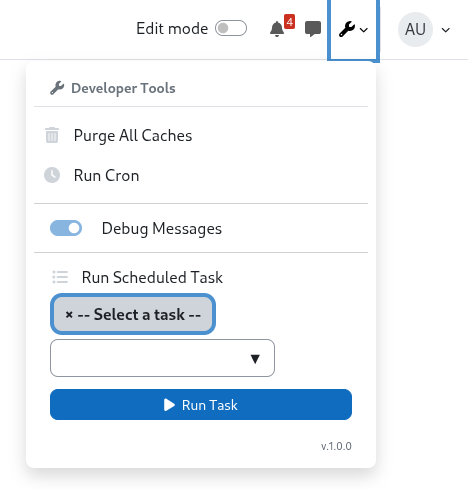
local_devtools is a Moodle local plugin that adds a Developer Tools dropdown to the top navigation bar for authorized users.
The dropdown provides quick admin/developer actions without leaving the current page:
- Purge all caches
- Run cron
- Run a specific scheduled task
- Toggle debug mode
What it does
When a user with the local/devtools:use capability is logged in:
- A wrench icon appears in the navbar.
- Clicking it opens a dropdown with quick actions.
- Actions are executed via Moodle external functions (AJAX).
- Success/error feedback is shown in-page.
For scheduled tasks, the plugin loads all available task classes into a searchable autocomplete selector. For debug mode, the toggle is disabled if $CFG->debug is locked in config.php.
Permission model
Capability:
local/devtools:use
- Risk:
RISK_CONFIG | RISK_DATALOSS
- Type: write
- Context: system
- Default: allowed for the
manager archetype
Technical notes
- AJAX services are declared in
db/services.php:
local_devtools_purge_caches — no parameters
local_devtools_run_cron — no parameters
local_devtools_run_scheduled_task — task (string, fully-qualified class name)
local_devtools_set_debug — enabled (boolean)
- All services return
{success, message, output}.
- Cron and scheduled tasks are executed through CLI scripts using the configured PHP binary (
$CFG->pathtophp, fallback php).
- CLI script resolution is handled by
classes/helper/cli_helper.php, which supports both standard and mixed public/ webroot layouts.
- Scheduled task selector is enhanced using Moodle form autocomplete.
- On successful cache purge, the page reloads and a success notice is shown via
sessionStorage.
- Debug mode writes directly to the Moodle database config table; it respects forced settings from
config.php.
Installation
Place the plugin in:
local/devtools
Visit:
Site administration -> Notifications
Complete the Moodle upgrade/install flow.
Building AMD assets
After modifying amd/src/devtools.js, rebuild from the Moodle root:
npx grunt amd
This compiles amd/src/devtools.js into amd/build/devtools.min.js.
Usage
- Log in as a user with
local/devtools:use.
- Click the wrench icon in the top navbar.
- Choose one of the actions:
- Purge All Caches — purges all Moodle caches and reloads the page.
- Run Cron — executes
admin/cli/cron.php via PHP CLI.
- Run Scheduled Task — select a task from the autocomplete dropdown, then click Run Task.
- Debug mode toggle — enables/disables
DEBUG_DEVELOPER level. Disabled (with tooltip) when the setting is locked in config.php.
Troubleshooting
Wrench icon does not appear
- Verify the plugin is installed and upgraded.
- Verify user capability
local/devtools:use.
- Rebuild AMD assets and purge caches.
Cron/task execution fails
- Verify CLI scripts are available/readable under
admin/cli/.
- Verify PHP CLI is available (
$CFG->pathtophp or php on PATH).
Task autocomplete/search not showing
- Purge caches and rebuild frontend assets if needed.
- Ensure JavaScript is enabled and not blocked by browser policy.
Debug toggle is disabled
- The
debug setting is locked via $CFG->config_php_settings in config.php. Remove the forced value to enable the toggle.