FenomioStream Activity Module
A Moodle activity module that embeds FenomioStream video content as a dedicated course activity with authenticated access and a built-in media browser.
Features
- Embeds FenomioStream video player as a course activity
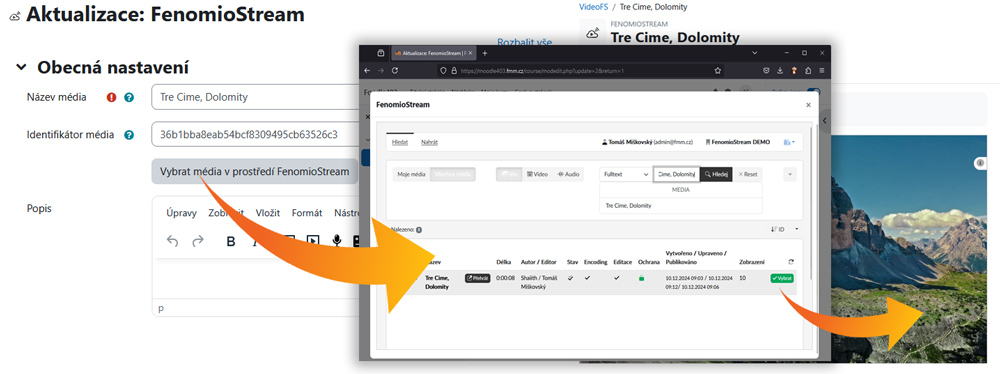
- Built-in media browser for selecting videos directly from the FenomioStream platform
- Secure authentication via SHA-512 signed tokens
- Configurable user identity field for FenomioStream authentication (username, email, ID number, institution, or department)
- Activity completion tracking (marks activity as viewed)
- Responsive 16:9 aspect ratio player
Requirements
- Moodle 4.1 or later
- A FenomioStream platform instance with connector access
- A shared secret key from your FenomioStream portal administrator
Installing via uploaded ZIP file
- Log in to your Moodle site as an admin and go to Site administration >
Plugins > Install plugins.
- Upload the ZIP file with the plugin code. You should only be prompted to add
extra details if your plugin type is not automatically detected.
- Check the plugin validation report and finish the installation.
Installing manually
The plugin can be also installed by putting the contents of this directory to
{your/moodle/dirroot}/mod/fenomiostream
Afterwards, log in to your Moodle site as an admin and go to Site administration >
Notifications to complete the installation.
Configuration
Go to Site administration > Plugins > Activity modules > FenomioStream and configure:
- FenomioStream URL — Base URL of your FenomioStream platform instance
- Shared secret — Secret key for server-to-server authentication
- Profile field — Which Moodle user profile field to use for FenomioStream user identification
- Profile field prefix/suffix — Optional prefix and suffix for the profile field value
- Debug authorization — Show debug URL when authorization fails
Usage
- Turn editing on in your course
- Click Add an activity or resource
- Select FenomioStream
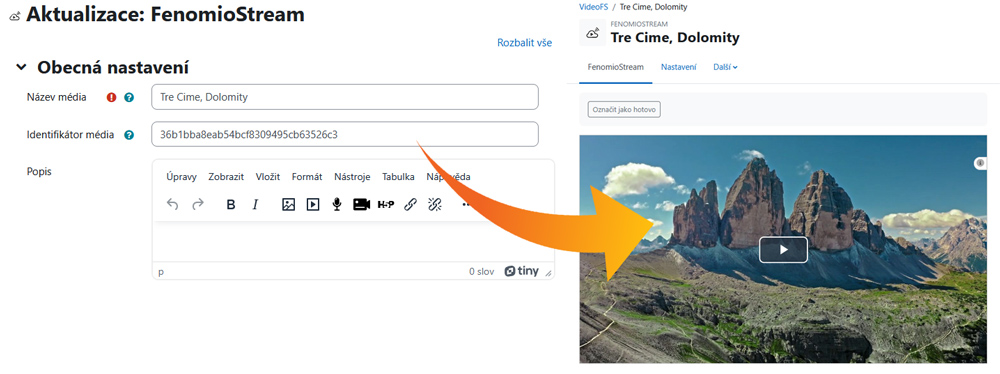
- Click the FenomioStream button to open the media browser and select a video, or enter the media identifier manually
- Save the activity
Students will see the embedded video player when they open the activity.
External service
This plugin requires a FenomioStream platform subscription. The plugin communicates with the FenomioStream server to authenticate users and retrieve video content. No personal data is stored on the FenomioStream server by this plugin — only the user identifier is sent for authentication purposes.
About FenomioStream
FenomioStream is a cloud-based platform for managing, publishing, and streaming multimedia content. It supports both on-demand (VOD) and live streaming with adaptive HLS quality, secure access control, and integration with identity providers including eduID/Shibboleth, Google, Microsoft, and others. Visit www.fenomio.stream for more information.
Related plugins
License
2024 Fenomen multimedia
This program is free software: you can redistribute it and/or modify it under
the terms of the GNU General Public License as published by the Free Software
Foundation, either version 3 of the License, or (at your option) any later
version.
This program is distributed in the hope that it will be useful, but WITHOUT ANY
WARRANTY; without even the implied warranty of MERCHANTABILITY or FITNESS FOR A
PARTICULAR PURPOSE. See the GNU General Public License for more details.
You should have received a copy of the GNU General Public License along with
this program. If not, see https://www.gnu.org/licenses/.