FenomioStream icon

FenomioStream

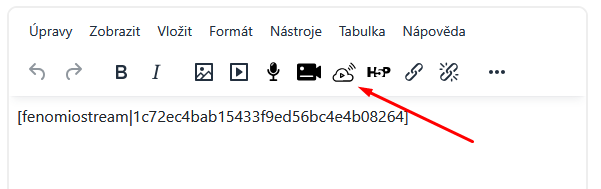
TinyMCE editor button for inserting FenomioStream media tags into text content. Works with the filter_fenomiostream plugin.
Price option: Free

Supports Moodle 4.1-4.5 See all versions
Latest release: 4 months ago
Installations: 3
Downloads (last 90 days): 69

Frankenstyle name: tiny_fenomiostream
TinyMCE

Description

FenomioStream TinyMCE Editor Button

A Moodle TinyMCE editor plugin that adds a toolbar button for inserting FenomioStream media tags into text content.

How it works

When clicked, the button opens a dialog where the user enters a FenomioStream media identifier (GUID). The plugin then inserts a [fenomiostream|GUID] tag at the cursor position. This tag is later converted to a video player iframe by the companion filter_fenomiostream plugin.

Features

  • Adds a FenomioStream button to the TinyMCE editor toolbar
  • Dialog for entering the media identifier (GUID)
  • Input validation prevents empty identifiers
  • Localized interface (English and Czech)

Requirements

  • Moodle 4.1 or later (TinyMCE is the default editor from Moodle 4.1)
  • The filter_fenomiostream plugin must be installed and enabled for the tags to render as video players

Privacy

This plugin does not collect, store, or transmit any personal user data. It implements the Moodle Privacy API as a null provider.

Contributors