
Academic Ticket System

Versions
Current version
3.2.1 (2026052101)
3.2.1
Plugin type: Local plugins
Frankenstyle component name: local_academic_ticket_system
Version build number: 2026052101
Version release name: 3.2.1
Maturity: Stable
Supported Moodle versions: 4.0, 4.1, 4.2, 4.3, 4.4, 4.5, 5.0, 5.1, 5.2
Repository URL (Git): https://github.com/abdelrhman2049/moodle-local_academic_ticket_system
Repository branch:
Repository tag: v3.2.1
Issue/bug tracker URL: https://github.com/abdelrhman2049/moodle-local_academic_ticket_system/issues
Academic Ticket System
Short Description
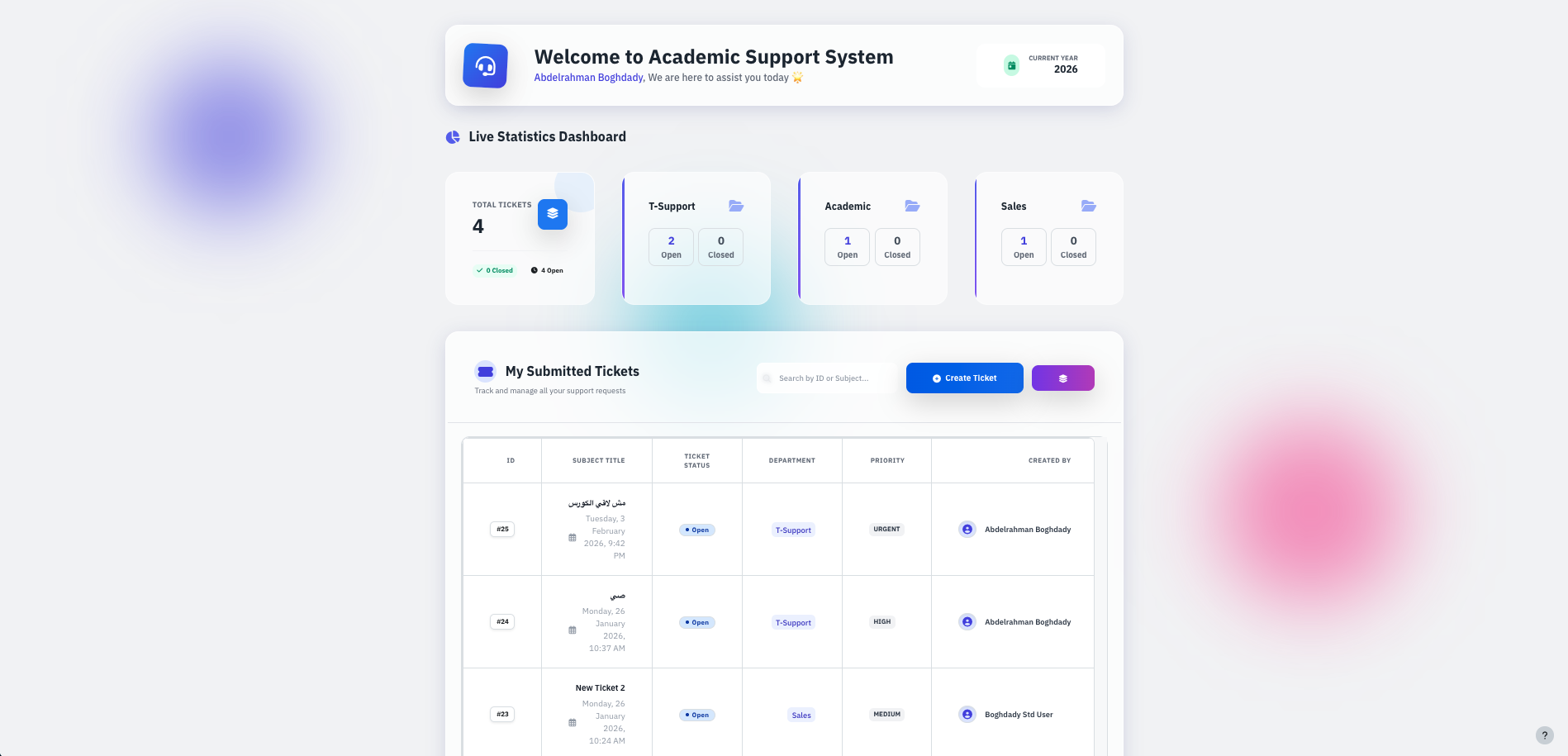
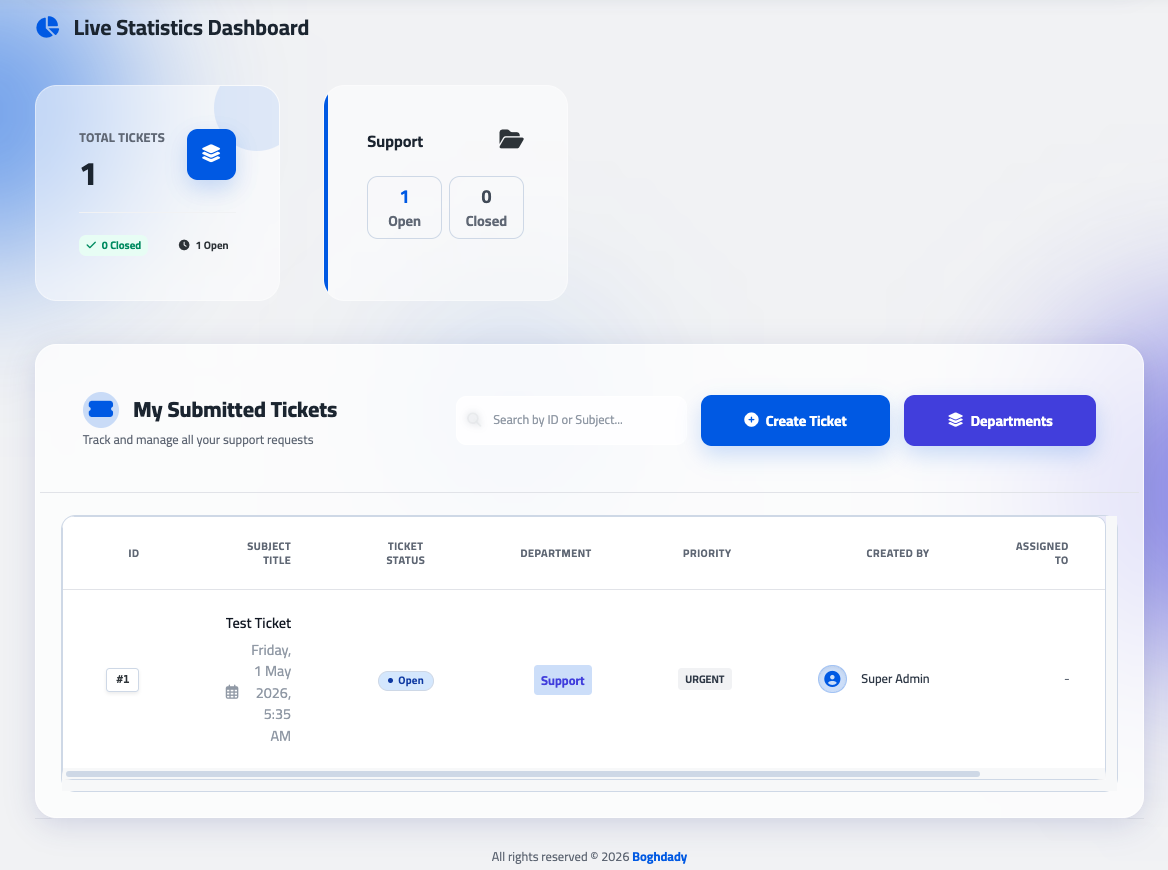
A robust and modern Moodle local plugin designed to streamline communication between students and academic support departments. It provides a centralized hub for managing inquiries, technical issues, and administrative requests with a high-end User Experience (UX).
Detailed Description
The Academic Ticket System (v3.2.0) is a comprehensive lifecycle management tool for academic support. Built with a focus on Instructional Design (LXD) principles and a modern Tailwind CSS interface, it ensures that the learning journey remains uninterrupted by technical or administrative hurdles.
The latest version introduces enhanced administrative workflows, including intelligent search for assignments, customizable role visibility, and improved tracking tools to keep your support team organized.
Key Features:
Modern UI/UX Overhaul: A clean, responsive dashboard that fits perfectly within the Moodle ecosystem while offering a modern, premium "SaaS" feel.
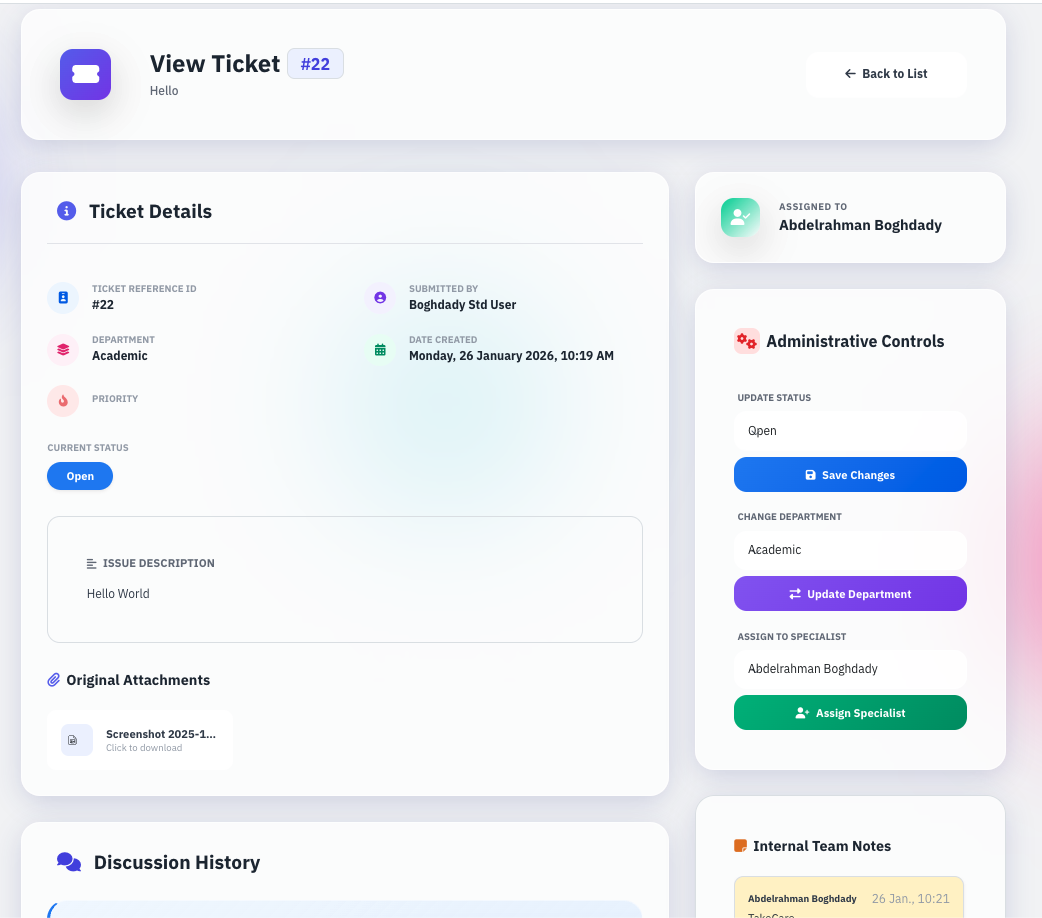
Intelligent Assignment Search: Administrators can now search for assignees directly within the ticket interface using Name, Email, or Username, making ticket routing faster and more accurate.
Configurable Role-Based Assignment: Administrators have full control to specify which Moodle roles appear in the assignment dropdown, ensuring that only the relevant staff (e.g., Support Specialists, Finance, Student Affairs) are available for selection.
My Assignment Tracking: Staff members can now quickly identify their workload through a dedicated "My Assignment" indicator, providing instant visibility into tickets awaiting their attention.
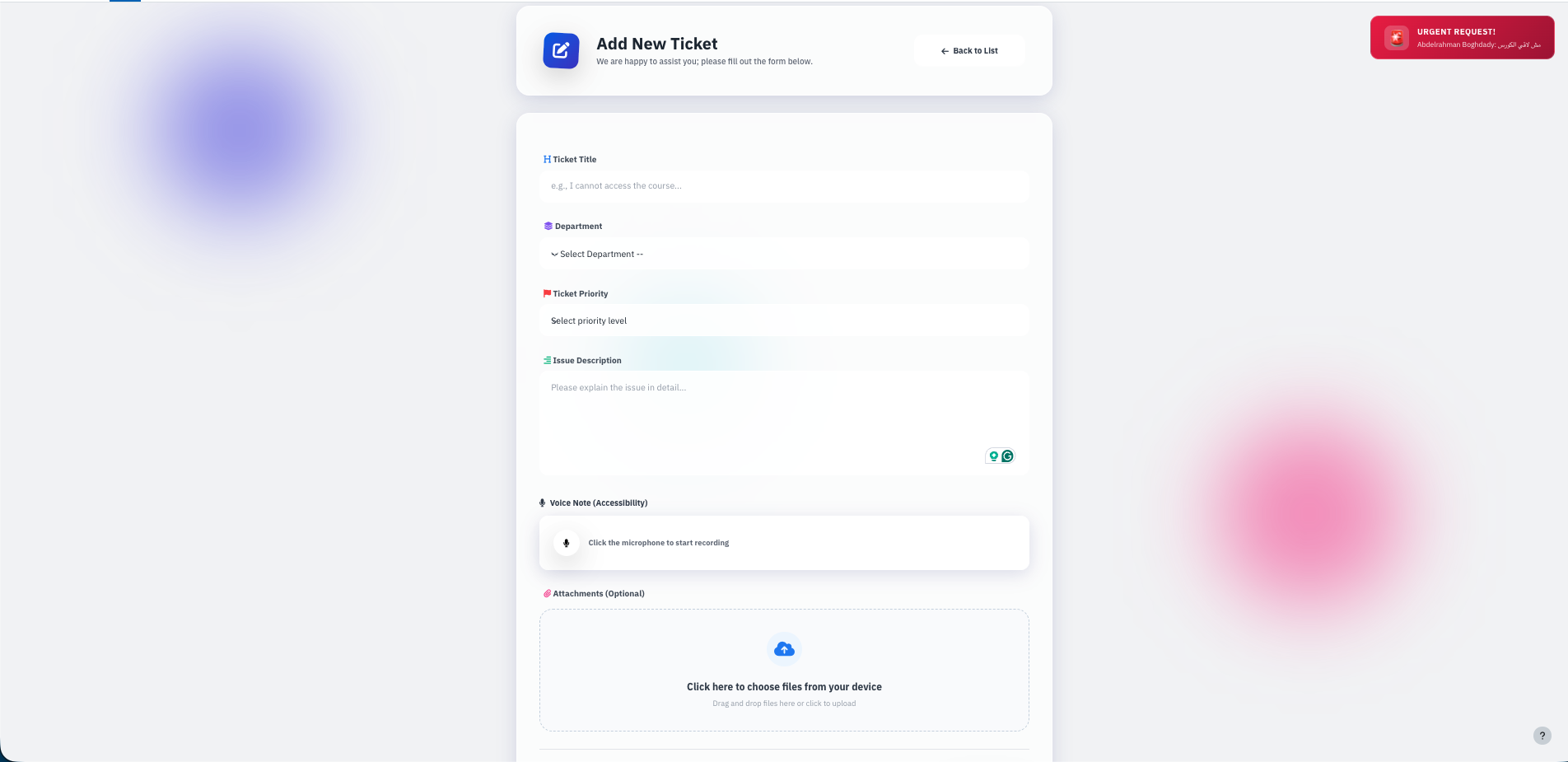
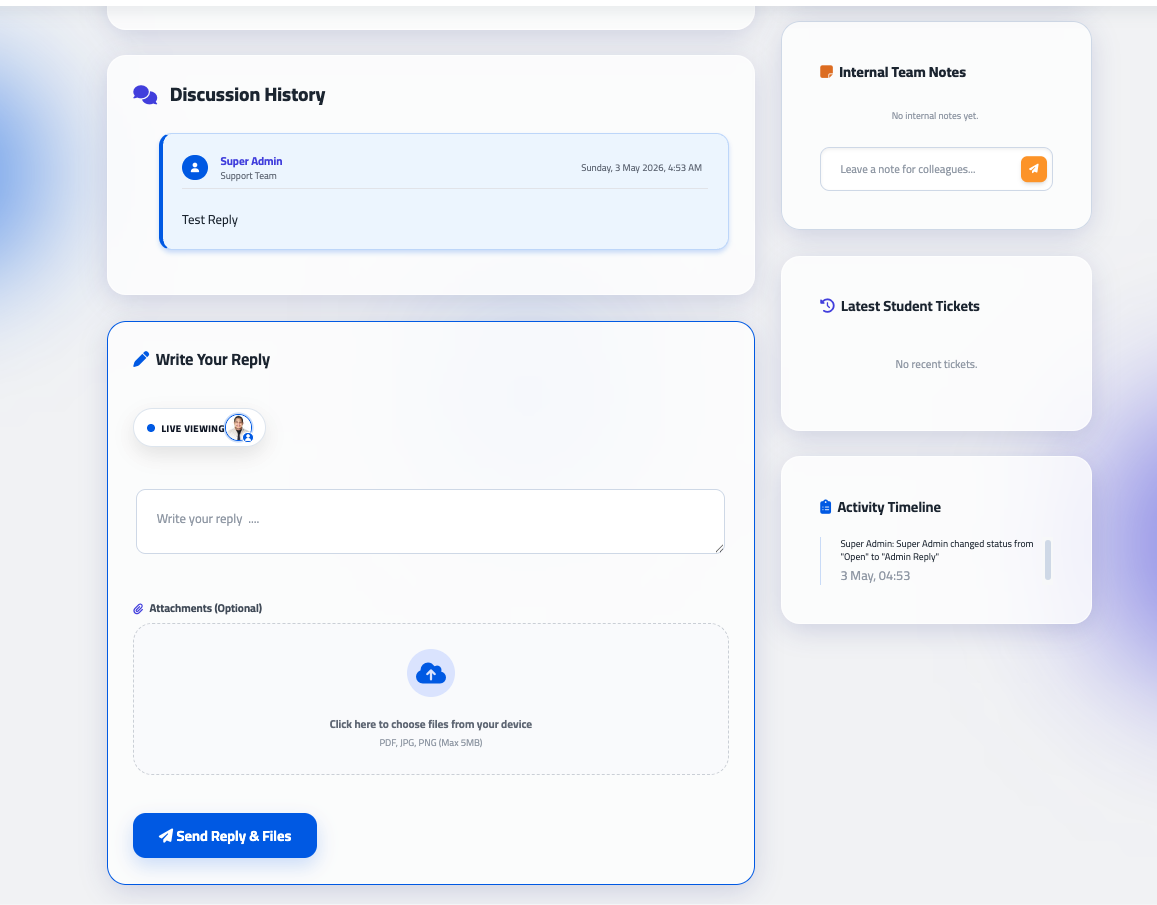
Enhanced Attachment Display: Improved layout for file handling, with inline previews for images, videos, and PDFs, allowing admins and students to review content without unnecessary downloads.
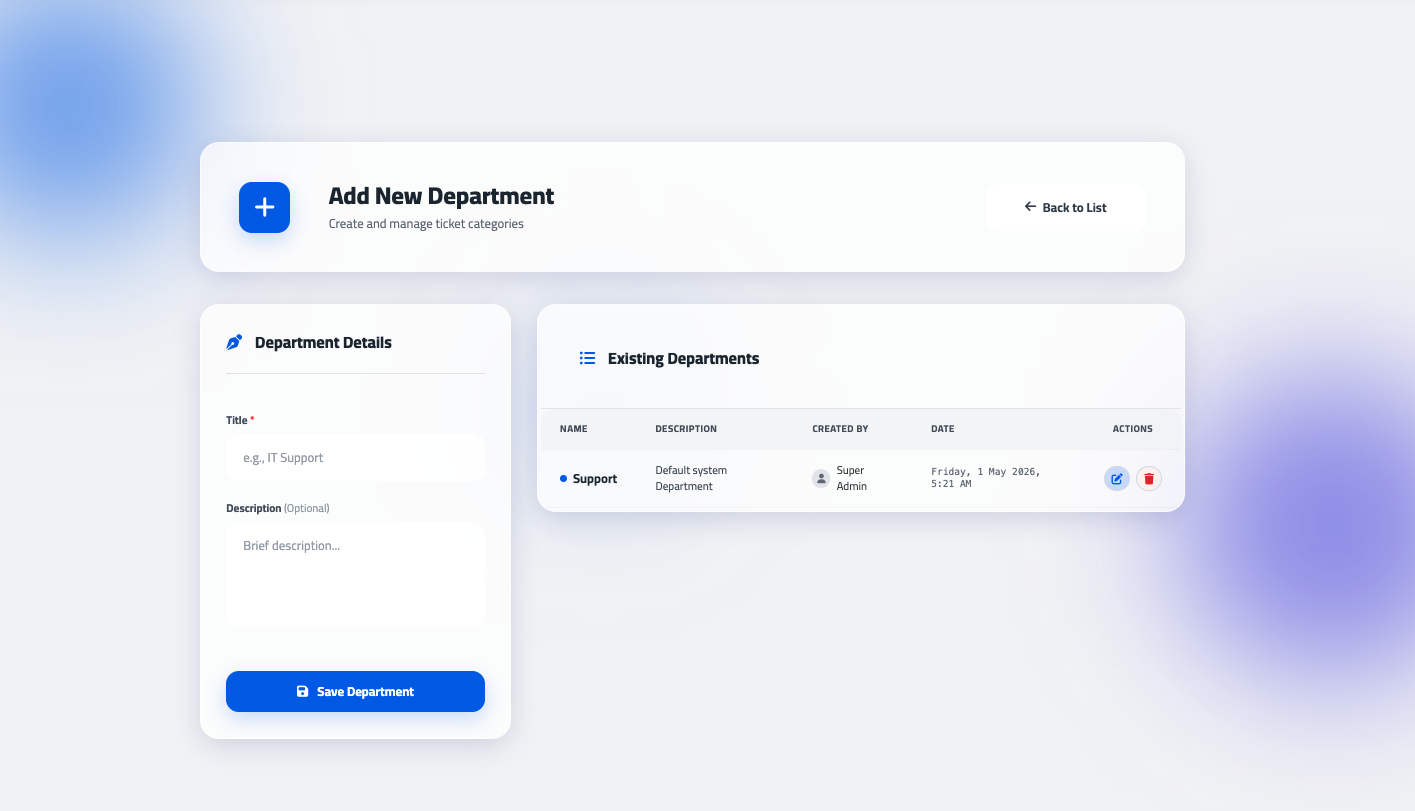
Department-Based Routing: Tickets can be categorized into specific departments for faster response times.
Activity Timeline: A detailed audit log that tracks every status change, assignment, and reply for full accountability.
Rich Text Support: Full integration with Moodle's TinyMCE/Atto editors for detailed issue descriptions and replies.
Installing via uploaded ZIP file
Log in to your Moodle site as an admin and go to Site administration > Plugins > Install plugins.
Upload the ZIP file with the plugin code.
Check the plugin validation report and finish the installation.
Installing manually
The plugin can also be installed by putting the contents of this directory into:
{your/moodle/dirroot}/local/academic_ticket_system
Afterwards, log in to your Moodle site as an admin and go to Site administration > Notifications to complete the installation.
Alternatively, you can run:
$ php admin/cli/upgrade.php
to complete the installation from the command line.
License
2026 learn-ix support@learn-ix.com
This program is free software: you can redistribute it and/or modify it under the terms of the GNU General Public License as published by the Free Software Foundation, either version 3 of the License, or (at your option) any later version.
3.1.6 (2026051608)
3.1.6
Plugin type: Local plugins
Frankenstyle component name: local_academic_ticket_system
Version build number: 2026051608
Version release name: 3.1.6
Maturity: Stable
Supported Moodle versions: 4.0, 4.1, 4.2, 4.3, 4.4, 4.5, 5.0, 5.1, 5.2
Repository URL (Git): https://github.com/abdelrhman2049/moodle-local_academic_ticket_system
Repository branch:
Repository tag: v3.1.6
Issue/bug tracker URL: https://github.com/abdelrhman2049/moodle-local_academic_ticket_system/issues
Academic Ticket System
Short Description
A robust and modern Moodle local plugin designed to streamline communication between students and academic support departments. It provides a centralized hub for managing inquiries, technical issues, and administrative requests with a high-end User Experience (UX).
Detailed Description
The Academic Ticket System is more than just a contact form; it's a full lifecycle management tool for academic support. Built with a focus on Instructional Design (LXD) principles and a modern Tailwind CSS interface, it ensures that the learning journey isn't interrupted by technical or administrative hurdles.
Key Features:
[NEW] Ultimate Flexibility with Dynamic Role Assignment: Administrators now have complete control over who handles tickets! Instead of hardcoded roles, you can effortlessly configure assignable roles (e.g., Manager, Specialist, Teacher) directly from the plugin settings. This makes the system incredibly flexible and adaptable to fit the unique organizational structure of any institution.
Modern UI/UX: A clean, responsive dashboard that fits perfectly within the Moodle ecosystem while offering a modern "SaaS" feel.
Smart Attachment System: Support for multiple file uploads with Inline Previews for images, videos, and PDFs, allowing admins to see issues without downloading files.
Department-Based Routing: Tickets can be categorized into specific departments (e.g., Technical Support, Student Affairs, Finance) for faster response times.
Role-Based Access: Specialized views for Students (to track their tickets) and Administrators/Staff (to manage and assign tickets).
Activity Timeline: A detailed audit log (Activity Log) that tracks every status change, assignment, and reply for full accountability.
Rich Text Support: Full integration with Moodle's TinyMCE/Atto editors for detailed issue descriptions and replies.
Installing via uploaded ZIP file
Log in to your Moodle site as an admin and go to Site administration > Plugins > Install plugins.
Upload the ZIP file with the plugin code. You should only be prompted to add extra details if your plugin type is not automatically detected.
Check the plugin validation report and finish the installation.
Installing manually
The plugin can be also installed by putting the contents of this directory to:
{your/moodle/dirroot}/local/academic_ticket_system
Afterwards, log in to your Moodle site as an admin and go to Site administration > Notifications to complete the installation.
Alternatively, you can run:
$ php admin/cli/upgrade.php
to complete the installation from the command line.
License
2026 learn-ix support@learn-ix.com
This program is free software: you can redistribute it and/or modify it under the terms of the GNU General Public License as published by the Free Software Foundation, either version 3 of the License, or (at your option) any later version.
3.1.5 (2026051607)
3.1.5
Plugin type: Local plugins
Frankenstyle component name: local_academic_ticket_system
Version build number: 2026051607
Version release name: 3.1.5
Maturity: Stable
Supported Moodle versions: 4.0, 4.1, 4.2, 4.3, 4.4, 4.5, 5.0, 5.1, 5.2
Repository URL (Git): https://github.com/abdelrhman2049/moodle-local_academic_ticket_system
Repository branch:
Repository tag: v3.1.5
Issue/bug tracker URL: https://github.com/abdelrhman2049/moodle-local_academic_ticket_system/issues
Academic Ticket System
Short Description
A robust and modern Moodle local plugin designed to streamline communication between students and academic support departments. It provides a centralized hub for managing inquiries, technical issues, and administrative requests with a high-end User Experience (UX).
Detailed Description
The Academic Ticket System is more than just a contact form; it's a full lifecycle management tool for academic support. Built with a focus on Instructional Design (LXD) principles and a modern Tailwind CSS interface, it ensures that the learning journey isn't interrupted by technical or administrative hurdles.
Release notes
- Added a new custom role ("Specialist") to easily assign and manage the support team without giving them full manager permissions.
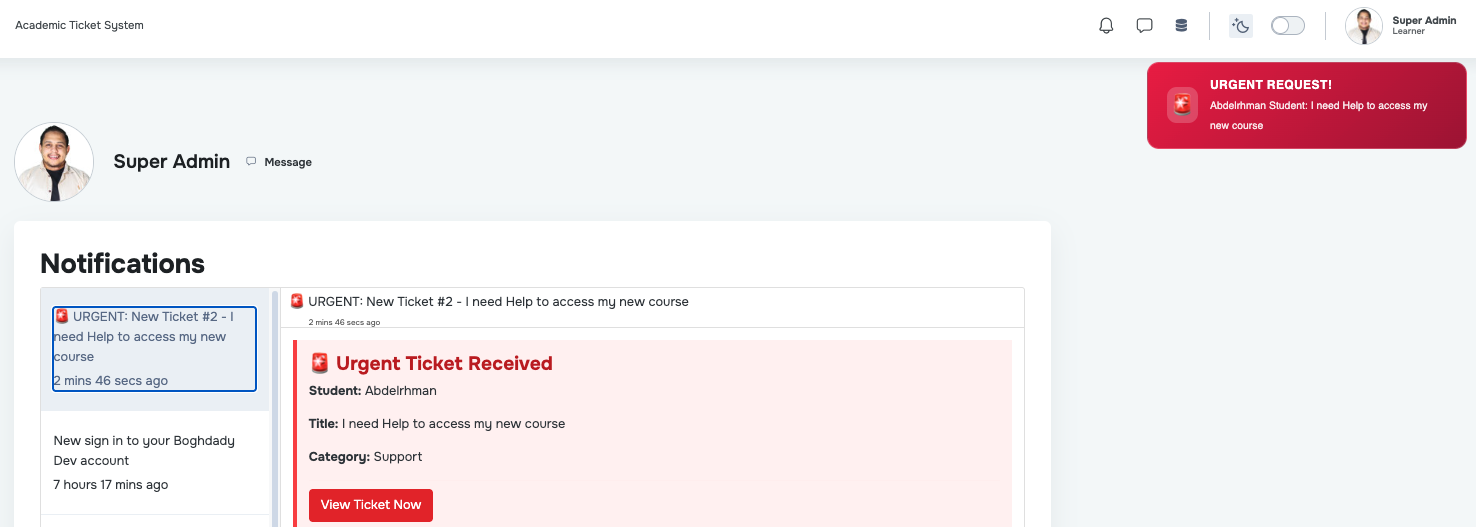
- Separated urgent ticket pop-up alerts so they are strictly received by Specialists, preventing unnecessary notifications for system managers.
- Updated the ticket assignment list to include the new Specialist role.
- Added official translations for Arabic, French, and Spanish.
Key Features:
Modern UI/UX: A clean, responsive dashboard that fits perfectly within the Moodle ecosystem while offering a modern "SaaS" feel.
Smart Attachment System: Support for multiple file uploads with Inline Previews for images, videos, and PDFs, allowing admins to see issues without downloading files.
Department-Based Routing: Tickets can be categorized into specific departments (e.g., Technical Support, Student Affairs, Finance) for faster response times.
Role-Based Access: Specialized views for Students (to track their tickets) and Administrators/Staff (to manage and assign tickets).
Activity Timeline: A detailed audit log (Activity Log) that tracks every status change, assignment, and reply for full accountability.
Rich Text Support: Full integration with Moodle's TinyMCE/Atto editors for detailed issue descriptions and replies.
Installing via uploaded ZIP file
Log in to your Moodle site as an admin and go to Site administration > Plugins > Install plugins.
Upload the ZIP file with the plugin code. You should only be prompted to add extra details if your plugin type is not automatically detected.
Check the plugin validation report and finish the installation.
Installing manually
The plugin can be also installed by putting the contents of this directory to
{your/moodle/dirroot}/local/academic_ticket_system
Afterwards, log in to your Moodle site as an admin and go to Site administration > Notifications to complete the installation.
Alternatively, you can run
$ php admin/cli/upgrade.php
to complete the installation from the command line.
License
2026 learn-ix support@learn-ix.com
This program is free software: you can redistribute it and/or modify it under the terms of the GNU General Public License as published by the Free Software Foundation, either version 3 of the License, or (at your option) any later version.
3.1.4 (2026051602)
3.1.4
Plugin type: Local plugins
Frankenstyle component name: local_academic_ticket_system
Version build number: 2026051602
Version release name: 3.1.4
Maturity: Stable
Supported Moodle versions: 4.0, 4.1, 4.2, 4.3, 4.4, 4.5, 5.0, 5.1, 5.2
Repository URL (Git): https://github.com/abdelrhman2049/moodle-local_academic_ticket_system
Repository branch:
Repository tag: v3.1.4
Issue/bug tracker URL: https://github.com/abdelrhman2049/moodle-local_academic_ticket_system/issues
Academic Ticket System
Short Description
A robust and modern Moodle local plugin designed to streamline communication between students and academic support departments. It provides a centralized hub for managing inquiries, technical issues, and administrative requests with a high-end User Experience (UX).
Detailed Description
The Academic Ticket System is more than just a contact form; it's a full lifecycle management tool for academic support. Built with a focus on Instructional Design (LXD) principles and a modern Tailwind CSS interface, it ensures that the learning journey isn't interrupted by technical or administrative hurdles.
Key Features:
Modern UI/UX: A clean, responsive dashboard that fits perfectly within the Moodle ecosystem while offering a modern "SaaS" feel.
Smart Attachment System: Support for multiple file uploads with Inline Previews for images, videos, and PDFs, allowing admins to see issues without downloading files.
Department-Based Routing: Tickets can be categorized into specific departments (e.g., Technical Support, Student Affairs, Finance) for faster response times.
Role-Based Access: Specialized views for Students (to track their tickets) and Administrators/Staff (to manage and assign tickets).
Activity Timeline: A detailed audit log (Activity Log) that tracks every status change, assignment, and reply for full accountability.
Rich Text Support: Full integration with Moodle's TinyMCE/Atto editors for detailed issue descriptions and replies.
Installing via uploaded ZIP file
Log in to your Moodle site as an admin and go to Site administration > Plugins > Install plugins.
Upload the ZIP file with the plugin code. You should only be prompted to add extra details if your plugin type is not automatically detected.
Check the plugin validation report and finish the installation.
Installing manually
The plugin can be also installed by putting the contents of this directory to
{your/moodle/dirroot}/local/academic_ticket_system
Afterwards, log in to your Moodle site as an admin and go to Site administration > Notifications to complete the installation.
Alternatively, you can run
$ php admin/cli/upgrade.php
to complete the installation from the command line.
License
2026 learn-ix support@learn-ix.com
This program is free software: you can redistribute it and/or modify it under the terms of the GNU General Public License as published by the Free Software Foundation, either version 3 of the License, or (at your option) any later version.
3.1.0 (2026051200)
3.1.0
Plugin type: Local plugins
Frankenstyle component name: local_academic_ticket_system
Version build number: 2026051200
Version release name: 3.1.0
Maturity: Stable
Supported Moodle versions: 4.0, 4.1, 4.2, 4.3, 4.4, 4.5, 5.0, 5.1, 5.2
Repository URL (Git): https://github.com/abdelrhman2049/moodle-local_academic_ticket_system
Repository branch:
Repository tag: v3.1.1
Issue/bug tracker URL: https://github.com/abdelrhman2049/moodle-local_academic_ticket_system/issues
What's New in v3.1.1
We are excited to announce full Internationalization (i18n) support for the Academic Ticket System! This release focuses on making the plugin globally accessible, alongside some important under-the-hood repository cleanups.
New Features##
Multi-Language Support: All 185 plugin strings have been completely translated and integrated.
Arabic (ar)
Spanish - International (es)
French (fr)
The plugin is now fully ready for integration with the Moodle AMOS translation tool.
Note for Moodle Admins: When upgrading to this version, the new translations will be automatically applied as long as your Moodle site has the respective language packs installed.
3.0.0 (2026012320)
3.0.0
Plugin type: Local plugins
Frankenstyle component name: local_academic_ticket_system
Version build number: 2026012320
Version release name: 3.0.0
Maturity: Stable
Supported Moodle versions: 4.0, 4.1, 4.2, 4.3, 4.4, 4.5, 5.0, 5.1, 5.2
Repository URL (Git): https://github.com/abdelrhman2049/moodle-local_academic_ticket_system
Repository branch:
Repository tag: v3.0.0
Issue/bug tracker URL: https://github.com/abdelrhman2049/moodle-local_academic_ticket_system/issues
Academic Ticket System
Release Notes - Version 3.0.0
- Enhanced UI/UX & Branding
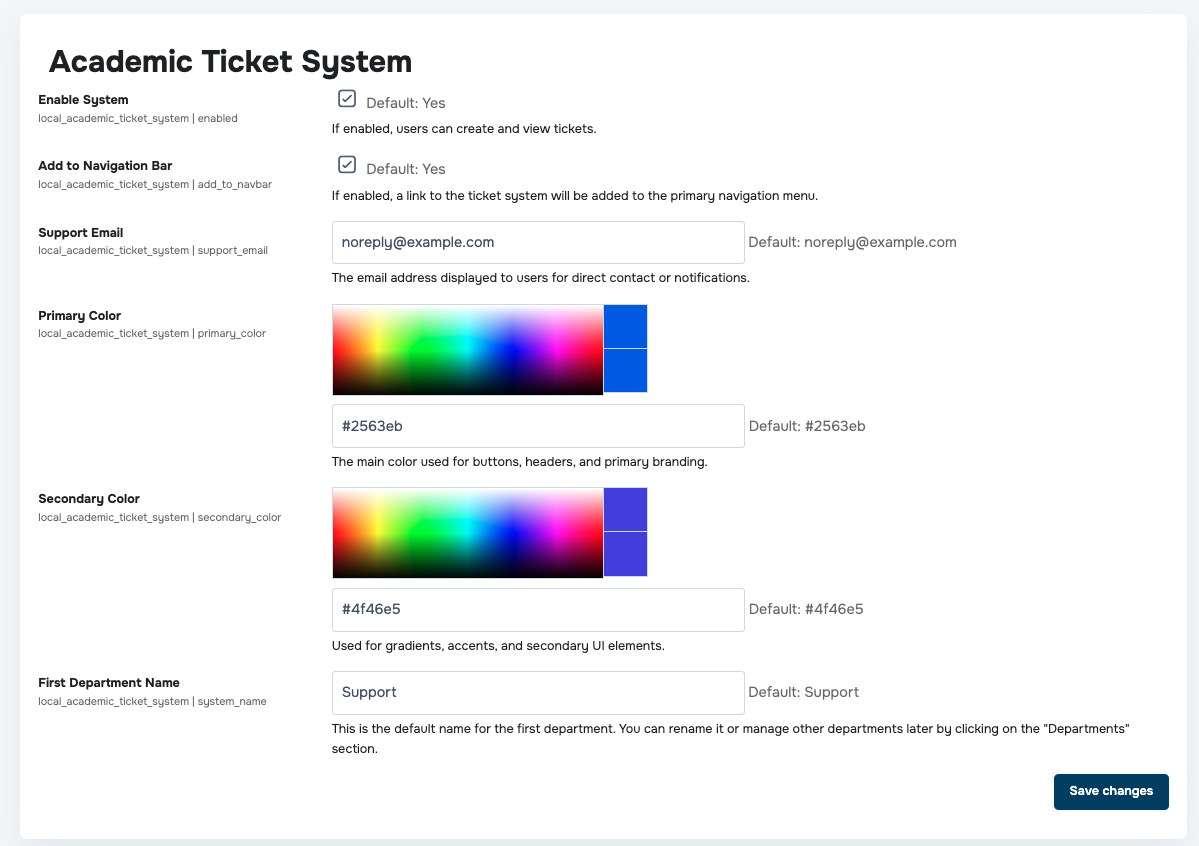
Dual-Color Branding System: Implemented a flexible branding architecture allowing administrators to define both Primary and Secondary colors directly from the settings page.
Glassmorphism UI: Applied modern glassmorphism design principles to all system panels and cards, enhancing the visual depth of the LMS interface.
Comprehensive RTL Support: Refined Right-to-Left (RTL) layouts specifically for Arabic, ensuring perfectly aligned UI components.
Animated Visual Elements: Integrated dynamic background blobs and hover transitions for a more engaging and responsive learning environment.
- Primary Department Initialization: Added a dedicated setting to define the default name for the first department (e.g., "Support") created during installation. This allows administrators to establish the initial system identity immediately, with the flexibility to rename it or manage additional departments later through the Departments section.
Department Management (CRUD): Empowered administrators with the ability to edit or delete existing departments to scale with institutional needs.
Navigation Bar Integration: Included a dedicated setting to toggle the visibility of the ticket system link directly within the primary Moodle navigation bar.
Auto-Installation Logic: Developed an installation hook in install.php that automatically generates a default "Support" category upon plugin deployment.
- Backend Architecture & Security
Capability Registry: Formally registered the manage ticket capability, ensuring granular permission control for different user roles within Moodle.
Refined Hooks: Optimized the footer_injector hook to perform efficient capability checks before rendering interface modifications.
- Stability & Bug Fixes
Clean Uninstallation Handler: Fixed critical errors in uninstall.php by correctly utilizing the Moodle XMLDB API for safe data removal.
Language String Management: Resolved "Invalid get_string" debugging warnings by providing complete English and Arabic language definitions.
Developer Recommendations
Post-Update Action: After deployment, run the Purge all caches command via CLI (admin/cli/purge_caches.php) to ensure all new branding variables are active.
Permission Audit: Review the Define roles page to assign the new manage ticket permission to the appropriate technical support staff.
Installing via uploaded ZIP file
Log in to your Moodle site as an admin and go to Site administration > Plugins > Install plugins.
Upload the ZIP file with the plugin code. You should only be prompted to add extra details if your plugin type is not automatically detected.
Check the plugin validation report and finish the installation.
Installing manually
The plugin can be also installed by putting the contents of this directory to
{your/moodle/dirroot}/local/academic_ticket_system
Afterwards, log in to your Moodle site as an admin and go to Site administration > Notifications to complete the installation.
Alternatively, you can run
$ php admin/cli/upgrade.php
to complete the installation from the command line.
License
2026 learn-ix support@learn-ix.com
This program is free software: you can redistribute it and/or modify it under the terms of the GNU General Public License as published by the Free Software Foundation, either version 3 of the License, or (at your option) any later version.
2.0.0 (2026012319)
2.0.0
Plugin type: Local plugins
Frankenstyle component name: local_academic_ticket_system
Version build number: 2026012319
Version release name: 2.0.0
Maturity: Stable
Supported Moodle versions: 4.0, 4.1, 4.2, 4.3, 4.4, 4.5, 5.0, 5.1, 5.2
Repository URL (Git): https://github.com/abdelrhman2049/moodle-local_academic_ticket_system
Repository branch:
Repository tag:
Issue/bug tracker URL: https://github.com/abdelrhman2049/moodle-local_academic_ticket_system/issues
Academic Ticket System
Short Description
A robust and modern Moodle local plugin designed to streamline communication between students and academic support departments. It provides a centralized hub for managing inquiries, technical issues, and administrative requests with a high-end User Experience (UX).
Detailed Description
The Academic Ticket System is more than just a contact form; it's a full lifecycle management tool for academic support. Built with a focus on Instructional Design (LXD) principles and a modern Tailwind CSS interface, it ensures that the learning journey isn't interrupted by technical or administrative hurdles.
Key Features:
Modern UI/UX: A clean, responsive dashboard that fits perfectly within the Moodle ecosystem while offering a modern "SaaS" feel.
Smart Attachment System: Support for multiple file uploads with Inline Previews for images, videos, and PDFs, allowing admins to see issues without downloading files.
Department-Based Routing: Tickets can be categorized into specific departments (e.g., Technical Support, Student Affairs, Finance) for faster response times.
Role-Based Access: Specialized views for Students (to track their tickets) and Administrators/Staff (to manage and assign tickets).
Activity Timeline: A detailed audit log (Activity Log) that tracks every status change, assignment, and reply for full accountability.
Rich Text Support: Full integration with Moodle's TinyMCE/Atto editors for detailed issue descriptions and replies.
Installing via uploaded ZIP file
Log in to your Moodle site as an admin and go to Site administration > Plugins > Install plugins.
Upload the ZIP file with the plugin code. You should only be prompted to add extra details if your plugin type is not automatically detected.
Check the plugin validation report and finish the installation.
Installing manually
The plugin can be also installed by putting the contents of this directory to
{your/moodle/dirroot}/local/academic_ticket_system
Afterwards, log in to your Moodle site as an admin and go to Site administration > Notifications to complete the installation.
Alternatively, you can run
$ php admin/cli/upgrade.php
to complete the installation from the command line.
License
2026 learn-ix support@learn-ix.com
This program is free software: you can redistribute it and/or modify it under the terms of the GNU General Public License as published by the Free Software Foundation, either version 3 of the License, or (at your option) any later version.
1.1.1 (2026012317)
1.1.1
Plugin type: Local plugins
Frankenstyle component name: local_academic_ticket_system
Version build number: 2026012317
Version release name: 1.1.1
Maturity: Stable
Supported Moodle versions: 4.0, 4.1, 4.2, 4.3, 4.4, 4.5, 5.0, 5.1, 5.2
Repository URL (Git): https://github.com/abdelrhman2049/moodle-local_academic_ticket_system
Repository branch:
Repository tag:
Issue/bug tracker URL: https://github.com/abdelrhman2049/moodle-local_academic_ticket_system/issues
Academic Ticket System
Short Description
A robust and modern Moodle local plugin designed to streamline communication between students and academic support departments. It provides a centralized hub for managing inquiries, technical issues, and administrative requests with a high-end User Experience (UX).
Detailed Description
The Academic Ticket System is more than just a contact form; it's a full lifecycle management tool for academic support. Built with a focus on Instructional Design (LXD) principles and a modern Tailwind CSS interface, it ensures that the learning journey isn't interrupted by technical or administrative hurdles.
Key Features:
Modern UI/UX: A clean, responsive dashboard that fits perfectly within the Moodle ecosystem while offering a modern "SaaS" feel.
Smart Attachment System: Support for multiple file uploads with Inline Previews for images, videos, and PDFs, allowing admins to see issues without downloading files.
Department-Based Routing: Tickets can be categorized into specific departments (e.g., Technical Support, Student Affairs, Finance) for faster response times.
Role-Based Access: Specialized views for Students (to track their tickets) and Administrators/Staff (to manage and assign tickets).
Activity Timeline: A detailed audit log (Activity Log) that tracks every status change, assignment, and reply for full accountability.
Rich Text Support: Full integration with Moodle's TinyMCE/Atto editors for detailed issue descriptions and replies.
Installing via uploaded ZIP file
Log in to your Moodle site as an admin and go to Site administration > Plugins > Install plugins.
Upload the ZIP file with the plugin code. You should only be prompted to add extra details if your plugin type is not automatically detected.
Check the plugin validation report and finish the installation.
Installing manually
The plugin can be also installed by putting the contents of this directory to
{your/moodle/dirroot}/local/academic_ticket_system
Afterwards, log in to your Moodle site as an admin and go to Site administration > Notifications to complete the installation.
Alternatively, you can run
$ php admin/cli/upgrade.php
to complete the installation from the command line.
License
2026 learn-ix support@learn-ix.com
This program is free software: you can redistribute it and/or modify it under the terms of the GNU General Public License as published by the Free Software Foundation, either version 3 of the License, or (at your option) any later version.
1.0.1 (2026012311)
1.0.1
Plugin type: Local plugins
Frankenstyle component name: local_academic_ticket_system
Version build number: 2026012311
Version release name: 1.0.1
Maturity: Stable
Supported Moodle versions: 4.0, 4.1, 4.2, 4.3, 4.4, 4.5, 5.0, 5.1
Repository URL (Git):
Repository branch:
Repository tag:
Issue/bug tracker URL: https://github.com/abdelrhman2049/moodle-local_academic_ticket_system/issues
Academic Ticket System
Short Description
A robust and modern Moodle local plugin designed to streamline communication between students and academic support departments. It provides a centralized hub for managing inquiries, technical issues, and administrative requests with a high-end User Experience (UX).
Detailed Description
The Academic Ticket System is more than just a contact form; it's a full lifecycle management tool for academic support. Built with a focus on Instructional Design (LXD) principles and a modern Tailwind CSS interface, it ensures that the learning journey isn't interrupted by technical or administrative hurdles.
Key Features:
Modern UI/UX: A clean, responsive dashboard that fits perfectly within the Moodle ecosystem while offering a modern "SaaS" feel.
Smart Attachment System: Support for multiple file uploads with Inline Previews for images, videos, and PDFs, allowing admins to see issues without downloading files.
Department-Based Routing: Tickets can be categorized into specific departments (e.g., Technical Support, Student Affairs, Finance) for faster response times.
Role-Based Access: Specialized views for Students (to track their tickets) and Administrators/Staff (to manage and assign tickets).
Activity Timeline: A detailed audit log (Activity Log) that tracks every status change, assignment, and reply for full accountability.
Rich Text Support: Full integration with Moodle's TinyMCE/Atto editors for detailed issue descriptions and replies.
Installing via uploaded ZIP file
Log in to your Moodle site as an admin and go to Site administration > Plugins > Install plugins.
Upload the ZIP file with the plugin code. You should only be prompted to add extra details if your plugin type is not automatically detected.
Check the plugin validation report and finish the installation.
Installing manually
The plugin can be also installed by putting the contents of this directory to
{your/moodle/dirroot}/local/academic_ticket_system
Afterwards, log in to your Moodle site as an admin and go to Site administration > Notifications to complete the installation.
Alternatively, you can run
$ php admin/cli/upgrade.php
to complete the installation from the command line.
License
2026 learn-ix support@learn-ix.com
This program is free software: you can redistribute it and/or modify it under the terms of the GNU General Public License as published by the Free Software Foundation, either version 3 of the License, or (at your option) any later version.