
Jitsi
Maintained by
Sergio Comerón
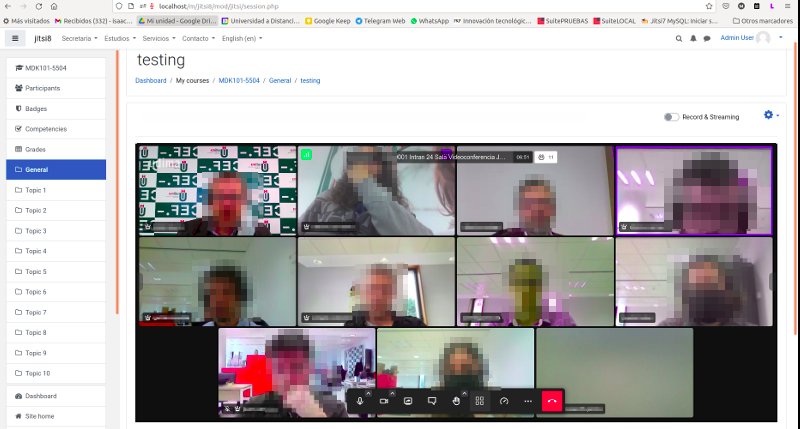
This module allows creating jitsi-meet videoconference sessions.
Comments
Product ratings and reviews are coming to Moodle Marketplace. Until then, existing comments remain available to read, but new posts have been disabled.
Tengo como servidor meet.jit.si y moodle 3.7. He visto que está oculta la opción "i" que permite compartir la url de la reunión jitsi. En ese enlace también indica cómo acceder por via telefónica (que es una opción muy útil cuando los alumnos tienen problemas con el audio). He conseguido obtener el pin telefónico de la reunión capturando la url, pero ¿hay alguna forma de que muestre el teléfono y el pin a los alumnos o desde Moodle?. En caso contrario, creo que sería una opción muy interesante.
Gracias de antemano.
Saludos
you can submit your request on https://github.com/udima-university/moodle-mod_jitsi
Thanks!
@Jan Eichstaedt : it works very well ! Thanks.
Thus this a little bit unsecure configuration.
I had a similar problem like Frédéric P. -- only getting a gray box. I was able to make it work, though. I found the following error message in the Web console:
Request to access cookie or storage on [jit.si web address] was blocked because we are blocking all third-party storage access requests and content blocking is enabled.
I allowed third party cookies and then it worked like a charm.
Error: Database connection failed
It is possible that the database is overloaded or otherwise not running properly.
The site administrator should also check that the database details have been correctly specified in config.php
mod_jitsi
Error de ejecución DDL sql
Más información sobre este error
Información de depuración: ERROR: la relaci�n �mdl_jitsi� ya existe
BEGIN ISOLATION LEVEL SERIALIZABLE;
CREATE TABLE mdl_jitsi (
id BIGSERIAL,
course BIGINT NOT NULL,
name VARCHAR(255) NOT NULL DEFAULT '',
intro TEXT NOT NULL,
introformat SMALLINT NOT NULL DEFAULT 0,
timecreated BIGINT NOT NULL,
timemodified BIGINT NOT NULL DEFAULT 0,
timeopen BIGINT NOT NULL DEFAULT 0,
minpretime SMALLINT NOT NULL DEFAULT 0,
CONSTRAINT mdl_jits_id2_pk PRIMARY KEY (id)
)
;
COMMENT ON TABLE mdl_jitsi IS 'Default comment for jitsi, please edit me'
;
CREATE INDEX mdl_jits_cou2_ix ON mdl_jitsi (course)
; COMMIT
Error code: ddlexecuteerror
Trazado de la pila (stack):
line 492 of /lib/dml/moodle_database.php: ddl_change_structure_exception thrown
line 259 of /lib/dml/pgsql_native_moodle_database.php: call to moodle_database->query_end()
line 688 of /lib/dml/pgsql_native_moodle_database.php: call to pgsql_native_moodle_database->query_end()
line 77 of /lib/ddl/database_manager.php: call to pgsql_native_moodle_database->change_database_structure()
line 425 of /lib/ddl/database_manager.php: call to database_manager->execute_sql_arr()
line 370 of /lib/ddl/database_manager.php: call to database_manager->install_from_xmldb_structure()
line 790 of /lib/upgradelib.php: call to database_manager->install_from_xmldb_file()
line 532 of /lib/upgradelib.php: call to upgrade_plugins_modules()
line 1877 of /lib/upgradelib.php: call to upgrade_plugins()
line 694 of /admin/index.php: call to upgrade_noncore()
I'm a newbie of Moodle and Jitsi, I have the same problem of Frédéric P, with chrome I see a dark gray screen, with firefox works perfectly, with microsoft edge I see a dark gray screen and a text that say the browser is not supported.
I use Moodle 3.8 Jitsi plugin 2.4, I update Chrome and Microsoft Edge, but still don't works
I'm sorry for my english.
Can you help me, thanks.
Monica
NB. I can't get the Ansible to connect to my server for some reason.
Please check this link:
https://github.com/udima-university/moodle-mod_jitsi/issues/36
Hello Sergio Comerón
Is it possible to record video using public server. I get Upload to Dropbox option, when I press start recording.
I'm using V2.4 with Moodle 3.8 on Centos 7. Thanks in advance