
QuickNote
Versions
Current version
0.8.3 (2026071200)
0.8.3
Plugin type: Local plugins
Frankenstyle component name: local_quicknote
Version build number: 2026071200
Version release name: 0.8.3
Maturity: Beta
Supported Moodle versions: 4.0, 4.1, 4.2, 4.3, 4.4, 4.5, 5.0, 5.1, 5.2
Repository URL (Git): https://github.com/Matheu46/moodle-local_quicknote
Repository branch:
Repository tag: 0.8.3
Issue/bug tracker URL: https://github.com/Matheu46/moodle-local_quicknote/issues
Moodle plugin: local_quicknote
0.8.3 (2026-07-13)
- Backward Compatibility (Moodle < 4.4):
- Re-introduced the legacy callback
before_standard_top_of_body_htmlinlib.phpto render the QuickNote toggle/sidebar on older Moodle versions that do not support the Hooks API. - Replaced
cloneNodewithdocument.importNodeinnotes.jswhen cloning template content, preventing a jQuery 3.6.x TypeError (Cannot read properties of null (reading 'contains')) on older Moodle versions.
- Re-introduced the legacy callback
0.8.2 (2026-07-07)
- Style Fix: Updated primary color CSS variables to use
--bs-primarywith a fallback to--primaryfor compatibility with Moodle 5.x, where--primaryis no longer supported.
0.8.1 (2026-07-01)
- Accessibility Improvements (A11y):
- Added support to close the sidebar using the
Esckey. - Implemented logical focus management in the sidebar (focus moves into the panel when opened, and returns to the toggle button or action elements when closed/deleted).
- Fixed an issue in the Notes Center where the course filter dropdown would automatically submit for keyboard users navigating with arrow keys.
- Added support to close the sidebar using the
- UX & Architecture Enhancements:
- The course filter dropdown in the Notes Center now lists only courses where the user has created at least one note, rather than all enrolled courses.
0.8.0 (2026-06-28)
- Copy Note to Clipboard: Added a copy button inside the note's textarea in the sidebar, visible only when the note has content.
- Visual Feedback: Implemented visual feedback that changes the copy icon to a checkmark and colors it green for 2 seconds when clicked.
0.7.0 (2026-06-21)
- Mobile Support: Implemented visualization and management of notes in the official Moodle mobile app.
- Export to Markdown: Added a new option in the Notes Center to export notes to
.mdformat with proper text block formatting and decoded HTML entities. - UI Improvements:
- Preserved whitespace and line breaks in both the quoted text and the note content within the Notes Center.
- Added a "View in text" link to notes even when they do not have a specific text quote attached.
0.6.0 (2026-06-15)
- Pagination: Implemented pagination in the Notes Center to limit the number of notes fetched and displayed at once.
- Admin Configuration: Added a new global setting (
perpage) to customize the number of notes displayed per page (options: 12, 24, 48, or no pagination). - Sorting: Changed the default sorting in the Notes Center to order strictly by the last modified date (newest first).
0.5.0 (2026-06-07)
- New Feature: Added an administration setting allowing administrators to choose whether the QuickNote toggle icon and sidebar is displayed on the left or right side of the screen.
- UI/UX: Adjusted the
z-indexlogic to dynamically increase only when the sidebar is open, preventing it from being hidden behind its own sidebar while still remaining below the Moodle message drawer when closed.
0.4.0 (2026-06-04)
- Replaced some hardcoded CSS colors with Moodle's native Bootstrap variables. The QuickNote toggle button now have the same color of your Moodle theme's primary color.
- Lowered the
z-indexof the QuickNote toggle button to 120, ensuring it remains below the Moodle message drawer (z-index 121) to prevent interaction conflicts. - Fix H5P: Resolved the issue where the QuickNote toggle button was incorrectly rendered inside
mod_h5pactivityiframes, preventing duplicate icons. - Enabled QuickNote highlight capture support for native Moodle H5P activities (
mod_h5pactivity) through cross-window communication.
0.3.1 (2026-05-30)
- Fix backup and restore.
- Restrict quicknote rendering to course and module contexts.
0.3.0 (2026-05-28)
- Core Improvements:
- Implement Notes Center page (
view.php). - Added PDF Export functionality (
view.php?export=pdf). - Search & Filters:
- Global Search: Search across all notes from all courses.
- Course Filter: Filter notes by specific course.
- Empty State: Clean UI when no notes are found.
- Implement Notes Center page (
- UI/UX:
- Animated toggle icon transition in the quicknote sidebar.
0.2.0 (2026-05-25)
Contributions by @mattgig:
- Added backup functionality.
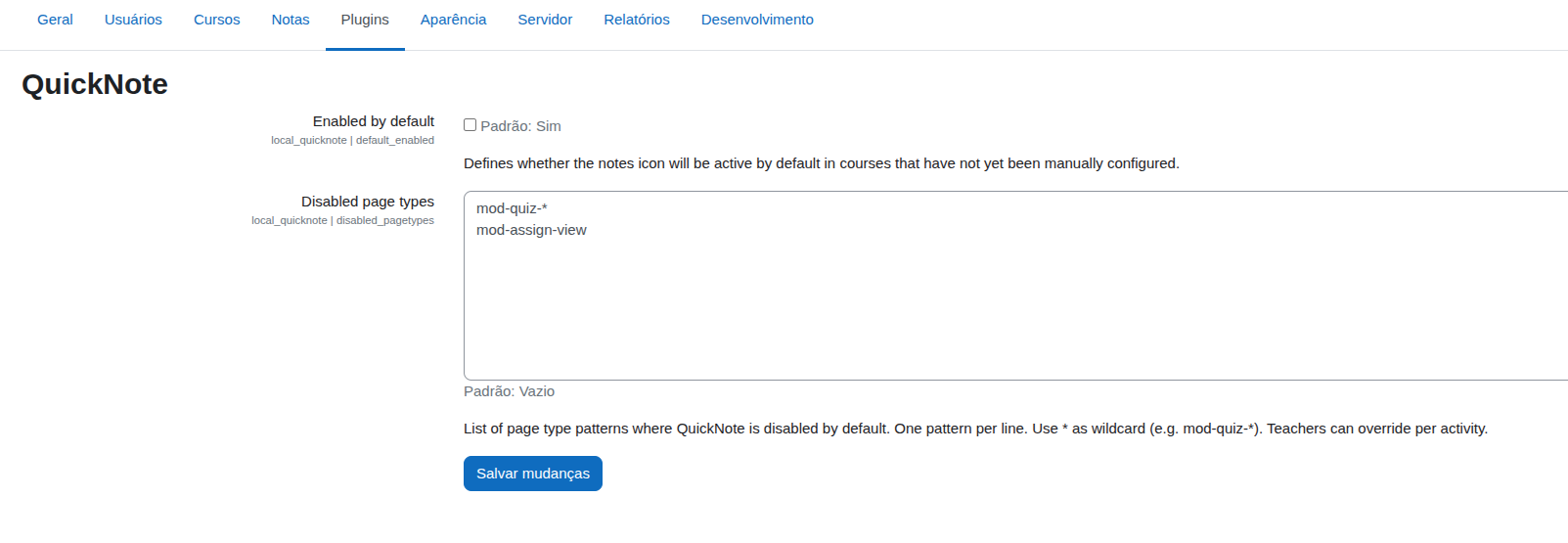
- Added administration settings to exclude specific pages (e.g., mod-quiz-*).
- Added teacher-level settings for Quicknotes visibility per page.
- Added automatic deletion of quicknotes upon user unenrollment.
- Fixed a bug breaking message functionality in Moodle 5.0.
Maintainer updates:
- Hide search bar in sidebar when the user has no quicknotes.
0.1.1 (2026-05-22)
- Fixed a dmlreadexception caused by a mismatch between the database table name in install.xml and the classes.
0.1.0 (2026-05-19)
- Initial release.
0.8.2 (2026070700)
0.8.2
Plugin type: Local plugins
Frankenstyle component name: local_quicknote
Version build number: 2026070700
Version release name: 0.8.2
Maturity: Beta
Supported Moodle versions: 4.0, 4.1, 4.2, 4.3, 4.4, 4.5, 5.0, 5.1, 5.2
Repository URL (Git): https://github.com/Matheu46/moodle-local_quicknote
Repository branch:
Repository tag: 0.8.2
Issue/bug tracker URL: https://github.com/Matheu46/moodle-local_quicknote/issues
Moodle plugin: local_quicknote
0.8.2 (2026-07-07)
- Style Fix: Updated primary color CSS variables to use
--bs-primarywith a fallback to--primaryfor compatibility with Moodle 5.x, where--primaryis no longer supported.
0.8.1 (2026-07-01)
- Accessibility Improvements (A11y):
- Added support to close the sidebar using the
Esckey. - Implemented logical focus management in the sidebar (focus moves into the panel when opened, and returns to the toggle button or action elements when closed/deleted).
- Fixed an issue in the Notes Center where the course filter dropdown would automatically submit for keyboard users navigating with arrow keys.
- Added support to close the sidebar using the
- UX & Architecture Enhancements:
- The course filter dropdown in the Notes Center now lists only courses where the user has created at least one note, rather than all enrolled courses.
0.8.0 (2026-06-28)
- Copy Note to Clipboard: Added a copy button inside the note's textarea in the sidebar, visible only when the note has content.
- Visual Feedback: Implemented visual feedback that changes the copy icon to a checkmark and colors it green for 2 seconds when clicked.
0.7.0 (2026-06-21)
- Mobile Support: Implemented visualization and management of notes in the official Moodle mobile app.
- Export to Markdown: Added a new option in the Notes Center to export notes to
.mdformat with proper text block formatting and decoded HTML entities. - UI Improvements:
- Preserved whitespace and line breaks in both the quoted text and the note content within the Notes Center.
- Added a "View in text" link to notes even when they do not have a specific text quote attached.
0.6.0 (2026-06-15)
- Pagination: Implemented pagination in the Notes Center to limit the number of notes fetched and displayed at once.
- Admin Configuration: Added a new global setting (
perpage) to customize the number of notes displayed per page (options: 12, 24, 48, or no pagination). - Sorting: Changed the default sorting in the Notes Center to order strictly by the last modified date (newest first).
0.5.0 (2026-06-07)
- New Feature: Added an administration setting allowing administrators to choose whether the QuickNote toggle icon and sidebar is displayed on the left or right side of the screen.
- UI/UX: Adjusted the
z-indexlogic to dynamically increase only when the sidebar is open, preventing it from being hidden behind its own sidebar while still remaining below the Moodle message drawer when closed.
0.4.0 (2026-06-04)
- Replaced some hardcoded CSS colors with Moodle's native Bootstrap variables. The QuickNote toggle button now have the same color of your Moodle theme's primary color.
- Lowered the
z-indexof the QuickNote toggle button to 120, ensuring it remains below the Moodle message drawer (z-index 121) to prevent interaction conflicts. - Fix H5P: Resolved the issue where the QuickNote toggle button was incorrectly rendered inside
mod_h5pactivityiframes, preventing duplicate icons. - Enabled QuickNote highlight capture support for native Moodle H5P activities (
mod_h5pactivity) through cross-window communication.
0.3.1 (2026-05-30)
- Fix backup and restore.
- Restrict quicknote rendering to course and module contexts.
0.3.0 (2026-05-28)
- Core Improvements:
- Implement Notes Center page (
view.php). - Added PDF Export functionality (
view.php?export=pdf). - Search & Filters:
- Global Search: Search across all notes from all courses.
- Course Filter: Filter notes by specific course.
- Empty State: Clean UI when no notes are found.
- Implement Notes Center page (
- UI/UX:
- Animated toggle icon transition in the quicknote sidebar.
0.2.0 (2026-05-25)
Contributions by @mattgig:
- Added backup functionality.
- Added administration settings to exclude specific pages (e.g., mod-quiz-*).
- Added teacher-level settings for Quicknotes visibility per page.
- Added automatic deletion of quicknotes upon user unenrollment.
- Fixed a bug breaking message functionality in Moodle 5.0.
Maintainer updates:
- Hide search bar in sidebar when the user has no quicknotes.
0.1.1 (2026-05-22)
- Fixed a dmlreadexception caused by a mismatch between the database table name in install.xml and the classes.
0.1.0 (2026-05-19)
- Initial release.
0.8.1 (2026070100)
0.8.1
Plugin type: Local plugins
Frankenstyle component name: local_quicknote
Version build number: 2026070100
Version release name: 0.8.1
Maturity: Beta
Supported Moodle versions: 4.0, 4.1, 4.2, 4.3, 4.4, 4.5, 5.0, 5.1, 5.2
Repository URL (Git): https://github.com/Matheu46/moodle-local_quicknote
Repository branch:
Repository tag: 0.8.1
Issue/bug tracker URL: https://github.com/Matheu46/moodle-local_quicknote/issues
Moodle plugin: local_quicknote
0.8.1 (2026-07-01)
- Accessibility Improvements (A11y):
- Added support to close the sidebar using the
Esckey. - Implemented logical focus management in the sidebar (focus moves into the panel when opened, and returns to the toggle button or action elements when closed/deleted).
- Fixed an issue in the Notes Center where the course filter dropdown would automatically submit for keyboard users navigating with arrow keys.
- Added support to close the sidebar using the
- UX & Architecture Enhancements:
- The course filter dropdown in the Notes Center now lists only courses where the user has created at least one note, rather than all enrolled courses.
0.8.0 (2026-06-28)
- Copy Note to Clipboard: Added a copy button inside the note's textarea in the sidebar, visible only when the note has content.
- Visual Feedback: Implemented visual feedback that changes the copy icon to a checkmark and colors it green for 2 seconds when clicked.
0.7.0 (2026-06-21)
- Mobile Support: Implemented visualization and management of notes in the official Moodle mobile app.
- Export to Markdown: Added a new option in the Notes Center to export notes to
.mdformat with proper text block formatting and decoded HTML entities. - UI Improvements:
- Preserved whitespace and line breaks in both the quoted text and the note content within the Notes Center.
- Added a "View in text" link to notes even when they do not have a specific text quote attached.
0.6.0 (2026-06-15)
- Pagination: Implemented pagination in the Notes Center to limit the number of notes fetched and displayed at once.
- Admin Configuration: Added a new global setting (
perpage) to customize the number of notes displayed per page (options: 12, 24, 48, or no pagination). - Sorting: Changed the default sorting in the Notes Center to order strictly by the last modified date (newest first).
0.5.0 (2026-06-07)
- New Feature: Added an administration setting allowing administrators to choose whether the QuickNote toggle icon and sidebar is displayed on the left or right side of the screen.
- UI/UX: Adjusted the
z-indexlogic to dynamically increase only when the sidebar is open, preventing it from being hidden behind its own sidebar while still remaining below the Moodle message drawer when closed.
0.4.0 (2026-06-04)
- Replaced some hardcoded CSS colors with Moodle's native Bootstrap variables. The QuickNote toggle button now have the same color of your Moodle theme's primary color.
- Lowered the
z-indexof the QuickNote toggle button to 120, ensuring it remains below the Moodle message drawer (z-index 121) to prevent interaction conflicts. - Fix H5P: Resolved the issue where the QuickNote toggle button was incorrectly rendered inside
mod_h5pactivityiframes, preventing duplicate icons. - Enabled QuickNote highlight capture support for native Moodle H5P activities (
mod_h5pactivity) through cross-window communication.
0.3.1 (2026-05-30)
- Fix backup and restore.
- Restrict quicknote rendering to course and module contexts.
0.3.0 (2026-05-28)
- Core Improvements:
- Implement Notes Center page (
view.php). - Added PDF Export functionality (
view.php?export=pdf). - Search & Filters:
- Global Search: Search across all notes from all courses.
- Course Filter: Filter notes by specific course.
- Empty State: Clean UI when no notes are found.
- Implement Notes Center page (
- UI/UX:
- Animated toggle icon transition in the quicknote sidebar.
0.2.0 (2026-05-25)
Contributions by @mattgig:
- Added backup functionality.
- Added administration settings to exclude specific pages (e.g., mod-quiz-*).
- Added teacher-level settings for Quicknotes visibility per page.
- Added automatic deletion of quicknotes upon user unenrollment.
- Fixed a bug breaking message functionality in Moodle 5.0.
Maintainer updates:
- Hide search bar in sidebar when the user has no quicknotes.
0.1.1 (2026-05-22)
- Fixed a dmlreadexception caused by a mismatch between the database table name in install.xml and the classes.
0.1.0 (2026-05-19)
- Initial release.
0.8.0 (2026062800)
0.8.0
Plugin type: Local plugins
Frankenstyle component name: local_quicknote
Version build number: 2026062800
Version release name: 0.8.0
Maturity: Beta
Supported Moodle versions: 4.0, 4.1, 4.2, 4.3, 4.4, 4.5, 5.0, 5.1, 5.2
Repository URL (Git): https://github.com/Matheu46/moodle-local_quicknote
Repository branch:
Repository tag: 0.8.0
Issue/bug tracker URL: https://github.com/Matheu46/moodle-local_quicknote/issues
Moodle plugin: local_quicknote
0.8.0 (2026-06-28)
- Copy Note to Clipboard: Added a copy button inside the note's textarea in the sidebar, visible only when the note has content.
- Visual Feedback: Implemented visual feedback that changes the copy icon to a checkmark and colors it green for 2 seconds when clicked.
0.7.0 (2026-06-21)
- Mobile Support: Implemented visualization and management of notes in the official Moodle mobile app.
- Export to Markdown: Added a new option in the Notes Center to export notes to
.mdformat with proper text block formatting and decoded HTML entities. - UI Improvements:
- Preserved whitespace and line breaks in both the quoted text and the note content within the Notes Center.
- Added a "View in text" link to notes even when they do not have a specific text quote attached.
0.6.0 (2026-06-15)
- Pagination: Implemented pagination in the Notes Center to limit the number of notes fetched and displayed at once.
- Admin Configuration: Added a new global setting (
perpage) to customize the number of notes displayed per page (options: 12, 24, 48, or no pagination). - Sorting: Changed the default sorting in the Notes Center to order strictly by the last modified date (newest first).
0.5.0 (2026-06-07)
- New Feature: Added an administration setting allowing administrators to choose whether the QuickNote toggle icon and sidebar is displayed on the left or right side of the screen.
- UI/UX: Adjusted the
z-indexlogic to dynamically increase only when the sidebar is open, preventing it from being hidden behind its own sidebar while still remaining below the Moodle message drawer when closed.
0.4.0 (2026-06-04)
- Replaced some hardcoded CSS colors with Moodle's native Bootstrap variables. The QuickNote toggle button now have the same color of your Moodle theme's primary color.
- Lowered the
z-indexof the QuickNote toggle button to 120, ensuring it remains below the Moodle message drawer (z-index 121) to prevent interaction conflicts. - Fix H5P: Resolved the issue where the QuickNote toggle button was incorrectly rendered inside
mod_h5pactivityiframes, preventing duplicate icons. - Enabled QuickNote highlight capture support for native Moodle H5P activities (
mod_h5pactivity) through cross-window communication.
0.3.1 (2026-05-30)
- Fix backup and restore.
- Restrict quicknote rendering to course and module contexts.
0.3.0 (2026-05-28)
- Core Improvements:
- Implement Notes Center page (
view.php). - Added PDF Export functionality (
view.php?export=pdf). - Search & Filters:
- Global Search: Search across all notes from all courses.
- Course Filter: Filter notes by specific course.
- Empty State: Clean UI when no notes are found.
- Implement Notes Center page (
- UI/UX:
- Animated toggle icon transition in the quicknote sidebar.
0.2.0 (2026-05-25)
Contributions by @mattgig:
- Added backup functionality.
- Added administration settings to exclude specific pages (e.g., mod-quiz-*).
- Added teacher-level settings for Quicknotes visibility per page.
- Added automatic deletion of quicknotes upon user unenrollment.
- Fixed a bug breaking message functionality in Moodle 5.0.
Maintainer updates:
- Hide search bar in sidebar when the user has no quicknotes.
0.1.1 (2026-05-22)
- Fixed a dmlreadexception caused by a mismatch between the database table name in install.xml and the classes.
0.1.0 (2026-05-19)
- Initial release.
0.7.0 (2026062101)
0.7.0
Plugin type: Local plugins
Frankenstyle component name: local_quicknote
Version build number: 2026062101
Version release name: 0.7.0
Maturity: Beta
Supported Moodle versions: 4.0, 4.1, 4.2, 4.3, 4.4, 4.5, 5.0, 5.1, 5.2
Repository URL (Git): https://github.com/Matheu46/moodle-local_quicknote
Repository branch:
Repository tag: 0.7.0
Issue/bug tracker URL: https://github.com/Matheu46/moodle-local_quicknote/issues
Moodle plugin: local_quicknote
0.7.0 (2026-06-21)
- Mobile Support: Implemented visualization and management of notes in the official Moodle mobile app.
- Export to Markdown: Added a new option in the Notes Center to export notes to
.mdformat with proper text block formatting and decoded HTML entities. - UI Improvements:
- Preserved whitespace and line breaks in both the quoted text and the note content within the Notes Center.
- Added a "View in text" link to notes even when they do not have a specific text quote attached.
0.6.0 (2026-06-15)
- Pagination: Implemented pagination in the Notes Center to limit the number of notes fetched and displayed at once.
- Admin Configuration: Added a new global setting (
perpage) to customize the number of notes displayed per page (options: 12, 24, 48, or no pagination). - Sorting: Changed the default sorting in the Notes Center to order strictly by the last modified date (newest first).
0.5.0 (2026-06-07)
- New Feature: Added an administration setting allowing administrators to choose whether the QuickNote toggle icon and sidebar is displayed on the left or right side of the screen.
- UI/UX: Adjusted the
z-indexlogic to dynamically increase only when the sidebar is open, preventing it from being hidden behind its own sidebar while still remaining below the Moodle message drawer when closed.
0.4.0 (2026-06-04)
- Replaced some hardcoded CSS colors with Moodle's native Bootstrap variables. The QuickNote toggle button now have the same color of your Moodle theme's primary color.
- Lowered the
z-indexof the QuickNote toggle button to 120, ensuring it remains below the Moodle message drawer (z-index 121) to prevent interaction conflicts. - Fix H5P: Resolved the issue where the QuickNote toggle button was incorrectly rendered inside
mod_h5pactivityiframes, preventing duplicate icons. - Enabled QuickNote highlight capture support for native Moodle H5P activities (
mod_h5pactivity) through cross-window communication.
0.3.1 (2026-05-30)
- Fix backup and restore.
- Restrict quicknote rendering to course and module contexts.
0.3.0 (2026-05-28)
- Core Improvements:
- Implement Notes Center page (
view.php). - Added PDF Export functionality (
view.php?export=pdf). - Search & Filters:
- Global Search: Search across all notes from all courses.
- Course Filter: Filter notes by specific course.
- Empty State: Clean UI when no notes are found.
- Implement Notes Center page (
- UI/UX:
- Animated toggle icon transition in the quicknote sidebar.
0.2.0 (2026-05-25)
Contributions by @mattgig:
- Added backup functionality.
- Added administration settings to exclude specific pages (e.g., mod-quiz-*).
- Added teacher-level settings for Quicknotes visibility per page.
- Added automatic deletion of quicknotes upon user unenrollment.
- Fixed a bug breaking message functionality in Moodle 5.0.
Maintainer updates:
- Hide search bar in sidebar when the user has no quicknotes.
0.1.1 (2026-05-22)
- Fixed a dmlreadexception caused by a mismatch between the database table name in install.xml and the classes.
0.1.0 (2026-05-19)
- Initial release.
0.6.0 (2026061500)
0.6.0
Plugin type: Local plugins
Frankenstyle component name: local_quicknote
Version build number: 2026061500
Version release name: 0.6.0
Maturity: Beta
Supported Moodle versions: 4.0, 4.1, 4.2, 4.3, 4.4, 4.5, 5.0, 5.1, 5.2
Repository URL (Git): https://github.com/Matheu46/moodle-local_quicknote
Repository branch:
Repository tag: 0.6.0
Issue/bug tracker URL: https://github.com/Matheu46/moodle-local_quicknote/issues
Moodle plugin: local_quicknote
0.6.0 (2026-06-15)
- Pagination: Implemented pagination in the Notes Center to limit the number of notes fetched and displayed at once.
- Admin Configuration: Added a new global setting (
perpage) to customize the number of notes displayed per page (options: 12, 24, 48, or no pagination). - Sorting: Changed the default sorting in the Notes Center to order strictly by the last modified date (newest first).
0.5.0 (2026-06-07)
- New Feature: Added an administration setting allowing administrators to choose whether the QuickNote toggle icon and sidebar is displayed on the left or right side of the screen.
- UI/UX: Adjusted the
z-indexlogic to dynamically increase only when the sidebar is open, preventing it from being hidden behind its own sidebar while still remaining below the Moodle message drawer when closed.
0.4.0 (2026-06-04)
- Replaced some hardcoded CSS colors with Moodle's native Bootstrap variables. The QuickNote toggle button now have the same color of your Moodle theme's primary color.
- Lowered the
z-indexof the QuickNote toggle button to 120, ensuring it remains below the Moodle message drawer (z-index 121) to prevent interaction conflicts. - Fix H5P: Resolved the issue where the QuickNote toggle button was incorrectly rendered inside
mod_h5pactivityiframes, preventing duplicate icons. - Enabled QuickNote highlight capture support for native Moodle H5P activities (
mod_h5pactivity) through cross-window communication.
0.3.1 (2026-05-30)
- Fix backup and restore.
- Restrict quicknote rendering to course and module contexts.
0.3.0 (2026-05-28)
- Core Improvements:
- Implement Notes Center page (
view.php). - Added PDF Export functionality (
view.php?export=pdf). - Search & Filters:
- Global Search: Search across all notes from all courses.
- Course Filter: Filter notes by specific course.
- Empty State: Clean UI when no notes are found.
- Implement Notes Center page (
- UI/UX:
- Animated toggle icon transition in the quicknote sidebar.
0.2.0 (2026-05-25)
Contributions by @mattgig:
- Added backup functionality.
- Added administration settings to exclude specific pages (e.g., mod-quiz-*).
- Added teacher-level settings for Quicknotes visibility per page.
- Added automatic deletion of quicknotes upon user unenrollment.
- Fixed a bug breaking message functionality in Moodle 5.0.
Maintainer updates:
- Hide search bar in sidebar when the user has no quicknotes.
0.1.1 (2026-05-22)
- Fixed a dmlreadexception caused by a mismatch between the database table name in install.xml and the classes.
0.1.0 (2026-05-19)
- Initial release.
0.5.0 (2026060700)
0.5.0
Plugin type: Local plugins
Frankenstyle component name: local_quicknote
Version build number: 2026060700
Version release name: 0.5.0
Maturity: Beta
Supported Moodle versions: 4.0, 4.1, 4.2, 4.3, 4.4, 4.5, 5.0, 5.1, 5.2
Repository URL (Git): https://github.com/Matheu46/moodle-local_quicknote
Repository branch:
Repository tag: 0.5.0
Issue/bug tracker URL: https://github.com/Matheu46/moodle-local_quicknote/issues
Moodle plugin: local_quicknote
0.5.0 (2026-06-07)
- New Feature: Added an administration setting allowing administrators to choose whether the QuickNote toggle icon and sidebar is displayed on the left or right side of the screen.
- UI/UX: Adjusted the
z-indexlogic to dynamically increase only when the sidebar is open, preventing it from being hidden behind its own sidebar while still remaining below the Moodle message drawer when closed.
0.4.0 (2026-06-04)
- Replaced some hardcoded CSS colors with Moodle's native Bootstrap variables. The QuickNote toggle button now have the same color of your Moodle theme's primary color.
- Lowered the
z-indexof the QuickNote toggle button to 120, ensuring it remains below the Moodle message drawer (z-index 121) to prevent interaction conflicts. - Fix H5P: Resolved the issue where the QuickNote toggle button was incorrectly rendered inside
mod_h5pactivityiframes, preventing duplicate icons. - Enabled QuickNote highlight capture support for native Moodle H5P activities (
mod_h5pactivity) through cross-window communication.
0.3.1 (2026-05-30)
- Fix backup and restore.
- Restrict quicknote rendering to course and module contexts.
0.3.0 (2026-05-28)
- Core Improvements:
- Implement Notes Center page (
view.php). - Added PDF Export functionality (
view.php?export=pdf). - Search & Filters:
- Global Search: Search across all notes from all courses.
- Course Filter: Filter notes by specific course.
- Empty State: Clean UI when no notes are found.
- Implement Notes Center page (
- UI/UX:
- Animated toggle icon transition in the quicknote sidebar.
0.2.0 (2026-05-25)
Contributions by @mattgig:
- Added backup functionality.
- Added administration settings to exclude specific pages (e.g., mod-quiz-*).
- Added teacher-level settings for Quicknotes visibility per page.
- Added automatic deletion of quicknotes upon user unenrollment.
- Fixed a bug breaking message functionality in Moodle 5.0.
Maintainer updates:
- Hide search bar in sidebar when the user has no quicknotes.
0.1.1 (2026-05-22)
- Fixed a dmlreadexception caused by a mismatch between the database table name in install.xml and the classes.
0.1.0 (2026-05-19)
- Initial release.
0.4.0 (2026060400)
0.4.0
Plugin type: Local plugins
Frankenstyle component name: local_quicknote
Version build number: 2026060400
Version release name: 0.4.0
Maturity: Beta
Supported Moodle versions: 4.0, 4.1, 4.2, 4.3, 4.4, 4.5, 5.0, 5.1, 5.2
Repository URL (Git): https://github.com/Matheu46/moodle-local_quicknote
Repository branch:
Repository tag: 0.4.0
Issue/bug tracker URL: https://github.com/Matheu46/moodle-local_quicknote/issues
Moodle plugin: local_quicknote
0.4.0 (2026-06-04)
- Replaced some hardcoded CSS colors with Moodle's native Bootstrap variables. The QuickNote toggle button now have the same color of your Moodle theme's primary color.
- Lowered the
z-indexof the QuickNote toggle button to 120, ensuring it remains below the Moodle message drawer (z-index 121) to prevent interaction conflicts. - Fix H5P: Resolved the issue where the QuickNote toggle button was incorrectly rendered inside
mod_h5pactivityiframes, preventing duplicate icons. - Enabled QuickNote highlight capture support for native Moodle H5P activities (
mod_h5pactivity) through cross-window communication.
0.3.1 (2026-05-30)
- Fix backup and restore.
- Restrict quicknote rendering to course and module contexts.
0.3.0 (2026-05-28)
- Core Improvements:
- Implement Notes Center page (
view.php). - Added PDF Export functionality (
view.php?export=pdf). - Search & Filters:
- Global Search: Search across all notes from all courses.
- Course Filter: Filter notes by specific course.
- Empty State: Clean UI when no notes are found.
- Implement Notes Center page (
- UI/UX:
- Animated toggle icon transition in the quicknote sidebar.
0.2.0 (2026-05-25)
Contributions by @mattgig:
- Added backup functionality.
- Added administration settings to exclude specific pages (e.g., mod-quiz-*).
- Added teacher-level settings for Quicknotes visibility per page.
- Added automatic deletion of quicknotes upon user unenrollment.
- Fixed a bug breaking message functionality in Moodle 5.0.
Maintainer updates:
- Hide search bar in sidebar when the user has no quicknotes.
0.1.1 (2026-05-22)
- Fixed a dmlreadexception caused by a mismatch between the database table name in install.xml and the classes.
0.1.0 (2026-05-19)
- Initial release.
0.3.1 (2026053000)
0.3.1
Plugin type: Local plugins
Frankenstyle component name: local_quicknote
Version build number: 2026053000
Version release name: 0.3.1
Maturity: Beta
Supported Moodle versions: 4.0, 4.1, 4.2, 4.3, 4.4, 4.5, 5.0, 5.1, 5.2
Repository URL (Git): https://github.com/Matheu46/moodle-local_quicknote
Repository branch:
Repository tag: 0.3.1
Issue/bug tracker URL: https://github.com/Matheu46/moodle-local_quicknote/issues
Moodle plugin: local_quicknote
0.3.1 (2026-05-30)
- Fix backup and restore.
- Restrict quicknote rendering to course and module contexts.
0.3.0 (2026-05-28)
- Core Improvements:
- Implement Notes Center page (
view.php). - Added PDF Export functionality (
view.php?export=pdf). - Search & Filters:
- Global Search: Search across all notes from all courses.
- Course Filter: Filter notes by specific course.
- Empty State: Clean UI when no notes are found.
- Implement Notes Center page (
- UI/UX:
- Animated toggle icon transition in the quicknote sidebar.
0.2.0 (2026-05-25)
Contributions by @mattgig:
- Added backup functionality.
- Added administration settings to exclude specific pages (e.g., mod-quiz-*).
- Added teacher-level settings for Quicknotes visibility per page.
- Added automatic deletion of quicknotes upon user unenrollment.
- Fixed a bug breaking message functionality in Moodle 5.0.
Maintainer updates:
- Hide search bar in sidebar when the user has no quicknotes.
0.1.1 (2026-05-22)
- Fixed a dmlreadexception caused by a mismatch between the database table name in install.xml and the classes.
0.1.0 (2026-05-19)
- Initial release.
0.3.0 (2026052800)
0.3.0
Plugin type: Local plugins
Frankenstyle component name: local_quicknote
Version build number: 2026052800
Version release name: 0.3.0
Maturity: Beta
Supported Moodle versions: 4.0, 4.1, 4.2, 4.3, 4.4, 4.5, 5.0, 5.1, 5.2
Repository URL (Git): https://github.com/Matheu46/moodle-local_quicknote
Repository branch:
Repository tag: 0.3.0
Issue/bug tracker URL: https://github.com/Matheu46/moodle-local_quicknote/issues
Moodle plugin: local_quicknote
0.3.0 (2026-05-28)
- Core Improvements:
- Implement Notes Center page (
view.php). - Added PDF Export functionality (
view.php?export=pdf). - Search & Filters:
- Global Search: Search across all notes from all courses.
- Course Filter: Filter notes by specific course.
- Empty State: Clean UI when no notes are found.
- Implement Notes Center page (
- UI/UX:
- Animated toggle icon transition in the quicknote sidebar.
0.2.0 (2026-05-25)
Contributions by @mattgig:
- Added backup functionality.
- Added administration settings to exclude specific pages (e.g., mod-quiz-*).
- Added teacher-level settings for Quicknotes visibility per page.
- Added automatic deletion of quicknotes upon user unenrollment.
- Fixed a bug breaking message functionality in Moodle 5.0.
Maintainer updates:
- Hide search bar in sidebar when the user has no quicknotes.
0.1.1 (2026-05-22)
- Fixed a dmlreadexception caused by a mismatch between the database table name in install.xml and the classes.
0.1.0 (2026-05-19)
- Initial release.
0.2.0 (2026052500)
0.2.0
Plugin type: Local plugins
Frankenstyle component name: local_quicknote
Version build number: 2026052500
Version release name: 0.2.0
Maturity: Beta
Supported Moodle versions: 4.5, 5.0, 5.1, 5.2
Repository URL (Git): https://github.com/Matheu46/moodle-local_quicknote
Repository branch:
Repository tag: 0.2.0
Issue/bug tracker URL: https://github.com/Matheu46/moodle-local_quicknote/issues
Moodle plugin: local_quicknote
0.2.0 (2026-05-25)
Contributions by @mattgig:
- Added backup functionality.
- Added administration settings to exclude specific pages (e.g., mod-quiz-*).
- Added teacher-level settings for Quicknotes visibility per page.
- Added automatic deletion of quicknotes upon user unenrollment.
- Fixed a bug breaking message functionality in Moodle 5.0.
Maintainer updates:
- Hide search bar in sidebar when the user has no quicknotes.
0.1.1 (2026-05-22)
- Fixed a dmlreadexception caused by a mismatch between the database table name in install.xml and the classes.
0.1.0 (2026-05-19)
- Initial release.
0.1.1 (2026052200)
0.1.1
Plugin type: Local plugins
Frankenstyle component name: local_quicknote
Version build number: 2026052200
Version release name: 0.1.1
Maturity: Beta
Supported Moodle versions: 4.5, 5.0, 5.1, 5.2
Repository URL (Git): https://github.com/Matheu46/moodle-local_quicknote
Repository branch:
Repository tag:
Issue/bug tracker URL: https://github.com/Matheu46/moodle-local_quicknote/issues
Fixed a dmlreadexception caused by a mismatch between the database table name in install.xml and the classes. Special thanks to the community for reporting this!
0.1.0 (2026051800)
0.1.0
Plugin type: Local plugins
Frankenstyle component name: local_quicknote
Version build number: 2026051800
Version release name: 0.1.0
Maturity: Beta
Supported Moodle versions: 4.5, 5.0, 5.1, 5.2
Repository URL (Git): https://github.com/Matheu46/moodle-local_quicknote
Repository branch:
Repository tag:
Issue/bug tracker URL: https://github.com/Matheu46/moodle-local_quicknote/issues
Quick Note
Designed for the native Boost experience in Moodle 4.4 and 4.5+, QuickNote helps students capture important excerpts while reading course materials, connect those excerpts to personal reflections, and return to the exact place where learning happened. For teachers and administrators, it provides simple controls to decide when and where the tool is available.
Instead of forcing learners to copy text into external apps, QuickNote keeps the study workflow inside Moodle. Students can highlight a passage, save it instantly as a quote, add their own interpretation, and revisit the original context later through browser text-fragment navigation. The result is a cleaner, more focused note-taking experience that supports active reading, revision, and deeper engagement with course content.
" Features
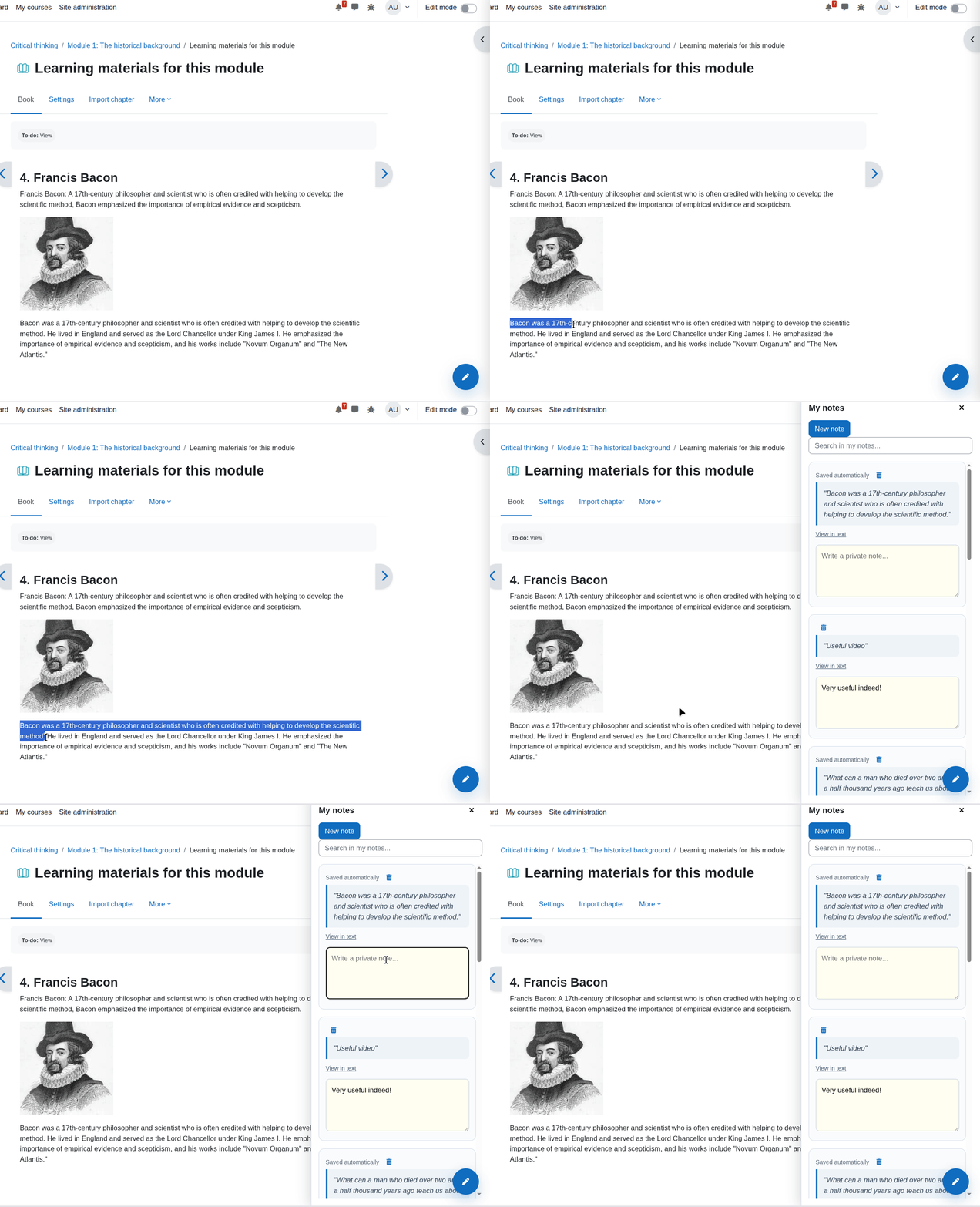
- Highlight to Note: Students can select text anywhere inside a course page and use a floating action button to save the selection instantly as a quote.
- Scroll to Text Fragments: Quote references use browser text fragments (
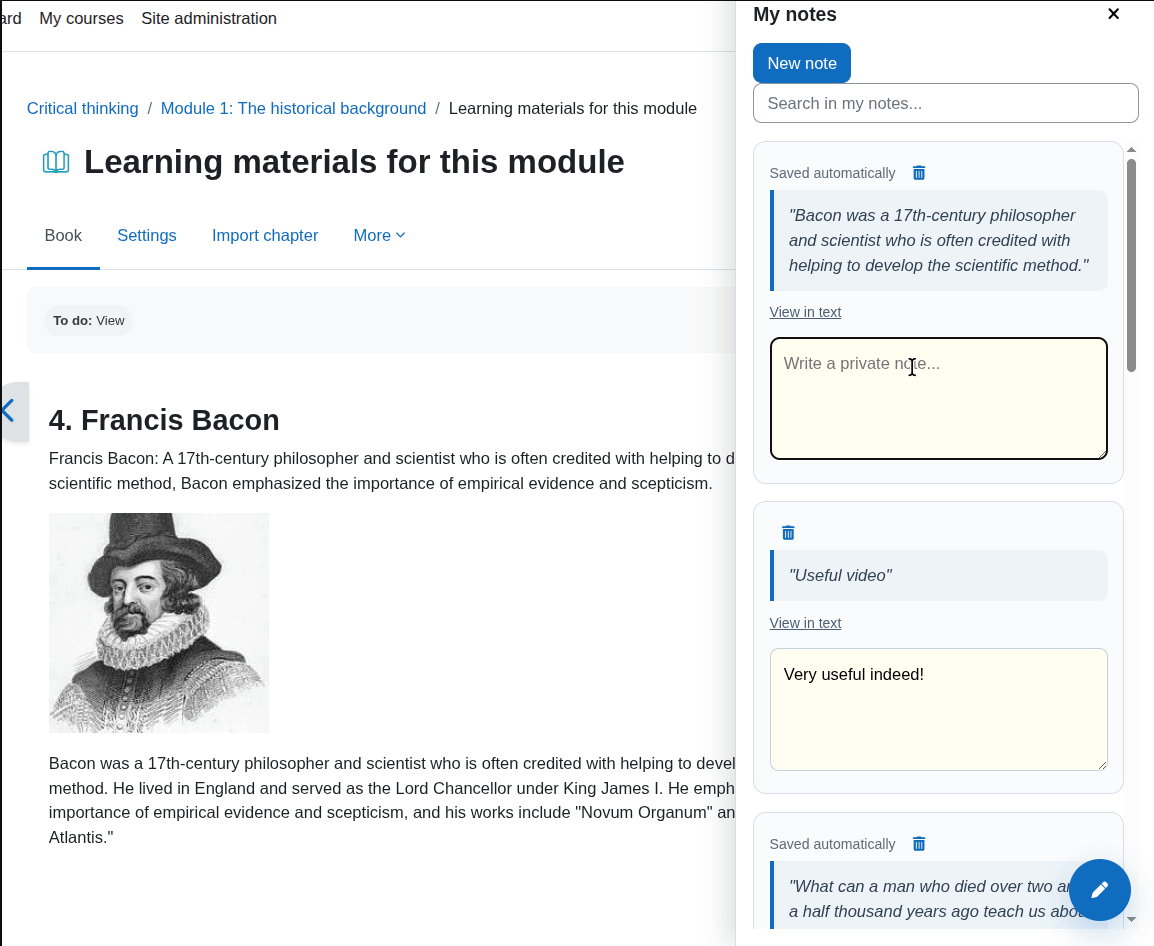
#:~:text=), allowing QuickNote to return users to the exact original passage and highlight it visually. - Quote and Reflection Separation: The interface clearly separates the quoted course text from the student's own annotation or reflection.
- Native Sidebar Drawer: Notes are managed inside a right-hand sidebar drawer integrated with the Boost user experience, accessible from a floating action button or navigation entry point.
- Auto-save: Notes and reflections are saved automatically in the background via Moodle AJAX services, reducing the risk of lost work.
- Search and Management: Students can filter notes in real time and delete notes they no longer need.
- Course-Level Control: Teachers can enable or disable QuickNote for individual courses.
- Default Site Policy: Administrators can define whether the feature should be enabled or disabled by default for newly configured courses.
- Student-Centered Study Workflow: Supports close reading, reflective writing, and quick review without leaving Moodle.
" Prerequisites
- Moodle
4.4+ - Boost theme
- Boost child themes are also supported
QuickNote is designed natively for the Moodle Boost interface. Compatibility with non-Boost themes is not the primary target.
⚙️ Configuration
QuickNote includes controls for both site administrators and course teachers.
Administrator settings
Administrators can define the default behavior for new courses:
- Go to
Site administration > Plugins > Local plugins > QuickNote. - Configure the default state for the plugin:
EnabledorDisabledfor courses that have not yet been individually configured.
This allows institutions to decide whether QuickNote should be available broadly by default or enabled selectively.
Teacher course settings
Teachers can control QuickNote per course:
- Open the target course.
- Go to the course settings form.
- Find the
QuickNotesection. - Enable or disable QuickNote for that course.
This makes it easy to align the tool with the pedagogical design of each course.
📦 Installation
QuickNote can be installed like any standard Moodle local plugin.
Option 1: Install from ZIP
- Download the plugin ZIP package.
- Log in to Moodle as an administrator.
- Go to
Site administration > Plugins > Install plugins. - Upload the ZIP file.
- Follow the Moodle installation steps.
- Complete the upgrade process when prompted.
Option 2: Install from Git
Clone or copy the plugin into your Moodle local plugins directory:
git clone https://github.com/Matheu46/moodle-local_quicknote.git /path/to/moodle/local/quicknote
Then complete the Moodle upgrade:
- Log in as an administrator.
- Go to
Site administration > Notifications.
Or run the CLI upgrade:
php admin/cli/upgrade.php
🧭 Usage
QuickNote is designed to be simple for students from the first interaction.
- Open any supported course page.
- Select a meaningful excerpt from the learning material.
- Click the floating button that appears near the selection.
- QuickNote saves the selected passage as a quote and opens the sidebar drawer.
- Add a personal reflection, interpretation, summary, or study note in the annotation field.
- Continue reading while notes are saved automatically in the background.
- Use the search field later to find notes quickly.
- Click
View in textto return to the original page location and highlight the saved passage.
🧩 Plugin Details
- Plugin name: QuickNote
- Component:
local_quicknote - Plugin type: Local plugin
- Primary interface target: Moodle Boost right-hand drawer workflow
🐛 Bug Reports & Support
If you find a bug or have a feature request, please open an issue on our tracker:
(https://github.com/Matheu46/moodle-local_quicknote/issues)
Pull requests are welcome!
📄 License
This program is free software: you can redistribute it and/or modify it under
the terms of the GNU General Public License as published by the Free Software
Foundation, either version 3 of the License, or (at your option) any later
version.
This program is distributed in the hope that it will be useful, but WITHOUT ANY
WARRANTY; without even the implied warranty of MERCHANTABILITY or FITNESS FOR A
PARTICULAR PURPOSE. See the GNU General Public License for more details.
You should have received a copy of the GNU General Public License along with
this program. If not, see https://www.gnu.org/licenses/.
0.1.0 (2026051600)
0.1.0
Plugin type: Local plugins
Frankenstyle component name: local_quicknote
Version build number: 2026051600
Version release name: 0.1.0
Maturity: Beta
Supported Moodle versions: 4.5, 5.0, 5.1, 5.2
Repository URL (Git): https://github.com/Matheu46/moodle-local_quicknote
Repository branch:
Repository tag:
Issue/bug tracker URL: https://github.com/Matheu46/moodle-local_quicknote/issues
Quick Note
Designed for the native Boost experience in Moodle 4.4 and 4.5+, QuickNote helps students capture important excerpts while reading course materials, connect those excerpts to personal reflections, and return to the exact place where learning happened. For teachers and administrators, it provides simple controls to decide when and where the tool is available.
Instead of forcing learners to copy text into external apps, QuickNote keeps the study workflow inside Moodle. Students can highlight a passage, save it instantly as a quote, add their own interpretation, and revisit the original context later through browser text-fragment navigation. The result is a cleaner, more focused note-taking experience that supports active reading, revision, and deeper engagement with course content.
" Features
- Highlight to Note: Students can select text anywhere inside a course page and use a floating action button to save the selection instantly as a quote.
- Scroll to Text Fragments: Quote references use browser text fragments (
#:~:text=), allowing QuickNote to return users to the exact original passage and highlight it visually. - Quote and Reflection Separation: The interface clearly separates the quoted course text from the student's own annotation or reflection.
- Native Sidebar Drawer: Notes are managed inside a right-hand sidebar drawer integrated with the Boost user experience, accessible from a floating action button or navigation entry point.
- Auto-save: Notes and reflections are saved automatically in the background via Moodle AJAX services, reducing the risk of lost work.
- Search and Management: Students can filter notes in real time and delete notes they no longer need.
- Course-Level Control: Teachers can enable or disable QuickNote for individual courses.
- Default Site Policy: Administrators can define whether the feature should be enabled or disabled by default for newly configured courses.
- Student-Centered Study Workflow: Supports close reading, reflective writing, and quick review without leaving Moodle.
" Prerequisites
- Moodle
4.4+ - Boost theme
- Boost child themes are also supported
QuickNote is designed natively for the Moodle Boost interface. Compatibility with non-Boost themes is not the primary target.
⚙️ Configuration
QuickNote includes controls for both site administrators and course teachers.
Administrator settings
Administrators can define the default behavior for new courses:
- Go to
Site administration > Plugins > Local plugins > QuickNote. - Configure the default state for the plugin:
EnabledorDisabledfor courses that have not yet been individually configured.
This allows institutions to decide whether QuickNote should be available broadly by default or enabled selectively.
Teacher course settings
Teachers can control QuickNote per course:
- Open the target course.
- Go to the course settings form.
- Find the
QuickNotesection. - Enable or disable QuickNote for that course.
This makes it easy to align the tool with the pedagogical design of each course.
📦 Installation
QuickNote can be installed like any standard Moodle local plugin.
Option 1: Install from ZIP
- Download the plugin ZIP package.
- Log in to Moodle as an administrator.
- Go to
Site administration > Plugins > Install plugins. - Upload the ZIP file.
- Follow the Moodle installation steps.
- Complete the upgrade process when prompted.
Option 2: Install from Git
Clone or copy the plugin into your Moodle local plugins directory:
git clone https://github.com/Matheu46/moodle-local_quicknote.git /path/to/moodle/local/quicknote
Then complete the Moodle upgrade:
- Log in as an administrator.
- Go to
Site administration > Notifications.
Or run the CLI upgrade:
php admin/cli/upgrade.php
🧭 Usage
QuickNote is designed to be simple for students from the first interaction.
- Open any supported course page.
- Select a meaningful excerpt from the learning material.
- Click the floating button that appears near the selection.
- QuickNote saves the selected passage as a quote and opens the sidebar drawer.
- Add a personal reflection, interpretation, summary, or study note in the annotation field.
- Continue reading while notes are saved automatically in the background.
- Use the search field later to find notes quickly.
- Click
View in textto return to the original page location and highlight the saved passage.
🧩 Plugin Details
- Plugin name: QuickNote
- Component:
local_quicknote - Plugin type: Local plugin
- Primary interface target: Moodle Boost right-hand drawer workflow
🐛 Bug Reports & Support
If you find a bug or have a feature request, please open an issue on our tracker:
(https://github.com/Matheu46/moodle-local_quicknote/issues)
Pull requests are welcome!
📄 License
This program is free software: you can redistribute it and/or modify it under
the terms of the GNU General Public License as published by the Free Software
Foundation, either version 3 of the License, or (at your option) any later
version.
This program is distributed in the hope that it will be useful, but WITHOUT ANY
WARRANTY; without even the implied warranty of MERCHANTABILITY or FITNESS FOR A
PARTICULAR PURPOSE. See the GNU General Public License for more details.
You should have received a copy of the GNU General Public License along with
this program. If not, see https://www.gnu.org/licenses/.
0.1.0 (2026050106)
0.1.0
Plugin type: Local plugins
Frankenstyle component name: local_quicknote
Version build number: 2026050106
Version release name: 0.1.0
Maturity: Beta
Supported Moodle versions: 4.5, 5.0, 5.1, 5.2
Repository URL (Git):
Repository branch:
Repository tag:
Issue/bug tracker URL: https://github.com/Matheu46/moodle-local_quicknote/issues
Quick Note
Designed for the native Boost experience in Moodle 4.4 and 4.5+, QuickNote helps students capture important excerpts while reading course materials, connect those excerpts to personal reflections, and return to the exact place where learning happened. For teachers and administrators, it provides simple controls to decide when and where the tool is available.
Instead of forcing learners to copy text into external apps, QuickNote keeps the study workflow inside Moodle. Students can highlight a passage, save it instantly as a quote, add their own interpretation, and revisit the original context later through browser text-fragment navigation. The result is a cleaner, more focused note-taking experience that supports active reading, revision, and deeper engagement with course content.
" Features
- Highlight to Note: Students can select text anywhere inside a course page and use a floating action button to save the selection instantly as a quote.
- Scroll to Text Fragments: Quote references use browser text fragments (
#:~:text=), allowing QuickNote to return users to the exact original passage and highlight it visually. - Quote and Reflection Separation: The interface clearly separates the quoted course text from the student's own annotation or reflection.
- Native Sidebar Drawer: Notes are managed inside a right-hand sidebar drawer integrated with the Boost user experience, accessible from a floating action button or navigation entry point.
- Auto-save: Notes and reflections are saved automatically in the background via Moodle AJAX services, reducing the risk of lost work.
- Search and Management: Students can filter notes in real time and delete notes they no longer need.
- Course-Level Control: Teachers can enable or disable QuickNote for individual courses.
- Default Site Policy: Administrators can define whether the feature should be enabled or disabled by default for newly configured courses.
- Student-Centered Study Workflow: Supports close reading, reflective writing, and quick review without leaving Moodle.
" Prerequisites
- Moodle
4.4+ - Boost theme
- Boost child themes are also supported
QuickNote is designed natively for the Moodle Boost interface. Compatibility with non-Boost themes is not the primary target.
⚙️ Configuration
QuickNote includes controls for both site administrators and course teachers.
Administrator settings
Administrators can define the default behavior for new courses:
- Go to
Site administration > Plugins > Local plugins > QuickNote. - Configure the default state for the plugin:
EnabledorDisabledfor courses that have not yet been individually configured.
This allows institutions to decide whether QuickNote should be available broadly by default or enabled selectively.
Teacher course settings
Teachers can control QuickNote per course:
- Open the target course.
- Go to the course settings form.
- Find the
QuickNotesection. - Enable or disable QuickNote for that course.
This makes it easy to align the tool with the pedagogical design of each course.
📦 Installation
QuickNote can be installed like any standard Moodle local plugin.
Option 1: Install from ZIP
- Download the plugin ZIP package.
- Log in to Moodle as an administrator.
- Go to
Site administration > Plugins > Install plugins. - Upload the ZIP file.
- Follow the Moodle installation steps.
- Complete the upgrade process when prompted.
Option 2: Install from Git
Clone or copy the plugin into your Moodle local plugins directory:
git clone https://github.com/Matheu46/moodle-local_quicknote.git /path/to/moodle/local/quicknote
Then complete the Moodle upgrade:
- Log in as an administrator.
- Go to
Site administration > Notifications.
Or run the CLI upgrade:
php admin/cli/upgrade.php
🧭 Usage
QuickNote is designed to be simple for students from the first interaction.
- Open any supported course page.
- Select a meaningful excerpt from the learning material.
- Click the floating button that appears near the selection.
- QuickNote saves the selected passage as a quote and opens the sidebar drawer.
- Add a personal reflection, interpretation, summary, or study note in the annotation field.
- Continue reading while notes are saved automatically in the background.
- Use the search field later to find notes quickly.
- Click
View in textto return to the original page location and highlight the saved passage.
🧩 Plugin Details
- Plugin name: QuickNote
- Component:
local_quicknote - Plugin type: Local plugin
- Primary interface target: Moodle Boost right-hand drawer workflow
🐛 Bug Reports & Support
If you find a bug or have a feature request, please open an issue on our tracker:
(https://github.com/Matheu46/moodle-local_quicknote/issues)
Pull requests are welcome!
📄 License
This program is free software: you can redistribute it and/or modify it under
the terms of the GNU General Public License as published by the Free Software
Foundation, either version 3 of the License, or (at your option) any later
version.
This program is distributed in the hope that it will be useful, but WITHOUT ANY
WARRANTY; without even the implied warranty of MERCHANTABILITY or FITNESS FOR A
PARTICULAR PURPOSE. See the GNU General Public License for more details.
You should have received a copy of the GNU General Public License along with
this program. If not, see https://www.gnu.org/licenses/.