local_fastpix
A Moodle local plugin that connects your Moodle site to
FastPix, the video hosting and streaming
platform. It provides the shared HTTP gateway, asset cache, webhook
ingestion, and JWT signing used by the FastPix activity module, filter,
and editor plugins.
Use this plugin if you administer a Moodle site and want to add FastPix
video support. On its own, it ships only an admin settings page, a
webhook endpoint, and a health probe.
Features
Gateway and integration
- Direct upload and URL-pull workflows for video assets, scoped to the
course the upload is started in.
- Server-side request forgery (SSRF) protection on URL-pull sources.
- Shared HTTP gateway with circuit breaker and rate limiter, backed by
Moodle Universal Cache.
- Asset cache that keeps Moodle and FastPix in sync without re-fetching
metadata on every request.
Webhook ingestion
- Idempotent ingestion with per-asset ordering, duplicate events are
silently ignored.
- Dual-secret rotation: when you rotate the signing secret, the verifier
accepts the previous value for 30 minutes, so you can update both
sides without losing deliveries.
- Public webhook endpoint at
/local/fastpix/webhook.php.
- Subscribes to
video.media.created, video.media.ready,
video.media.updated, video.media.failed, and
video.media.deleted events.
Playback and DRM
- Local RS256 JWT signing for private and DRM-protected playback. The
signing key is generated on first use.
- Optional DRM, controlled by a feature flag and a DRM Configuration
ID. If only one is set, DRM stays disabled.
- Signed playback tokens are time-limited and tied to the requesting
user, so links can't be shared outside the course context.
Operations and observability
- Public health check endpoint at
/local/fastpix/health.php - no
authentication required, rate-limited to 30 requests per minute per
IP, returns JSON.
- Compatible with Pingdom, UptimeRobot, and Prometheus blackbox
exporter.
- Returns
200 when healthy, 503 on upstream failure, and 429 when
rate-limited.
Privacy and data hygiene
- Full Moodle Privacy API support, including per-asset deletion under
GDPR.
- User identifiers are sent to FastPix only as a site-specific HMAC
value (user_hash), never as raw Moodle user IDs.
- The webhook ledger is pruned after 90 days; soft-deleted assets are
permanently removed after a 7-day grace window.
Requirements
- Moodle 4.5 LTS or later.
- PHP 8.1 or later (tested through PHP 8.3).
- A FastPix account with API credentials and a webhook signing secret.
Sign up if you don't have one.
- The FastPix activity module (
mod_fastpix) for the upload features.
local_fastpix provides the upload web services but authorises them with
mod/fastpix:uploadmedia, a capability owned by mod_fastpix. When that
module is not installed, the upload endpoints fail with a clear
"activity module required" message rather than silently breaking; playback,
retention and cleanup do not require it. This deliberate cross-plugin
capability ownership is recorded in docs/adr/.
- A shared Moodle Universal Cache (MUC) backend such as Redis,
Memcached, or on a single-server install with one PHP-FPM pool
the file store. The gateway circuit breaker and rate limiter rely on
shared cache state, so they need a backend that all PHP workers can
reach.
Supported databases
The plugin works with any database server supported by Moodle:
| Database | Minimum version |
|---|---|
| MariaDB | 10.6.7 |
| MySQL | 8.0 |
| PostgreSQL | 13 |
| MS SQL Server | 2017 |
| Oracle | 19c |
Note: Oracle support is deprecated in Moodle. If you're starting a
new deployment, pick one of the other databases.
Install
Choose one of the following methods.
Install from the Moodle Plugins directory
- Sign in to your Moodle site as an administrator.
- Go to Site administration > Plugins > Install plugins.
- Search for FastPix and follow the prompts.
Install from a ZIP file
- Download the latest release from the Download button on this Moodle plugins directory page.
- Sign in to your Moodle site as an administrator.
- Go to Site administration > Plugins > Install plugins and upload
the ZIP file. Don't unzip it first; Moodle installs the package
directly from the ZIP.
- Select Install plugin from the ZIP file, then continue through
the validation screen.
- On the Plugins requiring attention screen, select
Upgrade Moodle database now.
- When the upgrade finishes, select Continue.
When the install hook runs, the plugin generates a per-site user-hash
salt and the default feature flags (DRM off). The RSA signing key for
playback JWTs is created the first time it's needed, after you save
your API credentials. The webhook signing secret is not generated
locally; FastPix generates it for each webhook destination and you
paste it into the Moodle settings page (see Webhook).
Configure
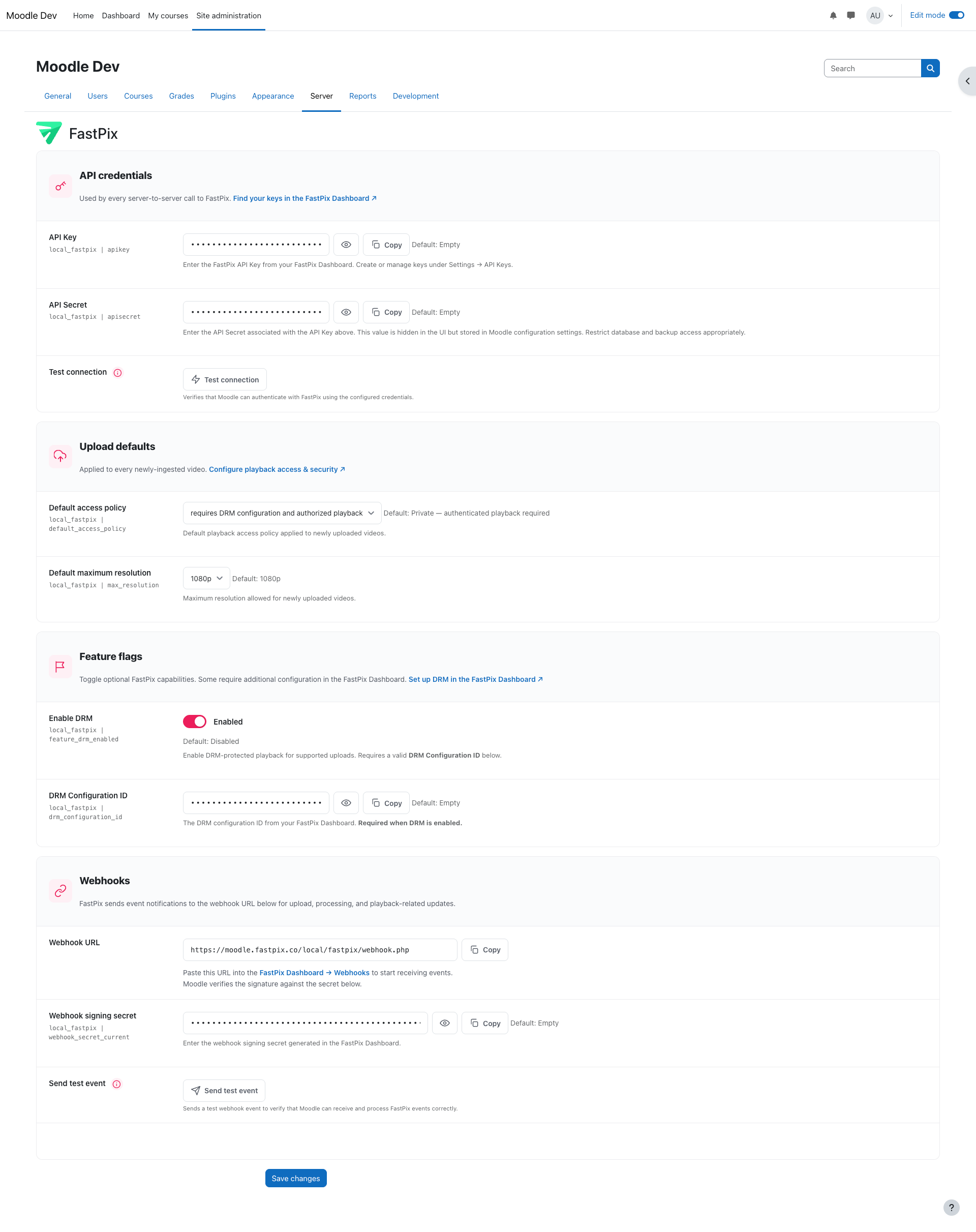
To open the settings page, go to Site administration > Server >
FastPix. You need the local/fastpix:configurecredentials
capability, which the Manager role has by default.
API credentials
- In your FastPix dashboard, go to Settings > API Keys.
- Copy the API Key and the API Secret.
- In Moodle, paste both values into the FastPix settings page and
select Save changes.
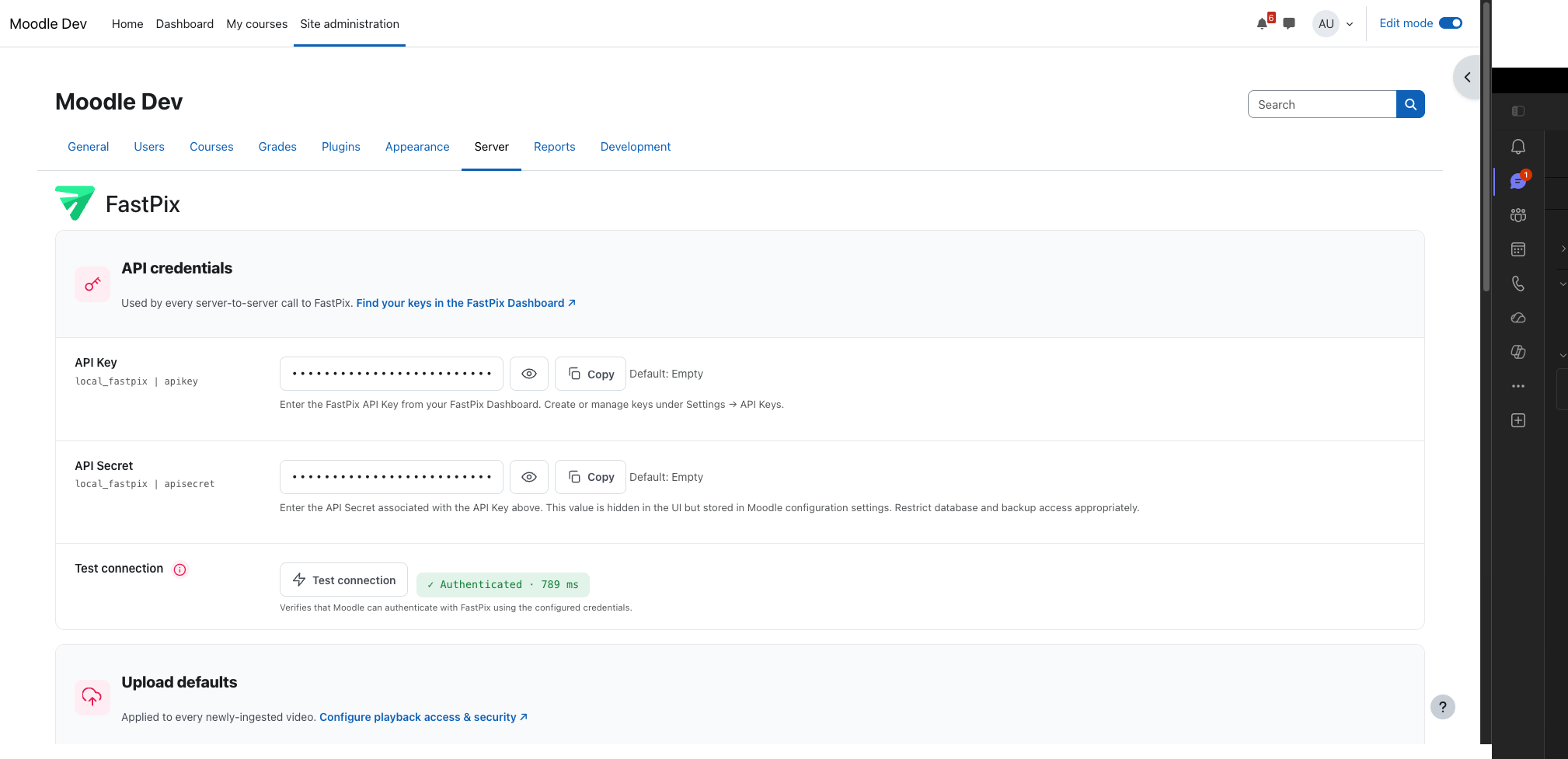
- Select Test connection to verify that Moodle can authenticate
with FastPix.
Important: The Test connection and Send test event
buttons act on the saved settings, not the values currently typed
into the fields. Always save first.
Moodle stores the API Secret in the config_plugins table using the
standard admin_setting_configpasswordunmask field. The settings page
masks the value in the browser, but the database doesn't encrypt it.
Protect your database backups accordingly.
Upload defaults
In the Upload defaults section, set the values applied to every
newly ingested video. Both settings are optional, and consumer plugins
can override them per activity.
- Default access policy:
public (no authentication), private
(signed-token playback, the default), or drm (requires DRM
configuration).
- Default maximum resolution: up to
1080p (the default).
Retention & cleanup
The Retention & cleanup section controls when abandoned uploads and
unattached videos are swept. The warning lead time must be shorter than
the grace period.
- Stale upload-session lifetime: how long an upload session that
never became a video is kept before the orphan sweeper cancels the
FastPix upload and deletes the session row. Default 1 day.
- Unattached video grace period: how long a ready video may stay
unattached to any activity before it is released — soft-deleted, then
permanently removed by the 7-day purge. Default 1 week.
- Unattached video warning lead time: how long before release the
owner is warned that an unattached video will be removed, giving them
time to attach it. Must be less than the grace period. Default 2 days.
- Automatically remove unattached videos: when enabled, ready videos
with no activity reference that haven't been rendered anywhere for the
grace period are soft-deleted, then purged. When disabled (the
default), owners are only notified and nothing is deleted
automatically.
Important: Keep Automatically remove unattached videos disabled
until the FastPix filter and editor plugins report video usage.
Otherwise a video embedded through one of those plugins could be
removed while still in use.
Webhook
FastPix uses webhooks to tell Moodle when an upload finishes processing
and when assets change. The webhook URL is fixed; the signing secret is
generated by FastPix and pasted into Moodle so that Moodle can verify
each event's signature.
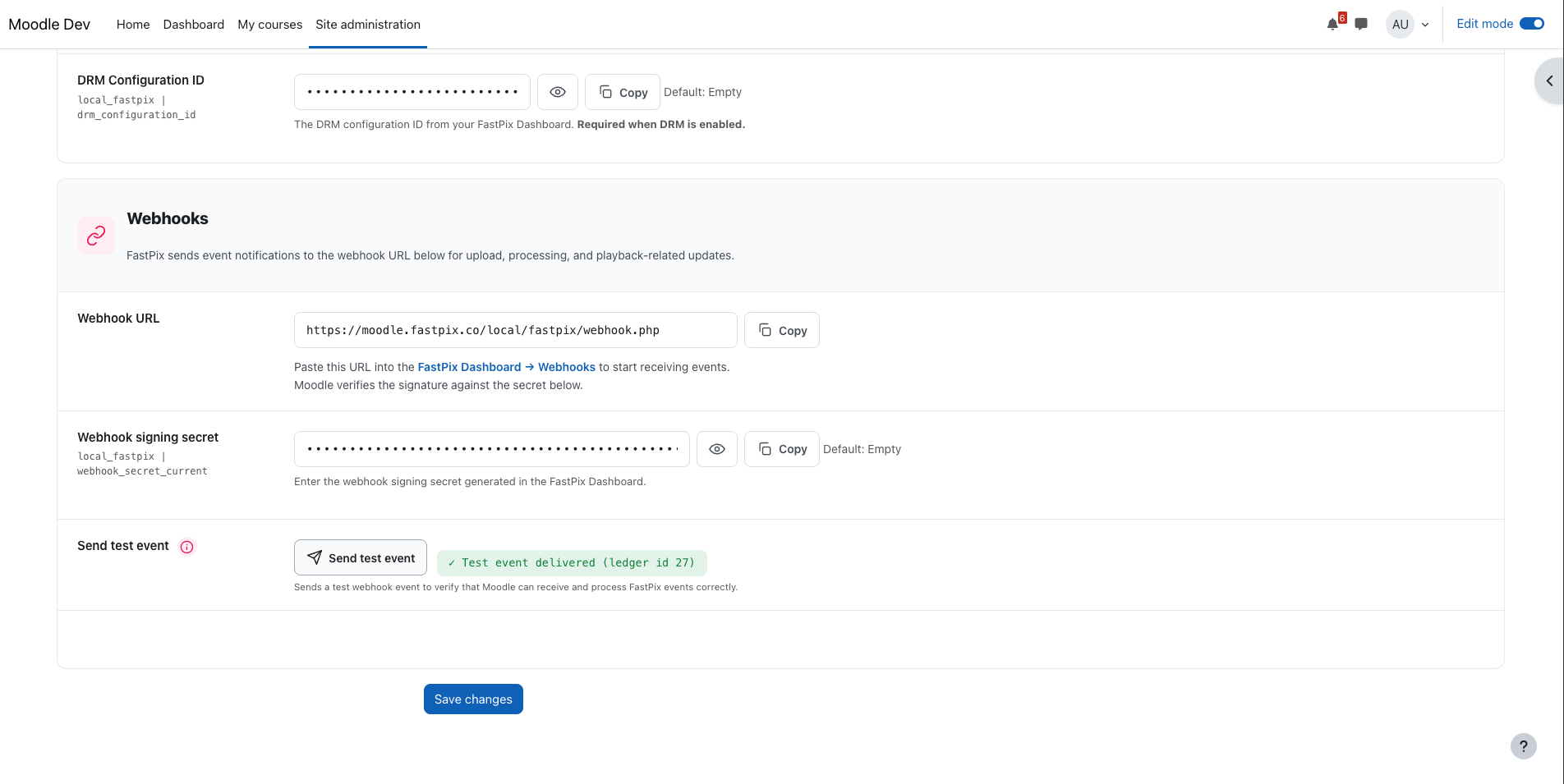
- On the Moodle settings page, in the Webhooks section, copy the
Webhook URL. The URL looks like
https://your.moodle.example/local/fastpix/webhook.php.
- In the FastPix dashboard, go to Webhooks, add a new destination,
and paste the URL.
- Subscribe the destination to at least these events:
video.media.created
video.media.ready
video.media.updated
video.media.failed
video.media.deleted
- Copy the signing secret that FastPix shows for the destination.
- Back on the Moodle settings page, paste the secret into Webhook
signing secret and save the changes.
Until a secret is saved, Moodle rejects all incoming webhook events and
shows a warning on the settings page. When you rotate the secret
later, Moodle continues to accept the previous value for 30 minutes,
so you can update both sides without losing deliveries.
DRM (optional)
DRM is disabled by default. To turn it on:
- On the Moodle settings page, select Enable DRM.
- Paste your FastPix DRM Configuration ID into the matching field.
- Save the changes.
You must set both. If either is missing, DRM stays disabled.
Usage
Once installed, local_fastpix runs entirely in the background. It
exposes:
- An admin settings page under Site administration > Server >
FastPix.
- A webhook endpoint at
/local/fastpix/webhook.php.
- A public health probe at
/local/fastpix/health.php.
Users see no new UI from this plugin alone. Install one
of the FastPix activity, filter, or editor plugins to add user-facing
video features.
Configuration reference
| Setting | Description | Default |
|---|---|---|
| API Key | FastPix API Key from the FastPix dashboard (Settings > API Keys). | Empty |
| API Secret | API Secret paired with the API Key. Stored in config_plugins using admin_setting_configpasswordunmask. | Empty |
| Default access policy | Playback access policy applied to newly uploaded videos. | Private - authenticated playback required |
| Default maximum resolution | Maximum resolution allowed for newly uploaded videos. | 1080p |
| Stale upload-session lifetime | How long an upload session that never became a video is kept before the orphan sweeper cancels the FastPix upload and deletes the session row. | 1 day |
| Unattached video grace period | How long a ready video may stay unattached to any activity before it is released (soft-deleted, then purged after 7 days). | 1 week |
| Unattached video warning lead time | How long before release the owner is warned that an unattached video will be removed. Must be less than the grace period. | 2 days |
| Automatically remove unattached videos | When enabled, unattached videos with no usage are soft-deleted after the grace period. When disabled, owners are only notified. | Disabled |
| Enable DRM | Turn on DRM-protected playback. Requires the DRM Configuration ID to also be set. | Disabled |
| DRM Configuration ID | Identifier from your FastPix dashboard. Required when Enable DRM is on. | Empty |
| Webhook URL | Read-only. Copy this into the FastPix dashboard when registering the webhook. | Auto-generated |
| Webhook signing secret | Paste the signing secret that FastPix generates for the webhook destination. Events are rejected until this is set. | Empty |
Capabilities
| Capability | Description | Default role |
|---|---|---|
| local/fastpix:configurecredentials | Open the FastPix settings page and edit API credentials, the webhook secret, and DRM configuration. | Manager |
The related activity-side capability mod/fastpix:uploadmedia is
defined by the mod_fastpix plugin, not this one.
The upload web services authorise mod/fastpix:uploadmedia at the
course context (not the site): a user must hold it in the course
where the upload happens. Editing teachers have it by default; enrolled
students do not, so they cannot upload or embed videos — they can still
view them.
Health endpoint
The plugin exposes a public health check at:
https://your.moodle.example/local/fastpix/health.php
The endpoint requires no authentication and is rate-limited to 30
requests per minute per IP address. It makes an authenticated check
against FastPix and never returns a 500; every server-side problem
surfaces as a 503. The response is JSON with these fields:
status
fastpix_reachable
latency_ms
timestamp
Response codes
| Code | status | Meaning |
|---|---|---|
| 200 | ok | Moodle reached FastPix and got an authenticated 2xx. |
| 503 | degraded | The probe ran, but FastPix didn't return a 2xx. |
| 503 | error | Something inside Moodle threw before the probe completed. Usually the MUC cache backend is unreachable. |
| 429 | rate_limited | More than 30 requests per minute came from one IP. |
The endpoint works with monitoring tools such as Pingdom, UptimeRobot,
and Prometheus blackbox exporter.
Third-party libraries
This plugin includes the following third-party library in the
classes/vendor/php-jwt/ directory:
- firebase/php-jwt v6.10.0 (BSD-3-Clause) - JWT signing for
playback tokens.
There are no Composer dependencies at runtime. Full machine-readable
details are in thirdpartylibs.xml.
Privacy
This plugin includes a full Moodle Privacy API provider. It does
not send raw Moodle user IDs to FastPix; instead, it sends a
site-specific HMAC value called user_hash. The webhook ledger is
automatically pruned after 90 days, and soft-deleted assets are
permanently removed after a 7-day grace window. Per-asset deletion
under GDPR is supported.
For full details after install, see Site administration > Users >
Privacy and policies > Data registry in your Moodle site.
Support
License
Copyright © 2026 FastPix Inc. Released under the
GNU GPL v3.0 or later. For
the full license text, see LICENSE.