
Mindmap
Versions
Current version
2024111800 (2024111800)
2024111800
Plugin type: Activities
Frankenstyle component name: mod_mindmap
Version build number: 2024111800
Version release name: 2024111800
Maturity: Stable
Supported Moodle versions: 4.1, 4.2, 4.3, 4.4, 4.5, 5.0
Repository URL (Git): https://github.com/t6nis/moodle-mod_mindmap
Repository branch:
Repository tag:
Issue/bug tracker URL: https://github.com/t6nis/moodle-mod_mindmap/issues
Mindmap module for Moodle
by Tõnis Tartes
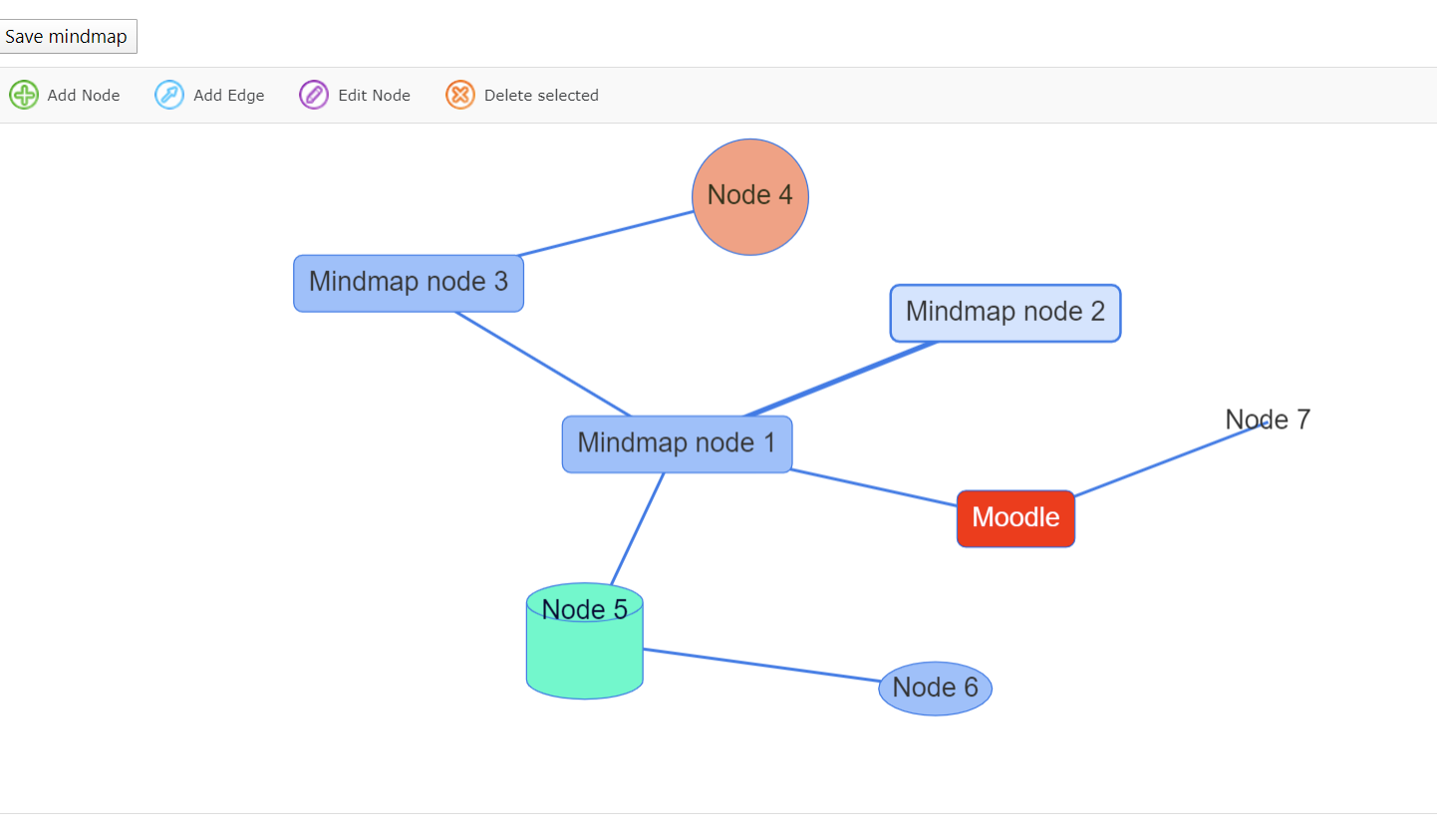
This Mindmap module allows you to create and save simple mindmaps from within moodle.
Quick install instructions:
- Copy this
/mindmap-Folder and place it in your/moddirectory - Go to your admin area and "Notifications"
- That's it
Have fun!
Thanks goes to FatCow Webhosting for the new Mindmap icon.
License: Creative Commons(Attribution 3.0 United States)
INSTRUCTIONS
Use the main buttons from mindmap taskbar to create mindmaps.
- If you double click anywhere in the empty space you can start connecting lines between nodes! Helps to save a few moves.
Plans for future releases.
TO-DO - code refactoring required for Moodle 4.x+ versions.
TO-DO - group mode for mindmaps
TO-DO - import/export of mindmaps
TO-DO - image url for nodes.(Uploads not possible)
Release notes
18.11.2024 - 2024111800 version
- Moodle supported version update.
- Added diamond,hexagon,triangle,star shapes.
05.01.2023 - 2022102100 version
- Ability to choose whether mindmap is collaborative or individual mode. Once chosen it cannot be changed per module. Similar like wikis.
14.09.2022 - 2022091400 version
- Replace empty json used on fresh new mindmap by a minimal one to avoid some http server to interpret it as an error.
- Add monoicon svg version for Moodle 4.x
26.10.2021 - 2021102601 version
- Removing default languages supported by VisJS, caused not beeing able to customize strings in the VisJS supported languages from Moodle.
- Added Spanish / Castilian translation. Thanks Marcelo Audisio!
- Added resetting function. All the mindmaps can be cleared of content when resetting course.
- Removing SWF support. If you require swf migration then from github branch 'swf_convert' has that functionality.
31.03.2020 - 2021032210 version
- VisJS supports default languages 'en', 'de', 'es', 'it', 'fr', 'cz', 'nl', 'ru', 'cn', 'ua'.
- Now you can also translate VisJS labels inside the edit window in your own language.
- Added new translatable strings.
30.03.2020 - 2021032208 version
- Max zoom out level
- Max zoom in level
- Zoom reset button
25.03.2020 - 2021032207 version
- Keyboard "Insert" key helps to add new nodes to mindmap.
- Keyboard "Delete" key enables to instantly delete selected nodes or edges.
- Coding style fixes
- Minor locking bug fix
05.03.2020 update
- Moved from Flash to JS - Thanks to vis.js library! - https:## visjs.org/
- Javascript version is supported in all browser!
- New version supports different shapes.
- Mobile friendly.
- Ability to review and convert from old Flash mindmap to JS based mindmap.
- In future Flash Conversion option will be dropped with database field holding flash data!!!
2021102601 (2021102601)
2021102601
Plugin type: Activities
Frankenstyle component name: mod_mindmap
Version build number: 2021102601
Version release name: 2021102601
Maturity: Stable
Supported Moodle versions: 2.6, 2.7, 2.8, 2.9, 3.0, 3.1, 3.10, 3.11, 3.2, 3.3, 3.4, 3.5, 3.6, 3.7, 3.8, 3.9
Repository URL (Git): https://github.com/t6nis/moodle-mod_mindmap
Repository branch:
Repository tag:
Issue/bug tracker URL: https://github.com/t6nis/moodle-mod_mindmap/issues
Mindmap module for Moodle
by Tõnis Tartes
This Mindmap module allows you to create and save simple mindmaps from within moodle.
Quick install instructions:
- Copy this "/mindmap"-Folder and place it in your /mod directory
- Go to your admin area and "Notifications"
- That's it
Have fun!
Thanks goes to FatCow Webhosting for the new Mindmap icon.
License: Creative Commons(Attribution 3.0 United States)
// INSTRUCTIONS
Use the main buttons from mindmap taskbar to create mindmaps.
- If you double click anywhere in the empty space you can start connecting lines between nodes! Helps to save a few moves.
// 26.10.2021 - 2021102601 version
- Removing default languages supported by VisJS, caused not beeing able to customize strings in the VisJS supported languages from Moodle.
- Added Spanish / Castilian translation. Thanks Marcelo Audisio!
- Added resetting function. All the mindmaps can be cleared of content when resetting course.
- Removing SWF support. If you require swf migration then from github branch 'swf_convert' has that functionality.
// 31.03.2020 - 2021032210 version
- VisJS supports default languages 'en', 'de', 'es', 'it', 'fr', 'cz', 'nl', 'ru', 'cn', 'ua'.
- Now you can also translate VisJS labels inside the edit window in your own language.
- Added new translatable strings.
// 30.03.2020 - 2021032208 version
- Max zoom out level
- Max zoom in level
- Zoom reset button
// 25.03.2020 - 2021032207 version
- Keyboard "Insert" key helps to add new nodes to mindmap.
- Keyboard "Delete" key enables to instantly delete selected nodes or edges.
- Coding style fixes
- Minor locking bug fix
// 05.03.2020 update
- Moved from Flash to JS - Thanks to vis.js library! - https://visjs.org/
- Javascript version is supported in all browser!
- New version supports different shapes.
- Mobile friendly.
- Ability to review and convert from old Flash mindmap to JS based mindmap.
- In future Flash Conversion option will be dropped with database field holding flash data!!!
NB! Conversion from flash data might still hold a few bugs. Always check your data!
- Dropped Moodle 1.x backup/restore support.
//25.04.2019 - version 2019042500
+Version update
+Fixing some deprecated functions
//20.10.2017 - version 2017102000
+Moodle 3.0+ compatibliy
+Code cleanup.
+Added getflash button. Clicking it will prompt whether to allow flash or not in chrome.
//09.06.2014 - version 2014060900
+Moodle 2.7 compatiblity with new logging api
This version is compatible with Moodle 2.6 and up.
Please download older version for Moodle 2.5 and below.
//13.05.2014 - version 2014051300
+Fixed minor logging messages
+Fixed notice in mindmap index
+On page reload mindmap field sizes according to window
//12.02.2014 - version 2014021200
+fixed context notice for Moodle 2.6
+added completion ability
+Bump to Moodle 2.6 version
//06.09.2013 - version 2013090600
+Removed old upgrade codes(2007040100)
+New default icon with transparent background
+Bump to Moodle 2.5 version
//01.03.2013 - version 2013030100
Teacher can enable locking, so that multiple students cannot edit a mindmap at the same time.
This caused problems with saving xml data.
NB! All mindmaps will have locking enabled by default after upgrade.
+Locking functionality.
//09.10.2012 - version 2012100900
+Modified viewer.swf and fixed IE compatiblity issue
//04.07.2012 - version 2012070400
+Minor fixes
//13.06.2012 - version 2012061300
+Refactored code
//10.06.2012 - version 2012061000
+adding access.php
//17.05.2012 - version 2012032300
+Fixed some errors when upgrading from 1.9 to 2.x
//13.01.2012 - version 2012011300
+Added licences
//12.09.2011 - version 2011091200
Everythings the same as the old one, except the backup & restore functionality.
+Fixed the editable box
+Added a Description field
+Moodle 2.x Backup/Restore
+Moodle 1.9>Moodle 2.x Restore
2021032210 (2021032210)
2021032210
Plugin type: Activities
Frankenstyle component name: mod_mindmap
Version build number: 2021032210
Version release name: 2021032210
Maturity: Stable
Supported Moodle versions: 3.5, 3.6, 3.7, 3.8
Repository URL (Git): https://github.com/t6nis/moodle-mod_mindmap
Repository branch:
Repository tag:
Issue/bug tracker URL: https://github.com/t6nis/moodle-mod_mindmap/issues
Mindmap module for Moodle
by Tõnis Tartes
This Mindmap module allows you to create and save simple mindmaps from within moodle.
Quick install instructions:
- Copy this "/mindmap"-Folder and place it in your /mod directory
- Go to your admin area and "Notifications"
- That's it
Have fun!
Thanks goes to FatCow Webhosting for the new Mindmap icon.
License: Creative Commons(Attribution 3.0 United States)
// INSTRUCTIONS
Use the main buttons from mindmap taskbar to create mindmaps.
- If you double click anywhere in the empty space you can start connecting lines between nodes! Helps to save a few moves.
// 31.03.2020 - 2021032210 version
- VisJS supports default languages 'en', 'de', 'es', 'it', 'fr', 'cz', 'nl', 'ru', 'cn', 'ua'.
- Now you can also translate VisJS labels inside the edit window in your own language.
- Added new translatable strings.
// 30.03.2020 - 2021032208 version
- Max zoom out level
- Max zoom in level
- Zoom reset button
// 25.03.2020 - 2021032207 version
- Keyboard "Insert" key helps to add new nodes to mindmap.
- Keyboard "Delete" key enables to instantly delete selected nodes or edges.
- Coding style fixes
- Minor locking bug fix
// 05.03.2020 update
- Moved from Flash to JS - Thanks to vis.js library! - https://visjs.org/
- Javascript version is supported in all browser!
- New version supports different shapes.
- Mobile friendly.
- Ability to review and convert from old Flash mindmap to JS based mindmap.
- In future Flash Conversion option will be dropped with database field holding flash data!!!
NB! Conversion from flash data might still hold a few bugs. Always check your data!
- Dropped Moodle 1.x backup/restore support.
//25.04.2019 - version 2019042500
+Version update
+Fixing some deprecated functions
//20.10.2017 - version 2017102000
+Moodle 3.0+ compatibliy
+Code cleanup.
+Added getflash button. Clicking it will prompt whether to allow flash or not in chrome.
//09.06.2014 - version 2014060900
+Moodle 2.7 compatiblity with new logging api
This version is compatible with Moodle 2.6 and up.
Please download older version for Moodle 2.5 and below.
//13.05.2014 - version 2014051300
+Fixed minor logging messages
+Fixed notice in mindmap index
+On page reload mindmap field sizes according to window
//12.02.2014 - version 2014021200
+fixed context notice for Moodle 2.6
+added completion ability
+Bump to Moodle 2.6 version
//06.09.2013 - version 2013090600
+Removed old upgrade codes(2007040100)
+New default icon with transparent background
+Bump to Moodle 2.5 version
//01.03.2013 - version 2013030100
Teacher can enable locking, so that multiple students cannot edit a mindmap at the same time.
This caused problems with saving xml data.
NB! All mindmaps will have locking enabled by default after upgrade.
+Locking functionality.
//09.10.2012 - version 2012100900
+Modified viewer.swf and fixed IE compatiblity issue
//04.07.2012 - version 2012070400
+Minor fixes
//13.06.2012 - version 2012061300
+Refactored code
//10.06.2012 - version 2012061000
+adding access.php
//17.05.2012 - version 2012032300
+Fixed some errors when upgrading from 1.9 to 2.x
//13.01.2012 - version 2012011300
+Added licences
//12.09.2011 - version 2011091200
Everythings the same as the old one, except the backup & restore functionality.
+Fixed the editable box
+Added a Description field
+Moodle 2.x Backup/Restore
+Moodle 1.9>Moodle 2.x Restore
2021032207 (2021032207)
2021032207
Plugin type: Activities
Frankenstyle component name: mod_mindmap
Version build number: 2021032207
Version release name: 2021032207
Maturity: Stable
Supported Moodle versions: 3.5, 3.6, 3.7, 3.8
Repository URL (Git): https://github.com/t6nis/moodle-mod_mindmap
Repository branch:
Repository tag:
Issue/bug tracker URL: https://github.com/t6nis/moodle-mod_mindmap/issues
Mindmap module for Moodle
by Tõnis Tartes
This Mindmap module allows you to create and save simple mindmaps from within moodle.
Quick install instructions:
- Copy this "/mindmap"-Folder and place it in your /mod directory
- Go to your admin area and "Notifications"
- That's it
Have fun!
Thanks goes to FatCow Webhosting for the new Mindmap icon.
License: Creative Commons(Attribution 3.0 United States)
// INSTRUCTIONS
Use the main buttons from mindmap taskbar to create mindmaps.
- If you double click anywhere in the empty space you can start connecting lines between nodes! Helps to save a few moves.
// 25.03.2020 - 2021032207 version
- Keyboard "Insert" key helps to add new nodes to mindmap.
- Keyboard "Delete" key enables to instantly delete selected nodes or edges.
- Coding style fixes
- Minor locking bug fix
// 05.03.2020 update
- Moved from Flash to JS - Thanks to vis.js library! - https://visjs.org/
- Javascript version is supported in all browser!
- New version supports different shapes.
- Mobile friendly.
- Ability to review and convert from old Flash mindmap to JS based mindmap.
- In future Flash Conversion option will be dropped with database field holding flash data!!!
NB! Conversion from flash data might still hold a few bugs. Always check your data!
- Dropped Moodle 1.x backup/restore support.
//25.04.2019 - version 2019042500
+Version update
+Fixing some deprecated functions
//20.10.2017 - version 2017102000
+Moodle 3.0+ compatibliy
+Code cleanup.
+Added getflash button. Clicking it will prompt whether to allow flash or not in chrome.
//09.06.2014 - version 2014060900
+Moodle 2.7 compatiblity with new logging api
This version is compatible with Moodle 2.6 and up.
Please download older version for Moodle 2.5 and below.
//13.05.2014 - version 2014051300
+Fixed minor logging messages
+Fixed notice in mindmap index
+On page reload mindmap field sizes according to window
//12.02.2014 - version 2014021200
+fixed context notice for Moodle 2.6
+added completion ability
+Bump to Moodle 2.6 version
//06.09.2013 - version 2013090600
+Removed old upgrade codes(2007040100)
+New default icon with transparent background
+Bump to Moodle 2.5 version
//01.03.2013 - version 2013030100
Teacher can enable locking, so that multiple students cannot edit a mindmap at the same time.
This caused problems with saving xml data.
NB! All mindmaps will have locking enabled by default after upgrade.
+Locking functionality.
//09.10.2012 - version 2012100900
+Modified viewer.swf and fixed IE compatiblity issue
//04.07.2012 - version 2012070400
+Minor fixes
//13.06.2012 - version 2012061300
+Refactored code
//10.06.2012 - version 2012061000
+adding access.php
//17.05.2012 - version 2012032300
+Fixed some errors when upgrading from 1.9 to 2.x
//13.01.2012 - version 2012011300
+Added licences
//12.09.2011 - version 2011091200
Everythings the same as the old one, except the backup & restore functionality.
+Fixed the editable box
+Added a Description field
+Moodle 2.x Backup/Restore
+Moodle 1.9>Moodle 2.x Restore
2021032206 (2021032206)
2021032206
Plugin type: Activities
Frankenstyle component name: mod_mindmap
Version build number: 2021032206
Version release name: 2021032206
Maturity: Stable
Supported Moodle versions: 3.5, 3.6, 3.7, 3.8
Repository URL (Git): https://github.com/t6nis/moodle-mod_mindmap
Repository branch:
Repository tag:
Issue/bug tracker URL: https://github.com/t6nis/moodle-mod_mindmap/issues
Mindmap module for Moodle
by Tõnis Tartes
This Mindmap module allows you to create and save simple mindmaps from within moodle.
Quick install instructions:
- Copy this "/mindmap"-Folder and place it in your /mod directory
- Go to your admin area and "Notifications"
- That's it
Have fun!
Thanks goes to FatCow Webhosting for the new Mindmap icon.
License: Creative Commons(Attribution 3.0 United States)
// INSTRUCTIONS
Use the main buttons from mindmap taskbar to create mindmaps.
- If you double click anywhere in the empty space you can start connecting lines between nodes! Helps to save a few moves.
// 05.03.2020 update
- Moved from Flash to JS - Thanks to vis.js library! - https://visjs.org/
- Javascript version is supported in all browser!
- New version supports different shapes.
- Mobile friendly.
- Ability to review and convert from old Flash mindmap to JS based mindmap.
- In future Flash Conversion option will be dropped with database field holding flash data!!!
NB! Conversion from flash data might still hold a few bugs. Always check your data!
- Dropped Moodle 1.x backup/restore support.
//25.04.2019 - version 2019042500
+Version update
+Fixing some deprecated functions
//20.10.2017 - version 2017102000
+Moodle 3.0+ compatibliy
+Code cleanup.
+Added getflash button. Clicking it will prompt whether to allow flash or not in chrome.
//09.06.2014 - version 2014060900
+Moodle 2.7 compatiblity with new logging api
This version is compatible with Moodle 2.6 and up.
Please download older version for Moodle 2.5 and below.
//13.05.2014 - version 2014051300
+Fixed minor logging messages
+Fixed notice in mindmap index
+On page reload mindmap field sizes according to window
//12.02.2014 - version 2014021200
+fixed context notice for Moodle 2.6
+added completion ability
+Bump to Moodle 2.6 version
//06.09.2013 - version 2013090600
+Removed old upgrade codes(2007040100)
+New default icon with transparent background
+Bump to Moodle 2.5 version
//01.03.2013 - version 2013030100
Teacher can enable locking, so that multiple students cannot edit a mindmap at the same time. This caused problems with saving xml data.
NB! All mindmaps will have locking enabled by default after upgrade.
+Locking functionality.
//09.10.2012 - version 2012100900
+Modified viewer.swf and fixed IE compatiblity issue
//04.07.2012 - version 2012070400
+Minor fixes
//13.06.2012 - version 2012061300
+Refactored code
//10.06.2012 - version 2012061000
+adding access.php
//17.05.2012 - version 2012032300
+Fixed some errors when upgrading from 1.9 to 2.x
//13.01.2012 - version 2012011300
+Added licences
//12.09.2011 - version 2011091200
Everythings the same as the old one, except the backup & restore functionality.
+Fixed the editable box
+Added a Description field
+Moodle 2.x Backup/Restore
+Moodle 1.9>Moodle 2.x Restore
2019042500 (2019042500)
2019042500
Plugin type: Activities
Frankenstyle component name: mod_mindmap
Version build number: 2019042500
Version release name: 2019042500
Maturity: Stable
Supported Moodle versions: 3.0, 3.1, 3.2, 3.3, 3.4, 3.5, 3.6
Repository URL (Git): https://github.com/t6nis/moodle-mod_mindmap
Repository branch:
Repository tag:
Issue/bug tracker URL: https://github.com/t6nis/moodle-mod_mindmap/issues
Mindmap module for Moodle 2.x
by Tõnis Tartes
This is the original Mindmap module for moodle formerly found on ekpenso.com.
This Mindmap module allows you to create and save simple mindmaps from within moodle.
Quick install instructions:
- Copy this "/mindmap"-Folder and place it in your /mod directory
- Go to your admin area and "Notifications"
- That's it
Have fun!
Thanks to original mindmap module author: Andreas Geier
Link: https://github.com/functino/Moodle-Mindmap-Module
Thanks goes to FatCow Webhosting for the new Mindmap icon.
License: Creative Commons(Attribution 3.0 United States)
//25.04.2019 - version 2019042500
+Version update
+Fixing some deprecated functions
//20.10.2017 - version 2017102000
+Moodle 3.0+ compatibliy
+Code cleanup.
+Added getflash button. Clicking it will prompt whether to allow flash or not in chrome.
//09.06.2014 - version 2014060900
+Moodle 2.7 compatiblity with new logging api
This version is compatible with Moodle 2.6 and up.
Please download older version for Moodle 2.5 and below.
//13.05.2014 - version 2014051300
+Fixed minor logging messages
+Fixed notice in mindmap index
+On page reload mindmap field sizes according to window
//12.02.2014 - version 2014021200
+fixed context notice for Moodle 2.6
+added completion ability
+Bump to Moodle 2.6 version
//06.09.2013 - version 2013090600
+Removed old upgrade codes(2007040100)
+New default icon with transparent background
+Bump to Moodle 2.5 version
//01.03.2013 - version 2013030100
Teacher can enable locking, so that multiple students cannot edit a mindmap at the same time. This caused problems with saving xml data.
NB! All mindmaps will have locking enabled by default after upgrade.
+Locking functionality.
//09.10.2012 - version 2012100900
+Modified viewer.swf and fixed IE compatiblity issue
//04.07.2012 - version 2012070400
+Minor fixes
//13.06.2012 - version 2012061300
+Refactored code
//10.06.2012 - version 2012061000
+adding access.php
//17.05.2012 - version 2012032300
+Fixed some errors when upgrading from 1.9 to 2.x
//13.01.2012 - version 2012011300
+Added licences
//12.09.2011 - version 2011091200
Everythings the same as the old one, except the backup & restore functionality.
+Fixed the editable box
+Added a Description field
+Moodle 2.x Backup/Restore
+Moodle 1.9>Moodle 2.x Restore
2017102000 (2017102000)
2017102000
Plugin type: Activities
Frankenstyle component name: mod_mindmap
Version build number: 2017102000
Version release name: 2017102000
Maturity: Stable
Supported Moodle versions: 3.0, 3.1, 3.2, 3.3, 3.4
Repository URL (Git): https://github.com/t6nis/moodle-mod_mindmap
Repository branch:
Repository tag:
Issue/bug tracker URL: https://github.com/t6nis/moodle-mod_mindmap/issues
Mindmap module for Moodle 2.x
by Tõnis Tartes
This is the original Mindmap module for moodle formerly found on ekpenso.com.
This Mindmap module allows you to create and save simple mindmaps from within moodle.
Quick install instructions:
- Copy this "/mindmap"-Folder and place it in your /mod directory
- Go to your admin area and "Notifications"
- That's it
Have fun!
Thanks to original mindmap module author: Andreas Geier
Link: https://github.com/functino/Moodle-Mindmap-Module
Thanks goes to FatCow Webhosting for the new Mindmap icon.
License: Creative Commons(Attribution 3.0 United States)
//20.10.2017 -version 2017102000
+Moodle 3.0+ compatibliy
+Code cleanup.
+Added getflash button. Clicking it will prompt whether to allow flash or not in chrome.
//09.06.2014 - version 2014060900
+Moodle 2.7 compatiblity with new logging api
This version is compatible with Moodle 2.6 and up.
Please download older version for Moodle 2.5 and below.
2014060900 (2014060900)
2014060900
Plugin type: Activities
Frankenstyle component name: mod_mindmap
Version build number: 2014060900
Version release name: 2014060900
Maturity: Stable
Supported Moodle versions: 2.7, 2.8, 2.9, 3.0
Repository URL (Git): https://github.com/t6nis/moodle-mod_mindmap
Repository branch:
Repository tag:
Issue/bug tracker URL: https://github.com/t6nis/moodle-mod_mindmap/issues
Mindmap module for Moodle 2.x
by Tõnis Tartes
This is the original Mindmap module for moodle formerly found on ekpenso.com.
This Mindmap module allows you to create and save simple mindmaps from within moodle.
Quick install instructions:
- Copy this "/mindmap"-Folder and place it in your /mod directory
- Go to your admin area and "Notifications"
- That's it
Have fun!
Thanks to original mindmap module author: Andreas Geier
Link: https://github.com/functino/Moodle-Mindmap-Module
Thanks goes to FatCow Webhosting for the new Mindmap icon.
License: Creative Commons(Attribution 3.0 United States)
//09.06.2014 - version 2014060900
+Moodle 2.7 compatiblity with new logging api
This version is compatible with Moodle 2.6 and up.
Please download older version for Moodle 2.5 and below.
//13.05.2014 - version 2014051300
+Fixed minor logging messages
+Fixed notice in mindmap index
+On page reload mindmap field sizes according to window
//12.02.2014 - version 2014021200
+fixed context notice for Moodle 2.6
+added completion ability
+Bump to Moodle 2.6 version
//06.09.2013 - version 2013090600
+Removed old upgrade codes(2007040100)
+New default icon with transparent background
+Bump to Moodle 2.5 version
//01.03.2013 - version 2013030100
Teacher can enable locking, so that multiple students cannot edit a mindmap at the same time. This caused problems with saving xml data.
NB! All mindmaps will have locking enabled by default after upgrade.
+Locking functionality.
//09.10.2012 - version 2012100900
+Modified viewer.swf and fixed IE compatiblity issue
//04.07.2012 - version 2012070400
+Minor fixes
//13.06.2012 - version 2012061300
+Refactored code
//10.06.2012 - version 2012061000
+adding access.php
//17.05.2012 - version 2012032300
+Fixed some errors when upgrading from 1.9 to 2.x
//13.01.2012 - version 2012011300
+Added licences
//12.09.2011 - version 2011091200
Everythings the same as the old one, except the backup & restore functionality.
+Fixed the editable box
+Added a Description field
+Moodle 2.x Backup/Restore
+Moodle 1.9>Moodle 2.x Restore
2014051300 (2014051300)
2014051300
Plugin type: Activities
Frankenstyle component name: mod_mindmap
Version build number: 2014051300
Version release name: 2014051300
Maturity: Stable
Supported Moodle versions: 2.2, 2.3, 2.4, 2.5, 2.6
Repository URL (Git): https://github.com/t6nis/moodle-mod_mindmap
Repository branch:
Repository tag:
Issue/bug tracker URL: https://github.com/t6nis/moodle-mod_mindmap/issues
Mindmap module for Moodle 2.x
by Tõnis Tartes
This is the original Mindmap module for moodle formerly found on ekpenso.com.
This Mindmap module allows you to create and save simple mindmaps from within moodle.
Quick install instructions:
- Copy this "/mindmap"-Folder and place it in your /mod directory
- Go to your admin area and "Notifications"
- That's it
Have fun!
Thanks to original mindmap module author: Andreas Geier
Link: https://github.com/functino/Moodle-Mindmap-Module
Thanks goes to FatCow Webhosting for the new Mindmap icon.
License: Creative Commons(Attribution 3.0 United States)
//13.05.2014 - version 2014051300
+Fixed minor logging messages
+Fixed notice in mindmap index
+On page reload mindmap field sizes according to window
//12.02.2014 - version 2014021200
+fixed context notice for Moodle 2.6
+added completion ability
+Bump to Moodle 2.6 version
//06.09.2013 - version 2013090600
+Removed old upgrade codes(2007040100)
+New default icon with transparent background
+Bump to Moodle 2.5 version
//01.03.2013 - version 2013030100
Teacher can enable locking, so that multiple students cannot edit a mindmap at the same time. This caused problems with saving xml data.
NB! All mindmaps will have locking enabled by default after upgrade.
+Locking functionality.
//09.10.2012 - version 2012100900
+Modified viewer.swf and fixed IE compatiblity issue
//04.07.2012 - version 2012070400
+Minor fixes
//13.06.2012 - version 2012061300
+Refactored code
//10.06.2012 - version 2012061000
+adding access.php
//17.05.2012 - version 2012032300
+Fixed some errors when upgrading from 1.9 to 2.x
//13.01.2012 - version 2012011300
+Added licences
//12.09.2011 - version 2011091200
Everythings the same as the old one, except the backup & restore functionality.
+Fixed the editable box
+Added a Description field
+Moodle 2.x Backup/Restore
+Moodle 1.9>Moodle 2.x Restore
2014021201 (2014021201)
2014021201
Plugin type: Activities
Frankenstyle component name: mod_mindmap
Version build number: 2014021201
Version release name: 2014021201
Maturity: Stable
Supported Moodle versions: 2.2, 2.3, 2.4, 2.5, 2.6
Repository URL (Git): https://github.com/t6nis/moodle-mod_mindmap
Repository branch:
Repository tag:
Issue/bug tracker URL: https://github.com/t6nis/moodle-mod_mindmap/issues
Mindmap module for Moodle 2.x
by Tõnis Tartes
This is the original Mindmap module for moodle formerly found on ekpenso.com.
This Mindmap module allows you to create and save simple mindmaps from within moodle.
Quick install instructions:
- Copy this "/mindmap"-Folder and place it in your /mod directory
- Go to your admin area and "Notifications"
- That's it
Have fun!
Thanks to original mindmap module author: Andreas Geier
Link: https://github.com/functino/Moodle-Mindmap-Module
Thanks goes to FatCow Webhosting for the new Mindmap icon.
License: Creative Commons(Attribution 3.0 United States)
//12.02.2014 - version 2014021201
+fixed context notice for Moodle 2.6
+added completion ability
+Bump to Moodle 2.6 version
//06.09.2013 - version 2013090600
+Removed old upgrade codes(2007040100)
+New default icon with transparent background
+Bump to Moodle 2.5 version
//01.03.2013 - version 2013030100
Teacher can enable locking, so that multiple students cannot edit a mindmap at the same time. This caused problems with saving xml data.
NB! All mindmaps will have locking enabled by default after upgrade.
+Locking functionality.
//09.10.2012 - version 2012100900
+Modified viewer.swf and fixed IE compatiblity issue
//04.07.2012 - version 2012070400
+Minor fixes
//13.06.2012 - version 2012061300
+Refactored code
//10.06.2012 - version 2012061000
+adding access.php
//17.05.2012 - version 2012032300
+Fixed some errors when upgrading from 1.9 to 2.x
//13.01.2012 - version 2012011300
+Added licences
//12.09.2011 - version 2011091200
Everythings the same as the old one, except the backup & restore functionality.
+Fixed the editable box
+Added a Description field
+Moodle 2.x Backup/Restore
+Moodle 1.9>Moodle 2.x Restore
2013060900 (2013060900)
2013060900
Plugin type: Activities
Frankenstyle component name: mod_mindmap
Version build number: 2013060900
Version release name: 2013060900
Maturity: Stable
Supported Moodle versions: 2.1, 2.2, 2.3, 2.4, 2.5
Repository URL (Git): https://github.com/t6nis/moodle-mod_mindmap
Repository branch:
Repository tag:
Issue/bug tracker URL: https://github.com/t6nis/moodle-mod_mindmap/issues
Mindmap module for Moodle 2.x
by Tõnis Tartes
This is the original Mindmap module for moodle formerly found on ekpenso.com.
This Mindmap module allows you to create and save simple mindmaps from within moodle.
Quick install instructions:
- Copy this "/mindmap"-Folder and place it in your /mod directory
- Go to your admin area and "Notifications"
- That's it
Have fun!
Thanks to original mindmap module author: Andreas Geier
Link: https://github.com/functino/Moodle-Mindmap-Module
Thanks goes to FatCow Webhosting for the new Mindmap icon.
License: Creative Commons(Attribution 3.0 United States)
//06.09.2013 - version 2013090600
+Removed old upgrade codes(2007040100)
+New default icon with transparent background
+Bump to Moodle 2.5 version
//01.03.2013 - version 2013030100
Teacher can enable locking, so that multiple students cannot edit a mindmap at the same time. This caused problems with saving xml data.
NB! All mindmaps will have locking enabled by default after upgrade.
+Locking functionality.
//09.10.2012 - version 2012100900
+Modified viewer.swf and fixed IE compatiblity issue
//04.07.2012 - version 2012070400
+Minor fixes
//13.06.2012 - version 2012061300
+Refactored code
//10.06.2012 - version 2012061000
+adding access.php
//17.05.2012 - version 2012032300
+Fixed some errors when upgrading from 1.9 to 2.x
//13.01.2012 - version 2012011300
+Added licences
//12.09.2011 - version 2011091200
Everythings the same as the old one, except the backup & restore functionality.
+Fixed the editable box
+Added a Description field
+Moodle 2.x Backup/Restore
+Moodle 1.9>Moodle 2.x Restore
2013050600 (2013050600)
2013050600
Plugin type: Activities
Frankenstyle component name: mod_mindmap
Version build number: 2013050600
Version release name: 2013050600
Maturity: Stable
Supported Moodle versions: 2.1, 2.2, 2.3, 2.4
Repository URL (Git): https://github.com/t6nis/moodle-mod_mindmap
Repository branch:
Repository tag:
Issue/bug tracker URL: https://github.com/t6nis/moodle-mod_mindmap/issues
Mindmap module for Moodle 2.x
by Tõnis Tartes
This is the original Mindmap module for moodle formerly found on ekpenso.com.
This Mindmap module allows you to create and save simple mindmaps from within moodle.
Quick install instructions:
- Copy this "/mindmap"-Folder and place it in your /mod directory
- Go to your admin area and "Notifications"
- That's it
Have fun!
Thanks to original mindmap module author: Andreas Geier
Link: https://github.com/functino/Moodle-Mindmap-Module
//01.03.2013 - version 2013030100
Teacher can enable locking, so that multiple students cannot edit a mindmap at the same time. This caused problems with saving xml data.
NB! All mindmaps will have locking enabled by default after upgrade.
+Locking functionality.
//09.10.2012 - version 2012100900
+Modified viewer.swf and fixed IE compatiblity issue
//04.07.2012 - version 2012070400
+Minor fixes
//13.06.2012 - version 2012061300
+Refactored code
//10.06.2012 - version 2012061000
+adding access.php
//17.05.2012 - version 2012032300
+Fixed some errors when upgrading from 1.9 to 2.x
//13.01.2012 - version 2012011300
+Added licences
//12.09.2011 - version 2011091200
Everythings the same as the old one, except the backup & restore functionality.
+Fixed the editable box
+Added a Description field
+Moodle 2.x Backup/Restore
+Moodle 1.9>Moodle 2.x Restore
2013030100 (2013030100)
2013030100
Plugin type: Activities
Frankenstyle component name: mod_mindmap
Version build number: 2013030100
Version release name: 2013030100
Maturity: Stable
Supported Moodle versions: 2.1, 2.2, 2.3
Repository URL (Git): https://github.com/t6nis/moodle-mod_mindmap
Repository branch:
Repository tag:
Issue/bug tracker URL: https://github.com/t6nis/moodle-mod_mindmap/issues
Mindmap module for Moodle 2.x
by Tõnis Tartes
This is the original Mindmap module for moodle formerly found on ekpenso.com.
This Mindmap module allows you to create and save simple mindmaps from within moodle.
Quick install instructions:
- Copy this "/mindmap"-Folder and place it in your /mod directory
- Go to your admin area and "Notifications"
- That's it
Have fun!
Thanks to original mindmap module author: Andreas Geier
Link: https://github.com/functino/Moodle-Mindmap-Module
//01.03.2013 - version 2013030100
Teacher can enable locking, so that multiple students cannot edit a mindmap at the same time. This caused problems with saving xml data.
NB! All mindmaps will have locking enabled by default after upgrade.
+Locking functionality.
//09.10.2012 - version 2012100900
+Modified viewer.swf and fixed IE compatiblity issue
//04.07.2012 - version 2012070400
+Minor fixes
//13.06.2012 - version 2012061300
+Refactored code
//10.06.2012 - version 2012061000
+adding access.php
//17.05.2012 - version 2012032300
+Fixed some errors when upgrading from 1.9 to 2.x
//13.01.2012 - version 2012011300
+Added licences
//12.09.2011 - version 2011091200
Everythings the same as the old one, except the backup & restore functionality.
+Fixed the editable box
+Added a Description field
+Moodle 2.x Backup/Restore
+Moodle 1.9>Moodle 2.x Restore
2.1 (2011070100) (2012091000)
2.1 (2011070100)
Plugin type: Activities
Frankenstyle component name: mod_mindmap
Version build number: 2012091000
Version release name: 2.1 (2011070100)
Maturity: Stable
Supported Moodle versions: 2.1, 2.2, 2.3
Repository URL (Git): https://github.com/t6nis/moodle-mod_mindmap
Repository branch:
Repository tag:
Issue/bug tracker URL: https://github.com/t6nis/moodle-mod_mindmap/issues
Mindmap module for Moodle 2.x
by Tõnis Tartes
This is the original Mindmap module for moodle formerly found on ekpenso.com.
This Mindmap module allows you to create and save simple mindmaps from within moodle.
Quick install instructions:
- Copy this "/mindmap"-Folder and place it in your /mod directory
- go go to your admin area and go to "notificatiosn"
- That's it
Have fun!
Thanks to original mindmap module author: Andreas Geier
Link: https://github.com/functino/Moodle-Mindmap-Module
//09.10.2012 - version 2012100900
+Modified viewer.swf and fixed IE compatiblity issue
//04.07.2012 - version 2012070400
+Minor fixes
//13.06.2012 - version 2012061300
+Refactored code
//10.06.2012 - version 2012061000
+adding access.php
//17.05.2012 - version 2012032300
+Fixed some errors when upgrading from 1.9 to 2.x
//13.01.2012 - version 2012011300
+Added licences
//12.09.2011 - version 2011091200
Everythings the same as the old one, except the backup & restore functionality.
+Fixed the editable box
+Added a Description field
+Moodle 2.x Backup/Restore
+Moodle 1.9>Moodle 2.x Restore
2.1 (2011070100) (2012070400)
2.1 (2011070100)
Plugin type: Activities
Frankenstyle component name: mod_mindmap
Version build number: 2012070400
Version release name: 2.1 (2011070100)
Maturity: Stable
Supported Moodle versions: 2.1, 2.2, 2.3
Repository URL (Git): https://github.com/t6nis/moodle-mod_mindmap
Repository branch:
Repository tag:
Issue/bug tracker URL: https://github.com/t6nis/moodle-mod_mindmap/issues
Mindmap module for Moodle 2.x
by Tõnis Tartes
This is the original Mindmap module for moodle formerly found on ekpenso.com.
This Mindmap module allows you to create and save simple mindmaps from within moodle.
Quick install instructions:
- Copy this "/mindmap"-Folder and place it in your /mod directory
- go go to your admin area and go to "notificatiosn"
- That's it
Have fun!
Thanks to original mindmap module author: Andreas Geier
Link: https://github.com/functino/Moodle-Mindmap-Module
//04.07.2012 - version 2012070400
+Minor fixes
//13.06.2012 - version 2012061300
+Refactored code
//10.06.2012 - version 2012061000
+adding access.php
//17.05.2012 - version 2012032300
+Fixed some errors when upgrading from 1.9 to 2.x
//13.01.2012 - version 2012011300
+Added licences
//12.09.2011 - version 2011091200
Everythings the same as the old one, except the backup & restore functionality.
+Fixed the editable box
+Added a Description field
+Moodle 2.x Backup/Restore
+Moodle 1.9>Moodle 2.x Restore