User Data Synchronization (External Source)
Versions
Current version
0.2.1 (2026061601)
0.2.1
Plugin type: Local plugins
Frankenstyle component name: local_userdatasync
Version build number: 2026061601
Version release name: 0.2.1
Maturity: Beta
Supported Moodle versions: 4.1, 4.2, 4.3, 4.4, 4.5, 5.0, 5.1, 5.2
Repository URL (Git): https://github.com/haniayyoub/local_userdatasync
Repository branch:
Repository tag:
Issue/bug tracker URL: https://github.com/haniayyoub/local_userdatasync/issues
local_userdatasync
Plugin Name And Purpose
local_userdatasync is a Moodle local plugin named User Data Synchronization (External Source). It synchronizes selected Moodle user profile fields from an external database table or view.
The plugin solves the operational problem of keeping Moodle user data aligned with an institutional source system without manually editing each Moodle account.
Supported Moodle Version
The plugin declares:
- Component:
local_userdatasync - Version:
2026061601 - Release:
0.2.1 - Required Moodle version:
2022112800(Moodle 4.1+) - Maturity:
MATURITY_BETA
It is intended to remain compatible with Moodle 4.5 (2024100700).
Release 0.2.1 Summary
This release updates the package after Moodle Plugins Directory review feedback. It includes the package-level GPLv3 license, safer parameter validation, optimized privacy export queries, standard user_updated event triggering during synchronized profile updates, and corrected ZIP packaging structure for re-approval.
Moodle And PHP Compatibility Requirements
The plugin declares Moodle 2022112800 as its minimum required version and is intended for Moodle 4.1 and later, including Moodle 4.3, 4.4, 4.5, and 5.x where the Moodle APIs used by the plugin remain available. It avoids PHP 8 - only helpers so it can run on Moodle-supported PHP versions for those releases.
External database access depends on Moodle's bundled ADOdb library and the relevant PHP database extension or client library for the configured external DB type, for example MySQL/MariaDB, PostgreSQL, SQL Server, or Oracle client support.
Main Features
- Scheduled synchronization from an external database.
- ADOdb-based external connection, including Oracle aliases.
- Configurable local and remote matching fields.
- Field mappings for standard Moodle user fields and selected custom profile fields.
- Dry run mode.
- Batch size control.
- Optional email and phone validation.
- Optional skip-empty and update-only-if-changed behavior.
- Admin test connection page.
- Admin report page with recent safe sync logs and last run statistics.
Architecture Overview
The scheduled task \local_userdatasync\task\sync_user_data_task calls \local_userdatasync\sync_service. The sync service reads plugin settings, requests rows from \local_userdatasync\external_db_client, maps external columns to Moodle user fields, validates configured values, updates Moodle users, and records activity using \local_userdatasync\logger.
External database access uses Moodle's bundled ADOdb library from $CFG->libdir . '/adodb/adodb.inc.php'. It does not use Moodle's native DML driver for the external source.
Folder And File Structure
version.php: plugin metadata and Moodle version requirement.settings.php: admin settings and links to report/test pages.index.php: admin report page for recent synchronization logs.testconnection.php: admin-only external database test page.classes/external_db_client.php: ADOdb connection, table validation, row fetching, and connection testing.classes/sync_service.php: main synchronization workflow.classes/logger.php: database and CLI logging helper.classes/task/sync_user_data_task.php: scheduled task implementation.db/tasks.php: scheduled task registration.db/access.php: plugin capabilities.db/install.xml:local_userdatasync_logtable definition.lang/en/local_userdatasync.php: English language strings.docs/: administrator and developer documentation.
Admin Settings
Settings are under Site administration > Plugins > Local plugins > User Data Synchronization (External Source).
Important settings include:
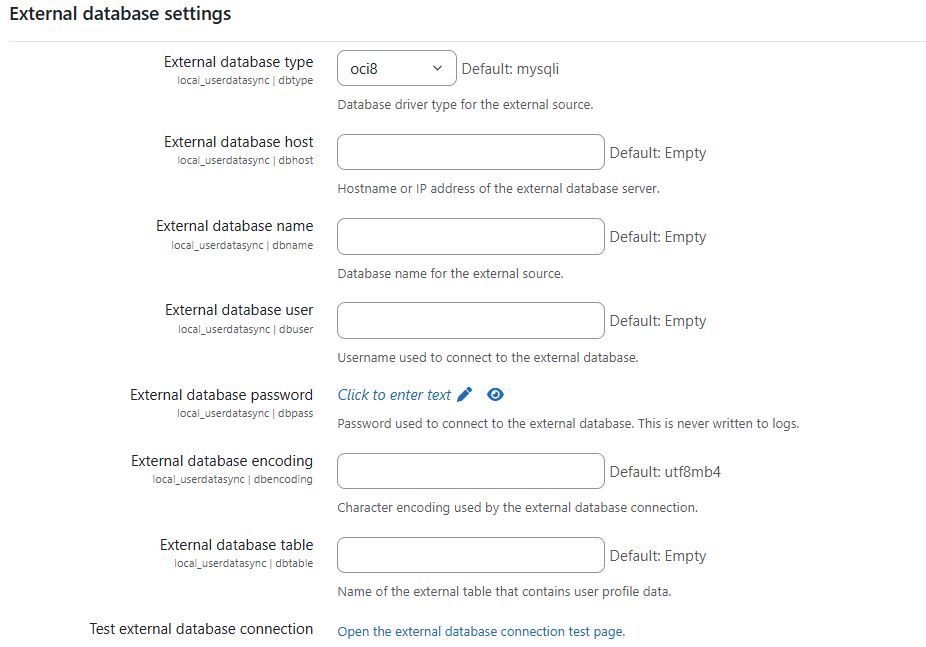
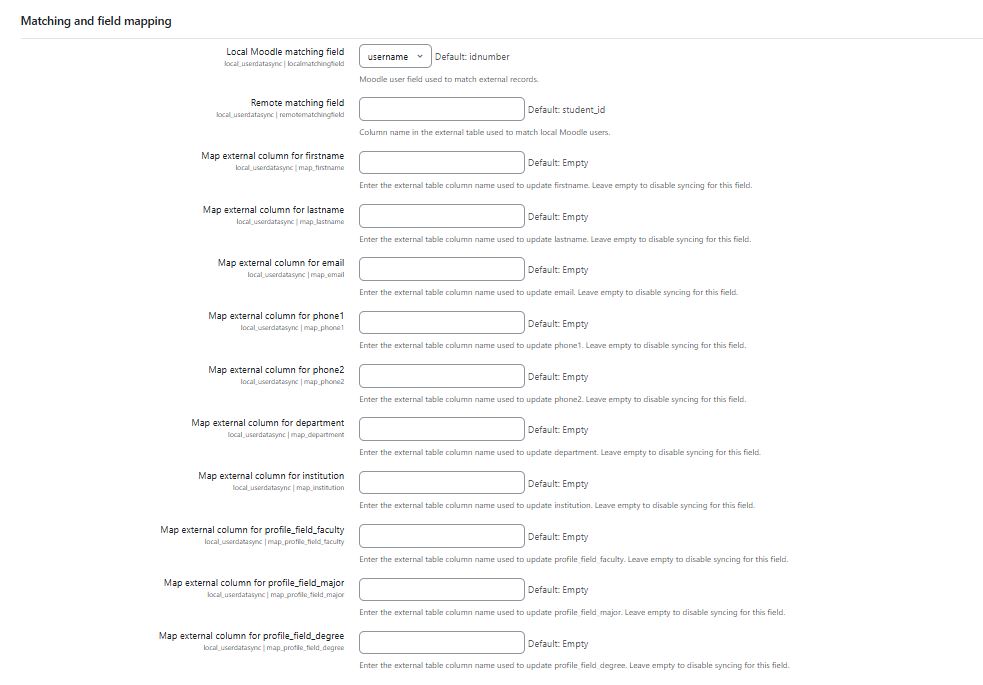
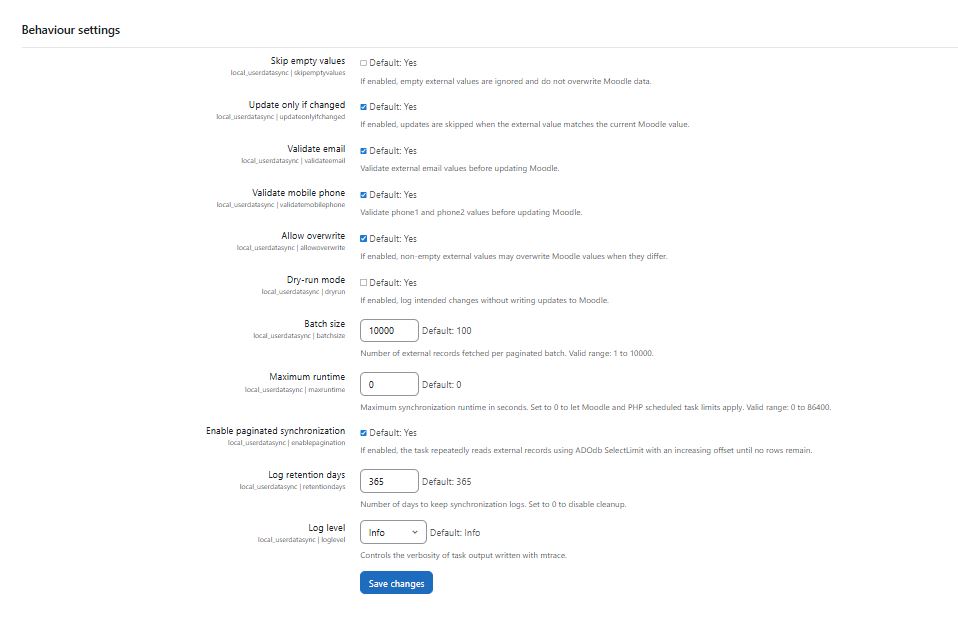
enabled: enables or disables synchronization.dbtype: external database type. Aliases such asoracle,oci, andoci8are normalized byexternal_db_client.dbhost,dbname,dbuser,dbpass,dbencoding: external database connection settings.dbtable: source table or view name.localmatchingfield: Moodle user field used to find the user (id,username,idnumber, oremail).remotematchingfield: external column used to match the Moodle user.map_firstname,map_lastname,map_email,map_phone1,map_phone2,map_department,map_institution: standard user field mappings.map_profile_field_faculty,map_profile_field_major,map_profile_field_degree: custom profile field mappings.skipemptyvalues: skips mapped values that are empty in the source.updateonlyifchanged: avoids writes when Moodle already has the same value.validateemail: validates mapped email addresses.validatemobilephone: validatesphone1andphone2with a basic international phone pattern.allowoverwrite: controls whether existing non-empty Moodle values can be overwritten.dryrun: logs intended changes without writing them.batchsize: external rows fetched per paginated batch.maxruntime: optional maximum runtime in seconds, checked between batches.enablepagination: enables offset pagination until no external rows remain.loglevel: controls DB/CLI log verbosity.
External Database Configuration
The connection is implemented in classes/external_db_client.php.
Configured DB types are normalized as follows:
oracle,oci,oci8->oci8oci8po->oci8pomysqli,mariadb,mysql->mysqlipgsql,postgres,postgresql->postgressqlsrv,mssql,mssqlnative->mssqlnative
The client calls:
\ADONewConnection($normalizeddbtype);

$db->Connect($dbhost, $dbuser, $dbpass, $dbname, true);
Passwords are not displayed by the test page or logger.
Oracle And ADOdb Connection Method
Oracle connections use ADOdb driver names such as oci8 or oci8po. This approach is separate from Moodle's native Oracle DML driver and is intended to avoid the native Moodle Oracle MOODLELIB support package requirement for this external source connection.
If the MOODLELIB error still appears, verify that the deployed code is current, purge Moodle caches, and confirm that another plugin or old code path is not using Moodle's native Oracle DML driver for the same test.
Source Table Vs Source SQL Query Mode
Current code supports source table/view mode only through dbtable.
external_db_client::fetch_records_in_batches() builds:
SELECT configured_columns FROM configured_table ORDER BY remote_matching_field
and repeatedly applies ADOdb SelectLimit($sql, $batchsize, $offset) until the source returns no rows. The first selected column is the remote matching field, which gives Oracle offset pagination a deterministic order.
There is no implemented arbitrary source SQL query setting. Do not put a SELECT statement in dbtable; use a database view if a custom query is needed.
Field Mapping
sync_service::get_field_mappings() supports these target fields:
firstnamelastnameemailphone1phone2departmentinstitutionprofile_field_facultyprofile_field_majorprofile_field_degree
External column names are validated as safe identifiers. Oracle uppercase result keys are normalized by adding lowercase aliases in external_db_client::decode_record().
Sync Logic
For each external row:
- Read the remote matching field value.
- Find a non-deleted Moodle user using
localmatchingfield. - Build standard and custom profile updates from configured mappings.
- Skip empty source values when
skipemptyvaluesis enabled. - Validate emails and phone fields when enabled.
- Skip unchanged values when
updateonlyifchangedis enabled. - Respect
allowoverwritefor non-empty Moodle values. - In dry run mode, log the intended change without saving.
- Save standard fields with
user_update_user(). - Save custom profile fields with
profile_save_data(). - Persist run counters in plugin config.
Scheduled Task Behavior
The scheduled task class is:
\local_userdatasync\task\sync_user_data_task
It is registered in db/tasks.php and runs hourly with randomized minute R.
Run it manually from the Moodle root:
php admin/cli/scheduled_task.php --execute="\local_userdatasync\task\sync_user_data_task"
Test Connection Page
The admin test page is:
/local/userdatasync/testconnection.php
It requires config.php, adminlib.php, admin_externalpage_setup('local_userdatasync_testconnection'), moodle/site:config, and local/userdatasync:managesettings. Running the connection test requires a POST submission with a valid Moodle sesskey; a simple GET request only displays the page. It displays diagnostics including configured DB type, normalized DB type, connection method, host, database name, table, and row count when the connection succeeds.
Error Handling
- External database connection errors are sanitized before display.
- Invalid DB type and missing ADOdb driver conditions are reported as readable Moodle exceptions.
- Invalid table or column identifiers are rejected before query execution.
- Sync exceptions are logged and counted in
lasterrors. - Passwords and secrets are not printed.
Security Notes
- Store the external database user with the least privileges required.
- Prefer a read-only account restricted to the configured table or view.
- Do not expose database passwords in logs, screenshots, or support tickets.
- Restrict access to plugin settings, report, and test pages to trusted administrators.
- Use database views when you need to hide columns that Moodle should not read.
Privacy And External Data Processing
The plugin processes personal data from a configured external database table or view and may import it into Moodle user profile fields. Depending on the configured mappings, imported data can include matching identifiers such as username, idnumber, user id, or email, and profile fields such as firstname, lastname, email, phone1, phone2, department, institution, faculty, major, degree, or any other configured mapped profile field supported by the plugin.
Imported Personal Data
Imported data is limited to the configured matching field and enabled field mappings. Administrators should map only the fields required for Moodle account profile maintenance and should prefer an external view that exposes only those columns.
External Database Credentials Storage
External database connection details, including host, database name, username, password, source table, and mapped column names, are stored in Moodle plugin configuration. Administrators should protect access to plugin settings and use an external database account with only the read permissions needed for the configured table or view.
Sync Logs And Audit Information
Synchronization logs are kept in Moodle for audit and troubleshooting. Current logs are designed not to store personal field values, but they may store Moodle user id, field name, synchronization status, safe diagnostic messages, and timestamps. Older upgraded installations may still contain legacy log columns for username, old value, and new value, so retention settings and privacy exports should be reviewed during deployment.
Troubleshooting
See docs/troubleshooting.md for detailed fixes for common errors, including invalid drivers, Oracle package messages, stale [[value]] output, and source field validation problems.
CLI Test Commands
From the Moodle root:
php admin/cli/purge_caches.php

php admin/cli/upgrade.php

php admin/cli/scheduled_task.php --execute="\local_userdatasync\task\sync_user_data_task"
To inspect scheduled task status:
php admin/cli/scheduled_task.php --list | grep userdatasync
On Windows PowerShell:
php admin/cli/scheduled_task.php --execute="\local_userdatasync\task\sync_user_data_task"
Installation And Upgrade
- Copy the plugin folder to
local/userdatasync. - Visit Moodle admin notifications or run
php admin/cli/upgrade.php. - Configure the plugin settings.
- Open the test connection page and verify the external database connection.
- Enable dry run and execute the scheduled task manually.
- Review the report page.
- Disable dry run when the mappings are verified.
For detailed steps, see docs/installation.md.
Submission Notes
Repository Name
Keep the Moodle plugin directory and component name as local_userdatasync. For the Moodle Plugins Directory, the recommended GitHub repository name is moodle-local_userdatasync. If GitHub CLI is available and authenticated, rename the repository with:
gh repo rename moodle-local_userdatasync --yes
Otherwise, rename it manually in the GitHub repository settings.
Installation
Copy the plugin directory to local/userdatasync, keep the component name local_userdatasync, then run Moodle upgrade and purge caches from the Moodle root.
Configuration
Configure the external database connection, source table, local matching field, remote matching field, and only the mappings that should be synchronized. Empty mapping settings are ignored. Batch size must be between 1 and 10000 records.
Scheduled Task
The existing synchronization task command remains supported:
sudo -u www-data /usr/bin/php /var/www/html/moodle/admin/cli/scheduled_task.php --execute='\local_userdatasync\task\sync_user_data_task'
The log cleanup task can be run manually:
sudo -u www-data /usr/bin/php /var/www/html/moodle/admin/cli/scheduled_task.php --execute='\local_userdatasync\task\cleanup_logs_task'
Oracle External DB Notes
The plugin uses Moodle's bundled ADOdb layer for external database access. Oracle aliases oracle, oci, oci8, and oci8po are normalized for ADOdb. Ensure the CLI PHP user and web server PHP user both have access to the required Oracle client libraries and PHP extension.
Privacy And Security
New synchronization logs and task output do not store or print usernames, emails, phone numbers, student names, old values, new values, or remote matching values. Logs are limited to user id, field name, status, safe messages, and counts. Moodle Privacy API support covers metadata, export, user deletion, user-list deletion, and system-context deletion for local_userdatasync_log.
Troubleshooting skipped_empty
skipped_empty can mean that the configured remote matching field exists but its value is empty, the configured remote matching field was not returned by the external query, or a mapped external value is empty while skipemptyvalues is enabled. Check the configured field and column names; the task intentionally does not print the skipped personal value.