Ldesign Media - qbank_delayedanswers
Description
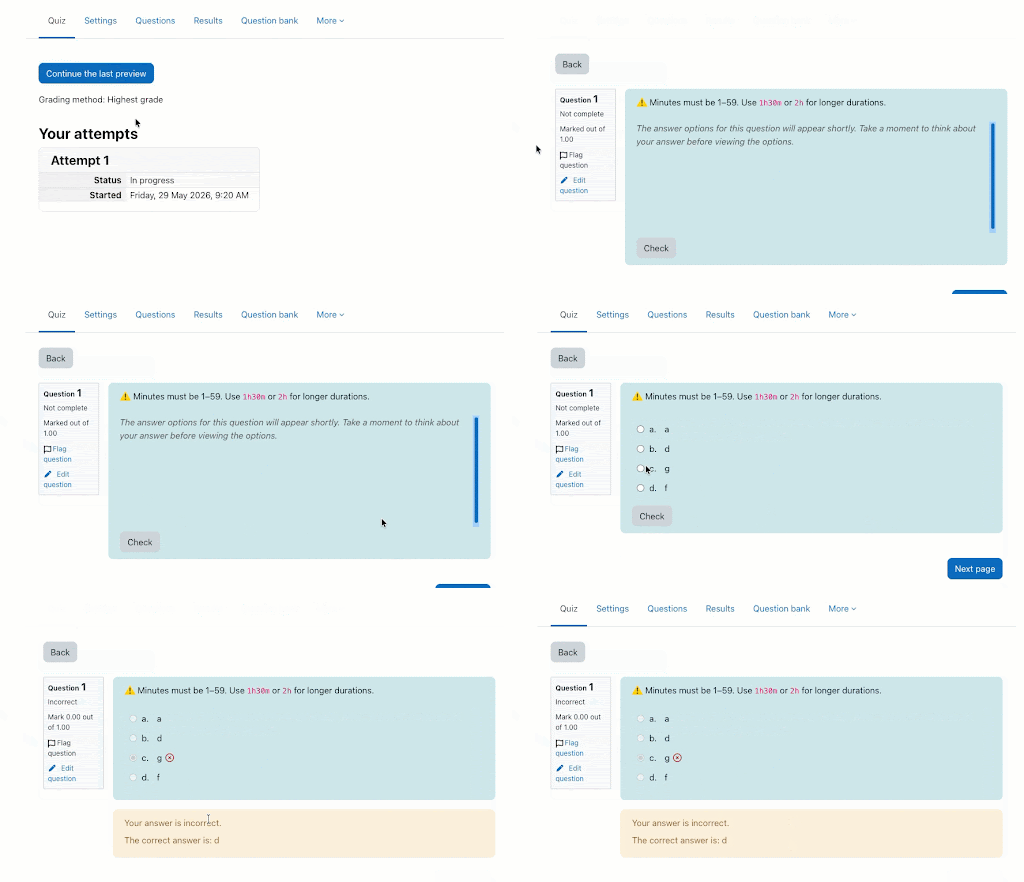
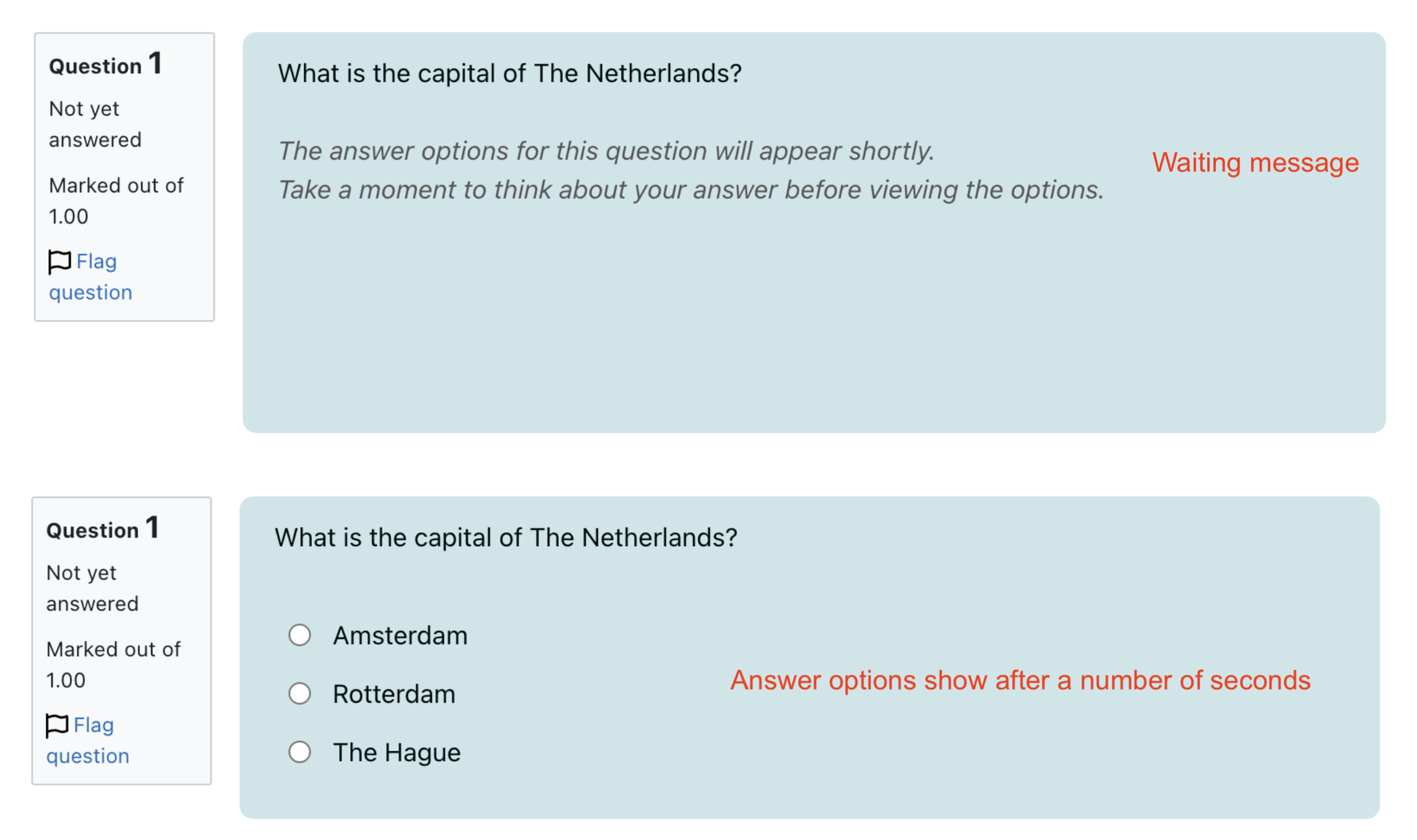
Moodle question bank subplugin that hides multiple-choice answer options for a short, configurable delay on quiz
attempt pages, encouraging students to read the question stem before making a selection. The delay is a pedagogical
nudge, not an anti-cheat mechanism.
Features:
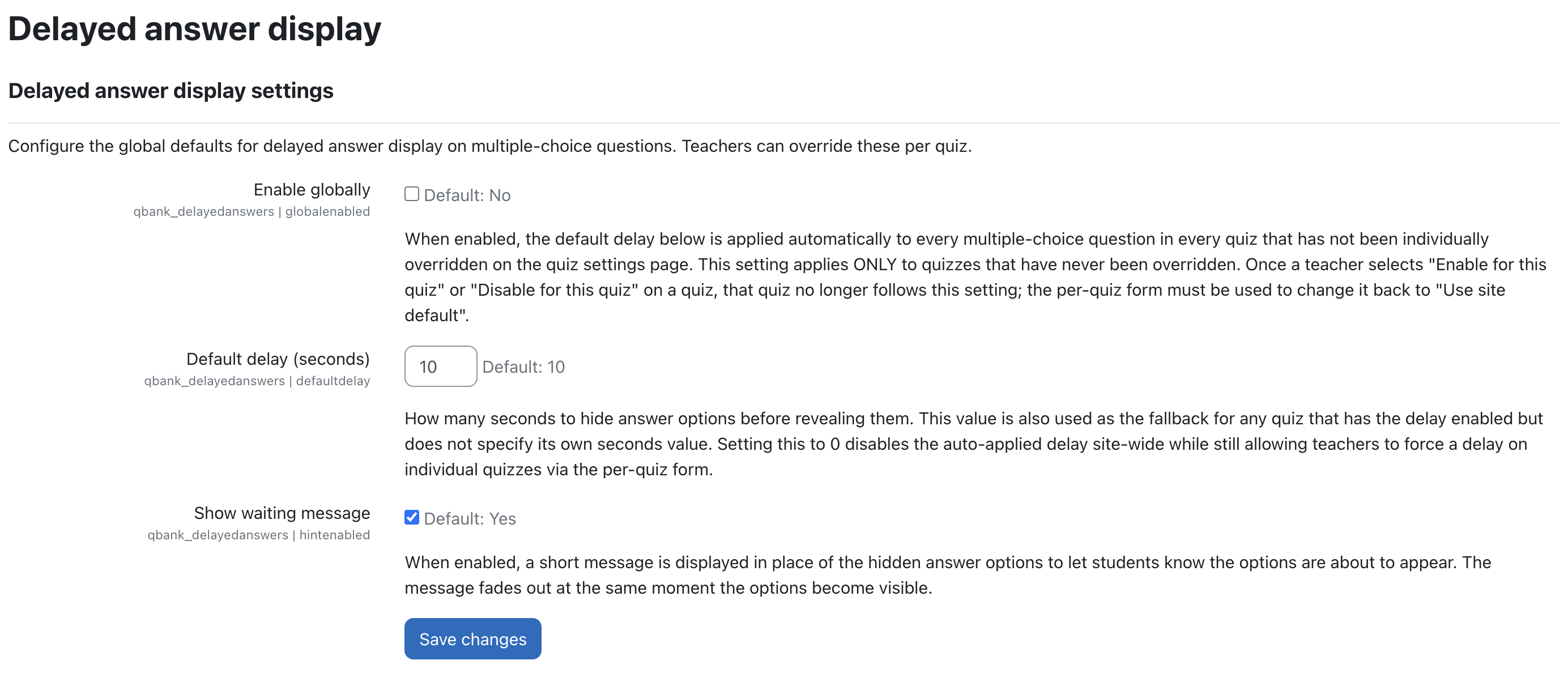
Site default delay — Global default applied to every multichoice question across the site
(Site administration ' Plugins ' Question bank ' Delayed answer display).
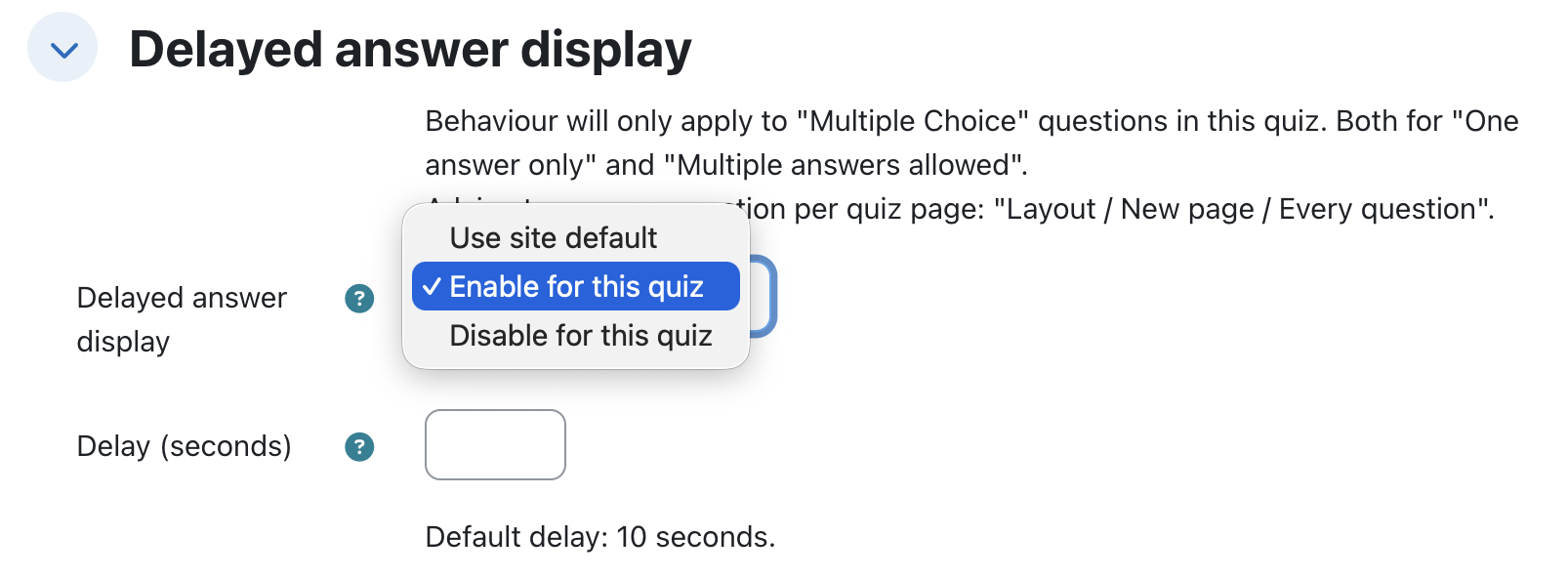
Per-quiz override — Tri-state dropdown on each quiz's edit form: Use site default / Enable for this quiz / Disable for this quiz.
Resolution rule — Per-quiz override wins over the site default. Untouched quizzes follow the site default.
Sensible default — Ships with a 10-second delay.
Pure-CSS reveal — Uses a native @keyframes animation with animation-delay. No JavaScript on the student
side.
Waiting message — Optional message shown in place of the hidden answer options during the delay,
fading out at the moment the options appear. Toggle from the plugin settings.
Privacy API — Stores plugin configuration and per-quiz settings only; no personal user data.
Tested:


Installation
Requirements:
- Recommended Moodle version: 5.2 LMS
- Recommended PHP version: 8.3
- Required Moodle version: 4.5 LMS
- Required PHP version: 8.1
- Required dependencies:
qtype_multichoice
- Theme: tested against stock Boost
Steps:
- Copy the plugin directory to
question/bank/delayedanswers/ on the Moodle server.
- Navigate to
Site administration ' Notifications to trigger the database upgrade.
- Configure the site default under
Site administration ' Plugins ' Question bank ' Delayed answer display.
- (Optional) Override the delay per quiz via the quiz edit form.
- Clear all caches.
How it works
The plugin has two configuration layers:
- Site-wide default (admin) —
Enable globally checkbox + Default delay (seconds).
- Per-quiz override (teacher) — a
Delayed answer display dropdown on the quiz edit form, with three options.
Per-quiz dropdown
On each quiz's edit form, teachers pick one of:
- Use site default — this quiz follows the site-wide setting. If the administrator changes that setting later, this quiz follows the change.
- Enable for this quiz — the delay is applied on this quiz regardless of the site-wide setting. The
Delay (seconds) field (1-60) controls the length; leave it blank to inherit the site default delay value.
- Disable for this quiz — no delay is applied on this quiz regardless of the site-wide setting.
The site-wide Enable globally setting applies ONLY to quizzes that have not been individually overridden. Once a teacher selects Enable for this quiz or Disable for this quiz, the choice is pinned to that quiz and the global toggle no longer affects it. To return a quiz to the global behaviour, change the dropdown back to Use site default.
Resolution table
| Per-quiz dropdown | Per-quiz seconds | Effective delay |
|--------------------------|------------------|--------------------------------------------|
| Use site default | — | Follows site Enable globally |
| Enable for this quiz | N (1-60) | N seconds |
| Enable for this quiz | blank | Site Default delay (seconds) (fallback) |
| Disable for this quiz | — | None (pinned off, ignores site setting) |
To kill the delay site-wide, the admin can either uncheck Enable globally (untouched quizzes get no delay) or set Default delay (seconds) to 0 (untouched quizzes and quizzes that opted in with blank seconds get no delay). Quizzes that picked Enable for this quiz with an explicit seconds value continue to apply that value.
Waiting message
A short message can optionally be displayed in place of the hidden answer options while the delay runs. It fades out at
the exact moment the options become visible, so the transition feels natural. Admins can switch the message on or off site-wide via
the Show waiting message setting on the plugin's settings page.
Changelog
v5.2.1 (2026070700)
- Default site-wide delay raised from 4 to 10 seconds (settings page and resolver fallback).
- Quiz edit form: added a scope note clarifying the delay only applies to Multiple Choice questions
(both One answer only and Multiple answers allowed), with the advice to use one question per
quiz page (Layout / New page / Every question).
- Quiz edit form: the current site default delay is now shown (
Default delay: {N} seconds.) when
Enable for this quiz is selected, so teachers know what a blank seconds field falls back to.
- Waiting message: multi-line support. Lang string line breaks are rendered via the CSS
\A escape
with white-space: pre-line; the default message is now split over two lines.
- Delay is now skipped on questions the student has already interacted with (answered, cleared or
graded — any question attempt with more than one step), instead of only fully graded slots. This
prevents options from being re-hidden when a page is re-rendered mid-attempt.
- Dutch translations revised (
quiz renamed to test, new strings translated).
- GitHub Actions CI added, based on the Catalyst moodle-workflows (release publishing disabled).
v5.2.0 (2026052100) — Initial release
- Site-wide default delay setting (
Enable globally + Default delay (seconds)). Default applies to all multichoice
questions in quizzes that have not been overridden per-quiz.
- Per-quiz override via a tri-state dropdown on the quiz edit form:
Use site default / Enable for this quiz /
Disable for this quiz. Row presence in qbank_delayedanswers_quiz encodes the teacher's intent: no row = follow
site default; row exists = pinned override that survives global toggles.
- Per-quiz seconds validation: 1-60. Site-wide
Default delay (seconds) allows 0, which disables the auto-applied
delay site-wide while still letting teachers force a delay on individual quizzes.
qtype_multichoice support.
- CSS-only reveal via the
before_http_headers hook + per-request inline <style>. No JavaScript on the student side.
visibility: hidden during delay (accessibility-safe; removes options from the keyboard tab order and assistive
technology trees).
- Optional waiting message shown in place of the hidden options, fading out at reveal. Admin toggle on the plugin
settings page.
- Event observer on
\core\event\course_module_deleted cleans up per-quiz override rows when the parent quiz is
deleted. Orphan cleanup is event-driven rather than enforced by a cross-plugin foreign key: rows can persist if a
quiz is deleted via a path that does not fire the event (e.g., direct SQL). Orphan rows are inert (resolver returns
null for unknown quizid).
- Stale-form guard in
qbank_delayedanswers_coursemodule_edit_post_actions: a quiz settings form opened in another
browser tab before an upgrade does not silently delete the row when submitted.
- Privacy API (
null_provider).
- Plugin feature registration for question bank discovery.
Security Vulnerabilities
If you discover any security vulnerabilities, please send an e-mail to Avetica via security@avetica.nl.
License
This project is licensed under the GNU General Public License v3.0. - https://www.gnu.org/licenses or see
the LICENSE file.
Copyright

Copyright © 2026 Avetica :: avetica.nl
Author: