
PassionFinder
Versions
Current version
0.1.0 (2026060200)
0.1.0
Plugin type: Activities
Frankenstyle component name: mod_passionfinder
Version build number: 2026060200
Version release name: 0.1.0
Maturity: Alpha
Supported Moodle versions: 4.4, 4.5, 5.0, 5.1, 5.2
Repository URL (Git): https://github.com/JohanMyF/moodle-mod_passionfinder
Repository branch:
Repository tag:
Issue/bug tracker URL: https://github.com/JohanMyF/moodle-mod_passionfinder
PassionFinder Activity Module for Moodle
mod_passionfinder is a Moodle activity module that helps teachers create reflective Best–Worst choice instruments. A PassionFinder activity is made up of:
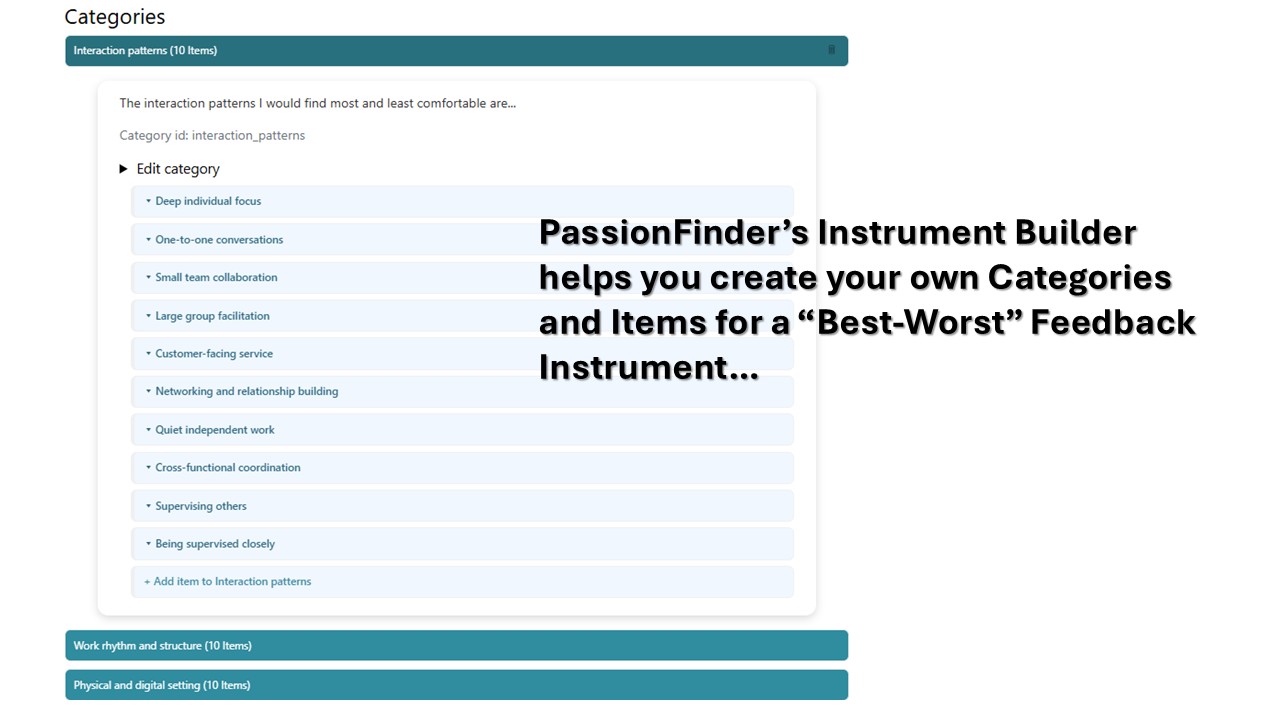
- teacher-defined categories;
- a prompt for each category;
- teacher-defined items linked to those categories;
- configurable "most" and "least" labels;
- generated choice sets;
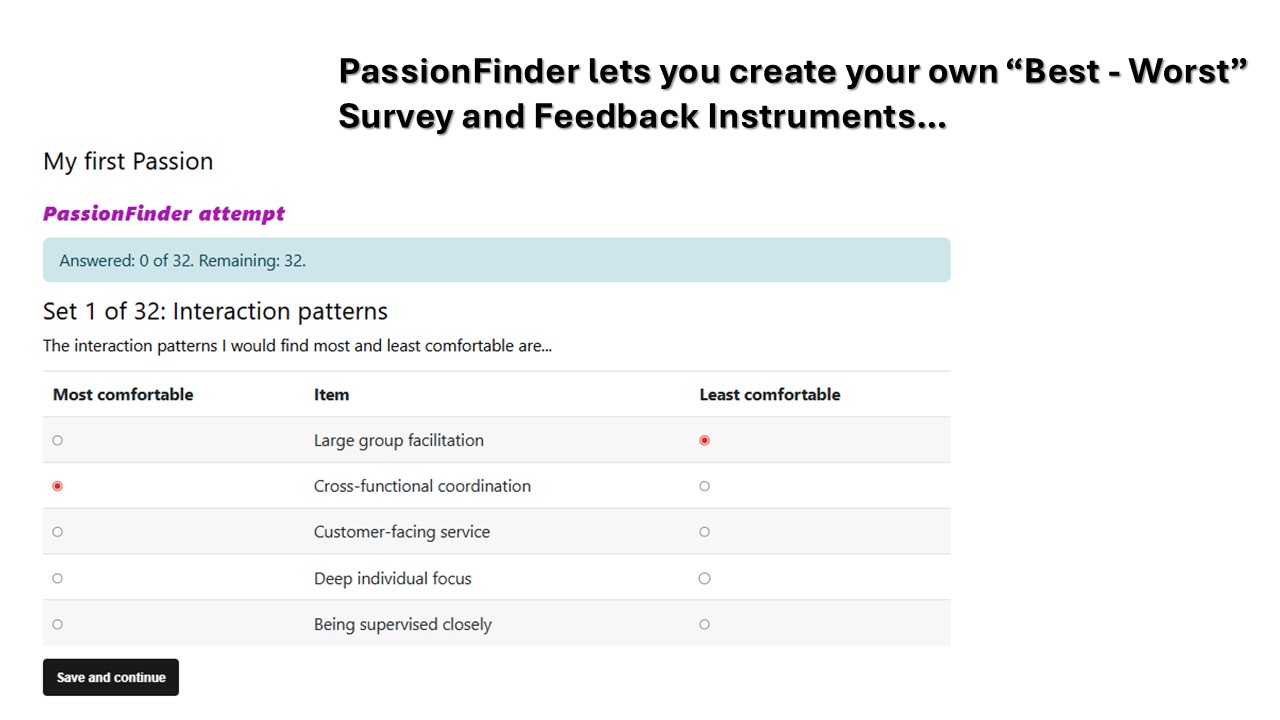
- learner responses where exactly one item is selected as most preferred and one item as least preferred;
- relative preference scoring;
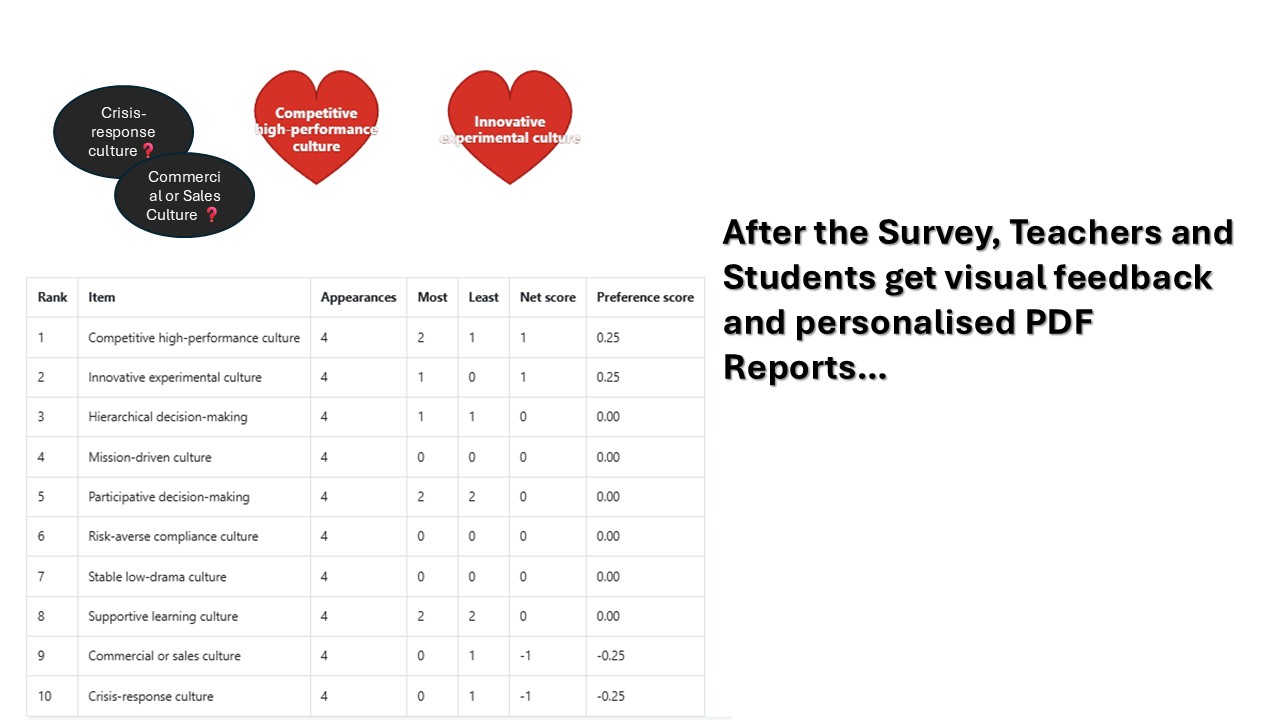
- visual browser reports with positive signals and caution signals;
- downloadable PDF reports;
- teacher reports for submitted attempts;
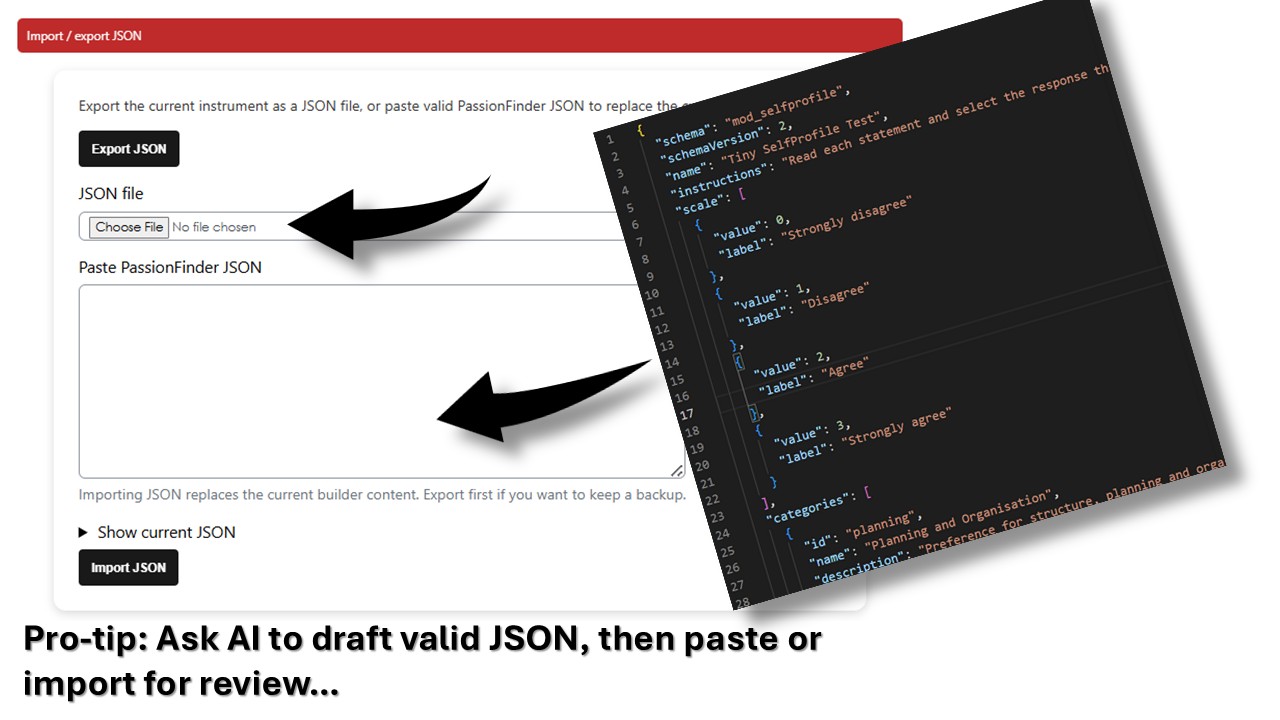
- JSON import and export for sharing instruments between teachers.
PassionFinder is intended for reflective guidance and structured conversation, not for clinical, psychometric, diagnostic, selection, or high-stakes assessment. It helps respondents notice patterns in their choices and gives teachers, mentors, coaches, facilitators, or counsellors a better starting point for discussion.
Why PassionFinder exists
Teachers and facilitators often want learners or respondents to reflect on questions such as:
- What kinds of tasks energise me?
- What kinds of people do I feel drawn to serve or support?
- What work environments feel comfortable or uncomfortable?
- What issues do I feel most strongly about?
- What kinds of roles or activities should I explore further?
- Which work situations should I think about carefully before committing?
A normal Moodle quiz is good at asking questions and marking answers. PassionFinder is different. It asks respondents to make relative choices. Instead of rating every item independently, the respondent sees a small group of items and must choose:
- the item that is most preferred, most comfortable, most attractive, most important, or most energising; and
- the item that is least preferred, least comfortable, least attractive, least important, or least energising.
This forces clearer trade-offs than a simple rating scale.
PassionFinder is useful where the purpose is not to give marks, but to help the respondent recognise preference patterns that may otherwise remain vague.
What kind of tool is PassionFinder?
PassionFinder is a teacher-authored Best–Worst reflection instrument. It is inspired by the logic of Best–Worst choice tasks and MaxDiff-style activities, but it does not claim to be a formal psychometric MaxDiff package.
The plugin is designed for educational, pastoral, vocational, coaching, leadership-development, and reflective learning contexts where:
- the teacher controls the wording of categories and items;
- the activity produces structured preference signals;
- the report becomes a discussion document;
- the respondent and facilitator interpret the results together.
A PassionFinder activity should not be used in isolation to make high-stakes decisions.
Typical use cases
PassionFinder can be used for many low-stakes reflective activities, including:
- career and work-environment reflection;
- ministry-fit or service-fit reflection;
- leadership-role exploration;
- team-role conversations;
- professional development coaching;
- study pathway exploration;
- learner interest discovery;
- course or programme orientation;
- mentoring preparation;
- work preference discussions;
- personal development planning;
- values and issue-priority reflection.
Examples of teacher prompts include:
The people I feel most and least drawn to serve are...
The work environments I would find most and least comfortable are...
The activities that would give me most and least energy are...
The societal issues I feel most and least passionate about are...
The organisational cultures I would find most and least sustainable are...
Teacher workflow
A teacher creates a PassionFinder activity inside a Moodle course.
The teacher can then:
- Define the activity name and introductory text.
- Open the PassionFinder Builder.
- Define the instrument title and description.
- Choose how many items appear on each screen.
- Choose how many choice sets are generated per category.
- Choose the result output size.
- Define global "most" and "least" labels.
- Define whether positive and lower/caution signals should appear in visual reports.
- Choose visual shapes such as hearts and bubbles.
- Create categories.
- Add prompts to categories.
- Add items under each category.
- Export the completed structure as JSON.
- Import a JSON file created by another teacher or generated from a valid example.
- View submitted respondent reports.
- Download respondent PDF reports.
Example category:
Work rhythm and structure
Example prompt:
The work rhythms and structures I would find most and least comfortable are...
Example items:
- Predictable daily routine
- Flexible schedule
- Deadline-driven sprints
- High autonomy
- Rapid task switching
Student workflow
When a student or respondent opens the activity, the student sees:
- the teacher’s introduction;
- progress information;
- one choice set at a time;
- the category prompt;
- a small list of items;
- one column for the "most" choice;
- one column for the "least" choice.
The student must select exactly one item as the strongest or most preferred option and exactly one item as the weakest or least preferred option.
Progress is saved as the respondent works through the choice sets. The respondent can review earlier sets before final submission.
After submission, the respondent can see a visual report and download a PDF report.
Results and scoring
PassionFinder calculates results per category.
Each item receives:
- number of appearances;
- number of times selected as most preferred;
- number of times selected as least preferred;
- net score;
- normalised preference score;
- rank within the category.
A simple interpretation is:
| Signal | Meaning |
| --- | --- |
| Positive score | The item was selected as "most" more often than "least". |
| Zero score | The item showed no strong positive or negative signal in this attempt. |
| Negative score | The item was selected as "least" more often than "most". |
The visual report uses these signals to create a quick discussion summary.
Visual reports
PassionFinder can display a browser-based visual report.
The current visual report can show:
- red hearts for strongest positive indications;
- dark caution bubbles for lower or negative indications;
- a detailed data table below the visual summary.
The visual report is designed to be immediately understandable. Larger shapes indicate stronger relative preference signals.
Example interpretation:
The respondent showed a strong positive indication for deep individual focus and quiet independent work, while the lower signals suggest that being supervised closely or heavy networking should be discussed carefully before choosing a work environment.
The dark bubbles should not be read as shame, failure, inability, or permanent aversion. They are fit signals to examine. They indicate topics that deserve careful discussion.
PDF reports
PassionFinder includes a dedicated pdf.php route that generates a proper Moodle PDF report.
The PDF report includes:
- activity name;
- respondent name;
- course;
- submitted date;
- strongest indications per category;
- fit signals to examine per category;
- data tables;
- educational disclaimer.
The PDF is suitable for download, discussion, mentoring records, or reflective portfolio evidence.
The PDF report is not merely a browser screenshot. It is a structured document generated using Moodle’s PDF library.
Teacher reports
Teachers with the appropriate capability can open a report page showing submitted respondent attempts.
The teacher report includes:
- student name;
- attempt status;
- progress;
- submitted time;
- action buttons;
- PDF download links.
This allows a teacher, facilitator, mentor, or counsellor to collect respondent reports without logging in as each respondent.
JSON sharing
A teacher can export the structure of a PassionFinder activity as a JSON file.
The exported JSON includes:
- schema information;
- instrument title and description;
- activity settings;
- global visual-report settings;
- categories;
- category prompts;
- category-level labels;
- report settings;
- items;
- optional item warning text or discussion guidance;
- metadata.
The exported JSON does not include:
- student responses;
- student names;
- grades;
- attempts;
- personal data.
This makes it possible for teachers to share PassionFinder instruments with colleagues. A colleague can import the JSON, adapt it in the builder, and use it in another Moodle course.
AI-assisted authoring pro-tip
PassionFinder becomes especially powerful when a teacher uses AI to create a valid JSON draft.
A teacher can ask ChatGPT or another AI assistant to produce a PassionFinder instrument on a chosen topic, then paste or import the JSON into the PassionFinder Builder. The teacher should then review, edit, and approve every category, prompt, and item before using the activity with respondents.
AI can help draft structure quickly, but the teacher remains responsible for:
- accuracy;
- fairness;
- cultural appropriateness;
- language level;
- age appropriateness;
- ethical suitability;
- avoiding harmful labels;
- avoiding diagnostic claims;
- ensuring that the activity fits the educational purpose.
Suggested AI prompt for creating a PassionFinder JSON instrument
Teachers can adapt the prompt below.
Create a valid JSON instrument for the Moodle plugin mod_passionfinder.


Purpose:

[INSERT PURPOSE OF THE INSTRUMENT]


Audience:

[INSERT RESPONDENT GROUP]


Context:

[INSERT COURSE, WORKSHOP, COACHING, CAREER, MINISTRY, OR TRAINING CONTEXT]


Create:

- [NUMBER] categories

- [NUMBER] items per category

- clear category ids using lowercase letters, numbers, and underscores

- clear item ids using lowercase letters, numbers, and underscores

- a short prompt for each category

- concise item labels

- optional warning or discussion guidance for each item

- no student data

- no markdown

- no explanation outside the JSON


Use this exact overall structure:


{

  "metadata": {

    "title": "[TITLE]",

    "description": "[DESCRIPTION]",

    "schema": "mod_passionfinder",

    "schemaVersion": 1,

    "createdBy": "ai_draft_review_required",

    "containsStudentData": false,

    "reportNote": "[A short note explaining that this is a reflective tool, not a diagnosis.]"

  },

  "settings": {

    "itemsperround": 5,

    "roundspercategory": 8,

    "resultdepth": 5,

    "mostlabel": "Most drawn to",

    "leastlabel": "Least drawn to",

    "showpositive": true,

    "shownegative": true,

    "positivevisual": "hearts",

    "negativevisual": "bubbles"

  },

  "categories": [

    {

      "id": "example_category",

      "name": "Example category",

      "prompt": "The items I feel most and least drawn to are...",

      "mostlabel": "Most drawn to",

      "leastlabel": "Least drawn to",

      "report": {

        "showpositive": true,

        "shownegative": true,

        "positivevisual": "hearts",

        "negativevisual": "bubbles",

        "showdatatable": true

      },

      "warning": "A short category-level note explaining how lower-scoring items should be discussed carefully.",

      "items": [

        {

          "id": "example_item_1",

          "label": "Example item one",

          "warning": "A short discussion note or caution related to this item."

        },

        {

          "id": "example_item_2",

          "label": "Example item two",

          "warning": "A short discussion note or caution related to this item."

        },

        {

          "id": "example_item_3",

          "label": "Example item three",

          "warning": "A short discussion note or caution related to this item."

        }

      ]

    }

  ]

}


Important requirements:

- Return only valid JSON.

- Do not wrap the JSON in markdown fences.

- Do not add comments.

- Use double quotes for all JSON keys and string values.

- Make sure every category has at least 3 items.

- Prefer 8 to 12 items per category for a useful instrument.

- Keep item labels short enough to display inside visual report shapes.

- Avoid clinical, diagnostic, recruitment-selection, or high-stakes claims.

- Include "containsStudentData": false.
Valid PassionFinder JSON example
The following is a small valid example. It can be used as a template for creating new instruments.
{

  "metadata": {

    "title": "Work Environment Fit Reflection",

    "description": "A reflective instrument that helps respondents explore work environments where they may feel most and least comfortable.",

    "schema": "mod_passionfinder",

    "schemaVersion": 1,

    "createdBy": "example",

    "containsStudentData": false,

    "reportNote": "This is a reflective guidance tool, not a formal career assessment."

  },

  "settings": {

    "itemsperround": 5,

    "roundspercategory": 8,

    "resultdepth": 5,

    "mostlabel": "Most comfortable",

    "leastlabel": "Least comfortable",

    "showpositive": true,

    "shownegative": true,

    "positivevisual": "hearts",

    "negativevisual": "bubbles"

  },

  "categories": [

    {

      "id": "interaction_patterns",

      "name": "Interaction patterns",

      "prompt": "The interaction patterns I would find most and least comfortable are...",

      "mostlabel": "Most comfortable",

      "leastlabel": "Least comfortable",

      "report": {

        "showpositive": true,

        "shownegative": true,

        "positivevisual": "hearts",

        "negativevisual": "bubbles",

        "showdatatable": true

      },

      "warning": "Pay special attention to low-scoring interaction patterns. A mismatch here can affect daily energy and long-term fit.",

      "items": [

        {

          "id": "deep_individual_focus",

          "label": "Deep individual focus",

          "warning": "May suit focused specialist work; be cautious if the role requires constant interruption."

        },

        {

          "id": "small_team_collaboration",

          "label": "Small team collaboration",

          "warning": "May suit project teams; be cautious if team conflict or unclear roles are common."

        },

        {

          "id": "large_group_facilitation",

          "label": "Large group facilitation",

          "warning": "May suit training or leadership; be cautious if public performance drains you."

        },

        {

          "id": "customer_facing_service",

          "label": "Customer-facing service",

          "warning": "May suit service roles; be cautious if emotional labour is frequent."

        },

        {

          "id": "quiet_independent_work",

          "label": "Quiet independent work",

          "warning": "May suit research, writing, or analysis; be cautious if isolation reduces motivation."

        }

      ]

    }

  ]

}
Good item-writing guidance
When writing PassionFinder items:
- use short item labels;
- write one idea per item;
- keep items in the same category logically comparable;
- avoid mixing people, tasks, values, and environments in one category;
- avoid labels that shame the respondent;
- avoid clinical or diagnostic language;
- avoid using protected characteristics as simplistic preference labels;
- use language appropriate to the respondent group;
- make lower-scoring items safe to discuss;
- review AI-generated items before use;
- pilot the instrument with a small group before using it widely.
Better:
Quiet independent work
Riskier:
Jobs for people who cannot cope with teams
The second example labels and shames the respondent. PassionFinder works best when items are neutral enough to support honest reflection.
Design guidance for categories
A good PassionFinder category should contain items that can reasonably be compared with each other.
Good category:
Work rhythm and structure
Items:
- Predictable daily routine
- Flexible schedule
- Deadline-driven sprints
- High autonomy
- Rapid task switching
Riskier category:
Things about work
Items:
- Salary
- Children
- Open-plan offices
- Leadership
- Climate change
The second example mixes unrelated dimensions. It may still produce scores, but the interpretation