AI Hub icon

AI Hub

Maintained by Jean Lúcio
AI Hub is a small BYOK (bring your own key) broker for Moodle. It lets the institution's own plugins generate text through shared AI API keys, without each plugin reimplementing the HTTP transport, the SSRF guard, the provider ladder or a key store.
Price option: Free
Supports Moodle 4.5-5.2 See all versions

Latest release: 0 days ago
Installations: 6
Downloads (last 90 days): 9

Frankenstyle name: local_aihub
Local plugins

Description

AI Hub is a small BYOK (bring your own key) broker for Moodle. It lets the institution's own plugins generate text through shared AI API keys, without each plugin reimplementing the HTTP transport, the SSRF guard, the provider ladder or a key store.

👥 Who it is for: developers of sibling Moodle plugins who want AI text generation without building their own provider integration, and site administrators who want a single place to manage AI keys, opt-in personal keys, and usage reporting across the site.

📋 Requirements

  • Moodle 4.5 or later; PHP 8.1 or later.
  • No hard dependency on any other plugin. Consuming plugins detect AI Hub through an optional class_exists() check, so AI Hub can be installed and updated independently.
  • No API key is required to install AI Hub itself; it works and reports "not available" until at least one key is configured.

🌐 External services and costs

AI Hub does not charge for usage and does not resell access to any provider. Once an administrator or a user configures a key, the prompt text is sent to the matching third-party provider (Google Gemini, Groq, DeepSeek, or a configured OpenAI-compatible endpoint) to generate the response. Any usage costs, quotas or terms are set directly by that provider, not by this plugin. See the Third-party Service Disclosure in the documentation for exact endpoints and data handling.

✨ Features

  • 🔑 BYOK key store: site keys (admin) and optional personal keys (per user, opt-in) for Gemini, Groq, DeepSeek and any OpenAI-compatible endpoint.
  • 🪜 Personal → site resolution: the hub tries the user's own key first, then the site key, exposing a single result to the caller.
  • 🧩 One-call facade: \local_aihub\ai::generate_text() and is_available() — consumed by sibling plugins through a soft dependency (class_exists), with no hard dependency entry.
  • 🚫 Does not wrap core_ai: each consumer keeps its own core_ai fallback, so a site that already has core_ai configured needs no extra setup — the hub stays optional.
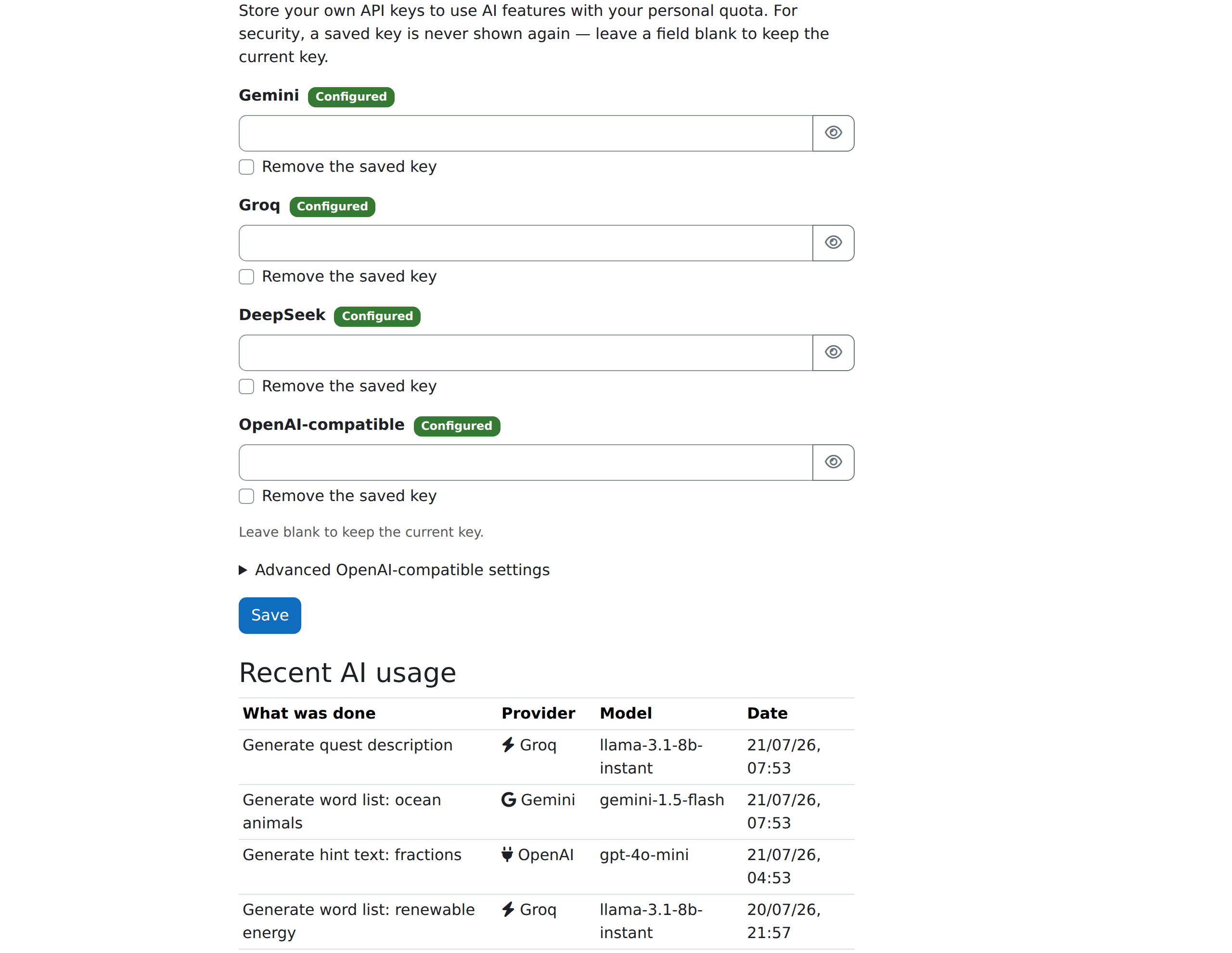
  • 👁️ Write-only personal keys: once saved, a personal key is never returned to the browser — the page only reports a configured / not configured status, closing the read vector via Log in as.
  • 🧑‍💻 Self-service page: My AI keys (in the user's preferences) to add/replace/remove personal keys and review one's own recent usage.
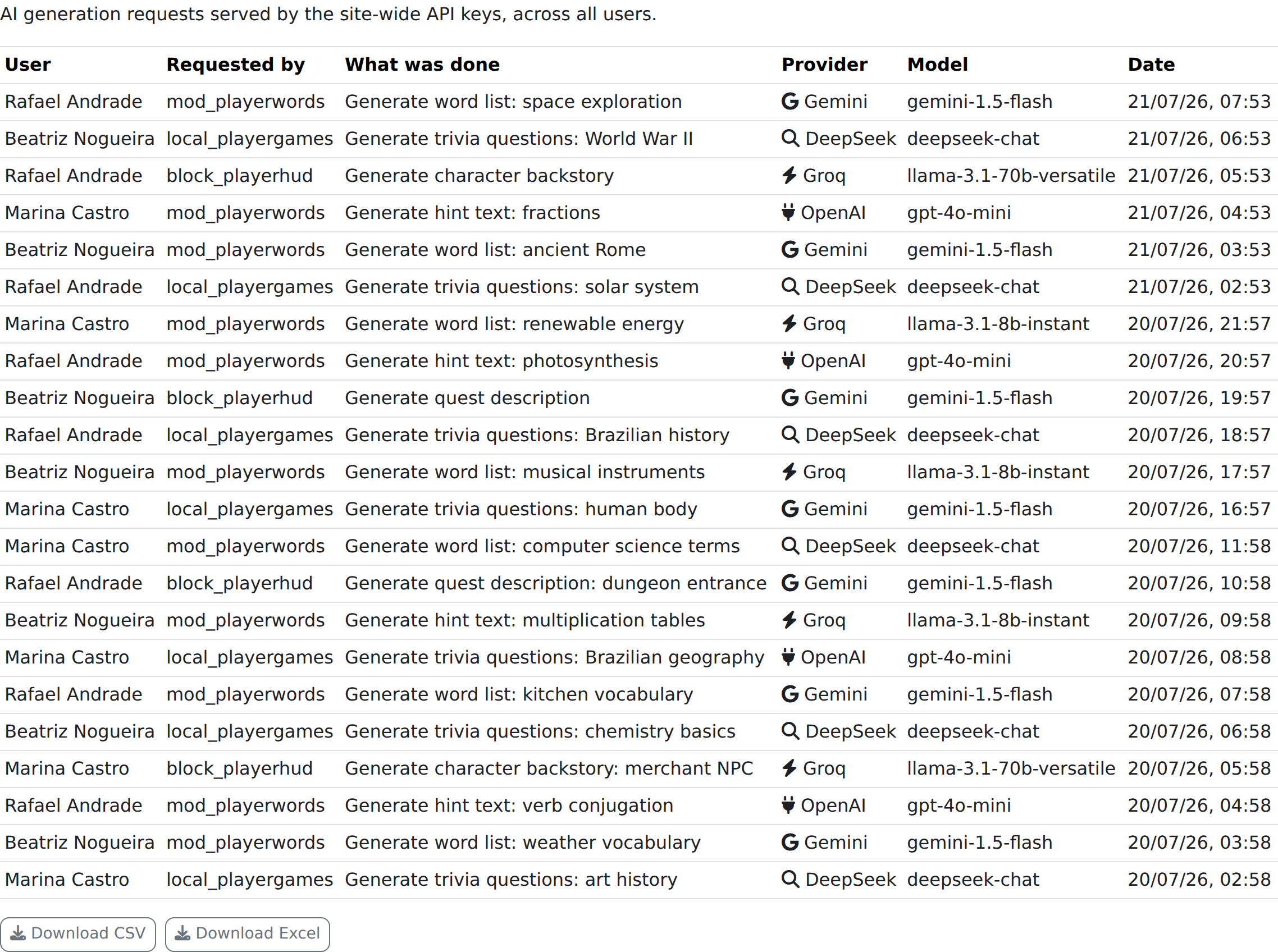
  • 📊 Administrator usage report: every request served by the site keys, across all users, with CSV / Excel download — gated by local/aihub:viewusage.
  • 🛡️ SSRF guard: the configurable OpenAI-compatible endpoint is forced to HTTPS, with loopback / link-local / private ranges blocked and DNS A/AAAA anti-rebinding.
  • 🧾 Usage log + retention task: one row per request (user, requesting component, what was generated, provider, model, key tier) and a scheduled task that purges logs past a configurable retention.
  • 🔒 Privacy-complete: full Privacy provider for the usage log and personal preferences, with the three external destinations declared.

🔗 Key resolution (BYOK ladder)

The hub resolves a key tier by tier and stops at the first tier that holds a key:

Tier Source
1 Personal key — the user's own key, when personal keys are enabled and the user has local/aihub:usepersonalkey
2 Site key — the admin key set in the hub settings

Within the chosen tier, providers are tried in the order Gemini → Groq → DeepSeek → OpenAI-compatible (first key found is used; if its call fails, the next provider in the same tier is tried). When no tier holds a key, generate_text() returns success = false — the hub never falls back to core_ai; that decision belongs to the consumer.

🚀 Getting started

  • Install AI Hub in local/aihub and complete the Moodle upgrade as usual.
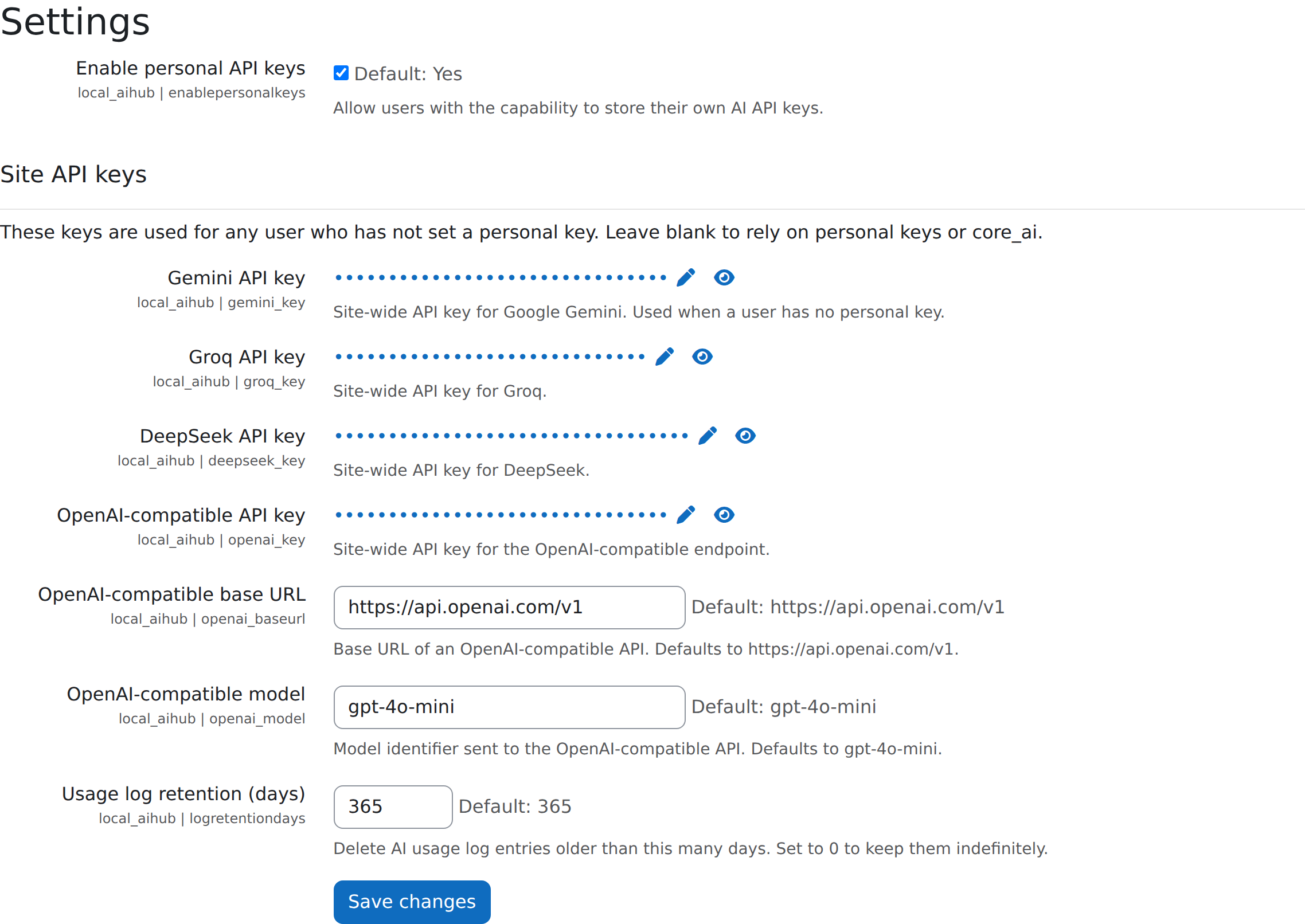
  • As an administrator, go to Site administration → Plugins → Local plugins → AI Hub → Settings, and configure at least one site key (or enable personal keys) before any consuming plugin can generate text.
  • As a user with the local/aihub:usepersonalkey capability, open My AI keys in your preferences to add your own key.
  • As a developer, call \local_aihub\ai::generate_text() behind a class_exists() guard in your own plugin, keeping your own core_ai fallback.
  • As an administrator, review the AI usage report (under the AI Hub category, capability local/aihub:viewusage) to see every request served by the site keys across all users, with CSV and Excel download.

🔐 Security & Compliance

  • Capability- and opt-in-gated personal keys (local/aihub:usepersonalkey and the site toggle).
  • Write-only personal keys — never returned to the page after saving, even under Log in as.
  • Site keys stored with admin_setting_configpasswordunmask; the SSRF guard protects the configurable endpoint.
  • require_sesskey() on the key form; capability local/aihub:viewusage on the usage report.
  • Full Privacy API coverage (export/delete of the usage log and personal preferences) with the external destinations declared.

📚 Documentation and support

Full documentation — the developer facade, the BYOK key-resolution ladder, usage guide and full test suite — is published at jeanlucio.github.io/moodle-local_aihub. Found a bug or have a question? Open an issue on the issue tracker.

📄 License

This project is licensed under the GNU General Public License v3 (GPLv3).

Copyright: 2026 Jean Lúcio

Contributors

Awards

Automated testing support
Privacy friendly