EvalFP
EvalFP is a Moodle local plugin for Formación Profesional (FP), Spain's vocational education and training system.
It adds a curriculum-based assessment layer to Moodle courses, connecting Moodle gradebook items with learning outcomes, assessment criteria, evaluation periods and evidence reports.
The plugin is designed for Spanish vocational education workflows where teachers need to assess by Resultados de Aprendizaje (RA) and Criterios de Evaluación (CE) while keeping Moodle as the official source of activities, grade items and grades.
In the English interface, EvalFP uses:
- LO: learning outcome, equivalent to RA in Spanish.
- AC: assessment criterion, equivalent to CE in Spanish.
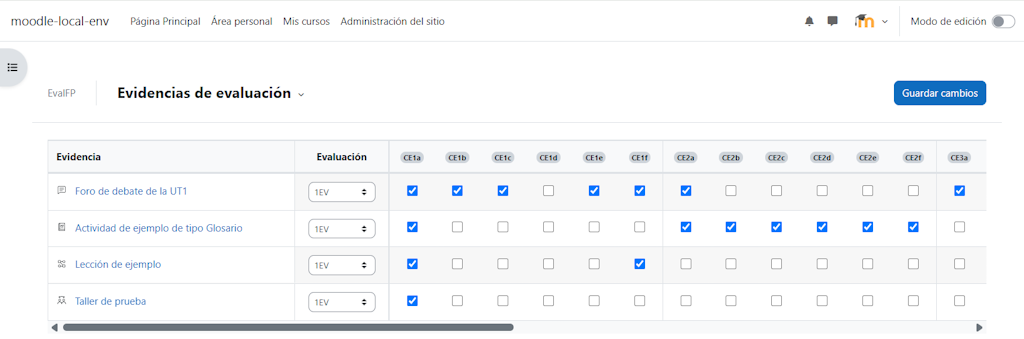
- Evidence: a Moodle gradebook item linked to one or more assessment criteria.
Purpose
Moodle already provides a powerful gradebook. Teachers can grade assignments, quizzes, manual items, categories and calculated items with a lot of flexibility.
EvalFP does not replace that gradebook. It gives Moodle grades the additional curriculum meaning normally required in Formación Profesional based on:
- which learning outcomes are defined in the course.
- which assessment criteria belong to each learning outcome.
- which Moodle gradebook items are used as assessment evidence.
- which evaluation period each evidence item belongs to.
- how assessment criteria contribute to each learning outcome.
- how learning outcomes contribute to the evaluation grade.
The guiding idea is simple:
Moodle gradebook -> activities, grade items and grades.

EvalFP -> FP curriculum structure, evidence links, weights, periods and reports.
This helps teachers avoid parallel spreadsheets and/or external tools while keeping the assessment process transparent within Moodle.
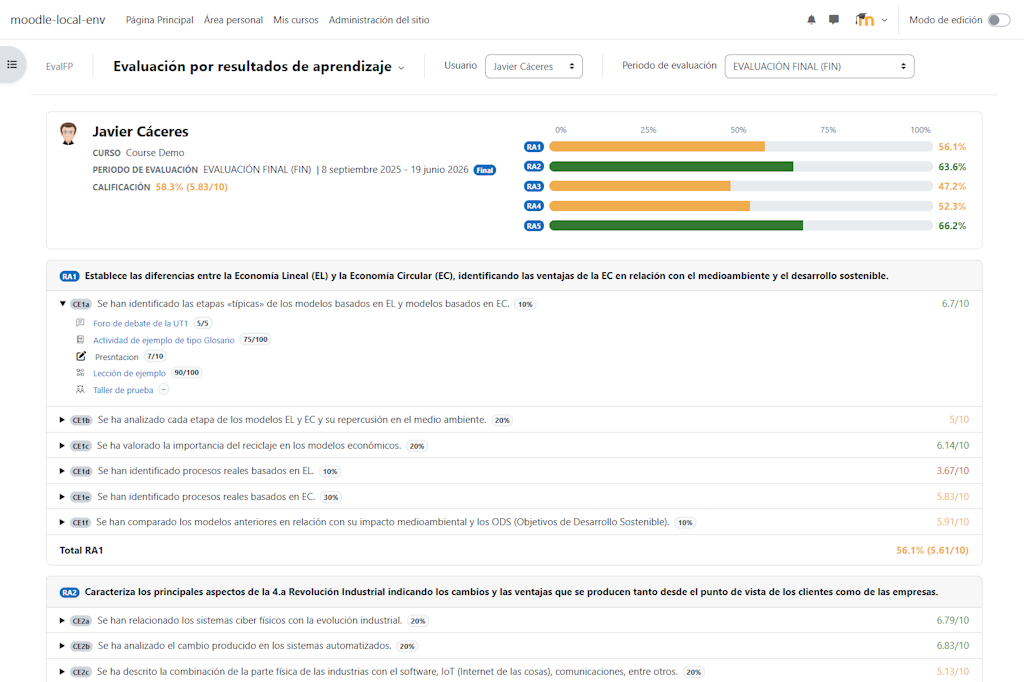
![Detailed student assessment report by learning outcome and assessment criterion]()
Main features
- Define learning outcomes and assessment criteria per course.
- Import RA/CE structures from an ODS template.
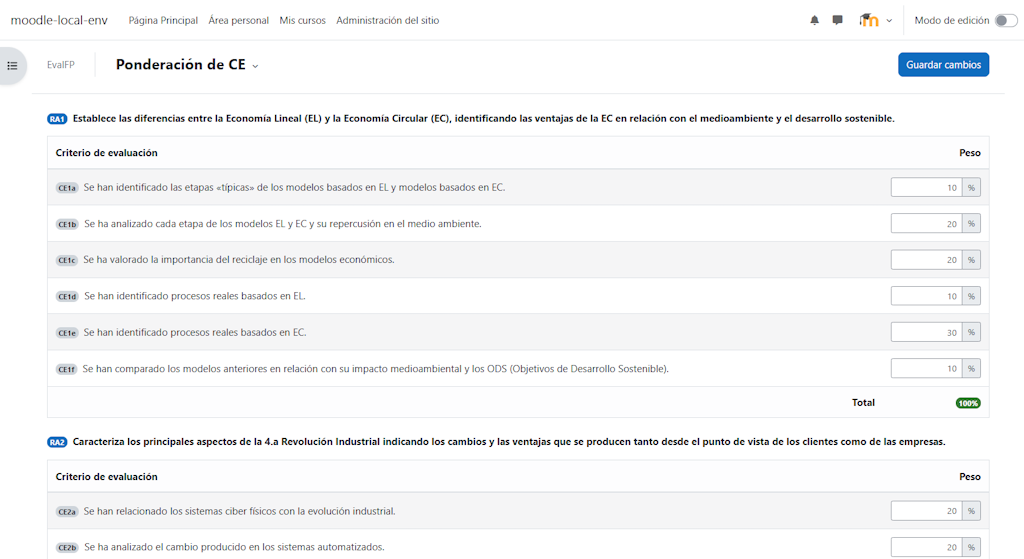
- Configure learning outcome weights.
- Configure assessment criterion weights within every learning outcome.
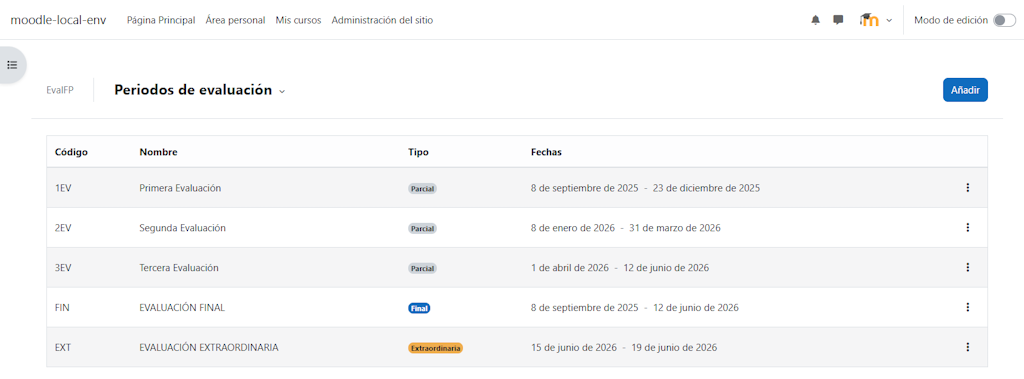
- Define partial, final and extraordinary evaluation periods.
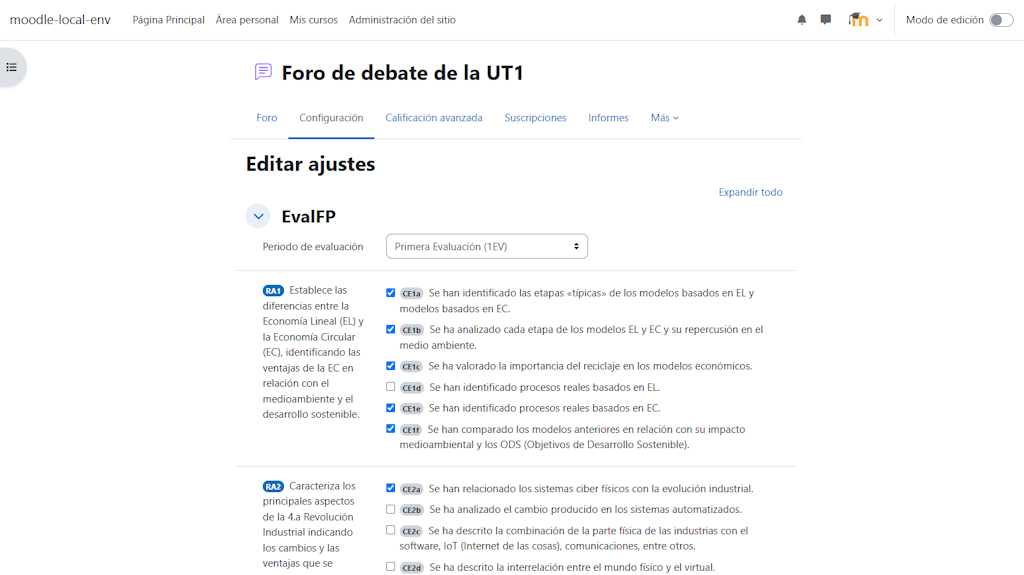
- Link Moodle gradebook items to evaluation periods and assessment criteria.
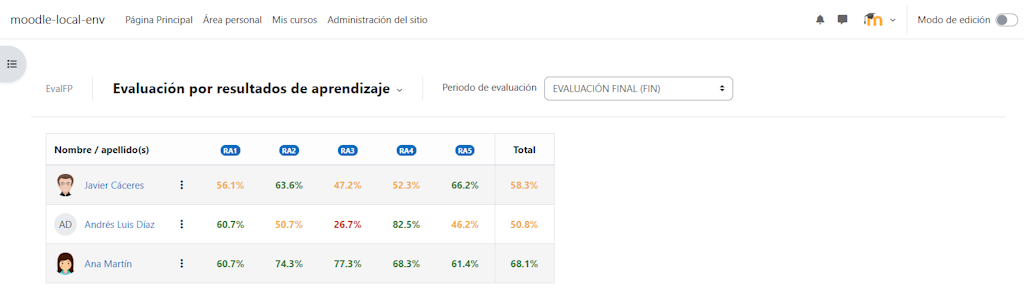
- Review an assessment summary by learning outcome.
- Open individual user reports with the structure LO > AC > evidence.
- Review evidence grouped by learning outcome, assessment criterion or evaluation period.
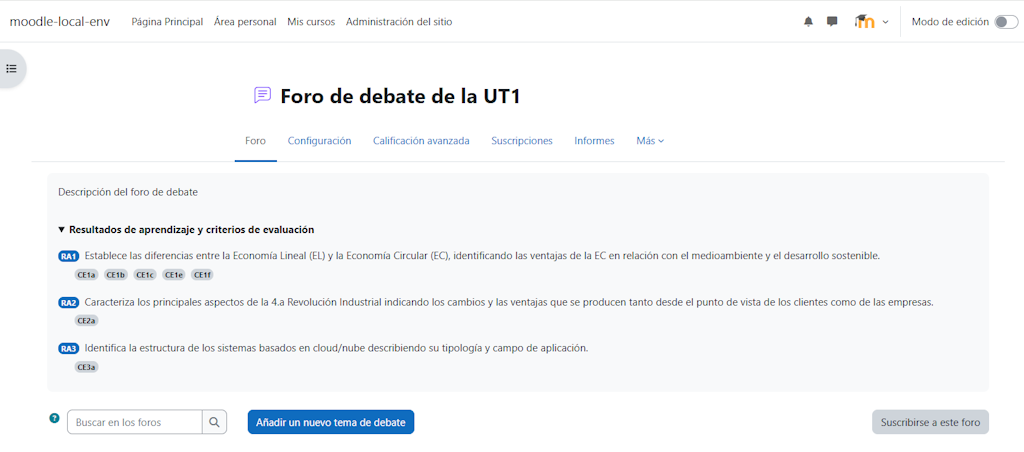
- Optionally display linked RA/CE information inside Moodle activity pages.
Plugin information
| Item | Value |
| ----------------- | ------------------------------------------------------------- |
| Plugin type | Local plugin |
| Moodle component | local_evalfp |
| Installation path | local/evalfp |
| Compatibility | Moodle 4.5 LTS or later |
| Main scope | Formación Profesional, Spanish VET, Spain |
| Assessment focus | Learning outcomes, assessment criteria and evaluation periods |
| License | GNU GPL v3 or later |
Languages
EvalFP is primarily designed for use in Spanish, as its natural context is Formación Profesional in Spain.
The plugin includes an English translation to make the project easier to understand, review and reuse by the wider Moodle community.
Additional languages can be added following Moodle's standard language file system by creating the corresponding language folder and strings inside the plugin's lang directory.
What EvalFP does not do
EvalFP does not create a parallel grading system and does not modify how Moodle activities are graded.
It reads Moodle gradebook data and interprets it through the configured FP curriculum structure. Moodle remains the source of grades, grade items, activity grading settings and gradebook scales.
EvalFP is also not a substitute for the official teaching plan of a department. The plugin supports curriculum-based assessment workflows, but each school, department and teaching team remains responsible for applying the regulations and criteria approved in their official documentation.
Requirements
- Moodle 4.5 LTS or later.
- A course with Moodle gradebook items or gradable activities.
- Users with course editing permissions to configure EvalFP.
Installation
Copy the plugin folder to:
local/evalfp
Then complete the installation using one of the standard Moodle methods.
From the command line:
php admin/cli/upgrade.php
Or from the Moodle web interface:
Site administration > Notifications
If needed, purge Moodle caches:
php admin/cli/purge_caches.php
Permissions
EvalFP defines the following course capability:
local/evalfp:useincourse
By default, it is allowed for:
- editing teachers;
- managers.
Users without this capability cannot manage EvalFP in a course.
Some assessment pages also require Moodle gradebook permissions, especially:
moodle/grade:viewall
Recommended workflow
- Define or import learning outcomes and assessment criteria.
- Configure learning outcome weights.
- Configure assessment criterion weights within each learning outcome.
- Create the evaluation periods used in the course.
- Link Moodle gradebook items as assessment evidence.
- Review the course assessment summary.
- Review individual user reports and evidence reports.
![Overview of student achievement by learning outcome]()
Course navigation
EvalFP is accessed from the course navigation, under the course More menu.
The plugin is organised into four main areas:
- Assessment: assessment summary and individual user reports.
- Curriculum configuration: learning outcomes, assessment criteria, weights, evaluation periods and evidence links.
- Reports: read-only evidence reports grouped by learning outcome, assessment criterion or evaluation period.
- Settings: course-level options, currently focused on activity display settings.
Basic use
A typical EvalFP course setup starts by defining or importing the learning outcomes and assessment criteria for the module.
Teachers then configure the weight of each learning outcome and the weight of each assessment criterion inside its corresponding learning outcome.
After that, evaluation periods are created and Moodle gradebook items are linked as assessment evidence. Each evidence item can be assigned to an evaluation period and linked to one or more assessment criteria.
Once the configuration is complete, teachers can review course-level summaries, individual user reports and evidence reports.
Activity information
EvalFP can optionally display linked curriculum information inside supported Moodle activity pages.
When enabled, the activity page displays the linked learning outcomes and assessment criteria as read-only curriculum context.
![EvalFP learning outcomes and assessment criteria shown on a Moodle activity page]()
This does not change grading, does not modify the Moodle gradebook and does not allow editing evidence links from the activity view.
Calculation model
EvalFP uses Moodle gradebook grades as the source data.
The calculation follows these general rules:
- Moodle grade values are normalised internally to a 0-100 scale.
- Displayed evidence grades keep their original Moodle scale, for example
80/100 or 6/10.
- An evidence item linked to an assessment criterion but without a user grade counts as
0.
- An assessment criterion with no linked evidence in the selected evaluation period is displayed but does not penalise the learning outcome result.
- Learning outcome results are calculated from the weighted assessment criteria with available evidence.
- Evaluation grades are calculated from the weighted learning outcomes with available results.
This means that unassessed criteria do not unfairly penalise the result, while assigned evidence without a grade does count as 0 because it represents assessment evidence that exists for that period.
Visual thresholds
EvalFP uses the same achievement thresholds across the plugin:
- success: 60% or higher;
- warning: 40% or higher;
- danger: below 40%;
- no data: dash.
These colours are only visual indicators. They do not change Moodle grades.
Data and privacy
EvalFP stores course-level curriculum configuration and links between Moodle gradebook items and the FP curriculum structure.
This includes learning outcomes, assessment criteria, their weights, evaluation periods, evidence links and course-level display settings.
The plugin does not store independent user grades. It reads grade information from Moodle's gradebook.
Individual reports are generated from Moodle users and Moodle gradebook data already present in the course.
Current scope and future work
This initial public release focuses on the core EvalFP workflow: defining the FP curriculum structure, linking Moodle gradebook items as evidence, configuring weights, creating evaluation periods and generating assessment reports.
Some advanced features have not been included in this first version in order to keep the plugin focused, stable and easier to validate in real teaching contexts.
Planned or potential future improvements include:
- backup and restore support for EvalFP course configuration;
- automatic review of evidence links after duplicating or importing activities;
- improved filtering and navigation in large evidence matrices;
- additional export options for reports;
- extended documentation with practical examples;
- further usability improvements based on teacher feedback.
Backup and restore support is not included yet. After duplicating or importing Moodle activities, teachers should review the evaluation evidence matrix to confirm that evidence links are correctly configured.
This roadmap keeps EvalFP open to improvement while preserving the main goal of the first release: providing a clear and useful curriculum-based assessment layer integrated into Moodle.
License
This plugin is licensed under the GNU General Public License v3 or later.
See: http://www.gnu.org/copyleft/gpl.html
Author
Created and maintained by Javier Caceres Gonzalez (javiercaceresgonzalez@gmail.com).
EvalFP stems from a personal experience in teaching vocational courses for the Spanish Formación Profesional system, as a response to a real need identified through the daily use of Moodle: a clear, integrated and coherent way to connect course grades with learning outcomes, assessment criteria and evaluation periods.
For years, this need has led many teachers to complement Moodle with spreadsheets or external tools in order to organise, interpret and justify assessment according to the curriculum model used in vocational education. EvalFP aims to reduce that dependency, avoid duplicated work and make better use of the information already available in Moodle's gradebook.
The project also has an important personal dimension. After many years working with Moodle, I felt the need and curiosity to understand its internal architecture more deeply, as well as the proper way to develop integrated solutions within the platform.
EvalFP is a personal project developed over a long time in short and discontinuous periods, due to professional and teaching responsibilities. It has been a constant learning process, involving documentation review, Moodle development standards, best practices and examples shared by the Moodle community.
Throughout the development process of EvalFP, each decision has been questioned and reviewed with the aim of building a useful, maintainable tool that respects Moodle's philosophy. EvalFP does not try to replace the gradebook, but to complement it with a curriculum layer adapted to the reality of assessment in Spanish Formación Profesional.
This plugin is shared as an open contribution to both the educational community and the Moodle community, with the hope that it may be useful to other teachers, schools and departments facing similar needs.