
Gapfill
Maintained by
Marcus Green
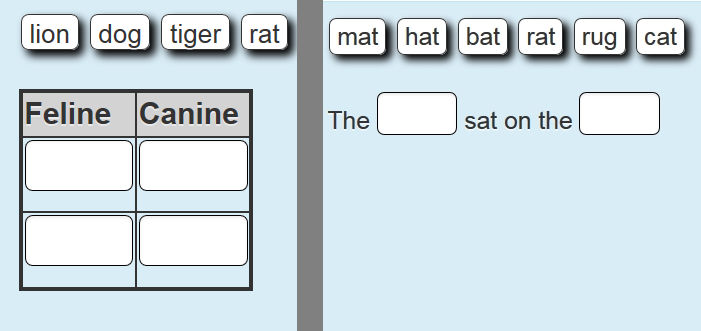
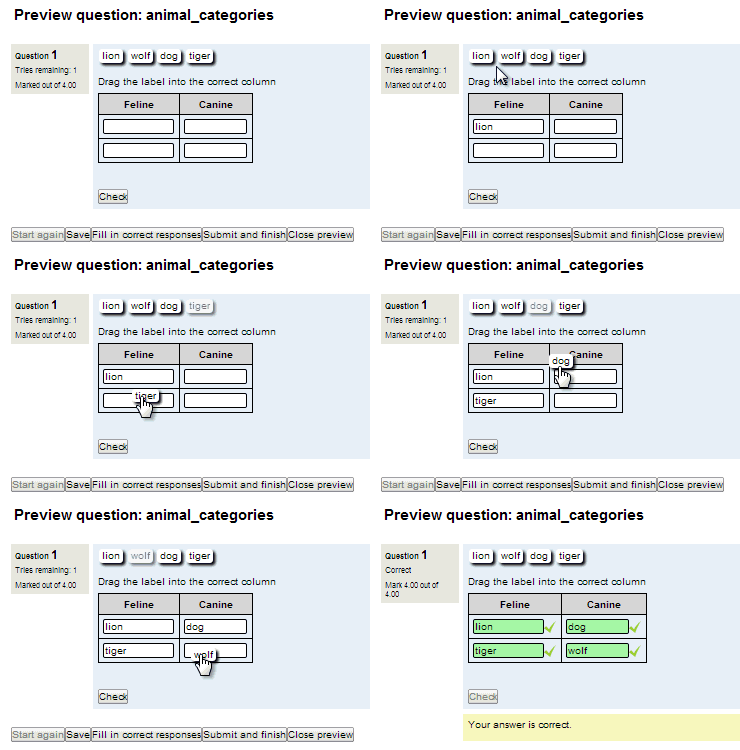
Cloze (fill in the blanks) question type with VERY simple question creation syntax. Can do drag drop, dropdowns or gapfill questions
Comments
Comments are no longer open for new posts. Existing comments remain available to read.
Place this text and try to do.
"Εδώ ο [εκπαιδευτής] κάνει μια ερώτηση και καθορίζει μια επιλογή από πολλαπλές απαντήσεις. Αυτό μπορεί να είναι χρήσιμο σαν μια γρήγορη δημοσκόπηση για να [διεγείρετε] τη σκέψη πάνω σε ένα θέμα, για να επιτρέψετε στους μαθητές της τάξης να ψηφίσουν για το πως θα συνεχιστεί το μάθημα ή για να συλλέξετε ερευνητικά δεδομένα."
From the words below drag and drop the 5 C reserved words into the table below listed 1 to 5.
[struct] [sqr] [finally] [goto] [instanceof] [sizeof] [Int] [continue][break] [Auto]
Target table to drag to:
------------------------------------
¦ 1 ¦ ¦
------------------------------------
¦ 2 ¦ ¦
------------------------------------
¦ 3 ¦ ¦
------------------------------------
¦ 4 ¦ ¦
------------------------------------
¦ 5 ¦ ¦
------------------------------------
Notes: the square brackets here indicate that they are draggable (not to be confused with the plugin markup system of double square brackets) such that [struct] can be dragged to any of the infinite group markers. So [struct] can be place to the right of ¦ 1 ¦ , ¦ 2 ¦, ¦ 3 ¦ , ¦ 4 ¦ or ¦ 5 ¦
What we need is to be able to specify a draggable item as n, n+1, . . . rather than just n. Simpler method may be to assume no shuffle on the questions and on post of the form sort the hidden target fields that match the order of the draggable words. So for example the correct answers struct, goto, sizeof, break can be dragged to any position to the right of 1, 2, 3, 4, 5 in any order and then needs to be sorted on post. An example answer would be
------------------------------------
¦ 1 ¦ break ¦
------------------------------------
¦ 2 ¦ struct ¦
------------------------------------
¦ 3 ¦ continue ¦
------------------------------------
¦ 4 ¦ sizeof ¦
------------------------------------
¦ 5 ¦ goto ¦
------------------------------------
To mark these as correct would mean sorting the answers to become
------------------------------------
¦ 1 ¦ struct ¦
------------------------------------
¦ 2 ¦ goto ¦
------------------------------------
¦ 3 ¦ sizeof ¦
------------------------------------
¦ 4 ¦ continue ¦
------------------------------------
¦ 5 ¦ break ¦
------------------------------------
Thanks
You need to fix an error in install.xml, string 24: It will be correct as REFFIELDS="id"