Enrol by user profile fields
Maintained by
Nicolas Dunand
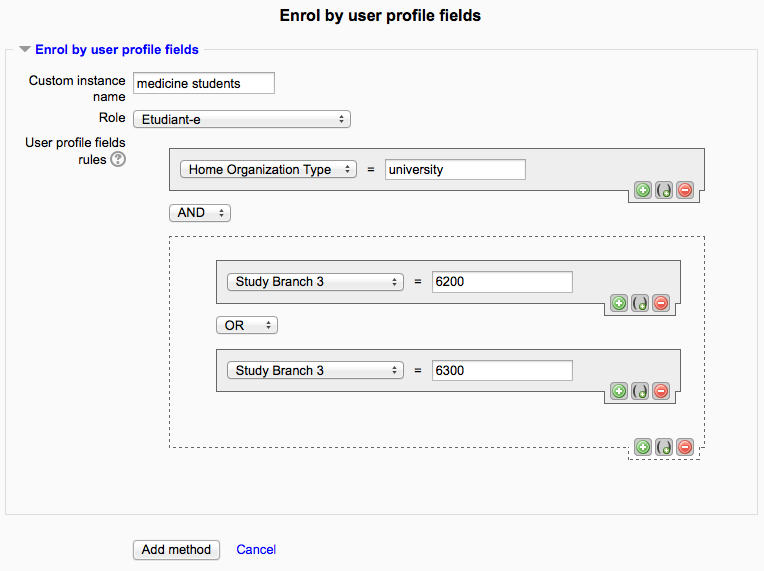
This plugin allows users to be enrolled according to any value stored in their user profile.
Comments
Product ratings and reviews are coming to Moodle Marketplace. Until then, existing comments remain available to read, but new posts have been disabled.
I installed the plugin in Moodle 4.1 and where I add this enrolment method to a course I enter the in page where you can change the rules based on profile fields. It proposes the URL field and is not possible to modify it with other field. Perhaps I'm missing some steps. May you can help me ?
Thanks
If you could add the option to unenrol students if they no longer fit the criteria based on a profile field value that would be hugely appreciated!
We have the plug-in running on Moodle 4.1.9+ and it's set to unenrol students if the user profile field that was used to enrol them no longer matches the enrolment conditions - but, even after a couple of hours, test students remain enrolled. Manually purging enrolments clears them, as does manually forcing enrolments but I don't want to have to do that every time somebody's details change. Is there a setting somewhere that I'm missing?
Thank you,
Tim
This is the output of the task failure:
Execute scheduled task: Process all rules and enrolments for Enrol by user profile fields (enrol_attributes\task\processenrolments_task)
... started 16:46:45. Current memory use 6.4 MB.
Debugging increased temporarily due to faildelay of 86400
--------------------------
Fail delay: 1 day - Process all rules and enrolments for Enrol by user profile fields (enrol_attributes\task\processenrolments_task)
I have used it to enrol users based on a numerical value from a drop down field in the user's profile (i.e. if value = 2).
This worked (but not automatically, I had to click "Force enrolments now), however when the value of that field changes (e.g. new value = 0) the user is not unenrolled from the course even though I chose the option to "Unenroll user" in the "Behaviour after attributes expiration" field.
Three questions:
1) Does this plugin not recognise changes to drop down fields? If it does, how can I use this plugin to automatically unenroll users who no longer match that profile field value?
2) Can the plugin automatically add users who match the profile field conditions or do I have to click "Force enrolments now" every time new users are added to moodle / user fields are updated?
3) If using values from a checkbox, what do I enter in "User profile fields rules"? I've tried "yes" and "true" and neither work.
Thanks!
I use FilterCodes https://moodle.org/plugins/filter_filtercodes it is very versatile.
It allows you to auto populate using plain text tags. I've just done a load more testing and I don't think this plug in does pick up the filter codes values. Or I could be doing it wrong. It would be amazing if this plugin could pick up plain text tags.
Am using Moodle 4.0
Many thanks
Marie
_______________
I have tested the following
I want to be able to enrol my users to a course using your plugin if they meet the criteria 'is member' and 'has paid' The 'is member' criteria changes and is dynamic, the 'has paid' state is static and a one off. Both are decided in a different course.
So I have created two custom user profile fields
The first field 'is member' uses the filter code
{ifhasarolename roleshortname}{/ifhasarolename}: Displays enclosed content if the user has been assigned the specified role anywhere in the Moodle site within any context.
which i change to
{ifhasarolename member}Member{/ifhasarolename}
So if this condition is met, the text in the custom profile field displays Member
The second custom profile field is 'has paid'. I manually fill this in with 'yes'.
When I set up your plug in I use the user profile rules
'is member' = Member
AND
'has paid' = yes
With testing in various combinations and using different types of custom profile fields, I can not get this plug in to recognise the the filer code returned value 'Member'
Sorry for keeping your questions unanswered.
Brian,
Now multi-valued arguments are supported in the latest version, make sure to check it out.
Marie,
I'm not sure which Filter Codes plugin you're referring, to. Could you elaborate?