Enrol by user profile fields
Maintained by
Nicolas Dunand
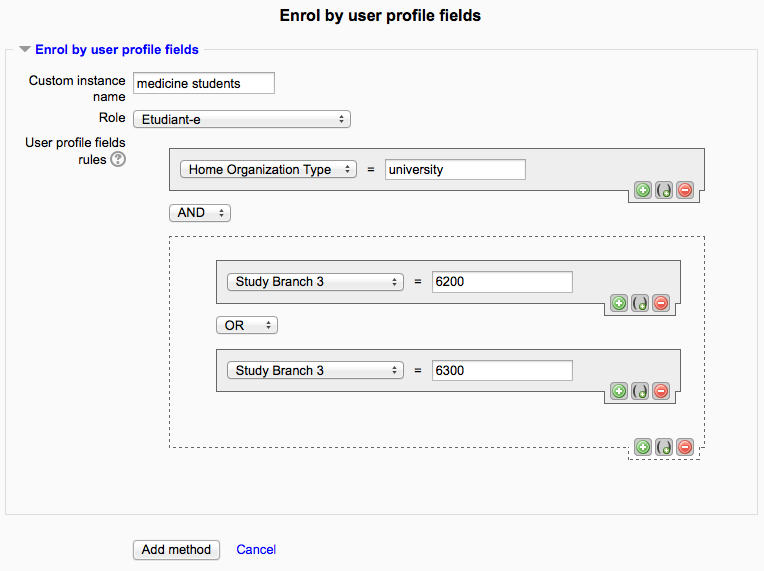
This plugin allows users to be enrolled according to any value stored in their user profile.
Comments
Product ratings and reviews are coming to Moodle Marketplace. Until then, existing comments remain available to read, but new posts have been disabled.
Thanks for your feedback. Yes this would be possible, but please note that this could have a performance impact, as then all rules would have to be evaluated each time a user updates such a field.
I had to add a feature to optionally disable the processing of all rules at login (see https://github.com/ndunand/moodle-enrol_attributes/commit/f395ff5eebbd), as this had a serious performance impact on our installation. This is due to the fact that we have almost 100k users and some complex enrolment rules – this results in a 100k^n join SQL query (where n is the number of rule components).
Therefore we now rely on the scheduled task, which does process all enrolments every full hour, but you could also change the delay in the Moodle administration setup to make it run more often.
),
array(
'eventname' => '\core\event\user_info_field_updated',
'callback' => 'enrol_attributes_plugin::process_enrolments',
'includefile' => '/enrol/attributes/lib.php',
'internal' => true,
'priority' => 9999,
),
);
but I suspect that is the wrong approach ! Can you offer any suggestions please ?
You probably have to set at least one custom user profile field (see https://docs.moodle.org/37/en/User_profile_fields), then a new setting would appear in the plugin setting.
Thanks for your feedback.
1. I could not reproduce the problem you mention in your first post.
2. Using SQL, you could use `SELECT * FROM mdl_enrol WHERE enrol = 'attributes' AND courseid = ` to get the values, and then use `INSERT` to insert similar rows for other courses – but there is no easy way to do this. The rule itself is a JSON string contained in the `customtext1` field.
I removed the slashes and everything works as hoped. Love this plugin and than you Nicolas
You are right about mismatching versions strings, sorry about that. The fact is that the 2018092300 build was previously rated for up to Moodle 3.5 has been checked against Moodle 3.6 and 3.7 and is now tagged as compatible with these versions. This has no impact as to whether the plugin will activate or not on your Moodle version (as long as your Moodle version is higher that version 2.7).
To activate the plugin, go to your Moodle's administration, then to Plugins > Enrolments > Enrol by user profile fields, and there make sure to set the plugin according to your needs.
There are some mandatory settings in the Moodle administration, under Plugins > Enrolments > Enrol by user profile fields. In particular, even if you leave all other fields to their default values, you have to set the "Profile fields to be used in the selector" field for the plugin to work.
I have installed this module in Moodle 3.6 and enabled it, but can't find any place where I can configure the enrollment instances. Even inside my courses I can't add this enrollment method. What should I check to have it working?
Is there a plan to expand on the validation of the user? Because it's is just a little bit simplistic with just an equals.
For example, my users have the option to register their company name on their profile, and I would like to grant them access to certain courses if they have.
So in the user profile fields rules I would like to have 'orgno' not null and 'orgno' > 0. Today all I can do is check for 'orgno' = XXXX.
But in my case all users have different values in that field.