
Waitlist enrolment icon

Waitlist enrolment

Maintained by Flotter Totte, emeneo Plugins
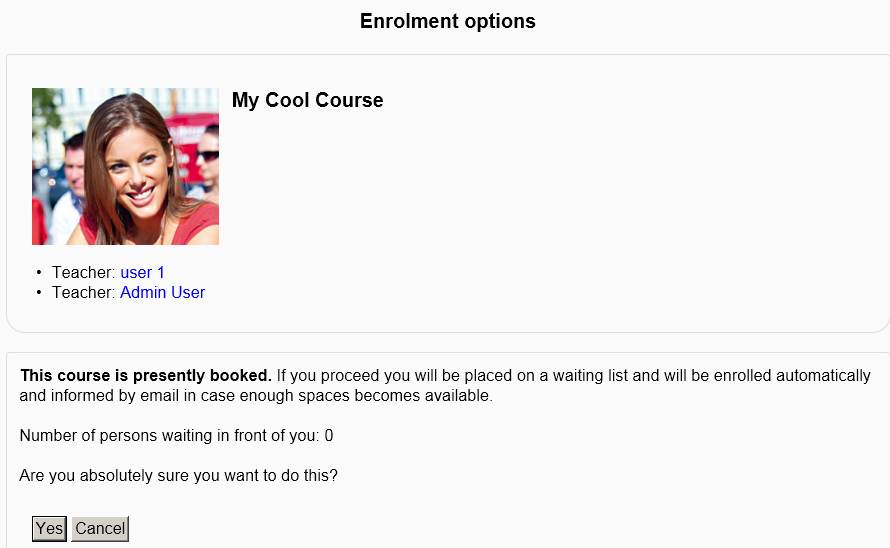
If students enrol via the enrolment plugin "Waitlist & Custom course fields" they are put into a waitlist in case the maximum amount of course participants is reached. They later get enrolled automatically as soon as free seats are available. The plugin also can be used to add custom course fields. Related moodle forum: https://moodle.org/mod/forum/discuss.php?d=220078
Price option: Free

Supports Moodle 2.0-4.5 See all versions
Latest release: 2 weeks ago
Installations: 577
Downloads (last 90 days): 85

Frankenstyle name: enrol_waitlist
Enrolment

Comments

Comments are no longer open for new posts. Existing comments remain available to read.

FYI everyone, this is published at https://github.com/emeneo/moodle-enrol_waitlist
If you are able to make a fix for yourself, you can contribute back the fix to the maintainer and the community there ^^
Hello everyone! I have tried using the waitlist plugin for a while now. Just recently, I have encountered an error whenever I click the "see waitlisted users" button. it says "Coding error detected, it must be fixed by a programmer: get_extra_user_fields() has been removed. Please use the \core_user\fields API instead."
I have no IT expertise so this instruction is very challenging to me. How do I fix this?
i got this message
Coding error detected, it must be fixed by a programmer: get_extra_user_fields() has been removed. Please use the \core_user\fields API instead.
when try to view waitlist users as an admin
i am using moodle 4.3 , php8.1
Hi! Is there a way to extract/see a list of people that are on a waitlist in a specific course but with date/time signature they were added to the waitlist? What i want to know is who signed to waitlist from 1st to last.
Hi! I was wondering when a stable version of the this plugging for moodle 4.0 will come out?
Hey Georgia, Please send a screenshot of your problem, especially where you click. You can send it on github (I saw you posted the problem there, too). Thanks!
Hi Georgia, this plugin is more of a waitlist for courses, not an activity waitlist. Take a look at the FaceToFace plugin. It also includes a waitlist feature but at an activity level.
I installed the plugin in my site, 3 instances of it. However, once i click one of the "click to enter text" all 3 are selected. I noticed that there is the same id for the form. How to change that to be able to use 3 instances in the same course?
using Course Enrol Waitlist Plugin Version 3.9-1 2021030800; description says this is used with manual enrollment and I am only seeing availability for self-enrollment. Also, indicates that an email will be sent to learner - only email and not notification within Moodle?
@Azmat Ullah, I just tried on moodle 3.9 and found no issues with that. Please open a ticket at www.emeneo.com/support or post the problem on github. Please Describe your steps and include a screenshot.
HI, There is an issue when we search enrolled users then exception was showing that the specific class is not found! I tested in Moodle version 3.9
Thanks for your reply.
It works fine when changing the course size to a specific value (e.g. 10 -> 12), but as mentioned above when changing it to infinite (e.g. 10 -> 0), users on the wait list remain stuck.
If you could point me the way on where to check in the code (having issues finding the cron job you mentioned), we would try to come up with a solution to this issue.
Hey Sebastian, Regarding 1: Users should be pushed inside as soon as the next cron job runs
Greetings Flotter Totte,
I just wanted to report on two bugs I’ve stumbled upon (Waitlist version: 3.5-h; Moodle version 3.5.8):
1. Changing the available seats in a course to a specific value (e.g. 32) and back to infinite (=0) won’t enroll users who were previously on the waitlist. They remain stuck on the waitlist.
2. When using 2 or more waitlists for a single course as enrollment methods, users can only enter the password of the top waitlist.
Kind regards
Sebastian
Hi Timo,
We are currently working on implementing GDPR compliance but it still will be for moodle 3.5
If you need the plugin for another moodle version urgently or if you need a new feature etc., please send a development request at https://www.emeneo.com/support including your budget.
You also can help with testing the plugin in higher moodle versions and sending us bugs you found.
Greetings,
Flotter