
Overview Statistics
Maintained by
DualCube Team
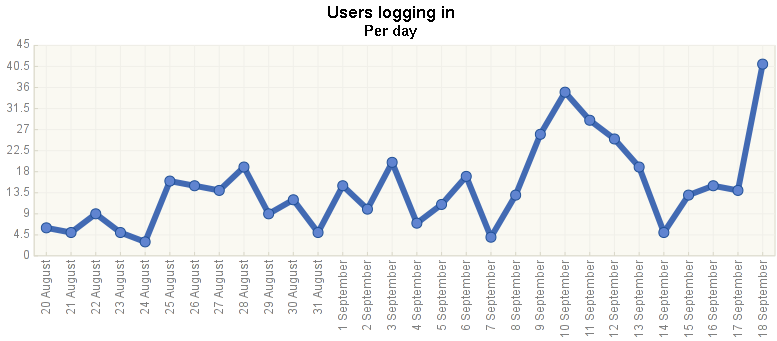
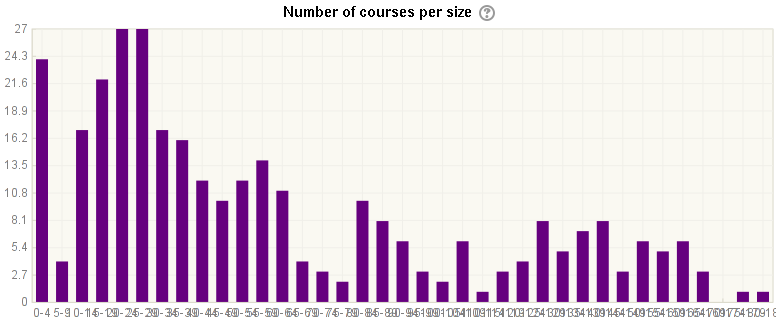
The Overview Statistics plugin for Moodle is a powerful tool that provides administrators with a variety of site and course report charts. It’s designed to make adding more reports easy, and it’s coded with the latest techniques.
Comments
Comments are no longer open for new posts. Existing comments remain available to read.
Getting HTTP ERROR 500 since upgrade to Moodle 3.10.
Just updated to Moodle 3.10.1+ but it did not solve the problem.
Uninstalled plugin and installed it again, but no luck.
Any suggestions?
Thank you Петър fo raising this. I just tried myself and I had no problems with installing the report into a 3.9 site. Maybe you could provide more detailed description of the problem you experienced - please feel encouraged to use the plugin's bug tracker to do so.
I haven't tested myself. Generally it should just work and the Stats tab shows there are few hundreds 3.9 sites having this installed. I believe it works same well in 3.9.
It is part of your web server configuration - https://www.php.net/manual/en/info.configuration.php#ini.max-execution-time
I am thinking thought why is it taking so long, it shouldn't really. Have you performed some other modifications?
Fatal error: Maximum execution time of 30 seconds exceeded in /var/www/html/report/overviewstats/classes/chart_logins.php on line 99
That line is
foreach (array_reverse($lastmonth, true) as $timestamp => $loggedin) {
Where is that 30 seconds hard coded?
Hello Mahmood. I am happy you found the plugin useful. At the moment, the time period of 30 days is hard-coded in a few places in the code. You may try to experiment with extending that period by changing the value in the
prepare_data()method of the chart subclasses.Empty page is a typical symptom of a fatal PHP error (such as all the memory exhausted) while displaying the error messages is disabled. Check your PHP and Moodle settings on displaying the error messages.
I don't know what happened that today when I open the overview statistic page, I just see a blank page. the path truly goes to /report/overviewstats/index.php
Any guess for debugging? I don't see any entry in /var/log/apache2/error.log
Is it expected to have to wait too long for the graphics to be generated?
Ricardo