
Overview Statistics
Maintained by
DualCube Team
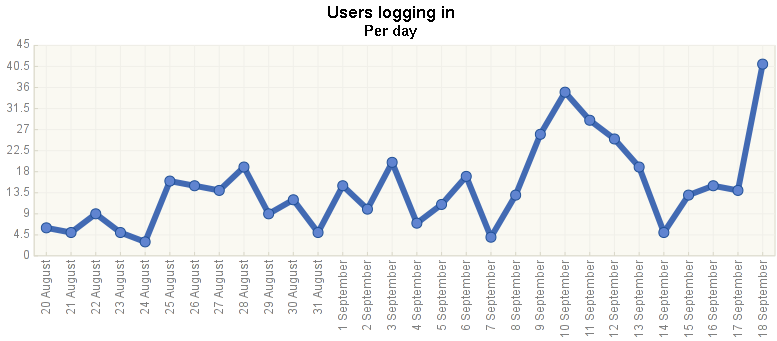
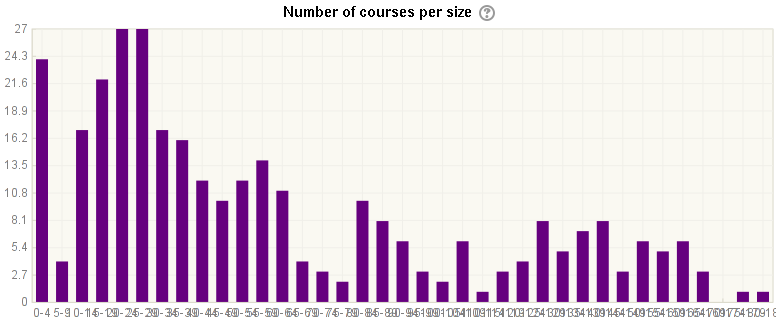
The Overview Statistics plugin for Moodle is a powerful tool that provides administrators with a variety of site and course report charts. It’s designed to make adding more reports easy, and it’s coded with the latest techniques.
Comments
Comments are no longer open for new posts. Existing comments remain available to read.
Right now the current version does not have this feature. But it can be achieved via custom coding. You can email your requirement to suman.d@dualcube.com
Thank you.
I am using this plugin to check some stats on my Moodle website, however the graph only shows the last monthly activity, is it possible that we can select a duration of date of which we want the stats?
Regards,
Thank you.
By default, it won't allow you this option. However, with customization, you will be able to do that.
For service request, you can send an email to suman.d@dualcube.com
Thank you.
Yes, we have a plan to upgrade all of our plugins for the latest Moodle release.
Thank you.
Are there any plans to release a version for Moodle 3.5?
Ricardo
Currently, this plugin works with Moodle v 3.4 (up to). We are not sure if it will work with Moodle 3.5. We have not tested it with Moodle 3.5 yet.
Thank you.
Yes, you can use the plugin to view this type of report. You have to write particular query according to your requirement.
Help link for Ad-hoc query writing : https://docs.moodle.org/32/en/ad-hoc_contributed_reports
Thanks and Regards,
Arindam
Yes, I can find log in Administration > Reports > Logs, but we would like to search the information by week or by month. And now we face the question as same as the link https://moodle.org/mod/forum/discuss.php?d=350237#p1413799 .
So at the same time, we try to find out the related information with you .
Thanks a lot.
Best Regards, Anderson Hsu
You should be able to see all successful login in your site logs. Go to Administration > Reports > Logs and you can the filter by the user you are looking for, choose "download in excel format" or "download in ods format". You can then open them up in your spreadsheet application and filter them by action to only display Logged in user.
Thanks and Regards,
Arindam
I adjust log sequence : standard log first , and then it can work.
refer to the link : https://drive.google.com/file/d/0BxriXuT0xeaFc3F0NTE1NUtRWDg/view?usp=sharing / https://drive.google.com/file/d/0BxriXuT0xeaFMEstaTh2aXNId0U/view?usp=sharing
Can we find out how many people login moodle quickly ? How can we do it ? Thanks a lot.
Best Regards, Anderson Hsu