
Cloze Editor
Maintained by
Germán Valero, Andreas Glombitza
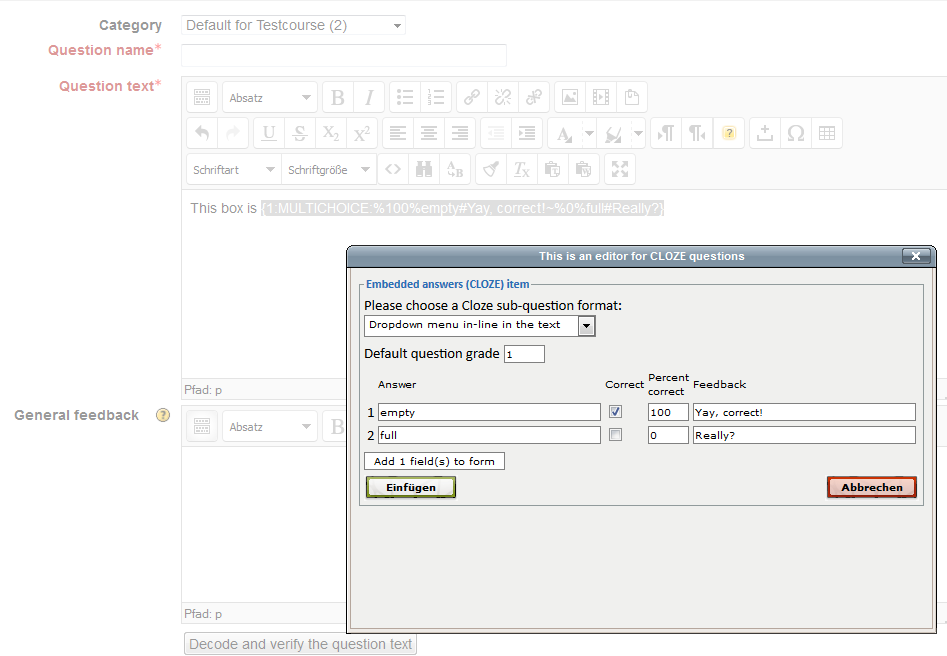
An interface that integrates with Moodle 3.x, 4.0 and 4.1 TinyMCE (legacy) editor to support teachers in creating CLOZE (Embedded answers) questions in the GIFT syntax. It will also read and edit existing CLOZE items.
THIS PLUGIN WILL NOT WORK IN MOODLE 4.2 ONWARDS. For Moodle 4.1, 4.2 and newer branches please see https://moodle.org/plugins/tiny_cloze
Comments
Comments are no longer open for new posts. Existing comments remain available to read.
https://moodle.org/plugins/browse.php?list=category&id=82
and not the legacy one? thank you
For all the other standard question types or ather additional question types, you use the other icons available inside the TinyMCE editor.
Please see the documentation at https://docs.moodle.org/39/en/Embedded_Answers_(Cloze)_question_type
Remember to choose TinyMCE as your upmost (preferred) text editor.
Remember to choose TinyMCE as your upmost (preferred) text editor.
Remember to choose TinyMCe as your upmost (preferred) text editor.
Thanks!
Remember to choose TinyMCe as your upmost (preferred) text ed
The new version also reduced the number of issues reported by the plugins database code prechecks system (190-235 versus versus 195-334). The original code (before I started working on it) had 493-360 issues reported by the code prechecks system.
The new version should work exactly the same as the previous version. Please report any issue found.
The new version will be offered as a recommended update when you check your installed plugins, but the old version is maintained in case anyone develops a problem.
Remember to choose TinyMCe as your upmost (preferred) text editor.
The new version also reduced the number of issues reported by the plugins database code prechecks system (194-292 versus 195-334). The original code (before I started working on it) had 493-360 issues reported by the code prechecks system.
The new version should work exactly the same as the previous version. Please report any issue found.
The new version will be offered as a recommended update when you check your installed plugins, but the old version is maintained in case anyone develops a problem.