
Cloze Editor
Maintained by
Germán Valero, Andreas Glombitza
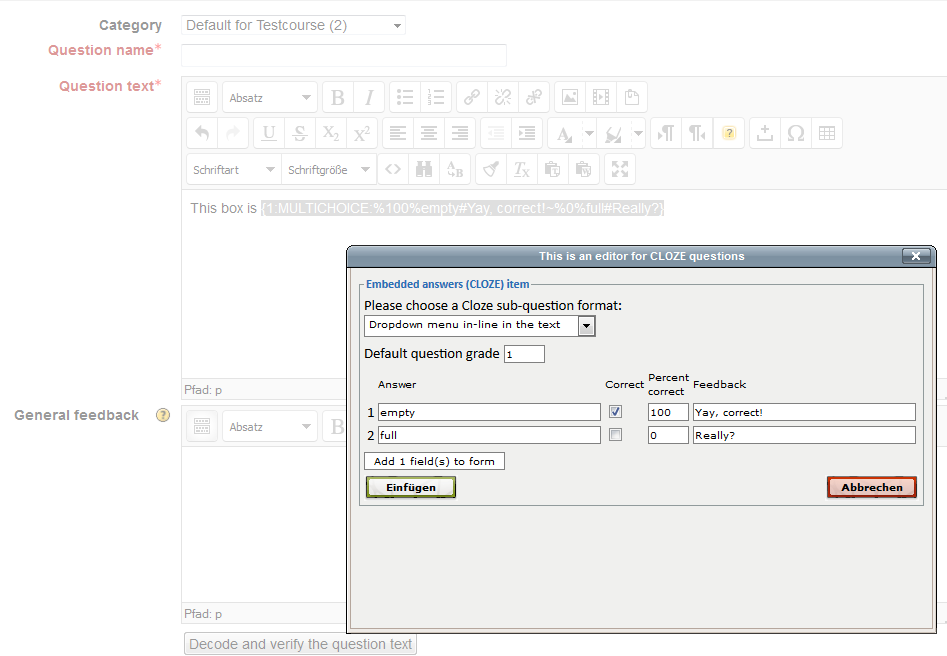
An interface that integrates with Moodle 3.x, 4.0 and 4.1 TinyMCE (legacy) editor to support teachers in creating CLOZE (Embedded answers) questions in the GIFT syntax. It will also read and edit existing CLOZE items.
THIS PLUGIN WILL NOT WORK IN MOODLE 4.2 ONWARDS. For Moodle 4.1, 4.2 and newer branches please see https://moodle.org/plugins/tiny_cloze
Comments
Comments are no longer open for new posts. Existing comments remain available to read.
It will be available for installing in Moodle 3.6 when it is released in 3rd december 2018
Remember to choose TinyMCe as your upmost (preferred) text editor.
It is standard for all Moodle quizzes that use RANDOMLY selected questions to set a 1 point score for all random questions in the quiz.
This is the default situation for ALL question types, not only CLOZE.
I am afraid this can not be changed; if you use randomly selected questions, each question scores one point .
Problems with cloze quiz scores.
When randomly taking quizzes in the quiz bank, the cloze quiz will bring two or more multiple question unconditionally to 1 point.
But when I choose the question in the quiz bank, get the original score.
Is there a way to get the score when it's original even when it's random?
I'm sorry my English.
If 1cloze question have 2Q and 1point (1PointX2Q), Total score is 2Points
Now => random import => 1Point (0.5x2)
want to change => 2Point (1Pointx2Q)
Added support for Privacy API.
It has a wider window in order to fix the problem described by Patrick Viney
Remember to choose TinyMCe as your upmost (preferred) text editor
lib/editor/tinymce/plugins/clozeeditor/tinymce/editorplugin.js
There, change width (originally 490) to 620.
Don't forget to clear all caches : both browser AND Moodle caches
You're right, it depends a lot on the browser and computer that you use !
I've tried with both Mac and PC computers, on several browsers, and it's not quite satisfying since it appears wrong on most of them. See this image where I made the comparison : https://tinyurl.com/y7t2hj3q
(I kept 100% zoom on browser's screen for each screenshot)
The problem is not the french language localization. I just tested it in a new 3.4 local server in both french and mexican Spanish and it works OK.
See the French and Spanish images at https://docs.moodle.org/34/en/Cloze_editor_for_TinyMCE#Other_languages
Have you tried with a different browser?
or from a different computer with a larger image display size?
Here is a screenshot : http://bit.ly/2j4EU3D
it's hard to diagnose from a distance, and I have no experience with a LiteSpeed server, but it sounds as if the files are not in the correct directory. You may want to double-check the file locations with the paths listed in the Readme-file.
Best,
Andreas
I have just used your online Cloze editor, and decided to install the plugin. The plugin installed successfully. When I click on it a new window pops up just like your online editor - but all that is in the window is a 403 error.
I'm hosted on a LiteSpeed server, which has caused issues with some of my WordPress plugins in the past - but I have no idea where to start looking for what could be wrong. Do you have any ideas? I love the tool, and in the worst case scenario, I can still use your online editor.
Thanks.
Russell
Thank you for your quick answer and all those interesting information, your plugin works well and is very usefull, congratulation for the job you made.
the GIFT-codes generated by the CLOZE-editor are interpreted by Moodle's quiz-module parser (on PHP-level), not by a filter. The codes are parsed when the quiz is started, not beforehand, and the process is completely independent from the CLOZE-editor (to be exact: there is a second parsing mechanism "inside" the editor, which allows you to edit highlighted codes after encoding; this mechanism is "reverse engineered" from the quiz-module's parser, and independent from it).
For clarification:
When you are using the editor and "encoded" one or more items, it is expected behaviour that you see the codes generated by the editor (instead of the forms generated from them later by the quiz module).
The proper forms (dropdown etc.) should be displayed when you start the quiz, however. After you save your questions and start the quiz, does it still display the codes instead of those forms?
In that case, you should go back to the editing window and check the GIFT-Syntax in sourcecode. Sometimes, "invisible" HTML/CSS-formatting instructions (span tags etc.) generated by tinyMCE interfere with the GIFT-syntax, so that the quiz-module parser cannot resolve them properly.
Best,
Andreas
I installed this plugin on a Moodle 2.9, i can see the "?" button in tinyMCE editor, when using it the wysiwyg tool seems to work well (it generates a gift code as expected).
But when I save the page, the result doesn't display any form, it simply display the gift code (like : {1:SHORTANSWER:%100%MyAnswer#}).
I didn't see any specific setting to change in plugin documentation, "tinymce_clozeeditor" is correctly installed and activated, is anyone experiencing the same problem ?
PS : During installation, I was surprised to see there's only a tinyMCE subplugin to install, I expected to have to deploy also a filter plugin (to transform the gift code to form while displaying the content saved within tinyMCE) but obviously this job is also supposed to be made by the "tinymce_clozeeditor" plugin ... ?