
Raison AI Tutor: AI Teaching Assistant for Courses
Versions
Current version
1.8.28 (2026072200)
1.8.28
Plugin type: Local plugins
Frankenstyle component name: local_corolair
Version build number: 2026072200
Version release name: 1.8.28
Maturity: Stable
Supported Moodle versions: 3.10, 3.11, 4.0, 4.1, 4.2, 4.3, 4.4, 4.5, 5.0, 5.1, 5.2
Issue/bug tracker URL: https://github.com/corolair/moodle-local_corolair/issues
• Raison Exams as course activities: Create and manage Raison Exams as native course activities through LTI, embedded alongside your other course content.
• LTI in the activity chooser (4.4+): Raison now appears directly in the course activity chooser, so trainers can add a Raison activity to a course without any manual LTI setup.
• Richer course metadata: Platform-side improvements that capture more course context, so assistants and exams are better grounded in each course.
1.8.24 (2026050700)
1.8.24
Plugin type: Local plugins
Frankenstyle component name: local_corolair
Version build number: 2026050700
Version release name: 1.8.24
Maturity: Stable
Supported Moodle versions: 3.2, 3.3, 3.4, 3.5, 3.6, 3.7, 3.8, 3.9, 3.10, 3.11, 4.0, 4.1, 4.2, 4.3, 4.4, 4.5, 5.0, 5.1, 5.2
Issue/bug tracker URL: https://github.com/corolair/moodle-local_corolair/issues
1.8.22 (2025120300)
1.8.22
Plugin type: Local plugins
Frankenstyle component name: local_corolair
Version build number: 2025120300
Version release name: 1.8.22
Maturity: Stable
Supported Moodle versions: 3.10, 3.11, 4.0, 4.1, 4.2, 4.3, 4.4, 4.5, 5.0, 5.1
Issue/bug tracker URL: https://github.com/corolair/moodle-local_corolair/issues
Add new external functions for course activity completion status retrieval
1.8.20 (2025111702)
1.8.20
Plugin type: Local plugins
Frankenstyle component name: local_corolair
Version build number: 2025111702
Version release name: 1.8.20
Maturity: Stable
Supported Moodle versions: 3.10, 3.11, 4.0, 4.1, 4.2, 4.3, 4.4, 4.5, 5.0, 5.1
Issue/bug tracker URL: https://github.com/corolair/moodle-local_corolair/issues
Plugin update for the transition from Corolair to Raison.
What's new:
- Added an Excluded Activities setting to disable assistants on selected activity types using module short names
- Rebranding: Corolair becomes Raison (raison.is). Logo and wording updated across the plugin.
- Updated APIs to communicate with Raison services. The existing services.corolair.com endpoint remains functional until its planned deprecation in 2026.
- Minor fixes and performance improvements.
1.8.17 (2025103100)
1.8.17
Plugin type: Local plugins
Frankenstyle component name: local_corolair
Version build number: 2025103100
Version release name: 1.8.17
Maturity: Stable
Supported Moodle versions: 3.10, 3.11, 4.0, 4.1, 4.2, 4.3, 4.4, 4.5, 5.0, 5.1
Issue/bug tracker URL: https://github.com/corolair/moodle-local_corolair/issues
This update is required to continue using Corolair (now Raison) services.
What's new:
- Management of multiple Moodle instances for the same account (Test + Prod, multiple prod, etc.).
- Redirection to the assistant's analytics via the course shortcut rather than to a new creation flow when an assistant exists for the course.
- Deprecation of the creator space integrated into Moodle as an iframe (CSS & theme conflicts, and auth issues by passing on the teacher's credentials).
- Resolution of other minor bugs and performance improvements.
1.8.14 (2025101700)
1.8.14
Plugin type: Local plugins
Frankenstyle component name: local_corolair
Version build number: 2025101700
Version release name: 1.8.14
Maturity: Stable
Supported Moodle versions: 3.10, 3.11, 4.0, 4.1, 4.2, 4.3, 4.4, 4.5, 5.0, 5.1
Issue/bug tracker URL: https://github.com/corolair/moodle-local_corolair/issues
- Added metadata retrieval for topics (e.g., "Restrict access") to enable future Corolair features that mirror course topic progress and availability for students.
1.8.12 (2025093000)
1.8.12
Plugin type: Local plugins
Frankenstyle component name: local_corolair
Version build number: 2025093000
Version release name: 1.8.12
Maturity: Stable
Supported Moodle versions: 3.10, 3.11, 4.0, 4.1, 4.2, 4.3, 4.4, 4.5, 5.0
Issue/bug tracker URL: https://github.com/corolair/moodle-local_corolair/issues
In order to provide precise, contextual assistance, to student by knowing the exact Moodle page where it is invoked. This update help detecting when the visited Moodle URL/resource matches stored assistant metadata.
1.8.11 (2025092500)
1.8.11
Plugin type: Local plugins
Frankenstyle component name: local_corolair
Version build number: 2025092500
Version release name: 1.8.11
Maturity: Stable
Supported Moodle versions: 3.10, 3.11, 4.0, 4.1, 4.2, 4.3, 4.4, 4.5, 5.0
Issue/bug tracker URL: https://github.com/corolair/moodle-local_corolair/issues
- Fixed redirection behavior: opening Corolair in a new tab now keeps you on the current course instead of redirecting to the dashboard.
- Enhanced Mustache templates: added licensing information and descriptions for improved clarity and maintainability.
1.8.10 (2025091100)
1.8.10
Plugin type: Local plugins
Frankenstyle component name: local_corolair
Version build number: 2025091100
Version release name: 1.8.10
Maturity: Stable
Supported Moodle versions: 3.10, 3.11, 4.0, 4.1, 4.2, 4.3, 4.4, 4.5, 5.0
Issue/bug tracker URL: https://github.com/corolair/moodle-local_corolair/issues
Changelog – Version 1.8.10 (2025-09-11)
Improvements
New Navigation Behavior:
- Corolair shortcuts for teachers (from course view and Moodle homepage) now open in a new tab instead of embedding the Corolair interface directly within Moodle.
- This change eliminates theme/CSS conflicts, prevents iframe-related issues (disabled buttons, unexpected refreshes), and introduces a more secure authentication flow through the redirection URL.
Enhanced Installation Flow:
- The installer now presents a Calendly link so administrators can book a short setup call to describe their use case.
- This approach avoids relying on the Moodle admin account email (which may be a placeholder or shared address), ensures we collect a valid contact and accurate requirements, and allows the Corolair team to assist with installation or necessary adaptations before the plugin is activated.
1.8.8 (2025090400)
1.8.8
Plugin type: Local plugins
Frankenstyle component name: local_corolair
Version build number: 2025090400
Version release name: 1.8.8
Maturity: Stable
Supported Moodle versions: 3.10, 3.11, 4.0, 4.1, 4.2, 4.3, 4.4, 4.5, 5.0
Issue/bug tracker URL: https://github.com/corolair/moodle-local_corolair/issues
Corolair Moodle Plugin
Version: 1.8.8
Last Updated: 2025/09/04
Changelog
Compatibility with the new Corolair Quiz creation activity plugin
Overview
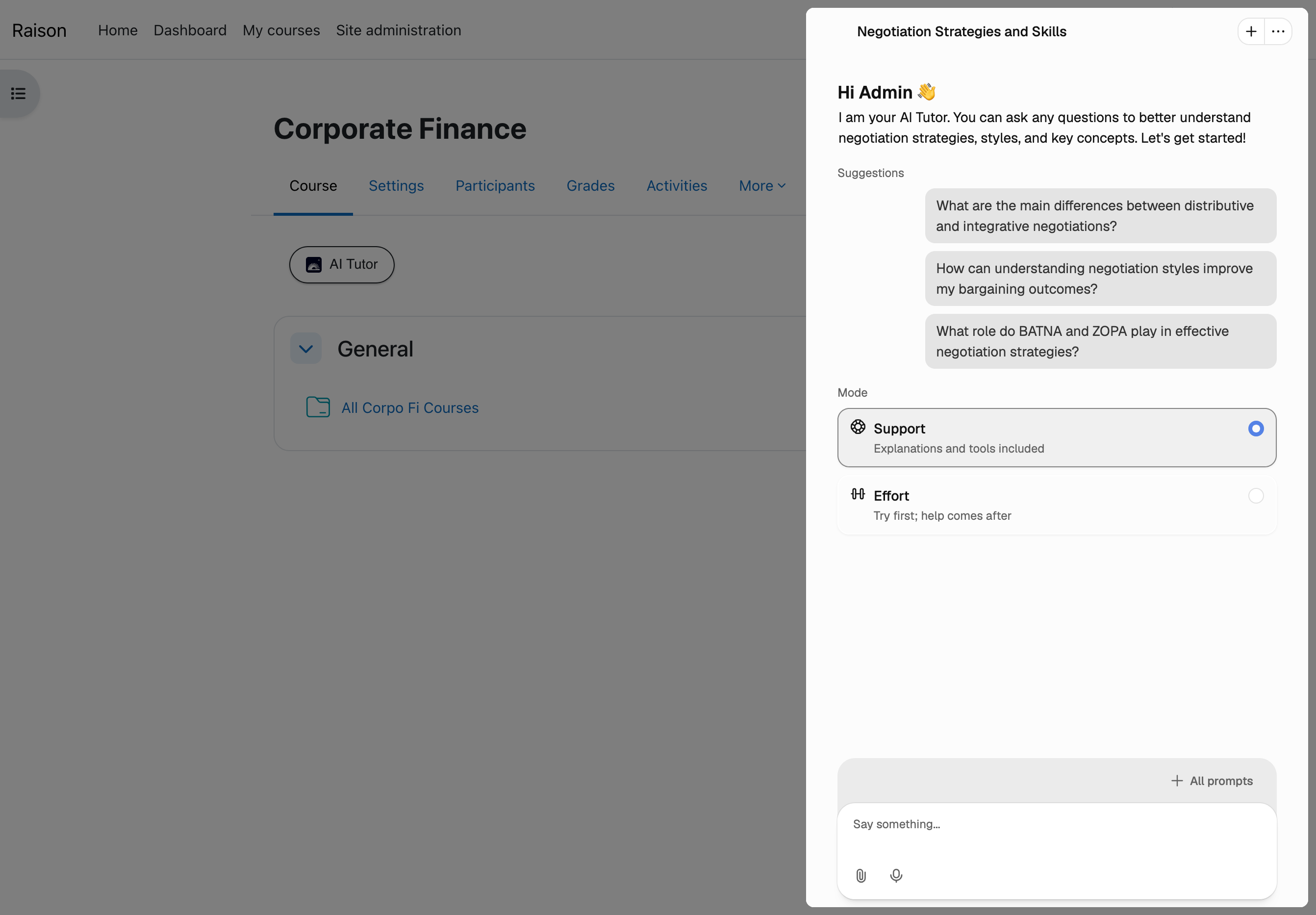
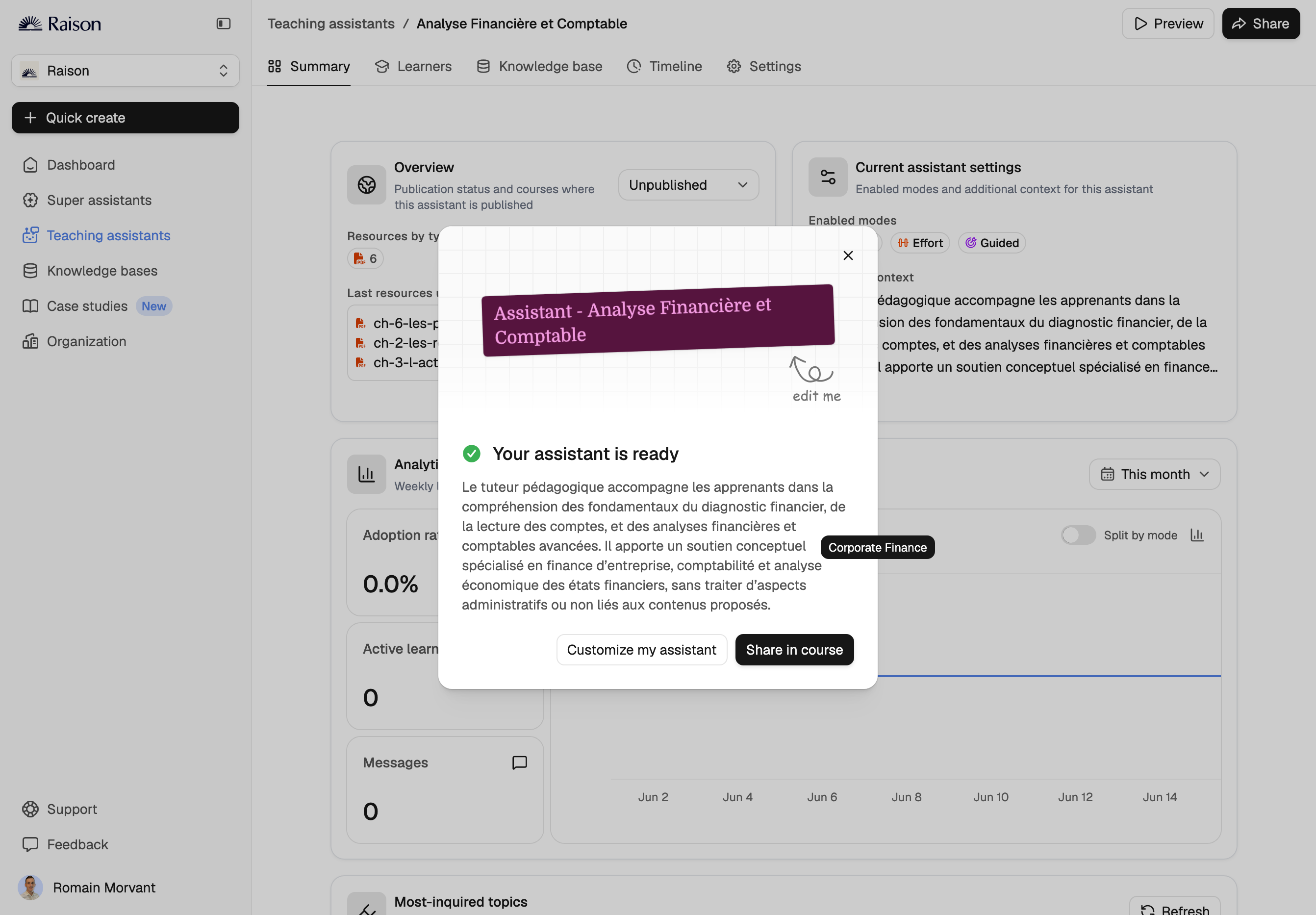
The Corolair Moodle Plugin enables seamless integration of AI Tutors into Moodle courses, enhancing the learning experience for both trainers and learners. This plugin transforms courses into interactive, AI-powered learning assistants tailored to the course content.
Key Features
- For Instructional Designers & Trainers:
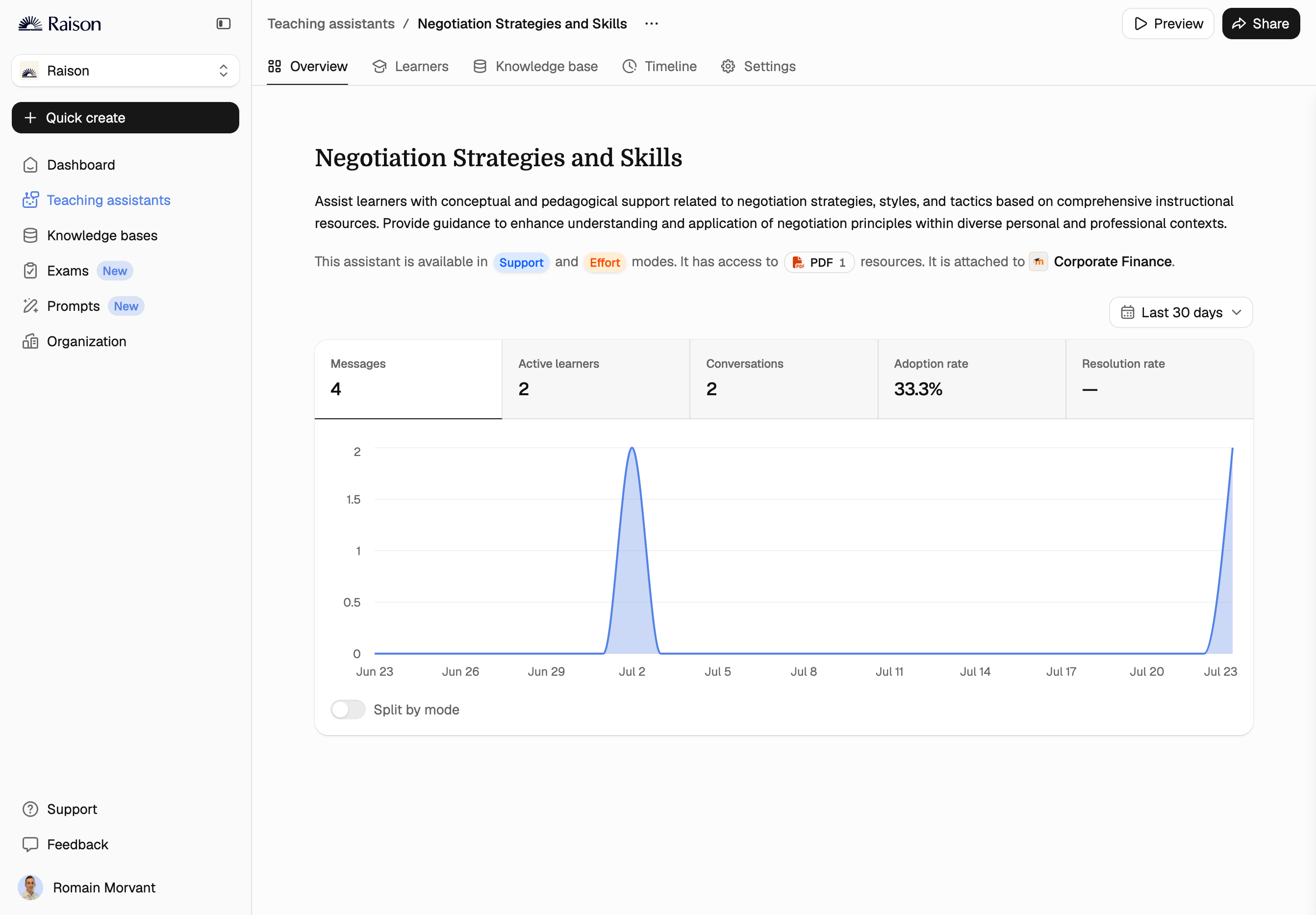
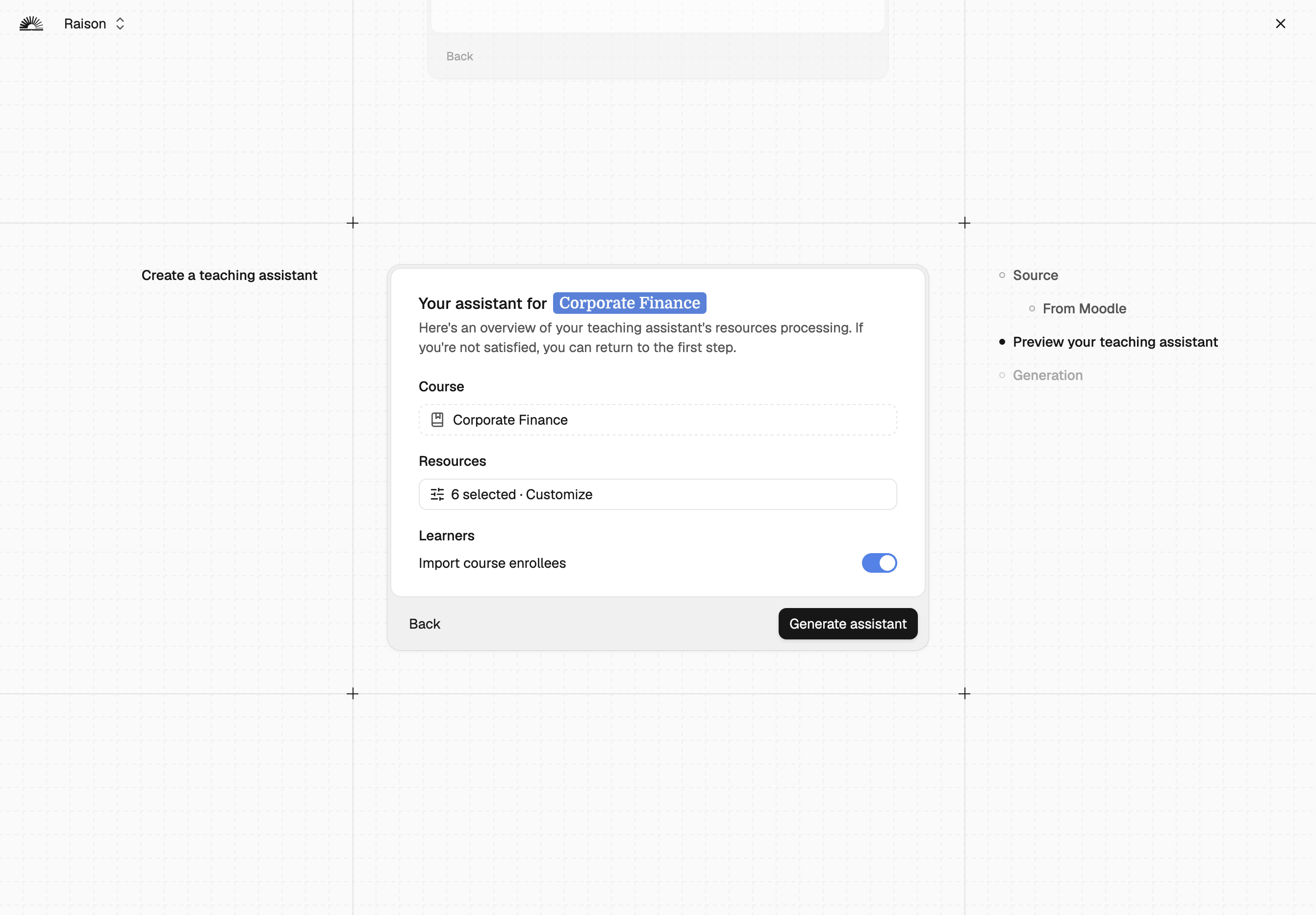
- Easily create and customize AI Tutors directly from Moodle courses.
- Curate additional resources to enhance AI Tutor responses.
- Monitor learner interactions and insights, including trending topics and discussion analytics.
- Manage AI Tutor behavior, update sources, and track usage.
- For Learners:
- Access AI Tutors embedded natively within Moodle courses.
- Ask course-related questions and receive instant, AI-driven answers.
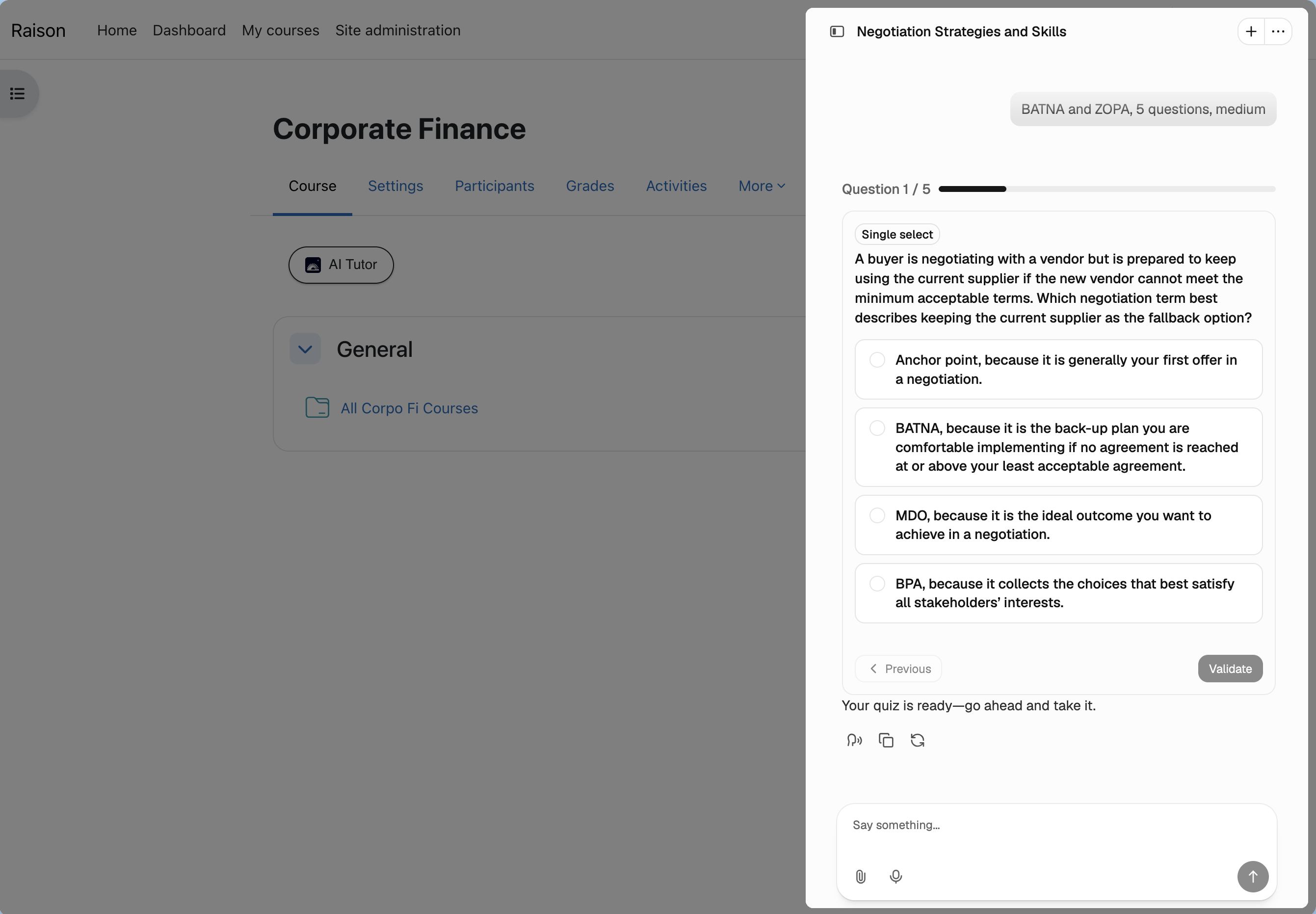
- Self-assess understanding using an AI-generated question bank, curated and validated by the trainer.
- Enjoy a flexible, stop-and-resume chatbot experience for ongoing discussions and auto-evaluation mode.
Installation
- Install the latest version of the plugin from Moodle Plugins directory
- Upon installation, a Corolair account with a trial plan will be automatically created for the administrator who installed the plugin.
- Assign the Corolair Manager role to Trainers to configure access permissions. This role includes the capability to access Corolair from Home or Courses. You can also include the corresponding capability to existing roles. Trial accounts will also be automatically set up for all assigned Trainers.
Access
For Trainers & Instructional Designers:
- Via Moodle Homepage: Navigate to Plus > Corolair to access the Creator tools.
- From Course View: Select Plus > Corolair: Create AI Tutor to initiate the AI Tutor creation process for a specific course.
Once in the Creator platform, trainers can:
- Create, share, and monitor AI Tutors.
- Update sources and adjust behavior.
- Track discussions and gain insights into key learner queries.
For Learners:
- Access Corolair directly as an embedded chatbot within their enrolled courses.
- Start and Resume Discussions: Click to interact with AI Tutors anytime, with the ability to pause and return.
- Switch Modes: Seamlessly transition from discussion to self-assessment mode.
Roadmap
Version 2.0: Proactive AI Tutor
- Mobile Compatibility: Seamlessly continue the AI Assistant experience on mobile devices.
- Expanded Learning Capabilities: Beyond Q&A, the AI Tutor will provide a complete learning experience, enabling learners to explore topics from scratch in new and engaging ways, distinct from the current Moodle course structure.
- Personalized Learning Paths: Tailor learning journeys to individual skill levels and performance, ensuring optimal progress for each learner.
- Microlearning Support: Break down courses and resources into bite-sized lessons that can be completed in under 5 minutes for greater focus and retention.
- Multimedia Integration: Offer lessons in multimedia formats, including videos, audio clips, and interactive visuals, to enhance comprehension and engagement.
- Voice Search: Enable learners to interact with the AI Tutor using voice commands for quick and intuitive navigation.
Contributing
We welcome contributions on the Moodle plugin! Do not hesitate to submit feature requests, bug fixes, or enhancements on Corolair Plugin Github Repository.
Support
For support, please contact our team at contact@corolair.com.
Copyright © 2025 Corolair. All rights reserved.
1.8.7 (2025070800)
1.8.7
Plugin type: Local plugins
Frankenstyle component name: local_corolair
Version build number: 2025070800
Version release name: 1.8.7
Maturity: Stable
Supported Moodle versions: 3.10, 3.11, 4.0, 4.1, 4.2, 4.3, 4.4, 4.5, 5.0
Issue/bug tracker URL: https://github.com/corolair/moodle-local_corolair/issues
Corolair Moodle Plugin
Version: 1.8.7
Last Updated: 2025/07/08
Now supports native Lessons content
Overview
The Corolair Moodle Plugin enables seamless integration of AI Tutors into Moodle courses, enhancing the learning experience for both trainers and learners. This plugin transforms courses into interactive, AI-powered learning assistants tailored to the course content.
Key Features
- For Instructional Designers & Trainers:
- Easily create and customize AI Tutors directly from Moodle courses.
- Curate additional resources to enhance AI Tutor responses.
- Monitor learner interactions and insights, including trending topics and discussion analytics.
- Manage AI Tutor behavior, update sources, and track usage.
- For Learners:
- Access AI Tutors embedded natively within Moodle courses.
- Ask course-related questions and receive instant, AI-driven answers.
- Self-assess understanding using an AI-generated question bank, curated and validated by the trainer.
- Enjoy a flexible, stop-and-resume chatbot experience for ongoing discussions and auto-evaluation mode.
Installation
- Install the latest version of the plugin from Moodle Plugins directory
- Upon installation, a Corolair account with a trial plan will be automatically created for the administrator who installed the plugin.
- Assign the Corolair Manager role to Trainers to configure access permissions. This role includes the capability to access Corolair from Home or Courses. You can also include the corresponding capability to existing roles. Trial accounts will also be automatically set up for all assigned Trainers.
Access
For Trainers & Instructional Designers:
- Via Moodle Homepage: Navigate to Plus > Corolair to access the Creator tools.
- From Course View: Select Plus > Corolair: Create AI Tutor to initiate the AI Tutor creation process for a specific course.
Once in the Creator platform, trainers can:
- Create, share, and monitor AI Tutors.
- Update sources and adjust behavior.
- Track discussions and gain insights into key learner queries.
For Learners:
- Access Corolair directly as an embedded chatbot within their enrolled courses.
- Start and Resume Discussions: Click to interact with AI Tutors anytime, with the ability to pause and return.
- Switch Modes: Seamlessly transition from discussion to self-assessment mode.
Roadmap
Version 2.0: Proactive AI Tutor
- Mobile Compatibility: Seamlessly continue the AI Assistant experience on mobile devices.
- Expanded Learning Capabilities: Beyond Q&A, the AI Tutor will provide a complete learning experience, enabling learners to explore topics from scratch in new and engaging ways, distinct from the current Moodle course structure.
- Personalized Learning Paths: Tailor learning journeys to individual skill levels and performance, ensuring optimal progress for each learner.
- Microlearning Support: Break down courses and resources into bite-sized lessons that can be completed in under 5 minutes for greater focus and retention.
- Multimedia Integration: Offer lessons in multimedia formats, including videos, audio clips, and interactive visuals, to enhance comprehension and engagement.
- Voice Search: Enable learners to interact with the AI Tutor using voice commands for quick and intuitive navigation.
Contributing
We welcome contributions on the Moodle plugin! Do not hesitate to submit feature requests, bug fixes, or enhancements on Corolair Plugin Github Repository.
Support
For support, please contact our team at contact@corolair.com.
Copyright © 2024 Corolair. All rights reserved.
1.8.6 (2025051200)
1.8.6
Plugin type: Local plugins
Frankenstyle component name: local_corolair
Version build number: 2025051200
Version release name: 1.8.6
Maturity: Stable
Supported Moodle versions: 3.10, 3.11, 4.0, 4.1, 4.2, 4.3, 4.4, 4.5, 5.0
Issue/bug tracker URL: https://github.com/corolair/moodle-local_corolair/issues
Corolair Moodle Plugin
Version: 1.8.6
Last Updated: 2025/05/12
Overview
The Corolair Moodle Plugin enables seamless integration of AI Tutors into Moodle courses, enhancing the learning experience for both trainers and learners. This plugin transforms courses into interactive, AI-powered learning assistants tailored to the course content.
Key Features
- For Instructional Designers & Trainers:
- Easily create and customize AI Tutors directly from Moodle courses.
- Curate additional resources to enhance AI Tutor responses.
- Monitor learner interactions and insights, including trending topics and discussion analytics.
- Manage AI Tutor behavior, update sources, and track usage.
- For Learners:
- Access AI Tutors embedded natively within Moodle courses.
- Ask course-related questions and receive instant, AI-driven answers.
- Self-assess understanding using an AI-generated question bank, curated and validated by the trainer.
- Enjoy a flexible, stop-and-resume chatbot experience for ongoing discussions and auto-evaluation mode.
Installation
- Install the latest version of the plugin from Moodle Plugins directory
- Upon installation, a Corolair account with a trial plan will be automatically created for the administrator who installed the plugin.
- Assign the Corolair Manager role to Trainers to configure access permissions. This role includes the capability to access Corolair from Home or Courses. You can also include the corresponding capability to existing roles. Trial accounts will also be automatically set up for all assigned Trainers.
Access
For Trainers & Instructional Designers:
- Via Moodle Homepage: Navigate to Plus > Corolair to access the Creator tools.
- From Course View: Select Plus > Corolair: Create AI Tutor to initiate the AI Tutor creation process for a specific course.
Once in the Creator platform, trainers can:
- Create, share, and monitor AI Tutors.
- Update sources and adjust behavior.
- Track discussions and gain insights into key learner queries.
For Learners:
- Access Corolair directly as an embedded chatbot within their enrolled courses.
- Start and Resume Discussions: Click to interact with AI Tutors anytime, with the ability to pause and return.
- Switch Modes: Seamlessly transition from discussion to self-assessment mode.
Roadmap
Version 2.0: Proactive AI Tutor
- Mobile Compatibility: Seamlessly continue the AI Assistant experience on mobile devices.
- Expanded Learning Capabilities: Beyond Q&A, the AI Tutor will provide a complete learning experience, enabling learners to explore topics from scratch in new and engaging ways, distinct from the current Moodle course structure.
- Personalized Learning Paths: Tailor learning journeys to individual skill levels and performance, ensuring optimal progress for each learner.
- Microlearning Support: Break down courses and resources into bite-sized lessons that can be completed in under 5 minutes for greater focus and retention.
- Multimedia Integration: Offer lessons in multimedia formats, including videos, audio clips, and interactive visuals, to enhance comprehension and engagement.
- Voice Search: Enable learners to interact with the AI Tutor using voice commands for quick and intuitive navigation.
Contributing
We welcome contributions on the Moodle plugin! Do not hesitate to submit feature requests, bug fixes, or enhancements on Corolair Plugin Github Repository.
Support
For support, please contact our team at contact@corolair.com.
Copyright © 2024 Corolair. All rights reserved.
1.8.5 (2025041700)
1.8.5
Plugin type: Local plugins
Frankenstyle component name: local_corolair
Version build number: 2025041700
Version release name: 1.8.5
Maturity: Stable
Supported Moodle versions: 3.10, 3.11, 4.0, 4.1, 4.2, 4.3, 4.4, 4.5, 5.0
Issue/bug tracker URL: https://github.com/corolair/moodle-local_corolair/issues
Corolair Moodle Plugin
Version: 1.8.5
Last Updated: 2025/04/17
Overview
The Corolair Moodle Plugin enables seamless integration of AI Tutors into Moodle courses, enhancing the learning experience for both trainers and learners. This plugin transforms courses into interactive, AI-powered learning assistants tailored to the course content.
Key Features
- For Instructional Designers & Trainers:
- Easily create and customize AI Tutors directly from Moodle courses.
- Curate additional resources to enhance AI Tutor responses.
- Monitor learner interactions and insights, including trending topics and discussion analytics.
- Manage AI Tutor behavior, update sources, and track usage.
- For Learners:
- Access AI Tutors embedded natively within Moodle courses.
- Ask course-related questions and receive instant, AI-driven answers.
- Self-assess understanding using an AI-generated question bank, curated and validated by the trainer.
- Enjoy a flexible, stop-and-resume chatbot experience for ongoing discussions and auto-evaluation mode.
Installation
- Install the latest version of the plugin from Moodle Plugins directory
- Upon installation, a Corolair account with a trial plan will be automatically created for the administrator who installed the plugin.
- Assign the Corolair Manager role to Trainers to configure access permissions. This role includes the capability to access Corolair from Home or Courses. You can also include the corresponding capability to existing roles. Trial accounts will also be automatically set up for all assigned Trainers.
Access
For Trainers & Instructional Designers:
- Via Moodle Homepage: Navigate to Plus > Corolair to access the Creator tools.
- From Course View: Select Plus > Corolair: Create AI Tutor to initiate the AI Tutor creation process for a specific course.
Once in the Creator platform, trainers can:
- Create, share, and monitor AI Tutors.
- Update sources and adjust behavior.
- Track discussions and gain insights into key learner queries.
For Learners:
- Access Corolair directly as an embedded chatbot within their enrolled courses.
- Start and Resume Discussions: Click to interact with AI Tutors anytime, with the ability to pause and return.
- Switch Modes: Seamlessly transition from discussion to self-assessment mode.
Roadmap
Version 2.0: Proactive AI Tutor
- Mobile Compatibility: Seamlessly continue the AI Assistant experience on mobile devices.
- Expanded Learning Capabilities: Beyond Q&A, the AI Tutor will provide a complete learning experience, enabling learners to explore topics from scratch in new and engaging ways, distinct from the current Moodle course structure.
- Personalized Learning Paths: Tailor learning journeys to individual skill levels and performance, ensuring optimal progress for each learner.
- Microlearning Support: Break down courses and resources into bite-sized lessons that can be completed in under 5 minutes for greater focus and retention.
- Multimedia Integration: Offer lessons in multimedia formats, including videos, audio clips, and interactive visuals, to enhance comprehension and engagement.
- Voice Search: Enable learners to interact with the AI Tutor using voice commands for quick and intuitive navigation.
Contributing
We welcome contributions on the Moodle plugin! Do not hesitate to submit feature requests, bug fixes, or enhancements on Corolair Plugin Github Repository.
Support
For support, please contact our team at contact@corolair.com.
Copyright © 2024 Corolair. All rights reserved.
1.8.4 (2025031700)
1.8.4
Plugin type: Local plugins
Frankenstyle component name: local_corolair
Version build number: 2025031700
Version release name: 1.8.4
Maturity: Stable
Supported Moodle versions: 3.10, 3.11, 4.0, 4.1, 4.2, 4.3, 4.4, 4.5
Issue/bug tracker URL: https://github.com/corolair/moodle-local_corolair/issues
Corolair Moodle Plugin
Version: 1.8.4
Last Updated: 2025/03/17
v1.8.4 Release Notes
- Automatic Troubleshooting: Loads a troubleshoot page with detailed information when API retrieval from Corolair fails, allowing admins to submit comments for quick API key resolution
- Customizable CSS: Allows tuning of Corolair page size to fit various Moodle themes and settings
- Spanish Translation: Now available in Spanish for broader accessibility
Overview
The Corolair Moodle Plugin enables seamless integration of AI Tutors into Moodle courses, enhancing the learning experience for both trainers and learners. This plugin transforms courses into interactive, AI-powered learning assistants tailored to the course content.
Key Features
- For Instructional Designers & Trainers:
- Easily create and customize AI Tutors directly from Moodle courses.
- Curate additional resources to enhance AI Tutor responses.
- Monitor learner interactions and insights, including trending topics and discussion analytics.
- Manage AI Tutor behavior, update sources, and track usage.
- For Learners:
- Access AI Tutors embedded natively within Moodle courses.
- Ask course-related questions and receive instant, AI-driven answers.
- Self-assess understanding using an AI-generated question bank, curated and validated by the trainer.
- Enjoy a flexible, stop-and-resume chatbot experience for ongoing discussions and auto-evaluation mode.
Installation
- Install the latest version of the plugin from Moodle Plugins directory
- Upon installation, a Corolair account with a trial plan will be automatically created for the administrator who installed the plugin.
- Assign the Corolair Manager role to Trainers to configure access permissions. This role includes the capability to access Corolair from Home or Courses. You can also include the corresponding capability to existing roles. Trial accounts will also be automatically set up for all assigned Trainers.
Access
For Trainers & Instructional Designers:
- Via Moodle Homepage: Navigate to Plus > Corolair to access the Creator tools.
- From Course View: Select Plus > Corolair: Create AI Tutor to initiate the AI Tutor creation process for a specific course.
Once in the Creator platform, trainers can:
- Create, share, and monitor AI Tutors.
- Update sources and adjust behavior.
- Track discussions and gain insights into key learner queries.
For Learners:
- Access Corolair directly as an embedded chatbot within their enrolled courses.
- Start and Resume Discussions: Click to interact with AI Tutors anytime, with the ability to pause and return.
- Switch Modes: Seamlessly transition from discussion to self-assessment mode.
Roadmap
Version 2.0: Proactive AI Tutor
- Mobile Compatibility: Seamlessly continue the AI Assistant experience on mobile devices.
- Expanded Learning Capabilities: Beyond Q&A, the AI Tutor will provide a complete learning experience, enabling learners to explore topics from scratch in new and engaging ways, distinct from the current Moodle course structure.
- Personalized Learning Paths: Tailor learning journeys to individual skill levels and performance, ensuring optimal progress for each learner.
- Microlearning Support: Break down courses and resources into bite-sized lessons that can be completed in under 5 minutes for greater focus and retention.
- Multimedia Integration: Offer lessons in multimedia formats, including videos, audio clips, and interactive visuals, to enhance comprehension and engagement.
- Voice Search: Enable learners to interact with the AI Tutor using voice commands for quick and intuitive navigation.
Contributing
We welcome contributions on the Moodle plugin! Do not hesitate to submit feature requests, bug fixes, or enhancements on Corolair Plugin Github Repository.
Support
For support, please contact our team at contact@corolair.com.
Copyright © 2024 Corolair. All rights reserved.
1.8.3 (2025011700)
1.8.3
Plugin type: Local plugins
Frankenstyle component name: local_corolair
Version build number: 2025011700
Version release name: 1.8.3
Maturity: Stable
Supported Moodle versions: 3.10, 3.11, 4.0, 4.1, 4.2, 4.3, 4.4, 4.5
Issue/bug tracker URL: https://github.com/corolair/moodle-local_corolair/issues
Corolair Moodle Plugin
Version: 1.8.3
Last Updated: 2025/01/17
Overview
The Corolair Moodle Plugin enables seamless integration of AI Tutors into Moodle courses, enhancing the learning experience for both trainers and learners. This plugin transforms courses into interactive, AI-powered learning assistants tailored to the course content.
Key Features
- For Instructional Designers & Trainers:
- Easily create and customize AI Tutors directly from Moodle courses.
- Curate additional resources to enhance AI Tutor responses.
- Monitor learner interactions and insights, including trending topics and discussion analytics.
- Manage AI Tutor behavior, update sources, and track usage.
- For Learners:
- Access AI Tutors embedded natively within Moodle courses.
- Ask course-related questions and receive instant, AI-driven answers.
- Self-assess understanding using an AI-generated question bank, curated and validated by the trainer.
- Enjoy a flexible, stop-and-resume chatbot experience for ongoing discussions and auto-evaluation mode.
Installation
- Install the latest version of the plugin from Moodle Plugins directory
- Upon installation, a Corolair account with a trial plan will be automatically created for the administrator who installed the plugin.
- Assign the Corolair Manager role to Trainers to configure access permissions. This role includes the capability to access Corolair from Home or Courses. You can also include the corresponding capability to existing roles. Trial accounts will also be automatically set up for all assigned Trainers.
Access
For Trainers & Instructional Designers:
- Via Moodle Homepage: Navigate to Plus > Corolair to access the Creator tools.
- From Course View: Select Plus > Corolair: Create AI Tutor to initiate the AI Tutor creation process for a specific course.
Once in the Creator platform, trainers can:
- Create, share, and monitor AI Tutors.
- Update sources and adjust behavior.
- Track discussions and gain insights into key learner queries.
For Learners:
- Access Corolair directly as an embedded chatbot within their enrolled courses.
- Start and Resume Discussions: Click to interact with AI Tutors anytime, with the ability to pause and return.
- Switch Modes: Seamlessly transition from discussion to self-assessment mode.
Roadmap
Version 2.0: Proactive AI Tutor
- Mobile Compatibility: Seamlessly continue the AI Assistant experience on mobile devices.
- Expanded Learning Capabilities: Beyond Q&A, the AI Tutor will provide a complete learning experience, enabling learners to explore topics from scratch in new and engaging ways, distinct from the current Moodle course structure.
- Personalized Learning Paths: Tailor learning journeys to individual skill levels and performance, ensuring optimal progress for each learner.
- Microlearning Support: Break down courses and resources into bite-sized lessons that can be completed in under 5 minutes for greater focus and retention.
- Multimedia Integration: Offer lessons in multimedia formats, including videos, audio clips, and interactive visuals, to enhance comprehension and engagement.
- Voice Search: Enable learners to interact with the AI Tutor using voice commands for quick and intuitive navigation.
Contributing
We welcome contributions on the Moodle plugin! Do not hesitate to submit feature requests, bug fixes, or enhancements on Corolair Plugin Github Repository.
Support
For support, please contact our team at contact@corolair.com.
Copyright © 2024 Corolair. All rights reserved.
1.8.3 (2025011600)
1.8.3
Plugin type: Local plugins
Frankenstyle component name: local_corolair
Version build number: 2025011600
Version release name: 1.8.3
Maturity: Stable
Supported Moodle versions: 3.10, 3.11, 4.0, 4.1, 4.2, 4.3, 4.4, 4.5
Issue/bug tracker URL: https://github.com/corolair/moodle-local_corolair/issues
Corolair Moodle Plugin
Version: 1.8.3
Last Updated: 2025/01/16
Overview
The Corolair Moodle Plugin enables seamless integration of AI Tutors into Moodle courses, enhancing the learning experience for both trainers and learners. This plugin transforms courses into interactive, AI-powered learning assistants tailored to the course content.
Key Features
- For Instructional Designers & Trainers:
- Easily create and customize AI Tutors directly from Moodle courses.
- Curate additional resources to enhance AI Tutor responses.
- Monitor learner interactions and insights, including trending topics and discussion analytics.
- Manage AI Tutor behavior, update sources, and track usage.
- For Learners:
- Access AI Tutors embedded natively within Moodle courses.
- Ask course-related questions and receive instant, AI-driven answers.
- Self-assess understanding using an AI-generated question bank, curated and validated by the trainer.
- Enjoy a flexible, stop-and-resume chatbot experience for ongoing discussions and auto-evaluation mode.
Installation
- Install the latest version of the plugin from Moodle Plugins directory
- Upon installation, a Corolair account with a trial plan will be automatically created for the administrator who installed the plugin.
- Assign the Corolair Manager role to Trainers to configure access permissions. This role includes the capability to access Corolair from Home or Courses. You can also include the corresponding capability to existing roles. Trial accounts will also be automatically set up for all assigned Trainers.
Access
For Trainers & Instructional Designers:
- Via Moodle Homepage: Navigate to Plus > Corolair to access the Creator tools.
- From Course View: Select Plus > Corolair: Create AI Tutor to initiate the AI Tutor creation process for a specific course.
Once in the Creator platform, trainers can:
- Create, share, and monitor AI Tutors.
- Update sources and adjust behavior.
- Track discussions and gain insights into key learner queries.
For Learners:
- Access Corolair directly as an embedded chatbot within their enrolled courses.
- Start and Resume Discussions: Click to interact with AI Tutors anytime, with the ability to pause and return.
- Switch Modes: Seamlessly transition from discussion to self-assessment mode.
Roadmap
Version 2.0: Proactive AI Tutor
- Mobile Compatibility: Seamlessly continue the AI Assistant experience on mobile devices.
- Expanded Learning Capabilities: Beyond Q&A, the AI Tutor will provide a complete learning experience, enabling learners to explore topics from scratch in new and engaging ways, distinct from the current Moodle course structure.
- Personalized Learning Paths: Tailor learning journeys to individual skill levels and performance, ensuring optimal progress for each learner.
- Microlearning Support: Break down courses and resources into bite-sized lessons that can be completed in under 5 minutes for greater focus and retention.
- Multimedia Integration: Offer lessons in multimedia formats, including videos, audio clips, and interactive visuals, to enhance comprehension and engagement.
- Voice Search: Enable learners to interact with the AI Tutor using voice commands for quick and intuitive navigation.
Contributing
We welcome contributions on the Moodle plugin! Do not hesitate to submit feature requests, bug fixes, or enhancements on Corolair Plugin Github Repository.
Support
For support, please contact our team at contact@corolair.com.
Copyright © 2024 Corolair. All rights reserved.
1.8.3 (2024120600)
1.8.3
Plugin type: Local plugins
Frankenstyle component name: local_corolair
Version build number: 2024120600
Version release name: 1.8.3
Maturity: Stable
Supported Moodle versions: 3.10, 3.11, 4.0, 4.1, 4.2, 4.3, 4.4, 4.5
Issue/bug tracker URL: https://github.com/corolair/moodle-local_corolair/issues
Corolair Moodle Plugin
Version: 1.8.3
Last Updated: 2025/01/16
Overview
The Corolair Moodle Plugin enables seamless integration of AI Tutors into Moodle courses, enhancing the learning experience for both trainers and learners. This plugin transforms courses into interactive, AI-powered learning assistants tailored to the course content.
Key Features
- For Instructional Designers & Trainers:
- Easily create and customize AI Tutors directly from Moodle courses.
- Curate additional resources to enhance AI Tutor responses.
- Monitor learner interactions and insights, including trending topics and discussion analytics.
- Manage AI Tutor behavior, update sources, and track usage.
- For Learners:
- Access AI Tutors embedded natively within Moodle courses.
- Ask course-related questions and receive instant, AI-driven answers.
- Self-assess understanding using an AI-generated question bank, curated and validated by the trainer.
- Enjoy a flexible, stop-and-resume chatbot experience for ongoing discussions and auto-evaluation mode.
Installation
- Install the latest version of the plugin from Moodle Plugins directory
- Upon installation, a Corolair account with a trial plan will be automatically created for the administrator who installed the plugin.
- Assign the Corolair Manager role to Trainers to configure access permissions. This role includes the capability to access Corolair from Home or Courses. You can also include the corresponding capability to existing roles. Trial accounts will also be automatically set up for all assigned Trainers.
Access
For Trainers & Instructional Designers:
- Via Moodle Homepage: Navigate to Plus > Corolair to access the Creator tools.
- From Course View: Select Plus > Corolair: Create AI Tutor to initiate the AI Tutor creation process for a specific course.
Once in the Creator platform, trainers can:
- Create, share, and monitor AI Tutors.
- Update sources and adjust behavior.
- Track discussions and gain insights into key learner queries.
For Learners:
- Access Corolair directly as an embedded chatbot within their enrolled courses.
- Start and Resume Discussions: Click to interact with AI Tutors anytime, with the ability to pause and return.
- Switch Modes: Seamlessly transition from discussion to self-assessment mode.
Roadmap
Version 2.0: Proactive AI Tutor
- Mobile Compatibility: Seamlessly continue the AI Assistant experience on mobile devices.
- Expanded Learning Capabilities: Beyond Q&A, the AI Tutor will provide a complete learning experience, enabling learners to explore topics from scratch in new and engaging ways, distinct from the current Moodle course structure.
- Personalized Learning Paths: Tailor learning journeys to individual skill levels and performance, ensuring optimal progress for each learner.
- Microlearning Support: Break down courses and resources into bite-sized lessons that can be completed in under 5 minutes for greater focus and retention.
- Multimedia Integration: Offer lessons in multimedia formats, including videos, audio clips, and interactive visuals, to enhance comprehension and engagement.
- Voice Search: Enable learners to interact with the AI Tutor using voice commands for quick and intuitive navigation.
Contributing
We welcome contributions on the Moodle plugin! Do not hesitate to submit feature requests, bug fixes, or enhancements on Corolair Plugin Github Repository.
Support
For support, please contact our team at contact@corolair.com.
Copyright © 2024 Corolair. All rights reserved.