Navigation buttons (for Moodle 1.9 / 2.0+)
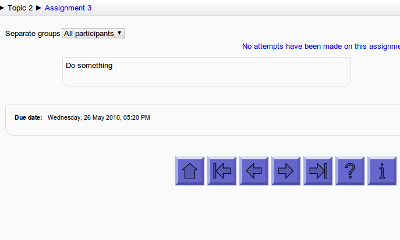
This block adds customisable navigation buttons (first/previous/next/etc.) to the bottom of each activity/resource page in a course.
It is based on an idea from Penny Mondani: http://pennymondani.com
Thanks also to the US company that sponsored the development, who wish to remain anonymous.
Installation:
- Download the file and unzip it somewhere convenient.
- On your server, in the 'blocks' folder, create a subfolder called 'navbuttons'
- Upload all the files inside the 'davosmith-moodle-navbuttons-???????' folder to this new 'navbuttons' folder on your server.
- Log in to your Moodle site as an administrator and click on the 'Notifications' option in the Admin settings block.
- If you are running a version of Moodle earlier than 3.10, you need to make a small change to one Moodle core file to make this work (the change is different between Moodle 1.9 & Moodle 2.0 - see the included README.txt for
details).
- Add the block to a course (turn editing on, select 'Navigation Buttons' from the 'Blocks - Add' menu)
- Customise the button appearance by clicking on 'Edit the Navigation Button settings' in the newly created block.
- Check the message at the bottom of the screen (under the 'Save changes' button) - it should read "Navbuttons self-test: required core modifications have been completed successfully". If not, then go back to step 5 above and check carefully.
Note: The block is only visible to users who are able to edit courses modules. Deleting the block will remove the navigation buttons (they can also be disabled through the settings).
For a quick demo, there is a screencast available here:
http://www.youtube.com/watch?v=GlUYr_kcsxs