
Skype
Maintained by
RACHELS, DANIEL A.
NOTE: Skype will be retired on May 5, 2025.
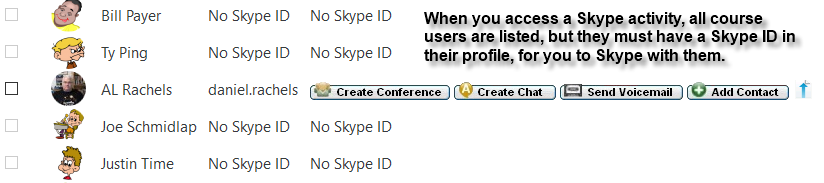
Skype activity plugin module implements a user listing and shows, Create Conference, Create Chat, Send Voicemail, Add Contact, and Send File links to any user who has entered a Skype ID into their profile.
Comments
Comments are no longer open for new posts. Existing comments remain available to read.
This was the response I got:
"The Skype plugin for Moodle installs as a block. It only acts like a phone book for any user that has a Skype account added into their Moodle profile. The functions provided are to Create Conference, Create Chat, Send Voicemail, Add Contact, and Send File. When I recently took over development for the plugin, I added Group capability and some other stuff, mostly code cleanup to meet Moodle standards.
When a user clicks to use Skype from within Moodle, it actually just starts the regular Skype application, which HAS to be installed on the device from which the user is accessing Moodle. The actual capabilities depend on the type of account the user has for their Skype account. To make a video call, you have to have a camera. Without a camera, you are limited to audio only. As for as making sure that only the professor can start a call, after the course teacher/professor adds the Skype block, hide it. The teacher/professor will still be able to see the block and use it, but it will not be visible to the students in the course."
So it is not possible the way I wanted it to function, but maybe this helps you.
Regards
I happen to have the same question as Raisa Retif, where I want to have video conference with all students at the same time. Also if it is possible to only allow teachers and admins to start it. Thank you in advance.
I have a question regarding this plugin.
How do you make a videocall with all the students enrolled in the course? is this possible or it is just for 1 on 1 videocall?
Also, how can you make sure that only the professor can start the videochat?
Thank you in advance
Hope a quick recovery of your wife's health.
Here the requested information : Moodle 3.8.3+ (Build: 20200602); Skype 3.6.0 (Build: 2020052000); Centos 7.7.1908; PHP 7.2.28; Maria DB 5.5.65.
In your case, when running cron after deleting a skype activity the emails sent from forums is working?
In my case the cron seemed to work, but then I realised the forum mailing won't came and in tasks log appeared that skype exception error message. As soon as I deleted that skype lines in database, some hundreds of mails from forums was shoted.
Just to report a problem that was blocking all my cron tasks.
Every time an skype activity is deleted, my cron tasks stops and looking at task logs I found that has an error with the "\core_course\task\course_delete_modules" which says "!!! Exception - Class 'backup_skype_activity_task' not found !!!"
The only way I could found to solve the problem was deleting the rows about skype module in "mdl_task_adhoc" database table.
Done this, my cron tasks started running again.
Regards!
that's what students see....
Time to Skype: Sunday, May 3, 2020, 22:43
Separate groups: All participants
Select Photo Name Skype ID Contact
name teacher image email@example.it skype@example.it button create conference - chat .....
name student image email@example.it skype@example.it button create conference - chat .....
is it right or should I just see the meeting link?
Thank you