
Skype
Maintained by
RACHELS, DANIEL A.
NOTE: Skype will be retired on May 5, 2025.
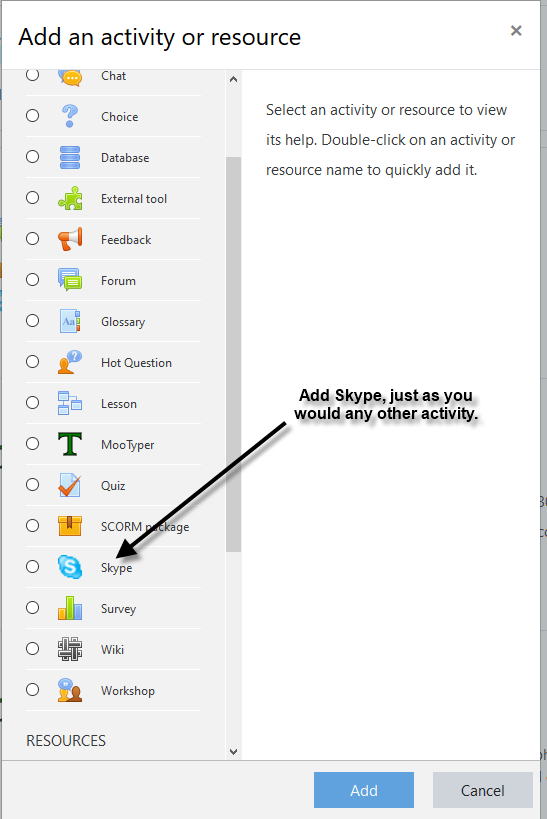
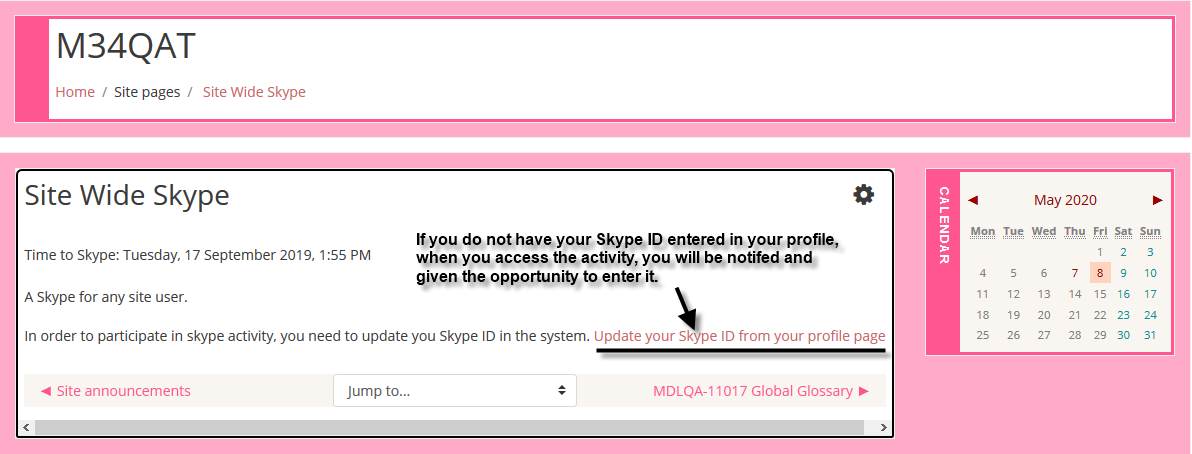
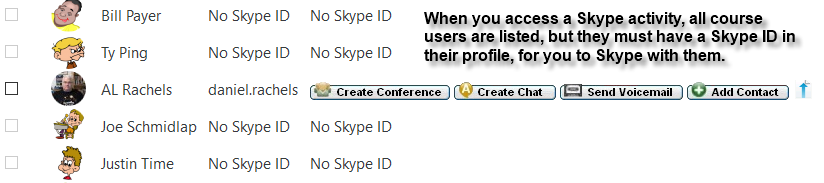
Skype activity plugin module implements a user listing and shows, Create Conference, Create Chat, Send Voicemail, Add Contact, and Send File links to any user who has entered a Skype ID into their profile.
Comments
Comments are no longer open for new posts. Existing comments remain available to read.
Sorry, been very busy with other things, but I think you may have missed how to, "have a Skype conversation all together at once." You go through the list of users that have a Skype ID, placing a checkmark in the, Select, box before their photo/names. Once you have all the people selected, scroll to the bottom of the list and click the appropriate button that popped up there at the bottom of the list, such as, Create Conference. This will start up Skype and it will attempt to call everyone selected in the list.
NOTE: That if your Moodle is prior to 3.11.0 you can upload a normal user csv file with the skype ID's in it. Since Moodle HQ removed Skype from user profiles starting in Moodle 3.11.0, user uploads with just skype in the header column to upload. In Moodle 3.11.x and later, go to the link below to see that now for Skype, the column heading must be, profile_field_skype. https://docs.moodle.org/400/en/User_profile_fields
Sorry, I do not know of a way to automatically recover those profile fields. However, if you have them in a backup, you could manipulate the data in a CSV file to build an upload file to recreate the entries in user profiles. For the next Skype update I will see about adding an option regarding whether to delete or keep those fields.
Recently installed the plugin, realized that we are unable to have a Skype conversation all together at once through this plugin, uninstalled it. All to find out, all my profile fields have been deleted along with it. Is there any way I may be able to retrieve them. That's a lot of data lost in one click, and I have a very old backup of it which contains inundated data.
I have just added a new version Skype v3.8.3 that should be what both of you need.
I am not sure what you mean. Could you send me further details or some example code to my email address listed in my profile?
I believe there is a bug in the last version of mod_skype plugin. The code you added on install.php file is needed in the version upgrade step. This runs fine if you uninstall the plugin and then install it, but not if you upgrade an existing plugin.
Cheers
The version 3.7.0 located here will not. I have a 3.8.0 version at my github account that I was working on before my wife died, that will, but had a problem where some new settings that Moodle added, would not save. Wound up just having to manually enter the site URL to bypass the problem. No one responded to my request for help, and I have been side tracked with other projects. I will try to get back to this in the next few days.
Will this work for moodle 3.11.5.
Cheers