
StudentQuiz
Versions
Current version
v5.5.0 (2026030600)
v5.5.0
Plugin type: Activities
Frankenstyle component name: mod_studentquiz
Version build number: 2026030600
Version release name: v5.5.0
Maturity: Stable
Supported Moodle versions: 4.4, 4.5, 5.0, 5.1
Repository URL (Git): https://github.com/studentquiz/moodle-mod_studentquiz
Repository branch:
Repository tag:
Issue/bug tracker URL: https://github.com/studentquiz/moodle-mod_studentquiz/issues
Change log for the StudentQuiz activity
Version 5.5.0
- This release is compatible with Moodle 5.1
- Implement "Move to" feature
- Fix coding style issues and automated tests for PHP 8.4
- Support course overview page
- Update module description and icon, tables to match Moodle 5.x style.
Version 5.4.0
- This release is compatible with Moodle 5.0.
- Changes to use the editor based on the system setting.
- Adds a new feature to use a customized button set with the TinyMCE editor.
- Fixes a bug to clear the comment/reply input field after submission when using the Tiny editor.
- Fixes an issue to allow questions from a StudentQuiz to be reused in other StudentQuizzes.
- Calls the require_login function for StudentQuiz pages to resolve the missing userid parameter error.
- Fixes pagination issues.
- Fix coding style issues and automated tests.
- Resolved performance issue caused when deleting users from the Moodle system.
- Remove legacy support for unsupported M3.5 version.
- Fixes an issue that caused errors when restoring a StudentQuiz with questions that have
multiple versions and are disapproved. - Add visually-hidden class to support Bootstrap 5.
Version 5.3.0
- This release fixes some security issues. You are strongly recommended to upgrade.
- This release is compatible with Moodle 4.4.
- Fixed an issue with activity completion in Moodle 4.3.
- History table now supports anonymous users properly.
- Improve performance of statistics calculations.
- Fix some layout issues.
Version 5.2.1
- Added Compatability with Moodle 4.3
- Fixed a bug with permission checking of state changes.
Version 5.2.0
Mainly a bugfix release, but with one new feature adding activity completion.
This version works with Moodle 4.0, 4.1 and 4.2. (4.3 support is being worked on.)
- New feature: You can now set automatic completion rules like 'Students must author at least 3 questions' or
'Students must score at least 42 points'. - An improvement to set the state of the question in the Moodle question bank (draft/read) based on the state of the question in StudentQuiz.
- New actvity icon to match the Moodle 4.x style.
- Fix to ensure that only the right notifications are sent when using separate groups mode.
- Fix to permission checks on questions in separate groups mode.
- Fix display order of the question list, including pinned questions.
- Fix an issue that prevented the use of question types where the student responds by uploading a file.
- Fix backup and restore of availability information.
- Fix questions sometimes being incorrectly set to state Disapproved.
- Fix the wording of one of the notifications.
- Fix to the 'delete orphaned questions' task.
- Fix the layout of some buttons in Moodle 4.2.
- Technical fixes (automated testing config, coding style, improved tests for backup and restore).
Version 5.1.0
This is basically a bugfix release. Also, we can confirm it works with Moodle 4.1 as well as 4.0.
- Show the question version number in StudentQuiz.
- ... but don't show the Status column. We don't want to expose students to the concept of draft questions.
- Improve validation when editing StudentQuiz settings.
- Fix an issue where StudentQuiz events did not show in the calendar/timeline.
- Fix a bug where names were swapped in emails about anonymous ranking.
- Improvement to make the 3.x -> 4.x upgrade more robust.
Version 5.0.0
- The focus of this release was getting the plugin to work again after the Moodle 4.0 question bank changes.
Older releases
Where not documented here. See the releases on GitHub.
https://github.com/studentquiz/moodle-mod_studentquiz/releases
v5.4.0 (2025070700)
v5.4.0
Plugin type: Activities
Frankenstyle component name: mod_studentquiz
Version build number: 2025070700
Version release name: v5.4.0
Maturity: Stable
Supported Moodle versions: 4.4, 4.5, 5.0
Repository URL (Git): https://github.com/studentquiz/moodle-mod_studentquiz
Repository branch:
Repository tag:
Issue/bug tracker URL: https://github.com/studentquiz/moodle-mod_studentquiz/issues
Change log for the StudentQuiz activity
Version 5.4.0
- This release is compatible with Moodle 5.0.
- Changes to use the editor based on the system setting.
- Adds a new feature to use a customized button set with the TinyMCE editor.
- Fixes a bug to clear the comment/reply input field after submission when using the Tiny editor.
- Fixes an issue to allow questions from a StudentQuiz to be reused in other StudentQuizzes.
- Calls the require_login function for StudentQuiz pages to resolve the missing userid parameter error.
- Fixes pagination issues.
- Fix coding style issues and automated tests.
- Resolved performance issue caused when deleting users from the Moodle system.
- Remove legacy support for unsupported M3.5 version.
- Fixes an issue that caused errors when restoring a StudentQuiz with questions that have
multiple versions and are disapproved. - Add visually-hidden class to support Bootstrap 5.
Version 5.3.0
- This release fixes some security issues. You are strongly recommended to upgrade.
- This release is compatible with Moodle 4.4.
- Fixed an issue with activity completion in Moodle 4.3.
- History table now supports anonymous users properly.
- Improve performance of statistics calculations.
- Fix some layout issues.
Version 5.2.1
- Added Compatability with Moodle 4.3
- Fixed a bug with permission checking of state changes.
Version 5.2.0
Mainly a bugfix release, but with one new feature adding activity completion.
This version works with Moodle 4.0, 4.1 and 4.2. (4.3 support is being worked on.)
- New feature: You can now set automatic completion rules like 'Students must author at least 3 questions' or
'Students must score at least 42 points'. - An improvement to set the state of the question in the Moodle question bank (draft/read) based on the state of the question in StudentQuiz.
- New actvity icon to match the Moodle 4.x style.
- Fix to ensure that only the right notifications are sent when using separate groups mode.
- Fix to permission checks on questions in separate groups mode.
- Fix display order of the question list, including pinned questions.
- Fix an issue that prevented the use of question types where the student responds by uploading a file.
- Fix backup and restore of availability information.
- Fix questions sometimes being incorrectly set to state Disapproved.
- Fix the wording of one of the notifications.
- Fix to the 'delete orphaned questions' task.
- Fix the layout of some buttons in Moodle 4.2.
- Technical fixes (automated testing config, coding style, improved tests for backup and restore).
Version 5.1.0
This is basically a bugfix release. Also, we can confirm it works with Moodle 4.1 as well as 4.0.
- Show the question version number in StudentQuiz.
- ... but don't show the Status column. We don't want to expose students to the concept of draft questions.
- Improve validation when editing StudentQuiz settings.
- Fix an issue where StudentQuiz events did not show in the calendar/timeline.
- Fix a bug where names were swapped in emails about anonymous ranking.
- Improvement to make the 3.x -> 4.x upgrade more robust.
Version 5.0.0
- The focus of this release was getting the plugin to work again after the Moodle 4.0 question bank changes.
Older releases
Where not documented here. See the releases on GitHub.
https://github.com/studentquiz/moodle-mod_studentquiz/releases
v5.3.0 (2024092000)
v5.3.0
Plugin type: Activities
Frankenstyle component name: mod_studentquiz
Version build number: 2024092000
Version release name: v5.3.0
Maturity: Stable
Supported Moodle versions: 4.3, 4.4
Repository URL (Git): https://github.com/studentquiz/moodle-mod_studentquiz
Repository branch:
Repository tag: v5.3.0
Issue/bug tracker URL: https://github.com/studentquiz/moodle-mod_studentquiz/issues
Version 5.3.0
- This release fixes some security issues. You are strongly recommended to upgrade.
- This release is compatible with Moodle 4.4.
- Fixed an issue with activity completion in Moodle 4.3.
- History table now supports anonymous users properly.
- Improve performance of statistics calculations.
- Fix some layout issues.
v5.2.1 (2024011900)
v5.2.1
Plugin type: Activities
Frankenstyle component name: mod_studentquiz
Version build number: 2024011900
Version release name: v5.2.1
Maturity: Stable
Supported Moodle versions: 4.0, 4.1, 4.2, 4.3
Repository URL (Git): https://github.com/studentquiz/moodle-mod_studentquiz
Repository branch:
Repository tag: v5.2.1
Issue/bug tracker URL: https://github.com/studentquiz/moodle-mod_studentquiz/issues
- Added Compatability with Moodle 4.3
- Fixed a bug with permission checking of state changes.
v5.2.0 (2023081702)
v5.2.0
Plugin type: Activities
Frankenstyle component name: mod_studentquiz
Version build number: 2023081702
Version release name: v5.2.0
Maturity: Stable
Supported Moodle versions: 4.0, 4.1, 4.2
Repository URL (Git): https://github.com/studentquiz/moodle-mod_studentquiz
Repository branch:
Repository tag: v5.2.0
Issue/bug tracker URL: https://github.com/studentquiz/moodle-mod_studentquiz/issues
Version 5.2.0
Mainly a bugfix release, but with one new feature adding activity completion.
This version works with Moodle 4.0, 4.1 and 4.2. (4.3 support is being worked on.)
- New feature: You can now set automatic completion rules like 'Students must author at least 3 questions' or
'Students must score at least 42 points'. - An improvement to set the state of the question in the Moodle question bank (draft/read) based on the state of the question in StudentQuiz.
- New actvity icon to match the Moodle 4.x style.
- Fix to ensure that only the right notifications are sent when using separate groups mode.
- Fix to permission checks on questions in separate groups mode.
- Fix display order of the question list, including pinned questions.
- Fix an issue that prevented the use of question types where the student responds by uploading a file.
- Fix backup and restore of availability information.
- Fix questions sometimes being incorrectly set to state Disapproved.
- Fix the wording of one of the notifications.
- Fix to the 'delete orphaned questions' task.
- Fix the layout of some buttons in Moodle 4.2.
- Technical fixes (automated testing config, coding style, improved tests for backup and restore).
v5.1.0 (2022122200)
v5.1.0
Plugin type: Activities
Frankenstyle component name: mod_studentquiz
Version build number: 2022122200
Version release name: v5.1.0
Maturity: Stable
Supported Moodle versions: 4.0, 4.1, 4.2
Repository URL (Git): https://github.com/studentquiz/moodle-mod_studentquiz
Repository branch:
Repository tag: v5.1.0
Issue/bug tracker URL: https://github.com/studentquiz/moodle-mod_studentquiz/issues
This is basically a bugfix release. Also, we can confirm it works with Moodle 4.1 as well as 4.0.
- Show the question version number in StudentQuiz.
- ... but don't show the Status column. We don't want to expose students to the concept of draft questoins.
- Improve validation when editing StudentQuiz settings.
- Fix an issue where StudentQuiz events did not show in the calendar/timeline.
- Fix a bug where names were swapped in emails about anonymous ranking.
- Improvement to make the 3.x -> 4.x upgrade more robust.
v4.7.1 (2022052401)
v4.7.1
Plugin type: Activities
Frankenstyle component name: mod_studentquiz
Version build number: 2022052401
Version release name: v4.7.1
Maturity: Stable
Supported Moodle versions: 3.10, 3.11, 3.9
Repository URL (Git): https://github.com/studentquiz/moodle-mod_studentquiz
Repository branch:
Repository tag: v4.7.1
Issue/bug tracker URL: https://github.com/studentquiz/moodle-mod_studentquiz/issues
Compared to version 4.7.0, this just fixes one bug where images in questions do not appear.
v5.0.0 (2022080343)
v5.0.0
Plugin type: Activities
Frankenstyle component name: mod_studentquiz
Version build number: 2022080343
Version release name: v5.0.0
Maturity: Stable
Supported Moodle versions: 4.0
Repository URL (Git): https://github.com/studentquiz/moodle-mod_studentquiz
Repository branch:
Repository tag: v5.0.0
Issue/bug tracker URL: https://github.com/studentquiz/moodle-mod_studentquiz/issues
This version is compatible with Moodle 4.0 and later (and won't work with earlier versions).
v4.7.0 (2022052400)
v4.7.0
Plugin type: Activities
Frankenstyle component name: mod_studentquiz
Version build number: 2022052400
Version release name: v4.7.0
Maturity: Stable
Supported Moodle versions: 3.10, 3.11, 3.9
Repository URL (Git): https://github.com/studentquiz/moodle-mod_studentquiz
Repository branch:
Repository tag: v4.7.0
Issue/bug tracker URL: https://github.com/studentquiz/moodle-mod_studentquiz/issues
Changes in this version:
- This is almost certianly the last version which will support Moodle 3.x. We are nearly ready to realease a Moodle 4.0-compatible version, and before we do, here are the latest bug fixes in the old version.
- Compatibile with PHP8
- Comments report can now report on private comments.
- Clearer UI when changing the state of questions.
- Fixed a bug with backup and restore of comments.
- Fixed a bug with deleting student-quizzes.
- Ensure question text is not displayed in the list of questions.
- Fixed a bug with filtering the question list by time.
- Fixed a bug when emailing a user failed.
- Fixed a bug where your preferred page size for the question list got forgotten.
v4.6.0 (2022011702)
v4.6.0
Plugin type: Activities
Frankenstyle component name: mod_studentquiz
Version build number: 2022011702
Version release name: v4.6.0
Maturity: Stable
Supported Moodle versions: 3.10, 3.11, 3.9
Repository URL (Git): https://github.com/studentquiz/moodle-mod_studentquiz
Repository branch:
Repository tag: v4.6.0
Issue/bug tracker URL: https://github.com/studentquiz/moodle-mod_studentquiz/issues
This is the first release since The Open University took over maintenance for this plugin.
Also, this is probably the last significant release which will support Moodle 3.11 and below. We are working on a new version which is compatible with Moodle 4.0, but because of the improvements in the question bank in Moodle 4.0, that is requiring significant work, and will be a new version which will be the focus of future development.
- Support for using StudentQuiz with Moodle Separate groups mode.
- A new feature to allow the teacher to pin certain questions at the top of the list.
- When using the approval process, there is now an option to have private comments between the student and the teacher, as well as the public comments on a questions.
- The state history of the approval process is now tracked, and can be seen by the teacher.
- There is also a new 'Reviewable' state so the student can make it clear when they have responded to the teacher's comments.
- In the question list, all the little action icons by each question have been moved into an Action menu.
- Where we print user names, those names now link to the user's profile, as is standard in Moodle.
- There is a new admin setting, which can be used to limit the 'Default roles to exclude from rankings' setting to show only the relevent roles. This is helpful if your site has a lot of custom roles.
- The content of the digest emails is now translatable.
- Fixes to improve accessibility.
- Fixes to the visual design, for example where things were not well aligned.
- The automated tests were improved so they run more efficiently.
v4.5.0 (2021071300)
v4.5.0
Plugin type: Activities
Frankenstyle component name: mod_studentquiz
Version build number: 2021071300
Version release name: v4.5.0
Maturity: Stable
Supported Moodle versions: 3.10, 3.11, 3.8, 3.9
Repository URL (Git): https://github.com/frankkoch/moodle-mod_studentquiz
Repository branch:
Repository tag: v4.5.0
Issue/bug tracker URL: https://github.com/studentquiz/moodle-mod_studentquiz/issues
This is probably the last release I am doing. The Open University (UK) has contributed to StudentQuiz for several years, and has agreed to maintain this activity plug-in going forward. We are very pleased with their support and are very confident that their team will do a great job!
- Continuous Integration (CI) has been moved from travis to Github Actions with all checks and tests activated
- Support for Moodle 3.11 has been added and Moodle 3.5 has been dropped
- Experimental support for MSSQL has been added - please read the Readme for further informations (Thanks @mrkskwsnck)
- Upgrade of StudentQuizzes from and restore of backups with StudentQuizzes older than 3.1.0 have been dropped
- Comment sorting affects now all comments and are now sorted by comment date descending by default (Thanks @JBThong)
- And some small fixes (Thanks @ewallah, @HuongNV13, @JBThong)
v4.4.2 (2021022500)
v4.4.2
Plugin type: Activities
Frankenstyle component name: mod_studentquiz
Version build number: 2021022500
Version release name: v4.4.2
Maturity: Stable
Supported Moodle versions: 3.10, 3.5, 3.7, 3.8, 3.9
Repository URL (Git): https://github.com/frankkoch/moodle-mod_studentquiz
Repository branch:
Repository tag: v4.4.2
Issue/bug tracker URL: https://github.com/studentquiz/moodle-mod_studentquiz/issues
- Improved capability sync performance (Thank you @timhunt)
- Fixed bug that buttons in the state change dialog weren't always working
- Fixed bug that students weren't able to delete their own questions
v4.4.1 (2020120400)
v4.4.1
Plugin type: Activities
Frankenstyle component name: mod_studentquiz
Version build number: 2020120400
Version release name: v4.4.1
Maturity: Stable
Supported Moodle versions: 3.10, 3.5, 3.7, 3.8, 3.9
Repository URL (Git): https://github.com/frankkoch/moodle-mod_studentquiz
Repository branch:
Repository tag: v4.4.1
Issue/bug tracker URL: https://github.com/studentquiz/moodle-mod_studentquiz/issues
- Fix calculation in the ranking of negative points in the rating due to incorrect exclusion of hidden questions (Thank you all for your contribution @lucaboesch @machiaveli88 @Peyje @zabellemotte)
- Related to above: For clearer interpretation the "created question factor" has been renamed to "published question factor"
- And a few minor fixes
v4.4.0 (2020110600)
v4.4.0
Plugin type: Activities
Frankenstyle component name: mod_studentquiz
Version build number: 2020110600
Version release name: v4.4.0
Maturity: Stable
Supported Moodle versions: 3.10, 3.5, 3.7, 3.8, 3.9
Repository URL (Git): https://github.com/frankkoch/moodle-mod_studentquiz
Repository branch:
Repository tag: v4.4.0
Issue/bug tracker URL: https://github.com/studentquiz/moodle-mod_studentquiz/issues
- Added support for question types with adaptive question behaviour (thanks @timhunt for your input)
- Changed the way capability overrides are applied using the Moodle event API
- This way fixed a bug where question capability overrides are not removed if a StudentQuiz capability has been removed
- Added finer grained StudentQuiz capabilites: 'organize' allows a role to move question within the StudentQuiz, 'changestate' allows a role to change the state of a question, 'manage' now only allows to edit and delete questions. Roles which had 'manage' will automatically receive the new capabilities
- Added a capability 'canselfratecomment' to allow a role to rate and comment its own question in the preview (thanks @HuongNV13)
- Added a setting to enable a scheduled task to delete orphaned questions (deleted questions and not-approved questions) and their related data once the question has reached the defined age (thanks @Clyxz)
- Added a workaround to display the comment area with the atto editor even if atto is not set as the primary editor in Moodle
- Changed moodle-plugin-ci for travis CI testing to the hard forked version of moodlehq
- Fixed the display when editing a comment in the preview mode (thanks @sangnguyen)
- Fixed a bug where questions could not be flagged
- Fixed a bug where students couldn't see their own questions when they were hidden
- Small fix for rating that it can only accept a rating between 1 and 5
- Small fix for digest settings (thanks @HuongNV13)
v4.3.3 (2020081100)
v4.3.3
Plugin type: Activities
Frankenstyle component name: mod_studentquiz
Version build number: 2020081100
Version release name: v4.3.3
Maturity: Stable
Supported Moodle versions: 3.5, 3.7, 3.8, 3.9
Repository URL (Git): https://github.com/frankkoch/moodle-mod_studentquiz
Repository branch:
Repository tag: v4.3.3
Issue/bug tracker URL: https://github.com/studentquiz/moodle-mod_studentquiz/issues
- improvements and fixes in the comment section (thanks @HuongNV13)
- minor fixes and improvements to testing
v4.3.2 (2020061600)
v4.3.2
Plugin type: Activities
Frankenstyle component name: mod_studentquiz
Version build number: 2020061600
Version release name: v4.3.2
Maturity: Stable
Supported Moodle versions: 3.5, 3.7, 3.8, 3.9
Repository URL (Git): https://github.com/frankkoch/moodle-mod_studentquiz
Repository branch:
Repository tag: v4.3.2
Issue/bug tracker URL: https://github.com/studentquiz/moodle-mod_studentquiz/issues
- Officially adding Moodle 3.9 support and with it automatically adding PHP 7.4 support as well
- Dropped Moodle 3.6 (end of life) and PHP 7.0 support. Technically PHP 7.1 is end of life as well but Moodle 3.5 LTS requires it. Consider upgrading your Moodle!
- Many improvements and fixes to UI, UX and functional code in the comment section (Thanks @HuongNV13)! Noteworthy:
- Which text editor plugins (atto toolbar) are enabled is now configurable in the StudentQuiz plugin admin settings page
- Fixed re-ratings were not saved
- Corrected the display of comment count
- Added Navigation crumbtrail in the quiz showing which question number to total is currently active (Thanks @HuongNV13)
v4.3.1 (2020052400)
v4.3.1
Plugin type: Activities
Frankenstyle component name: mod_studentquiz
Version build number: 2020052400
Version release name: v4.3.1
Maturity: Stable
Supported Moodle versions: 3.5, 3.6, 3.7, 3.8
Repository URL (Git): https://github.com/frankkoch/moodle-mod_studentquiz
Repository branch:
Repository tag: v4.3.1
Issue/bug tracker URL: https://github.com/studentquiz/moodle-mod_studentquiz/issues
- Fixes an error in the upgrade step where users were unable to upgrade.
This release replaces 4.3.0, so its changelog is included here:
- All notifications of StudentQuiz were sent immediatley. While you were able to opt-in or out of them using the notification settings, we've added a notification setting allowing to set the notifications to daily or weekly digests instead. Notifications coming from comments are still immediately. (Thanks @HuongNV13)
- Added comment history feature for edited comments. In a restore only affects new comments. (Thanks @HuongNV13)
- Setting "Publish new questions" is now allowed to be changed when questions already exists. The change of this setting only affects newly created questions as also stated in the help text.
- Other bug fixes and improvements (Thanks @HuongNV13 @timhunt)
v4.3.0 (2020052300)
v4.3.0
Plugin type: Activities
Frankenstyle component name: mod_studentquiz
Version build number: 2020052300
Version release name: v4.3.0
Maturity: Stable
Supported Moodle versions: 3.5, 3.6, 3.7, 3.8
Repository URL (Git): https://github.com/frankkoch/moodle-mod_studentquiz
Repository branch:
Repository tag: v4.3.0
Issue/bug tracker URL: https://github.com/studentquiz/moodle-mod_studentquiz/issues
- This release is broken, use v4.3.1 instead
v4.2.0 (2020050100)
v4.2.0
Plugin type: Activities
Frankenstyle component name: mod_studentquiz
Version build number: 2020050100
Version release name: v4.2.0
Maturity: Stable
Supported Moodle versions: 3.5, 3.6, 3.7, 3.8
Repository URL (Git): https://github.com/frankkoch/moodle-mod_studentquiz
Repository branch:
Repository tag: v4.2.0
Issue/bug tracker URL: https://github.com/studentquiz/moodle-mod_studentquiz/issues
- Removed unused migration code affecting the question categories of other existing StudentQuizzes during restore (and thus potential fix for question loss issue)
- Students can now also edit (and not only delete) their comment themselves within the time limit set in the settings (Thank you @lamtranb)
- Fixed various filter options not applying correctly due to past changes
- Fixed tags for questions in a subcategory weren't shown
- Fixed hidden questions are now correctly filtered and so don't have a side effect on the question count and table view anymore
- Removed unused database tables and fields
- Fix missing translation in state change during quiz
- And as always minor fixes and improvements (Thank you @HuongNV13 and @timhunt for your valuable input as always)
v4.1.2 (2020021800)
v4.1.2
Plugin type: Activities
Frankenstyle component name: mod_studentquiz
Version build number: 2020021800
Version release name: v4.1.2
Maturity: Stable
Supported Moodle versions: 3.5, 3.6, 3.7, 3.8
Repository URL (Git): https://github.com/frankkoch/moodle-mod_studentquiz
Repository branch:
Repository tag: v4.1.2
Issue/bug tracker URL: https://github.com/studentquiz/moodle-mod_studentquiz/issues
- Various fixes and improvements to the comments section (Thank you @lamtranb)
v4.1.1 (2020013000)
v4.1.1
Plugin type: Activities
Frankenstyle component name: mod_studentquiz
Version build number: 2020013000
Version release name: v4.1.1
Maturity: Stable
Supported Moodle versions: 3.5, 3.6, 3.7, 3.8
Repository URL (Git): https://github.com/frankkoch/moodle-mod_studentquiz
Repository branch:
Repository tag: v4.1.1
Issue/bug tracker URL: https://github.com/studentquiz/moodle-mod_studentquiz/issues
- Fixed error in upgrade code that it couldn't be upgraded to StudentQuiz 4.1.0. Sorry for the inconvenience!
v4.1.0 (2020012800)
v4.1.0
Plugin type: Activities
Frankenstyle component name: mod_studentquiz
Version build number: 2020012800
Version release name: v4.1.0
Maturity: Stable
Supported Moodle versions: 3.5, 3.6, 3.7, 3.8
Repository URL (Git): https://github.com/frankkoch/moodle-mod_studentquiz
Repository branch:
Repository tag: v4.1.0
Issue/bug tracker URL: https://github.com/studentquiz/moodle-mod_studentquiz/issues
- Added a brand new comment area, which enables comments to be added to other comments allowing topic related discussions. Comes also with a small editor. Thank you @lamtranb @HuongNV13 @timhunt for developing, reporting, organizing and reviewing!
v4.0.5 (2020011600)
v4.0.5
Plugin type: Activities
Frankenstyle component name: mod_studentquiz
Version build number: 2020011600
Version release name: v4.0.5
Maturity: Stable
Supported Moodle versions: 3.5, 3.6, 3.7, 3.8
Repository URL (Git): https://github.com/frankkoch/moodle-mod_studentquiz
Repository branch:
Repository tag: v4.0.5
Issue/bug tracker URL: https://github.com/studentquiz/moodle-mod_studentquiz/issues
In this release we have an important fix requiring your attention! Question states were missing in the backup since their introduction in v4.0.0. If you still have your StudentQuiz activity and you want to have these states in the backup, create a course backup after upgrading to this StudentQuiz version or later.
- Officially adding Moodle 3.8 support
- Improved the accessibility on the fast filters. Thanks @nashtechdev01
- Improved accessibility in date fields. Thanks @lamtranb
- Added question state to backup and restore. Restoring questions with these informations missing will get the state "new" and are visible.
- Approving a question sets it automatically to visible, independent on what was defined in the setting for publishing new questions
- Fixed a bug that questions couldn't be moved. Thanks @HuongNV13
- Fixed question state change within the StudentQuiz table not possible due to inactive staying button
- Changed option for publishing new questions to dropdown to better clarify their impact. Thanks @HuongNV13
- Now ensuring the question category exists if they're missing for whatever reason.
- Fixed same state change resubmits. Thanks @HuongNV13
- Added behat test to check for backup- and restorability of incoming PR's
- Fixed a behat test falsely reporting an error in travis
- Using string components from core wherever possible. Thanks @HuongNV13
- Cleaned up and reworded notifications a bit to a common order of the relevant informations.
Even if you haven't been named, thank you all for your help, reporting issues and other actions to help StudentQuiz getting better and better!
v4.0.4 (2019082900)
v4.0.4
Plugin type: Activities
Frankenstyle component name: mod_studentquiz
Version build number: 2019082900
Version release name: v4.0.4
Maturity: Stable
Supported Moodle versions: 3.5, 3.6, 3.7
Repository URL (Git): https://github.com/frankkoch/moodle-mod_studentquiz
Repository branch:
Repository tag: v4.0.4
Issue/bug tracker URL: https://github.com/studentquiz/moodle-mod_studentquiz/issues
- Fix error StudentQuiz not usable in latest weekly Moodle release due to changes in the date filter form fields #159
v4.0.3 (2019082200)
v4.0.3
Plugin type: Activities
Frankenstyle component name: mod_studentquiz
Version build number: 2019082200
Version release name: v4.0.3
Maturity: Stable
Supported Moodle versions: 3.5, 3.6, 3.7
Repository URL (Git): https://github.com/frankkoch/moodle-mod_studentquiz
Repository branch:
Repository tag: v4.0.3
Issue/bug tracker URL: https://github.com/studentquiz/moodle-mod_studentquiz/issues
- Fix for Difficulty bar not work with PostgreSQL Database. Thanks @HuongNV13
- Improving help text. Thanks @lucaboesch
- Improving various strings. Thanks @lucaboesch
- Fixing problem that state cannot be changed on Moodle versions prior to 3.7. Thanks @HuongNV13
- Automatically create Question to Studentquiz_questions table when import question from MoodleXML file do not work. Thanks @HuongNV13
- Setting state of imported questions to 'new' on Moodle versions prior to 3.7. Thanks @HuongNV13
- Improving Change State when answering/previewing question. Thanks @HuongNV13
v4.0.2 (2019081400)
v4.0.2
Plugin type: Activities
Frankenstyle component name: mod_studentquiz
Version build number: 2019081400
Version release name: v4.0.2
Maturity: Stable
Supported Moodle versions: 3.5, 3.6, 3.7
Repository URL (Git): https://github.com/frankkoch/moodle-mod_studentquiz
Repository branch:
Repository tag: v4.0.2
Issue/bug tracker URL: https://github.com/studentquiz/moodle-mod_studentquiz/issues
- Improved upgrade migration code performance. Thanks @timhunt
- User names in email notification are now anonymous if this option is set in the settings. Thanks @HuongNV13
- Visual and accessibility fixes. Thanks @HuongNV13
v4.0.1 (2019072300)
v4.0.1
Plugin type: Activities
Frankenstyle component name: mod_studentquiz
Version build number: 2019072300
Version release name: v4.0.1
Maturity: Stable
Supported Moodle versions: 3.5, 3.6, 3.7
Repository URL (Git): https://github.com/frankkoch/moodle-mod_studentquiz
Repository branch:
Repository tag: v4.0.1
Issue/bug tracker URL: https://github.com/studentquiz/moodle-mod_studentquiz/issues
- Fixed missing notification language strings
v4.0.0 (2019071700)
v4.0.0
Plugin type: Activities
Frankenstyle component name: mod_studentquiz
Version build number: 2019071700
Version release name: v4.0.0
Maturity: Stable
Supported Moodle versions: 3.5, 3.6, 3.7
Repository URL (Git): https://github.com/frankkoch/moodle-mod_studentquiz
Repository branch:
Repository tag: v4.0.0
Issue/bug tracker URL: https://github.com/studentquiz/moodle-mod_studentquiz/issues
- Introduced new question states and visibility settings. Questions created start in state "New", where edited questions get the state "Changed", which allows the teacher to Approve/Disapprove the question again, and questions can also be hidden. Thanks @HuongNV13
- Calculations are now based on the aggregated table instead of the raw Moodle question engine data. All activities are automatically migrated during StudentQuiz upgrade and in Moodle course backup restores.
- Implemented more improvements and fixes to help StudentQuiz getting into the Moodle core. See the progress in the Moodle tracker
- Fixed various missing accessibility features. Thanks @HuongNV13
- Fixed filtering and pagination issues in the question table
- And some other improvements and fixes. Thanks @HuongNV13 @lucaboesch @mkassaei @KietChan
v3.3.0 (2019040100)
v3.3.0
Plugin type: Activities
Frankenstyle component name: mod_studentquiz
Version build number: 2019040100
Version release name: v3.3.0
Maturity: Stable
Supported Moodle versions: 3.4, 3.5, 3.6, 3.7
Repository URL (Git): https://github.com/frankkoch/moodle-mod_studentquiz
Repository branch:
Repository tag: v3.3.0
Issue/bug tracker URL: https://github.com/studentquiz/moodle-mod_studentquiz/issues
- Added setting that roles can be excluded from the ranking table (e.g. teachers)
- Added setting to enforce rating (by default enabled)
- Added setting to enforce commenting (by default disabled)
- Fixed bug about a comment listing error after commenting
- Fixed bug stylesheet affecting other sites outside StudentQuiz
v3.2.3 (2019031100)
v3.2.3
Plugin type: Activities
Frankenstyle component name: mod_studentquiz
Version build number: 2019031100
Version release name: v3.2.3
Maturity: Stable
Supported Moodle versions: 3.4, 3.5, 3.6
Repository URL (Git): https://github.com/frankkoch/moodle-mod_studentquiz
Repository branch:
Repository tag: v3.2.3
Issue/bug tracker URL: https://github.com/studentquiz/moodle-mod_studentquiz/issues
- students will be informed about data loss, when they try to navigate without saving their comment
- comment list is now chronologically descending, retain their formatting (and newlines), are now below the navigation and longer before the "show more" button appears
- improved the display of the question table and the sidebar in the overview for smaller screens
- A lot of various fixes and improvements to help integrate StudentQuiz into moodle core, see MDL-62822(https://tracker.moodle.org/browse/MDL-62822), almost all of them are not visible to the users
- fixed attempt calculation when questions got deleted
v3.2.2 (2019020800)
v3.2.2
Plugin type: Activities
Frankenstyle component name: mod_studentquiz
Version build number: 2019020800
Version release name: v3.2.2
Maturity: Stable
Supported Moodle versions: 3.4, 3.5, 3.6
Repository URL (Git): https://github.com/frankkoch/moodle-mod_studentquiz
Repository branch:
Repository tag: v3.2.2
Issue/bug tracker URL: https://github.com/studentquiz/moodle-mod_studentquiz/issues
- Implemented GDPR core_userlist_provider
- Fixed difficulty/star bar rendering bug
- Fixed multiplechoice shuffle bug
- New feature: Manage availability of question submission phase and question answering phase. #77
- Refactoring and bug fixing: #90, #89, #87, #86, #85, #84, #83, #82
v3.2.1 (2018121800)
v3.2.1
Plugin type: Activities
Frankenstyle component name: mod_studentquiz
Version build number: 2018121800
Version release name: v3.2.1
Maturity: Stable
Supported Moodle versions: 3.4, 3.5, 3.6
Repository URL (Git): https://github.com/frankkoch/moodle-mod_studentquiz
Repository branch:
Repository tag: v3.2.1
Issue/bug tracker URL: https://github.com/studentquiz/moodle-mod_studentquiz/issues
 StudentQuiz

Students like self-assessments in order to prepare for exams. However,
it’s hard to provide all the many questions needed. That’s one reason
why the University of Applied Sciences Rapperswil developed the
Moodle plugin StudentQuiz. StudentQuiz enables students to collaboratively
create their own question pools within Moodle. Even if an individual student
contributes a few questions only, a large cohort could easily build up an
extensive question pool.
In StudentQuiz, students can filter questions into quizzes, and they can rate
and comment on questions while working through the quizzes. StudentQuiz
collects usage data for each question and ranks students based on their
contribution and performance within the quizzes. A personal learning assistance
feature displays the individual progress and compares it with the community
average. The created questions become part of the Moodle question bank and can
be reused in other Moodle quizzes.
A teacher can configure:
- whether StudentQuiz runs anonymously or displays student names.
- whether students can rate and comment on questions.
- what questions types are allowed to be added to the pool.
- the number of points assigned to questions contributed and answers given.
There are more benefits of using StudentQuiz. Find out in our 15 minutes
introduction video.
Installation
Download StudentQuiz from the Moodle Plugin Directory and install by going to the Site administration -> Plugins -> Install plugins page.
You can try StudentQuiz without installing on the StudentQuiz Demo Page.
Upgrade
For changes and instructions please read the Release Notes.
Documentation
You can find manuals for each role in the manuals website.
Compatibility
Supported and tested with:
- Moodle 3.4, 3.5
- PHP 7.0, 7.1, 7.2
- Databases: MySQL, MariaDB, PostgreSQL
- Browsers: Firefox, Chrome
Refer to the Moodle release notes for the minimum requirements for PHP and the databases. Other modern browsers should be compatible too, it's just not tested or developed against them explicitly.
Contributing
Please help translate StudentQuiz into your language on AMOS.
Feel free to submit code changes as Pull Request or help people and universities around the world in our Issue Tracker.
License
GNU General Public License v3.0
(c) Hochschule für Technik Rapperswil
v3.2.0 (2018112900)
v3.2.0
Plugin type: Activities
Frankenstyle component name: mod_studentquiz
Version build number: 2018112900
Version release name: v3.2.0
Maturity: Stable
Supported Moodle versions: 3.4, 3.5, 3.6
Repository URL (Git): https://github.com/frankkoch/moodle-mod_studentquiz
Repository branch:
Repository tag: v3.2.0
Issue/bug tracker URL: https://github.com/studentquiz/moodle-mod_studentquiz/issues
- Enhancement: Setting default question types at server-level
- Improve auto set-up of question caps when a StudentQuiz is created
- Question bank capabilities are relevant to Student Quiz
- Removed all sql debug lines
- Fixed compatibility versions of moodle and php in readme
- Fixed codecheker & phpcpd
- fixed "invalid course module ID " when filtering questions
- fixed pointsystem (userstats block) wrong calculation
- fixed Ranking System wrong calculation
- fixed Anonymous setting when filtering by firstname or lastname
v3.1.1 (2018072400)
v3.1.1
Plugin type: Activities
Frankenstyle component name: mod_studentquiz
Version build number: 2018072400
Version release name: v3.1.1
Maturity: Stable
Supported Moodle versions: 3.1, 3.2, 3.3, 3.4, 3.5
Repository URL (Git): https://github.com/frankkoch/moodle-mod_studentquiz
Repository branch:
Repository tag: v3.1.1
Issue/bug tracker URL: https://github.com/studentquiz/moodle-mod_studentquiz/issues
Fixed release version number, nothing changed since 3.1.0
v3.0.3 (2018051300)
v3.0.3
Plugin type: Activities
Frankenstyle component name: mod_studentquiz
Version build number: 2018051300
Version release name: v3.0.3
Maturity: Stable
Supported Moodle versions: 3.1, 3.2, 3.3, 3.4, 3.5
Repository URL (Git): https://github.com/frankkoch/moodle-mod_studentquiz
Repository branch:
Repository tag: v3.1.0
Issue/bug tracker URL: https://github.com/studentquiz/moodle-mod_studentquiz/issues
StudentQuiz
Students like self-assessments in order to prepare for exams. However,
it’s hard to provide all the many questions needed. That’s one reason
why the University of Applied Sciences Rapperswil developed the
Moodle plugin StudentQuiz. StudentQuiz enables students to collaboratively
create their own question pools within Moodle. Even if an individual student
contributes a few questions only, a large cohort could easily build up an
extensive question pool.
In StudentQuiz, students can filter questions into quizzes, and they can rate
and comment on questions while working through the quizzes. StudentQuiz
collects usage data for each question and ranks students based on their
contribution and performance within the quizzes. A personal learning assistance
feature displays the individual progress and compares it with the community
average. The created questions become part of the Moodle question bank and can
be reused in other Moodle quizzes.
A teacher can configure:
- whether StudentQuiz runs anonymously or displays student names.
- whether students can rate and comment on questions.
- what questions types are allowed to be added to the pool.
- the number of points assigned to questions contributed and answers given.
There are more benefits of using StudentQuiz. Find out in our 15 minutes
introduction video.
Installation
Download StudentQuiz from the Moodle Plugin Directory and install by going to the Site administration -> Plugins -> Install plugins page.
You can try StudentQuiz without installing on the StudentQuiz Demo Page.
Upgrade
For changes and instructions please read the Release Notes.
Documentation
You can find manuals for each role in the manuals website.
Compatibility
Supported and tested with:
- Moodle 3.1, 3.2, 3.3, 3.4, 3.5
- PHP 5.6, 7.0, 7.1, 7.2
- Databases: MySQL, MariaDB, PostgreSQL
- Browsers: Firefox, Chrome
Refer to the Moodle release notes for the minimum requirements for PHP and the databases. Other modern browsers should be compatible too, it's just not tested or developed against them explicitly.
Contributing
Please help translate StudentQuiz into your language on AMOS.
Feel free to submit code changes as Pull Request or help people and universities around the world in our Issue Tracker.
License
GNU General Public License v3.0
(c) Hochschule für Technik Rapperswil
v3.0.2 (2018031201)
v3.0.2
Plugin type: Activities
Frankenstyle component name: mod_studentquiz
Version build number: 2018031201
Version release name: v3.0.2
Maturity: Stable
Supported Moodle versions: 3.1, 3.2, 3.3, 3.4
Repository URL (Git): https://github.com/frankkoch/moodle-mod_studentquiz
Repository branch:
Repository tag: v3.0.2
Issue/bug tracker URL: https://github.com/studentquiz/moodle-mod_studentquiz/issues
Finally fixing a strange MariaDB issue. Added MariaDB to supported DBs, but continuous testing is currently limited.
Feature updates and bug fixes
- Merged #38, Improved loading time of quiz questions (thank you @tlock)
- Merged #30, Fixed #34, Support images in questions (thank you @miroi @tlock)
- Fixed #27, wrong capability reset in the plugin upgrade process (thank you @nwp90)
- Fixed #26, finally fully working with MariaDB
- Fixed #31, declare use of FEATURE_USES_QUESTIONS (thank you @ewallah @tlock)
v3.0.1 (2018011100)
v3.0.1
Plugin type: Activities
Frankenstyle component name: mod_studentquiz
Version build number: 2018011100
Version release name: v3.0.1
Maturity: Stable
Supported Moodle versions: 3.1, 3.2, 3.3, 3.4
Repository URL (Git): https://github.com/frankkoch/moodle-mod_studentquiz
Repository branch:
Repository tag: v3.0.1
Issue/bug tracker URL: https://github.com/studentquiz/moodle-mod_studentquiz/issues
This release is a small security release!
Security fixes
- Preview Question: Only allow to preview questions from the category and its subcategories from the related StudentQuiz activity (flaw since 3.0.0)
- Start Quiz: Only allow to attempt questions from the category and its subcategories from the related StudentQuiz activity (flaw since 1.0.0)
v3.0.0 (2017121102)
v3.0.0
Plugin type: Activities
Frankenstyle component name: mod_studentquiz
Version build number: 2017121102
Version release name: v3.0.0
Maturity: Stable
Supported Moodle versions: 3.1, 3.2, 3.3, 3.4
Repository URL (Git): https://github.com/frankkoch/moodle-mod_studentquiz
Repository branch: master
Repository tag: v3.0.0
Issue/bug tracker URL: https://github.com/studentquiz/moodle-mod_studentquiz/issues
StudentQuiz
We are happy to announce a major release for StudentQuiz today!
Personal Learning Assistance
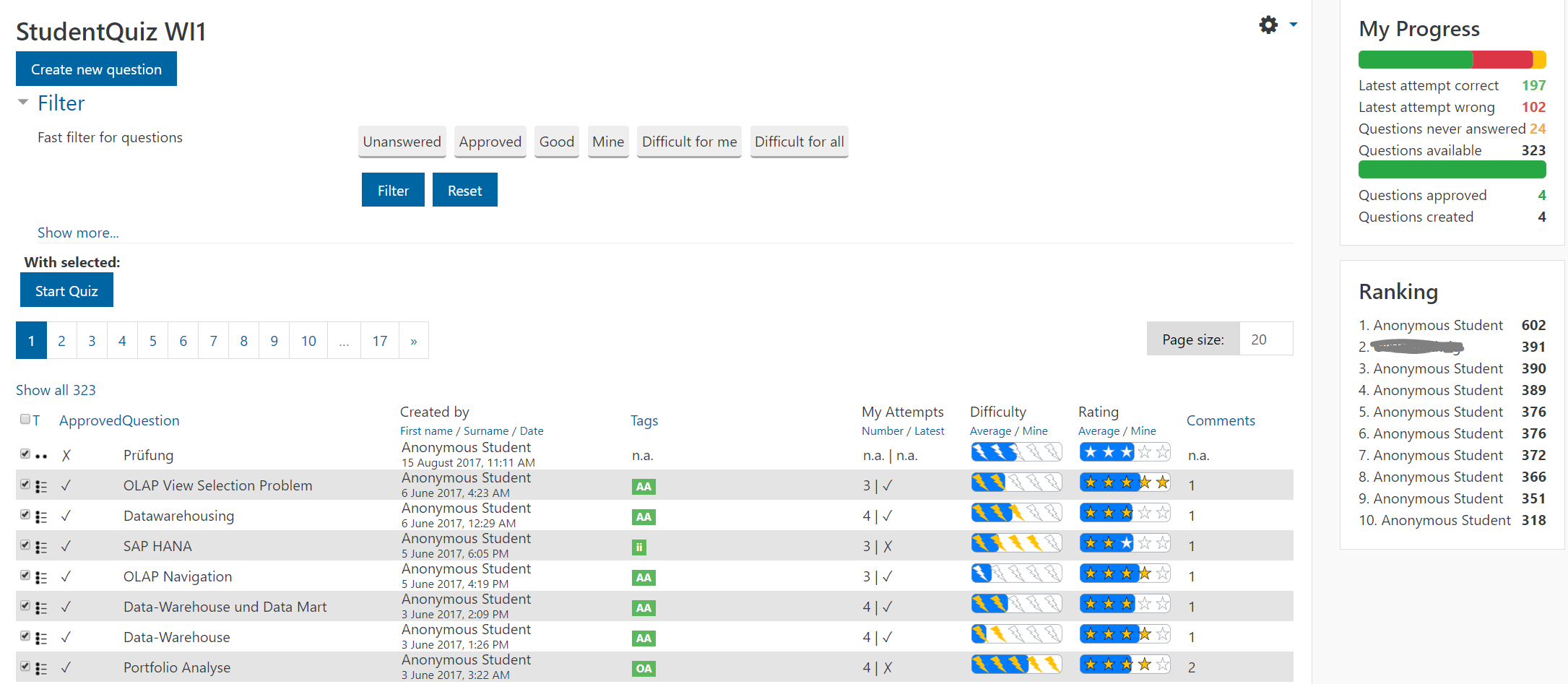
While prior versions of StudentQuiz provided students and teachers with insights on the difficulty and rating of questions by the community, our latest release enables every student to compare his own progress with the crowd.
A progress bar indicates how many of the available questions were answered correctly or incorrectly on the latest attempt or not at all by the individual student.
A table of the top 10 ranked students is now featured prominently on the main view as well.
Personalized question table for students
- Difficulty: The number of yellow bolts indicates how difficult this question is for you, the blue bar how difficult the question is for the community. Both values compare the number of correct answers to all answers given to a question.
- Rating: The number of yellow stars represent your own rating, the blue bar in the background the average rating by the community.
- Attempts: The number of your attempts, and a check mark if your last attempt was correct are displayed as well.
- The table is sortable by all of these new values as well.
Fast & personalised filtering
- Every student can now filter by specific values for personal difficulty and rating as well as his number of attempts and the correctness of his latest attempt.
- We provide new fast toggle filters to select a specific set of questions. E.g. with only 4 clicks a student can quickly filter for approved questions, with personal difficulty rating of more than 3 bolts and a crowd difficulty of more than 60%.
Ranking & Points
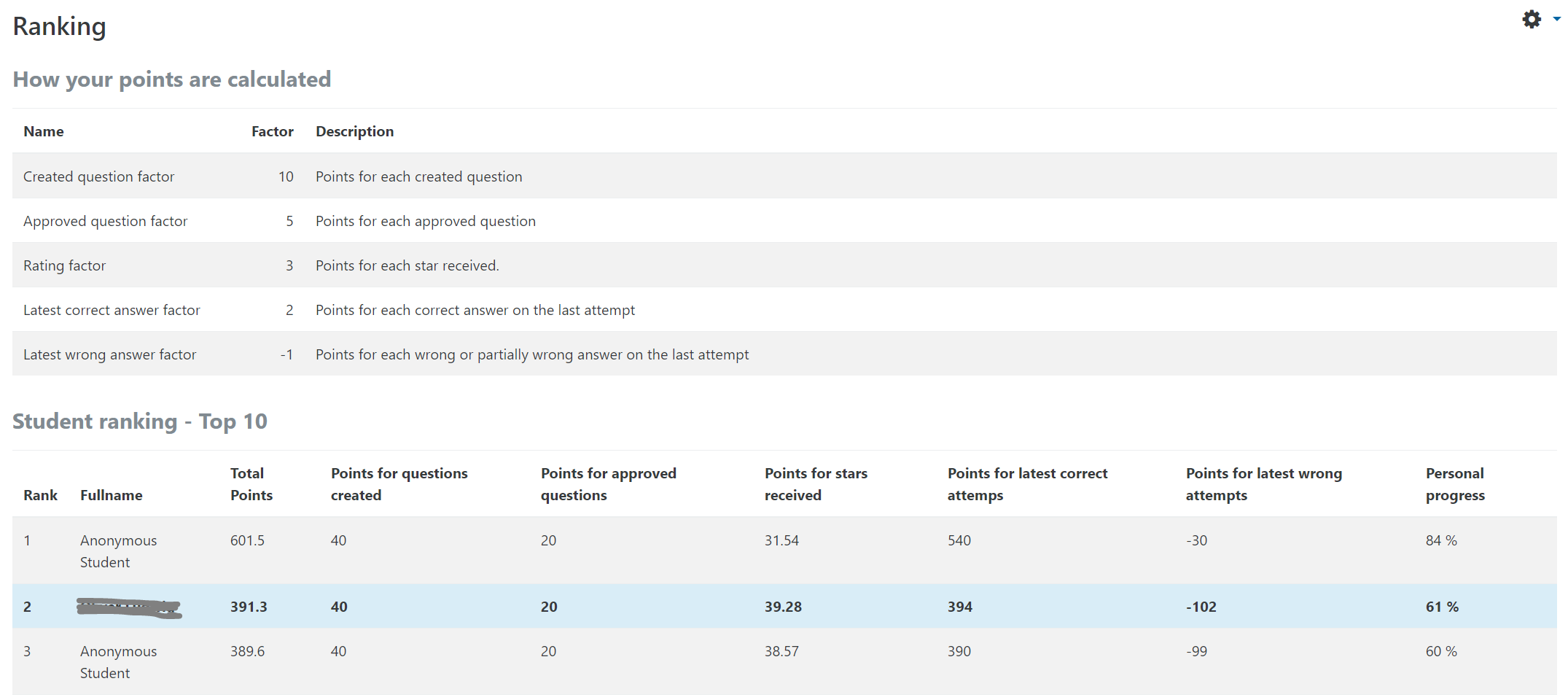
- A table explains the number of points a teacher awards students in this StudentQuiz activity for creating questions, approvals received, ratings received.
- In prior versions, point settings were set system wide. Now every teacher can configure them on activity level.
- Every student can see how his ranking points are calculated and how these values compare to the top 10 of this course.
- New value: Personal Progress: is defined to be 100% when all available questions have been answered correctly on the latest attempt.
Question types
Teachers can now restrict the allowed question types.
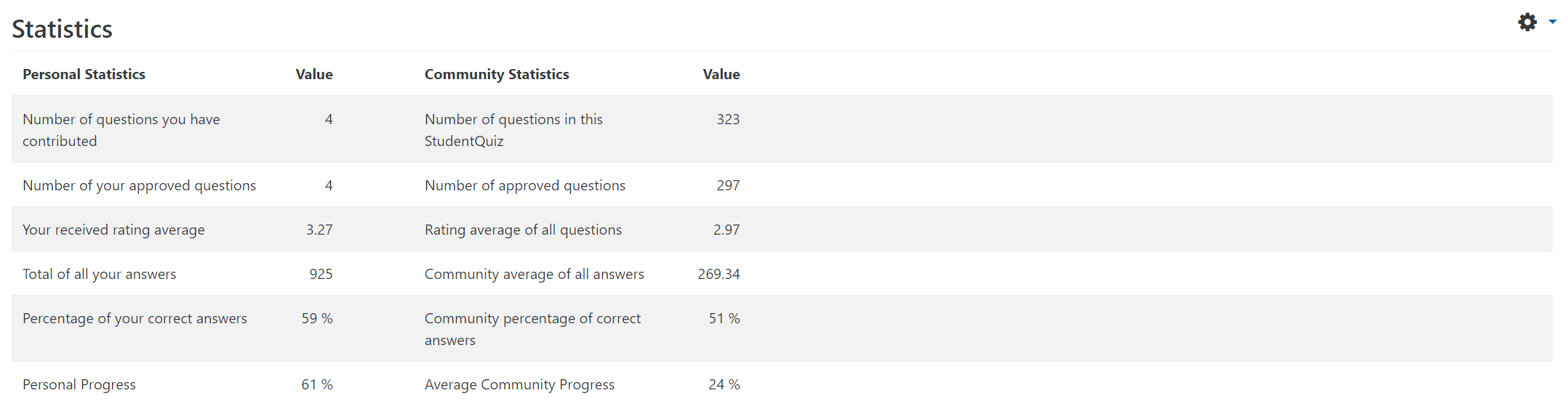
Statistics
We cleaned up the statistics view where every student can compare his efforts with the average values of the crowd.
Notifications
StudentQuiz now sends notifications to a question's author when it gets approved, changed or deleted by a teacher or commented by anyone. It also notifies the author of a comment if it was deleted by a teacher. These notifications should further encourage students to interact with the StudentQuiz activity in a course.
Under the hood
Performance
We significantly reduced the number of database queries StudentQuiz fires on "Start Quiz" or when calculating the ranking table. These changes will have a significant positive impact on the performance for all large-scale sites.
No more hidden sections or hidden Quiz instances
Prior versions of StudentQuiz depended on additional hidden Quiz instances in a hidden section.
We obliterated this dependency, which was a major redesign under the hood.
No more StudentQuiz Question behaviour
With this release StudentQuiz has no dependency on the StudentQuiz Question behaviour any more.
Rating and commenting features are now integrated into StudentQuiz.
No more entries in the gradebook
StudentQuiz no longer produces data for the grade book. We consider a StudentQuiz activity a fun and engaging tool to prepare students for assessments, and not to assess students.
Implementing Backup & Restore for StudentQuiz data
Former releases of StudentQuiz didn't implement the backup of rating, comment and question approval data, which are now backuped and therefore restorable.
Sophisticated upgrade & cleanup
Although this is a major update we implemented an upgrade procedure to migrate existing attempt and rating data generated with StudentQuiz activities with prior versions to our new data structure.
Also, if a course backup made with an older version of StudentQuiz gets restored, we cleanup the infamous 990+ empty sections automatically now. During the upgrade process, StudentQuiz tries to uninstall the StudentQuiz Question behaviour plugin.
Minor features
- Pagination size: The pagination size of the question table can now be set to the desired value.
- Tags are now displayed in the original case, so lowercase, CamelCase or UPPERCASE tags are displayed as such. Filtering by tags continues to be case insensitive.
- Questions can be moved up and down the category hierarchy by users with capabilities. (#24)
- Fixed a lot of small bugs.
- 100% translatable: Every string is now translatable with AMOS.
Thanks
We thank the Moodle community for all your helpful issue reports leading up to this release and all the continuous efforts by the AMOS translators.
v2.1.0 (2017110600)
v2.1.0
Plugin type: Activities
Frankenstyle component name: mod_studentquiz
Version build number: 2017110600
Version release name: v2.1.0
Maturity: Stable
Supported Moodle versions: 3.1, 3.2, 3.3, 3.4
Repository URL (Git): https://github.com/frankkoch/moodle-mod_studentquiz
Repository branch: master
Repository tag: v2.1.0
Issue/bug tracker URL: https://github.com/studentquiz/moodle-mod_studentquiz/issues
StudentQuiz
Students like preparatory questions for exams. However, it’s hard
to provide a large quantity of questions for all the self-assessments
and exams. That’s why the University of Applied Sciences Rapperswil
developed the Moodle plugin StudentQuiz. StudentQuiz enables students
to collaboratively create their own question pools within Moodle.
Even if an individual student contributes just a few questions, a large
cohort could easily build up an extensive question pool.
In StudentQuiz, students can filter questions into quizzes, and they
can rate and comment on questions while working through the quizzes.
StudentQuiz collects usage data, and assigns points to students for
creating questions and giving right answers. The created questions
become part of the Moodle question bank and can be reused in other
Moodle quizzes.
Find out more in our short introduction video.
We hope that StudentQuiz finds your interest.
For more information read the User-Manuel.
Installation
The StudentQuiz activity depends on the Quiz activity (installed by default).
The simplest way to install the StudentQuiz is by going to the Site administration -> Plugins -> Install plugins page.
License
Moodle Version
Supported is Moodle v3. Not tested with Moodle v2.
Copyright
Hochschule für Technik Rapperswil
v2.0.3 (2017053101)
v2.0.3
Plugin type: Activities
Frankenstyle component name: mod_studentquiz
Version build number: 2017053101
Version release name: v2.0.3
Maturity: Stable
Supported Moodle versions: 3.0, 3.1, 3.2, 3.3
Repository URL (Git): https://github.com/frankkoch/moodle-mod_studentquiz
Repository branch: master
Repository tag: v2.0.3
Issue/bug tracker URL: https://github.com/studentquiz/moodle-mod_studentquiz/issues
StudentQuiz
Students like preparatory questions for exams. However, it’s hard
to provide a large quantity of questions for all the self-assessments
and exams. That’s why the University of Applied Sciences Rapperswil
developed the Moodle plugin StudentQuiz. StudentQuiz enables students
to collaboratively create their own question pools within Moodle.
Even if an individual student contributes just a few questions, a large
cohort could easily build up an extensive question pool.
In StudentQuiz, students can filter questions into quizzes, and they
can rate and comment on questions while working through the quizzes.
StudentQuiz collects usage data, and assigns points to students for
creating questions and giving right answers. The created questions
become part of the Moodle question bank and can be reused in other
Moodle quizzes.
Find out more in our short introduction video.
We hope that StudentQuiz finds your interest.
For more information read the User-Manuel.
Installation
The StudentQuiz activity depends on the Quiz activity (installed by default).
The simplest way to install the StudentQuiz is by going to the Site administration -> Plugins -> Install plugins page.
License
Moodle Version
Supported is Moodle v3. Not tested with Moodle v2.
Copyright
Hochschule für Technik Rapperswil
v2.0.2 (2017040601)
v2.0.2
Plugin type: Activities
Frankenstyle component name: mod_studentquiz
Version build number: 2017040601
Version release name: v2.0.2
Maturity: Stable
Supported Moodle versions: 3.0, 3.1, 3.2
Repository URL (Git): https://github.com/frankkoch/moodle-mod_studentquiz
Repository branch: master
Repository tag: v2.0.2
Issue/bug tracker URL: https://github.com/studentquiz/moodle-mod_studentquiz/issues
StudentQuiz
Students like preparatory questions for exams. However, it’s hard
to provide a large quantity of questions for all the self-assessments
and exams. That’s why the University of Applied Sciences Rapperswil
developed the Moodle plugin StudentQuiz. StudentQuiz enables students
to collaboratively create their own question pools within Moodle.
Even if an individual student contributes just a few questions, a large
cohort could easily build up an extensive question pool.
In StudentQuiz, students can filter questions into quizzes, and they
can rate and comment on questions while working through the quizzes.
StudentQuiz collects usage data, and assigns points to students for
creating questions and giving right answers. The created questions
become part of the Moodle question bank and can be reused in other
Moodle quizzes.
Find out more in our short introduction video.
We hope that StudentQuiz finds your interest.
For more information read the User-Manuel.
Installation
The StudentQuiz activity depends on the Quiz activity (installed by default).
The simplest way to install the StudentQuiz is by going to the Site administration -> Plugins -> Install plugins page.
License
Moodle Version
Supported is Moodle v3. Not tested with Moodle v2.
Copyright
Hochschule für Technik Rapperswil
v2.0.0 (2017011301)
v2.0.0
Plugin type: Activities
Frankenstyle component name: mod_studentquiz
Version build number: 2017011301
Version release name: v2.0.0
Maturity: Stable
Supported Moodle versions: 3.0, 3.1, 3.2
Repository URL (Git): https://github.com/frankkoch/moodle-mod_studentquiz
Repository branch:
Repository tag: v2.0.0
Issue/bug tracker URL: https://github.com/studentquiz/moodle-mod_studentquiz/issues
StudentQuiz
Students like preparatory questions for exams. However, it’s hard
to provide a large quantity of questions for all the self-assessments
and exams. That’s why the University of Applied Sciences Rapperswil
developed the Moodle plugin StudentQuiz. StudentQuiz enables students
to collaboratively create their own question pools within Moodle.
Even if an individual student contributes just a few questions, a large
cohort could easily build up an extensive question pool.
In StudentQuiz, students can filter questions into quizzes, and they
can rate and comment on questions while working through the quizzes.
StudentQuiz collects usage data, and assigns points to students for
creating questions and giving right answers. The created questions
become part of the Moodle question bank and can be reused in other
Moodle quizzes.
Find out more in our short introduction video.
We hope that StudentQuiz finds your interest.
For more information read the User-Manuel.
Installation
The StudentQuiz activity depends on the Quiz activity (installed by default).
The simplest way to install the StudentQuiz is by going to the Site administration -> Plugins -> Install plugins page.
License
Moodle Version
Supported is Moodle v3. Not tested with Moodle v2.
Copyright
Hochschule für Technik Rapperswil
v1.0.10 (2016112400)
v1.0.10
Plugin type: Activities
Frankenstyle component name: mod_studentquiz
Version build number: 2016112400
Version release name: v1.0.10
Maturity: Stable
Supported Moodle versions: 3.0, 3.1, 3.2
Repository URL (Git): https://github.com/frankkoch/moodle-mod_studentquiz
Repository branch: master
Repository tag: v1.0.10
Issue/bug tracker URL: https://github.com/studentquiz/moodle-mod_studentquiz/issues
StudentQuiz
Students like preparatory questions for exams. However, it’s hard
to provide a large quantity of questions for all the self-assessments
and exams. That’s why the University of Applied Sciences Rapperswil
developed the Moodle plugin StudentQuiz. StudentQuiz enables students
to collaboratively create their own question pools within Moodle.
Even if an individual student contributes just a few questions, a large
cohort could easily build up an extensive question pool.
In StudentQuiz, students can filter questions into quizzes, and they
can rate and comment on questions while working through the quizzes.
StudentQuiz collects usage data, and assigns points to students for
creating questions and giving right answers. The created questions
become part of the Moodle question bank and can be reused in other
Moodle quizzes.
Find out more in our short introduction video.
We hope that StudentQuiz finds your interest.
For more information read the User-Manuel.
Installation
The StudentQuiz activity depends on the Quiz activity (installed by default).
The simplest way to install the StudentQuiz is by going to the Site administration -> Plugins -> Install plugins page.
License
Moodle Version
Supported is Moodle v3. Not tested with Moodle v2.
Copyright
Hochschule für Technik Rapperswil
v1.0.9 (2016110300)
v1.0.9
Plugin type: Activities
Frankenstyle component name: mod_studentquiz
Version build number: 2016110300
Version release name: v1.0.9
Maturity: Stable
Supported Moodle versions: 3.0, 3.1, 3.2
Repository URL (Git): https://github.com/frankkoch/moodle-mod_studentquiz
Repository branch:
Repository tag: v1.0.9
Issue/bug tracker URL: https://github.com/studentquiz/moodle-mod_studentquiz/issues
StudentQuiz
Students like preparatory questions for exams. However, it’s hard to provide a large quantity of questions for all the self-assessments and exams. That’s why the University of Applied Sciences Rapperswil developed the Moodle plugin StudentQuiz. StudentQuiz enables students to collaboratively create their own question pools within Moodle. Even if an individual student contributes just a few questions, a large cohort could easily build up an extensive question pool.
In StudentQuiz, students can filter questions into quizzes, and they can rate and comment on questions while working through the quizzes. StudentQuiz collects usage data, and assigns points to students for creating questions and giving right answers. The created questions become part of the Moodle question bank and can be reused in other Moodle quizzes.
Find out more in our short introduction video. We hope that StudentQuiz finds your interest.
Notes
See also the accompanying question behavior: qbehviour_studentquiz
Installation
The StudentQuiz activity depends on the Quiz activity (installed by default).
The simplest way to install the StudentQuiz is by going to the Site administration -> Plugins -> Install plugins page.
License
Moodle Version
Supported is Moodle v3. Not tested with Moodle v2.
Copyright
Hochschule für Technik Rapperswil