Advanced Notifications
Maintained by
Zander Potgieter
Easily create, manage and display notifications/alerts to users.
Comments
Comments are no longer open for new posts. Existing comments remain available to read.
In short, it's not currently possible to *push* notifications to groups or cohorts or the like, only to show them globally or a specific instance of a block.
Pull requests are always welcomed, while trying to keep the core principle of the plugin alive - keeping it simple and easy to use.
Thanks,
Zander
It would be great if it was possible to selectively display the block to members of specific cohorts.
Ricardo
More info here: https://github.com/learningworks/moodle-block_advnotifications/issues/24
This update also ensured the plugin supports Moodle v3.10!
Hope this helps!
Thanks,
Zander
I suspect it should still work for Moodle v3.10 - but I will test it soon and officially update it.
Thanks,
Zander
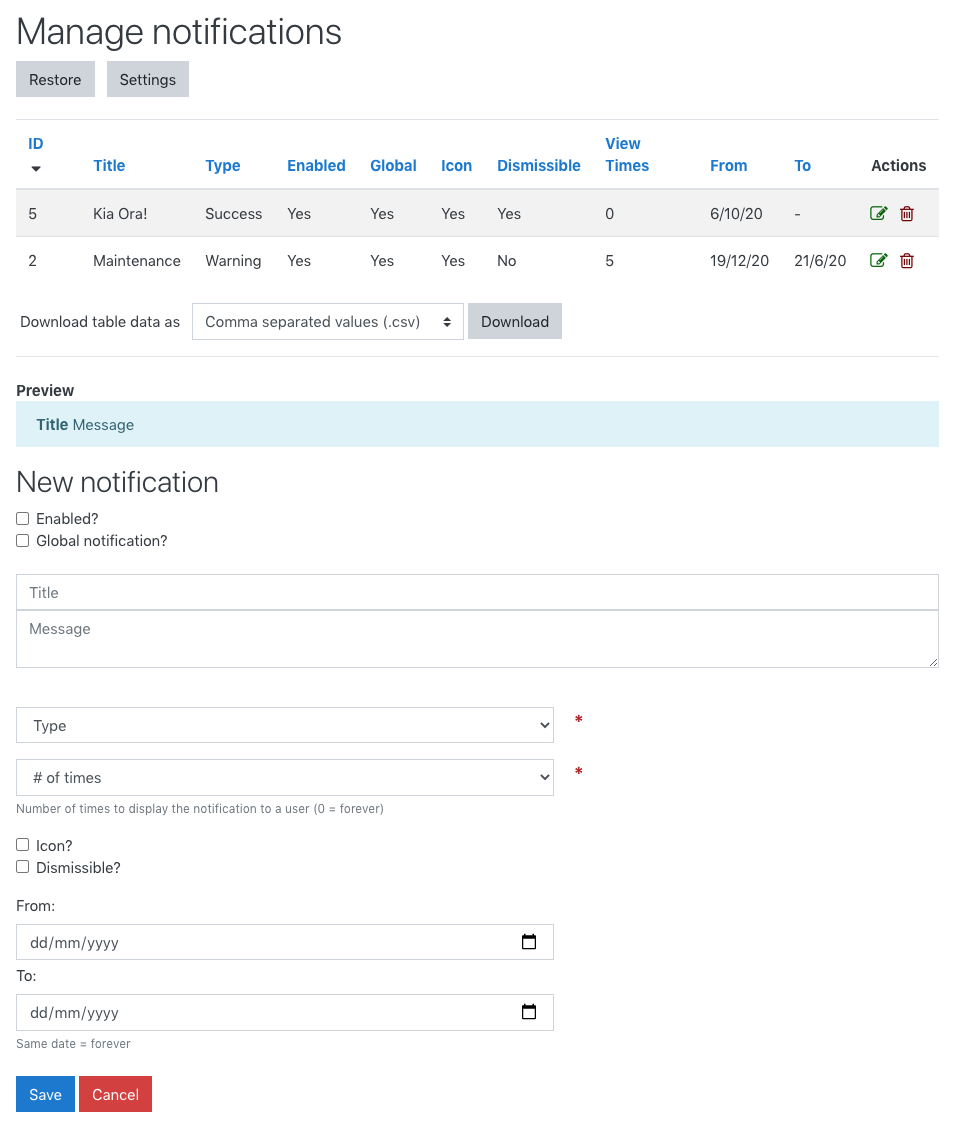
maybe you're looking for more than just this, but you should be able to do it by unticking the "Global notification?" checkbox when you create a notification. Global notifications show in all Advanced Notifications blocks (as global ones are usually very important - site going down for maintenance, etc), but if it's not global, it should only display for the block it was created in.
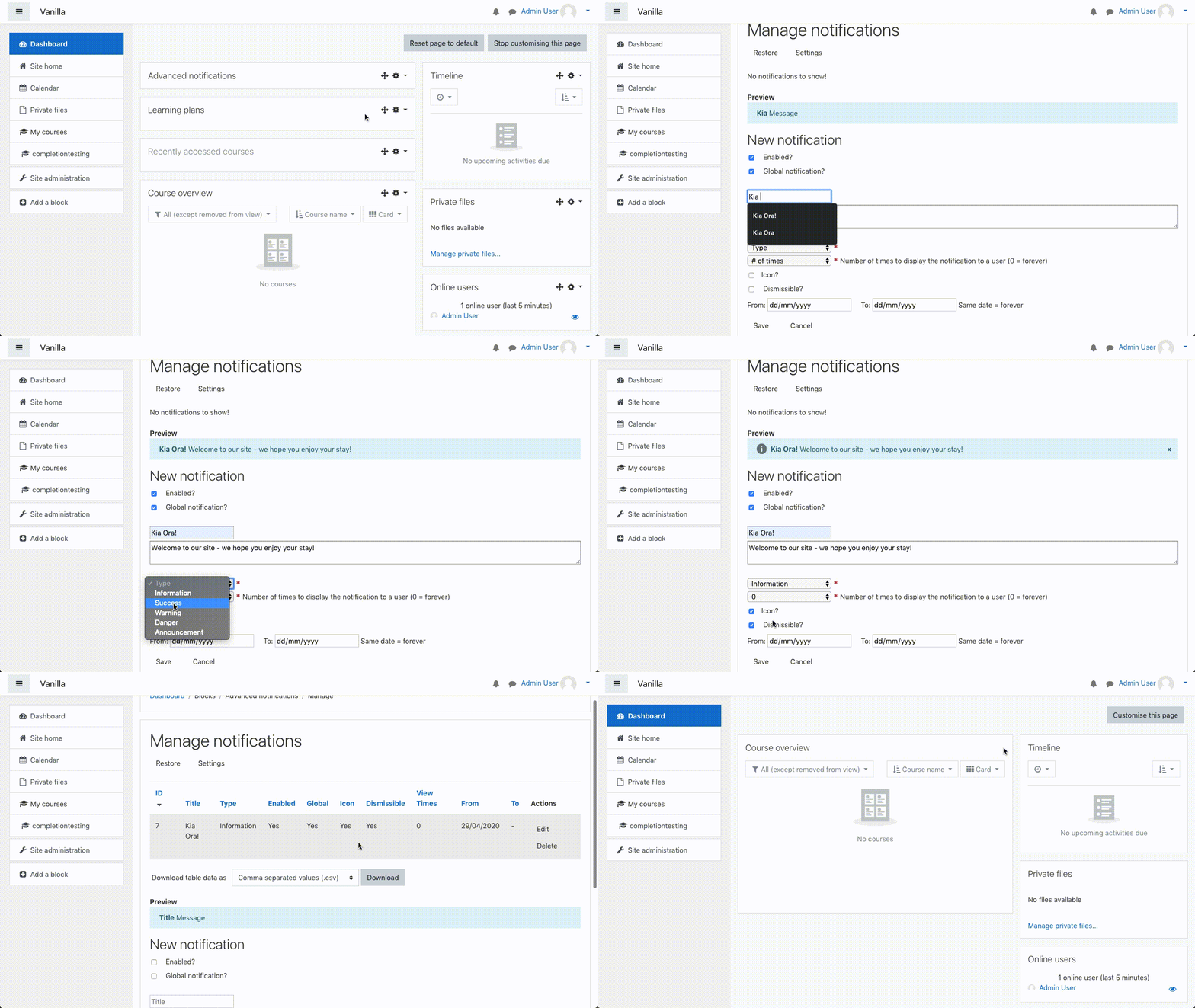
In short, you need to go into the course you want to add the unique message to, turn editing mode on, add the 'Advanced notifications' block, click the cog/configure button for the block and select "Manage notifications" from the dropdown, create the course-specific notification, make sure "Global notification?" is unchecked, click "Save". Your new notification should now only show in that course.
Two things to note:
* Global notifications are shown everywhere there is an Advanced Notifications block
* You need to create the non-global notification from the block you want it to appear in, and leave 'Global notification' unchecked.
Hope that helps!
Thanks,
Zander
I believe it will just show all notifications created when adding the block.
So, for example, I thought this was a brilliant solution as I wanted to put these Advanced Notifications into specific courses, so I can display course specific info messages/ notifications on a particular course.
However, It doesn't look like I can achieve this without the ability to select, which notification(s) should be displayed in any particular block added to a course or elsewhere.
Is there any chance of adding this feature as it would vastly improve the functionality and flexibility of this plugin?
Great job btw, just hoping I can use this in the above scenario.
Thanks,
Zander
Renee
I think this is a combination of being a bug and a feature I've been meaning to add. I've created an issue on GitHub - https://github.com/learningworks/moodle-block_advnotifications/issues/24 - to track this and fix it in (hopefully) the near future. Anyone is also free to submit a pull request to implement this if they have time.
Thanks,
Zander
Tuve que usar el Traductor de Google, lo siento si no está traducido correctamente ...
Sí, puede agregarlo a un solo curso y cualquier alerta que agregue a ese bloque solo aparecerá en ese bloque (no haga clic en "Notificación global" cuando lo configure).
Limitarlo solo a ciertos estudiantes en un curso aún no es realmente posible; no puede limitarse a usuarios o grupos específicos en un curso. Una forma de hacerlo es dar a los estudiantes un rol único en el curso, agregar el bloque al curso y establecer los permisos en el bloque para que solo ese rol pueda ver el bloque.
Espero que se haya traducido correctamente, de lo contrario, necesitaré algo de ayuda de la comunidad si ven esto.
Siéntase libre de crear un 'Problema' en GitHub o enviar una Solicitud de extracción. Espero que esto ayude.
Gracias,
Zander
---------------------------------------------
Hi there, Samuel!
I had to use Google Translate, so sorry if it's not translated correctly...
Yes, you can add it to a single course and any alerts you add to that block will only appear in that block (don't click "Global notification" when setting it up).
To limit it to only certain students in a course is not really possible yet - you can't limit to specific users or groups in a course. One way you could do it is to give the students a unique role in the course, add the block to the course and set the permissions on the block so only that role can see the block.
Hopefully that translated correctly, otherwise, I'll need some help from the community if they see this.
Feel free to create an 'Issue' on GitHub or submit a Pull Request. Hope this helps.
Thanks,
Zander
Habría alguna forma de que incrustarlo en la pagina de inicio de un curso, y que se pueda configurar para solamente un curso y para unos alumnos determinados
gracias
https://github.com/learningworks/moodle-block_advnotifications/issues/21