Coupon
Maintained by
Sebsoft BV, Rogier van Dongen
The Sebsoft Coupon Plugin offers you the possibility to create coupons for various levels
of course access. Using a coupon code, users will be enrolled into courses that are attached to the coupon.

Comments
Comments are no longer open for new posts. Existing comments remain available to read.
As I commented 2 years ago "Sun, Jan 3, 2016, 8:18 AM", Is it possible for registered users and guests to have a look at what activities and resources I have in a course first? If so, customers will be more persuasive before buying a course. A brief preview in the main course page not just a course summary.
* P/s:
+ Most payment gateways just give a link of the course and it's hard for course creators to buy. I hope your plugin will be different.
+ Just the same as when a guest access to a course, he/ she can see quizzes, assignments, forums...However, when he/ she hits the links, moodle will appear the popup to register or to enter the coupon code to continue (available in moodle)
Kind regards,
Changes for Version 3.3.1 (build 2017092501)
* Added coupon code to "progress report" for validation purposes (feature request by Michael Reen)
* Added claimed user to "used coupons" overview for validation purposes (feature request by Michael Reen)
The additions allow for specific tracking of coupon codes in case this would be needed. For instance if you provide students their own personal code, have this registered somewhere and you want to validate whether or not students do not use someone elses code, the reports can now show this.
Thus, In the aforementioned reports you will now find both the person who was claimed the coupon code as well as the code used.
Do note: this is only available for Moodle 3.3 and onwards. There's no plans as of yet to backport this to older versions.
Cheers!
how can I notify you -> I wrote you a message on moodle!
Best wishes!
Changes for Version 3.3.0 (build 2017092500)
* Fixed deprecated pix_url references (replaced by image_url)
* Minimum required Moodle version: 3.3
Cheers!
You could use the "Used coupons" overview tab along with the implemented filtering capabilities.
This will provide you an overview of the used coupons/vouchers along withy their code and the user it was assigned to.
If you'd wish to see extra filtering possibilities (for example a search on specific coupon/voucher codes), please notify me so we can incorporate it in a future release.
Cheers! Rogier
is it possible to see who (user account) used which coupon (for example AjsjS2jfkasajFJ2) to access the courses?
If one coupon was stolen, we would be able to deactivate the right account.
Best wishes!
Thank you very much for the coupon plug-in. It has been much usefull.
I'd like to ask you if you could update the plug-in in order to accept the Portuguese (Brazil) language.
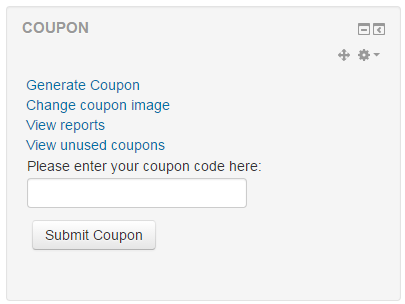
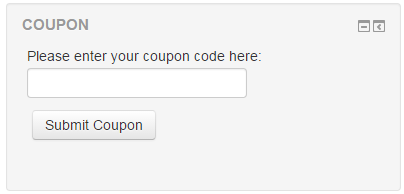
For instance, in the following print you can see the strings "CUPOM" and "Enviar Cupom" in Portuguese, but the string "Please enter your coupon code here:" in English.
Print screen: https://drive.google.com/file/d/0B2vYjTcyuOCpRFZOSkNIX3NJbkE/view?usp=sharing
Is it possible to correct ?
Thanks for your attention.
Thank you very much in advance
This resolves and issue with cohort enrolment coupons not functioning as intended.
Added is the possibility to disable including the QR Code in the generated coupons.
@Rekha: due to lack of time, we have yet to write a comprehensive manual. In short, the QR Code enables the possibility to process the coupon without having to type it in.
For example; when logged in in Moodle and on a device that can scan the QR Code, this method can be used to instantly scan the QR Code. The coupon code is instantly applied, so users do not have to type it in.
It also allows users to scan the QR Code and register with your website (providing the user isn't logged in yet). The signup form is the same as the "standard" form, but also has a input field that holds the coupon code. After successful registration, the coupon code for the new user will automatically be processed.
We're working on a manual to explain all capabilities and processes for the coupon block and hope to have it finished soon.
Cheers!
This resolves issue #14 where the page, after a successful login, redirects back to the customized signup page after choosing "I already have an account and want to login".
Cheers!
In this release we added the possibility for enrolment extension coupons on a course level.
The possibility to create enrolment extension coupons is available from the course administration menu (added as a new menu item).
We also added a webservices to generate coupon codes or coupons and request the progress reports.
In case of questions on functionality, don't hesitate to contact us.
Cheers!