
Soft Course format


Versions
Current version
4.7 (2026041601)
4.7
Plugin type: Course formats
Frankenstyle component name: format_softcourse
Version build number: 2026041601
Version release name: 4.7
Maturity: Stable
Supported Moodle versions: 5.2
Repository URL (Git): https://github.com/DigiDago/moodle-course_format_softcourse
Repository branch:
Repository tag: 4.7
Issue/bug tracker URL: https://github.com/DigiDago/moodle-course_format_softcourse/issues
🚀 Release Update (v5.2.1)
" Summary
This update addresses critical issues related to CSV imports and data persistence for courses, specifically when using the softcourse feature.
🐛 Bug Fixes
CSV Import/Update (Softcourse):
Resolved a conflict preventing the creation and update of courses via CSV when the softcourse is defined as format.
Fixed an issue where course descriptions were not being saved correctly in the database. All description fields now persist as expected after an update.
4.6 (2025102001)
4.6
Plugin type: Course formats
Frankenstyle component name: format_softcourse
Version build number: 2025102001
Version release name: 4.6
Maturity: Stable
Supported Moodle versions: 5.1
Repository URL (Git): https://github.com/DigiDago/moodle-course_format_softcourse
Repository branch: https://github.com/DigiDago/moodle-format_softcourse/tree/MOODLE_501_STABLE
Repository tag: 4.6
Issue/bug tracker URL: https://github.com/DigiDago/moodle-course_format_softcourse/issues
moodle-format_softcourse
Plugin Overview
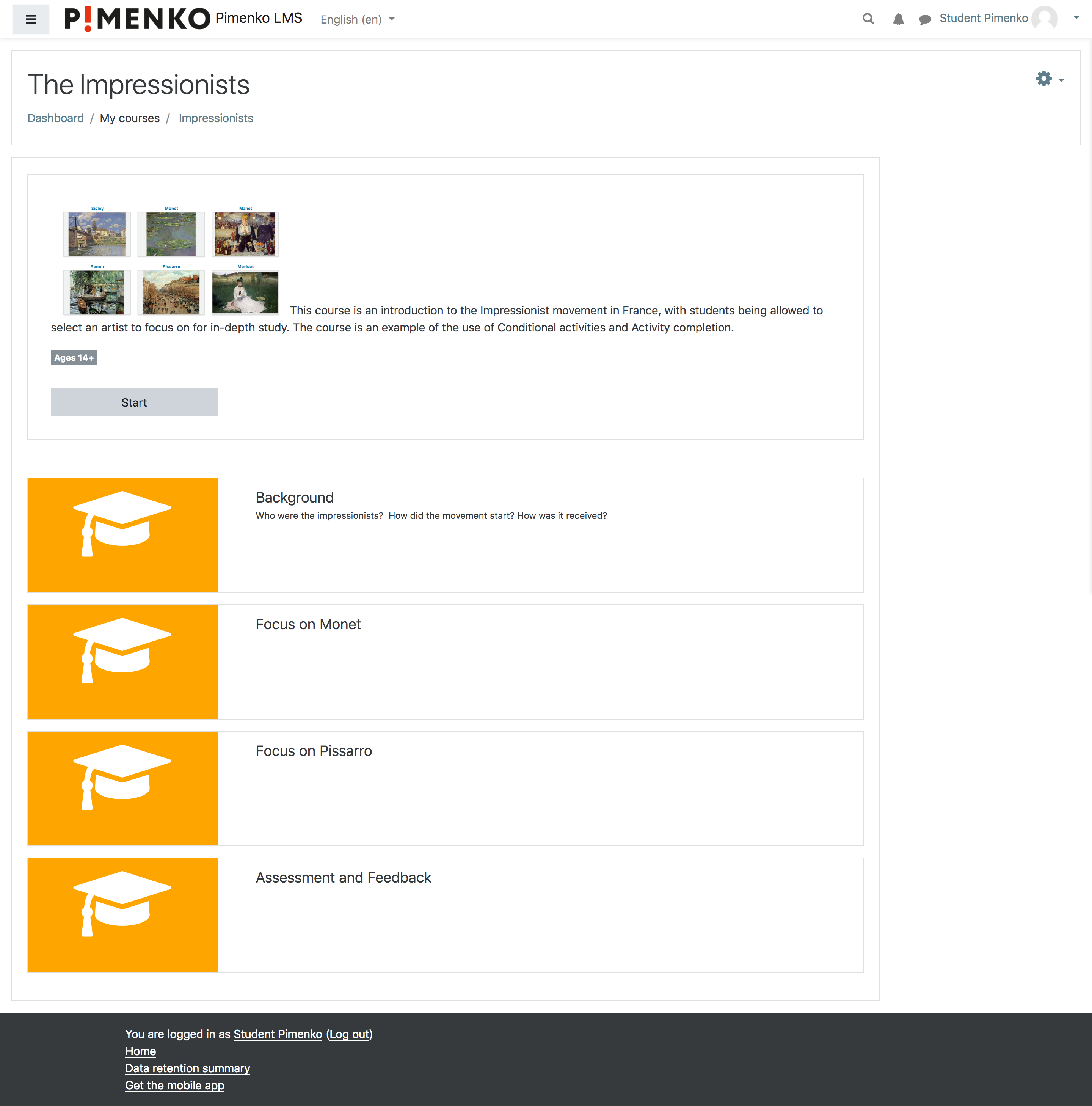
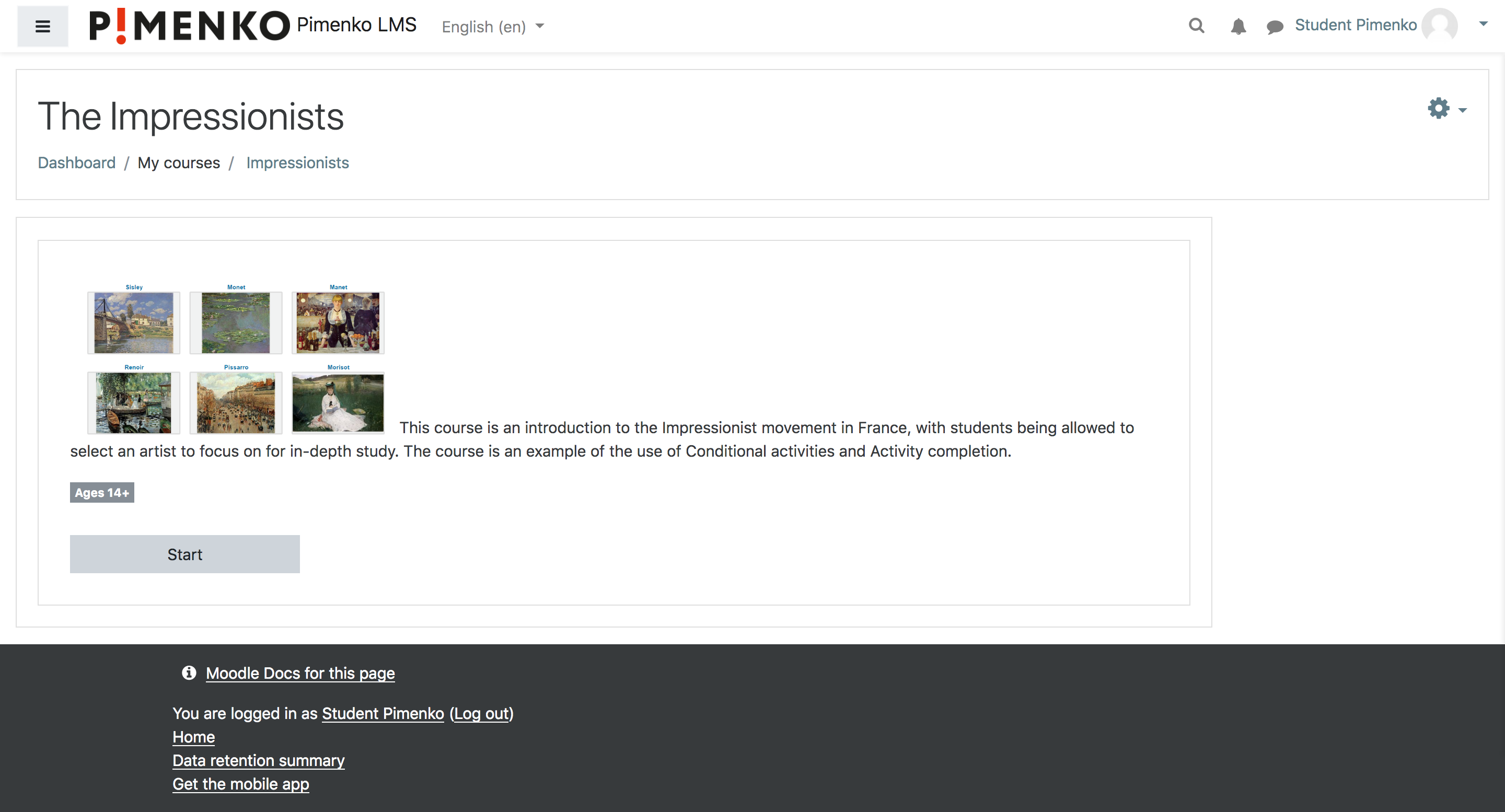
Softcourse is an innovative course format plugin for Moodle that enhances the visual presentation and organization of course content. It displays sections with images and optional text on the course homepage, providing a more engaging and intuitive navigation experience for learners.
Plugin Objectives
The main objectives of the Softcourse format are:
- Enhance Visual Appeal: Present course sections with images and text for a more attractive course layout.
- Improve Navigation: Offer an intuitive way for students to navigate through course content.
- Increase Engagement: Create a more interactive and engaging course homepage to motivate learners.
- Customize Course Presentation: Provide teachers with options to tailor the course appearance to their needs.
- Simplify Course Structure: Organize course content in a clear, visually-oriented manner.
Features
- Display course sections as image cards with optional text
- Customizable section images
- Option to hide all sections or only section zero
- Customizable course introduction
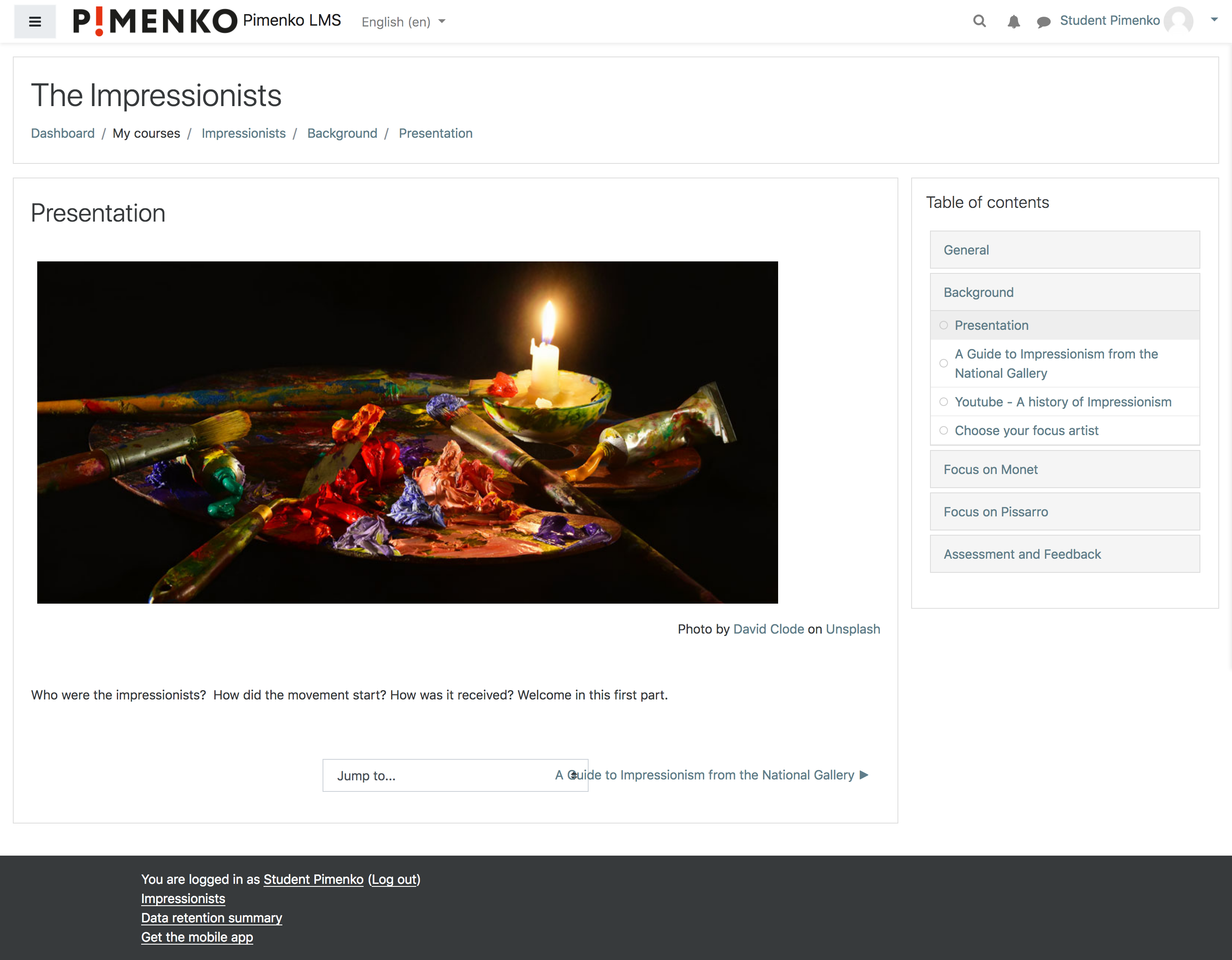
- Compatible with Moodle's course index for easy navigation
- Progression tracking for each section
- "Start" button for quick access to section content
- Activity count display for each section
- Responsive design, compatible with various themes including Boost
Requirements
- Moodle 3.5 or later (check version.php for specific version requirements)
- PHP 7.0 or later
Installation
- Download the plugin from GitHub or the Moodle plugins directory.
- Extract the contents to /course/format/softcourse in your Moodle installation.
- Log in as an administrator and visit the notifications page to complete the installation.
- Go to Site administration > Plugins > Course formats > Manage course formats and ensure that "Soft Course format" is enabled.
Usage
- Create a new course or edit an existing one.
- In the course settings, select "Soft Course format" as the course format.
- Customize the course sections, adding images and descriptions as desired.
- Save the changes and view the course to see the new layout.
Configuration
The plugin offers several configuration options:
- Hide all sections: Option to hide all course sections on the main page.
- Hide section zero: Option to hide the general section (section 0) of the course.
- Course introduction: Add an introduction text to be displayed on the course page.
- Section images: Upload and manage images for each course section.
Customization
You can further customize the appearance of the Softcourse format using CSS. Refer to the plugin's CSS files for specific selectors and classes.
Compatibility
Softcourse is compatible with Moodle 3.5 and later versions, including Moodle 4.0. It has been tested with various Moodle themes, including Boost.
Known Issues
- Text may be truncated if there are multiple paragraphs in the section description. Consider limiting the character count in section summaries.
Contributing
Contributions to the Softcourse format are welcome. Please submit pull requests to the GitHub repository.
Support
If you encounter any issues or have questions, please use the GitHub issue tracker or contact the maintainers.
License
This plugin is licensed under the GNU GPL v3 or later. See the LICENSE file for details.
Maintainer
The Softcourse format is currently maintained by:
Pimenko
- Email: contact@pimenko.com
- GitHub: https://github.com/DigiDago/moodle-format_softcourse
Acknowledgements
Softcourse was developed by Pimenko to enhance the learning experience in Moodle courses.
About Pimenko
Pimenko is a leading company specializing in Moodle development and e-learning solutions. With a team of experienced developers and e-learning experts, we are committed to creating innovative and high-quality plugins that enhance the Moodle experience for educators and learners alike.
Our Expertise
- Custom Moodle development
- Moodle plugin creation and maintenance
- E-learning platform optimization
- Moodle theme development
- Learning analytics solutions
Connect with Us
- Website: https://www.pimenko.com
- Email: contact@pimenko.com
- GitHub: https://github.com/DigiDago
- LinkedIn: Pimenko LinkedIn Profile
We are passionate about improving e-learning experiences through technology. If you have any questions about our services or need custom Moodle solutions, don't hesitate to reach out!
@copyright Pimenko https://www.pimenko.com
4.05.1 (2025011400)
4.05.1
Plugin type: Course formats
Frankenstyle component name: format_softcourse
Version build number: 2025011400
Version release name: 4.05.1
Maturity: Stable
Supported Moodle versions: 4.5, 5.0
Repository URL (Git): https://github.com/DigiDago/moodle-course_format_softcourse
Repository branch:
Repository tag: 4.05.1
Issue/bug tracker URL: https://github.com/DigiDago/moodle-course_format_softcourse/issues
moodle-format_softcourse
Plugin Overview
Softcourse is an innovative course format plugin for Moodle that enhances the visual presentation and organization of course content. It displays sections with images and optional text on the course homepage, providing a more engaging and intuitive navigation experience for learners.
Plugin Objectives
The main objectives of the Softcourse format are:
- Enhance Visual Appeal: Present course sections with images and text for a more attractive course layout.
- Improve Navigation: Offer an intuitive way for students to navigate through course content.
- Increase Engagement: Create a more interactive and engaging course homepage to motivate learners.
- Customize Course Presentation: Provide teachers with options to tailor the course appearance to their needs.
- Simplify Course Structure: Organize course content in a clear, visually-oriented manner.
Features
- Display course sections as image cards with optional text
- Customizable section images
- Option to hide all sections or only section zero
- Customizable course introduction
- Compatible with Moodle's course index for easy navigation
- Progression tracking for each section
- "Start" button for quick access to section content
- Activity count display for each section
- Responsive design, compatible with various themes including Boost
Requirements
- Moodle 4.5 or later (check version.php for specific version requirements)
- PHP 7.0 or later
Installation
- Download the plugin from GitHub or the Moodle plugins directory.
- Extract the contents to /course/format/softcourse in your Moodle installation.
- Log in as an administrator and visit the notifications page to complete the installation.
- Go to Site administration > Plugins > Course formats > Manage course formats and ensure that "Soft Course format" is enabled.
Usage
- Create a new course or edit an existing one.
- In the course settings, select "Soft Course format" as the course format.
- Customize the course sections, adding images and descriptions as desired.
- Save the changes and view the course to see the new layout.
Configuration
The plugin offers several configuration options:
- Hide all sections: Option to hide all course sections on the main page.
- Hide section zero: Option to hide the general section (section 0) of the course.
- Course introduction: Add an introduction text to be displayed on the course page.
- Section images: Upload and manage images for each course section.
Customization
You can further customize the appearance of the Softcourse format using CSS. Refer to the plugin's CSS files for specific selectors and classes.
Compatibility
Softcourse is compatible with Moodle 3.5 and later versions, including Moodle 4.0. It has been tested with various Moodle themes, including Boost.
Known Issues
- Text may be truncated if there are multiple paragraphs in the section description. Consider limiting the character count in section summaries.
Contributing
Contributions to the Softcourse format are welcome. Please submit pull requests to the GitHub repository.
Support
If you encounter any issues or have questions, please use the GitHub issue tracker or contact the maintainers.
License
This plugin is licensed under the GNU GPL v3 or later. See the LICENSE file for details.
Maintainer
The Softcourse format is currently maintained by:
Pimenko
- Email: contact@pimenko.com
- GitHub: https://github.com/DigiDago/moodle-format_softcourse
Acknowledgements
Softcourse was developed by Pimenko to enhance the learning experience in Moodle courses.
About Pimenko
Pimenko is a leading company specializing in Moodle development and e-learning solutions. With a team of experienced developers and e-learning experts, we are committed to creating innovative and high-quality plugins that enhance the Moodle experience for educators and learners alike.
Our Expertise
- Custom Moodle development
- Moodle plugin creation and maintenance
- E-learning platform optimization
- Moodle theme development
- Learning analytics solutions
Connect with Us
- Website: https://www.pimenko.com
- Email: contact@pimenko.com
- GitHub: https://github.com/DigiDago
- LinkedIn: Pimenko LinkedIn Profile
We are passionate about improving e-learning experiences through technology. If you have any questions about our services or need custom Moodle solutions, don't hesitate to reach out!
@copyright Pimenko https://www.pimenko.com
4.05 (2024101601)
4.05
Plugin type: Course formats
Frankenstyle component name: format_softcourse
Version build number: 2024101601
Version release name: 4.05
Maturity: Stable
Supported Moodle versions: 4.5
Repository URL (Git): https://github.com/DigiDago/moodle-course_format_softcourse
Repository branch:
Repository tag: 4.05
Issue/bug tracker URL: https://github.com/DigiDago/moodle-course_format_softcourse/issues
moodle-format_softcourse
Plugin Overview
Softcourse is an innovative course format plugin for Moodle that enhances the visual presentation and organization of course content. It displays sections with images and optional text on the course homepage, providing a more engaging and intuitive navigation experience for learners.
Plugin Objectives
The main objectives of the Softcourse format are:
- Enhance Visual Appeal: Present course sections with images and text for a more attractive course layout.
- Improve Navigation: Offer an intuitive way for students to navigate through course content.
- Increase Engagement: Create a more interactive and engaging course homepage to motivate learners.
- Customize Course Presentation: Provide teachers with options to tailor the course appearance to their needs.
- Simplify Course Structure: Organize course content in a clear, visually-oriented manner.
Features
- Display course sections as image cards with optional text
- Customizable section images
- Option to hide all sections or only section zero
- Customizable course introduction
- Compatible with Moodle's course index for easy navigation
- Progression tracking for each section
- "Start" button for quick access to section content
- Activity count display for each section
- Responsive design, compatible with various themes including Boost
Requirements
- Moodle 3.5 or later (check version.php for specific version requirements)
- PHP 7.0 or later
Installation
- Download the plugin from GitHub or the Moodle plugins directory.
- Extract the contents to /course/format/softcourse in your Moodle installation.
- Log in as an administrator and visit the notifications page to complete the installation.
- Go to Site administration > Plugins > Course formats > Manage course formats and ensure that "Soft Course format" is enabled.
Usage
- Create a new course or edit an existing one.
- In the course settings, select "Soft Course format" as the course format.
- Customize the course sections, adding images and descriptions as desired.
- Save the changes and view the course to see the new layout.
Configuration
The plugin offers several configuration options:
- Hide all sections: Option to hide all course sections on the main page.
- Hide section zero: Option to hide the general section (section 0) of the course.
- Course introduction: Add an introduction text to be displayed on the course page.
- Section images: Upload and manage images for each course section.
Customization
You can further customize the appearance of the Softcourse format using CSS. Refer to the plugin's CSS files for specific selectors and classes.
Compatibility
Softcourse is compatible with Moodle 3.5 and later versions, including Moodle 4.0. It has been tested with various Moodle themes, including Boost.
Known Issues
- Text may be truncated if there are multiple paragraphs in the section description. Consider limiting the character count in section summaries.
Contributing
Contributions to the Softcourse format are welcome. Please submit pull requests to the GitHub repository.
Support
If you encounter any issues or have questions, please use the GitHub issue tracker or contact the maintainers.
License
This plugin is licensed under the GNU GPL v3 or later. See the LICENSE file for details.
Maintainer
The Softcourse format is currently maintained by:
Pimenko
- Email: contact@pimenko.com
- GitHub: https://github.com/DigiDago/moodle-format_softcourse
Acknowledgements
Softcourse was developed by Pimenko to enhance the learning experience in Moodle courses.
About Pimenko
Pimenko is a leading company specializing in Moodle development and e-learning solutions. With a team of experienced developers and e-learning experts, we are committed to creating innovative and high-quality plugins that enhance the Moodle experience for educators and learners alike.
Our Expertise
- Custom Moodle development
- Moodle plugin creation and maintenance
- E-learning platform optimization
- Moodle theme development
- Learning analytics solutions
Connect with Us
- Website: https://www.pimenko.com
- Email: contact@pimenko.com
- GitHub: https://github.com/DigiDago
- LinkedIn: Pimenko LinkedIn Profile
We are passionate about improving e-learning experiences through technology. If you have any questions about our services or need custom Moodle solutions, don't hesitate to reach out!
@copyright Pimenko https://www.pimenko.com
4.04 (2024042401)
4.04
Plugin type: Course formats
Frankenstyle component name: format_softcourse
Version build number: 2024042401
Version release name: 4.04
Maturity: Stable
Supported Moodle versions: 4.4
Repository URL (Git): https://github.com/DigiDago/moodle-course_format_softcourse
Repository branch:
Repository tag: 4.04
Issue/bug tracker URL: https://github.com/DigiDago/moodle-course_format_softcourse/issues
Introduction
Softcourse is a course format for Moodle. Softcourse is a course format that display sections with only an image and an optional text on the course homepage.
Required version of Moodle
This version works with Moodle 4.04 only.
Please ensure that your hardware and software complies with 'Requirements' in 'Installing Moodle' on
'https://docs.moodle.org/404/en/Installing_Moodle'.
Installation
- Ensure you have the version of Moodle as stated above in 'Required version of Moodle'. This is essential as the
format relies on underlying core code that is out of our control. - Put Moodle in 'Maintenance Mode' (docs.moodle.org/en/admin/setting/maintenancemode) so that there are no
users using it bar you as the administrator - if you have not already done so. - Copy 'softcourse' to '/course/format/' if you have not already done so.
- Login as an administrator and follow standard the 'plugin' update notification. If needed, go to
'Site administration' -> 'Notifications' if this does not happen. - Put Moodle out of Maintenance Mode.
Upgrade Instructions
- Ensure you have the version of Moodle as stated above in 'Required version of Moodle'. This is essential as the
format relies on underlying core code that is out of my control. - Put Moodle in 'Maintenance Mode' so that there are no users using it bar you as the administrator.
- In '/course/format/' move old 'softcourse' directory to a backup folder outside of Moodle.
- Follow installation instructions above.
- If automatic 'Purge all caches' appears not to work by lack of display etc. then perform a manual 'Purge all caches'
under 'Home -> Site administration -> Development -> Purge all caches'. - Put Moodle out of Maintenance Mode.
Uninstallation
- Put Moodle in 'Maintenance Mode' so that there are no users using it bar you as the administrator.
- It is recommended but not essential to change all of the courses that use the format to another. If this is
not done Moodle will pick the last format in your list of formats to use but display in 'Edit settings' of the
course the first format in the list. You can then set the desired format. - In '/course/format/' remove the folder 'softcourse'.
- Put Moodle out of Maintenance Mode.
Version Information
See Changes.md.
Us
Pimenko Team
4.03 (2023101700)
4.03
Plugin type: Course formats
Frankenstyle component name: format_softcourse
Version build number: 2023101700
Version release name: 4.03
Maturity: Stable
Supported Moodle versions: 4.1, 4.2, 4.3
Repository URL (Git): https://github.com/DigiDago/moodle-course_format_softcourse
Repository branch:
Repository tag: 4.03
Issue/bug tracker URL: https://github.com/DigiDago/moodle-course_format_softcourse/issues
Introduction
Softcourse is a course format for Moodle. Softcourse is a course format that display sections with only an image and an optional text on the course homepage.
Required version of Moodle
This version works with Moodle version 2018050800 and above within the 3.5 branch until the
next release.
Please ensure that your hardware and software complies with 'Requirements' in 'Installing Moodle' on
'docs.moodle.org/35/en/Installing_Moodle'.
Installation
- Ensure you have the version of Moodle as stated above in 'Required version of Moodle'. This is essential as the
format relies on underlying core code that is out of our control. - Put Moodle in 'Maintenance Mode' (docs.moodle.org/en/admin/setting/maintenancemode) so that there are no
users using it bar you as the administrator - if you have not already done so. - Copy 'softcourse' to '/course/format/' if you have not already done so.
- Login as an administrator and follow standard the 'plugin' update notification. If needed, go to
'Site administration' -> 'Notifications' if this does not happen. - Put Moodle out of Maintenance Mode.
Upgrade Instructions
- Ensure you have the version of Moodle as stated above in 'Required version of Moodle'. This is essential as the
format relies on underlying core code that is out of my control. - Put Moodle in 'Maintenance Mode' so that there are no users using it bar you as the administrator.
- In '/course/format/' move old 'softcourse' directory to a backup folder outside of Moodle.
- Follow installation instructions above.
- If automatic 'Purge all caches' appears not to work by lack of display etc. then perform a manual 'Purge all caches'
under 'Home -> Site administration -> Development -> Purge all caches'. - Put Moodle out of Maintenance Mode.
Uninstallation
- Put Moodle in 'Maintenance Mode' so that there are no users using it bar you as the administrator.
- It is recommended but not essential to change all of the courses that use the format to another. If this is
not done Moodle will pick the last format in your list of formats to use but display in 'Edit settings' of the
course the first format in the list. You can then set the desired format. - In '/course/format/' remove the folder 'softcourse'.
- Put Moodle out of Maintenance Mode.
Version Information
See Changes.md.
Us
Pimenko Team
4.01 (2022121300)
4.01
Plugin type: Course formats
Frankenstyle component name: format_softcourse
Version build number: 2022121300
Version release name: 4.01
Maturity: Stable
Supported Moodle versions: 4.0, 4.1, 4.2
Repository URL (Git): https://github.com/DigiDago/moodle-course_format_softcourse
Repository branch:
Repository tag: 4.01
Issue/bug tracker URL: https://github.com/DigiDago/moodle-course_format_softcourse/issues
Introduction
Softcourse is a course format for Moodle. Softcourse is a course format that display sections with only an image and an optional text on the course homepage.
Required version of Moodle
This version works with Moodle version 2018050800 and above within the 3.5 branch until the
next release.
Please ensure that your hardware and software complies with 'Requirements' in 'Installing Moodle' on
'docs.moodle.org/35/en/Installing_Moodle'.
Installation
- Ensure you have the version of Moodle as stated above in 'Required version of Moodle'. This is essential as the
format relies on underlying core code that is out of our control. - Put Moodle in 'Maintenance Mode' (docs.moodle.org/en/admin/setting/maintenancemode) so that there are no
users using it bar you as the administrator - if you have not already done so. - Copy 'softcourse' to '/course/format/' if you have not already done so.
- Login as an administrator and follow standard the 'plugin' update notification. If needed, go to
'Site administration' -> 'Notifications' if this does not happen. - Put Moodle out of Maintenance Mode.
Upgrade Instructions
- Ensure you have the version of Moodle as stated above in 'Required version of Moodle'. This is essential as the
format relies on underlying core code that is out of my control. - Put Moodle in 'Maintenance Mode' so that there are no users using it bar you as the administrator.
- In '/course/format/' move old 'softcourse' directory to a backup folder outside of Moodle.
- Follow installation instructions above.
- If automatic 'Purge all caches' appears not to work by lack of display etc. then perform a manual 'Purge all caches'
under 'Home -> Site administration -> Development -> Purge all caches'. - Put Moodle out of Maintenance Mode.
Uninstallation
- Put Moodle in 'Maintenance Mode' so that there are no users using it bar you as the administrator.
- It is recommended but not essential to change all of the courses that use the format to another. If this is
not done Moodle will pick the last format in your list of formats to use but display in 'Edit settings' of the
course the first format in the list. You can then set the desired format. - In '/course/format/' remove the folder 'softcourse'.
- Put Moodle out of Maintenance Mode.
Version Information
See Changes.md.
Us
Pimenko Team
4.00rc1.2 (2022041301)
4.00rc1.2
Plugin type: Course formats
Frankenstyle component name: format_softcourse
Version build number: 2022041301
Version release name: 4.00rc1.2
Maturity: Stable
Supported Moodle versions: 4.0
Repository URL (Git): https://github.com/DigiDago/moodle-course_format_softcourse
Repository branch: git@github.com:DigiDago/moodle-format_softcourse.git
Repository tag: 4.00rc1.2
Issue/bug tracker URL: https://github.com/DigiDago/moodle-course_format_softcourse/issues
Introduction
Softcourse is a course format for Moodle. Softcourse is a course format that display sections with only an image and an optional text on the course homepage.
Required version of Moodle
This version works with Moodle version 2018050800 and above within the 3.5 branch until the
next release.
Please ensure that your hardware and software complies with 'Requirements' in 'Installing Moodle' on
'docs.moodle.org/35/en/Installing_Moodle'.
Installation
- Ensure you have the version of Moodle as stated above in 'Required version of Moodle'. This is essential as the
format relies on underlying core code that is out of our control. - Put Moodle in 'Maintenance Mode' (docs.moodle.org/en/admin/setting/maintenancemode) so that there are no
users using it bar you as the administrator - if you have not already done so. - Copy 'softcourse' to '/course/format/' if you have not already done so.
- Login as an administrator and follow standard the 'plugin' update notification. If needed, go to
'Site administration' -> 'Notifications' if this does not happen. - Put Moodle out of Maintenance Mode.
Upgrade Instructions
- Ensure you have the version of Moodle as stated above in 'Required version of Moodle'. This is essential as the
format relies on underlying core code that is out of my control. - Put Moodle in 'Maintenance Mode' so that there are no users using it bar you as the administrator.
- In '/course/format/' move old 'softcourse' directory to a backup folder outside of Moodle.
- Follow installation instructions above.
- If automatic 'Purge all caches' appears not to work by lack of display etc. then perform a manual 'Purge all caches'
under 'Home -> Site administration -> Development -> Purge all caches'. - Put Moodle out of Maintenance Mode.
Uninstallation
- Put Moodle in 'Maintenance Mode' so that there are no users using it bar you as the administrator.
- It is recommended but not essential to change all of the courses that use the format to another. If this is
not done Moodle will pick the last format in your list of formats to use but display in 'Edit settings' of the
course the first format in the list. You can then set the desired format. - In '/course/format/' remove the folder 'softcourse'.
- Put Moodle out of Maintenance Mode.
Version Information
See Changes.md.
Us
Pimenko Team
3.11rc1.2 (2021051202)
3.11rc1.2
Plugin type: Course formats
Frankenstyle component name: format_softcourse
Version build number: 2021051202
Version release name: 3.11rc1.2
Maturity: Stable
Supported Moodle versions: 3.10, 3.11, 3.9
Repository URL (Git): https://github.com/DigiDago/moodle-course_format_softcourse
Repository branch:
Repository tag: 3.11rc1.2
Issue/bug tracker URL: https://github.com/DigiDago/moodle-course_format_softcourse/issues
Introduction
Softcourse is a course format for Moodle. Softcourse is a course format that display sections with only an image and an optional text on the course homepage.
Required version of Moodle
This version works with Moodle version 2018050800 and above within the 3.9 branch until the
next release.
Please ensure that your hardware and software complies with 'Requirements' in 'Installing Moodle' on
'docs.moodle.org/35/en/Installing_Moodle'.
Installation
- Ensure you have the version of Moodle as stated above in 'Required version of Moodle'. This is essential as the
format relies on underlying core code that is out of our control. - Put Moodle in 'Maintenance Mode' (docs.moodle.org/en/admin/setting/maintenancemode) so that there are no
users using it bar you as the administrator - if you have not already done so. - Copy 'softcourse' to '/course/format/' if you have not already done so.
- Login as an administrator and follow standard the 'plugin' update notification. If needed, go to
'Site administration' -> 'Notifications' if this does not happen. - Put Moodle out of Maintenance Mode.
Upgrade Instructions
- Ensure you have the version of Moodle as stated above in 'Required version of Moodle'. This is essential as the
format relies on underlying core code that is out of my control. - Put Moodle in 'Maintenance Mode' so that there are no users using it bar you as the administrator.
- In '/course/format/' move old 'softcourse' directory to a backup folder outside of Moodle.
- Follow installation instructions above.
- If automatic 'Purge all caches' appears not to work by lack of display etc. then perform a manual 'Purge all caches'
under 'Home -> Site administration -> Development -> Purge all caches'. - Put Moodle out of Maintenance Mode.
Uninstallation
- Put Moodle in 'Maintenance Mode' so that there are no users using it bar you as the administrator.
- It is recommended but not essential to change all of the courses that use the format to another. If this is
not done Moodle will pick the last format in your list of formats to use but display in 'Edit settings' of the
course the first format in the list. You can then set the desired format. - In '/course/format/' remove the folder 'softcourse'.
- Put Moodle out of Maintenance Mode.
Version Information
- Fix a problem when the first activity is of type label
- Fix a problem with the default color not taken into account, when brandcolor is not define.
- Improves the indentation of the css file
Us
Pimenko Team
3.11rc1 (2021051201)
3.11rc1
Plugin type: Course formats
Frankenstyle component name: format_softcourse
Version build number: 2021051201
Version release name: 3.11rc1
Maturity: Stable
Supported Moodle versions: 3.10, 3.11, 3.9
Repository URL (Git): https://github.com/DigiDago/moodle-course_format_softcourse
Repository branch:
Repository tag: 3.11rc1
Issue/bug tracker URL: https://github.com/DigiDago/moodle-course_format_softcourse/issues
Introduction
Softcourse is a course format for Moodle. Softcourse is a course format that display sections with only an image and an optional text on the course homepage.
Required version of Moodle
This version works with Moodle version 2018050800 and above within the 3.5 branch until the
next release.
Please ensure that your hardware and software complies with 'Requirements' in 'Installing Moodle' on
'docs.moodle.org/35/en/Installing_Moodle'.
Installation
- Ensure you have the version of Moodle as stated above in 'Required version of Moodle'. This is essential as the
format relies on underlying core code that is out of our control. - Put Moodle in 'Maintenance Mode' (docs.moodle.org/en/admin/setting/maintenancemode) so that there are no
users using it bar you as the administrator - if you have not already done so. - Copy 'softcourse' to '/course/format/' if you have not already done so.
- Login as an administrator and follow standard the 'plugin' update notification. If needed, go to
'Site administration' -> 'Notifications' if this does not happen. - Put Moodle out of Maintenance Mode.
Upgrade Instructions
- Ensure you have the version of Moodle as stated above in 'Required version of Moodle'. This is essential as the
format relies on underlying core code that is out of my control. - Put Moodle in 'Maintenance Mode' so that there are no users using it bar you as the administrator.
- In '/course/format/' move old 'softcourse' directory to a backup folder outside of Moodle.
- Follow installation instructions above.
- If automatic 'Purge all caches' appears not to work by lack of display etc. then perform a manual 'Purge all caches'
under 'Home -> Site administration -> Development -> Purge all caches'. - Put Moodle out of Maintenance Mode.
Uninstallation
- Put Moodle in 'Maintenance Mode' so that there are no users using it bar you as the administrator.
- It is recommended but not essential to change all of the courses that use the format to another. If this is
not done Moodle will pick the last format in your list of formats to use but display in 'Edit settings' of the
course the first format in the list. You can then set the desired format. - In '/course/format/' remove the folder 'softcourse'.
- Put Moodle out of Maintenance Mode.
Version Information
See Changes.md.
- Fixed learners will no longer see the hidden section
- Fixed a display issue with the number of activities on the section thumbnail does not match the number of activities visible to learners
- Fix issue when 1st activity is a ressource link will crash, also fix some report made by stylelint
- Fix issues with restrict sessions or activities
Section with only restricted/hide activities will no longer be displayed
Us
Pimenko Team
v3.10-r2 (2020062014)
v3.10-r2
Plugin type: Course formats
Frankenstyle component name: format_softcourse
Version build number: 2020062014
Version release name: v3.10-r2
Maturity: Stable
Supported Moodle versions: 3.10, 3.9
Repository URL (Git): https://github.com/DigiDago/moodle-course_format_softcourse
Repository branch:
Repository tag: v3.10-r2
Issue/bug tracker URL: https://github.com/DigiDago/moodle-course_format_softcourse/issues
Introduction
Softcourse is a course format for Moodle. Softcourse is a course format that display sections with only an image and an optional text on the course homepage.
Required version of Moodle
This version works with Moodle build version 20210204 and above until the next release.
Please ensure that your hardware and software complies with 'Requirements' in 'Installing Moodle' on
'docs.moodle.org/35/en/Installing_Moodle'.
Installation
- Ensure you have the version of Moodle as stated above in 'Required version of Moodle'. This is essential as the
format relies on underlying core code that is out of our control. - Put Moodle in 'Maintenance Mode' (docs.moodle.org/en/admin/setting/maintenancemode) so that there are no
users using it bar you as the administrator - if you have not already done so. - Copy 'softcourse' to '/course/format/' if you have not already done so.
- Login as an administrator and follow standard the 'plugin' update notification. If needed, go to
'Site administration' -> 'Notifications' if this does not happen. - Put Moodle out of Maintenance Mode.
Upgrade Instructions
- Ensure you have the version of Moodle as stated above in 'Required version of Moodle'. This is essential as the
format relies on underlying core code that is out of my control. - Put Moodle in 'Maintenance Mode' so that there are no users using it bar you as the administrator.
- In '/course/format/' move old 'softcourse' directory to a backup folder outside of Moodle.
- Follow installation instructions above.
- If automatic 'Purge all caches' appears not to work by lack of display etc. then perform a manual 'Purge all caches'
under 'Home -> Site administration -> Development -> Purge all caches'. - Put Moodle out of Maintenance Mode.
Uninstallation
- Put Moodle in 'Maintenance Mode' so that there are no users using it bar you as the administrator.
- It is recommended but not essential to change all of the courses that use the format to another. If this is
not done Moodle will pick the last format in your list of formats to use but display in 'Edit settings' of the
course the first format in the list. You can then set the desired format. - In '/course/format/' remove the folder 'softcourse'.
- Put Moodle out of Maintenance Mode.
Version Information
- Fix an issue with multi-lang content
- Fix incorrect use of the $PAGE variable in the renderer file, credits @ewallah
- Fix some dependencies outdated
Us
Pimenko Team
1.0 (2019103100)
1.0
Plugin type: Course formats
Frankenstyle component name: format_softcourse
Version build number: 2019103100
Version release name: 1.0
Maturity: Stable
Supported Moodle versions: 3.6, 3.7
Repository URL (Git): https://github.com/DigiDago/moodle-format_softcourse
Repository branch:
Repository tag: v5-moodle37-and-previous
Issue/bug tracker URL: https://github.com/DigiDago/moodle-course_format_softcourse/issues
Introduction
Softcourse is a course format for Moodle. Softcourse is a course format that display sections with only an image and an optional text on the course homepage.
Required version of Moodle
This version works with Moodle version 2018050800 and above within the 3.5 branch until the
next release.
Please ensure that your hardware and software complies with 'Requirements' in 'Installing Moodle' on
'docs.moodle.org/35/en/Installing_Moodle'.
Installation
- Ensure you have the version of Moodle as stated above in 'Required version of Moodle'. This is essential as the
format relies on underlying core code that is out of our control. - Put Moodle in 'Maintenance Mode' (docs.moodle.org/en/admin/setting/maintenancemode) so that there are no
users using it bar you as the administrator - if you have not already done so. - Copy 'softcourse' to '/course/format/' if you have not already done so.
- Login as an administrator and follow standard the 'plugin' update notification. If needed, go to
'Site administration' -> 'Notifications' if this does not happen. - Put Moodle out of Maintenance Mode.
Upgrade Instructions
- Ensure you have the version of Moodle as stated above in 'Required version of Moodle'. This is essential as the
format relies on underlying core code that is out of my control. - Put Moodle in 'Maintenance Mode' so that there are no users using it bar you as the administrator.
- In '/course/format/' move old 'softcourse' directory to a backup folder outside of Moodle.
- Follow installation instructions above.
- If automatic 'Purge all caches' appears not to work by lack of display etc. then perform a manual 'Purge all caches'
under 'Home -> Site administration -> Development -> Purge all caches'. - Put Moodle out of Maintenance Mode.
Uninstallation
- Put Moodle in 'Maintenance Mode' so that there are no users using it bar you as the administrator.
- It is recommended but not essential to change all of the courses that use the format to another. If this is
not done Moodle will pick the last format in your list of formats to use but display in 'Edit settings' of the
course the first format in the list. You can then set the desired format. - In '/course/format/' remove the folder 'softcourse'.
- Put Moodle out of Maintenance Mode.
Version Information
See Changes.md.
Us
Pimenko Team
1.0 (2018111500)
1.0
Plugin type: Course formats
Frankenstyle component name: format_softcourse
Version build number: 2018111500
Version release name: 1.0
Maturity: Stable
Supported Moodle versions: 3.5, 3.6, 3.7
Repository URL (Git): https://github.com/DigiDago/moodle-format_softcourse
Repository branch:
Repository tag:
Issue/bug tracker URL: https://github.com/DigiDago/moodle-course_format_softcourse/issues
Introduction
Softcourse is a course format for Moodle. Softcourse is a course format that display sections with only an image and an optional text on the course homepage.
Maintainer
Softcourse is developed by Pimenko team.
Any Problems, questions, suggestions
If you have a problem with this block, suggestions for improvement, drop an email at :
- contact@pimenko.com
- Github : https://github.com/DigiDago/moodle-course_format_softcourse
Version Information
Version 1 (2019.02.16)
- First release
Required version of Moodle
This version works with Moodle version 2018050800 and above within the 3.5 branch until the
next release.
Please ensure that your hardware and software complies with 'Requirements' in 'Installing Moodle' on
'docs.moodle.org/35/en/Installing_Moodle'.
Installation
- Ensure you have the version of Moodle as stated above in 'Required version of Moodle'. This is essential as the
format relies on underlying core code that is out of our control. - Put Moodle in 'Maintenance Mode' (docs.moodle.org/en/admin/setting/maintenancemode) so that there are no
users using it bar you as the administrator - if you have not already done so. - Copy 'softcourse' to '/course/format/' if you have not already done so.
- Login as an administrator and follow standard the 'plugin' update notification. If needed, go to
'Site administration' -> 'Notifications' if this does not happen. - Put Moodle out of Maintenance Mode.
Upgrade Instructions
- Ensure you have the version of Moodle as stated above in 'Required version of Moodle'. This is essential as the
format relies on underlying core code that is out of my control. - Put Moodle in 'Maintenance Mode' so that there are no users using it bar you as the administrator.
- Follow installation instructions above.
- If automatic 'Purge all caches' appears not to work by lack of display etc. then perform a manual 'Purge all caches'
under 'Home -> Site administration -> Development -> Purge all caches'. - Put Moodle out of Maintenance Mode.
Uninstallation
- Put Moodle in 'Maintenance Mode' so that there are no users using it bar you as the administrator.
- It is recommended but not essential to change all of the courses that use the format to another. If this is
not done Moodle will pick the last format in your list of formats to use but display in 'Edit settings' of the
course the first format in the list. You can then set the desired format. - In '/course/format/' remove the folder 'softcourse'.
- Put Moodle out of Maintenance Mode.
Version Information
See Changes.md.
Us
Pimenko Team