
Restriction by relative date
Maintained by
Renaat Debleu
Restrict module and section access based on a relative date.
Comments
Product ratings and reviews are coming to Moodle Marketplace. Until then, existing comments remain available to read, but new posts have been disabled.
I have to explain it
The basics:
I'd like to restrict something based on users first login into Moodle. Eg, in the first 30 days after his/her first login he/she can reach activity A, but after 30 days only activity B. Your plugin can do most of it, but we cannot check the first login date (I called it: createUser attribute), only the enrollment date.
I think, the user's enrollment date of a course belongs to that user - and the first login date belongs to him/her, too. I mean, this two informations are not so different. So I think, it is possible to modify your plugin to check that information, too. And I think, it would not be so hard to do that modification.
(And some words about enrollment. There is this plugin: AutoEnrol ( https://moodle.org/plugins/enrol_autoenrol ). It can automatically enroll users based on some criterias. And I can filter enrolling users using availability restrictions. So if your relative-date restriction plugin could check createUser date, I could enroll users based on their first login using these 2 plugins working together.)
this is an availability restriction plugin and not an enrollment plugin. If the auto enroll would add the correct start date from your AD, then this plugin let you restrict activities and section based on this start date.
So you have to modify your auto enrol plugin.
R
Is it possible to modify this plugin to be usable with the Auto Enroll plugin, to enroll "new" users to some mandatory courses?
I mean, if the users createDate (we got this attribute from AD) information is relative new (eg. in the last 30-60 day), he/she needs to enroll to course X.
Now the plugin doesn't check this user attribute so we could not configure it.
Tal vez el plugin https://moodle.org/plugins/availability_gwpayments es una solutión?
Antes de nada enhorabuena por su trabajo.
Quería preguntar cómo puedo hacer la siguiente configuración:
Tengo un curso que se abona mensualmente y cada mes se abre un cierto contenido,
Lo que quería hacer es que si un alumno no abona una mensualidad no tenga acceso al contenido del mes que no ha abonado. No sé si me explique bien...
Un saludo y gracias
on this moment there is no budget nor time for this implementation. It is somewhere planned, but far far away.
Perhaps you can create an issue in the tracker and collect some votes (it always helps when more 10 people ask for a new feature).
R
Are you working (or at least planning to work) on an option "before" for the "user enrolment end date" and the "enrolment method end date"?
Thank you in advance for your response.
Gabrielle Guevara
All features are only available in the latest versions of Moodle. There is only security support for 3.9 until end 13 Nov 2023 so I see no reason to add the enhancements to an almost obsolete version.
R
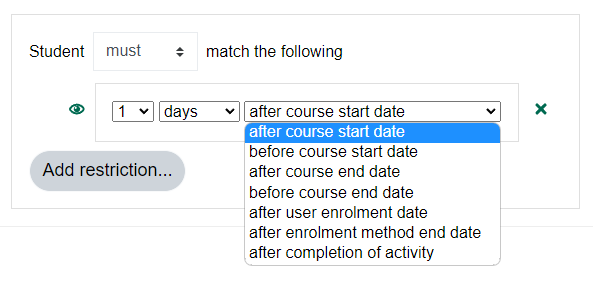
- after enrolment method end date
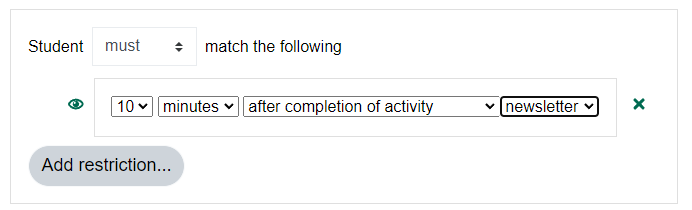
- after the completion of an activity
I have moodle version 3.9
I know, for 5 years I said it was a bad idea (complex and bad for performance). But again and again the question was asked to add this functionality.
Finally I gave in when Stefan Hanauska submitted a more or less good pull request and a [behat](https://github.com/ewallah/moodle-availability_relativedate/blob/main/tests/behat/availability_relative_module.feature) scenario with 25 restricted modules worked not so bad.
Restricting access is mostly a bad idea. Personally I only use activity restrictions when I find 3 good reasons to do so, otherwise I see it as nothing but student harassment.
But in some rare situations this plugin can be handy.
R
Your idea seems nice, but very complex. What do you mean by "is active beginning"? Because of some date setting - the visibility - an availabitlity restriction changed? If you add a user to another group, can also be a reason why someone sees other resources.
Currently the plugin calculates course level dates, adding a calcullation on module level to pinpoint this 'active' date for every module will do no good for the performanc.
R
R
Your idea seems nice, but very complex. What do you mean by "is active beginning"? Because of some date setting - the visibility - an availabitlity restriction changed? If you add a user to another group, can also be a reason why someone sees other resources.
Currently the plugin calculates course level dates, adding a calcullation on module level to pinpoint this 'active' date for every module will do no good for the performanc.
R
this seams to be exactly what i was looking for!
I have one question though, is it possible to add the Option
Make available after X days, since an other activity was availale?
I wanted to have an option, where I have dependencies not from the Start Date but regarding an activity. As an Example:
Acitity A is active beginning on the 12.March.
Activity B is activer 7 days, after activity A.
Thanks
Awsome plugin!
How to add more than "51" in the select field. I need to go beyond 51 days in some cases.
Thank you