Restriction by relative date icon

Restriction by relative date

Maintained by Renaat Debleu
Restrict module and section access based on a relative date.
Price option: Free

Supports Moodle 3.5-5.2 See all versions
Latest release: 2 months ago
Installations: 2453
Downloads (last 90 days): 946

Frankenstyle name: availability_relativedate

Comments

Product ratings and reviews are coming to Moodle Marketplace. Until then, existing comments remain available to read, but new posts have been disabled.

David, una cohorte no tiene una fecha de inicio y una persona puede pertenecer a diferentes cohortes. Ademas, la activación de un método de registro no es una fecha conveniente (¿qué pasaría si se desactivara temporalmente un registro?).
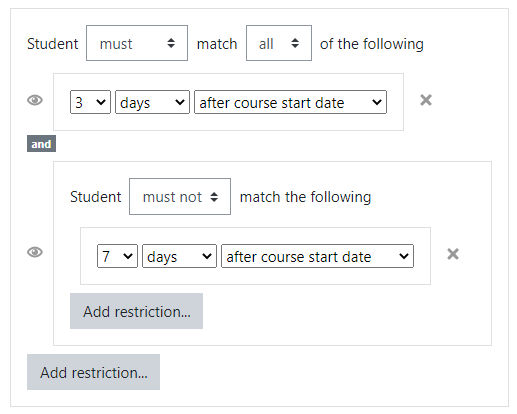
Si combina este plugin con el availability_cohort plugin, verá que rápidamente se vuelve muy complejo: desde 3 semanas después de la inscripción AND hasta 6 semanas después de la inscripción AND pertenecer a esa cohorte. Pero se puede.
Hola. Muchas gracias por el plugin, es muy bueno..
Tengo que implementarlo en un curso en dónde tendrá diferentes cohortes (por ejemplo cohorte_enero_2026, cohorte_junio_2026, cohorte_enero_2027, etc) y las secciones/actividades se tienen que habilitar X días/semanas a partir de la fecha de inicio de dicha cohorte (digamos que sería la fecha que activa el método de matriculación), se podrá hacer esto?.
Espero sea una mejora que se puede implementar.
Gracias !!!!
Hi Renaat. Thank you for your response. I tried it with v4.4.1 but it doesn't work with Moodle 4.4.4. I have 2 different installations. I'll submit an issue on bug tracker.
Hi Aziz,
Please use the bug tracker to report issues.
Because general support for Moodle 4.4 ended 21 April 2025, you can try to downgrade the plugin to version v4.4.1(2024042000).
Hi Renaat. I was using the settings as you mentioned above for a long time, but as of today, after the last update, it is not working anymore. It doesn't recognize the completion date of the previous activity. The previous activity is an exam and the completion conditions are viewing the activity and receiving a passing grade that is 75%. When students fail, it should enable the next activity after 24 hours. I set 2 conditions; grade must be less than 75% and 24 hours after completion date of exam. But it's not working. I use Moodle 4.4.4 (Build: 20241007). We also have another Moodle 4.0.5 and using your plugin 4.1.1. They are working fine. The exam completion conditions are the same. But now, I see you say we must set the receiving grade to "Any Grade". This affects our structure. If an exam is completed, it doesn't matter it is fail or pass. There is a completion date in both cases. So your plugin must take this date as the completion date. That's why combine it with passing grade restriction.
When you enable activity completion and configure the completion of your first exam to "Receive a grade" with "Any grade", then you should be able to configure your second exam with 2 restrictions: Grade lower than 50% AND 1 month after completion of Exam 1.
As a result only people who do not pass the first exam will have access to the second exam, the others will not.
Thanks for the reply. I realized I was a bit confused. What I actually need is to take into account the date the user took the first exam. I want the second exam to open a specified time after the user's first exam start date. In addition to the second exam requirement, I'll add a "fail to pass" condition. This way, if the user fails the first exam, the second exam will open a month later. If the user passes the first exam, the second exam won't open.
For a human being, it is easy to understand a sentence like: "two hours after my teacher did not show up". For a computer or a Moodle instance, this is far more difficult. Things that do not happen, are not recorded or do not have logs.
So I would add 2 availability restrictions, one on the grade (smaller than passing grade) combined with a date or relative date depending on the start of the course. How do you configure the availability of your first exam?
How can I ensure that if a user doesn't complete a module within the training, the second module will be unlocked after a certain period of time? If the user I need takes an exam and doesn't receive a passing grade, the exam will not be completed. The second exam requirement is that the user took the first exam but didn't receive a passing grade, and I want it to be unlocked one month later. I've configured the first exam to be incomplete because they didn't receive a passing grade. Can such a feature be added?
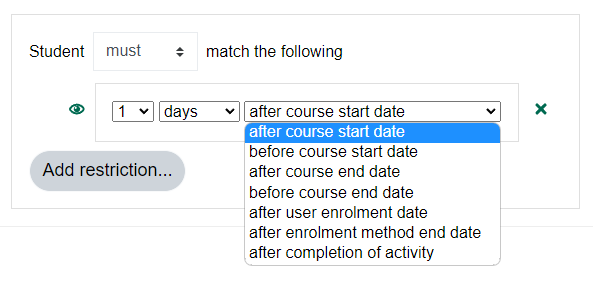
You cannot see "after enrolment method end date" because your enrolment has no end date configured (4 days after 0 will never happen) .
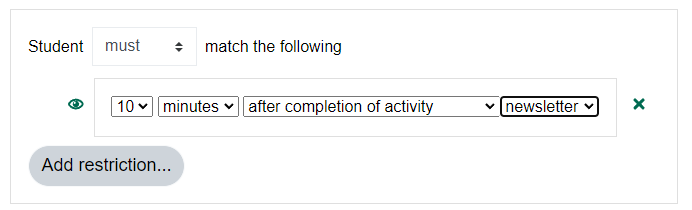
You cannot see "after completion of an activity" because you did not enable completion tracking in your course (or site)
Hello,
- after enrolment method end date
- after the completion of an activity
I have moodle version 3.9
So bad
I can't see
Technically this is possible, but it would involve a lot of computing power: calculating every minute all restrictions for all users in every course to check if the end of the relative date restriction is reached or not.
How would you handle combined restrictions (group = group1 AND 3 days before end of course)?
And what happens if a course/section/module is unhidden, then the availability changes, so on that moment everything has to be recalculated again.
So my answer is no, your problem should be revolved for every access restriction available in Moodle, and the huge amount of calculations and energy needed, makes it highly improbable it will ever be implemented or even work.
Is there any way to make it send a message by moodle and by mail to the user when an activity is available at the end of the relative date restriction?
Hello Gabor,
feature requests are made on GitHub (https://github.com/ewallah/moodle-availability_relativedate/issues).
We tried already to implement that feature. But it was not working as expected. We tried out to hide an activity 5 minutes after first login. But It is never clear when this first access is set in the database.
It did work when the user logged in - logged out and logged back in, or when the user accessed an activity, then the restriction worked as expected. But when the user did nothing during the first 5 minutes, the first access field was not yet set, so the restriction did not work.
When features are not working as expected in all situations, it is better to drop the idea.
R
(Small modification. In the user table, there is a field: timecreated - this is the information I'd like to check and called it: createDate. This name is the AD name of the same information.)