
Restriction by relative date
Maintained by
Renaat Debleu
Restrict module and section access based on a relative date.
Comments
Product ratings and reviews are coming to Moodle Marketplace. Until then, existing comments remain available to read, but new posts have been disabled.
I have been able to achieve my goal by following your advice (using the "must not" setting). I initially got confused because of the message that appears below the section heading:
Not available unless:
From 5 July 2021, 12:00 (2 weeks after the course start date)
From 29 August 2021, 11:59 (1 week before the course end date)
Note that this section is available from the second week on till the penultimate course week. I think that I was expecting a message such as follows:
Not available unless:
From 5 July 2021, 12:00 (2 weeks after the course start date)
Until 29 August 2021, 11:59 (1 week before the course end date)
I am not sure if there is anything that you could do to improve this.
This plugin already restricts on course enddate, But there has to be a course enddate, otherwise the module would never be available (0 minus 3 days = ∞ - 3 = ∞). Therefore the enddate condition is not even shown to teachers if the course end date is not set. So when you set a course end date, you can add a "2 days before course end date" condition.
Is the moodlecourse | courseenddateenabled global configuaration setting enabled in your Moodle?
R
I think that the setting that you suggest would work only for fixed duration courses. It may seem odd, but in my university, the course duration varies from semester to semester. It generally is between 15 and 17 weeks. Due to the pandemic, this semester we have only 11 weeks. This is why I am looking for a restriction setting that is relative to the course end date.
Please let me know if I have not been clear in my explanation.
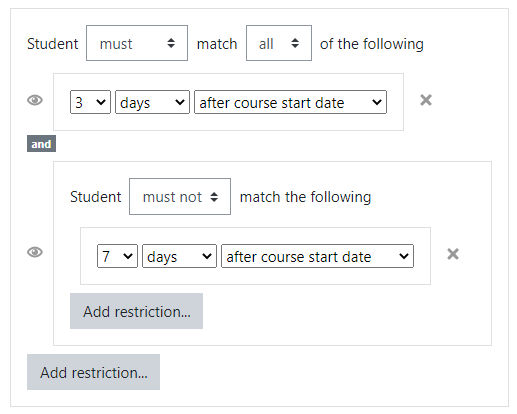
Did you try to use the "must not" setting? If I have a one year course, and I add an activity with the restriction: Student "must not" match the following "50 weeks after course start date", then students will be able to access the activity for 50 weeks, and the last 2 weeks the module will be restricted.
R
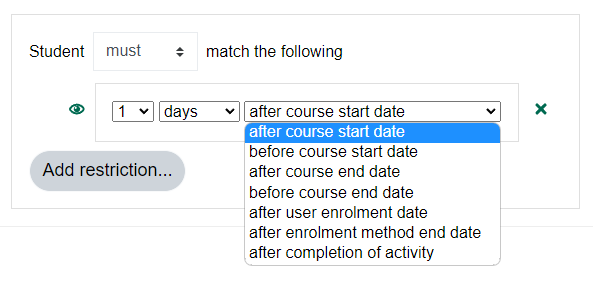
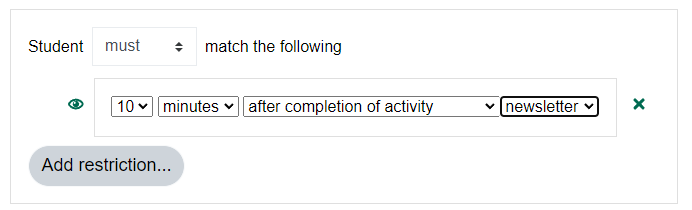
THX for the feedback. You mean something like 3 days after completing quiz 4?
Technically this seems possible to me. Although a lot of work would be needed to implement a cache for performance reasons.
But for the moment I do not see a lot of extra value in this link to completion of another activity. Completing an activity would become more a punishment than a achievement....
Can you provide some samples where this extra restriction could be used in a way students are encouraged instead of discouraged?
Of course, currently you can already combine restrictions: Quiz 4 is completed AND 4 weeks after course start date.
R
Thanks for your plugin!
Teachers in my university ask me the following question... Could relative dates be linked to completion of another activity?
Regards
The functionality you used was reported as a bug in one of our projects, so the plugin was updated to take the most recent enrollment as a starting point. Luckily this project is Open Source, so you can create a fork and modify line 222 of the classes/condition.php file to "restore" this bug.
R
for (i = 1; i <52; i ++) {
html + = '' + i + ''; "??? Thank you, as I have urgency in this
You can change the form.js source file and rebuild the YUI modules. Or you can suggest a new number (100 - 365 - ?) in the bug tracker and wait until it is implemented for you. I opted for choices between 1 and 51 to cover 51 weeks and to make the dropdown not too long. Any suggestion is welcome.
Excellent plugin, congratulations !! How can I do to increase the number of days to more than 50, as this is the limit that can be selected in the plugin for days, weeks or months
I had a similar problem in the version that was solved in version 3.8+ (2020111000).
Do you have that version?