Course templates
Maintained by
Flotter Totte, Sunny Teacher, emeneo Plugins
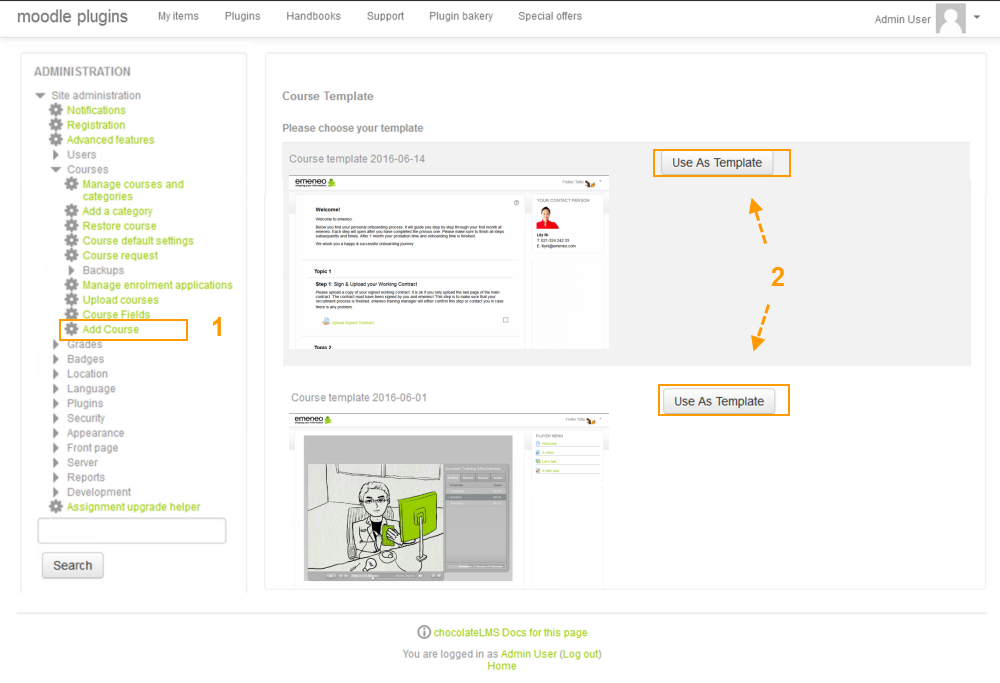
With this plugin you can easily create courses based on course templates. The plugin also can be used to easily duplicate courses
Comments
Comments are no longer open for new posts. Existing comments remain available to read.
first of all, thank you for your work on the local_course_templates plugin – it’s a very useful tool for setting up new courses quickly and consistently.
I noticed that the plugin hasn’t been marked as compatible with Moodle 5.0 yet.
Do you have any plans to update it for Moodle 4.5 and the upcoming Moodle 5.0 release?
It would be great to know whether there is an update on the roadmap or if you are already working on a compatible version.
Thanks again for your contribution to the Moodle community!
Best regards, Annie
webservice/backupprecheckerrors
I have another query: Is there a method to enable users to create courses from templates without granting them the ability to create or restore courses in any other way? I aim to restrict course creators to exclusively using templates for course creation, disallowing other methods.
@Keith VW
This error occurs when there is no category id 1 on the site, which is the one that the plugin sets by default. It is a bug.
You can try to access with the address by sending an id of an existing category, no matter which one, so that it does not use the default one, example: www.yoursite.com/local/course_templates/index.php?cateid=6
Have you planned to update the software for compatibility with Moodle version 4.1.1?
First I would like to thank you for your great plugin,
I used it in my university, and I have a manager for each college, and I want each manager to be able to restore only one template. to do this I didn't give any of them permission in the course templates category, but I enrolled each one of them as a manager in his template. this works great for me where when any admin tries to use a template not belong to his college he will get a message you don't have permission to do that.
THE ONLY ISSUE REMAINING IS
The admin is enrolled in all newly created courses, is there a way to have a setting to prevent user enrollment to be included in newly created courses from the template?
Zak's tip sounds good. If that doesn't help, try assigning "moodle/course:viewhiddencourses" or even "moodle/course:view" permissions. (course:view allows users to see content of courses they are not enrolled in. Only use that if appropriate for the role you are assigning to.)
I allowed for following capabilities
Allow: local/course_templates:view
Allow: moodle/backup:backupcourse
Allow: moodle/backup:userinfo
Allow: moodle/restore:restorecourse
Allow: moodle/restore:userinfo
Allow: moodle/course:create
Allow: moodle/site:approvecourse
Allow: moodle/restore:configure
On the third step "Define Settings" of Create a course from a template, I am getting the error, "Course or activity not accessible." after the user click continue after entering Course name & Course short name.
Moodle 4.0.1
Can you please hint, what I might be missing?