
VPL Question
Maintained by
Astor Bizard
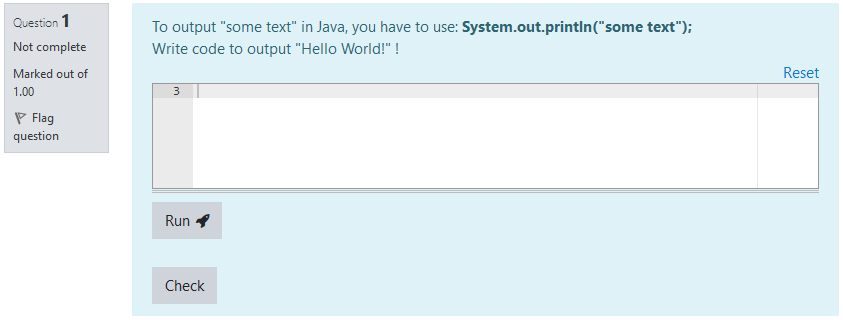
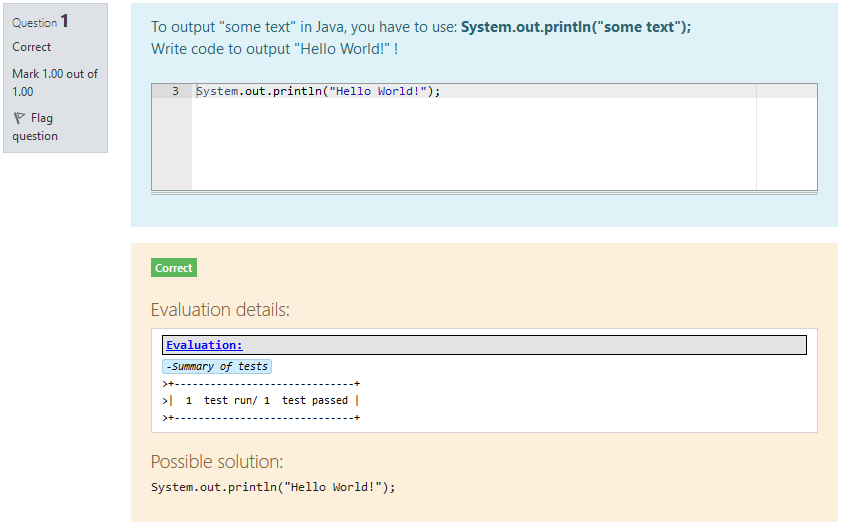
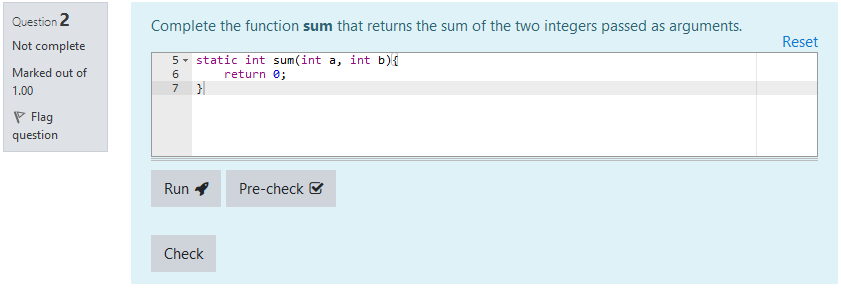
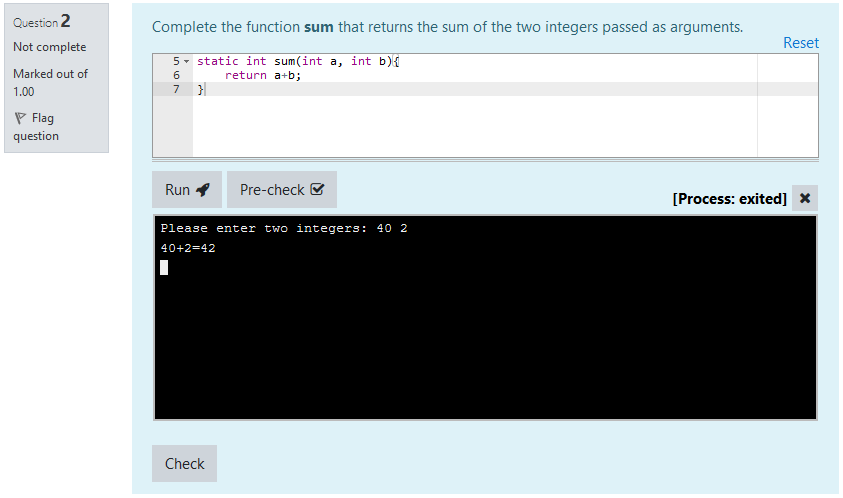
VPL Questions are questions that can fit within a Moodle quiz. They are intended to create small to medium coding exercises, based on the Virtual Programming Lab plugin.
They are designed to offer a simple interface for students, while keeping the power and versatility of Virtual Programming Labs.
Comments
Comments are no longer open for new posts. Existing comments remain available to read.
Thank you for bringing the issue with manual grading to my attention - I was not aware of this Moodle feature when designing the question HTML. I fixed this problem in the just-released version 3.5.1
About progress indicator, this is not possible. The "Check" button is included within the Quiz process and I cannot change how it functions.
However, there are two suggestions I'd like to make :
- If your evaluation takes 30 seconds, maybe an actual VPL activity would be better suited for the exercise, or maybe you test too many things
- Have a look at asynchronous evaluations (built-in VPL Questions, you have both an admin setting and a per-question setting) that should improve the behaviour (questions will be evaluated by the server independently of the web request, so students will not be left hanging with a non-responding page).
Best regards,
Astor
Thank you so much for the latest update! The expanded tag support (tables, SVG, details/summary) works great, and we've already built a visual feedback display using it. We really appreciate how responsive you've been throughout this.
We have two items we'd like to raise if possible :
1. Loading indicator similar to the progress bar in VPL mod
When students submit their code for evaluation in VPL Question(check button), the process sometimes may take even 30-40 seconds depending on their code(we use evaluate.sh with custom tests). Right now there's no visual feedback during this wait, so students aren't sure whether anything is happening in the background. Would it be possible to add a loading spinner (or similar indicator) while the evaluation runs?
2. Duplicate ID bug on the manual grading page
We found a bug on the manual grading page (mod/quiz/report.php?mode=grading&grade=all). When an instructor views all attempts at once, each student's result(generated html page) is rendered in a div with the same ID ( for example: id="vpl_eval_details_q20837"). Since HTML IDs must be unique, the JavaScript only binds to the first element, and the generated HTML output is not displayed for the rest of the students.
A possible fix would be to make the div ID unique per attempt - for example, by appending the attempt ID or user ID.
Thanks again for all your great work on this plugin!
Best regards,
Jack
I implemented another fix for course reuse. If, during the import phase, the user performs a partial import that does not include the 'Include activities and resources' option, the process is unable to find the VPL template. With this fix, if the VPL template isn't found, the program attempts to find a VPL template in the current course with the same name as the original one.
You can find the fix here: https://gitlab.com/osangoi/moodle-qtype_vplquestion/-/commit/6004e5c56cf9953c7e9cb7df65d6af68da75f446
as I frequently export questions from a course template to other courses, I faced the same problem reported by @Kay Otto. Usually, what I did to solve this was to manually modify the vpltemplate field in the database.
Based on @Kay Otto's suggestion, I rewrote questiontype.php, overriding export_to_xml to export the vpltemplatename and modifying import_from_xml to use the vpltemplatename if the templatevpl was not in the same course.
Of course, before importing the VPL Questions, the VPL Template must be imported from the course template using "Course reuse".
You can find the fix here: https://gitlab.com/osangoi/moodle-qtype_vplquestion/-/commit/b76f71cb195a42947a945078885f87ac65e25d48
The update 3.4.2 is now online and should address your concerns.
Best regards,
Astor
This is fantastic news! Thank you so much for the quick response and for adding these features. We really appreciate your work on this plugin - it's not something we take for granted.
The addition of table tags and style attribute in 3.4.1 is a big step forward for us. And the upcoming support for "dir" attribute and "details"/"summary" tags is exactly what we need for RTL and collapsible sections.
We completely understand your position on JavaScript/onclick - it makes total sense from a security perspective.
Two quick questions:
Do you have a rough timeline for the next release (with dir, details, and summary)?
Is there any chance SVG support (svg, path tags) could be included? We use it for a progress gauge to show students their score visually. If not, we'll find an alternative with CSS.
Thanks again for your dedication to this plugin and for being so responsive to the community!
Best regards,
Jack
Update 3.4.1 that was released includes more tags (esp. table tags and style).
It still does not allow "dir" attribute which is a mistake by me, and will be fixed in the next release.
For collapsible regions, "details" and "summary" tags will be allowed as well in the next release.
For any javascript (onclick or not) or wrapper tag to bypass sanitization, it is a big no-no. Because even if your use case may capture student output and control everything, this is not the case for every evaluation mechanism (and obviously student-generated javascript should never be trusted by default).
Best regards,
Astor
Thanks for the suggestion.
I am not sure to totally understand your point, as you seem to sometimes say that regrade should be done asynchronously, and sometimes say that it should be done synchronously.
The current idea is to do dry regrading synchronously, and to follow question setting on every other case (standard workflow or true regrade).
I will take into account your suggestion to better detect dry regrade (include 'regradealldrydo' and 'dryrunregrade' params).
I hope this will suit your needs.
Best regards,
Astor
Thank you so much for implementing HTML support! We really appreciate you taking the time to address our request.
We've started testing and it's a great step forward. However, the current allowedTags and allowedAttrs lists are too restrictive for our use case.
We've built a visual feedback template that includes:
Progress gauge using svg and path
Results table using table, tbody, tr, td
Collapsible sections using onclick and id attributes
RTL support using dir attribute
Visual styling using style attribute
All of these are currently blocked by the sanitizer, which breaks our feedback layout.
Would it be possible to either:
Expand the allowed lists to include these elements, or
Add a bypass mechanism (e.g. a wrapper tag) that skips sanitization for trusted content from the evaluation script?
Since the HTML is generated server-side by our evaluation script (not user input), we believe it can be safely trusted.
Happy to test any solution or contribute code if needed.
Thanks again for your great work!
Jack
Here is my implementation of the use_async_evaluation function
/**
* Determine if this question should use asynchronous evaluation or not.
* @return boolean
*/
public function use_async_evaluation() {
// Check that the question uses async evaluation, that it is allowed from admin settigns and that a step is set.
// If in regrade (dry or normal) force synchronous evaluation.
$isregrading = optional_param('regrade', 0, PARAM_BOOL)
|| optional_param('dryrunregrade', 0, PARAM_BOOL)
|| optional_param('regradeselectedattempts', 0, PARAM_BOOL)
|| optional_param('regradeselectedquestions', 0, PARAM_BOOL)
|| optional_param('regradealldrydo', 0, PARAM_BOOL);
return !empty($this->useasynceval) && $this->step !== null && get_config('qtype_vplquestion', 'allowasynceval')
&& !$isregrading
&& !optional_param('previewid', 0, PARAM_INT);
}
Thanks for the report. It makes sense given the way answers are saved by VPL Questions.
I did not anticipate that kind of usage with limited time Quizzes.
I will try and fix this issue as soon as possible!
Best regards,
Astor
Thank you for your feedback!
You are right, the current evaluation output display is limited. I think it is the legacy of first versions that I never bothered to change.
I will see what I can do in the next release I am working on!
Best regards,
Astor
I recently got aware of a possible issue with the conditions under which a VPL-Question answer is saved during a running Moodle quiz.
Our testing specs:
- Moodle: 5.1.1+ - Build 20251212
- VPL: 4.4.1 - 2025112512
- VPL-Jail Server: 4.0.3
- VPL Question: 3.3.0 for Moodle 4.2+ - 2025121601
When a Moodle quiz is running and the student sees a VPL-Question, his code seems to solely be saved when (1) he executes / pre-checks the code (button interaction) or (2) if he navigates to the next or previous question (also a button interaction). Nevertheless, when editing the answer in a VPL Question, after 30 seconds or so a message appears on the right side that pretends that the answer is being saved, together with a timestamp. Actually, this seems to have no effect - the answer is not really saved. If the quiz has a time limit and the limit runs out, the student is automatically redirected to the results page where he can have a look at the answers he gave in the quiz and he will find that his latest inputs in the recent VPL-Question that was open before the automatic closing of the quiz are not present. He sees only the version of his answer that was stored when he executed his code. Without any execution / pre-check, he will find his answer completely empty.
The behaviour of the standard free-text questions is different: Even the latest input, e.g. just one second before an automatic closing of a time-limited quiz, is reliably stored and thus visible to the student in the result page. I assume that the finish / redirect event somehow triggers a submit for the answer. For real examination scenarios, this would be the preferred behavior also for VPL-Questions. Otherwise, a student could lose parts of his answers that he did'nt have the time to execute or pre-check shortly before the quiz runs out.
I assume that this is related to the VPL Question plugin, or am I missing something? Can we control this behaviour by configuration?
Thanks in advance.
Best regards
Kay
Hi,
First of all, thank you for this great plugin – it's exactly what we were looking for.
About us:
We're an educational organization that teaches programming to thousands of high school students. We're currently migrating our assessment system to VPL and have decided to use the VPL Question plugin as our main solution.
The challenge:
Our students have little to no background in computers or programming. Because of this, we're looking for ways to present feedback in a more visual and beginner-friendly way.
Currently, the evaluation output window (vpl_eval_details_q208) only supports plain text. This limits us in two ways:
Formatting limitations: We can't use visual elements to make feedback clearer and more accessible for young learners.
RTL/LTR mixing issues: Our feedback combines Right-to-Left text (Hebrew) with English code and terms. In plain text, this mix breaks the display and creates confusing, garbled output. With HTML5, we could use proper dir attributes to handle bidirectional text correctly.
Feature request:
Would it be possible to add HTML5 support to this output window (or introduce an alternative output area that supports HTML)?
This would allow us to:
Use colors and formatting to highlight errors vs. successes
Properly handle bidirectional (RTL/LTR) text
Add visual elements to make feedback clearer
Create a more encouraging experience for beginners
We'd be happy to provide more details about our use case or help test if needed.
Thanks for considering this!
I am glad you find the plugin useful!
This is indeed a correct way to use VPL Questions! This is even the intended way to set them up
The reason we are not using a virtual, empty VPL activity is that we often want to setup generic, sometimes advanced, evaluation mechanism. In that case, we put it in the base VPL activity, and it can be easily re-used across multiple questions.
Best regards,
Astor