
OpenID Connect
Premium Certified Partner
Maintained by
Enovation Dev Team, Lai Wei, Patryk Mroczko
The OpenID Connect plugin provides single-sign-on functionality using configurable identity providers.
Comments
Product ratings and reviews are coming to Moodle Marketplace. Until then, existing comments remain available to read, but new posts have been disabled.
[12-Mar-2018 21:31:10 UTC] Default exception handler: Error in OpenID Connect. Please check logs for more information. Debug:
Error code: erroroidccall
* line 47 of /auth/oidc/classes/utils.php: moodle_exception thrown
* line 252 of /auth/oidc/classes/oidcclient.php: call to auth_oidc\utils::process_json_response()
* line 177 of /auth/oidc/classes/loginflow/authcode.php: call to auth_oidc\oidcclient->tokenrequest()
* line 84 of /auth/oidc/classes/loginflow/authcode.php: call to auth_oidc\loginflow\authcode->handleauthresponse()
* line 105 of /auth/oidc/auth.php: call to auth_oidc\loginflow\authcode->handleredirect()
* line 29 of /auth/oidc/index.php: call to auth_plugin_oidc->handleredirect()
It looks like in utils.php there is a NULL value. Where do I start debugging this?
Thanks,
Willem
Thanks
I am trying to consume this library with existing Identityserver 3 integration.
I am using
$plugin->version = 2016120501;
$plugin->requires = 2016120500;
$plugin->component = 'auth_oidc';
$plugin->maturity = MATURITY_STABLE;
$plugin->release = '3.2.0.1';
and I have one client in Identityserver 3 with
redirect URI
Flow is Authorization code
Logout Uri and almost everything.
I have already tried this client(idsrv3) with another application and it is working fine.
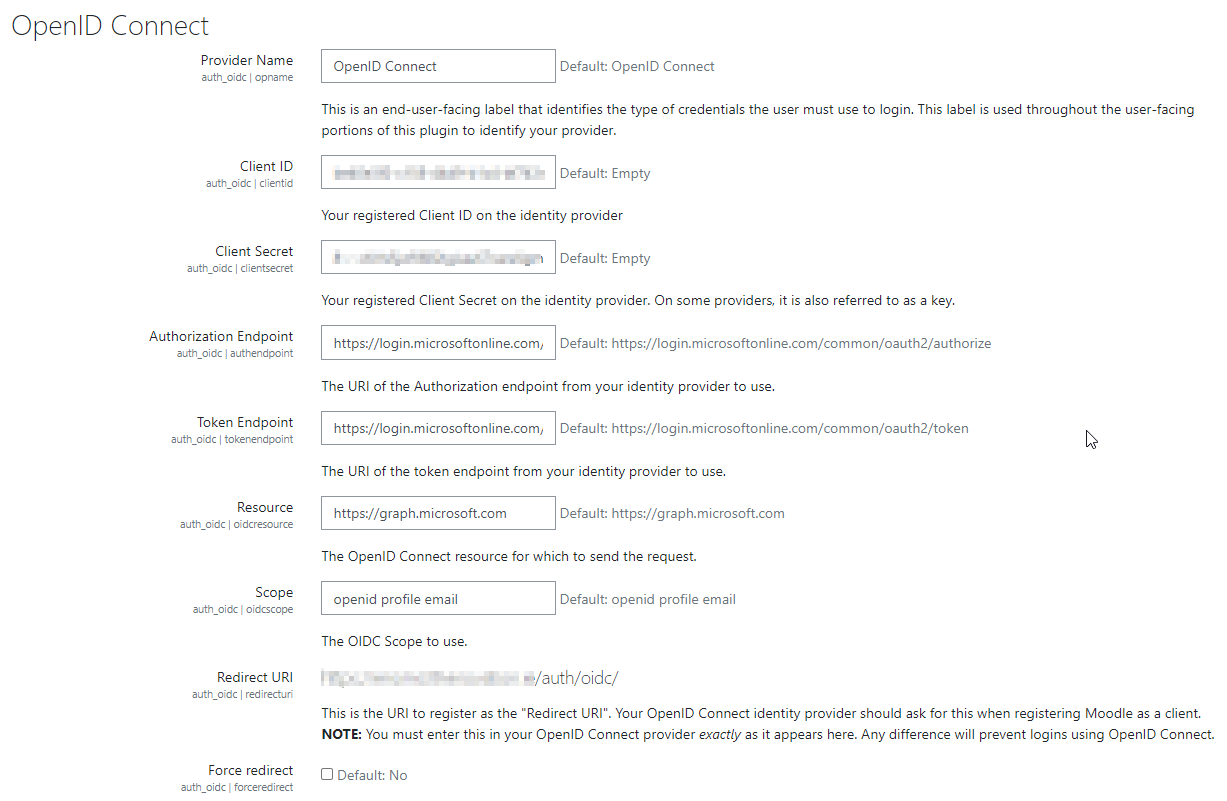
In DashboardSite --> administration -->Plugins -->Authentication -->OpenID Connect
i have configure
Provider name = OpenID Connect
ClientId = same as idsrv3
Authorization endpoint= https://myidentityserver3.com/identity
Token Endpoint= https://myidentityserver3.com/identity/connect/token
Redirect URI = https://localhost/moodle/auth/oidc/
Authentication Method = Authorization Code Flow (recommended)
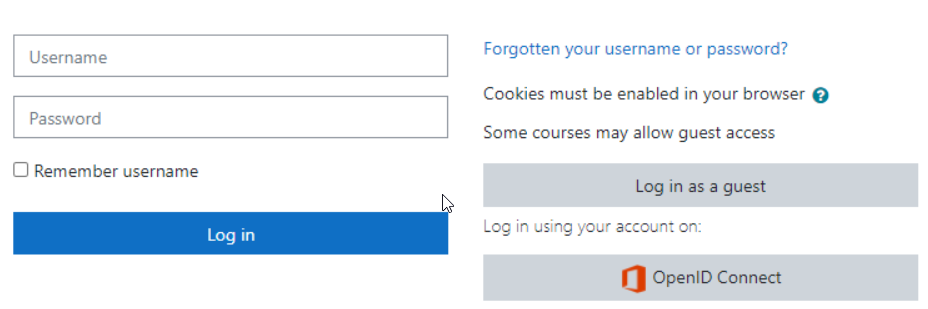
but it is not showing any link or any changes on my login page.
please suggest me if it works with identityserver3 or not.
if yes then what is I am missing?
Thanks,
ajay kotnala
kotnala.ajayk@gmail.com
I just installed installed Office 365 integration plugin and following the configuration steps but can't do the step 2: Set system API user. When I click 'Set User' button, I see the page with 'Please configure OpenID Connect server endpoint.' and on the browser console, I see the message: '/local/o365/acp.php?mode=setsystemuser:1 GET http://example.com/local/o365/acp.php?mode=setsystemuser 404 (Not Found)'. And when I visited the Sign-on URL 'http://training.aerothreads.com/auth/oidc/' I get the same message, too. I feel like I am missing something obvious, but I can't figure out. Does anyone have similar experience and how did you resolve this?
My Moodle version is 3.2.2+ (Build: 20170412)
Also Is there office 365 plugin mandatory for SSO with Azure AD?
I can't find out what my users are doing, but still they get switched to OpenID authentication in Moodle. I only notice this when I get reports about users not being able to login. Upon checking, I always find out that the users are switched to OpenID in stead of SAML.
Is there any place where users can set this themselves? I can hardly imagine it. I think it happens when they click the Moodle TILE in the Office 365 environment. You know, the page where all the tiles are in Office 365 (tiles like Sharepoint, Delve, Word, etc. we have a Moodle tile there too.
E.g. O365 and HumanitarianID on the same Moodle site, both configured using the same instance of the OpenID connect plugin.