Microsoft 365 Integration
Premium Certified Partner
Maintained by
Enovation Dev Team, Lai Wei, Patryk Mroczko
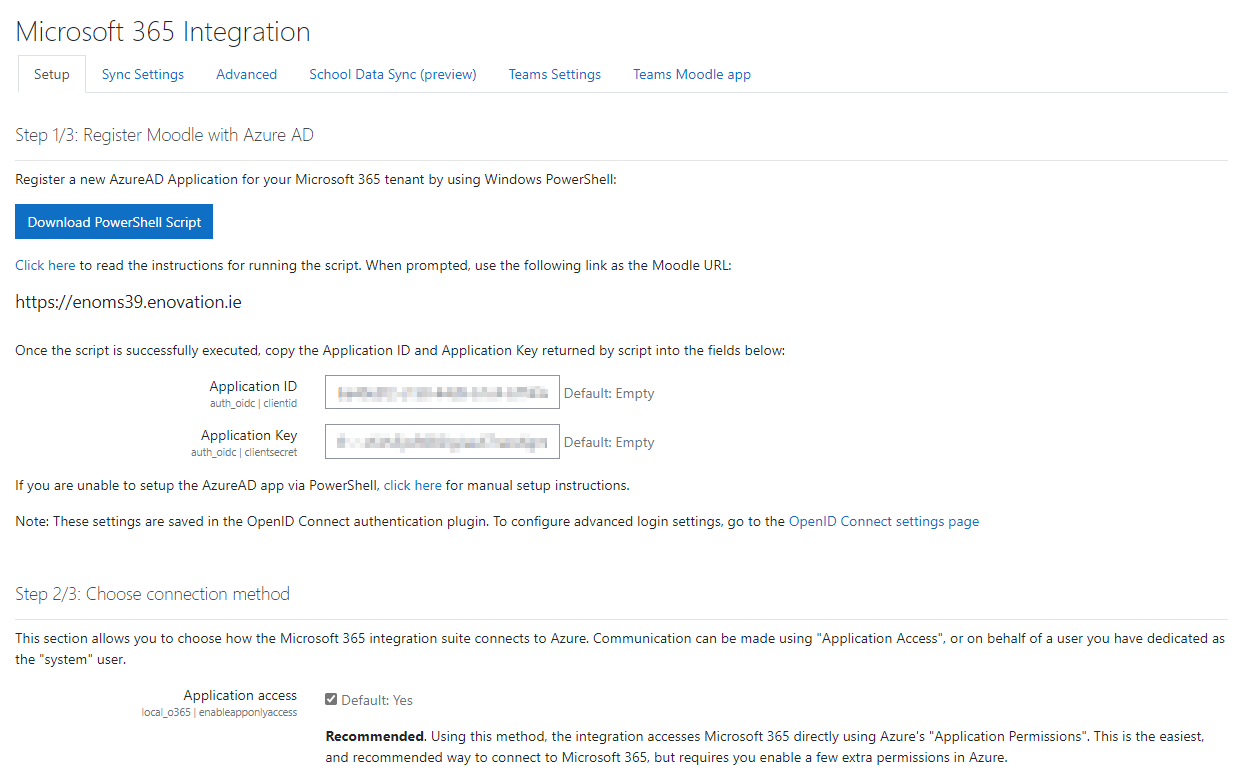
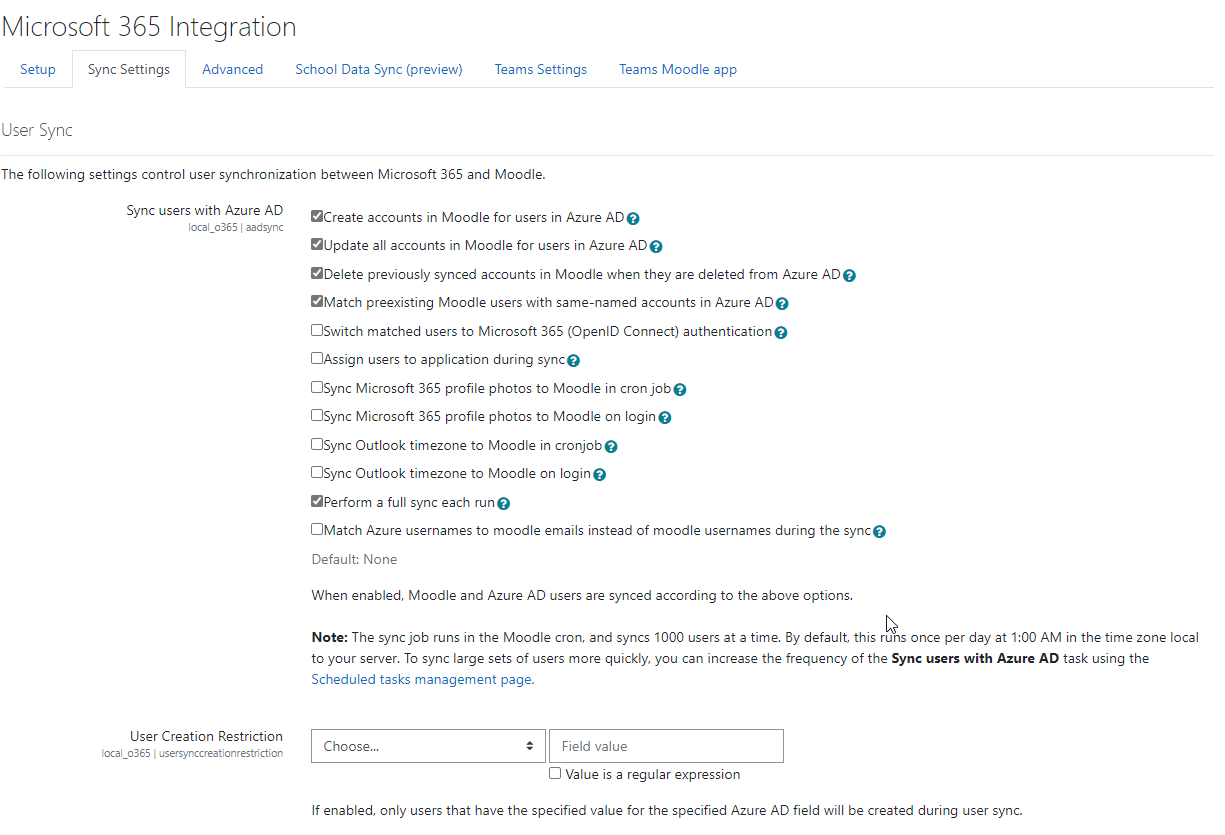
This plugin provides libraries and services that power other Microsoft 365 plugins.
Comments
Comments are no longer open for new posts. Existing comments remain available to read.
"PHP Fatal error: Declaration of local_o365\httpclient::put($url, $params = [], $options = []): string|bool must be compatible with curl::put($url, $params = [], $options = [], $includeuserpwd = true) in /var/www/virtual.hosts/moodle-gen2-test-admin.cc.jyu.fi-https/moodle_app/local/o365/classes/httpclient.php on line 162"
We haven't had this problem/error with previous Moodle updates and o365 integration and plugin have been working correctly.
What might cause this error and how we could fix it?
I could log in but when run the scheduled task to sync users, it says Microsoft 365 not configured.
And it cannot detect my tenant domain.
Are any of the Plugin functions or the capacity to match/connect Moodle users available on a webservices API endpoint ?
Can the plugin 'extend' the Moodle webservices API ?
If there is a webservce API, is it SOAP or REST or what ?
What are the authentication proceededures for an API session if separate to Moodle..
Cheers
Angus
To do this, you need to edit or create a new meeting policy on the page https://admin.teams.microsoft.com/policies/meetings (see attached screenshot) and then assign the newly created policies to users who should have these restrictions. This can be done in the Users section: https://admin.teams.microsoft.com/users by selecting a user and then choosing Edit in the policies tab. If you raise an issue in https://github.com/Microsoft/o365-moodle/issues it's easier to get back to you. Regards
I'd like to ask about Teams Meetings LTI app is there a way to restrict who can create meetings from this app? We would like that only teachers could create meetings and/or user couldn't add anyone to the meeting who's not enrolled in the course. We see it problematic when students can create meetings through this and can add anyone to the meeting who don't have anything to do with the course.
Does anyone know how we could solve this?
when a student tries to submit their file for their homework submission, they can only do "make a copy of the file".
The option to select "Link to the file" is missing.
[o] Make a copy of the file
[o] Link to the file (this does not show up)
The student can only upload their file.
Also if we are able to link to it other than trying to do a file assignment submission, I see this
Original: unknownsource,repository
what does this mean?
However, I have a question:
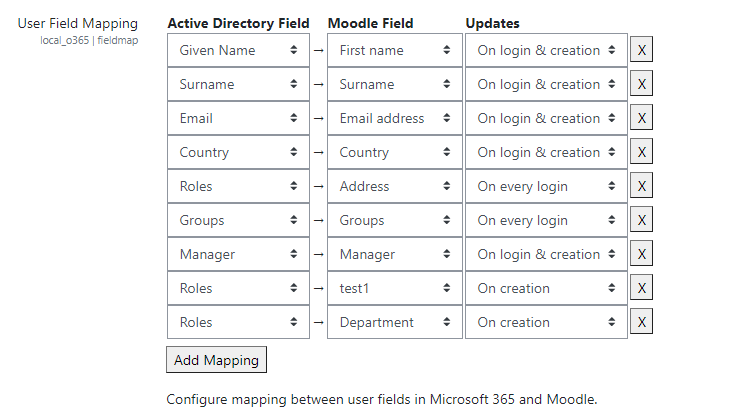
When I create a class in Moodle, a MS Teams team is created automatically with a tab named 'Moodle' that gives access to Moodle directly for teams. What I would like is to change that default name from 'Moodle' to 'Online Class'. I don't want to do it manyally team by team, I want it do be done automatically. How can I do that? Thanks!
We have been using Microsoft 365 integration in Moodle (version 4.1) for quite some time.
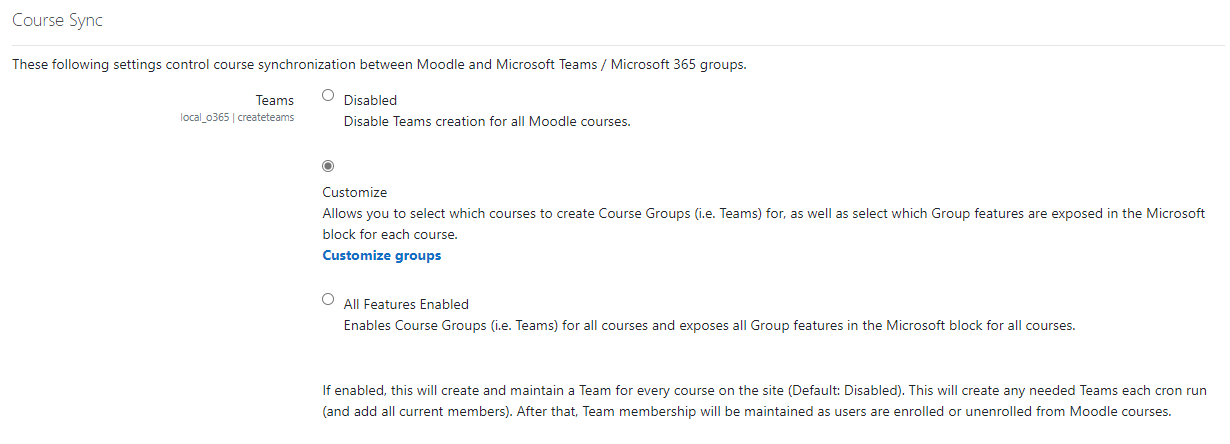
Now I have also successfully integrated Teams using the tutorial "Integrate Microsoft Teams classes and meetings within Moodle".
But now the following problem has occurred:
The students from a course are transferred as members to the corresponding team.
In Teams, however, they then have the status "Speaker" and can automatically, for example, switch off the microphones of all other participants.
If you change the status in teams manually to "Participant", all settings are as desired.
At which point is it defined that the student becomes a "speaker"? In Moodle the students are only in the group "Student".
Does anyone here have a tip, what the problem could be, or do I understand something wrong in the use?
Thank you.
Marco
I'm trying to configure the microsoft integration to use teams inside moodle.
When users regularly registered on Azure AD access the teams meeting, an error message appear: "There was a problem connecting your course to Microsoft Teams
You need an educator or student license to use Teams for Education. Try asking your IT administrator to assign the correct license to you."
It seems that the integration works only with an edu license but we have a business license: could you confirm if we need of the edu license to use the integration?
Otherwise, could you give information about the right settings to configure, in order to get access with a business license?
Thank you.
Carlo
I am using Moodle 4.2 with authentication by Microsoft 365 accounts. Since today, several accounts are no longer able to connect to Moodle. I wonder if this is not related to a message I received recently from Microsoft 365 which told me that it would be necessary to switch to double authentication.
Anyway, I now get a "Connection failed, please try again" message when I try to connect.
Until now, in the setting of the OIDC authentication method, I had checked "Grant resource owner password credentials" which allowed users to enter their username and password directly on the Moodle login page. their Microsoft 365 password.
To work around my connection problem, I checked "Authorization code stream (recommended)" which helps to find my connection. But it requires me to go through the Microsoft 365 login page and use two-factor authentication. In short, it's a big waste of time that I would like to avoid.
Does anyone have an interesting lead?
Anyone can help I am getting the following message when configuring the openid connect to detect o365 business drive:
'We could not determine your OneDrive for Business URL.
Please make sure "Microsoft 365 SharePoint Online" has been added to your registered application in Azure AD