Eoin Campbell
Lead maintainer

This plugin supports importing a Microsoft Word docx-formatted file as terms into an existing glossary. The file is split into terms and definitions based on the built-in heading style "Heading 1" in Word. Embedded images are also imported if they are in web-compatible format (GIF, PNG, JPEG).
It imports .docx files only, not the older .doc format. Word versions 2007 and higher support this format. Note that files in .docm format (i.e. including macros) are not supported.
LibreOffice 5.x and Google Docs can also save files in .docx format, and they will import too, but generally the quality is not as good as those files saved from the native Word editor, even if the document uses the same built-in "Heading 1" and "Heading 2" styles well. Your mileage may vary.
Note also that the PHP XSL extension must be enabled on your webserver, the plugin requires Moodle 3.7, and the Microsoft Word file Import/Export (Book) plugin will also be installed if necessary.
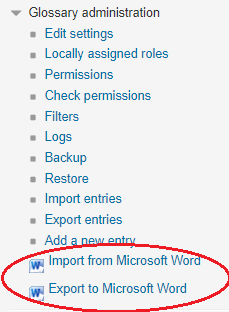
After installation, the Glossary administration menu should have a new item added, similar to the screenshot below.

