Report Orphaned files
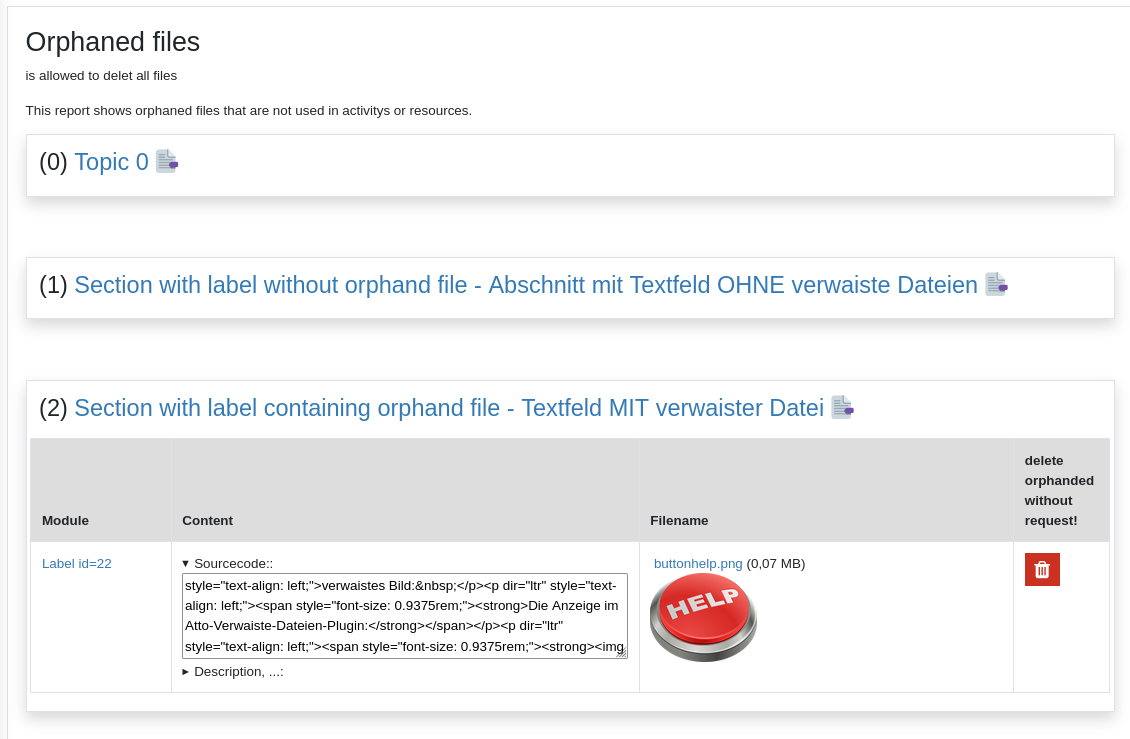
This plugin is a report to show files that are stored in moodle but are not in use.
Example:
A teacher adds a material "label" into a moodlecourse and uploads an image to this label. Then the teacher recognize that this was the wrong image and selects the image and deletes the image. Now the teacher adds the correct image.
The problem is, that the first uploades image ist still stored in this label. This can be seen by clicking at the "manage files" icon where unused files are indicated at the bottom of the shown dialog.
This report only shows orphaned files that are stored by a teacher in the intro-field of added moodle activity or moodle material. The files that are added by students are not checked.
Capabilitys
(README_capability.png)
A new capability "sphorphandfiles:view" is added and is set to "allowed" for the role "editingteacher".
Plugin also needs the capability moodle/coruse:managemodules
A new capability "sphorphandfiles:delete" is added and is set to "allowed" for the role "editingteacher".
Settings in websiteadministration
(README_settings.png)
- report_sphorphanedfiles/isactive: Activate report
When activate the report can be started in the coursenavigation.
- report_sphorphanedfiles/isactiveforadmin: Activate report for siteadmin
When activate an admin can start report in the coursenavigation regardless status isactive for normal users.
Changelog
[v2.0.0]
- refactoring
- new capability report/sphorphanedfiles:delete
[v1.0.12]
- refactoring, better capability management, ...
[v1.0.11]
[v1.0.10]
[v1.0.9]
- some coding and dokumentation enhancements
[v1.0.8]
- issues #1 german strings in english language file
- issues #4 files should check user is logged in.
- issues #5 consider adding github actions support
- issues #6 plugin settings should be using config_plugins table not global $CFG
- issues #7 missing privacy api
[v1.0.7]
[v1.0.6]
- supports section summary
- shows the id of a mod eg. Our forum id=7
- label does not have a special modulname so use label or the correct translation for label in column "modul"
- uses correct languagestings for summary, section and also adds the section number für orhaned files in sectionsummarys
[v1.0.5]
- 20220210 fix: setting error
[v1.0.4] January 2022
- IntroHandler improvement: Implemented setting to be able to add new plugins the list of plugins that should be checked for orphaned files in the intro (description).
[v1.0.3]
- added missing languagefiles
- correct capability for editing teacher instead of teacher
- supports courseformat gridlayout that is storing imagefiles in section summary
- solved problem with capability
[v1.0.2] releasecanditade
[v1.0.1]
[v1.0.0] first release for betatesting
Installing via uploaded ZIP file
- Log in to your Moodle site as an admin and go to Site administration >
Plugins > Install plugins.
- Upload the ZIP file with the plugin code. You should only be prompted to add
extra details if your plugin type is not automatically detected.
- Check the plugin validation report and finish the installation.
Installing manually
The plugin can be also installed by putting the contents of this directory to
{your/moodle/dirroot}/report/sphorphanedfiles
Afterwards, log in to your Moodle site as an admin and go to Site administration >
Notifications to complete the installation.
Alternatively, you can run
$ php admin/cli/upgrade.php
to complete the installation from the command line.
License
Entwickelt für das Schulportal Hessen (SPH)
This program is free software: you can redistribute it and/or modify it under
the terms of the GNU General Public License as published by the Free Software
Foundation, either version 3 of the License, or (at your option) any later
version.
This program is distributed in the hope that it will be useful, but WITHOUT ANY
WARRANTY; without even the implied warranty of MERCHANTABILITY or FITNESS FOR A
PARTICULAR PURPOSE. See the GNU General Public License for more details.
You should have received a copy of the GNU General Public License along with
this program. If not, see .